> For the complete documentation index, see [llms.txt](https://developer.harness.io/llms.txt). Markdown versions of documentation pages are available by appending `.md` to page URLs; this page is available as [Markdown](https://developer.harness.io/continuous-delivery/use-continuous-delivery/deploy-services-on-different-platforms/helm/step-reference/helm-delete.md).
# Helm Delete step
Reference for the Helm Delete step
The Harness Helm Delete step uninstalls Helm releases within a pipeline execution. This step does not require a service but must be executed in an environment and infrastructure that supports Helm natively. You can specify the release name manually or retrieve it from the selected infrastructure.
Use this step when Helm-based applications need to be removed as part of cleanup processes, rollback strategies, or custom pipeline workflows.
{% hint style="info" %}
**Delegate version requirement**
Harness Delegate version `85400` or later is required for this step.
{% endhint %}
***
## What you will learn from this topic
* How to decide [when to use this step](#when-to-use-this-step).
* How to [configure the Helm Delete step](#configure-the-helm-delete-step) in a Deploy stage.
* How to set [step configuration options](#step-configuration-options), including dry-run, release name, command flags, and environment variables.
* How to review [limitations](#limitations) and [advanced settings](#advanced-options).
***
## Before you begin
The following prerequisites apply to the Helm Delete step:
* **Native Helm deployment type**: Use a Deploy stage with **Native Helm**, or a Custom stage where you can supply the release name manually.
* **Environment and infrastructure**: An environment and infrastructure that natively supports Helm. Go to [Native Helm quickstart](/continuous-delivery/use-continuous-delivery/deploy-services-on-different-platforms/helm/native-helm-quickstart.md) to set up Helm deployments.
* **Delegate version**: Harness Delegate version `85400` or later.
* **Matching service and environment (Deploy stage)**: When you use the step in a Deploy stage, use the same service and environment that were used for the Helm deployment you want to uninstall.
***
## When to use this step
Use the Helm Delete step in the following scenarios:
* Uninstalling Helm releases as part of a deployment rollback.
* Cleaning up resources in custom pipeline workflows.
* Removing specific Helm deployments without requiring a full service definition.
***
## Configure the Helm Delete step
Perform the following steps to add and configure the Helm Delete step:
1. Navigate to your pipeline and add a new **Deploy** stage.
2. Under **Deployment Type**, select **Native Helm**.
3. For **Service**, use the same service that was used for the Helm deployment.
4. For **Environment**, use the same environment that was used for the Helm deployment.
5. In **Execution**, choose any execution strategy. Because the Helm Delete step must be added separately:
* Click **Add Step**.
* Select **Helm Delete**.
6. Save and execute the pipeline.
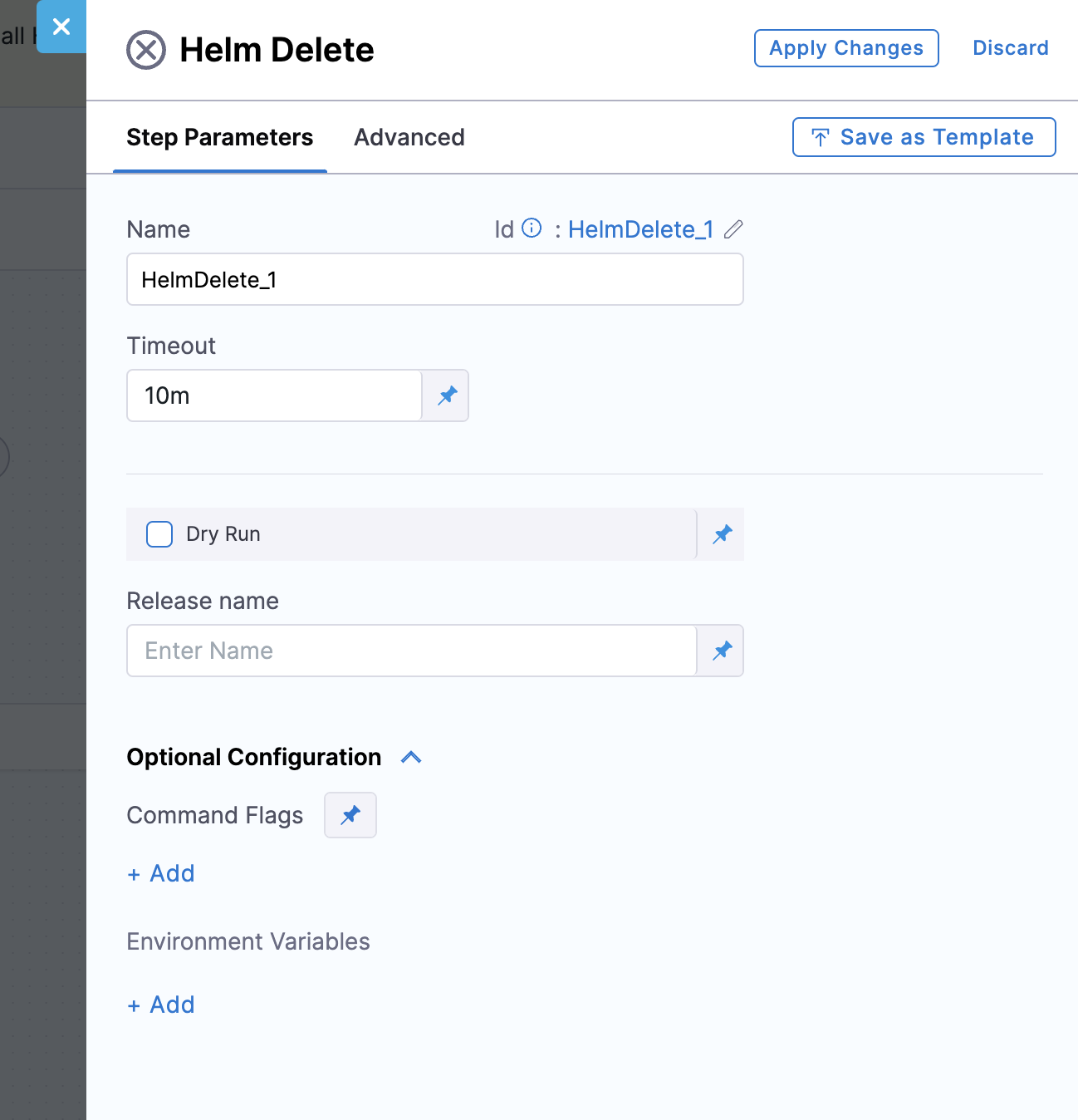
***
## Step configuration options
Configure the following settings on the Helm Delete step:
* **Name**: The name for the step.
* **Timeout**: The timeout duration for this step. You can specify:
* `w` for weeks
* `d` for days
* `h` for hours
* `m` for minutes
* `s` for seconds
* `ms` for milliseconds
* **Dry-Run**: A **`--dry-run`** checkbox is available for safer execution of destructive operations, allowing you to preview the changes before applying them.
* **Release Name**: The name of the Helm release to be deleted. You can specify this manually or leave it blank to automatically retrieve the release name from the selected infrastructure.
* When the Helm Delete step is used in a **Deploy** stage, the release name can be fetched from the selected service and infrastructure configuration.
* If used in a **Custom** stage, you must manually provide the release name, because there is no service context available in that stage.
* The release name supports **Runtime input** and **expressions**.
### Optional configuration
The following optional settings are available:
* **Command Flags**: You can add or remove Helm flags as needed within the step configuration. Go to the [Helm uninstall options](https://helm.sh/docs/helm/helm_uninstall/#options) for a complete list of supported command flags.
**Adding command flags at the service**
You can also configure command flags at the service level, which are applied during Helm uninstallation. To do this:
* Navigate to the **Service Configuration**.
* Go to the **Manifests** tab.
* In the **Advanced** section, select the **Command Type** as `Uninstall`.
* Add the required Helm flags under **Flags**.
When the Helm Delete step is used in a **Deploy** stage, both service-level and step-level command flags are supported. However, step-level flags take precedence over service-level flags during execution.
If the Helm Delete step is used in a **Custom** stage, only the flags defined in the step itself are considered. The step does not inherit flags or configurations from the service in this case.
* **Environment Variables**: Add any environment variables here.
### Advanced options
The following Advanced settings are available on the step:
* [Delegate Selector](https://developer.harness.io/docs/platform/delegates/manage-delegates/select-delegates-with-selectors)
* [Conditional Execution](https://developer.harness.io/docs/platform/pipelines/step-skip-condition-settings)
* [Failure Strategy](https://developer.harness.io/docs/platform/pipelines/failure-handling/define-a-failure-strategy-on-stages-and-steps)
* [Looping Strategy](https://developer.harness.io/docs/platform/pipelines/looping-strategies/looping-strategies-matrix-repeat-and-parallelism)
* [Policy Enforcement](https://developer.harness.io/docs/platform/governance/policy-as-code/harness-governance-overview)
* [Command Flags](/continuous-delivery/use-continuous-delivery/deploy-services-on-different-platforms/helm/native-helm-quickstart.md#command-flags-at-step-level)
***
## Limitations
Review the following limitations before you use the Helm Delete step:
* Helm v2 is not supported.
* The Helm delete command behavior depends on Helm v3 flags, which vary based on the release.
* You must have an environment and infrastructure that natively supports Helm.
***
## Troubleshooting
The following issues are common when you use the Helm Delete step:
Release name is empty or incorrect in a Custom stage
In a Custom stage there is no service context, so you must enter the release name manually or as a runtime input or expression. Confirm the release name matches the Helm release deployed in the target cluster.
Service-level uninstall flags are ignored
In a Custom stage, only step-level command flags apply. In a Deploy stage, step-level flags override service-level uninstall flags. Move required flags onto the Helm Delete step when you need them to take effect.
Step fails on older delegates
Confirm the Harness Delegate is version `85400` or later, and that the stage infrastructure natively supports Helm.
***
## Next steps
* [Native Helm quickstart](/continuous-delivery/use-continuous-delivery/deploy-services-on-different-platforms/helm/native-helm-quickstart.md): Deploy with Native Helm and configure command flags.
* [Helm Deploy step](/continuous-delivery/use-continuous-delivery/deploy-services-on-different-platforms/helm/step-reference/helm-deploy.md): Deploy a Helm release before you delete it.
* [Helm Rollback step](/continuous-delivery/use-continuous-delivery/deploy-services-on-different-platforms/helm/step-reference/helm-rollback.md): Roll back a Helm release instead of deleting it.
{% @harness-feedback/feedback %}