> For the complete documentation index, see [llms.txt](https://developer.harness.io/llms.txt). Markdown versions of documentation pages are available by appending `.md` to page URLs; this page is available as [Markdown](https://developer.harness.io/continuous-delivery/use-continuous-delivery/deploy-services-on-different-platforms/helm/step-reference/helm-dry-run.md).
# Helm Dry Run Step
Reference for the Helm Dry Run step.
{% hint style="info" %}
This feature is in Beta[^1] and requires enablement. [View all early access features.](/release-notes/features.md)
{% @harness-feature-flag-access/request-feature-flag-access module="continuous-delivery" pagePath="continuous-delivery/use-continuous-delivery/deploy-services-on-different-platforms/helm/step-reference/helm-dry-run" featureFlags="%5B%7B%22name%22%3A%22Helm%20Dry%20Run%20step%22%2C%22key%22%3A%22CDS\_HELM\_DRY\_RUN\_STEP%22%2C%22status%22%3A%22BETA%22%2C%22description%22%3A%22Adds%20a%20Helm%20Dry%20Run%20step%20for%20Native%20Helm%20deployment%20stages%20that%20previews%20rendered%20manifests%2C%20hooks%2C%20and%20NOTES%20without%20installing%20anything%20in%20the%20cluster.%22%7D%5D" %}
{% endhint %}
The Helm Dry Run step lets you preview the rendered Helm release — manifests, hooks, and NOTES — against your target cluster before a real deployment. It runs `helm upgrade --install --dry-run` and surfaces the output as a step outcome, without installing or modifying anything in the cluster.
This step is available for **Native Helm** deployment stages and provides parity with the [Kubernetes Dry Run step](/continuous-delivery/use-continuous-delivery/deploy-services-on-different-platforms/kubernetes/kubernetes-executions/k8s-dry-run.md), which applies only to Kubernetes deployment types.
***
## Before you begin
* A **Native Helm** pipeline stage configured with a service, environment, and infrastructure. Go to [Deploy Native Helm using Harness](/continuous-delivery/use-continuous-delivery/deploy-services-on-different-platforms/helm/native-helm-quickstart.md) to set up a Native Helm stage.
* **Helm v3 or v4** on your delegate. Go to [Helm Version Support Policy](https://helm.sh/docs/topics/version_skew/) to review Helm version compatibility details.
* The feature flag `CDS_HELM_DRY_RUN_STEP` enabled on your account. This feature requires a minimum delegate version of **26.09.90102** or later.
***
## Add the Helm Dry Run step
1. In your pipeline, open the **Native Helm** deployment stage.
2. In the **Execution** tab, select **Add Step**.
3. Search for **Helm Dry Run** and add it.
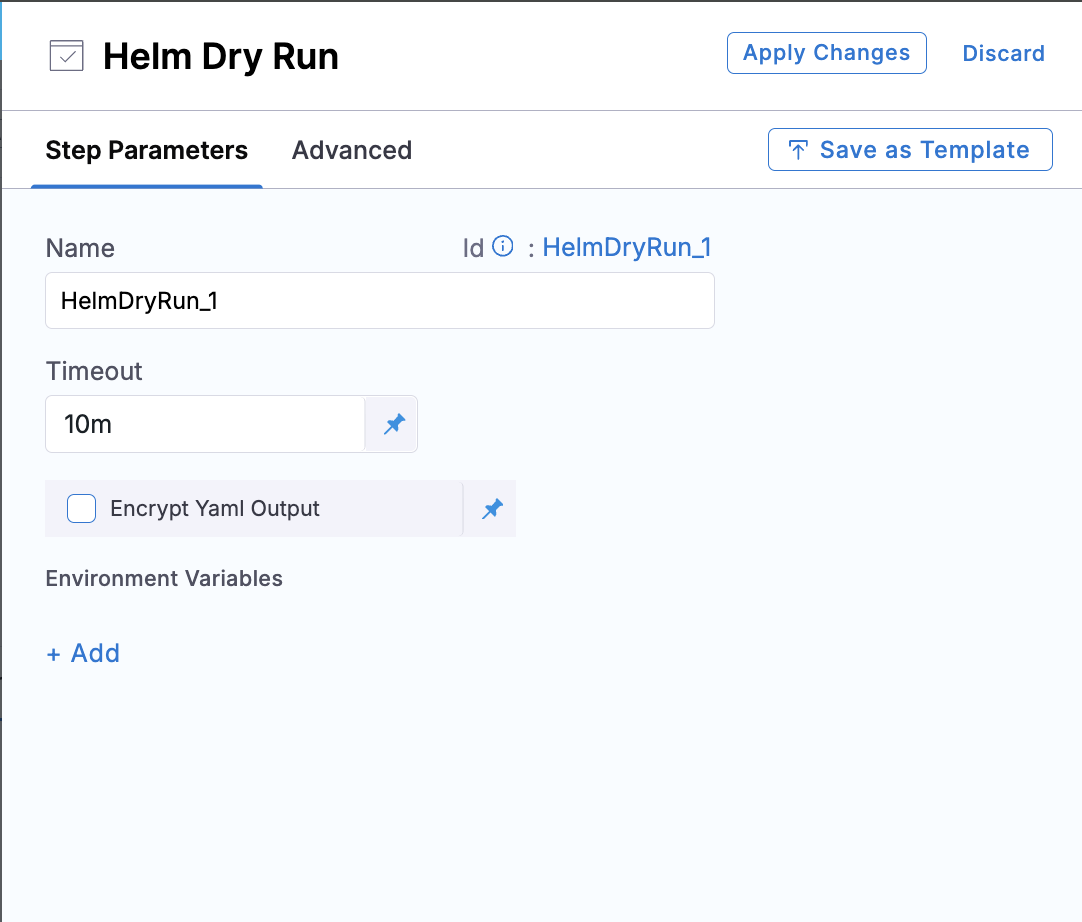
Helm Dry Run step parameters
You can place the step anywhere in the execution flow. A recommended pattern is to combine it with an approval step: add **Helm Dry Run** to preview the manifests, then a **Harness Approval** step to gate on the output, then **Helm Deploy** to apply. This gives teams a human checkpoint between preview and deploy.
Example pipeline YAML with the Helm Dry Run step
```yaml
pipeline:
identifier: HelmDryRunTest
name: HelmDryRunTest
stages:
- stage:
identifier: HelmDryRun
type: Deployment
name: HelmDryRun
spec:
deploymentType: NativeHelm
service:
serviceRef:
environment:
environmentRef:
deployToAll: false
infrastructureDefinitions:
- identifier:
execution:
steps:
- step:
identifier: HelmDryRun_1
type: HelmDryRun
name: HelmDryRun_1
spec:
encryptYamlOutput: false
timeout: 10m
rollbackSteps: []
failureStrategies:
- onFailure:
errors:
- AllErrors
action:
type: StageRollback
```
***
## Step settings
### Name
A unique name for the step. Harness uses this name as the step identifier in expressions.
### Timeout
The maximum time Harness waits for the step to complete. If the step does not finish within this duration, Harness marks it as failed and applies the configured failure strategy.
You can use: `w` (weeks), `d` (days), `h` (hours), `m` (minutes), `s` (seconds), `ms` (milliseconds).
### Command flags
Additional flags to pass to the underlying `helm upgrade --install --dry-run` command. Only **Upgrade** type flags are supported on this step, because the step hardcodes the `upgrade --install` command. Specifying a flag type other than `Upgrade` has no effect.
This mirrors the pattern of the Kubernetes Dry Run step, which surfaces only `Apply` flags.
To use client-side rendering instead of the default server-side dry-run, add `--dry-run=client` as an `Upgrade` command flag. Client-side mode renders manifests without contacting the cluster — `lookup()` returns empty values and no API-server validation is performed.
Example command flag configuration
```yaml
- step:
type: HelmDryRun
name: Helm Dry Run
identifier: helmDryRun
timeout: 10m
spec:
commandFlags:
- commandType: Upgrade
flag: "--atomic"
```
### Encrypt YAML output
When enabled, Harness base64-encodes the rendered manifest before storing it as the step outcome. This setting requires **both** `encryptYamlOutput: true` on the step **and** the account-level feature flag `CDS_ENABLE_ENCRYPTING_RAW_OUTPUT_YAML` to be enabled. If either condition is not met, the output is stored unencrypted.
When disabled (the default), the step redacts `kind: Secret` resource values in the output automatically: `data` values (base64) are replaced with `Kioq` (the base64 encoding of `***`), and `stringData` values (plaintext) are replaced with `***`. Secrets rendered into non-Secret resources (for example, a password in a Deployment environment variable) are not redacted — this matches the behavior of the Kubernetes Dry Run and Helm Deploy steps.
### Environment variables
Key-value pairs passed to the delegate Helm process and to any service hooks configured on the stage. Include environment variables here when your Helm charts or hooks rely on them, so the dry run renders exactly as the real deploy would.
Example with environment variables
```yaml
- step:
type: HelmDryRun
name: Helm Dry Run
identifier: helmDryRun
timeout: 10m
spec:
encryptYamlOutput: false
environmentVariables:
HTTPS_PROXY: http://proxy.internal:8080
HELM_KUBECONTEXT: <+env.name>
commandFlags:
- commandType: Upgrade
flag: "--atomic"
delegateSelectors:
- my-delegate
```
***
## Advanced options
* **Delegate selector:** Target a specific delegate for this step. Go to [Select delegates with selectors](/harness-platform/use-harness-platform/delegates/delegate/manage-delegates/select-delegates-with-selectors.md) to configure targeting.
* **Conditional execution:** Run the step only when specific conditions are met. Go to [Stage and step conditional execution settings](/harness-platform/use-harness-platform/pipelines/step-skip-condition-settings.md) to configure conditions.
* **Failure strategy:** Define how Harness responds when this step fails. Go to [Define a failure strategy on stages and steps](/harness-platform/use-harness-platform/pipelines/failure-handling/define-a-failure-strategy-on-stages-and-steps.md) to set up failure handling.
* **Looping strategy:** Repeat the step across a matrix or list of values. Go to [Looping strategies overview](/harness-platform/use-harness-platform/pipelines/looping-strategies/looping-strategies-matrix-repeat-and-parallelism.md) for configuration details.
* **Policy enforcement:** Apply OPA governance policies to this step. Go to [Harness Policy as Code overview](/harness-platform/use-harness-platform/governance/policy-as-code/harness-governance-overview.md) for details.
***
## Step output
The Helm Dry Run step produces a `NativeHelmDryRunOutcome` named `helmDryRun`. You can reference the rendered manifest in later steps using either form:
```
# Short form (within the same stage)
<+execution.steps.HelmDryRun_1.helmDryRun.manifestDryRun>
# Full form (cross-stage or from an approval step)
<+pipeline.stages.HelmDryRun.spec.execution.steps.HelmDryRun_1.helmDryRun.manifestDryRun>
```
Replace `HelmDryRun_1` with your step identifier and `HelmDryRun` with your stage identifier.
The rendered manifest is not printed in the step logs. It is stored only as the step outcome, and you access it via the `manifestDryRun` expressions above. A common pattern is to pipe it into a **Shell Script** step for inspection or validation.
The output is subject to a **5 MB cap**. If the rendered manifest exceeds 5 MB, the delegate empties the outcome and the step fails with an error indicating the manifest was too large or empty.
***
## Service hooks
The Helm Dry Run step supports `FETCH_FILES` and `TEMPLATE_MANIFEST` service hooks. Both pre and post hooks fire for each hook type. Hook execution order is:
```
PRE FETCH_FILES → (fetch) → POST FETCH_FILES → PRE TEMPLATE_MANIFEST → helm upgrade --install --dry-run → POST TEMPLATE_MANIFEST
```
**STEADY\_STATE\_CHECK hooks do not run.** The step performs no steady-state check (no cluster apply, no workload wait), so `ServiceHookAction.STEADY_STATE_CHECK` hooks are not invoked. A service hook configured for `STEADY_STATE_CHECK` is skipped when this step runs.
***
## Behavior differences from Helm Deploy
The Helm Dry Run step omits several fields from the [Helm Deploy step](/continuous-delivery/use-continuous-delivery/deploy-services-on-different-platforms/helm/step-reference/helm-deploy.md) intentionally, because those settings control live-deploy behavior that does not apply to a preview:
| Deploy setting | Why it is omitted |
| ---------------------------------------- | -------------------------------------------------------------------------------------------------------------------------------------------------------------------------------------------------------------------------------------------------- |
| **Use Upgrade with Install** | The Dry Run step hardcodes `helm upgrade --install --dry-run`. |
| **Skip Steady State Check** | The Dry Run step never performs a steady-state check. |
| **Skip Cleanup** | Controls cleanup of a failed first install; not applicable when nothing is installed. |
| **Ignore Release History Failed Status** | The Dry Run step does not apply the release-history fail-fast gate; it always proceeds to render even when the previous release failed. This is intentional — the purpose of the step is to preview manifests regardless of release history state. |
***
## Important notes
**Helm v2 is not supported.** This step works with Helm v3 and v4 only.
**No cluster changes.** The step runs `helm upgrade --install --dry-run` against the target cluster to compute the rendered manifests but does not install, modify, or delete any resources.
**No rollback step.** Because the Helm Dry Run step does not mutate the cluster, there is no `HelmDryRunRollback` step. Rollback applies only to steps that perform real deployments.
**Server-side dry-run by default.** The step uses server-side dry-run (`--dry-run`), which validates manifests against the Kubernetes API server and resolves `lookup()` calls with real cluster data. To use client-side rendering instead (no cluster contact, `lookup()` returns empty values), pass `--dry-run=client` as an `Upgrade` command flag.
**Release context is accurate.** Unlike `helm template`, which defaults to `Release.IsInstall=true`, `Revision=1`, and reads no existing release state, `helm upgrade --install --dry-run` reads the actual Helm release history from the cluster. This means the rendered output reflects the true next revision and upgrade/install context, producing a more accurate preview for upgrade scenarios.
{% @harness-feedback/feedback %}
[^1]: Beta features are feature-complete but still being validated. Available on request.