> For the complete documentation index, see [llms.txt](https://developer.harness.io/llms.txt). Markdown versions of documentation pages are available by appending `.md` to page URLs; this page is available as [Markdown](https://developer.harness.io/continuous-delivery/use-continuous-delivery/deploy-services-on-different-platforms/kubernetes/kubernetes-executions/create-a-kubernetes-progressive-canary-deployment.md).
# Create a Kubernetes progressive canary deployment
Roll out Kubernetes Deployments in percentage-based phases while keeping the total pod count within a fixed budget.
This guide shows you how to create a progressive canary deployment for Kubernetes workloads. A progressive canary rolls out a new version in percentage-based phases (for example, 25%, 50%, and 100%), with verification or approval gates between phases, while keeping the total pod count within a fixed budget throughout the rollout.
Progressive canary is a sub-type of the Kubernetes Canary strategy. Unlike a standard canary, which adds extra canary pods on top of the primary deployment, a progressive canary maintains two Deployments and shifts replicas between them, so the total pod count never significantly exceeds your declared replica count. This gives you fine-grained, budget-constrained control over how a new version replaces the old one.
For a comparison of Kubernetes deployment strategies, go to [Deployment concepts and strategies](/continuous-delivery/use-continuous-delivery/manage-deployments/deployment-concepts.md) to understand when to use each strategy.
{% hint style="info" %}
This feature is behind the feature flag `CDS_K8S_PROGRESSIVE_CANARY`. A minimum delegate version 897xx or later is required for this feature.
Contact [Harness Support](mailto:support@harness.io) to enable the feature.
{% endhint %}
***
### How progressive canary differs from standard canary
A standard Harness canary deployment creates a separate canary Deployment alongside the full primary fleet. If the primary runs 100 replicas and you target a 25% canary, the cluster temporarily runs 125 pods (100 primary plus 25 canary). The canary is verified, deleted, and then a full rolling update replaces the primary.
A progressive canary keeps the total pod count constant. It creates a second Deployment for the new version at 0 replicas and then shifts replicas from the old version to the new version in controlled batches. At each phase, the old version scales down as the new version scales up, so the combined total stays within your replica budget.
The following table compares the pod counts for a 100-replica workload rolling out to 25%, 50%, and 100%.
| Phase | Old version (v1) | New version (v2) | Total pods |
| -------------- | ---------------- | ---------------- | ---------- |
| Initial | 100 | 0 | 100 |
| Phase 1 (25%) | 75 | 25 | 100 |
| Phase 2 (50%) | 50 | 50 | 100 |
| Phase 3 (100%) | 0 | 100 | 100 |
During a phase transition, the total can briefly reach the budget plus `maxSurge` (for example, 105 pods with `maxSurge=5`), but it never exceeds that bound. New pods must pass readiness checks before old pods are removed.
Use a progressive canary when you want phased, verifiable rollouts without doubling your infrastructure footprint, or when your cluster has a fixed capacity budget that a standard canary would exceed.
***
### Before you begin
Before you create a progressive canary deployment, make sure you have the following:
* **Feature flag enabled:** The `CDS_K8S_PROGRESSIVE_CANARY` flag must be enabled on your account. Contact [Harness Support](mailto:support@harness.io) to enable it.
* **Minimum delegate version:** Delegate version 897xx or later is required for the progressive canary steps to run. Go to [Delegate overview](/harness-platform/use-harness-platform/delegates/delegate/delegate-concepts/delegate-overview.md) to check your delegate version.
* **A CD pipeline stage:** A Deploy stage with a Kubernetes service and infrastructure. Go to [Add Kubernetes manifests](/continuous-delivery/use-continuous-delivery/deploy-services-on-different-platforms/kubernetes/cd-kubernetes-category/define-kubernetes-manifests.md) to configure your service.
* **A single Deployment workload:** Progressive canary supports one Kubernetes Deployment workload per stage, the same as standard canary. Go to [Define your Kubernetes target infrastructure](/continuous-delivery/use-continuous-delivery/deploy-services-on-different-platforms/kubernetes/define-your-kubernetes-target-infrastructure.md) to configure your infrastructure.
* **Istio control plane, if you use traffic routing:** Traffic routing is optional. If you add a Traffic Routing step, Istio must already be installed in the cluster with the `VirtualService` CRD available and sidecar injection enabled on the target namespace. Go to [Traffic routing](#traffic-routing) to review the full prerequisite list. Without a Traffic Routing step, Harness splits traffic purely by pod ratio and has no Istio dependency.
***
### What workloads can you deploy?
Progressive canary supports a single [Kubernetes Deployment workload](https://kubernetes.io/docs/concepts/workloads/controllers/deployment/), the same as the standard Canary and Blue Green strategies.
{% hint style="warning" %}
**SINGLE WORKLOAD ONLY**
Progressive canary supports only one Deployment workload. If your service manifests contain multiple workloads, the deployment fails. Deploy additional objects with the [Apply step](/continuous-delivery/use-continuous-delivery/deploy-services-on-different-platforms/kubernetes/kubernetes-executions/deploy-manifests-using-apply-step.md).
{% endhint %}
***
### Select the progressive canary strategy
Progressive canary is selected as a sub-type of the Canary strategy.
1. In your Deploy stage, go to the **Execution** tab.
2. Select the **Canary** execution strategy.
3. In the **Select Canary Type** panel, select **Progressive Canary**.
Click to view full size image
The two canary types are:
* **Standard Canary:** Creates extra canary pods alongside the primary deployment. The total pod count is the primary replicas plus the canary count. This is the existing canary behavior.
* **Progressive Canary:** Uses two Deployments and shifts replicas between them so the total pod count stays within your replica budget.
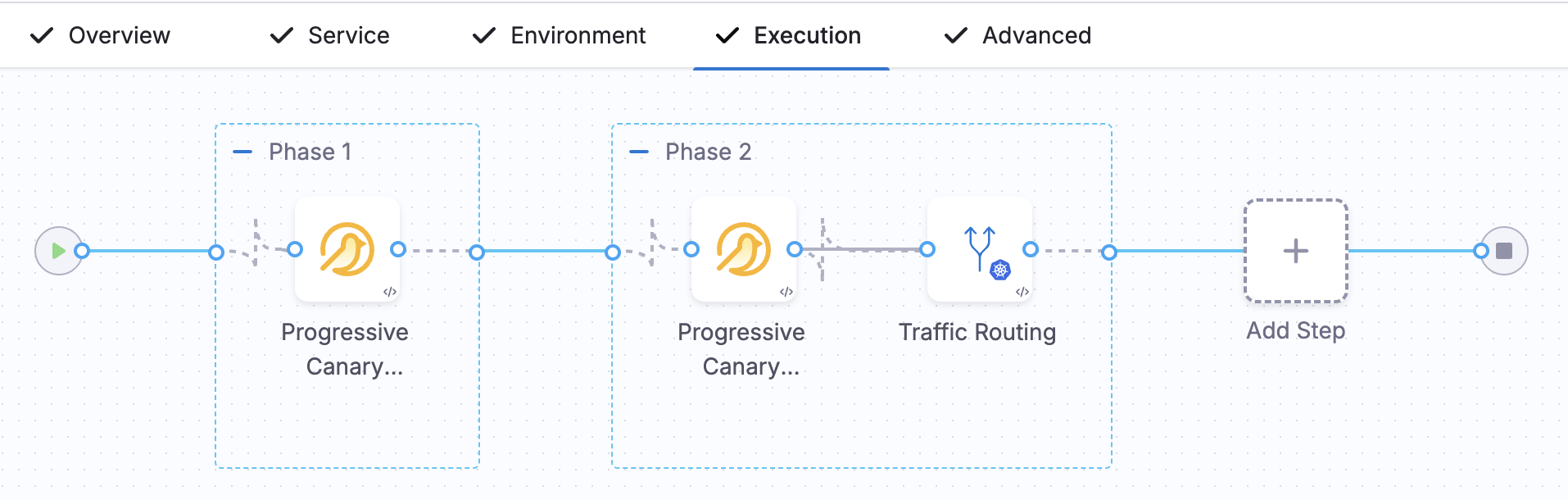
When you select **Progressive Canary**, Harness generates the phased deploy steps, verification gates, and rollback steps for you. The following image shows the generated execution graph with two phases and a **Traffic Routing** step after the second phase.
Click to view full size image
***
### Configure the phases
A progressive canary rollout is a sequence of **Canary Deployment** steps, each targeting a higher percentage, with a verification or approval gate between phases.
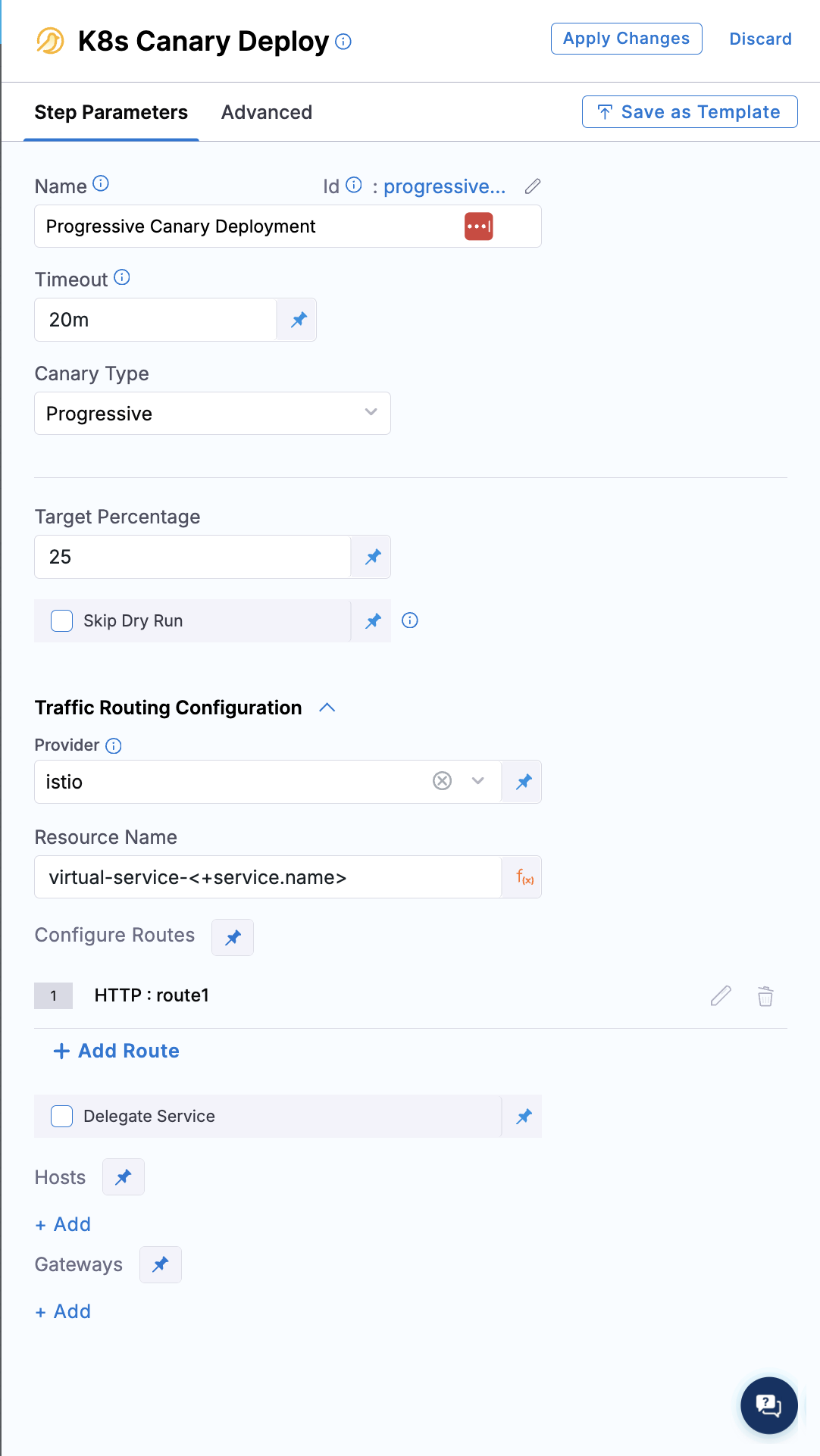
Each **Canary Deployment** step in a progressive canary has two relevant fields:
* **Canary Type:** Set to `Progressive`. Harness populates this automatically from your strategy selection, so the delegate runs the progressive code path at runtime.
* **Target Percentage:** The percentage of total replicas that the new version reaches by the end of this phase. Enter a value from 1 to 100. This field is specific to progressive canary and replaces the instance count and percentage fields used by standard canary.
Click to view full size image
For a phased rollout, you configure a **Canary Deployment** step in each phase and set a higher target percentage for each phase. Each step reads the current replica counts from the cluster and scales toward its target, so phases build on each other. To shift traffic explicitly with Istio, add a **Traffic Routing** step after a phase.
Your phases must include a final step with **Target Percentage** set to 100 to complete the rollout. Harness does not add this phase for you, so add it explicitly as the last phase in your pipeline. Intermediate phases, for example 25, 50, and 75, are up to you to define based on your own rollout strategy.
Harness generates a `K8sProgressiveCanaryRollback` step in the stage's rollback section automatically, so you do not add rollback steps manually.
Here is the pipeline YAML for a two-phase progressive canary rollout with Istio traffic routing.
Progressive canary pipeline YAML
```yaml
pipeline:
name: k8s-progressive-deploy
identifier: k8sprogressivedeploy
tags: {}
projectIdentifier: my_project
orgIdentifier: default
stages:
- stage:
name: k8s-deploy
identifier: k8sdeploy
description: ""
type: Deployment
spec:
deploymentType: Kubernetes
service:
serviceRef: <+input>
serviceInputs: <+input>
environment:
environmentRef: <+input>
deployToAll: false
environmentInputs: <+input>
serviceOverrideInputs: <+input>
infrastructureDefinitions: <+input>
execution:
steps:
- stepGroup:
name: Phase 1
identifier: phase1
steps:
- step:
name: Progressive Canary Deployment
identifier: progressiveCanaryDeployment
type: K8sCanaryDeploy
timeout: 20m
spec:
canaryType: Progressive
skipDryRun: false
trafficRouting:
provider: istio
spec:
name: virtual-service-<+service.name>
routes:
- route:
type: http
name: route1
destinations:
- destination:
host: stable
- destination:
host: canary
- stepGroup:
name: Phase 2
identifier: phase2
steps:
- step:
name: Progressive Canary Deployment
identifier: progressiveCanaryDeployment
type: K8sCanaryDeploy
timeout: 20m
spec:
canaryType: Progressive
skipDryRun: false
- step:
name: Traffic Routing
identifier: trafficRouting
type: K8sTrafficRouting
timeout: 10m
spec:
type: inherit
trafficRouting:
routes:
- route:
name: route1
destinations:
- destination:
host: stable
- destination:
host: canary
rollbackSteps:
- step:
name: Progressive Canary Rollback
identifier: progressiveCanaryRollback
type: K8sProgressiveCanaryRollback
timeout: 20m
spec: {}
tags: {}
failureStrategies:
- onFailure:
errors:
- AllErrors
action:
type: StageRollback
```
***
### How the rollout works
When you run a progressive canary, Harness executes each phase against the live cluster state.
The first **Canary Deployment** step creates the new-version Deployment. Harness clones your workload manifest, appends an incrementing version suffix such as `-v5` to the name, and applies it with the new image at 0 replicas. The same suffix is applied to the associated ConfigMaps and Secrets. Harness then runs a batch scaling loop to reach the target percentage: it scales up the new version by a batch of pods, waits for those pods to pass readiness probes and `minReadySeconds`, and then scales down the old version by an equivalent batch. This repeats until the new version reaches the target and the old version is reduced to match.
Each subsequent **Canary Deployment** step reads the current replica counts of both Deployments directly from the cluster and continues the batch scaling loop toward its own target percentage. Because the state lives in the cluster, no external state store is required, and a retried step resumes from wherever the cluster currently is.
Harness tracks each rollout as a numbered version deployment and tracks the pods of both versions separately, so on the service instances page you can always see how many instances of each version are running. After each phase, Harness stores both the old and new workload manifests in the release history so that a later rollback can restore the previous version.
The batch size is derived from your `maxSurge` and `maxUnavailable` settings, and the combined pod count stays within the range of `budget - maxUnavailable` to `budget + maxSurge` at every step. The following example shows the scaling cycles for the 25% phase of a 100-replica workload with `maxSurge=5` and `maxUnavailable=0`.
Batch scaling cycles for the 25% phase
```
Start: v1=100, v2=0 (total=100)
Cycle 1: scale up v2 to 5, wait for readiness, scale down v1 to 95 (total=100)
Cycle 2: scale up v2 to 10, wait for readiness, scale down v1 to 90 (total=100)
Cycle 3: scale up v2 to 15, wait for readiness, scale down v1 to 85 (total=100)
Cycle 4: scale up v2 to 20, wait for readiness, scale down v1 to 80 (total=100)
Cycle 5: scale up v2 to 25, wait for readiness, scale down v1 to 75 (total=100)
Phase complete: v1=75, v2=25
```
**Clean up the old version:** When the final phase reaches 100%, the old version is scaled down to 0 replicas, and Harness removes the old-version Deployment along with its associated Horizontal Pod Autoscaler (HPA) and Pod Disruption Budget (PDB). Harness verifies that the old version has 0 replicas before deleting it, so it never removes a version that is still serving traffic.
***
### Traffic routing
By default, progressive canary uses a single Kubernetes Service that selects pods from both Deployments. Traffic is distributed approximately in proportion to the pod ratio, with zero Istio dependency. With 75 old-version pods and 25 new-version pods, kube-proxy routes roughly 75% of requests to the old version and 25% to the new version. This split is approximate, not exact.
To control the exact traffic percentage independently of the pod ratio, add a traffic routing configuration using Istio. When traffic routing is configured, Harness isolates the two versions behind separate Services using pod labels and manages a weighted `VirtualService` so you can send, for example, 10% of traffic to the new version even when it runs 50% of the pods.
Istio traffic routing only takes effect starting from the second progressive canary deployment in a namespace. On the first-ever run, there is no previous version to route traffic from, so Harness skips the Istio setup entirely: pod-based percentage scaling still runs normally, but the embedded traffic routing config in the first phase logs an explicit skip reason in the step's command-unit log, similar to `No previous successful version found for v2 — nothing to route traffic from. Skipping traffic routing setup.` A standalone **Traffic Routing** step in a later phase of that same first run also skips without failing, but reports the skip reason only as a banner in the Harness UI step, not in the command-unit log. If you review a downloaded or exported log instead of the live UI, a skipped **Traffic Routing** step shows no log entries at all, which can look like a silent failure.
{% hint style="info" %}
**ISTIO PREREQUISITES**
Istio must already be installed in the cluster: the control plane (istiod) and the `VirtualService` CRD. Harness only creates or updates a `VirtualService`; it never creates a `Gateway` or `DestinationRule`, so those must already exist if you reference them. Sidecar injection must be enabled on the target namespace, or the `VirtualService` applies with no real traffic shift. Harness supports `networking.istio.io/v1beta1` and `networking.istio.io/v1alpha3` only; `networking.istio.io/v1` is not supported. This is a Harness-side limitation, not an Istio-side one. Go to [Istio - New config option](/continuous-delivery/use-continuous-delivery/deploy-services-on-different-platforms/kubernetes/cd-k8s-ref/traffic-shifting-step.md#istio-new-config-option) to review the full prerequisite list and setup commands.
{% endhint %}
You set up the traffic routing infrastructure in the first **Canary Deployment** step, where you define the stable and canary service weights. For example, you can start with a stable weight of 100 and a canary weight of 0, or any other split such as 25 and 75.
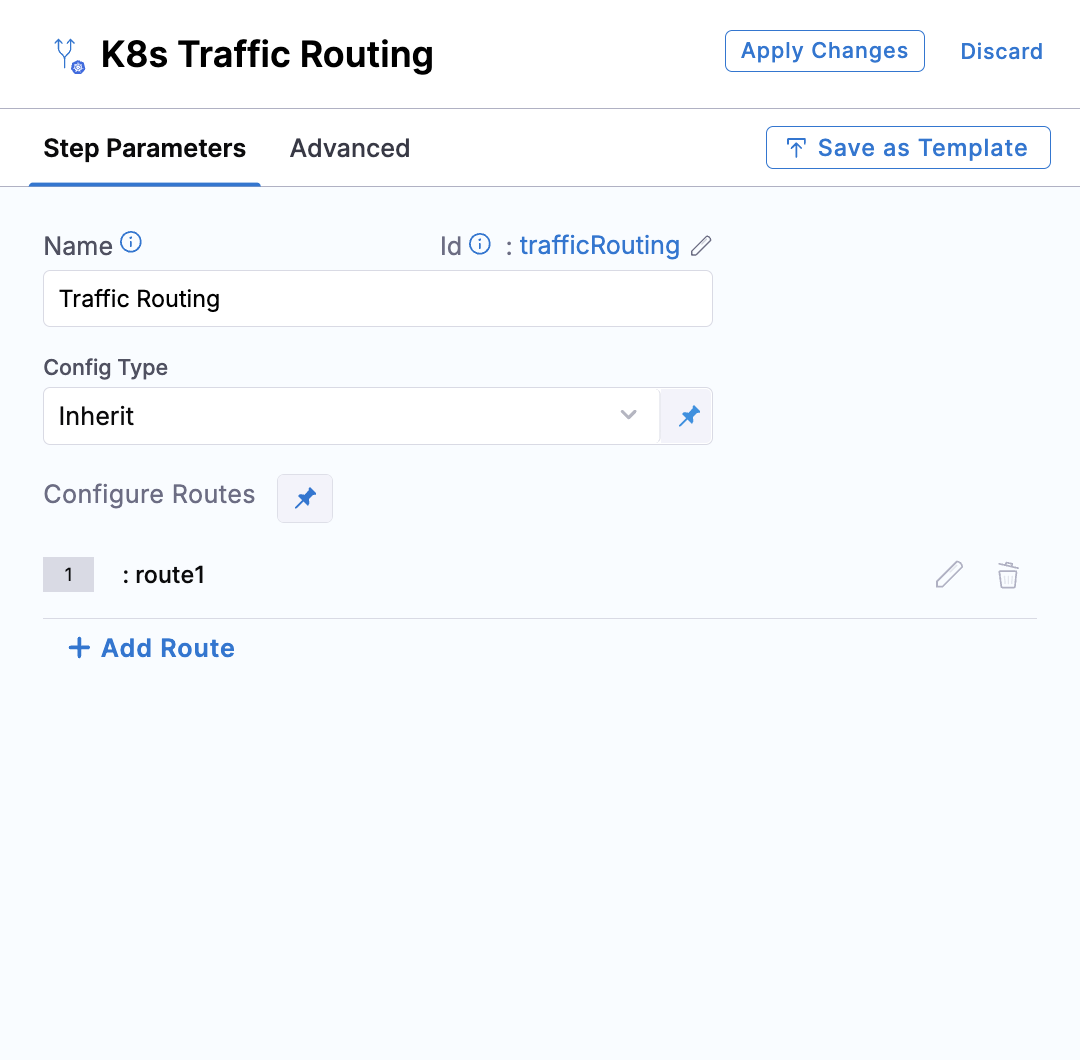
In each later phase, add a **Traffic Routing** step and set its **Config Type** to **Inherit**. The step reuses the configuration from the first deploy step and patches only the weights between the stable and canary services, so you can shift traffic gradually at your own pace. For example, you can set the phases to 75/25, then 90/10, and so on.
Click to view full size image
At the final 100% phase, you do not need a separate **Traffic Routing** step. The deploy step handles the cutover itself. When the rollout completes, the primary Service points to the new version, so 100% of traffic flows there automatically.
Go to the [Traffic routing step reference](/continuous-delivery/use-continuous-delivery/deploy-services-on-different-platforms/kubernetes/cd-k8s-ref/traffic-shifting-step.md) to configure weighted traffic routing.
Here is an execution excerpt for a four-phase rollout (25%, 50%, 75%, 100%) that combines the patterns above: the first phase embeds the Istio traffic routing configuration, the two middle phases each add a standalone **Traffic Routing** step in **Inherit** mode with explicit weights, and the final 100% phase has no **Traffic Routing** step.
Four-phase progressive canary rollout with Istio traffic routing
```yaml
execution:
steps:
- stepGroup:
name: Phase 25
identifier: Phase_25
steps:
- step:
name: Progressive Canary Deployment
identifier: progressiveCanaryDeployment
type: K8sCanaryDeploy
timeout: 20m
spec:
canaryType: Progressive
targetPercentage: 25
skipDryRun: false
trafficRouting:
provider: istio
spec:
name: virtual-service-<+service.name>
routes:
- route:
type: http
name: route1
destinations:
- destination:
host: stable
weight: 100
- destination:
host: canary
- stepGroup:
name: Phase 50
identifier: Phase_50
steps:
- step:
name: Progressive Canary Deployment
identifier: progressiveCanaryDeployment
type: K8sCanaryDeploy
timeout: 20m
spec:
canaryType: Progressive
targetPercentage: 50
skipDryRun: false
- step:
name: Traffic Routing
identifier: trafficRouting
type: K8sTrafficRouting
timeout: 10m
spec:
type: inherit
trafficRouting:
routes:
- route:
name: route1
destinations:
- destination:
host: stable
weight: 75
- destination:
host: canary
weight: 25
- stepGroup:
name: Phase 75
identifier: Phase_75
steps:
- step:
name: Progressive Canary Deployment
identifier: progressiveCanaryDeployment
type: K8sCanaryDeploy
timeout: 10m
spec:
canaryType: Progressive
targetPercentage: 75
skipDryRun: false
- step:
name: Traffic Routing
identifier: trafficRouting
type: K8sTrafficRouting
timeout: 10m
spec:
type: inherit
trafficRouting:
routes:
- route:
name: route1
destinations:
- destination:
host: stable
weight: 10
- destination:
host: canary
weight: 90
- stepGroup:
name: Phase 100
identifier: Phase_100
steps:
- step:
name: Progressive Canary Deployment
identifier: progressiveCanaryDeployment
type: K8sCanaryDeploy
timeout: 10m
spec:
canaryType: Progressive
targetPercentage: 100
skipDryRun: false
rollbackSteps:
- step:
name: Progressive Canary Rollback
identifier: progressiveCanaryRollback
type: K8sProgressiveCanaryRollback
timeout: 20m
spec: {}
```
***
### Rollback
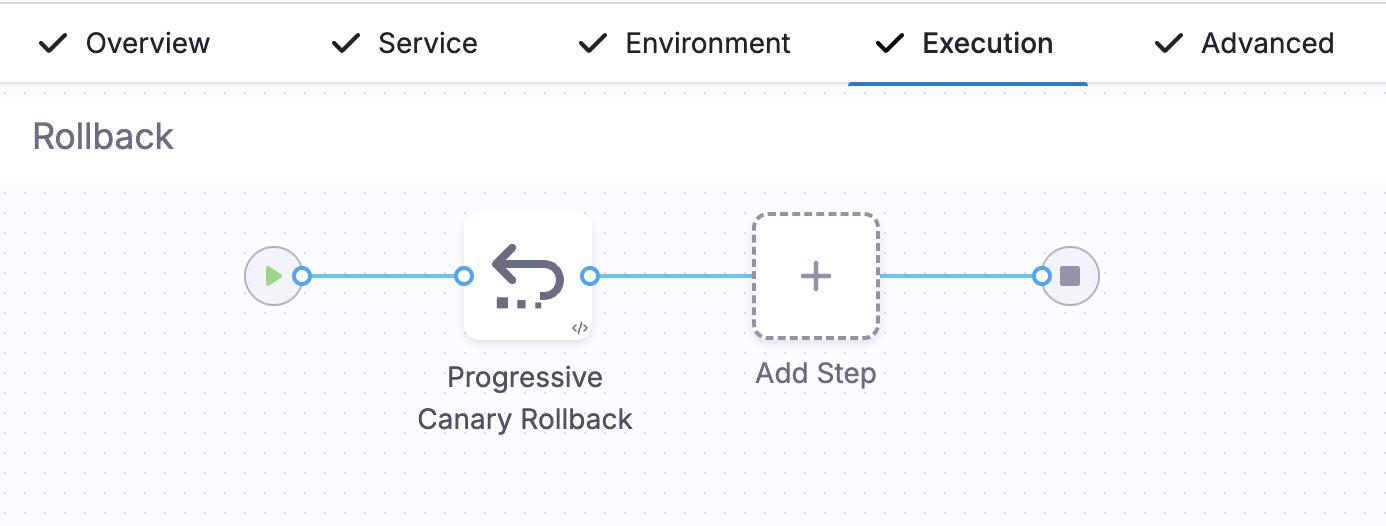
Progressive canary uses a dedicated **Progressive Canary Rollback** step (`K8sProgressiveCanaryRollback`), which Harness adds to the stage's rollback section automatically when you select the progressive canary strategy.
Click to view full size image
The rollback runs the batch scaling algorithm in reverse: it scales the old version back up and the new version back down, respecting the same budget constraints, until the old version is fully restored and the new version is removed. After the rollback completes, Harness deletes the failed version's Deployment, ConfigMaps, and Secrets.
Rollback prioritizes availability over speed. Because a progressive rollout controls a fixed pod budget, the rollback keeps enough pods serving traffic throughout rather than scaling down as fast as possible. It spends most of its time waiting for pods to reach a ready state anyway, so keeping the services available throughout adds no extra cost.
The rollback behavior depends on how far the deployment progressed.
For the first-ever progressive canary deployment in a namespace, there is no previous successful version to restore. Harness detects this in the step logs, and the traffic routing steps are intentionally skipped because there is no previous version to route traffic from.
Harness only records a deployment as the previous successful version once it completes all the way to the 100% phase. A run that fails partway through, for example on a missing Istio CRD, never reaches that point and does not count as a previous successful version.
If a phase fails partway through, the cluster is left in a partially scaled state, and the **Progressive Canary Rollback** step reads the current replica counts and scales the old version back to 100% and the new version to 0. Because the algorithm is idempotent, a retried rollback resumes from the current cluster state and converges to the same result.
If the deployment reached 100% and the old version was already deleted, Harness reads the stored old-version manifest from the release history, recreates that Deployment at 0 replicas, and then runs the reverse scaling loop to restore it to full capacity before removing the new version.
When traffic routing is enabled, the rollback patches the `VirtualService` weights at scaling checkpoints to match the current pod ratio, so traffic tracks the pods as they shift back to the old version. The traffic routing resources are cleaned up after the rollback completes.
***
### Horizontal Pod Autoscaler and Pod Disruption Budget
{% hint style="info" %}
**FEATURE AVAILABILITY**
HPA and PDB support requires the feature flag `CDS_SUPPORT_HPA_AND_PDB_NG`. Contact [Harness Support](mailto:support@harness.io) to enable the feature.
{% endhint %}
Progressive canary supports HPA and PDB resources using the same cloning pattern as Blue Green deployments. When your manifests include an HPA that targets the workload, Harness keeps the original HPA on the old version and creates a second HPA for the new-version Deployment.
At each phase, Harness patches both HPAs so that their `minReplicas` and `maxReplicas` reflect the current phase percentage. For example, an original HPA range of `min=50, max=100` is split proportionally at the 25% phase to `min=38, max=75` on the old version and `min=13, max=25` on the new version. Harness applies these proportional values before each phase's scaling loop begins, which prevents the autoscaler from fighting the scaling commands during the rollout. PDB resources are cloned and renamed for the new version using the same mechanism.
When the old version is deleted at the end of the rollout, its HPA and PDB are removed, and the new-version HPA takes over the full original range.
***
### Important notes
* Progressive canary supports a single Kubernetes Deployment workload per stage.
* The total pod count can briefly reach `budget + maxSurge` during a phase transition, but it never exceeds that bound.
* The default traffic split without a traffic routing configuration is approximate and follows the pod ratio. Use Istio traffic routing for exact traffic percentages.
* New pods must pass readiness probes and `minReadySeconds` before old pods are removed in each cycle.
***
### Troubleshooting Traffic routing fails with "CRD specification wasn't found for networking resource in the cluster"
This means Istio is not installed in the target cluster, or the `VirtualService` CRD is missing. The step fails with an error similar to:
```
Failed to execute traffic routing
Supported versions for resource type [networking] are: [networking.istio.io/v1beta1, networking.istio.io/v1alpha3]
CRD specification wasn't found for networking resource in the cluster
```
Install the Istio control plane and confirm the CRD is present before you retry:
```bash
kubectl get crd | grep istio
```
Go to [Istio - New config option](/continuous-delivery/use-continuous-delivery/deploy-services-on-different-platforms/kubernetes/cd-k8s-ref/traffic-shifting-step.md#istio-new-config-option) to review the full prerequisite list.
A skipped Traffic Routing step shows no information in a downloaded log export
On the first-ever progressive canary run in a namespace, there is no previous successful version to route traffic from, so Harness skips Istio traffic routing. A skipped standalone **Traffic Routing** step reports this only as a banner in the Harness UI step view, for example: "This is the first Progressive Canary deploy so traffic routing was not set up (there is no previous version to route traffic from). Skipping Traffic Routing step." The downloaded or exported log for that step has no entries at all, which can look like the step failed silently.
Check the step in the Harness UI directly to see the skip banner. Pod-based percentage scaling is still honored on the first run; only Istio traffic weighting is skipped. Go to [Traffic routing](#traffic-routing) to review when traffic routing takes effect.
***
### Next steps
* [Create a Kubernetes canary deployment](/continuous-delivery/use-continuous-delivery/deploy-services-on-different-platforms/kubernetes/kubernetes-executions/create-a-kubernetes-canary-deployment.md)
* [Create a Kubernetes Blue Green deployment](/continuous-delivery/use-continuous-delivery/deploy-services-on-different-platforms/kubernetes/kubernetes-executions/create-a-kubernetes-blue-green-deployment.md)
* [Create a Kubernetes rolling deployment](/continuous-delivery/use-continuous-delivery/deploy-services-on-different-platforms/kubernetes/kubernetes-executions/create-a-kubernetes-rolling-deployment.md)
* [View pod status and logs](/continuous-delivery/use-continuous-delivery/deploy-services-on-different-platforms/kubernetes/kubernetes-executions/view-pod-status-and-logs.md): Inspect pod-level status, events, and logs for this deployment directly in the pipeline execution.
{% @harness-feedback/feedback %}