> For the complete documentation index, see [llms.txt](https://developer.harness.io/llms.txt). Markdown versions of documentation pages are available by appending `.md` to page URLs; this page is available as [Markdown](https://developer.harness.io/continuous-delivery/use-continuous-delivery/deploy-services-on-different-platforms/serverless/serverless-image-build.md).
# Building Serverless Framework Images
A reusable Harness pipeline to build customized Serverless images.
This page provides a Harness CD pipeline to help you build your own Docker images for the Serverless framework.
The purpose of this pipeline is to give you flexibility—so you can adopt newer AWS Lambda runtimes or tailor the image to your specific serverless application needs.
### What This Pipeline Does
This pipeline automates building Serverless images for different programming languages using Harness. It enables you to keep up with the latest Serverless versions and apply customizations as required for your projects.
You can find the full pipeline YAML in the [Pipeline YAML](#pipeline-yaml) section below.
### Understanding Serverless Runtimes
Serverless runtimes refer to the programming language environments that the Serverless framework supports for function development. Each runtime provides the language-specific libraries, tools, and dependencies to build, test, and deploy serverless applications.
Common Serverless runtimes include:
* **Node.js**: Versions like nodejs18.x, nodejs20.x, nodejs22.x
* **Python**: Versions like python3.11, python3.12
* **Java**: Versions like java8, java17, java21
* **Ruby**: Versions like ruby2.7, ruby3.2
When you build your image using the Harness pipeline, you combine the Harness Serverless plugin (which provides the integration with Harness CD) with a specific runtime image from AWS. This allows you to deploy serverless applications written in your preferred programming language while leveraging Harness deployment capabilities.
### Key Components and pre-requisites
This pipeline helps you build **custom serverless plugin images** using Harness, enabling integration of the Harness plugin with supported AWS Lambda runtimes. Below are the key details you should know about the pipeline:
* **Deployment Stage with Kubernetes Infrastructure**
* Utilizes a Deployment stage configured to run on Kubernetes.
* **Kubernetes Cluster Requirement and Privileged Mode**
* Requires a Kubernetes cluster set up by the user.
* The pipeline’s step group runs with privileged: true mode enabled to allow Docker-in-Docker and image build operations.
* This privileged mode requires the Kubernetes cluster nodes to permit privileged containers.
* For example, if using Google Kubernetes Engine (GKE), do not use Autopilot clusters, as they restrict privileged containers. Instead, use a standard GKE cluster with node pools configured to allow privileged pods.
* Connect the Kubernetes cluster to Harness via a Kubernetes Cluster connector.
* **Use of Official AWS SAM Images**
* Pulls SAM base images from the [AWS ECR public gallery](https://gallery.ecr.aws/sam?page=1) for compatibility.
* **Automatic Extraction of Runtime and Version**
* Extracts runtime name and version details directly from the SAM base image name.
* **Final Image Naming Convention**
* Images are named following the format:\
`serverless-plugin:{VERSION}-{RUNTIME_NAME}-{VERSION}-linux-amd64`\
Example: `serverless-plugin:1.1.0-beta-python3.12-1.1.0-beta-linux-amd64`
#### Pipeline Runner Privileged Mode Requirement
Certain steps in the pipeline require the Kubernetes pod to run in privileged mode. This is necessary for starting Docker daemons (DinD), building container images inside pipeline steps, and granting the permissions Docker needs at runtime.
**Why privileged mode is required:**
* Enables Docker-in-Docker (DinD) support for building and pushing images.
* Allows installation and execution of docker CLI and manipulation of containers within the build step.
* Required for root access and mounting Docker volumes.
To enable privileged execution, set privileged: true in the step group or step-level security context. Example:
```yaml
stepGroup:
privileged: true
name: k8s-step-group
sharedPaths:
- /var/run
- /var/lib/docker
```
For individual steps:
```
step:
name: dinD
privileged: true
...
```
Without this setting, Docker builds and image pushes may fail due to insufficient permissions inside the container.
### Quick Start
1. Copy and paste the [pipeline YAML](#pipeline-yaml) provided into your Harness Project.
2. Add an empty/do nothing service to the pipeline.
3. Add a Kubernetes environment to the pipeline.
4. In the **Execution section**, enable **container-based execution** in the **step group**. Add the Kubernetes cluster connector inside the container step group. Save the pipeline.
5. Click **Run Pipeline**
6. Enter the required parameters:
* **VERSION**: The version number of the Harness base image (e.g., `1.1.0-beta`). VERSION represents specific code changes in the Harness repository. With each new code change, we push a new tag and publish new Docker images with these tags, allowing users to access specific versions of the plugin.
* **Harness\_base\_image**: You can find the Harness base image with the specific release versions from [Harness DockerHub](https://hub.docker.com/r/harness/serverless-plugin/tags).
* **RUNTIME\_BASE\_IMAGE\_VERSION**: Runtime base image from AWS ECR (e.g., `public.ecr.aws/sam/build-python3.12:1.142.1-20250701194731-x86_64`)
* **NODEJS\_BASE\_IMAGE\_VERSION**: Node.js base image from AWS ECR (e.g., `public.ecr.aws/sam/build-nodejs20.x:1.142.1-20250701194712-x86_64`)
* **SERVERLESS\_VERSION**: Serverless Framework version (e.g., `3.39.0`)
#### Serverless Plugin Image Pre-requisites
The pipeline supports only complete formats for the base images:
* `public.ecr.aws/sam/build-java21:1.140.0-20250605234711-x86_64`
* `public.ecr.aws/sam/build-nodejs18.x:1.120.0-20240626164104-x86_64`
**Serverless Base Image Pre-requisites**
Only official AWS SAM build images from the [AWS ECR Public Gallery](https://gallery.ecr.aws/sam?page=1) are supported.
* Use SAM base images only from: [AWS ECR Gallery - SAM](https://gallery.ecr.aws/sam?page=1)
* Only x86\_64 architecture images are supported
* Using different base images may cause library dependency issues
* Non-standard base images may cause the plugin not to function as required
* You must use the final image at the step level of your serverless deployment. This plugin cannot be used in [Plugin info](/continuous-delivery/use-continuous-delivery/deploy-services-on-different-platforms/serverless/serverless-lambda-cd-quickstart.md#plugin-info) at the service level, as this setting at the service level fetches only from the Harness official Dockerhub repository.
**Image Configuration**
The pipeline produces two types of images with the following naming patterns:
1. **Base Image** (without Serverless Framework):
`${RUNTIME_NAME}-${VERSION}-linux-amd64`
Example: `java21-1.1.0-beta-linux-amd64`
2. **Serverless Image** (with Serverless Framework installed): `${RUNTIME_NAME}-${SERVERLESS_VERSION}-${VERSION}-linux-amd64`
Example: `java21-3.39.0-1.1.0-beta-linux-amd64`
Where:
* `RUNTIME_NAME`: Extracted runtime name (e.g., `java21`, `nodejs22.x`)
* `SERVERLESS_VERSION`: Serverless Framework version (e.g., `3.39.0`)
* `VERSION`: Harness plugin version (e.g., `1.1.0-beta`)
#### Variables Used in Pipeline
These variables are actively used in the pipeline for building and pushing the image that you need to configure:
**Pipeline variables:** - **TARGET\_REPO**, **DOCKER\_USERNAME**, and **DOCKER\_PASSWORD** are set once as pipeline-level variables.
| Variable | Description | Example | Required |
| ---------------- | ------------------------------------------------------- | -------------------------------- | -------- |
| TARGET\_REPO | Target Docker repository to push built plugin images | `your_account/serverless-plugin` | Yes |
| DOCKER\_USERNAME | Docker registry username | `dockerhub_username` | Yes |
| DOCKER\_PASSWORD | Docker registry password or Personal Access Token (PAT) | `` | Yes |
**Runtime inputs:** - **VERSION**, **RUNTIME\_BASE\_IMAGE\_VERSION**, **NODEJS\_BASE\_IMAGE\_VERSION**, **HARNESS\_BASE\_IMAGE**, and **SERVERLESS\_VERSION** are user inputs set for each pipeline run to specify exact versions for the builds.
| Variable | Description | Example | Required |
| ----------------------------- | --------------------------------------- | ------------------------------------------------------------------- | -------- |
| VERSION | Plugin image/version tag | `1.1.2` | Yes |
| RUNTIME\_BASE\_IMAGE\_VERSION | AWS SAM runtime base image from ECR | `public.ecr.aws/sam/build-python3.12:1.143.0-20250822194415-x86_64` | Yes |
| NODEJS\_BASE\_IMAGE\_VERSION | AWS SAM Node.js base image from ECR | `public.ecr.aws/sam/build-nodejs22.x:1.143.0-20250822194415-x86_64` | Yes |
| HARNESS\_BASE\_IMAGE | Harness base image used in build | `harness/serverless-plugin:1.1.0-beta-base-image` | Yes |
| SERVERLESS\_VERSION | Serverless Framework version to install | `3.39.0` | Yes |
#### Compatibility Validation
* **Runtime Compatibility**: Always verify compatibility between runtime and Node.js images before building. The Serverless Framework requires Node.js to function correctly.
* **Library Dependencies**: Check that both images share the same C++ libraries (especially `libstdc++.so`) to ensure proper operation.
#### Validating Image Compatibility
Verify that the runtime and Node.js base images are compatible by sharing the same system libraries and dependencies. This is crucial because the Serverless Framework (which requires Node.js) must run properly on your chosen runtime image.
**Step 1: Pull and Inspect Both Images**
First, pull both images locally:
```
docker pull public.ecr.aws/sam/build-java21:1.140.0-20250605234711-x86_64
docker pull public.ecr.aws/sam/build-nodejs22.x:1.140.0-20250605234713-x86_64
```
**Step 2: Check C++ Library Compatibility**
Check that both images have the same version of `libstdc++.so`:
```
docker run --rm public.ecr.aws/sam/build-java21:1.140.0-20250605234711-x86_64 ls -l /lib64/libstdc++.so.6*
docker run --rm public.ecr.aws/sam/build-nodejs22.x:1.140.0-20250605234713-x86_64 ls -l /lib64/libstdc++.so.6*
```
They are compatible if both images show the same version (e.g., `libstdc++.so.6.0.33`).
**Recommended Compatible Combinations**
| Runtime | Node.js Base Image | Runtime Base Image |
| ---------- | ------------------ | ------------------ |
| nodejs18.x | nodejs18.x | nodejs18.x |
| nodejs20.x | nodejs20.x | nodejs20.x |
| nodejs22.x | nodejs22.x | nodejs22.x |
| java17 | nodejs18.x | java17 |
| java21 | nodejs22.x | java21 |
| python3.11 | nodejs18.x | python3.11 |
| python3.12 | nodejs20.x | python3.12 |
| java8.al2 | nodejs18.x | java8.al2 |
| ruby3.2 | nodejs18.x | ruby3.2 |
#### Pipeline YAML
This is the YAML for the AWS CDK image build pipeline. You can copy and paste it into your Harness Project.
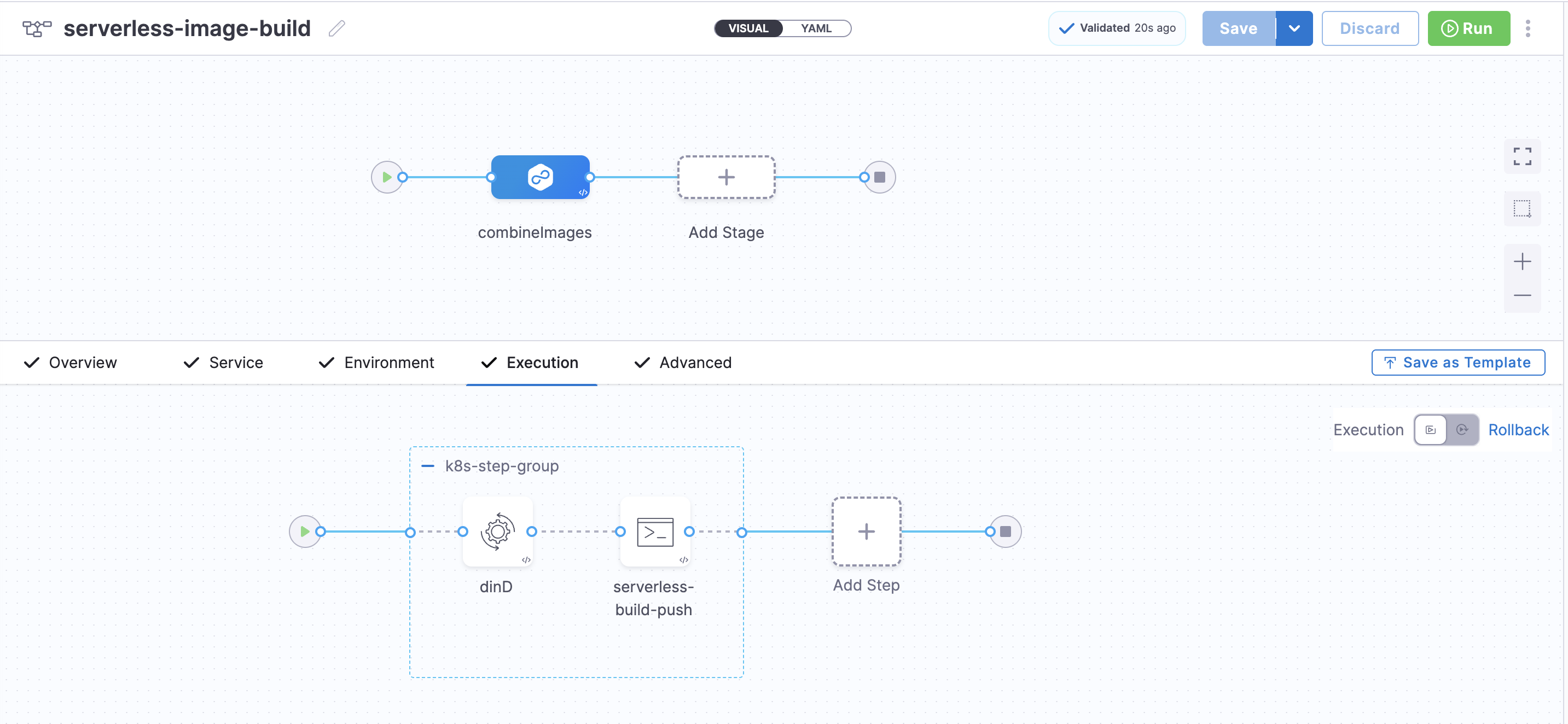
This is how the stage would look in the UI:
Click to view full size image
Pipeline YAML
Parameters you need to change:
* `projectIdentifier`: Your Harness project identifier
* `orgIdentifier`: Your Harness organization identifier
* `connectorRef`: Your Kubernetes cluster connector identifier
* `your_k8s_connector`: Your Kubernetes cluster connector identifier
```yaml
pipeline:
projectIdentifier: your_project_identifier
orgIdentifier: your_org_identifier
tags: {}
stages:
- stage:
name: combineImages
identifier: combineImages
description: Combine Harness base image with SAM base image and push to Docker
type: Deployment
spec:
deploymentType: Kubernetes
service:
serviceRef: service
environment:
environmentRef: k8s
deployToAll: false
infrastructureDefinitions:
- identifier: your_infrastructure_identifier
execution:
steps:
- stepGroup:
privileged: true
name: k8s-step-group
identifier: k8sstepgroup
sharedPaths:
- /var/run
- /var/lib/docker
steps:
- step:
type: Background
name: dinD
identifier: Background
spec:
connectorRef: account.your_dockerhub_connector
image: docker:24-dind
shell: Sh
privileged: true
- step:
identifier: generateTimestamp
type: Run
name: serverless-build-push
spec:
connectorRef: account.your_dockerhub_connector
image: docker:24
shell: Sh
command: |-
#!/bin/bash
set -e
# echo "Waiting for Docker daemon"
# ls -l /var/run/docker.sock
# until docker info; do sleep 1; done
echo "Waiting for Docker daemon socket to appear..."
for i in $(seq 1 30); do
if [ -S /var/run/docker.sock ]; then
echo "Docker socket found."
break
else
echo "Waiting for socket ($i/30)..."
sleep 2
fi
done
echo "Checking docker info:"
if docker info >/dev/null 2>&1; then
echo "Docker daemon is reachable."
else
echo "Error: Docker daemon not reachable."
exit 1
fi
export DEBIAN_FRONTEND=noninteractive
export TZ=UTC
VERSION="${VERSION:-<+pipeline.variables.VERSION>}"
HARNESS_BASE_IMAGE="${HARNESS_BASE_IMAGE:-<+pipeline.variables.HARNESS_BASE_IMAGE>}"
RUNTIME_BASE_IMAGE_VERSION="${RUNTIME_BASE_IMAGE_VERSION:-<+pipeline.variables.RUNTIME_BASE_IMAGE_VERSION>}"
NODEJS_BASE_IMAGE_VERSION="${NODEJS_BASE_IMAGE_VERSION:-<+pipeline.variables.NODEJS_BASE_IMAGE_VERSION>}"
SERVERLESS_VERSION="${SERVERLESS_VERSION:-<+pipeline.variables.SERVERLESS_VERSION>}"
TARGET_REPO="<+pipeline.variables.TARGET_REPO>"
TIMESTAMP=$(date -u +"%Y%m%d%H%M%S")
DOCKER_USERNAME="<+pipeline.variables.DOCKER_USERNAME>"
DOCKER_PASSWORD="<+pipeline.variables.DOCKER_PASSWORD>"
echo "${DOCKER_PASSWORD}"
BUILD_BASE=${BUILD_BASE:-true}
BUILD_SERVERLESS=${BUILD_SERVERLESS:-true}
build_image() {
local IMAGE_TYPE=$1
local SERVERLESS_VERSION=$2
local RUNTIME_TAG=$(echo "$RUNTIME_BASE_IMAGE_VERSION" | sed 's/[:\/]/-/g')
# Extract runtime name from full runtime image string, e.g. "ruby3.2" or "python3.12"
local RUNTIME_NAME="$(echo "${RUNTIME_BASE_IMAGE_VERSION}" | sed -n 's|.*/build-\([^:]*\):.*|\1|p')"
# Compose Serverless tag part only for serverless image
local SERVERLESS_TAG_PART=""
if [ "$IMAGE_TYPE" = "serverless" ] && [ -n "$SERVERLESS_VERSION" ]; then
SERVERLESS_TAG_PART="${SERVERLESS_VERSION}-"
fi
# Compose final image tag
# Extract runtime name from full runtime image string, e.g. "ruby3.2" or "python3.12"
local RUNTIME_NAME="$(echo "${RUNTIME_BASE_IMAGE_VERSION}" | sed -n 's|.*/build-\([^:]*\):.*|\1|p')"
# Compose Serverless tag part only for serverless image
local SERVERLESS_TAG_PART=""
if [ "$IMAGE_TYPE" = "serverless" ] && [ -n "$SERVERLESS_VERSION" ]; then
SERVERLESS_TAG_PART="${SERVERLESS_VERSION}-"
fi
# Compose final image tag
local FINAL_IMAGE="${TARGET_REPO}:${RUNTIME_NAME}-${SERVERLESS_TAG_PART}${VERSION}-linux-amd64"
echo "Building ${IMAGE_TYPE} image: ${FINAL_IMAGE}"
mkdir -p /tmp/serverless-build-${IMAGE_TYPE}
cd /tmp/serverless-build-${IMAGE_TYPE}
cat > Dockerfile << EOF
ARG RUNTIME_BASE_IMAGE_VERSION
ARG NODEJS_BASE_IMAGE_VERSION
FROM \${NODEJS_BASE_IMAGE_VERSION} AS nodejs_base
FROM \${RUNTIME_BASE_IMAGE_VERSION}
COPY --from=nodejs_base /var/lang /var/lang
COPY --from=nodejs_base /opt /opt
ENV PATH="/var/lang/bin:/opt/bin:\${PATH}"
ENV HARNESS_GO_PLUGIN_VERSION=v0.4.5
ENV INSTALL_GO_TEMPLATE_BINARY=true
ENV UNIFIED_PIPELINE=false
EOF
if [ -n "$SERVERLESS_VERSION" ]; then
echo "ENV SERVERLESS_VERSION=$SERVERLESS_VERSION" >> Dockerfile
fi
cat >> Dockerfile << 'EOF'
RUN if command -v apt-get >/dev/null 2>&1; then \
apt-get update -y && apt-get install -y wget ca-certificates && \
wget -O /tmp/docker.tgz "https://download.docker.com/linux/static/stable/x86_64/docker-20.10.24.tgz" && \
tar -xzf /tmp/docker.tgz -C /tmp && \
cp /tmp/docker/docker /usr/local/bin/ && \
chmod +x /usr/local/bin/docker && \
rm -rf /tmp/docker /tmp/docker.tgz; \
elif command -v yum >/dev/null 2>&1; then \
yum install -y wget && \
wget -O /tmp/docker.tgz "https://download.docker.com/linux/static/stable/x86_64/docker-20.10.24.tgz" && \
tar -xzf /tmp/docker.tgz -C /tmp && \
cp /tmp/docker/docker /usr/local/bin/ && \
chmod +x /usr/local/bin/docker && \
rm -rf /tmp/docker /tmp/docker.tgz; \
else \
echo "Skipping Docker CLI installation - not needed for runtime"; \
fi
USER root
RUN mkdir -m 777 -p /opt/harness/scripts/ /opt/harness/bin/ /opt/harness/client-tools/
EOF
cat >> Dockerfile << EOF
COPY --from=${HARNESS_BASE_IMAGE} /opt/harness/bin/harness-serverless-plugin /opt/harness/bin/harness-serverless-plugin
COPY --from=${HARNESS_BASE_IMAGE} /opt/harness/scripts/ /opt/harness/scripts/
EOF
cat >> Dockerfile << 'EOF'
RUN chmod +x /opt/harness/bin/harness-serverless-plugin /opt/harness/scripts/serverless-plugin.sh
EOF
if [ -n "$SERVERLESS_VERSION" ]; then
echo "RUN npm config set fetch-timeout 60000 && npm config set fetch-retry-mintimeout 20000 && npm config set fetch-retry-maxtimeout 120000 && npm install -g serverless@${SERVERLESS_VERSION} && echo \"service: pinned-version\" > serverless.yml && echo \"frameworkVersion: '${SERVERLESS_VERSION}'\" >> serverless.yml && serverless -v && rm serverless.yml" >> Dockerfile
fi
cat >> Dockerfile << EOF
RUN wget -O /opt/harness/client-tools/go-template https://app.harness.io/public/shared/tools/go-template/release/v0.4.15/bin/linux/amd64/go-template && \
chmod +x /opt/harness/client-tools/go-template || \
(echo "Primary download failed, trying alternative..." && \
curl -L -o /opt/harness/client-tools/go-template https://github.com/harness/go-template/releases/download/v0.4.15/go-template_linux_amd64 && \
chmod +x /opt/harness/client-tools/go-template) || \
(echo "Creating fallback stub for go-template..." && \
echo '#!/bin/bash' > /opt/harness/client-tools/go-template && \
echo 'echo "go-template stub - processing: \$@"' >> /opt/harness/client-tools/go-template && \
echo 'cat' >> /opt/harness/client-tools/go-template && \
chmod +x /opt/harness/client-tools/go-template)
ENTRYPOINT ["/opt/harness/scripts/serverless-plugin.sh"]
EOF
echo "=== Generated Dockerfile for ${IMAGE_TYPE} ==="
cat Dockerfile
echo "=== End of Dockerfile ==="
echo "=== Docker login ==="
docker login -u "${DOCKER_USERNAME}" -p ${DOCKER_PASSWORD}
docker build --build-arg RUNTIME_BASE_IMAGE_VERSION="${RUNTIME_BASE_IMAGE_VERSION}" --build-arg NODEJS_BASE_IMAGE_VERSION="${NODEJS_BASE_IMAGE_VERSION}" -t ${FINAL_IMAGE} .
docker push ${FINAL_IMAGE}
echo "Successfully built and pushed: ${FINAL_IMAGE}"
echo ""
}
if [ "$BUILD_BASE" = "true" ]; then
echo "=== Building BASE image ==="
build_image "base" ""
fi
if [ "$BUILD_SERVERLESS" = "true" ]; then
echo "=== Building SERVERLESS image ==="
build_image "serverless" "${SERVERLESS_VERSION}"
fi
echo "SUMMARY:"
echo " Source scratch image: ${HARNESS_BASE_IMAGE}"
echo " Runtime base: public.ecr.aws/sam/build-${RUNTIME_BASE_IMAGE_VERSION}-x86_64"
echo " Node.js base: public.ecr.aws/sam/build-${NODEJS_BASE_IMAGE_VERSION}-x86_64"
echo " Built images with Serverless framework and go-template"
echo " Push status: SUCCESS"
exit 0
envVariables:
VERSION: <+pipeline.variables.VERSION>
SAM_BASE_IMAGE: <+pipeline.variables.SAM_BASE_IMAGE>
SOURCE_REGISTRY: <+pipeline.variables.SOURCE_REGISTRY>
TARGET_REGISTRY: <+pipeline.variables.TARGET_REGISTRY>
resources:
limits:
memory: 4Gi
cpu: 2000m
description: SAM Prepare Build
timeout: 30m
stepGroupInfra:
type: KubernetesDirect
spec:
connectorRef: your_k8s_connector
rollbackSteps: []
tags: {}
failureStrategies:
- onFailure:
errors:
- AllErrors
action:
type: StageRollback
allowStageExecutions: true
variables:
- name: VERSION
type: String
description: Plugin version (e.g., 1.1.0-beta)
required: true
value: <+input>
- name: HARNESS_BASE_IMAGE
type: String
description: Scratch image from Pipeline 1
required: true
value: <+input>
- name: RUNTIME_BASE_IMAGE_VERSION
type: String
description: Serverless base image (e.g., public.ecr.aws/sam/build-python3.12:1.143.0-20250822194415-x86_64)
required: true
value: <+input>
- name: NODEJS_BASE_IMAGE_VERSION
type: String
description: Serverless base image (e.g., public.ecr.aws/sam/build-python3.12:1.143.0-20250822194415-x86_64)
required: true
value: <+input>
- name: DOCKER_USERNAME
type: String
description: Docker Hub username
required: false
value: <+secrets.getValue("dockerhub_username")>
- name: DOCKER_PASSWORD
type: String
description: Docker Hub PAT
required: false
value: <+secrets.getValue("dockerhub_pat")>
- name: TARGET_REPO
type: String
description: Target repository
required: false
value: your_repo/serverless-plugin
- name: TIMESTAMP
type: String
description: Build timestamp
required: false
value: <+execution.steps.k8sstepgroup.steps.sampreparebuild.output.outputVariables.TIMESTAMP>
- name: SERVERLESS_VERSION
type: String
description: Serverless Version
required: true
value: <+input>.selectOneFrom(3.39.0)
identifier: serverlessimagebuild
name: serverless-image-build
```
{% @harness-feedback/feedback %}