> For the complete documentation index, see [llms.txt](https://developer.harness.io/llms.txt). Markdown versions of documentation pages are available by appending `.md` to page URLs; this page is available as [Markdown](https://developer.harness.io/continuous-delivery/use-gitops/get-started/harness-git-ops-basics.md).
# Harness GitOps basics
Learn the core concepts and components of Harness GitOps, which uses Argo CD as the reconciler.
GitOps is an operating model for Continuous Delivery (CD) where Git is the single source of truth for both application and infrastructure configuration. Instead of treating deployments as one‑off actions in a pipeline, GitOps treats them as state changes declared in Git and reconciled automatically to your clusters.
In a **traditional CD** model, pipelines:
* Push changes directly to clusters on each run.
* Can drift from reality if manual changes are made in the cluster.
* Often require custom scripting to roll back or audit changes.
With **GitOps**, you:
* Describe the desired state in Git (YAML manifests, Helm charts, Kustomize, etc.).
* Use a controller such as [Argo CD](https://argo-cd.readthedocs.io/) to continuously compare the desired state in Git with the live state of the cluster.
* Let the controller reconcile any differences by applying changes so the cluster converges back to the declared state.
This approach provides:
* **Full traceability:** Every change is version-controlled in Git with history, reviews, and approvals.
* **Enforced desired state:** The deployed state is continuously driven to match what is defined in Git, without modifying Git from the cluster.
* **Safer rollbacks:** Reverting to a previous version is as simple as reverting a Git commit and allowing the controller to resync.
Harness GitOps builds on these principles by integrating Argo CD into the Harness platform, so you can manage GitOps workflows, security, and visibility alongside the rest of your delivery pipelines.
{% hint style="info" %}
**ARGO CD ONLY**
Harness GitOps supports **Argo CD** as the only GitOps reconciler. Flux is not supported. Go to [Migrate from Flux to Argo CD](/continuous-delivery/use-gitops/get-started/migrate-flux-to-argo.md) to move existing Flux workloads to Argo CD with Harness GitOps.
{% endhint %}
***
## What you will learn from this topic
* How [GitOps works in Harness](#how-gitops-works-in-harness) and the role of the GitOps Agent
* The [key components](#harness-gitops-key-components) of Harness GitOps: Agent, Service, Cluster, Repository, and Application
* The [operational concepts](#operational-concepts) including sync, drift, health status, and prune policy
* How to [get started](#get-started-with-harness-gitops) with your first GitOps Application
***
The following topics cover related GitOps building blocks:
* Go to [Harness GitOps vs Argo CD](/continuous-delivery/use-gitops/get-started/harness-gitops-vs-argocd.md) to compare Harness GitOps with standalone Argo CD.
* Go to [ApplicationSet basics](/continuous-delivery/use-gitops/applicationsets/appset-basics.md) to learn how to manage multiple applications across clusters and environments using a single template.
* Go to [Create and manage ApplicationSets](/continuous-delivery/use-gitops/applicationsets/harness-git-ops-application-set-tutorial.md) to learn how to create and manage ApplicationSets.
## How GitOps works in Harness
Harness GitOps ensures that your applications and infrastructure are always in sync with what is defined in Git. Instead of manually deploying updates, Harness automatically syncs changes from Git to your Kubernetes clusters, keeping everything consistent and version-controlled.
### GitOps workflow in Harness
**Store your desired state in Git**
Define your application configurations using Kubernetes manifests, Helm charts, or Kustomize.
These files act as the single source of truth for deployments.
**Harness continuously monitors Git for changes**
Whenever a change is made in Git, Harness detects it.
You do not need to trigger deployments manually.
**Sync the changes to your Kubernetes cluster**
The live state of the cluster is automatically updated to match Git.
This ensures consistency across environments.
### How Harness applies changes
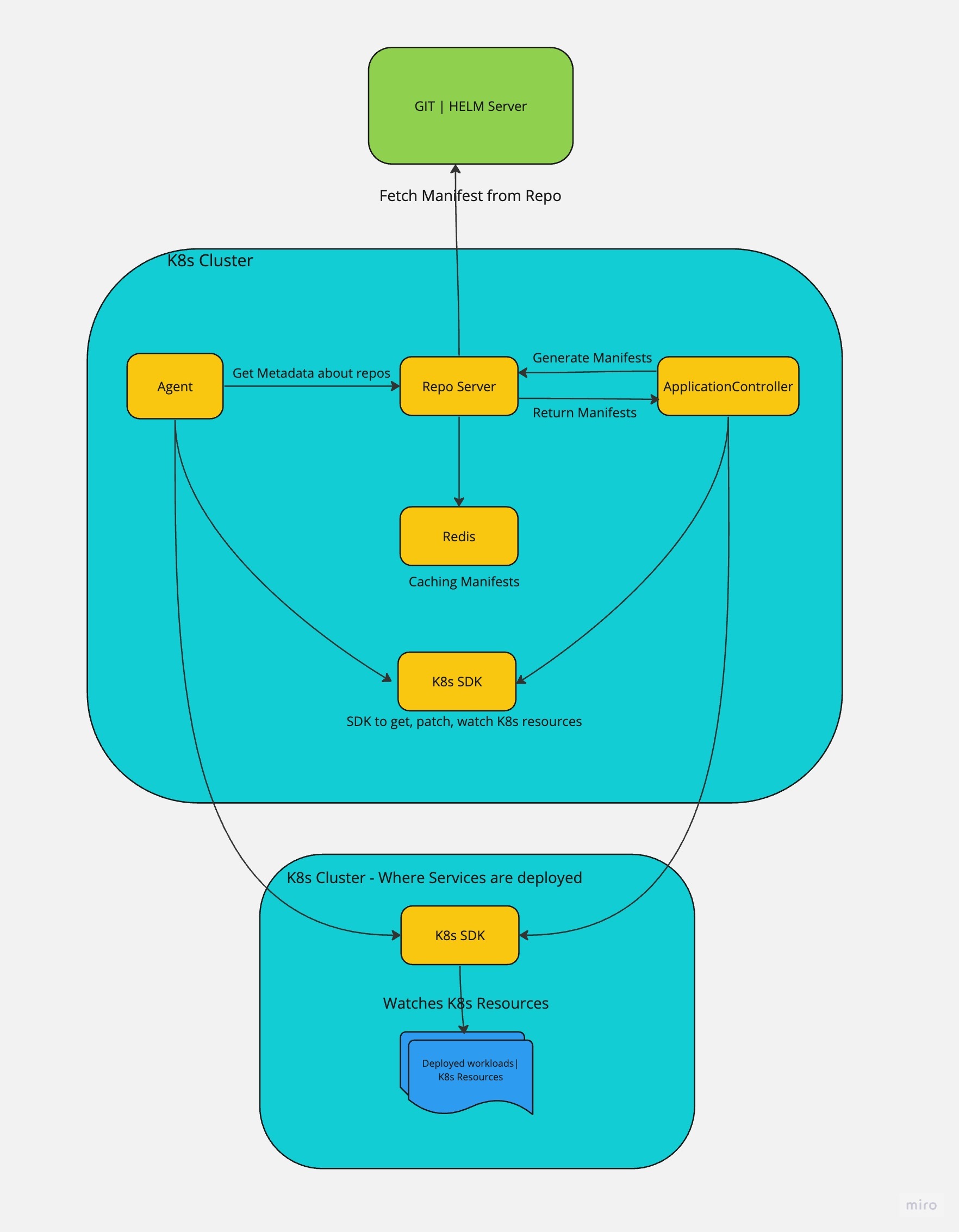
To enable secure and automated deployments, Harness uses a **GitOps Agent**, a lightweight worker process installed in a Kubernetes cluster.
* The Agent can be installed in the target cluster or a separate cluster with network access to the target cluster.
* It makes outbound connections to Harness SaaS and the Git source repo.
* Syncs the desired state from Git to the live cluster, ensuring consistency without modifying Git.
**No cluster-to-Git reconciliation**
Harness does not push changes from the cluster back to Git. Your Git repository remains the only source of truth, ensuring a predictable and auditable deployment process.
Here is a very simple diagram of the GitOps architecture:

Harness offers multiple Git-based features to enhance deployment and configuration management. Go to [Difference between Harness GitOps, Config as Code, and Harness Git Experience](/continuous-delivery/use-gitops/get-started/gitops-vs-gitex-vs-config.md) to understand the differences between GitOps, Config-as-Code, and the Harness Git Experience.
## What you can deploy with Harness GitOps
You can deploy any Kubernetes objects, including microservices and infrastructure. You can also use GitOps to bootstrap infrastructure before deploying applications.
## Harness platform integration
Harness GitOps benefits from all Harness platform features, such as:
* **Access Control & Security** – Granular permissions ensure controlled access using [Harness RBAC](https://developer.harness.io/docs/platform/role-based-access-control/rbac-in-harness).
* **REST APIs** – Automate GitOps tasks programmatically using [Harness APIs](https://apidocs.harness.io/).
* **Monitoring & Auditing** – Track changes and ensure compliance using [Harness Dashboard](/continuous-delivery/use-continuous-delivery/monitor-deployments/monitor-cd-deployments.md).
* **Continuous Verification (CV)** - Automatically detect anomalies and reduce deployment risks using [Harness CV](/continuous-delivery/use-continuous-delivery/verify-deployments/configure-cv/simple-verification.md).
While the GitOps Agent runs in your environment, all other GitOps functionalities are managed through Harness SaaS, eliminating the need to manage separate dashboards or administrative frontends.
## Harness GitOps key components
### Harness GitOps Agent
A Harness GitOps Agent is a lightweight worker process that runs in your Kubernetes environment and serves as the bridge between Harness SaaS and your clusters. The Agent makes secure, outbound connections to Harness SaaS and performs all GitOps operations you configure in the Harness platform.
**Key responsibilities:**
* Connects to your Git repositories to fetch desired state configurations
* Monitors Git for changes and triggers synchronization when updates are detected
* Applies manifests to target Kubernetes clusters to reconcile desired and live states
* Reports deployment status and health back to Harness SaaS
The Agent uses Repository and Cluster configurations to connect to source repos and target environments. When you create a Harness GitOps Application, you select the Agent you want to use for these connections and GitOps operations.
Here is an image that illustrates how the Agent interacts with Harness:

**Agent deployment patterns**
You can deploy a GitOps Agent in different configurations depending on your infrastructure and requirements. The Agent can run in your target cluster or in a separate cluster that has network access to your target clusters.
Here is an image that illustrates different deployment patterns:

**Quick comparison:**
| Pattern | Clusters | Agents | Best For | Tradeoffs |
| ------------------ | -------- | -------- | ---------------------------------------------------- | -------------------------------------------------------- |
| **In-cluster** | 1 | 1 | Single cluster deployments, development environments | Simple but limited scalability, single point of failure |
| **External agent** | 1 | 1 | Better isolation, single production cluster | Requires network configuration, more management overhead |
| **Hub and spoke** | Multiple | 1 | Centralized multi-cluster management | Single point of failure, performance limits at scale |
| **Multi-agent** | Multiple | Multiple | Enterprise scale, high availability | Higher resource usage, more complex management |
**Detailed scenarios**
**Scenario 1: Single cluster with in-cluster agent**
The Agent runs in the same cluster as the applications.
**When to use:** Development environments, single-cluster setups, or when simplicity is prioritized over high availability.
**Advantages:**
* Simplest setup and maintenance
* Optimal resource usage with a single instance
* No network configuration required between clusters
**Limitations:**
* Cannot scale to multiple clusters without adding more agents
* Single point of failure for that cluster
* Agent failure affects all deployments in the cluster
**Scenario 2: External agent for a single cluster**
The Agent runs in a separate cluster but manages deployments in one target cluster.
**When to use:** Production environments requiring better isolation, or when you want to separate GitOps infrastructure from application workloads.
**Advantages:**
* Better isolation between GitOps infrastructure and applications
* Single agent and cluster to manage
* Reduced risk of agent issues affecting application workloads
**Limitations:**
* Requires network configuration (IP allowlisting, cluster access permissions)
* More complex initial setup
* Additional overhead for managing cross-cluster connectivity
**Scenario 3: Hub and spoke (multi-cluster, single agent)**
One Agent manages multiple target clusters from a central location.
**When to use:** Organizations managing multiple clusters with centralized operations, or when you need consistent deployments across environments.
**Advantages:**
* Centralized management of multiple clusters
* Single agent to maintain
* Consistent deployment patterns across clusters
**Limitations:**
* Single point of failure affects all managed clusters
* Performance may degrade as clusters and applications scale
* May require transitioning to multiple agents as you grow
**Scenario 4: Multi-cluster with multiple agents**
Multiple Agents, each managing one or more clusters independently.
**When to use:** Enterprise environments requiring high availability, team isolation, or when managing many clusters at scale.
**Advantages:**
* High scalability and fault tolerance
* Team isolation and independent operations
* The failure of one agent does not affect others
**Limitations:**
* Higher resource utilization
* More complex management and coordination
* Requires planning for agent distribution and cluster assignment
**Installing a GitOps Agent**
Installing an Agent involves:
1. Creating an Agent configuration in Harness
2. Downloading the Agent YAML manifest
3. Applying the manifest to your Kubernetes cluster using `kubectl apply`
Kubernetes then pulls the Harness and Argo CD images from their respective public repositories. The Agent establishes outbound connections to Harness SaaS and begins monitoring for GitOps operations.
### Service
A Harness GitOps service uses the same service entity as traditional CD. For GitOps workflows, you populate GitOps-specific fields in the service definition, such as a Release Repository (pointing to the config file that PR pipelines update) or, for ApplicationSet workflows, an App Set Reference (pointing directly to an ApplicationSet managed by a GitOps agent). The Deployment Repository manifest also supports ApplicationSet workflows, but is deprecated; go to [Migrate Deployment Repo to Application Set references](/continuous-delivery/use-gitops/gitops-entities/service/migrate-deployment-repo-to-appset-references.md) if your service still uses one. When the feature flag `CDS_GITOPS_MERGE_K8S_SERVICES` is enabled, the GitOps checkbox is removed, and the same service can be used in both CD stages and GitOps stages.
Go to [GitOps services](/continuous-delivery/use-gitops/gitops-entities/service/service.md) and [GitOps vs CD services](/continuous-delivery/use-gitops/gitops-entities/service/gitops-vs-cd-service.md) to learn more.
### Service instance
Service instances represent the dynamic instantiation of a service you sync via Harness GitOps.
For example, for a service representing a Docker image, the number of service instances equals the number of pods running with that image.
A single service can have multiple service instances. For example, one for Dev, one for QA, and one for Prod.
### Environments
Harness environments represent your live environment logically (QA, Prod, etc). In Harness GitOps, an environment is the live state of the infrastructure.
Go to [Services overview](/continuous-delivery/use-continuous-delivery/cd-building-blocks/services/services-overview.md) and [Environments overview](/continuous-delivery/use-continuous-delivery/cd-building-blocks/environments/environment-overview.md) to learn more.
### Application
GitOps Applications are how you manage GitOps operations for a given desired state and its live instantiation.
A GitOps Application collects the Repository (what you want to deploy), Cluster (where you want to deploy), and Agent (how you want to deploy). You define these entities and then select them when you set up your Application.
You will also select:
* Sync Options to define how the Application syncs state.
* Prune Policy for garbage collection of orphaned resources.
* The Source manifest to use (Kubernetes, Helm chart, Kustomization, etc).
* The Destination cluster and namespace.
### ApplicationSets
An ApplicationSet can be used to define a single application and sync it across multiple target environments. Go to [ApplicationSets](/continuous-delivery/use-gitops/applicationsets.md) to learn how to use ApplicationSets with GitOps.
ApplicationSets can be used along with [PR Pipelines](/continuous-delivery/use-gitops/pr-pipelines.md) to make changes to the application in just one of the ApplicationSet target environments.
### Storage
Harness GitOps stores all configuration data in your cluster using **ConfigMaps** and **Secrets**, making the cluster itself the database for GitOps.
* Your GitOps Application, Repository, and Cluster configurations are saved on the cluster’s **PersistentVolume** (where the GitOps Agent runs).
* Harness SaaS only stores the **state cache**.
### Cluster
A cluster is where your applications are deployed and is continuously compared to the desired state defined in Git.
* Clusters sync with the source manifests stored in GitOps Repositories.
* You can run a GitOps Agent on the target cluster itself or on any other cluster with access to it.
* By default, each agent is assigned a cluster (`in-cluster`) with API URL `kubernetes.default.svc`.
* Namespaced agents do not have cluster-wide access, so they require a service account with cluster-scope access to manage deployments.
Only the GitOps Agent is required for GitOps operations. However, a [Harness Delegate](https://developer.harness.io/docs/platform/delegates/delegate-concepts/delegate-overview) is required for other Harness operations such as [PR pipeline](/continuous-delivery/use-gitops/pr-pipelines/pr-pipelines-basics.md) steps involving Git operations, including:
* **UpdateReleaseRepo**
* **MergePR**
* **RevertPR**
* **FetchLinkedApps**
You can deploy both the **GitOps Agent** and the Harness Delegate in the same cluster, or choose to deploy only the Agent if your use case is limited to GitOps-specific operations.
The Delegate is not required for RBAC functionality in Harness GitOps.

### Repository
A Harness GitOps Repository is a repo that contains a declarative description of the desired state. The declarative description can be in Kubernetes manifests, Helm charts, Kustomize manifests, etc.
### Repository certificates
You can apply a Repository certificate or a known host key to a GitOps Agent.
The GitOps Agent will use the certificate or key for all the connections it makes to repositories.
## Operational concepts
### Desired state and live state
* **Desired State**: The intended configuration of a service and environment as defined in Git.
* **Live State**: The actual deployed state of a service and environment.
### Drift
Drift occurs when the actual state of a system deviates from the desired state. Identifying and rectifying drift is crucial to maintaining system stability and consistency.
### Refresh
Pulls the latest commit from Git and displays whether the current Sync State is Synced or Out of Sync. It does not sync with the live cluster state.
### Sync and sync status
A Sync brings the live state to its desired state by applying changes made in the declarative description.
Sync Status identifies if the target state is Synched, Out of Sync, or Unknown.
### Sync policy
Applications respond to state differences between the source manifest and the target cluster using a Sync Policy.
With Automatic sync enabled, changes to the source manifest initiate sync automatically, while manual sync requires an operator to trigger it.
**Automatic sync (pros, risks, tips)**
* Pros: hands-free drift correction and fast rollout when Git changes.
* Risks: unwanted rollouts if bad commits land in the tracked branch; automatic prune can delete still-needed resources; rapid churn if external controllers keep modifying live state.
* Tips: use deployment gates (branch protections, PR checks, signed commits); enable selective auto-prune only when manifests are stable; pair with health checks to block sync when targets are unhealthy; scope Argo CD RBAC so that only trusted apps use auto-sync.
**Manual sync (pros, risks, tips)**
* Pros: change control before rollout, safer for shared clusters or critical workloads.
* Risks: longer drift window and possible configuration skew if operators forget to sync.
* Tips: require approvals in Harness before manual sync, [set notifications on Out of Sync](https://developer.harness.io/docs/platform/notifications/notifications-overview#gitops-application-notifications), and schedule periodic audits to avoid lingering drift. Common Sync Options help tune both modes: `Prune` to remove orphaned resources, `Self Heal` to overwrite in-cluster drift, and `Apply Out of Sync Only` to skip unchanged objects.
### Prune policy
The Prune Policy tells [Kubernetes garbage collection](https://kubernetes.io/docs/concepts/architecture/garbage-collection/) how to identify and delete objects that no longer have owner references.
### Health and health status
The health status of an application in Harness GitOps indicates whether the application is functioning as expected. It reflects the synchronization state and the operational status of resources deployed in the target Kubernetes cluster.
Health status is determined based on Kubernetes resource conditions and readiness probes. Harness GitOps continuously monitors application health and provides real-time feedback.
### App diff
Compares the latest Git commit with the live state and shows what differs.
If an Application is Healthy and Synced, then there is no App Diff.
### Migrate applications from other controllers to ArgoCD
When migrating application control from another controller to ArgoCD, the application diff view may show fields in the Git window that do not actually exist in Git.
**Why does this happen:**
Kubernetes sets managed fields for the initial controller used for deploying the application (such as Helm). When ArgoCD takes over control of the deployment, it cannot replace fields managed by other controllers. As a result:
* The live state in the cluster retains values managed by the original controller
* The diff view shows fields from the live cluster state that are managed by ArgoCD
**Solution:**
To completely transfer control of the application from other controllers to ArgoCD, perform a manual sync with the **Replace** option set to `true`.
This is expected Kubernetes behavior related to [Server-Side Apply and managed fields](https://kubernetes.io/docs/reference/using-api/server-side-apply/).
### GnuPG keys
GnuPG Keys can be used to configure Harness GitOps to sync only against commits signed with GnuPG.
## Get started with Harness GitOps
Go to [Harness CD GitOps tutorial](/continuous-delivery/use-gitops/get-started/harness-cd-git-ops-quickstart.md) to set up and deploy your first GitOps application.
## Frequently asked questions
Go to [GitOps FAQs](/continuous-delivery/use-gitops/resources/gitops-faqs.md) for frequently asked questions about Harness GitOps.
***
## Next steps
* [Harness CD GitOps tutorial](/continuous-delivery/use-gitops/get-started/harness-cd-git-ops-quickstart.md): Set up and deploy your first GitOps application.
* [Install a Harness GitOps Agent](/continuous-delivery/use-gitops/gitops-entities/agents/install-a-harness-git-ops-agent.md): Install your first agent.
* [GitOps FAQs](/continuous-delivery/use-gitops/resources/gitops-faqs.md): Answers to common questions.
{% @harness-feedback/feedback %}