> For the complete documentation index, see [llms.txt](https://developer.harness.io/llms.txt). Markdown versions of documentation pages are available by appending `.md` to page URLs; this page is available as [Markdown](https://developer.harness.io/continuous-error-tracking/cet-dashboard/cet-dashboard-intro.md).
# Overview
Learn about Error Tracking dashboard.
Harness Continuous Error Tracking (CET) features a pre-configured dashboard that offer consolidated insights into events across deployments and accounts, improving error tracking and decision-making. This dashboard encompasses data from all projects and environments within your organization. Additionally, you have the flexibility to create and customize your own CET dashboards.
CET dashboards provide you with the ability to:
* Tailor, personalize, and even craft your own dashboards to suit your specific needs.
* Set up automated delivery schedules and configure alert notifications based on the dashboard data.
For more information, go to [Harness dashboards](/harness-ai/use-harness-platform/harness-dashboards.md).
### View CET dashboards
To view the CET dashboards, do the following:
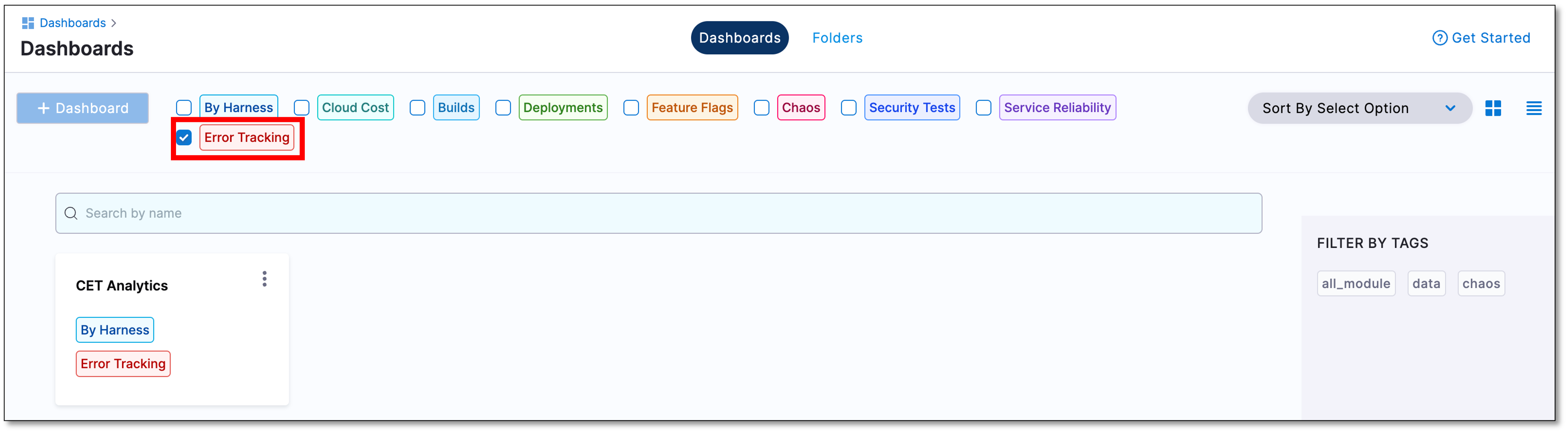
1. In your Harness project, navigate to **Dashboards**.
The Dashboards page is displayed.
2. Select **Error Tracking**.
The dashboard list is displayed, which includes the pre-configured CET Analytics dashboard
### View a specific CET dashboard
If you already have created multiple CET dashboards, to view a specific CET dashboard, do the following:
* In the dashboard list, locate the dashboard you wish to explore and select it. The selected dashboard opens, displaying the relevant metrics and data.
### Next steps
* [Explore the default pre-configured CET Analytics dashboard.](/continuous-error-tracking/cet-dashboard/cet-dashboard-analytics.md)
* [Manage dashboards.](/continuous-error-tracking/cet-dashboard/cet-manage-dashboard.md)
{% @harness-feedback/feedback %}