> For the complete documentation index, see [llms.txt](https://developer.harness.io/llms.txt). Markdown versions of documentation pages are available by appending `.md` to page URLs; this page is available as [Markdown](https://developer.harness.io/database-devops/use-db-devops/changelogs-and-schema-changes/liquibase/mongodb-changelog-generation.md).
# Generate a MongoDB Changelog from an Existing Database
Automatically generate a Liquibase-compatible changelog from an existing MongoDB database using a Python script in Harness Database DevOps pipelines, and commit it to Git for version control.
When onboarding an existing **MongoDB** database, you can use the `MongoDB.py` Python script to extract the current schema and generate a **Liquibase-compatible changelog**.
This changelog can then be versioned in Git and used in subsequent deployments, ensuring auditability and consistency across environments.
By automating this process in a Harness pipeline, you can:
* Avoid manual changelog creation for legacy or existing databases
* Standardize schema tracking using Liquibase-compatible formats (JSON or YAML)
* Keep your database changes version-controlled with peer review
{% hint style="info" %}
For the SQL version of changelog generation, refer to our [Get started with changelogs](/database-devops/setup-db-devops/get-started-with-changelogs.md) guide which includes examples for SQL changelogs.
{% endhint %}
### Before you begin
If you are unfamiliar with generating or structuring a changelog file, you may want to explore our general [build a changelog](/database-devops/use-db-devops/changelogs-and-schema-changes/liquibase/build-a-changelog.md) guide first, it covers generating SQL changelog, schema migration fundamentals, best practices, and format patterns. Before implementing the pipeline, ensure the following:
* Pipeline execution environment can connect to your MongoDB instance
* The Git connector used in the pipeline has **commit** permissions
* MongoDB credentials have **read-only** access for schema extraction
### Pipeline implementation
This pipeline will use the `MongoDB.py` script to generate a changelog file and commit it to Git for version control.
#### Create a new pipeline
1. Go to your Harness pipeline.
2. Click on "**Create a Pipeline**"
3. In the Stage, select "Custom" and then create a "Step Group".
4. Add the **GitClone** step.
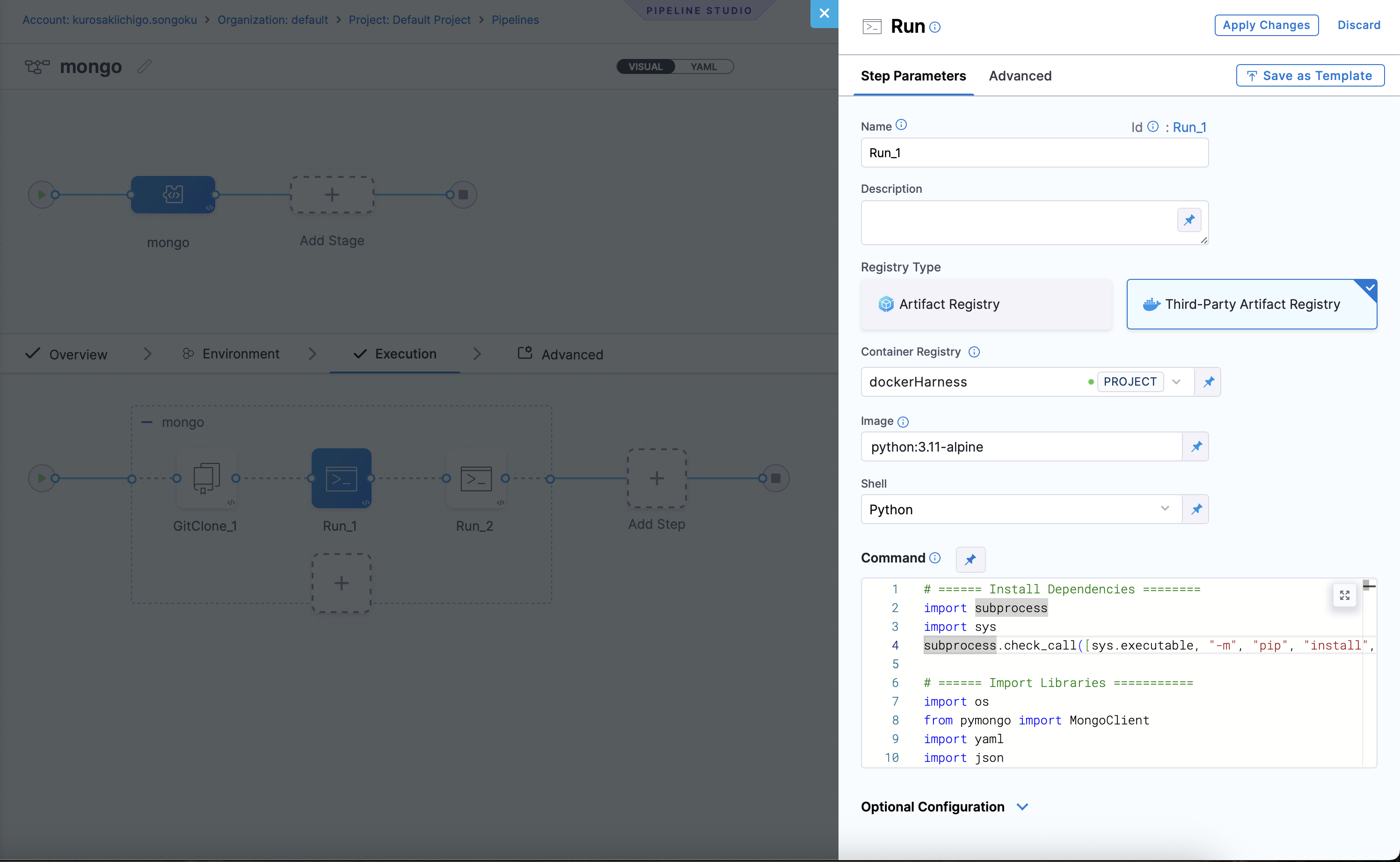
5. Then add a new step, **Run**
* **Container Registry**: used to pull images from private or public registries.
* **Image**: "`python:latest`"
* **Shell**: "`Python`"
* **Command**: Add the following script under the command palette:
```bash
# ====== Install Dependencies ========
import subprocess
import sys
subprocess.check_call([sys.executable, "-m", "pip", "install", "pymongo", "pyyaml"])
# ====== Import Libraries ===========
import os
import yaml
from bson import json_util
from pymongo import MongoClient
from pymongo.errors import OperationFailure
# === CONFIG ===
MONGO_URI = "<+pipeline.variables.URL>"
DATABASE_NAME = "<+pipeline.variables.DB_NAME>"
MONGO_USER = "<+pipeline.variables.USERNAME>"
MONGO_PASSWORD = "<+pipeline.variables.PASSWORD>"
OUTPUT_FILE = "/harness/dbops/chart/dbchangelog/<+pipeline.variables.DB_NAME>/baseline/generated.yml"
AUTHOR = "Harness"
CHANGESET_ID = "baseline-collections"
SKIP_COLLECTIONS = {"DATABASECHANGELOGLOCK", "DATABASECHANGELOG"}
SKIP_PREFIXES = ("system.",)
INDEX_OPTION_EXCLUDE_FIELDS = {"key", "v", "ns"}
def to_json_string(value):
if value is None:
value = {}
return json_util.dumps(value)
def build_index_options(index_name, index_data):
options = {"name": index_name}
for field, value in index_data.items():
if field in INDEX_OPTION_EXCLUDE_FIELDS or field == "name":
continue
options[field] = value
return options
# === SETUP ===
client = MongoClient(
MONGO_URI,
username=MONGO_USER or None,
password=MONGO_PASSWORD or None,
)
try:
db = client[DATABASE_NAME]
# === BUILD YAML STRUCTURE ===
changesets = []
for obj in db.list_collections():
name = obj["name"]
obj_type = obj.get("type", "collection")
if name in SKIP_COLLECTIONS:
print(f"skipping Liquibase collection: {name}")
continue
if name.startswith(SKIP_PREFIXES):
print(f"skipping internal MongoDB collection: {name}")
continue
if obj_type != "collection":
print(f"skipping non-collection object: {name} ({obj_type})")
continue
try:
changes = []
# Reuse collection options from list_collections output
collection_options = obj.get("options", {})
changes.append(
{
"createCollection": {
"collectionName": name,
"options": to_json_string(collection_options or {}),
}
}
)
indexes = db[name].index_information()
print(f"processing indexes for collection: {name}\n{to_json_string(indexes)}")
for index_name, index_data in indexes.items():
if index_name == "_id_":
continue
index_fields = index_data["key"]
index_for_changelog = {}
for field_name, direction in index_fields:
index_for_changelog[field_name] = direction
index_options = build_index_options(index_name, index_data)
change = {
"createIndex": {
"collectionName": name,
"keys": to_json_string(index_for_changelog),
"options": to_json_string(index_options),
}
}
if index_options.get("unique") is True:
change["createIndex"]["unique"] = True
changes.append(change)
changesets.append(
{
"changeSet": {
"id": f"{CHANGESET_ID}-{name}",
"author": AUTHOR,
"changes": changes,
}
}
)
except OperationFailure as exc:
print(f"skipping collection {name} due to authorization/metadata error: {exc}")
continue
# Final YAML structure
changeset = {
"databaseChangeLog": changesets
}
# === WRITE TO FILE ===
output_dir = os.path.dirname(OUTPUT_FILE)
if output_dir:
os.makedirs(output_dir, exist_ok=True)
yaml_output = yaml.safe_dump(changeset, sort_keys=False)
with open(OUTPUT_FILE, "w") as f:
f.write(yaml_output)
print(f"YAML baseline changelog with indexes written to: {OUTPUT_FILE}")
print("\nGenerated YAML:\n")
print(yaml_output)
finally:
client.close()
```
In the above script:
* Set the pipeline variables `URL`, `DB_NAME`, `USERNAME`, and `PASSWORD` to your MongoDB connection values.
* Set `OUTPUT_FILE` to the changelog path you want generated in your repo.
* Change `AUTHOR` and `CHANGESET_ID` to match your changelog naming convention.

You can commit the generated changelog file to your git repository using the `Run Command` step in the pipeline. This allows you to version control your changelog file and keep track of changes over time. Otherwise, once the pipeline is executed, pods will be deleted and the changelog file will be lost.
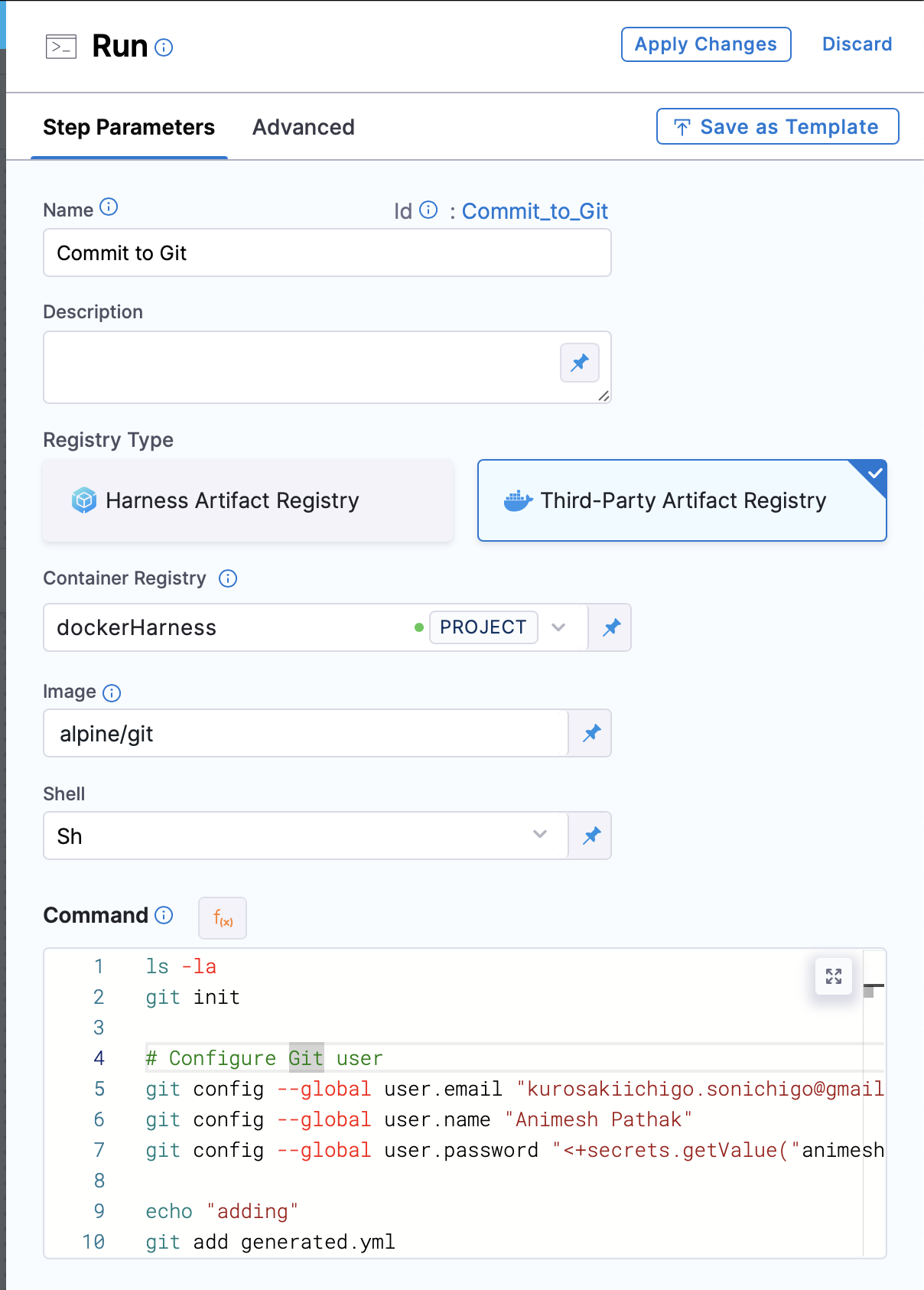
1. In the Pipeline, under the `Step Group` section, add a new step `Run Command` as the step type.
* **Name**: The name of the step.
* **Registry Type**: The type of registry to use. We can use `Third Party Registry` or `Harness Artifact Registry`.
* **Container Registry**: The container registry to use. This is the location where the image is stored. In this case, we will use Docker Hub as the registry.
* **Image**: The name of the image to use. In this case, we will use `alpine/git`.
* **Shell**: The shell to use. We can use `bash` or `sh`, depending on the image used.
* **Command**: The command to be executed. In this case, we will use following command to commit the changelog file to the git repository:
```bash
git init
# Configure Git user
git config --global user.email
git config --global user.name
git config --global user.password ## PAT saved in Harness Secrets Manager
git add generated.yml ## Our changelog file name which we generated in the previous step
git commit -m "generated changelog from running instance" -s
# Get current branch name
CURRENT_BRANCH=$(git rev-parse --abbrev-ref HEAD)
# Add remote repository
git remote add origin :@.git ## Artifact Registry URL with https:// after @
# Push to remote using the current branch name
git push -u origin $CURRENT_BRANCH -f
```
```
3. Click on `Apply Changes`. Save the Pipeline and click on the `Run` button to run the pipeline.
```
**Final result:**
{% tabs %}
{% tab title="Visual Overview" %}

{% endtab %}
{% tab title="YAML Overview" %}
```yml
pipeline:
name: mongo_changelog
identifier: mongo
projectIdentifier: default_project
orgIdentifier: default
tags: {}
stages:
- stage:
name: mongo
identifier: mongo
description: "Generate MongoDB Changelog and commit to Git Repo"
type: Custom
spec:
execution:
steps:
- stepGroup:
name: mongo
identifier: mongo
steps:
- step:
type: GitClone
name: Clone Repository
identifier: GitClone_1
spec:
connectorRef: multienv
repoName: dbops
build:
type: branch
spec:
branch: main
- step:
type: Run
name: Generate Changelog
identifier: Run_1
spec:
connectorRef: dockerHarness
image: python:latest
shell: Python
command: |-
# ====== Install Dependencies ========
import subprocess
import sys
subprocess.check_call([sys.executable, "-m", "pip", "install", "pymongo", "pyyaml"])
# ====== Import Libraries ===========
import os
import yaml
from bson import json_util
from pymongo import MongoClient
from pymongo.errors import OperationFailure
# === CONFIG ===
MONGO_URI = "<+pipeline.variables.URL>"
DATABASE_NAME = "<+pipeline.variables.DB_NAME>"
MONGO_USER = "<+pipeline.variables.USERNAME>"
MONGO_PASSWORD = "<+pipeline.variables.PASSWORD>"
OUTPUT_FILE = "/harness/dbops/chart/dbchangelog/<+pipeline.variables.DB_NAME>/baseline/baseline-changelog.yml"
AUTHOR = "Harness"
CHANGESET_ID = "baseline-collections"
SKIP_COLLECTIONS = {"DATABASECHANGELOGLOCK", "DATABASECHANGELOG"}
SKIP_PREFIXES = ("system.",)
INDEX_OPTION_EXCLUDE_FIELDS = {"key", "v", "ns"}
def to_json_string(value):
if value is None:
value = {}
return json_util.dumps(value)
def build_index_options(index_name, index_data):
options = {"name": index_name}
for field, value in index_data.items():
if field in INDEX_OPTION_EXCLUDE_FIELDS or field == "name":
continue
options[field] = value
return options
# === SETUP ===
client = MongoClient(
MONGO_URI,
username=MONGO_USER or None,
password=MONGO_PASSWORD or None,
)
try:
db = client[DATABASE_NAME]
# === BUILD YAML STRUCTURE ===
changesets = []
for obj in db.list_collections():
name = obj["name"]
obj_type = obj.get("type", "collection")
if name in SKIP_COLLECTIONS:
print(f"skipping Liquibase collection: {name}")
continue
if name.startswith(SKIP_PREFIXES):
print(f"skipping internal MongoDB collection: {name}")
continue
if obj_type != "collection":
print(f"skipping non-collection object: {name} ({obj_type})")
continue
try:
changes = []
# Reuse collection options from list_collections output
collection_options = obj.get("options", {})
changes.append(
{
"createCollection": {
"collectionName": name,
"options": to_json_string(collection_options or {}),
}
}
)
indexes = db[name].index_information()
print(f"processing indexes for collection: {name}\n{to_json_string(indexes)}")
for index_name, index_data in indexes.items():
if index_name == "_id_":
continue
index_fields = index_data["key"]
index_for_changelog = {}
for field_name, direction in index_fields:
index_for_changelog[field_name] = direction
index_options = build_index_options(index_name, index_data)
change = {
"createIndex": {
"collectionName": name,
"keys": to_json_string(index_for_changelog),
"options": to_json_string(index_options),
}
}
if index_options.get("unique") is True:
change["createIndex"]["unique"] = True
changes.append(change)
changesets.append(
{
"changeSet": {
"id": f"{CHANGESET_ID}-{name}",
"author": AUTHOR,
"changes": changes,
}
}
)
except OperationFailure as exc:
print(f"skipping collection {name} due to authorization/metadata error: {exc}")
continue
# Final YAML structure
changeset = {
"databaseChangeLog": changesets
}
# === WRITE TO FILE ===
output_dir = os.path.dirname(OUTPUT_FILE)
if output_dir:
os.makedirs(output_dir, exist_ok=True)
yaml_output = yaml.safe_dump(changeset, sort_keys=False)
with open(OUTPUT_FILE, "w") as f:
f.write(yaml_output)
print(f"YAML baseline changelog with indexes written to: {OUTPUT_FILE}")
print("\nGenerated YAML:\n")
print(yaml_output)
finally:
client.close()
- step:
type: Run
name: Commit to Git Repo
identifier: Run_2
spec:
connectorRef: dockerHarness
image: alpine/git
shell: Sh
command: |-
ls -la
git init
# Configure Git user
git config --global user.email "John.Doe@xyz.com"
git config --global user.name "John Doe"
git config --global user.password "<+secrets.getValue("github")>"
echo "adding"
git add .
echo "added"
git commit -m "generated changelog from running instance"
echo "committed"
# Get current branch name
CURRENT_BRANCH=$(git rev-parse --abbrev-ref HEAD)
echo "Current branch: $CURRENT_BRANCH"
# Add remote repository
git remote add gitlab https://animesh.pathak%40harness.io:<+secrets.getValue("github")>@github.com/Sonichigo/economy-discord.js.git
echo "remote set"
# Push to remote using the current branch name
git push -u gitlab $CURRENT_BRANCH -f
echo "pushed to $CURRENT_BRANCH branch"
stepGroupInfra:
type: KubernetesDirect
spec:
connectorRef: db
rollbackSteps: []
serviceDependencies: []
tags: {}
delegateSelectors:
- animesh-delegate
variables:
- name: URL
type: String
description: MongoDB URL
required: true
value: <+input>
- name: DB_NAME
type: String
description: Mongo Database Name
required: true
value: <+input>
- name: USERNAME
type: String
description: Mongo Database Username
required: true
value: <+input>
- name: PASSWORD
type: Secret
description: Mongo Database Password
required: true
value: <+input>
```
{% endtab %}
{% endtabs %}
This step will ensure that the generated changelog file is committed to your Git repository, allowing you to track changes and maintain version control over your database schema changes.
### Best practices
Some best practices to follow when generating and committing MongoDB changelogs:
```
- Store changelogs in a dedicated folder (e.g., `/db/changelog/`)
- Validate changelog generation in a staging pipeline before committing to production branches
- Parameterize connection details using Harness pipeline variables
- Always use a read-only MongoDB user for schema extraction
By integrating this process into Harness pipelines, you ensure repeatable, auditable, and version-controlled database schema onboarding.
```
### Next steps
* Go to [Build a Changelog](/database-devops/use-db-devops/changelogs-and-schema-changes/liquibase/build-a-changelog.md) to learn how to generate changelogs for SQL databases.
* Explore our [Database DevOps](/database-devops/readme.md) guide for a comprehensive overview of Harness Database DevOps features.
### FAQs
#### 1. Can I change the changelog filename?
Yes. Update the OUTPUT\_FILE variable in the script to set a custom filename.
#### 2. Does it support JSON output instead of YAML?
The script outputs YAML. You can modify the yaml.dump section to use json.dump if JSON output is preferred.
#### 3. How are indexes handled?
All non-\_id indexes are included in the changelog with createIndex changes. The script preserves uniqueness flags.
#### 4. How do I avoid including Liquibase internal collections?
The script automatically excludes DATABASECHANGELOG and DATABASECHANGELOGLOCK collections.
{% @harness-feedback/feedback %}