python-quickstart
Prerequisites
- Ensure you have Python CLI installed and configured on your local machine.
- Ensure you have access to a Harness account with the appropriate permissions to create registries and connectors.
Create a Python Artifact Registry
- Interactive Guide
- Step-by-Step
- Navigate to the Artifact Registry module in your Harness project.
- Click on New Artifact Registry.
- In the Registry Type list, select Python Registry.
- Provide a Registry Name.
- The registry name must start with a letter and can include lowercase alphanumeric characters, underscores (
_), periods (.), and hyphens (-).
- The registry name must start with a letter and can include lowercase alphanumeric characters, underscores (
- Optionally, add a Description and Labels for better organization.
- Choose visibility between Public and Private.
- Click Create Registry to finalize.
This registry will serve as your private Python registry within Harness.
Configure an Upstream Proxy (Optional)
An upstream proxy allows your registry to fetch Python packages from external sources if they are not available locally.
- Interactive Guides
- Step-by-Step
Create an upstream proxy
Configure the upstream proxy in your registry
Create an upstream proxy
- In the Artifact Registry module, click the dropdown next to New Artifact Registry and select Upstream Proxy.
- Choose Python Registry as the proxy type.
- Click Create Proxy to establish the connection.
Configure the upstream proxy in your registry
- In the Artifact Registry module, select an existing Artifact Registry.
- Select the Configuration tab.
- Under Advanced (Optional), select Configure Upstream.
- Select from the list of compatible proxies to add them to your registry.
- Click Save to save the configuration.
If a Python package isn’t found in your Harness registry, the upstream proxy fetches it from an external registry like PyPI, reducing duplication and improving package resolution.
Configuring Python PyPI Upstream Proxy with Custom Registry Suffix
Harness supports configuring Python PyPI upstream proxies for registries that use non-standard endpoint paths. In addition to specifying the remote registry URL, you can define an optional custom registry suffix when the PyPI repository is not available under the default /simple/ endpoint.
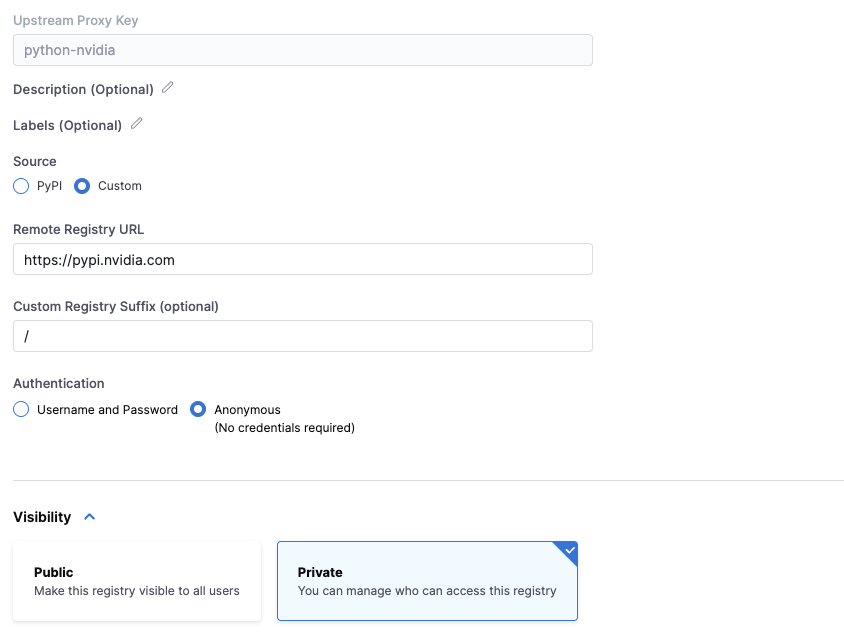
This is commonly required when integrating with enterprise artifact repositories such as Artifactory, Nexus, or private PyPI mirrors. Authentication can be configured using anonymous access or username and password credentials. Once configured, Harness handles package resolution and authentication automatically when proxying Python dependencies from the upstream registry.
Publish & Install Python Packages
- pip
- poetry
- uv
1. Generate Identity Token
An identity token will serve as the password for uploading and downloading artifacts.
Generate an identity token from your Harness account settings.
2. Configure Authentication
Create or update your ~/.pypirc file with the following content:
[distutils]
index-servers = harness

[harness]
repository = https://pkg.harness.io/pkg/<account-id>/<python-registry-name>/python
username = <your-email@harness.io>
password = <identity-token>
3. Publish Package
Build and publish your package:
python -m build
python -m twine upload --repository harness /path/to/files/*
4. Install Package
Install a package using pip:
pip install --index-url https://<your-email@harness.io>:<TOKEN>@pkg.harness.io/pkg/<account-id>/<python-registry-name>/python/simple --no-deps <ARTIFACT_NAME>==<VERSION>
1. Generate Identity Token
An identity token will serve as the password for uploading and downloading artifacts.
Generate an identity token from your Harness account settings.
2. Configure Repository
Add the registry as a source and configure authentication:
poetry source add --priority=explicit harness https://<your-email@harness.io>:<TOKEN>@pkg.harness.io/pkg/<account-id>/<python-registry-name>/python/simple/
poetry config http-basic.harness <your-email@harness.io> <identity-token>
3. Publish Package
Configure publish repository and publish your package:
poetry config repositories.harness https://pkg.harness.io/pkg/<account-id>/<python-registry-name>/python
poetry build
poetry publish --repository harness
4. Install Package
Install a package using poetry:
poetry add --source harness <ARTIFACT_NAME>==<VERSION>
1. Generate Identity Token
An identity token will serve as the password for uploading and downloading artifacts.
Generate an identity token from your Harness account settings.
2. Publish Package
Build and publish your package:
uv build
uv publish --publish-url https://pkg.harness.io/pkg/<account-id>/<python-registry-name>/python --username <your-email@harness.io> --password <identity-token>
3. Install Package
Install a package using uv:
uv pip install --index-url https://<your-email@harness.io>:<TOKEN>@pkg.harness.io/pkg/<account-id>/<python-registry-name>/python/simple --no-deps <ARTIFACT_NAME>==<VERSION>