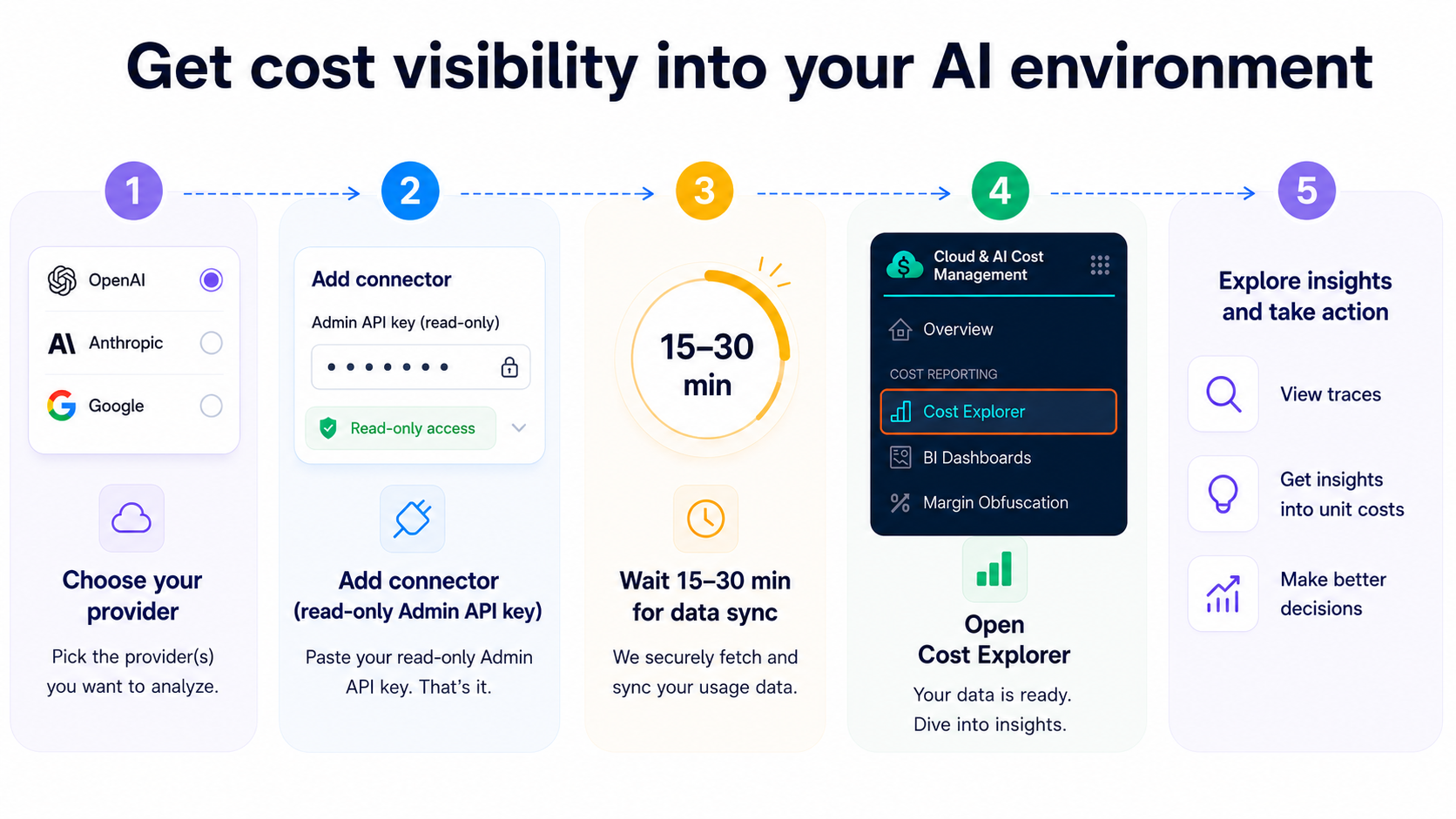
> For the complete documentation index, see [llms.txt](https://developer.harness.io/llms.txt). Markdown versions of documentation pages are available by appending `.md` to page URLs; this page is available as [Markdown](https://developer.harness.io/cloud-cost-management/new-to-cacm/ai-cost-management/ai-cost-management.md).
# AI Cost Management
See AI spend across LLM providers next to your cloud costs, attribute it to teams and agents, and govern it with the same FinOps workflow you use for cloud.
{% hint style="info" %}
**Beta Release | Feature Flag Required**
The feature is in beta and available behind a feature flag. Contact your Harness account team to enable it for your account.
{% endhint %}
Harness AI Cost Management extends the Cloud & AI Cost Management (CACM) platform to track AI spend across large language model (LLM) providers, managed AI services, and AI applications. See AI spend next to your cloud costs, attribute it to teams, agents, and outcomes, and govern it with the same FinOps workflow you already use for cloud.
Get cost visibility into your AI environment
***
## How AI cost tracking works
Harness tracks AI cost two ways:
* **Provider costs** come from a connector that pulls billed spend from the provider's billing API. Go to [Get Started](/cloud-cost-management/new-to-cacm/quickstart.md) to connect a billing provider.
* **Trace attribution** comes from telemetry your application emits, which breaks that spend down to the agent, session, or request that caused it.
Trace attribution builds on provider costs. Connect a provider first, then add traces when you need to know what drove the spend.
| | Provider costs | Trace attribution |
| ----------------- | ------------------------------------------------ | ------------------------------------------------------------------------------------ |
| **Answers** | How much did we spend, and on which models? | Which agent, session, or request drove it, and was it worth it? |
| **Needs** | A provider connector. No code changes. | A provider connector, plus generative AI (GenAI)-instrumented traces (code changes). |
| **Accuracy** | Billed-accurate. Source of truth for finance. | Approximate, calculated from tokens and list pricing. |
| **Time to value** | Minutes to connect, 6 to 12 hours to first data. | An afternoon to instrument, then continuous. |
### Trace attribution
A connector tells you how much you spent and on which model, but not which agent, session, or request drove the cost. To go one level deeper, instrument your application to emit GenAI traces. Traces give you cost per agent run, session, and inference, cost per business outcome, and drill-down to the exact LLM call or tool loop that drove spend.
Go to [How AI traces work](/cloud-cost-management/references/ai-cost-management/how-ai-traces-work.md) to understand code instrumentation and data flow architecture.
{% hint style="warning" %}
**ALERTS FIRE ON INGESTED DATA, NOT LIVE USAGE**
[Budget](/cloud-cost-management/cost-governance/budgets/create-a-budget.md) and [anomaly detection](/cloud-cost-management/cost-governance/anomalies/getting-started-with-ccm-anomaly-detection.md) alerts evaluate data after ingestion. Provider connector spikes can take 6 to 12 hours to surface. Trace data usually lands within a few minutes, but allow up to about 20 minutes. Factor this into alert thresholds.
{% endhint %}
### When you need traces on top of provider costs
A provider connector groups spend by provider, model, account, and token type. That is enough for finance-grade totals, chargeback by provider or model, and budgets. It cannot attribute spend below the model, because the billing API does not know which agent, session, or request made each call.
Add trace attribution when you need answers the connector cannot give:
* **Attribute spend below the model:** map cost to a specific team, agent, feature, or customer with [Cost Categories](/cloud-cost-management/cost-reporting/cost-categories/cost-categories.md) and [Perspectives](/cloud-cost-management/cost-reporting/perspectives/creating-a-perspective.md).
* **Debug a cost spike:** trace an expensive session to the exact LLM call, retry, or tool loop that drove it.
* **Measure unit economics:** compute cost per business outcome, such as cost per resolved ticket or per completed order.
Traces require GenAI-instrumented code, so you do not enable them everywhere at once. Instrument the applications where per-agent or per-outcome attribution is worth the code change, and leave the rest on provider costs. Go to the [AI Cost Management Quickstart](/cloud-cost-management/new-to-cacm/ai-cost-management/quickstart.md) to instrument an application.
Example: From a monthly total to cost per outcome
Say a customer-support copilot costs USD 28,000 a month. On a provider bill, that is a single line item. It tells you the copilot is expensive, but not whether it is worth the money.
Attribution changes the question. Divide that spend by the tickets the copilot resolves, and the cost becomes **USD 0.60 per resolved ticket**, which you can break down further by team and agent.
Now the number means something. If the copilot resolves tickets on its own at USD 0.60 each, that is a clear win, cheaper than a human agent. If some sessions cost USD 4.00 because the agent loops through unnecessary tool calls, that is a code problem to fix, not a budget line to negotiate. The monthly total alone could never tell you which was happening.
## Next steps
* Go to [AI Cost Management Quickstart](/cloud-cost-management/new-to-cacm/ai-cost-management/quickstart.md) to connect a provider and see your first data.
* Go to [How AI traces work](/cloud-cost-management/references/ai-cost-management/how-ai-traces-work.md) to understand trace attribution before you instrument anything.
{% @harness-feedback/feedback %}