azure-rec
Azure Recommendations
Azure Cloud & AI Cost Management provides two types of recommendations to help optimize your cloud costs:
- Azure VM
- Governance
Before You Begin
- Connect your Azure cloud account in Harness and set up CACM for cost management.
- Cost Visibility and the Inventory Management features should be enabled on your Azure CACM connector.
- Enabling the Visibility feature allows retrieving recommendations from the Azure Advisor. The Inventory Management feature allows you to fetch the CPU utilization data and display the corresponding recommendations. If the Inventory Management feature is not enabled, the graph and table may show a null state.
- Connect to Azure Advisor to receive recommendations for cost optimization:
- Sign in to the Azure portal > Advisor > Configuration.
- All resources are selected by default. However, you can deselect to exclude resources for which you do not wish to receive recommendations.
- Select the VM/VMSS right sizing tab.
- Select the subscriptions. This is required to receive VM rightsizing recommendations. The default CPU utilization is 100% and the default Look back period is 7 days.
Types of Azure VM recommendations
An effective way to reduce Azure VM costs is to optimize VM utilization. This involves resizing idle or underutilized VMs based on active tasks and shutting down unused VMs.
Virtual machines are considered low-utilization:
-
If their CPU utilization is 5 percent or less and their network utilization is less than 2 percent and have threshold memory pressure numbers.
-
If the current workload can be accommodated by a smaller sized virtual machine.
Harness CACM provides two types of recommendations to optimize your VMs:
-
VM Rightsizing: In this type of recommendation, CACM recommends resizing your VM based on usage. For information about the different types of Azure VMs, go to Available instance types.
-
Shutdown: In this type of recommendation, the instance is terminated or shutdown if not in use for a long time.
How are Azure recommendations computed?
The recommendations are computed by analyzing the past CPU utilization. Harness CACM leverages the Azure Advisor recommendations. CACM uses the Azure APIs to retrieve data from the Azure account.
Azure Advisor automatically runs in the background to find newly created resources. It can take up to 24 hours to provide recommendations on those resources as well as the newly created connectors for existing VMs.
How Pricing Works for Azure VM Recommendations
To determine the pricing for Azure Virtual Machines (VMs), public pricing information from an official source, Azure Retail Prices, is used.
An API call is made in the format: https://prices.azure.com/api/retail/prices?$filter=serviceName eq 'Virtual Machines' and priceType eq 'Consumption' and armSkuName eq '%s' and armRegionName eq '%s'.
The SKU name and region name sourced from Azure Advisor recommendations. The price of the current VM is calculated by multiplying the maximum retail price by 730.5, representing the total hours in a month.
Price of VM = max (retailPrice ) * 730.5
Public pricing is relied upon as Azure Advisor also depends on this data to show savings for its recommendations.
Calculating costs for Right Sizing Recommendation
For Right Sizing Recommendations, the highest price from all available retail prices for the current VM is selected. For the recommended VM, the savings provided by Azure Advisor are subtracted to determine its cost. The highest price is chosen to prevent cases where the cost of the recommended VM might be negative due to incorrect potential cost calculations.
Example:
Consider the given example of Standard_F32s_v2 in eastus2. Cost is given in form of https://prices.azure.com/api/retail/prices?$filter=serviceName eq 'Virtual Machines' and priceType eq 'Consumption' and armSkuName eq 'Standard_F32s_v2' and armRegionName eq 'eastus2.
Spot and Low Priority SKU's costs are filtered out and maximum cost hence received is 2.604 here.
Maximum Cost = 2.604
Total Cost =2.604* 730.5 = 1902.222$.
Calculating costs for Shutdown Recommendation
Here whatever Azure Advisor tells the savings is, we consider that cost of current VM. Because its a shutdown recommendation. Here, Savings = Cost of VM.
The savings number shown in recommendation directly comes from Azure Advisor, Harness does not change it.
Recommendation Drilldown
When you click on an individual recommendation, the following details are shown:
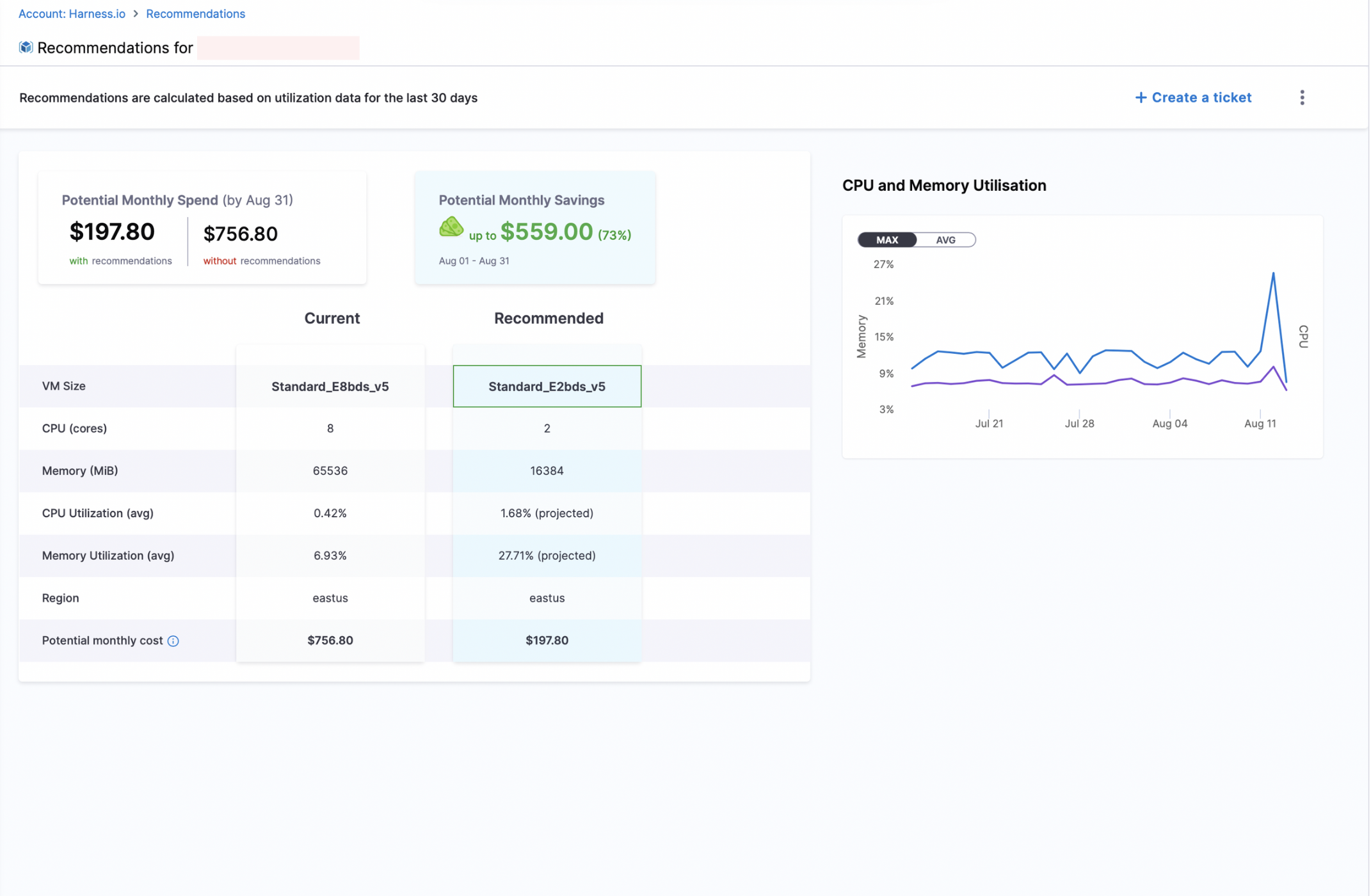
- Potential Monthly Spend: Projected cost with and without recommendations
- Potential Monthly Savings: Expected monthly cost reduction
- Current and Recommended:
- VM Size
- CPU (cores)
- Memory (MiB)
- CPU Utilization (avg)
- Memory Utilization (avg)
- Region
- Potential monthly cost (current and after recommendation)
- CPU and Memory Utilisation Graph: Visual representation of historical CPU and memory usage (Maximum and Average)
To see all Azure Governance recommendations, See here
Azure Resource Coverage (Examples)
- Virtual Machines (VMs)
- Storage accounts
- App services
- Cosmos DB accounts
- Key Vaults
For a comprehensive list of all supported Azure resources, refer to the Azure Resource Reference — Cloud Custodian documentation.