Canary deployment
The pipeline execution defines how Harness rolls out a new agent revision. For AWS Agent Core, Harness deploys the new revision, then shifts traffic to it in stages so you can validate the new version before it takes all traffic. This page shows you how to configure the canary execution on the pipeline stage.
Agent deployments are behind the feature flag CDS_AGENT_RUNTIME_DEPLOYMENT. Contact Harness Support to enable the feature.
You need a registered agent service and an environment with an AWS Agent Core infrastructure definition. For all prerequisites, go to Before you begin on the overview.
Select the execution strategy
On the Execution tab of the stage, select the execution strategy. Select Canary to scaffold the deploy and traffic shift steps, or select Blank Canvas to build the execution from an empty step group.
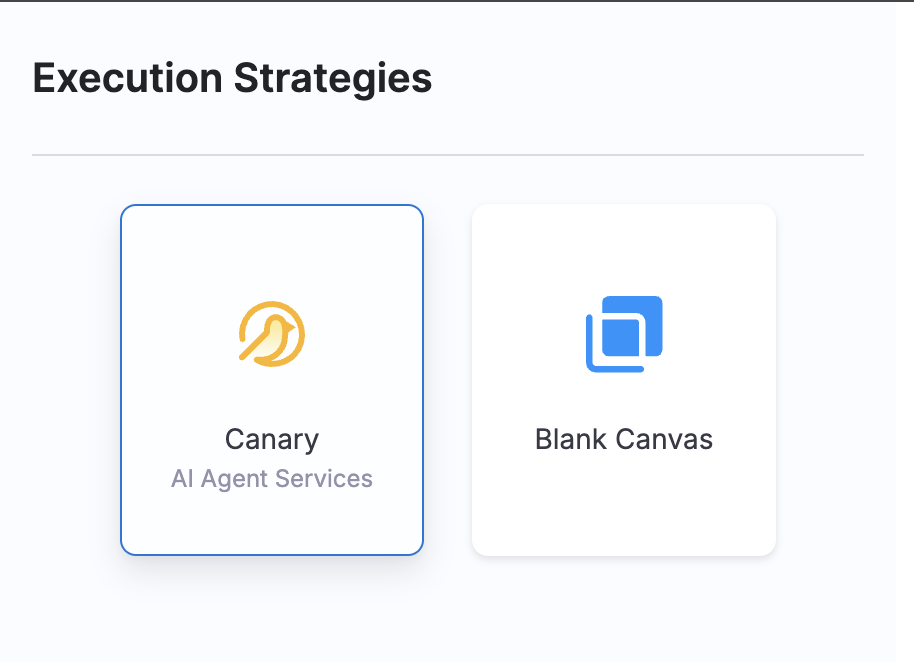
Canary is the only execution strategy for agent deployments in this release. Support for more deployment strategies is planned.
Default canary steps
When you select the Canary strategy, Harness adds a step group with two steps: a deploy step and a single traffic shift step that routes 100 percent of traffic to the new revision. Harness also adds a rollback step group with the rollback step.
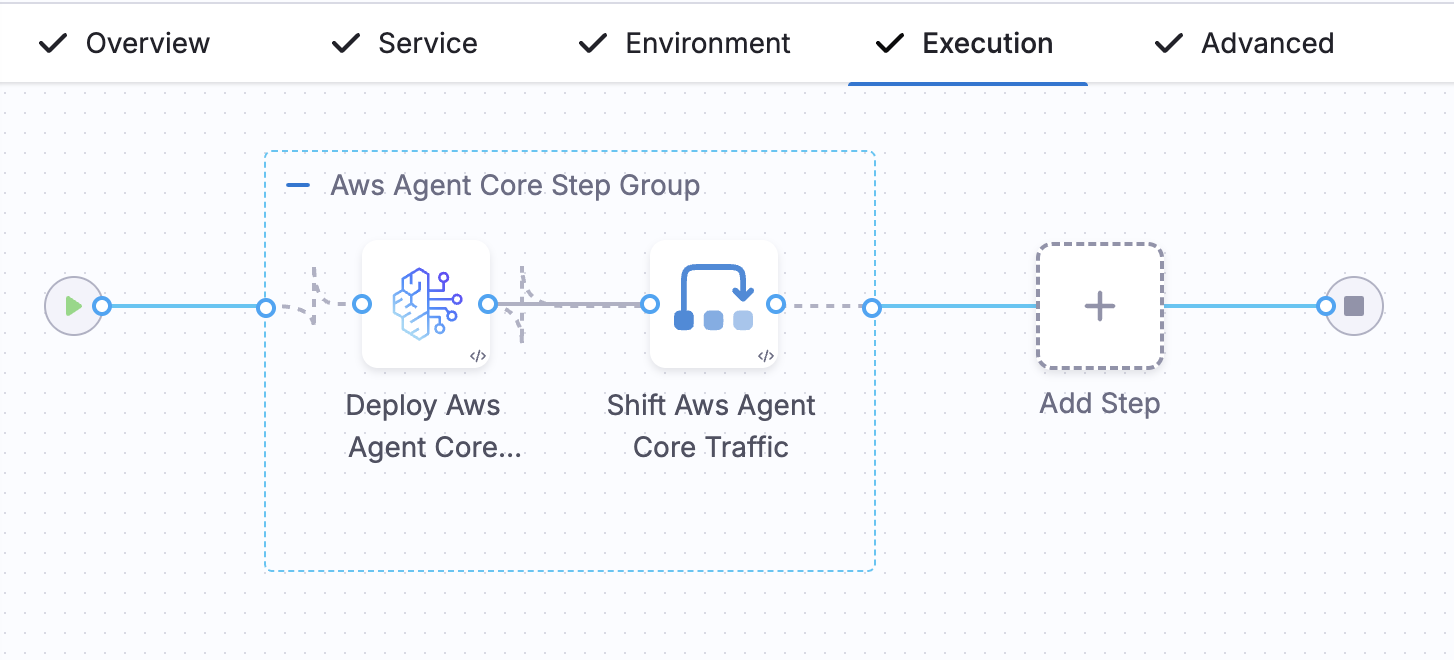
Deploy step
The deploy step creates a deployment for the agent on AWS Agent Core. On the first deployment for an agent, it creates the deployment. When a deployment already exists, it creates a new revision under the same deployment. The step publishes the new revision id as output that the traffic shift steps read.
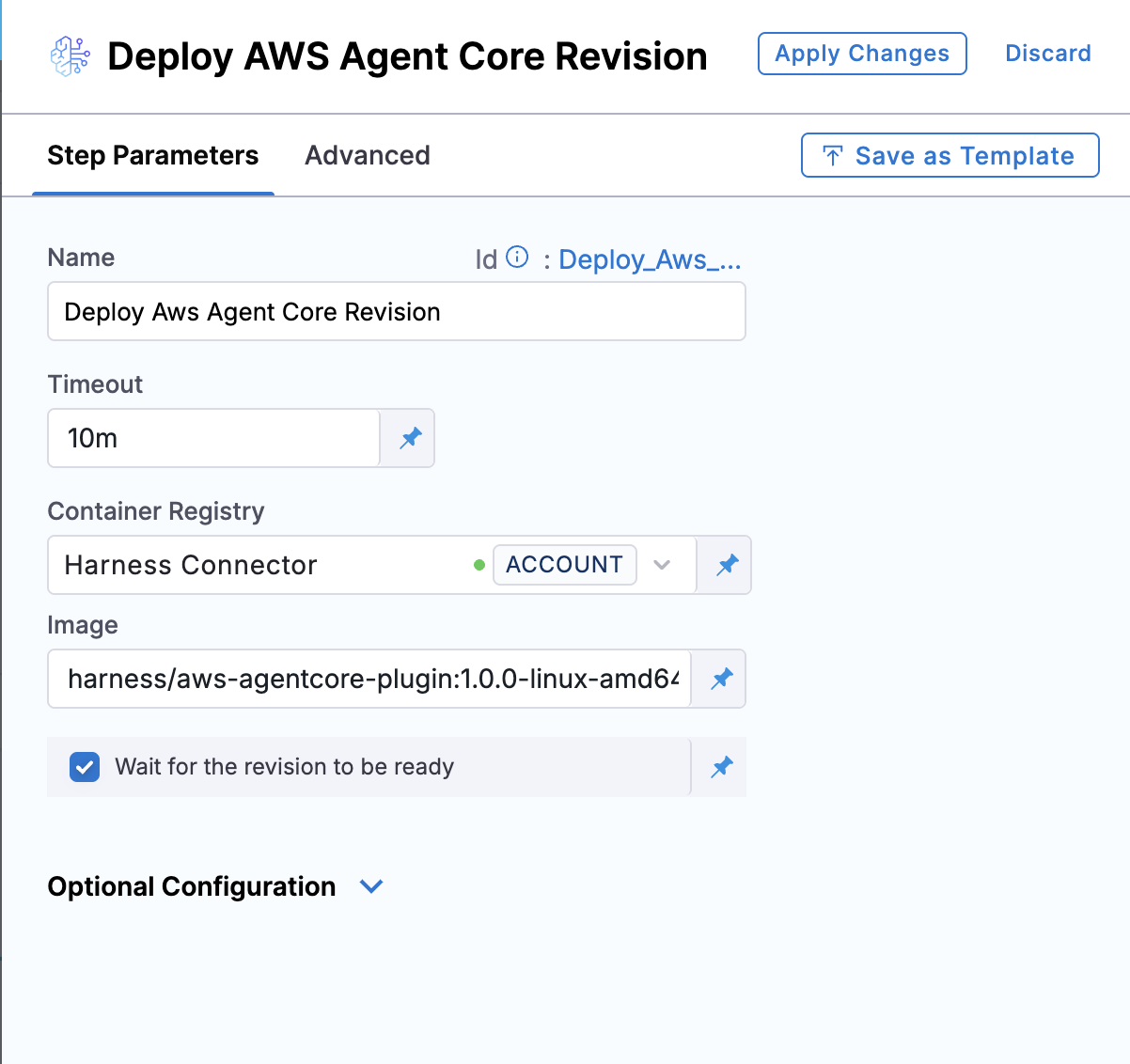
The step type is DeployAwsAgentCoreRevision. Configure the following fields:
- Container Registry: A Harness connector for the registry that hosts the plugin image.
- Image: The deploy plugin image,
harness/aws-agentcore-plugin:1.0.0-linux-amd64. - Wait for the revision to be ready: Enable this so the pipeline waits until the revision is ready before it continues.
Traffic shift step
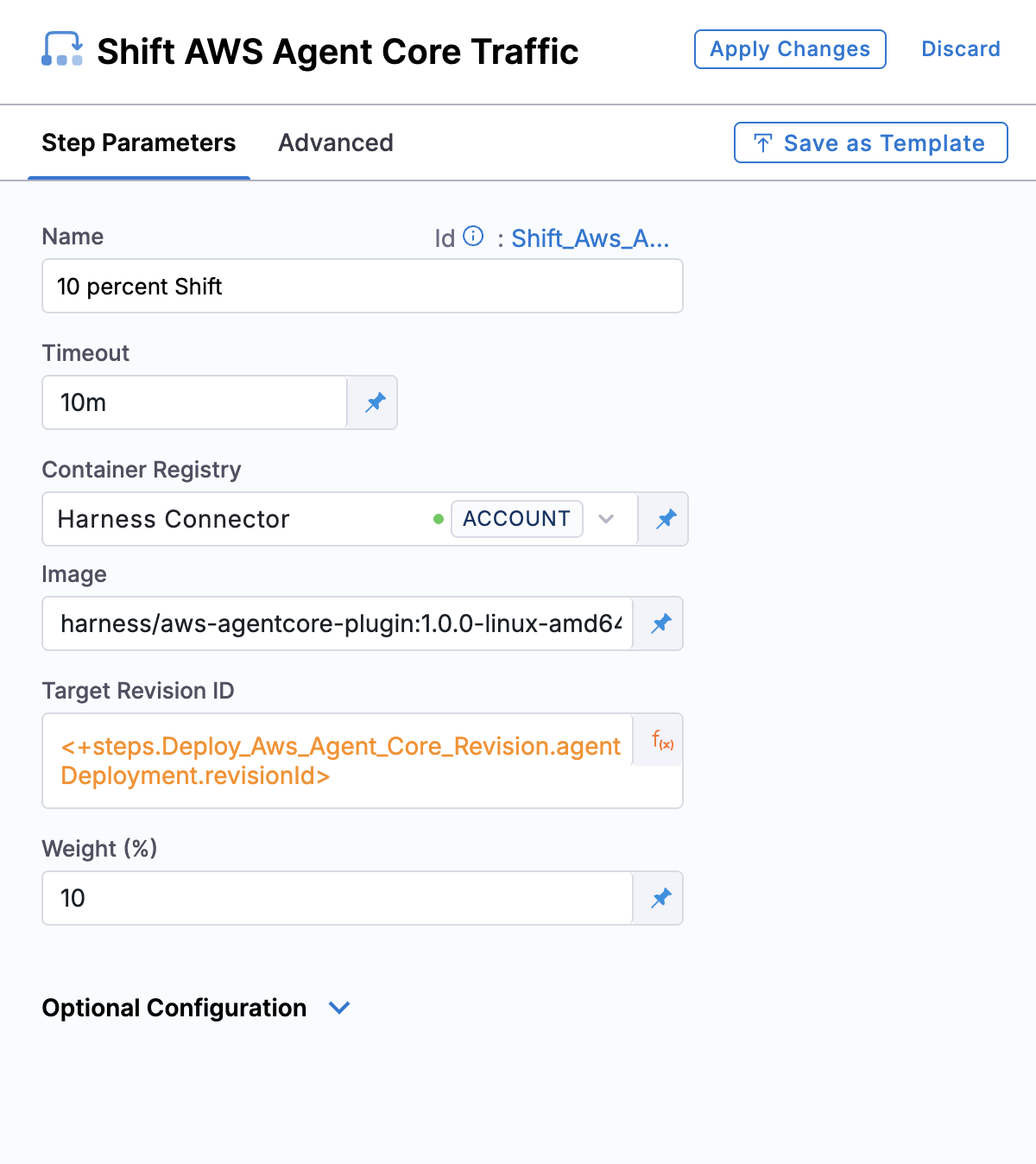
The traffic shift step routes a percentage of traffic to the revision produced by the deploy step. Add a step for each stage of the canary, for example 10 percent, 25 percent, 50 percent, and 100 percent.
The step type is ShiftAwsAgentCoreTraffic. This step requires an AgentCore Gateway on the infrastructure definition, and without a gateway the step rejects with AGENT.AWS.GATEWAY_NOT_CONFIGURED. Configure the following fields:
- Container Registry: A Harness connector for the registry that hosts the plugin image.
- Image: The traffic shift plugin image,
harness/aws-agentcore-plugin:1.0.0-linux-amd64. - Target Revision ID: The revision produced by the deploy step,
<+steps.Deploy_Aws_Agent_Core_Revision.agentDeployment.revisionId>. - Weight (%): The percentage of traffic to route to the target revision for this shift.
Rollback step
The rollback step reverts traffic to the previous revision. Harness adds it to the stage rollback steps so it runs when a deploy or traffic shift step fails.
The step type is RollbackAwsAgentCoreRevision and the Image is harness/aws-agentcore-plugin:1.0.0-linux-amd64.
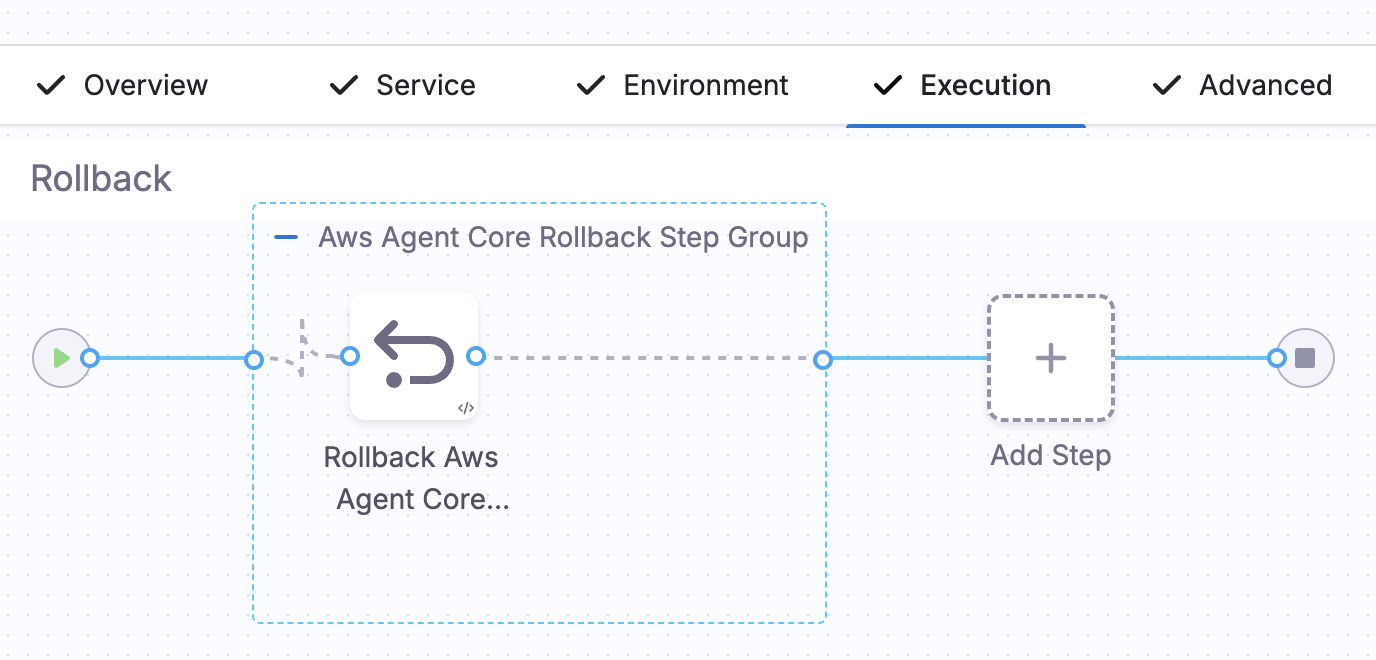
Default canary pipeline YAML
pipeline:
  projectIdentifier: Demo
  orgIdentifier: default
  tags: {}
  stages:
    - stage:
        name: AI Agent
        identifier: AI_Agent
        description: ""
        type: Deployment
        spec:
          deploymentType: AiAgent
          service:
            serviceRef: AWSExampleAgent
          environment:
            environmentRef: Aws_Agent_Core
            deployToAll: false
            infrastructureDefinitions:
              - identifier: Agent_Core_CD_Play
          execution:
            steps:
              - stepGroup:
                  steps:
                    - step:
                        type: DeployAwsAgentCoreRevision
                        name: Deploy Aws Agent Core Revision
                        identifier: Deploy_Aws_Agent_Core_Revision
                        spec:
                          connectorRef: account.harness_image_registry
                          image: harness/aws-agentcore-plugin:1.0.0-linux-amd64
                          imagePullPolicy: Always
                          waitReady: true
                    - step:
                        type: ShiftAwsAgentCoreTraffic
                        name: Shift Aws Agent Core Traffic
                        identifier: Shift_Aws_Agent_Core_Traffic
                        spec:
                          connectorRef: account.harness_image_registry
                          image: harness/aws-agentcore-plugin:1.0.0-linux-amd64
                          imagePullPolicy: Always
                          target:
                            revisionId: <+steps.Deploy_Aws_Agent_Core_Revision.agentDeployment.revisionId>
                          weight: 100
                  name: Aws Agent Core Step Group
                  identifier: Aws_Agent_Core_Step_Group
                  sharedPaths:
                    - /var/run
                    - /var/lib/docker
                  stepGroupInfra:
                    type: KubernetesDirect
                    spec:
                      connectorRef: <+input>
                      namespace: default
            rollbackSteps:
              - stepGroup:
                  name: Aws Agent Core Rollback Step Group
                  identifier: Aws_Agent_Core_Rollback_Step_Group
                  steps:
                    - step:
                        type: RollbackAwsAgentCoreRevision
                        name: Rollback Aws Agent Core Revision
                        identifier: Rollback_Aws_Agent_Core_Revision
                        spec:
                          connectorRef: account.harness_image_registry
                          image: harness/aws-agentcore-plugin:1.0.0-linux-amd64
                          imagePullPolicy: Always
                  sharedPaths:
                    - /var/run
                    - /var/lib/docker
                  stepGroupInfra:
                    type: KubernetesDirect
                    spec:
                      connectorRef: <+input>
                      namespace: default
        tags: {}
        failureStrategies:
          - onFailure:
              errors:
                - AllErrors
              action:
                type: StageRollback
  identifier: Sample_AWS_Agent_Core_Deployment
  name: Sample AWS Agent Core Deployment
Add staged traffic shifts
To roll out more gradually, add more traffic shift steps between the deploy step and the final 100 percent shift. Each step routes an increasing percentage of traffic to the new revision, for example 10 percent, 25 percent, 50 percent, and 100 percent. Between the shifts, you can add smoke tests, evals, approval gates, or release gates to validate each stage before more traffic moves to the new revision.
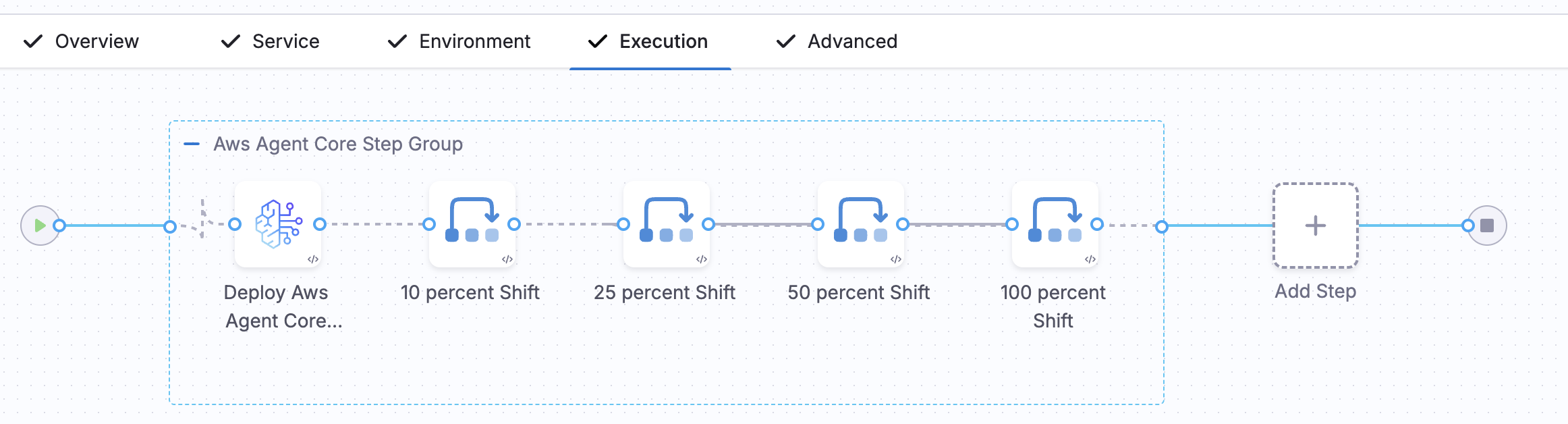
Staged canary pipeline YAML
pipeline:
  projectIdentifier: Demo
  orgIdentifier: default
  tags: {}
  stages:
    - stage:
        name: deploy
        identifier: deploy
        description: ""
        type: Deployment
        spec:
          deploymentType: AiAgent
          service:
            serviceRef: AWSExampleAgent
          environment:
            environmentRef: Aws_Agent_Core
            deployToAll: false
            infrastructureDefinitions:
              - identifier: Agent_Core_CD_Play
          execution:
            steps:
              - stepGroup:
                  name: Aws Agent Core Step Group
                  identifier: Aws_Agent_Core_Step_Group
                  steps:
                    - step:
                        type: DeployAwsAgentCoreRevision
                        name: Deploy Aws Agent Core Revision
                        identifier: Deploy_Aws_Agent_Core_Revision
                        spec:
                          connectorRef: account.harness_image_registry
                          image: harness/aws-agentcore-plugin:1.0.0-linux-amd64
                          imagePullPolicy: Always
                          waitReady: true
                        timeout: 10m
                    - step:
                        type: ShiftAwsAgentCoreTraffic
                        name: 10 percent Shift
                        identifier: Shift_Aws_Agent_Core_Traffic_10
                        spec:
                          connectorRef: account.harness_image_registry
                          image: harness/aws-agentcore-plugin:1.0.0-linux-amd64
                          imagePullPolicy: Always
                          target:
                            revisionId: <+steps.Deploy_Aws_Agent_Core_Revision.agentDeployment.revisionId>
                          weight: 10
                        timeout: 10m
                    - step:
                        type: ShiftAwsAgentCoreTraffic
                        name: 25 percent Shift
                        identifier: Shift_Aws_Agent_Core_Traffic_25
                        spec:
                          connectorRef: account.harness_image_registry
                          image: harness/aws-agentcore-plugin:1.0.0-linux-amd64
                          imagePullPolicy: Always
                          target:
                            revisionId: <+steps.Deploy_Aws_Agent_Core_Revision.agentDeployment.revisionId>
                          weight: 25
                        timeout: 10m
                    - step:
                        type: ShiftAwsAgentCoreTraffic
                        name: 50 percent Shift
                        identifier: Shift_Aws_Agent_Core_Traffic_50
                        spec:
                          connectorRef: account.harness_image_registry
                          image: harness/aws-agentcore-plugin:1.0.0-linux-amd64
                          imagePullPolicy: Always
                          target:
                            revisionId: <+steps.Deploy_Aws_Agent_Core_Revision.agentDeployment.revisionId>
                          weight: 50
                        timeout: 10m
                    - step:
                        type: ShiftAwsAgentCoreTraffic
                        name: 100 percent Shift
                        identifier: Shift_Aws_Agent_Core_Traffic_100
                        spec:
                          connectorRef: account.harness_image_registry
                          image: harness/aws-agentcore-plugin:1.0.0-linux-amd64
                          imagePullPolicy: Always
                          target:
                            revisionId: <+steps.Deploy_Aws_Agent_Core_Revision.agentDeployment.revisionId>
                          weight: 100
                        timeout: 10m
                  sharedPaths:
                    - /var/run
                    - /var/lib/docker
                  stepGroupInfra:
                    type: KubernetesDirect
                    spec:
                      connectorRef: <+input>
                      namespace: default
            rollbackSteps:
              - stepGroup:
                  name: Aws Agent Core Rollback Step Group
                  identifier: Aws_Agent_Core_Rollback_Step_Group
                  steps:
                    - step:
                        type: RollbackAwsAgentCoreRevision
                        name: Rollback Aws Agent Core Revision
                        identifier: Rollback_Aws_Agent_Core_Revision
                        spec:
                          connectorRef: account.harness_image_registry
                          image: harness/aws-agentcore-plugin:1.0.0-linux-amd64
                          imagePullPolicy: Always
                  sharedPaths:
                    - /var/run
                    - /var/lib/docker
                  stepGroupInfra:
                    type: KubernetesDirect
                    spec:
                      connectorRef: <+input>
                      namespace: default
        tags: {}
        failureStrategies:
          - onFailure:
              errors:
                - AllErrors
              action:
                type: StageRollback
  identifier: Sample_AWS_Agent_Core_Staged_Canary
  name: Sample AWS Agent Core Staged Canary
Run and monitor the deployment
Run the pipeline to deploy the agent. After the pipeline runs, open the agent service to review the deployment. The Summary tab lists every deployment that references the agent service, with its status and start time, and the Configuration tab shows the platform configuration, which you can edit.
Because the agent is a Harness deployment, approvals, OPA policies, and RBAC apply the same way they do for any other stage.
Next steps
You have deployed an agent service to AWS Agent Core with a canary strategy. You can now add approvals and policies to the stage, or configure additional environments.
- Step reference: Review the deploy and traffic-shift step parameters in detail.
- Deploy to Google Agent Runtime: Deploy an agent to Vertex Agent Runtime instead.