> For the complete documentation index, see [llms.txt](https://developer.harness.io/llms.txt). Markdown versions of documentation pages are available by appending `.md` to page URLs; this page is available as [Markdown](https://developer.harness.io/continuous-integration/use-harness-ci/use-harness-ci/codebase-configuration/create-and-configure-a-codebase.md).

# Configure codebase

Configure the Git repository that your CI pipeline clones, and edit the default codebase settings.

CI pipelines build and test code that Harness pulls from a Git code repository. In Harness CI, you configure a *codebase* for your pipeline to define the Git repository that your Build stages clone at runtime. A Build stage clones the codebase automatically unless you disable **Clone Codebase** for that stage. When you add a Build stage to a pipeline that has no codebase yet, you can configure one.

## What you will learn in this topic

In this topic, you learn how to:

* Configure the default codebase for a pipeline.
* Disable **Clone Codebase** for specific stages.
* Edit the default codebase configuration, including advanced settings such as depth, clone strategy, LFS, sparse checkout, submodules, and pre-fetch commands.
* Find troubleshooting information for codebases.

## Before you begin

Before you start, make sure you understand the [CI pipeline creation process](/continuous-integration/use-harness-ci/use-harness-ci/prep-ci-pipeline-components.md).

## Configure the default codebase

When you add a **Build** stage to a CI pipeline, you specify where your build code is stored. This location becomes the pipeline's *default codebase*.

1. In the Pipeline Studio, select **Add Stage**, and then select **Build**.
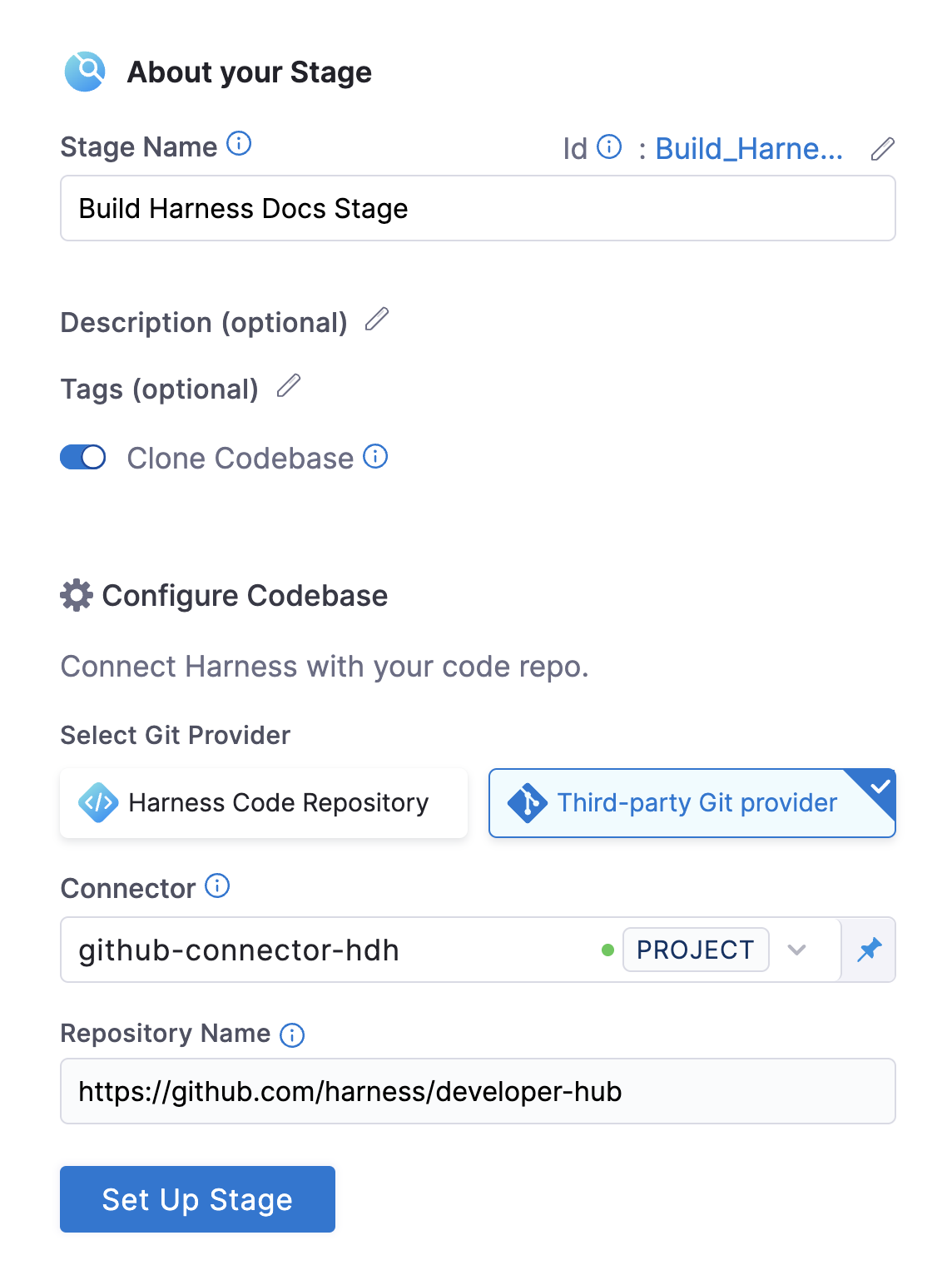
2. Enter a **Stage Name**. **Description** and **Tags** are optional.
3. Make sure **Clone Codebase** is enabled. This setting tells Harness to clone the codebase into the build environment before it runs the steps in the stage.

   <div data-gb-custom-block data-tag="hint" data-style="info" class="hint hint-info"><p>In VM runners and cloud infrastructure, the step that clones your codebase runs in a container by default. Enable the <code>CI_GIT_CLONE_CONTAINERLESS</code> feature flag to run it on the host. Running it on the host is recommended for faster cloning on Windows because it eliminates image download time.</p></div>
4. Configure your codebase connection.
   * To clone a repo from the [Harness Code Repository module](https://app.gitbook.com/s/oTP6ysjQCQlt5GlFHRfs/README), select **Harness Code Repository**, and then select the repo to clone.
   * To clone a repo from a third-party Git provider, select **Third-party Git provider**, select the relevant [code repo connector](/harness-platform/use-harness-platform/connectors/code-repositories.md), and enter the name of the repo to clone if **Repository Name** is not automatically populated.
5. Select **Set Up Stage**.

To change the connector or other default codebase settings, go to [Edit the default codebase configuration](#edit-the-default-codebase-configuration). If you do not want every stage to clone the default codebase, go to [Disable Clone Codebase for specific stages](#disable-clone-codebase-for-specific-stages). You can also [clone multiple repositories in a stage](/continuous-integration/use-harness-ci/use-harness-ci/codebase-configuration/clone-and-process-multiple-codebases-in-the-same-pipeline.md).

<figure><img src="https://4226796345-files.gitbook.io/~/files/v0/b/gitbook-x-prod.appspot.com/o/spaces%2FqKtVmwAGTfGQS1MVC97G%2Fuploads%2Fgit-blob-55e31ad230882d557a6479017d7d78883be56a79%2Fcreate-and-configure-a-codebase-00.png?alt=media" alt="Configuring the codebase when adding a Build stage."><figcaption></figcaption></figure>

<details>

<summary>YAML example: Default codebase configuration</summary>

```yaml
pipeline:
  name: tutorial example
  identifier: tutorial_example
  projectIdentifier: default
  orgIdentifier: default
  tags: {}
  properties:
    ci:
      codebase:
        connectorRef: YOUR_CODEBASE_CONNECTOR_ID
        build: <+input>
```

</details>

<details>

<summary>YAML example: Harness Code Repository codebase configuration</summary>

This configuration is for repositories in the [Harness Code Repository module](https://app.gitbook.com/s/oTP6ysjQCQlt5GlFHRfs/README).

```yaml
pipeline:
  name: tutorial example
  identifier: tutorial_example
  projectIdentifier: default
  orgIdentifier: default
  tags: {}
  properties:
    ci:
      codebase:
        repoName: YOUR_HARNESS_CODE_REPO_NAME
        build: <+input>
```

</details>

## Disable Clone Codebase for specific stages

After you define the default codebase in the first Build stage, you can disable **Clone Codebase** for individual stages that you add later. You can also disable cloning the default codebase, if necessary.

Disable **Clone Codebase** if the stage does not need the codebase, or if you need to use specific `git clone` arguments, such as to [clone a subdirectory instead of an entire repo](/continuous-integration/use-harness-ci/use-harness-ci/codebase-configuration/clone-subdirectory.md). You can also [clone multiple code repos in a pipeline](/continuous-integration/use-harness-ci/use-harness-ci/codebase-configuration/clone-and-process-multiple-codebases-in-the-same-pipeline.md).

In the Visual editor, you disable **Clone Codebase** in the stage's **Overview** tab.

<figure><img src="https://4226796345-files.gitbook.io/~/files/v0/b/gitbook-x-prod.appspot.com/o/spaces%2FqKtVmwAGTfGQS1MVC97G%2Fuploads%2Fgit-blob-bdc713bc76dda9dab8b5b6c81a5d25c0c303983c%2Fdisable-clone-codebase-visual.png?alt=media" alt=""><figcaption></figcaption></figure>

In the YAML editor, set `cloneCodebase` to `false` in the `stage.spec`.

```yaml
- stage:
    name: build
    identifier: build
    description: ""
    type: CI
    spec:
      cloneCodebase: false
```

Go to [CI Build stage settings](/continuous-integration/use-harness-ci/use-harness-ci/set-up-build-infrastructure/ci-stage-settings.md) for Build stage settings.

## Edit the default codebase configuration

{% hint style="info" %}
The following Git clone enhancements are now Generally Available (GA). They are available in both the Git Clone step and the native Clone Codebase functionality:

* **Git LFS:** Clone repositories with large file storage (LFS) efficiently.
* **Fetch Tags:** Fetch tags during the clone operation.
* **Sparse Checkout:** Clone specific subdirectories.
* **Clone Submodules:** Include and recursively clone Git submodules.
* **Clone Path Customization:** Specify a custom clone directory in the codebase section.
* **Additional Pre-Fetch Command:** Run additional Git commands before fetching the code.

If these capabilities are not enabled in your account, contact [Harness Support](mailto:support@harness.io).
{% endhint %}

{% tabs %}
{% tab title="Visual" %}
To edit a pipeline's default codebase configuration, select **Codebase** on the right side panel of the Pipeline Studio's Visual editor.

<figure><img src="https://4226796345-files.gitbook.io/~/files/v0/b/gitbook-x-prod.appspot.com/o/spaces%2FqKtVmwAGTfGQS1MVC97G%2Fuploads%2Fgit-blob-889a4aa342d21c51c0899a7507d3503cad1d4d32%2Fcreate-and-configure-a-codebase-03.png?alt=media" alt=""><figcaption></figcaption></figure>
{% endtab %}

{% tab title="YAML" %}
To edit a pipeline's default codebase configuration in the YAML editor, edit the `codebase` section. For example:

```yaml
pipeline:
  name: tutorial example
  identifier: tutorial_example
  projectIdentifier: tutorial_test
  orgIdentifier: default
  tags: {}
  properties:
    ci:
      codebase:
        connectorRef: YOUR_CODEBASE_CONNECTOR_ID
        build: <+input>
        depth: 0
        sslVerify: true
        prCloneStrategy: MergeCommit
```

{% endtab %}
{% endtabs %}

In addition to changing the **Connector** (`connectorRef`) or **Repository Name** (`repoName`), you can edit the following **Advanced** settings.

### Depth

The number of commits to fetch when the pipeline clones the codebase repo.

The default depth varies by build and trigger type:

* For manually triggered branch and tag builds, the default depth is `50`. Each `git clone` operation fetches the 50 most recent commits.
* For manually triggered PR builds and all auto-triggered builds, such as webhook triggers, the default depth is `0`. Each `git clone` operation fetches all commits from the relevant branch.

Go to the [git clone documentation](https://git-scm.com/docs/git-clone) for more information.

### Pull Request Clone Strategy

When a pull request triggers a build, this setting determines the branch that Harness uses for the artifact after it clones the repo.

If you set this to **Merge Commit**, which is the default, the pipeline tries to merge the pull request branch with the target branch before it builds the artifact. This strategy guarantees that the artifact includes all commits in both the pull request and the target branch. The disadvantage is that the merge can take more time and cause build failures: if the merge fails, the build fails.

![](https://4226796345-files.gitbook.io/~/files/v0/b/gitbook-x-prod.appspot.com/o/spaces%2FqKtVmwAGTfGQS1MVC97G%2Fuploads%2Fgit-blob-35a6f63083eda4d41c36e82d33ef0cc8a691a451%2Fcreate-and-configure-a-codebase-04.png?alt=media)

If you set this to **Source Branch**, the pipeline builds the artifact from the latest commit in the pull request branch. This strategy can be faster and less likely to cause build failures. However, the artifact might not include some commits in the target branch.

![](https://4226796345-files.gitbook.io/~/files/v0/b/gitbook-x-prod.appspot.com/o/spaces%2FqKtVmwAGTfGQS1MVC97G%2Fuploads%2Fgit-blob-78bd150a64b7b8fbf817ecb523ba48c5fad8857b%2Fcreate-and-configure-a-codebase-05.png?alt=media)

### Clone Directory

An optional target path in the pipeline workspace where you want to clone the repo.

You cannot specify `/harness/` as a target directory for a **Git Clone** step because this folder is reserved for the **Build** stage's codebase. To share data across steps in your **Build** stage, specify **Shared Paths** in your [CI Build stage settings](/continuous-integration/use-harness-ci/use-harness-ci/set-up-build-infrastructure/ci-stage-settings.md).

{% hint style="info" %}
**macOS workspace path**

On Harness macOS build infrastructure, `/harness` is a protected system directory. The workspace is `/tmp/harness` instead. `/tmp/harness` is a symlink to `/private/tmp/harness`, and both paths work. If you use macOS infrastructure, specify clone directory paths with either the full macOS workspace path, such as `/tmp/harness/my-repo`, or a relative path, such as `./my-repo`. Go to [How can I share cache between different OS types?](/continuous-integration/troubleshooting-and-resources/ci-articles-and-faqs/continuous-integration-faqs.md#how-can-i-share-cache-between-different-os-types-linuxmacos) for more information.
{% endhint %}

### Persist Credentials (Optional)

When you select this option, Harness persists the Git credentials that it uses during the clone step so they remain available for subsequent steps in the same build.

This option is useful when:

* You need to run Git commands after the clone step, such as fetching submodules, tagging, or pushing commits.
* You use a private Harness Code Repository or an authenticated third-party repository, and you want to avoid re-authenticating in every step.

{% hint style="info" %}
The persisted credentials remain available only within the scope of the build environment (container or VM) for the duration of the build. Harness does not store or reuse them after the build completes.
{% endhint %}

<figure><img src="https://4226796345-files.gitbook.io/~/files/v0/b/gitbook-x-prod.appspot.com/o/spaces%2FqKtVmwAGTfGQS1MVC97G%2Fuploads%2Fgit-blob-25aa26669128046c8c33295fb1354cfcfd9ddc9b%2Fpersist-creds.png?alt=media" alt=""><figcaption></figcaption></figure>

### Fetch Tags

Determines whether to fetch all tags when you perform a shallow clone (depth > 0). Setting this to `true` is equivalent to adding the `--tags` flag.

### Download LFS Files

The [Git Large File Storage (LFS)](https://git-lfs.com/) client is an extension for versioning large files, such as audio, video, datasets, and graphics.

Set **Download LFS Files** to `true` to download Git LFS files. The default is `false`. To run `git lfs` commands in a **Run** step instead, go to [Git Large File Storage](/continuous-integration/use-harness-ci/use-harness-ci/codebase-configuration/gitlfs.md).

### Sparse Checkout

Performs a sparse checkout on the patterns you provide. You choose the subset of files by providing a list of directories in cone mode. Go to the [git sparse-checkout documentation](https://git-scm.com/docs/git-sparse-checkout#_internalscone_pattern_set) for more information.

### Include Submodules

Determines whether to include submodules in the clone. The default is `false`. Set this to `true` to include submodules, or to `recursive` to clone submodules recursively.

### Pre Fetch Command

Specifies additional Git commands to run before Harness fetches the code. This field accepts Git commands only. Separate each command with a new line.

For example, you can use this field to set additional LFS configurations or to clone specific submodules:

```bash
git config lfs.fetchexclude ".jpg"
```

**Example: Partial clone**

[Git partial clone](https://git-scm.com/docs/partial-clone) downloads commit and tree objects upfront but defers blob (file content) downloads until Git accesses those files. The full commit history is available for `git log` with no extra network calls. Operations that read file content, such as `git blame`, `git show`, and the checkout step that `git bisect` performs, trigger on-demand blob downloads as they access the files. Partial clone reduces the initial fetch size for large repositories.

Partial clone works with the [Harness Code Repository module](https://app.gitbook.com/s/oTP6ysjQCQlt5GlFHRfs/README) and any third-party Git provider that supports the partial clone protocol, such as GitHub, GitLab, and Bitbucket.

To enable partial clone, set `depth: 0` so the clone is not shallow, and then add a `preFetchCommand` that runs `git fetch` with a `--filter` flag:

```yaml
properties:
  ci:
    codebase:
      connectorRef: YOUR_CODEBASE_CONNECTOR_ID
      build: <+input>
      depth: 0
      preFetchCommand: git fetch --filter=blob:none origin <+codebase.branch>
```

`depth: 0` is required. If `depth` is greater than `0`, the clone is shallow. Combining a shallow clone with a partial-clone filter is not supported and might produce unexpected results.

The expression `<+codebase.branch>` resolves to the codebase branch at runtime. You can also use a literal branch name, such as `main` or `master`. For pull request triggers, `<+codebase.branch>` resolves to the source branch of the PR. To fetch from the target branch instead, use `<+codebase.targetBranch>`.

You can substitute any `--filter` value that Git supports. For example:

* **Defer all blobs:** `git fetch --filter=blob:none origin <+codebase.branch>` downloads no blobs upfront and fetches each one on first access.
* **Defer large blobs only:** `git fetch --filter=blob:limit=100k origin <+codebase.branch>` downloads blobs smaller than 100 KB upfront and defers the rest.

To review all supported filter values, go to the [`git rev-list --filter` reference](https://git-scm.com/docs/git-rev-list#Documentation/git-rev-list.txt---filterltfilter-specgt).

To verify that partial clone is active inside a build step, add a **Run** step that prints the following Git configuration values:

```bash
git config --get remote.origin.promisor              # expected: true
git config --get remote.origin.partialclonefilter    # expected: your filter value, for example blob:none
git rev-parse --is-shallow-repository                # expected: false
```

{% hint style="info" %}
Combine partial clone with [sparse checkout](https://git-scm.com/docs/git-sparse-checkout) to limit which directories Git materializes in the working tree. This combination further reduces disk usage when the build needs only a subset of the repository.
{% endhint %}

Git downloads blobs that it did not fetch upfront on demand the first time you access them, for example with `git checkout`, `git show`, or `git blame`.

<details>

<summary>Partial clone filter is ignored or produces errors when depth is greater than 0</summary>

Set depth to 0. Shallow clones (depth > 0) are incompatible with partial clone filters. Remove the depth setting or set it explicitly to 0, and then re-run the pipeline.

</details>

**Example: Conditional Git clean and reset**

When you run builds on persistent workspaces, you might want to control whether each run discards untracked files or resets the working tree to the remote branch. An example is a [shared path](/continuous-integration/use-harness-ci/use-harness-ci/prep-ci-pipeline-components.md#shared-paths) on a self-managed build infrastructure that retains the cloned repository across executions. You can drive this behavior from `preFetchCommand` with pipeline variables and conditional expressions, so a single pipeline supports both warm and clean runs without changes to the pipeline structure.

Declare two string pipeline variables and reference them in `preFetchCommand` with the ternary operator. If the variable resolves to the literal string `"TRUE"`, the prefetch phase runs the corresponding Git command. Otherwise, it runs `git --version` as a no-op so the expression remains valid.

```yaml
properties:
  ci:
    codebase:
      connectorRef: YOUR_CODEBASE_CONNECTOR_ID
      build: <+input>
      preFetchCommand: |-
        <+<+pipeline.variables.cleanVar>=="TRUE"?"git clean -fdx":"git --version">
        <+<+pipeline.variables.resetVar>=="TRUE"?"git fetch origin <+pipeline.variables.branch> && git reset --hard origin/<+pipeline.variables.branch>":"git --version">
variables:
  - name: cleanVar
    type: String
    value: <+input>.default(TRUE)
  - name: resetVar
    type: String
    value: <+input>.default(TRUE)
  - name: branch
    type: String
    value: <+input>.default(<+codebase.branch>)
```

**Behavior:**

* **`cleanVar == "TRUE"`:** Runs `git clean -fdx`, which removes all untracked files and directories, including ignored files. Use this setting to remove build artifacts and restore a clean working tree.
* **`resetVar == "TRUE"`:** Runs `git fetch origin <branch>` followed by `git reset --hard origin/<branch>`, which moves the local branch pointer to the remote tip and discards any local commits or uncommitted changes.
* **Neither variable set to `"TRUE"`:** Both expressions resolve to `git --version`, which leaves the existing workspace untouched.

**Important callouts:**

* **Case-sensitive matching:** The comparison uses strict string matching. Only the literal value `TRUE` triggers the command. Harness treats values such as `true`, `True`, or `1` as false.
* **Independent toggles:** Harness evaluates `cleanVar` and `resetVar` separately. You can enable one, both, or neither per execution.
* **Runtime overrides:** Because the variables use `<+input>.default(...)`, you can override `cleanVar`, `resetVar`, or `branch` at runtime from the **Run Pipeline** form or from a [trigger](/harness-platform/use-harness-platform/triggers/triggers-overview.md), or pin them through an input set.
* **No-op fallback:** The pipeline requires the `git --version` placeholder so the ternary expression always produces a valid command line when the condition is false.

### SSL Verify

If you set this to **True**, which is the default value, the pipeline verifies your Git SSL certificates. The build fails if the certificate check fails. Set this to **False** only if you have a known issue with the certificate and you want to run your builds anyway.

To use self-signed certificates in a Kubernetes cluster build infrastructure, go to [Configure a Kubernetes Build Farm to use Self-Signed Certificates](/continuous-integration/use-harness-ci/use-harness-ci/set-up-build-infrastructure/k8s-build-infrastructure/configure-a-kubernetes-build-farm-to-use-self-signed-certificates.md).

### Set Container Resources

Set maximum resource limits for the containers that clone the codebase at runtime:

* **Limit Memory:** The maximum memory that the container can use. Express memory as a plain integer or as a fixed-point number with the suffix `G` or `M`. You can also use the power-of-two equivalents `Gi` and `Mi`. The default is `500Mi`.
* **Limit CPU:** The maximum number of cores that the container can use. CPU limits use CPU units. Fractional values are allowed. For example, specify one hundred millicpu as `0.1` or `100m`. The default is `400m`. Go to [Resource units in Kubernetes](https://kubernetes.io/docs/concepts/configuration/manage-resources-containers/#resource-units-in-kubernetes) for more information.

## Troubleshooting

Go to the [Harness CI Knowledge Base](/continuous-integration/troubleshooting-and-resources/ci-articles-and-faqs/continuous-integration-faqs.md) for more common questions and issues related to codebases.

<details>

<summary>How can I reduce clone codebase time?</summary>

Use one or more of the following strategies to improve codebase clone time:

* Depending on your build infrastructure, set [Limit Memory](#set-container-resources) to `1Gi` in your codebase configuration.
* For builds that PRs trigger, set the [Pull Request Clone Strategy](#pull-request-clone-strategy) to **Source Branch** and set [Depth](#depth) to `1`.
* If you do not need the entire repo contents for your build, disable the built-in clone codebase step and use a **Run** step to run specific `git clone` arguments, such as to [clone a subdirectory](/continuous-integration/use-harness-ci/use-harness-ci/codebase-configuration/clone-subdirectory.md).

</details>

<details>

<summary>The same Git commit is not used in all stages</summary>

If your pipeline has multiple stages, each stage that has **Clone Codebase** enabled clones the codebase during stage initialization. If your pipeline uses the generic [Git connector](https://developer.harness.io/harness-platform/use-harness-platform/connectors/code-repositories/ref-source-repo-provider/git-connector-settings-reference) and a commit lands in the codebase after the pipeline run starts, later stages can clone the newer commit instead of the commit that the pipeline started with.

To force all stages to use the same commit ID, even if the repository changes while the pipeline runs, use a [code repo connector](/continuous-integration/use-harness-ci/use-harness-ci/codebase-configuration/git-clone-step.md#connector) for a specific SCM provider instead of the generic Git connector.

</details>

<details>

<summary>Git fetch fails with invalid index-pack output when cloning large repos</summary>

* **Error:** During the **Initialize** step, when Harness clones the default codebase, `git fetch` throws `fetch-pack: invalid index-pack output`.
* **Cause:** This error can occur with large code repos and indicates that the build machine might have insufficient resources to clone the repo.
* **Solution:** Edit the pipeline's YAML and allocate `memory` and `cpu` resources in the `codebase` configuration. For example:

```yaml
properties:
  ci:
    codebase:
      connectorRef: YOUR_CODEBASE_CONNECTOR_ID
      repoName: YOUR_CODE_REPO_NAME
      build:
        type: branch
        spec:
          branch: <+input>
      sslVerify: false
      resources:
        limits:
          memory: 4G ## Set the maximum memory to use. You can express memory as a plain integer or as a fixed-point number using the suffixes `G` or `M`. You can also use the power-of-two equivalents `Gi` and `Mi`. The default is `500Mi`.
          cpu: "2" ## Set the maximum number of cores to use. CPU limits are measured in CPU units. Fractional requests are allowed; for example, you can specify one hundred millicpu as `0.1` or `100m`.
```

</details>

<details>

<summary>Clone codebase fails due to missing plugin</summary>

* **Error:** Git clone fails during stage initialization, and the runner's logs contain `Error response from daemon: plugin "<plugin>" not found`.
* **Platform:** This error can occur in build infrastructures that use a Harness Docker Runner, such as the [local runner build infrastructure](/continuous-integration/use-harness-ci/use-harness-ci/set-up-build-infrastructure/define-a-docker-build-infrastructure.md) or the [VM build infrastructures](https://developer.harness.io/docs/category/set-up-vm-build-infrastructures).
* **Cause:** Your build infrastructure container's Docker installation is missing a required plugin. Docker networks need this plugin.
* **Solution:**
  1. On the machine where the runner is running, stop the runner.
  2. Set the `NETWORK_DRIVER` environment variable to your preferred network driver plugin, such as `export NETWORK_DRIVER="nat"` or `export NETWORK_DRIVER="bridge"`. For Windows, use [PowerShell variable syntax](https://learn.microsoft.com/en-us/powershell/module/microsoft.powershell.core/about/about_environment_variables?view=powershell-5.1#using-the-variable-syntax), such as `$Env:NETWORK_DRIVER="nat"` or `$Env:NETWORK_DRIVER="bridge"`.
  3. Restart the runner.

</details>

Go to [SCM status checks](/continuous-integration/use-harness-ci/use-harness-ci/codebase-configuration/scm-status-checks.md) for branch protection and status checks for codebases associated with Harness CI pipelines.

Go to [Troubleshoot Git event triggers](/harness-platform/use-harness-platform/triggers/triggering-pipelines.md#troubleshoot-git-event-triggers) for troubleshooting information for Git event (webhook) triggers.

## Next steps

* [Git Clone step in CI](/continuous-integration/use-harness-ci/use-harness-ci/codebase-configuration/git-clone-step.md): Clone a repository into the stage's workspace.
* [Clone multiple code repos in one pipeline](/continuous-integration/use-harness-ci/use-harness-ci/codebase-configuration/clone-and-process-multiple-codebases-in-the-same-pipeline.md): Use Git Clone steps to clone additional repos.
* [Clone a subdirectory](/continuous-integration/use-harness-ci/use-harness-ci/codebase-configuration/clone-subdirectory.md): Use a Run step to clone a subdirectory instead of an entire repo.
* [CI codebase variables reference](/continuous-integration/use-harness-ci/use-harness-ci/codebase-configuration/built-in-cie-codebase-variables-reference.md): Reference Git codebase attributes with built-in expressions.
* [SCM status checks](/continuous-integration/use-harness-ci/use-harness-ci/codebase-configuration/scm-status-checks.md): Configure branch protection and status checks for your codebases.

{% @harness-feedback/feedback %}