> For the complete documentation index, see [llms.txt](https://developer.harness.io/llms.txt). Markdown versions of documentation pages are available by appending `.md` to page URLs; this page is available as [Markdown](https://developer.harness.io/database-devops/use-db-devops/deployment-pipeline-configuration/rollback-and-failure-strategies/rollback-for-database-schemas.md).
# Automated Rollback for Database Schemas
Configure automated database schema rollbacks by tag, by count, or by a specific changeset in Harness Database DevOps pipelines
Harness offers multiple mechanisms for rolling back schema changes, ensuring data integrity and operational resilience. This guide explains how to configure automated rollbacks, including rollback by tag, rollback by count, and rollback of a specific changeset, within your CI/CD pipelines.
***
## Before you begin
* **DB Schema and DB Instance:** You need a configured DB Schema and DB Instance before you add a rollback step. Go to [Set up connectors](/database-devops/setup-db-devops/jdbc-connection-string/set-up-connectors.md) to configure your database connector.
* **Pipeline permissions:** You need permission to create and edit pipelines in the project. Go to [RBAC in Harness](https://developer.harness.io/docs/platform/role-based-access-control/rbac-in-harness) to configure roles.
* **Rollback scripts for Liquibase:** Changesets that use custom SQL need an explicit rollback block. Go to [Automatic and custom rollbacks](/database-devops/use-db-devops/deployment-pipeline-configuration/rollback-and-failure-strategies/automatic-and-custom-rollback.md) for rollback script patterns.
***
### Roll back a database schema
Rollback in Harness Database DevOps refers to reverting one or more [changesets](/database-devops/use-db-devops/reference/glossary/changeset.md) that were previously applied to a database. Choose a method that matches your rollback strategy and operational context:
* **Rollback to a Tag:** Revert the database to a specific snapshot marked by a previously created Liquibase tag.
* **Rollback by Count:** Revert a specific number of the most recently applied changesets in sequential order.
* **Rollback a specific changeset:** Revert one applied changeset by its fully qualified identity.
* **Rollback to target:** Revert flyway migrations to a specific target version.
{% hint style="info" %}
**One rollback target per step**
On the **Rollback DB Schema** step, select exactly one rollback mode. Do not set more than one target on the same step.
{% endhint %}
{% tabs %}
{% tab title="Rollback by Tag" %}
Here is how you can rollback a database within Harness Database DevOps:
1. In Harness, go to the **Database DevOps** module and select your **Project**.
2. Determine the tag you want to roll back to. This tag represents a specific state of the database schema that you want to revert to after applying changes.
3. Select the **Pipelines** tab on the side menu, and open the pipeline in your Harness Database DevOps interface where the rollback will be executed.
4. In the configuration for the rollback step, provide the DB Schema, DB Instance, and rollback tag.
5. Run the pipeline with the configured rollback step.
6. After the rollback is complete, verify that the database schema has been reverted to the desired state. This may involve checking the schema structure and ensuring that any changes made after the specified tag have been undone.
{% endtab %}
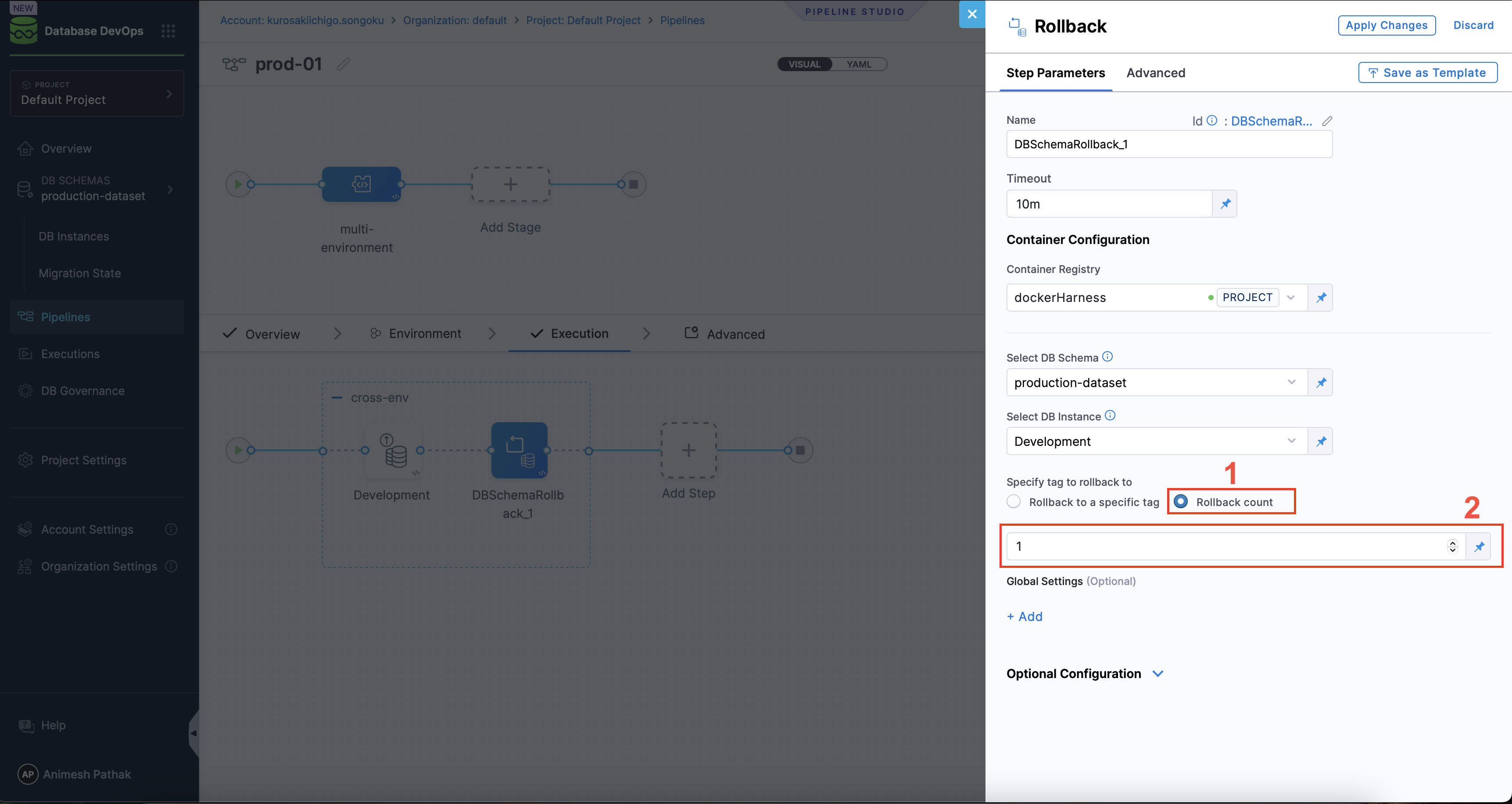
{% tab title="Rollback by Count" %}
To rollback a database schema by count in Harness Database DevOps, follow these steps:
1. In Harness, go to the **Database DevOps** module and select your **Project**.
2. Select the **Pipelines** tab on the side menu, and open the pipeline in your Harness Database DevOps interface where the rollback will be executed.
3. In the configuration for the rollback step, provide the following details:
* **DB Schema:** Specify the name of the database schema that you want to roll back.
* **DB Instance:** The name of the DB Instance. This is the Instance that will be used in the pipeline where the rollback will take place.
* **Rollback Count:** Enter the number of changesets you want to roll back.
4. Run the pipeline with the configured rollback step.
5. After the rollback is complete, verify that the database schema has been reverted to the desired state. This may involve checking the schema structure and ensuring that the specified number of changesets have been undone.
{% endtab %}
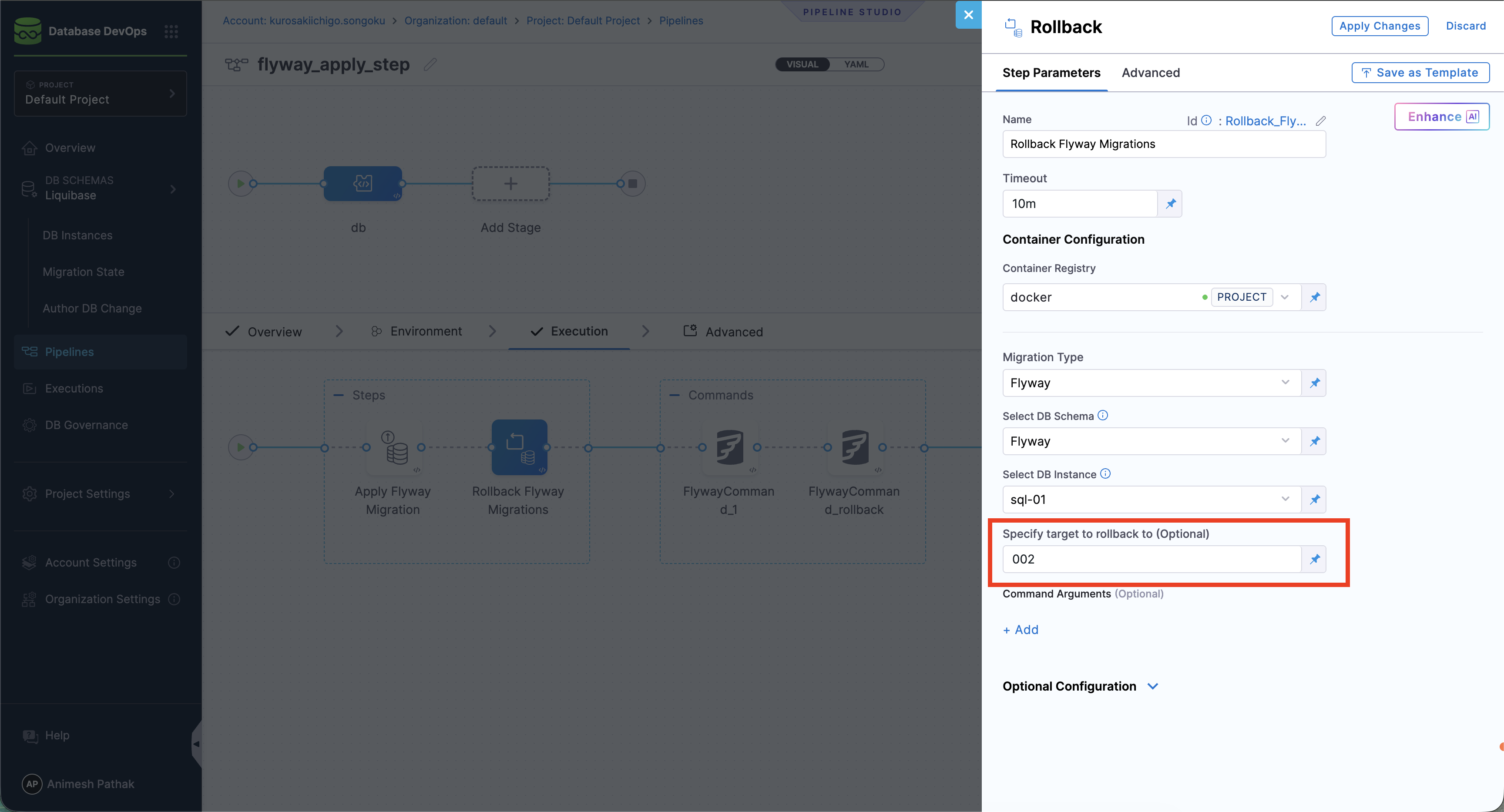
{% tab title="Rollback to Target" %}
To rollback a database schema to a specific target version in Harness Database DevOps, follow these steps:
1. In Harness, go to the **Database DevOps** module and select your **Project**.
2. Select the **Pipelines** tab on the side menu, and open the pipeline in your Harness Database DevOps interface where the rollback will be executed.
3. In the configuration for the rollback step, provide the following details:
* **DB Schema:** Specify the name of the database schema that you want to roll back.
* **DB Instance:** The name of the DB Instance. This is the Instance that will be used in the pipeline where the rollback will take place.
* **Rollback Target:** Enter the target version to which you want to roll back the schema.
4. Run the pipeline with the configured rollback step.
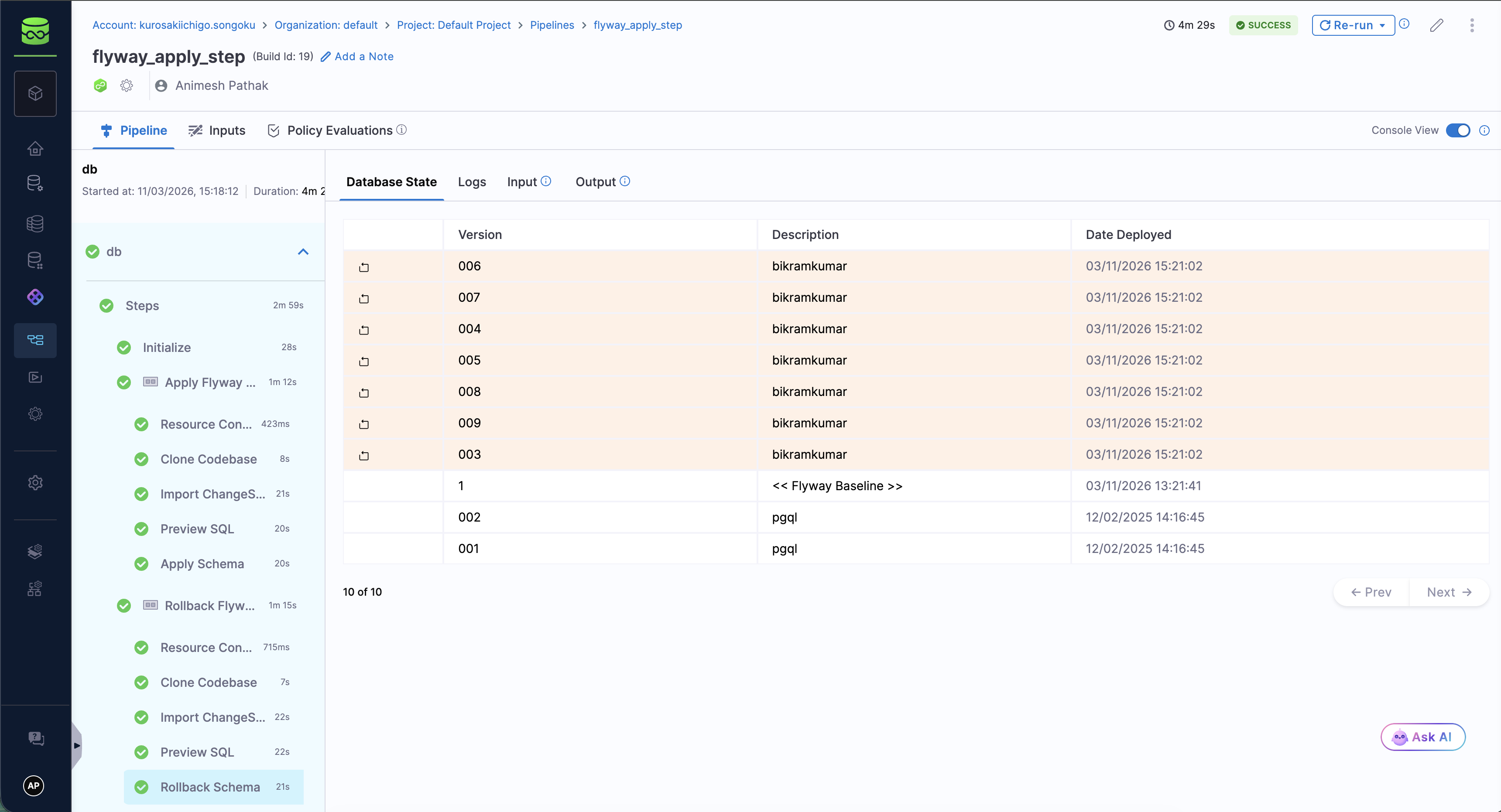
5. After the rollback is complete, verify that the database schema has been reverted to the desired state. This may involve checking the schema structure and ensuring that the specified number of changesets have been undone.
{% endtab %}
{% tab title="Rollback a specific changeset" %}
Use this mode when you need to revert **one** applied changeset without rolling back later changesets. Unlike rollback by tag or by count, this mode does not walk backward through applied history. It targets a single changeset identity and leaves every other applied changeset in place.
{% hint style="warning" %}
**Warning: rolling back changesets out of order can result in your database being left in an inconsistent state and is not recommended**
Harness does not analyze dependencies between changesets. If a later changeset depends on the one you revert, the database can be left in an inconsistent state.
{% endhint %}
To roll back a specific changeset in Harness Database DevOps:
1. In Harness, go to the **Database DevOps** module and select your **Project**.
2. Select the **Pipelines** tab, then open the pipeline where the rollback will run.
3. Open the **Rollback DB Schema** step (or add one). Go to [Rollback DB Schema step](/database-devops/use-db-devops/deployment-pipeline-configuration/step-types/rollback-dbschema-step.md) for step parameters.
4. Set **Migration Type** to **Liquibase** or **Flyway**, matching your schema.
5. Select the **DB Schema** and **DB Instance** for the rollback.
6. Under **Specify tag to rollback to**, select **Rollback a specific changeset**.
7. Enter the fully qualified changeset identity using this format:
`::::`
| Part | Description |
| ------------------------ | ------------------------------------------------------ |
| `file-path-of-changeset` | Path of the changelog file that contains the changeset |
| `changeset-id` | Changeset `id` |
| `changeset-author` | Changeset `author` |
Separate the three parts with `::`. Each part must be non-empty and must match the applied changeset.
For the sample changelog below, these are valid FQN values:
* `sample.changelog.yaml::3::dbe_team`
8. Click **Apply Changes**, then run the pipeline.
After the step succeeds, verify that only the targeted changeset was reverted and that the rest of the schema still matches your expectations.
**Sample changelog**
The following excerpt from `sample.changelog.yaml` shows three applied changesets. To roll back only the index created in changeset `9`, use `sample.changelog.yaml::9::dbe_team`.
{% code title="sample.changelog.yaml" overflow="wrap" %}
```yaml
databaseChangeLog:
- changeSet:
id: 3
author: dbe_team
changes:
- addColumn:
tableName: employees
columns:
- column:
name: email
type: varchar(255)
rollback:
- dropColumn:
tableName: employees
columnName: email
- changeSet:
id: 9
author: dbe_team
changes:
- createIndex:
indexName: idx_employee_email
tableName: employees
columns:
- column:
name: email
rollback:
- dropIndex:
indexName: idx_employee_email
tableName: employees
- changeSet:
id: 17
author: dbe_team
changes:
- insert:
tableName: projects
columns:
- column:
name: id
valueNumeric: 1
- column:
name: project_name
value: "Website Redesign"
- column:
name: start_date
valueDate: "2025-01-01"
- column:
name: budget
valueNumeric: 50000.00
rollback:
- delete:
tableName: projects
where: id = 1
```
{% endcode %}
**Pipeline step YAML**
```yaml
- step:
type: DBSchemaRollback
name: Revert employee email index
identifier: revert_employee_email_index
spec:
dbSchema: orders
dbInstance: prod_primary
changesetFQN: "sample.changelog.yaml::9::dbe_team"
```
**What this mode does**
* Runs the rollback logic defined on that changeset (automatic inverse or an explicit `rollback` block).
* Removes only that changeset's row from migration history.
* Does not roll back changesets applied before or after the target.
**After the rollback**
Decide what to do with the changeset in source control: modify it and redeploy, leave it so a later apply can redeploy it, or remove it from the changelog.
**Limitations**
* **No external rollback script:** This mode does not accept a separate external rollback SQL file. The changeset must define rollback behavior itself. Go to [Automatic and custom rollbacks](/database-devops/use-db-devops/deployment-pipeline-configuration/rollback-and-failure-strategies/automatic-and-custom-rollback.md) to add rollback statements on the changeset.
* **No dependency validation:** Harness does not detect whether later changesets depend on the changeset you revert. The out-of-order warning in the UI is intentional.
* **Deployment tags on the target row are removed:** If the history row for the changeset you roll back also held a deployment tag, that tag is deleted with the row. A later **Rollback to a specific tag** that uses that tag can fail because the tag no longer exists.
{% endtab %}
{% endtabs %}
### Roll back to a previous database state
The **Apply Schema** step in our deployment pipeline applies database changeSets and provides an expression pointing to the tag marking the database state before deployment.
**How it works**
* If a Liquibase tag exists on the last changeSet, it is captured and exposed in the rollback expression.
* If no tag exists, the Apply Schema step creates one before applying new changes.
* Use this exposed tag as an expression to rollback to the previous state.
Expression format:
1. If the Apply Schema step runs as part of a different stage: `<+pipeline.stages.{stageIdentifier}.spec.execution.steps.{stepGroupIdentifier}.steps.{stepIdentifier}.output.preStartTag>`
2. If the Apply Schema step runs as part of the same stage: `<+execution.steps.{stepGroupIdentifier}.steps.{stepIdentifier}.output.preStartTag>`
Example: For the following pipeline configuration, the expressions would be:
* `<+pipeline.stages.s2.spec.execution.steps.stepGroup1.steps.DBSchemaApply_1.output.preStartTag>`
* `<+execution.steps.stepGroup1.steps.DBSchemaApply_1.output.preStartTag>`

### Built-in failure strategies including rollback
When managing database schema changes, it is crucial to have mechanisms in place to handle failures gracefully. Built-in failure strategies, including rollback, are designed to protect your application and data by providing automated responses when something goes wrong during a database update.
Rollback is the process of undoing changes that were made to the database if an error occurs during an update. This ensures that the database is returned to its previous state, preventing partial updates that could lead to inconsistencies or application crashes.
This reduces the risk of downtime or data corruption and allows teams to quickly address issues without having to manually intervene.
### Automated rollback for database schema changes
When managing database schema changes, the risk of something going wrong is always present. With Harness DB DevOps, you can help mitigate this risk by providing an automated rollback feature. This feature ensures that if a schema change fails, the database can be quickly and automatically restored to its previous state, maintaining stability and data integrity.
**What is automated rollback?**
Automated rollback is a feature that automatically reverses database changes if an error occurs during a deployment. This prevents partial or inconsistent updates that could disrupt your application or lead to data corruption.
In Harness DB DevOps, automated rollback leverages tags and versioning to ensure a smooth and reliable process. There are two main scenarios where rollback can occur:
1. **Immediate Rollback:** If a change fails to apply during deployment.
2. **Delayed Rollback:** If a change is successfully applied, but a rollback is later required.
{% tabs %}
{% tab title="Immediate Rollback" %}
By default, if a change fails to apply during deployment, Harness DB DevOps will automatically roll back the change using the database's built-in transaction rollback mechanism. This is known as an **immediate rollback**. It ensures that your database remains in a consistent state by **undoing all changes in the current transaction**.
Immediate rollback is triggered automatically when:
* A changeset fails validation or execution
* A precondition is not met
* A Liquibase error halts schema application
* The database returns an error during DDL or DML execution
Immediate rollback is automatic and requires no manual intervention, which makes it ideal for preventing partial updates during failures in the apply phase of your deployment pipeline.
{% hint style="warning" %}
**Transactional DDL support**
Not all databases support transactional DDL. For example, MySQL with certain storage engines (for example, MyISAM) may not fully support transactional rollbacks. In such cases, fallback strategies like rollback by tag or count should be considered.
{% endhint %}
{% endtab %}
{% tab title="Delayed Rollback" %}
In some cases, you might need to roll back changes that were successfully applied. This could be due to:
* A subsequent change in the deployment pipeline failing
* An application health check failing after deployment
* Other operational or business reasons
{% endtab %}
{% endtabs %}
For these scenarios, Harness DB DevOps provides a **Rollback DB Schema** pipeline step. Configure the step to roll back to a tag, by count, or by a specific changeset, so you can revert the schema to a known good state.
{% hint style="info" %}
**Custom rollback scripts**
You can also use custom rollback scripts or commands in your pipeline to handle more complex rollback scenarios. Go to [Custom rollback statements](/database-devops/use-db-devops/deployment-pipeline-configuration/rollback-and-failure-strategies/automatic-and-custom-rollback.md#custom-rollback-statements) to write custom rollback logic in your changelog.
{% endhint %}
### Frequently asked questions
Can Harness rollback database changes automatically?
Yes. Harness provides built-in support for automated rollbacks during and after deployment failures using rollback tags.
What is the difference between immediate and delayed rollback?
Immediate rollback occurs when a deployment fails mid-process. Delayed rollback happens after a successful deployment if later steps fail or issues arise.
Do I need to create rollback tags manually?
Tags can be created manually or automatically as part of the Apply Schema step in your pipeline. These tags serve as rollback points.
Is this compatible with Liquibase?
Yes. Harness Database DevOps uses Liquibase under the hood and supports native Liquibase rollback workflows and tagging, including rollback of a specific changeset.
Is rollback compatible with Flyway?
Yes. Harness Database DevOps also supports Flyway. You can roll back to a specific Flyway target version, and you can use **Rollback a specific changeset** when **Migration Type** is **Flyway**.
Can I roll back only one changeset without rolling back later ones?
Yes. On the **Rollback DB Schema** step, select **Rollback a specific changeset** and provide the fully qualified identity in the form `::::`. Only that changeset is reverted. Later changesets are left applied. Review the out-of-order warning before you use this mode.
How do I verify a rollback was successful?
Monitor the pipeline execution logs and inspect the schema to confirm that the intended changes were reverted. For a specific-changeset rollback, confirm that only the targeted changeset was undone and that its history row was removed.
***
## Troubleshooting
Rollback step not executing
Verify the rollback step is configured in the pipeline with the correct failure strategy. Check that the rollback step has access to the same DB Schema and DB Instance as the failed apply step. Ensure the rollback step is in the rollback steps section, not the execution steps.
Cannot roll back to previous state
For Liquibase, verify that changesets include rollback blocks or use reversible change types. Some operations like `` or `` require explicit rollback statements. Go to [Automatic and custom rollbacks](/database-devops/use-db-devops/deployment-pipeline-configuration/rollback-and-failure-strategies/automatic-and-custom-rollback.md) for rollback script examples.
Tag-based rollback fails after deployment
Check that the Apply DB Schema step completed the post-deployment tagging. Verify the tag expression in the rollback step matches the tag created by the apply step. Use `preStartTag` for rollback to the state before the current deployment.
If you previously used **Rollback a specific changeset** on a row that held the tag, that tag was removed with the history row. Choose a different remaining tag, or create a new tag before you rely on tag-based rollback again.
Specific-changeset rollback fails to resolve the target
Confirm the value uses three non-empty parts separated by `::` in the form `::::`. Verify the file path, id, and author match the applied changeset exactly, including path spelling. Confirm the changeset is still recorded in migration history before the step runs.
Automated rollback triggers incorrectly
Review the failure strategy configuration on the Apply DB Schema step. Check the conditions under which rollback should trigger. Verify that transient errors like network timeouts are handled appropriately to avoid unnecessary rollbacks.
***
## Next steps
The following resources provide information for enhancing rollback strategies and pipeline configuration:
* Go to [Automatic and custom rollbacks](/database-devops/use-db-devops/deployment-pipeline-configuration/rollback-and-failure-strategies/automatic-and-custom-rollback.md) for Liquibase rollback SQL generation and custom rollback statements.
* Go to [Failure strategies in Database DevOps](/database-devops/use-db-devops/deployment-pipeline-configuration/rollback-and-failure-strategies/failure-strategies.md) to configure how your pipeline responds to changeset failures.
* Go to [Create a pipeline in Database DevOps](/database-devops/use-db-devops/deployment-pipeline-configuration/create-a-pipeline.md) to build a pipeline with rollback steps configured.
* Go to [Rollback DB Schema step](/database-devops/use-db-devops/deployment-pipeline-configuration/step-types/rollback-dbschema-step.md) to configure the step parameters for each rollback mode.
{% @harness-feedback/feedback %}