> For the complete documentation index, see [llms.txt](https://developer.harness.io/llms.txt). Markdown versions of documentation pages are available by appending `.md` to page URLs; this page is available as [Markdown](https://developer.harness.io/infrastructure-as-code-management/platform/workspaces/workspace-overview.md).
# Workspaces overview
Understand what a workspace is in Harness IaCM, including the overview tab, cost visibility cards, workspace tabs, and statuses.
{% hint style="info" %}
This feature is in Beta[^1] and requires enablement. [View all early access features.](/release-notes/features.md)
{% @harness-feature-flag-access/request-feature-flag-access module="infrastructure-as-code-management" pagePath="infrastructure-as-code-management/platform/workspaces/workspace-overview" featureFlags="%5B%7B%22name%22%3A%22IaCM%20Workspace%20Overview%22%2C%22key%22%3A%22IACM\_OVERVIEW\_V3%22%2C%22status%22%3A%22BETA%22%2C%22description%22%3A%22Introduces%20a%20redesigned%20workspace%20Overview%20tab%20with%20a%20new%20layout%20showing%20resource%20counts%2C%20live%20cloud%20costs%2C%20cost%20optimization%20opportunities%2C%20provisioner%20details%2C%20and%20recent%20provisioning%20activity%20at%20a%20glance.%22%7D%5D" %}
{% endhint %}
A workspace is the core unit in Infrastructure as Code Management (IaCM). It brings together your IaC source repository, cloud provider connector, provisioner configuration, and infrastructure state into a single named environment. Each workspace maps to one state file and has its own independent lifecycle.
You can create multiple workspaces from the same IaC configuration to manage separate environments, such as development, staging, and production. Each workspace maintains its own state, variables, and execution history. Pipelines run operations against a workspace (plan, apply, destroy, and drift detection) to provision and manage the infrastructure it defines.
***
## What you will learn from this topic
* **Workspace concept:** What a workspace is and how it relates to your infrastructure state and pipeline operations.
* **Overview tab cards:** What each card shows and when data appears on the workspace Overview tab.
* **Cost visibility:** How Harness surfaces cost estimates from Infracost and actual costs from Harness Cloud Cost Management (CCM).
* **Workspace tabs:** How to navigate the workspace tabs and what each one contains.
* **Workspace statuses:** What each workspace status means and when it is applied.
***
## Workspace overview tab
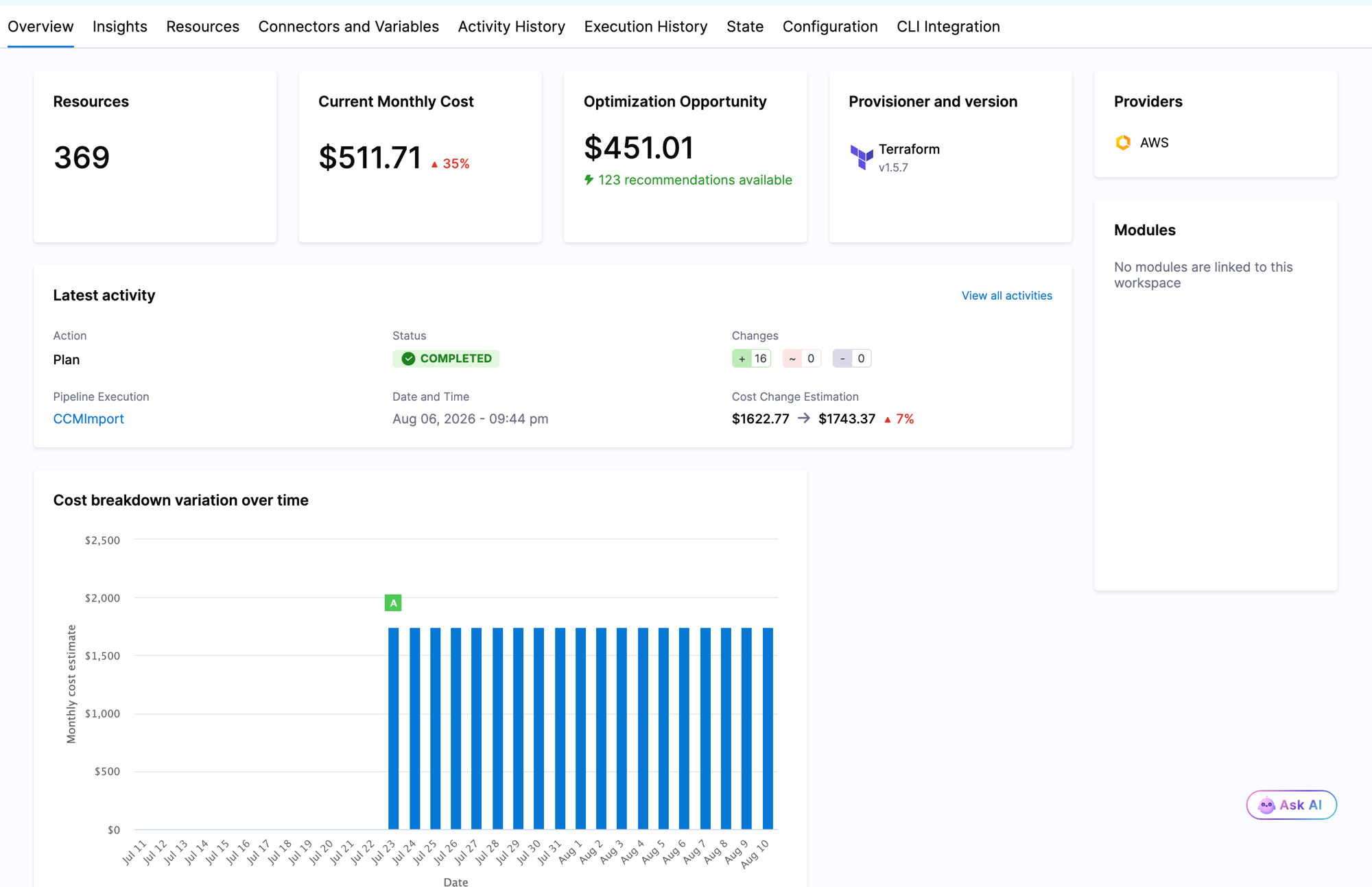
The **Overview** tab gives you a snapshot of the infrastructure managed by a workspace, including resource counts, live cost data, cost optimization opportunities, provisioner details, and recent activity.
The overview displays the following cards:
* **Resources:** Total count of infrastructure resources in the current workspace state.
* **Current Monthly Cost:** Actual monthly cloud spend for resources in this workspace, pulled from Harness Cloud Cost Management (CCM). Requires Cloud Cost Management Integration to be enabled in the workspace configuration.
* **Optimization Opportunity:** Estimated monthly savings from CCM recommendations, along with a count of available recommendations for this workspace. Requires Cloud Cost Management Integration to be enabled.
* **Provisioner and version:** The IaC provisioner (Terraform, OpenTofu, or AWS CDK) and the version configured for this workspace.
* **Providers:** Cloud providers used by the resources in this workspace.
* **Modules:** Registry modules referenced by this workspace.
The **Latest activity** section shows the most recent pipeline execution. It includes its action (plan, apply, or destroy), status, resource changes, and cost change estimation. Cost change estimation is the Infracost estimated cost delta from the latest plan run. Go to [Cost estimation](/infrastructure-as-code-management/platform/workspaces/cost-estimation.md) to enable cost change estimation. The **Cost breakdown variation over time** chart displays historical monthly cost data for the workspace.
***
## Cost visibility
Harness IaCM surfaces two types of cost data in a workspace. You enable each one independently in the workspace **Configuration** tab.
### Cloud cost estimation
Cloud Cost Estimation uses [Infracost](https://www.infracost.io/) to calculate estimated monthly cost changes from a Terraform or OpenTofu plan. Estimates appear before apply and on each execution's **Cost Change Estimation** tab. Infracost uses standard public cloud pricing.
{% hint style="info" %}
**Estimate coverage**
Estimates do not reflect enterprise agreements, reserved instances, or usage-based charges.
{% endhint %}
### Cloud Cost Management integration
Cloud Cost Management (CCM) Integration connects the workspace to the Harness CCM module to display **actual** infrastructure costs and cost optimization recommendations. When enabled, Harness syncs cost and recommendation data from CCM for the cloud resources in this workspace and displays the results in the **Current Monthly Cost** and **Optimization Opportunity** cards on the Overview tab.
CCM Integration requires the Harness CCM module to be enabled on your account. It also requires provisioned cloud resources on AWS, Azure, or Google Cloud Platform (GCP). Cost data refreshes approximately every 12 hours. Go to [Cloud Cost Management](https://developer.harness.io/cloud-cost-management) to set up the CCM module.
Go to [Cost estimation](/infrastructure-as-code-management/platform/workspaces/cost-estimation.md) to enable and configure both cost features.
***
## Workspace tabs
To reach a workspace, go to **IaCM** and select **Workspaces**, then select a workspace from the list. The following tabs are available:
* **Overview:** Snapshot of resource counts, live cost data, provisioner details, and latest pipeline activity.
* **Resources:** All infrastructure resources, data sources, and outputs from the current state. Go to [Workspace settings](/infrastructure-as-code-management/platform/workspaces/workspace-tabs.md) for details.
* **Connectors and Variables:** Connectors and input variables applied during pipeline execution. Go to [Connectors and variables](/infrastructure-as-code-management/platform/iacm-connectors-variables/connectors-variables.md) to configure them.
* **Execution History:** Log of pipeline operations (plan, apply, destroy, drift detection) for this workspace.
* **State:** The complete state file with version history and rollback capability. Go to [Roll back workspace state](/infrastructure-as-code-management/platform/workspaces/state-rollback.md) to restore a previous version.
* **Configuration:** Workspace settings including repository details, provisioner, and cloud cost integration options.
* **CLI Integration:** Instructions for using the Harness CLI with this workspace as a remote backend.
Go to [Workspace settings](/infrastructure-as-code-management/platform/workspaces/workspace-tabs.md) to explore each tab in detail.
***
## Workspace statuses
A workspace displays one of the following statuses:
* **Active:** Successfully provisioned and running.
* **Inactive:** Successfully destroyed or never provisioned.
* **Drifted:** Drift was detected between the workspace state and the actual cloud infrastructure.
* **Provisioning:** Harness is provisioning the workspace.
* **Destroying:** Harness is destroying the workspace.
* **Failed:** Errors were encountered during provisioning or destroying.
* **Apply\_Needed:** An apply operation is required to bring the cloud infrastructure in sync with the workspace configuration.
* **Unknown:** Changes were made to the cloud infrastructure outside of IaCM.
Go to [Workspace statuses](/infrastructure-as-code-management/platform/workspaces/workspace-statuses.md) to filter and interpret workspace statuses.
***
## Related concepts
* Go to [Create a workspace](/infrastructure-as-code-management/platform/workspaces/create-workspace.md) to set up a new workspace from scratch, clone an existing one, or use a template.
* Go to [Cost estimation](/infrastructure-as-code-management/platform/workspaces/cost-estimation.md) to enable Infracost estimates and Cloud Cost Management Integration.
* Go to [Workspace settings](/infrastructure-as-code-management/platform/workspaces/workspace-tabs.md) to understand each workspace tab and its settings.
* Go to [Provision a workspace](/infrastructure-as-code-management/platform/workspaces/provision-workspace.md) to run plan, apply, and destroy operations.
* Go to [Workspace role-based access control (RBAC)](/infrastructure-as-code-management/platform/workspaces/workspace-rbac.md) to configure access permissions.
{% @harness-feedback/feedback %}
[^1]: Off by default. If you want to try it and share feedback, request access and Harness will turn it on for your account. Beta features can change and may not be ready for production use.