catalog-yaml-1o
This page is part of IDP 1.0 and is no longer maintained.
In this documentation we describe the YAML format and semantics of catalog entities. Although it's possible to name catalog entity descriptor files however you wish, we recommend that you name them catalog-info.yaml. More detailed instructions regarding this can be found in the Descriptor Format of Catalog Entities
Support for Harness Account Variables [IDP 1.0]
In the context of Harness IDP you can use all the custom account variables and account scoped built-in variables in IDP YAML.
...
annotations:
    harness.io/pipelines: |
        Build: https://app.harness.io/ng/account/<+account.identifier>/home/orgs/<+variable.account.orgIdentifier>/projects/<+variable.account.projectIdentifier>/pipelines/Build_IDP_UI_App
...
...
spec:
  type: <+account.identifier>
  lifecycle: <+variable.account.orgIdentifier> <+variable.account.projectIdentifier>
Entity Kinds []
Kind: Component
The template given below is an example used for self-service onboarding using the Harness Custom Field extensions
apiVersion: backstage.io/v1alpha1
kind: Component
metadata:
  name: artist-web
  description: The place to be, for great artists
  labels:
    example.com/custom: custom_label_value
  annotations:
    example.com/service-discovery: artistweb
  tags:
    - java
  links:
    - url: https://admin.example-org.com
      title: Admin Dashboard
      icon: dashboard
      type: admin-dashboard
spec:
  type: website
  lifecycle: production
  owner: artist-relations-team
  system: public-websites
Kind: Template
apiVersion: scaffolder.backstage.io/v1beta3
kind: Template
metadata:
  name: Example Template
  title: Create a new service
  description: A template to create a new service
  tags:
    - nextjs
    - react
    - javascript
spec:
  owner: user:default/username
  type: service
  parameters:
    - title: Service Details
      required:
        - project_name
        - template_type
        - public_template_url
        - repository_type
        - repositoty_description
        - repository_default_branch
        - direct_push_branch
        - slack_id
      properties:
        project_name:
          title: Project Name
          type: string
          description: Mention the project name
        token:
          title: Harness Token
          type: string
          ui:widget: password
          ui:field: HarnessAuthToken
        projectId:
            title: Project Identifier
            description: Harness Project Identifier
            type: string
            ui:field: HarnessProjectPicker
            ui:autofocus: true
        orgId:
            title: Org Identifier
            description: Harness org Identifier
            type: string
            ui:field: HarnessAutoOrgPicker
            ui:autofocus: true
        template_type:
          title: Type of the Template
          type: string
          description: Type of the Template
        public_template_url:
          title: Give a Public template URL
          type: string
          description: Give a Public Cookiecutter Template
        repository_type:
          type: string
          title: Repository Type
          enum:
            - public
            - private
          default: Public
        repositoty_description:
          type: string
          title: Add a description to your repo
          description: Auto-generated using Self-Service-Flow of Harness-IDP
        repository_default_branch:
          title: Name of your Default Branch
          type: string
          description: name your branch
        direct_push_branch:
          title: Name of your develop branch
          type: string
          description: Name the Branch to which changes will be updated
        slack_id:
          title: Name of your slack ID
          type: string
          description: Give the slack ID to which notifications would be sent
        owner:
          title: Choose an Owner for the Service
          type: string
          ui:field: OwnerPicker
          ui:options:
            allowedKinds:
              - Group
  steps:
    - id: trigger
      name: Creating your react app
      action: trigger:harness-custom-pipeline
      input:
        url: "Harness Pipeline URL"
        inputset:
          project_name: ${{ parameters.project_name }}
          template_type: ${{ parameters.template_type }}
          public_template_url: ${{ parameters.public_template_url }}
          repository_type: ${{ parameters.repository_type }}
          repositoty_description: ${{ parameters.repository_description }}
          repository_default_branch: ${{ parameters.repository_default_branch }}
          direct_push_branch: ${{ parameters.direct_push_branch }}
          slack_id: ${{ parameters.slack_id }}
        apikey: ${{ parameters.token }}
    # The final step is to register our new component in the catalog.


  output:
    links:
      - title: Pipeline Details
        url: ${{ steps.trigger.output.PipelineUrl }}
Kind: API
We have detailed descriptions here on the how to add API docs.
Kind: Group
A group describes an organizational entity, such as for example a team, a business unit, or a loose collection of people in an interest group. Members of these groups are modeled in the catalog as kind User. In Harness IDP, this entity could also be referenced as Harness User Groups
Descriptor files for this kind may look as follows.
apiVersion: backstage.io/v1alpha1
kind: Group
metadata:
  name: infrastructure
  description: The infra business unit
spec:
  type: business-unit
  profile:
    displayName: Infrastructure
    email: infrastructure@example.com
    picture: https://example.com/groups/bu-infrastructure.jpeg
  parent: ops
  children: [backstage, other]
  members: [jdoe]
Kind: User
A user describes a person, such as an employee, a contractor, or similar. Users belong to User Group entities in the catalog or the Harness User Groups.
apiVersion: backstage.io/v1alpha1
kind: User
metadata:
  name: jdoe
spec:
  profile:
    displayName: Jenny Doe
    email: jenny-doe@example.com
    picture: https://example.com/staff/jenny-with-party-hat.jpeg
  memberOf: [team-b, employees]
Kind: Resource
A resource describes the infrastructure a system needs to operate, like BigTable databases, Pub/Sub topics, S3 buckets or CDNs. Modelling them together with components and systems allows visualizing resource footprint, and create tooling around them.
Descriptor files for this kind may look as follows.
apiVersion: backstage.io/v1alpha1
kind: Resource
metadata:
  name: artists-db
  description: Stores artist details
spec:
  type: database
  owner: artist-relations-team
  system: artist-engagement-portal
Kind: System
A system is a collection of resources and components. The system may expose or consume one or several APIs. It is viewed as abstraction level that provides potential consumers insights into exposed features without needing a too detailed view into the details of all components. This also gives the owning team the possibility to decide about published artifacts and APIs.
Descriptor files for this kind may look as follows.
apiVersion: backstage.io/v1alpha1
kind: System
metadata:
  name: artist-engagement-portal
  description: Handy tools to keep artists in the loop
spec:
  owner: artist-relations-team
  domain: artists
Kind: Domain
A Domain groups a collection of systems that share terminology, domain models, business purpose, or documentation, i.e. form a bounded context.
Descriptor files for this kind may look as follows.
apiVersion: backstage.io/v1alpha1
kind: Domain
metadata:
  name: artists
  description: Everything about artists
spec:
  owner: artist-relations-team
Kind: Location
A location is a marker that references other places to look for catalog data.
Descriptor files for this kind may look as follows.
apiVersion: backstage.io/v1alpha1
kind: Location
metadata:
  name: org-data
spec:
  type: url
  targets:
    - http://github.com/myorg/myproject/org-data-dump/catalog-info-staff.yaml
    - http://github.com/myorg/myproject/org-data-dump/catalog-info-consultants.yaml
Create an IDP YAML or catalog-info.yaml []
The IDP YAML or catalog-info.yaml is a crucial descriptor file that provides metadata about the software components you register within our IDP. It serves as a blueprint, detailing essential information about each component, such as its name, description, owner, and other related metadata. This file ensures that our portal accurately represents and organizes the software components, making it easier for teams to discover and understand the tools and services available.
Although it's possible to name catalog entity descriptor files however you wish, we recommend that you name them idp.yaml.
idp.yaml follows the same Descriptor Format of Catalog Entities as Backstage.io.
Start with basic entity information
Begin your YAML file with the basic entity information, this contains the kind which could be any of the following:
and few others.
Out of this Component is quite widely used for service, website, library, etc. which needs to be specified as spec.type as discussed below.
apiVersion: backstage.io/v1alpha1
kind: Component
Provide metadata
Under the metadata section, provide essential details about your component:
metadata:
  name: artist-service
  description: The place to be, for great artists
Add labels (Optional)
You can add key/value pairs as labels to classify the component:
labels:
  example.com/custom: custom_label_value
Add annotations (Optional)
Annotations are used to reference external systems or provide additional non-identifying metadata:
annotations:
  harness.io/project-url: "https://app.harness.io/ng/account/accountid/cd/orgs/orgid/projects/projectid"
  github.com/project-slug: github/example-org/artist-website
Include tags (Optional)
Tags are single-valued strings used to classify entities:
tags:
  - java
Add Relations
For the relationship graph to get populated, you need to add the dependencies in the catalog-info.yaml

The field spec.owner is a reference. In this case, the string group:pet-managers was given by the user. That means that the kind is Group, the namespace is left out, and the name is pet-managers.
The entries in providesApis are references. In this case, none of them needs to specify a kind since we know from the context that that's the only kind that's supported here. The second entry specifies a namespace, but the other ones don't, and in this context, the default is to refer to the same namespace as the originating entity (external-systems here). So the three references essentially expand to api:external-systems/petstore, api:internal/streetlights, and api:external-systems/hello-world. We expect there to exist three API kind entities in the catalog matching those references.
Read More about relations, in the system model docs. Also reference once mentioned for a single component catalog-info.yaml doesn't need to be included in the dependent components catalog-info.yaml to show up in the relationship graph of both the entities.
# Example catalog-info.yaml
...
spec:
  type: service
  lifecycle: experimental
  owner: group:pet-managers
  dependsOn:
    - Component:manager
    - Component:ng-manager
    - Component:platform-service
  providesApis:
    - accesscontrol-service
    - petstore
    - internal/streetlights
    - hello-world
...
Provide external links (Optional)
External hyperlinks related to the entity can be added for contextual information:
If you're referencing external URLs in your IDP.yaml file, such as Swagger documentation links, please ensure that these URLs are allowed within the Harness Internal Developer Portal. This is a crucial step to ensure that the portal can access and display content from these external sources.
To allow external URLs:
- Navigate to Configure in the Harness Internal Developer Portal.
- Go to URL Allow List.
- Click on +Add Host.
- In the provided field, enter the URL pattern you wish to allow. For example, to allow all URLs from Swagger, you'd enter
*.swagger.com. - Confirm and save your changes.
By following the above steps, you ensure that the portal can safely and correctly access the external content referenced in your IDP.yaml file.
links:
  - url: https://admin.example-org.com
    title: Admin Dashboard
    type: admin-dashboard
Support for Harness Account Variables
You can as well use all the custom account variables and account scoped built-in variables in IDP YAML.
...
annotations:
    harness.io/pipelines: |
        Build: https://app.harness.io/ng/account/<+account.identifier>/home/orgs/<+variable.account.orgIdentifier>/projects/<+variable.account.projectIdentifier>/pipelines/Build_IDP_UI_App
...
...
spec:
  type: <+account.identifier>
  lifecycle: <+variable.account.orgIdentifier> <+variable.account.projectIdentifier>
Specify component details
Under the spec section, provide specific details about the component:
Spec type
The current set of well-known and common values for this field is:
service- a backend service, typically exposing an APIwebsite- a websitelibrary- a software library, such as a npm module or a Java library
Spec owner
In the Harness Internal Developer Portal, the owner of a component can be identified by either:
- Platform User Group ID: The Harness User Group ID for groups synced from identity providers
- Custom User Group [IDP 2.0]: A Custom User Group created directly within IDP as a first-class catalog entity
In both cases, this User Group represents the collective entity that holds ultimate responsibility for the component and possesses the authority and capability to develop and maintain it. Should any issues arise or if there are requests for features, this User Group will serve as the primary point of contact. The primary purpose of this field in the Harness IDP is for display, ensuring that individuals accessing catalog items can easily identify the responsible User Group for a given component.
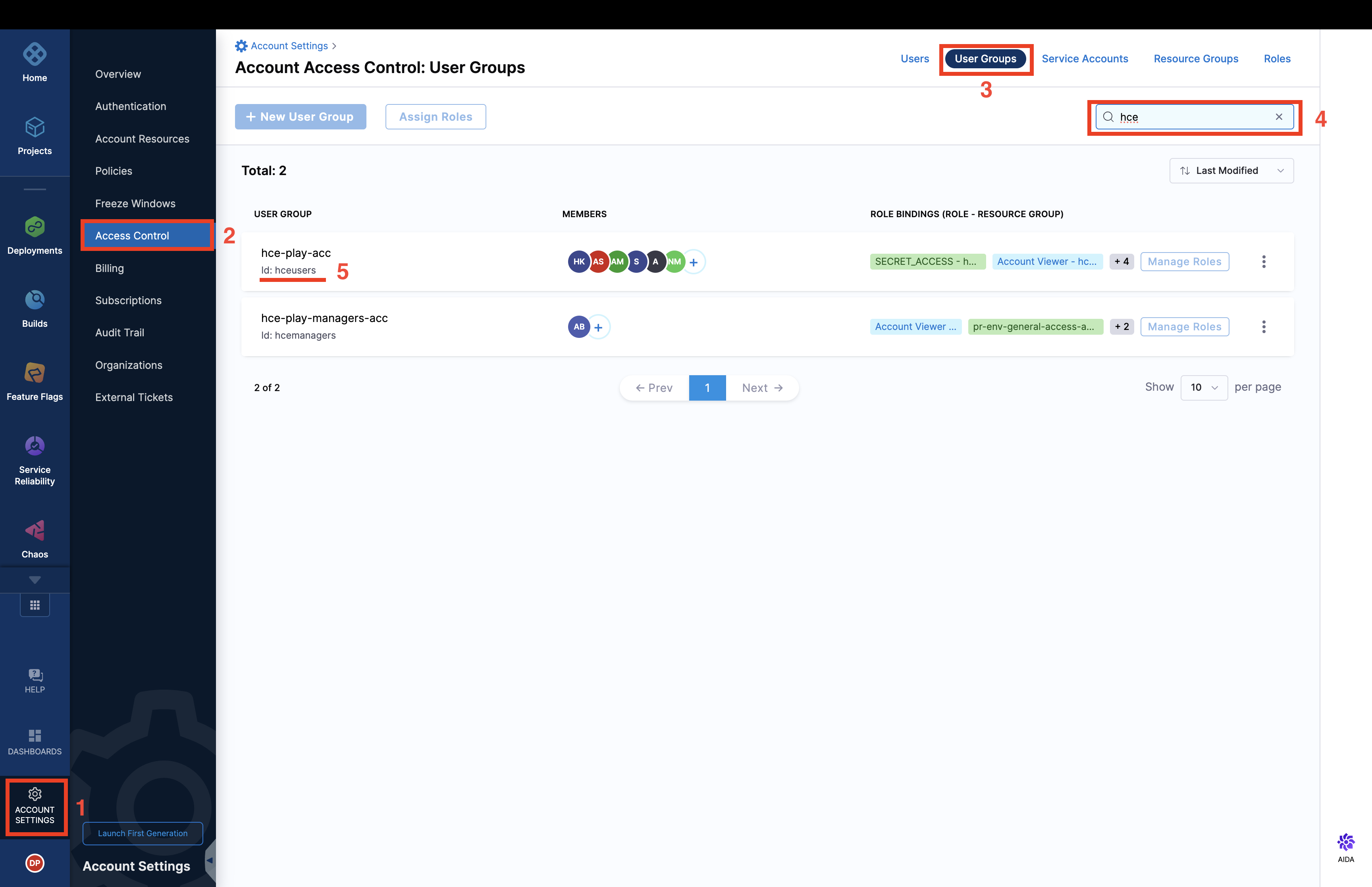
How to get the Harness User Group ID
- Navigate to the bottom left of the Harness dashboard and select Account settings.
- From the Account settings menu, select Access Control.
- Once in the Access Control section, look to the top right of the page and click on User Groups.
- You'll see a search bar at the top. Use this to search for the specific user group you're interested in.
- Once you've located the desired user group, you'll find the User Group ID listed. Simply copy this ID for your reference.
Spec system
A system is a collection of resources and components. The system may expose or consume one or several APIs. It is viewed as abstraction level that provides potential consumers insights into exposed features without needing a too detailed view into the details of all components. This also gives the owning team the possibility to decide about published artifacts and APIs.
Descriptor files for this kind may look as follows.
apiVersion: backstage.io/v1alpha1
kind: System
metadata:
  name: Custom Dashboards
  description: Handles creation of Custom Dashboard across different Harness Modules
spec:
  owner: platformengineeringteam
Spec lifecycle
The lifecycle state of the component, e.g. production. This field is required.
The software catalog accepts any lifecycle value, but an organization should take great care to establish a proper taxonomy for these.
The current set of well-known and common values for this field is:
production- an established, owned, maintained componentdeprecated- a component that is at the end of its lifecycle, and may disappear at a later point in time
Example YAML with all the Spec
spec:
  type: service
  owner: platformengineeringteam
  system: developer-experience
  lifecycle: production
Substitutions in the descriptor format:
The descriptor format supports substitutions using $text, $json, and $yaml. Placeholders like $json: https://example.com/entity.json are substituted by the content of the referenced file. You can reference relative files like ./referenced.yaml from the same location. For example:
spec:
  type: service
  owner: platformengineeringteam
  system: developer-experience
  lifecycle: production
  definition: $text://developer.harness.io/docs/enhancing-developer-experience
Save the file:
Save the file with the recommended name idp.yaml or catalog-info.yaml and upload it on your file in your Git repository. If it is a mono-repo, navigate to its directory and create a idp.yaml at the root of the directory. The file can technically live anywhere (for example, .harness/idp.yaml).
Following is an example of the same.
apiVersion: backstage.io/v1alpha1
kind: Component
metadata:
  name: my-new-service
  description: Description of my new service
  annotations:
    pagerduty.com/integration-key: <sample-service-integration-key>
  tags:
    - java
  links:
    - url: https://admin.example-org.com
      title: Admin Dashboard
      type: admin-dashboard
spec:
  type: service
  lifecycle: production
  owner: team-a
  system: project-x