> For the complete documentation index, see [llms.txt](https://developer.harness.io/llms.txt). Markdown versions of documentation pages are available by appending `.md` to page URLs; this page is available as [Markdown](https://developer.harness.io/feature-flags/readme.md).

# Feature Flags Documentation

Get started with Harness Feature Flags and explore its capabilities.

{% hint style="info" %}

#### New Feature Management & Experimentation (FME) documentation available

We have launched Feature Management & Experimentation documentation covering Feature Management, Release Monitoring, Cloud Experimentation, Warehouse Native Experimentation, and Harness AI.

<a href="/feature-management-experimentation/new-to-fme/get-started.md" class="button primary" data-icon="arrow-right">View New Docs</a>
{% endhint %}

{% hint style="info" %}
This documentation is for Harness Feature Flags. If you use Feature Management Engine (FME), go to the [FME documentation](https://developer.harness.io/feature-management-experimentation/) for feature and SDK updates.
{% endhint %}

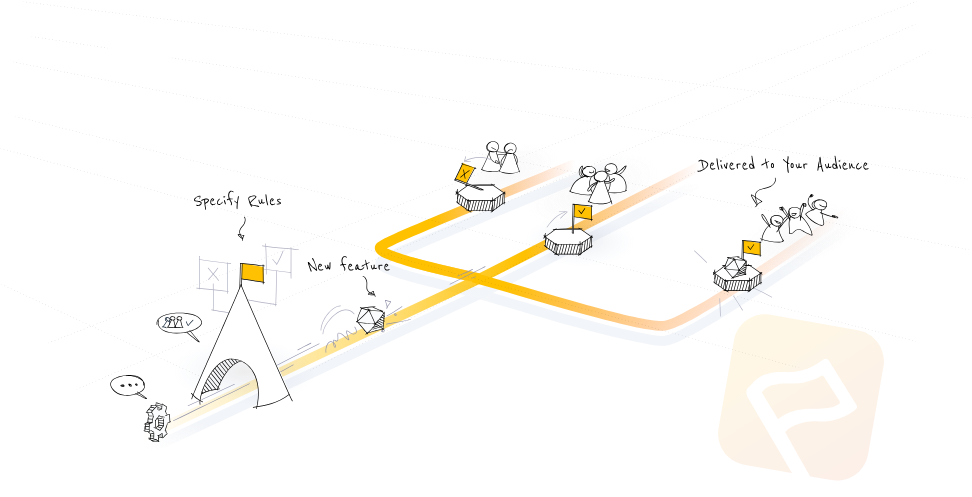
Harness Feature Flags (FF) is a feature management solution that lets you change your software functionality without deploying code. It lets you hide code or behavior without shipping new software versions. A feature flag is like a powerful *if* statement.

<figure><img src="https://3868793495-files.gitbook.io/~/files/v0/b/gitbook-x-prod.appspot.com/o/spaces%2F8hMqy7cgSxMJvSqtZuUT%2Fuploads%2Fgit-blob-73dc044adfd37316728e447f67db27afde593691%2Fimage.png?alt=media" alt=""><figcaption></figcaption></figure>

### Get started with the basics

<table data-view="cards"><thead><tr><th></th><th></th><th data-hidden data-card-target data-type="content-ref"></th></tr></thead><tbody><tr><td><strong>Get started with Feature Flags</strong></td><td>Learn the basics of Harness Feature Flags.</td><td><a href="/feature-flags/new-to-feature-flags/get-started/onboarding-guide.md">Onboarding Guide</a></td></tr><tr><td><strong>Create, update, and view Flags</strong></td><td>Learn how to create different types of flags, edit them, and enable them.</td><td><a href="/feature-flags/use-feature-flags/use-ff/ff-creating-flag.md">Create, Update, &amp; View Flags</a></td></tr><tr><td><strong>Use Feature Flag SDKs</strong></td><td>Choose the right SDK for your application from our numerous client and server SDKs, and then configure it to monitor your flags.</td><td><a href="/feature-flags/use-feature-flags/use-ff/ff-sdks.md">Use FF SDKs</a></td></tr></tbody></table>

### Manage your flags

<table data-view="cards"><thead><tr><th></th><th></th><th data-hidden data-card-target data-type="content-ref"></th></tr></thead><tbody><tr><td><strong>Manage target users and groups</strong></td><td>Control which users or groups see which variation of a flag.</td><td><a href="/feature-flags/use-feature-flags/use-ff/ff-target-management.md">Manage Target Users &amp; Groups</a></td></tr><tr><td><strong>Add a prerequisite to a flag</strong></td><td>Add a flag as dependency to another flag.</td><td><a href="/feature-flags/use-feature-flags/use-ff/ff-creating-flag/add-prerequisites-to-feature-flag.md">Add a Prerequisite to a Flag</a></td></tr><tr><td><strong>Manage flags using Git Experience</strong></td><td>Manage flags using a YAML file in your Git repository.</td><td><a href="/feature-flags/use-feature-flags/use-ff/ff-creating-flag/manage-featureflags-in-git-repos.md">Manage flags with Git</a></td></tr><tr><td><strong>Integrate flags with Jira</strong></td><td>Link flags to Jira issues so you and your team can easily see the associations, jump to creating a flag from a jira ticket, and see a list of jira tickets linked to a flag.</td><td><a href="/feature-flags/use-feature-flags/use-ff/ff-creating-flag/integrate-feature-flag-with-jira.md">Integrate Flags with Jira</a></td></tr><tr><td><strong>Get data on your flags</strong></td><td>View activities and analytics for flags, and track anonymous and monthly active users (MAUs).</td><td><a href="/feature-flags/use-feature-flags/use-ff/ff-data.md">Get Data on Your Flags</a></td></tr></tbody></table>

### Explore other features

<table data-view="cards"><thead><tr><th></th><th></th><th data-hidden data-card-target data-type="content-ref"></th></tr></thead><tbody><tr><td><strong>Connect flags to monitored services</strong></td><td>When you connect Feature Flags to monitored services you can be notified when there are service issues related to flag changes.</td><td><a href="/feature-flags/use-feature-flags/use-ff/connect-monitored-service.md">Connect Flags to Monitored Services</a></td></tr><tr><td><strong>Use pipelines with Feature Flags</strong></td><td>Use pipelines to combine a flag with other actions like adding Jira issues, creating notifications, and adding approvals.</td><td><a href="/feature-flags/use-feature-flags/use-ff/ff-build-pipeline.md">Use Pipelines with FF</a></td></tr><tr><td><strong>Use the Harness Relay Proxy</strong></td><td>The relay proxy lets your app connect directly to Feature Flag services without having to make a significant number of outbound connections.</td><td><a href="/feature-flags/use-feature-flags/use-ff/relay-proxy.md">Use the Relay Proxy with FF</a></td></tr><tr><td><strong>Add policies for a flag</strong></td><td>This topic gives you an overview of Harness Policy Engine and includes an example for how to add a policy for a flag.</td><td><a href="/feature-flags/use-feature-flags/use-ff/ff-build-pipeline.md">Use Pipelines with FF</a></td></tr></tbody></table>

{% @harness-feedback/feedback %}
