> For the complete documentation index, see [llms.txt](https://developer.harness.io/llms.txt). Markdown versions of documentation pages are available by appending `.md` to page URLs; this page is available as [Markdown](https://developer.harness.io/harness-cloud-operations/harness_pipeline_crud_architecture.md).
# Harness Pipeline Get, Create, and Update Architecture
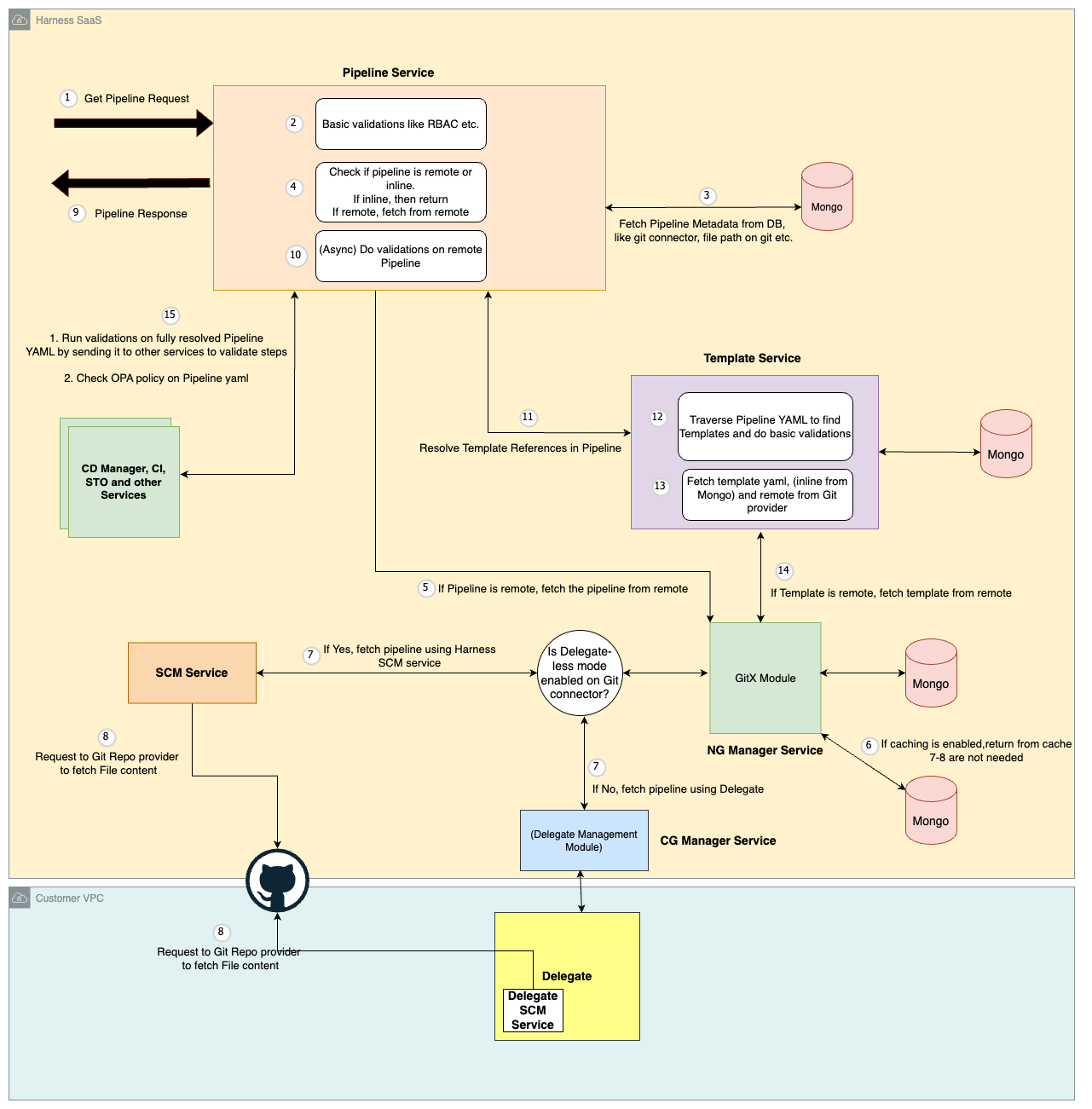
Harness Pipeline get, create, and update architecture.
Click to view full size image
This diagram illustrates the high-level process of the Pipeline Service handling a "Get" request for Pipeline details.
1. **Authorization check**: The service verifies that you have permission to access the specified pipeline.
2. **Pipeline Location**: It then determines the pipeline's location: either stored inline within the database (inline pipeline) or residing in a remote Git repository.
3. **Retrieving Pipeline Definition**:
* **Inline Pipeline**: If the pipeline is inline, the service retrieves the Pipeline YAML definition directly from the database and returns it in the response.
* **Remote Pipeline**: For pipelines in a remote Git repository:
* **Cache Check (Optional)**: If caching is enabled, the service first checks the GitX module within the NG Manager service for a cached copy of the Pipeline YAML for faster retrieval.
* **Download Pipeline YAML**: If not cached or caching is disabled, the service utilizes either the Delegate or Source Code Management (SCM) service to download the YAML definition directly from the remote repository.
4. **Validation**: The retrieved Pipeline YAML undergoes validation within the Pipeline service.
5. **Template Resolution**: The service identifies and resolves any template references included within the Pipeline YAML. This resolution involves communication with the Template Service, which follows a similar retrieval process as described previously (local data store for inline templates or the Git repository for remote ones).
6. **Final Validation**: Finally, the Pipeline service performs comprehensive validation on the entire assembled pipeline YAML, by calling other services, before sending the response back to the user.
Click to view full size image
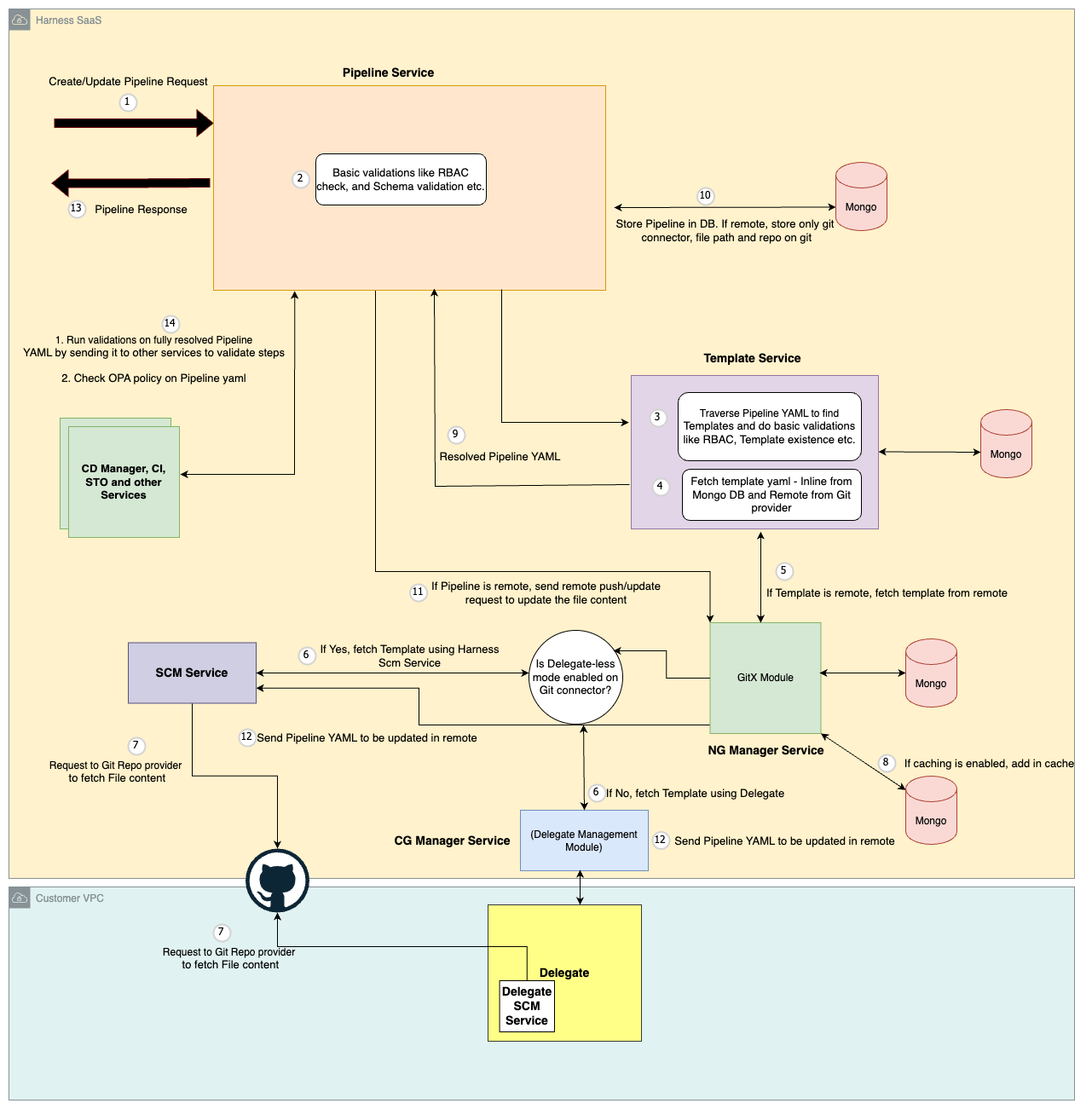
This diagram describes the high-level flow for creating or updating a Pipeline:
1. **Authorization check**: The Pipeline service verifies that you have permission to create or update the pipeline.
2. **Template Resolution**: The Pipeline service sends the request containing the pipeline definition, including any template references, to the Template service.
3. **Template Retrieval**: The Template service resolves each template reference within the pipeline definition:
* **Inline Template**: If a template is inline, the Template service retrieves the YAML definition directly from the database.
* **Remote Template**: For remote templates stored in a Git repository, the Template service follows these steps:
* **Cache Check (Optional)**: If caching is enabled, it checks the GitX module within the NG Manager service for a cached copy of the template YAML for faster retrieval.
* **Download Template YAML**: If not cached or caching is disabled, the Template service utilizes either the Delegate or Source Code Management (SCM) service to download the YAML definition directly from the remote repository.
4. **Full Pipeline Definition**: Once all template references are resolved, the Template service sends back the complete pipeline definition to Pipeline service.
5. **Pipeline Storage**:
* **Inline Pipeline**: For inline pipelines, the complete Pipeline YAML definition is stored directly in the database.
* **Remote Pipeline**: For pipelines referencing a remote Git repository, only metadata like Git connector details (e.g., Git URL), pipeline file location in Git etc are stored in the database.
6. **Remote Pipeline Create/Update**: If the pipeline resides in a remote Git repository, pipeline service sends a request (push for updates, create for new pipelines) to the GitX service to update the pipeline YAML content in the remote repository.
{% @harness-feedback/feedback %}