> For the complete documentation index, see [llms.txt](https://developer.harness.io/llms.txt). Markdown versions of documentation pages are available by appending `.md` to page URLs; this page is available as [Markdown](https://developer.harness.io/harness-platform/3.0/in-harness-3.0/overview.md).
# Overview
Learn the key concepts of the Harness Platform, including the four Harness Agents, accounts, organizations, projects, RBAC, delegates, connectors, and pipelines.
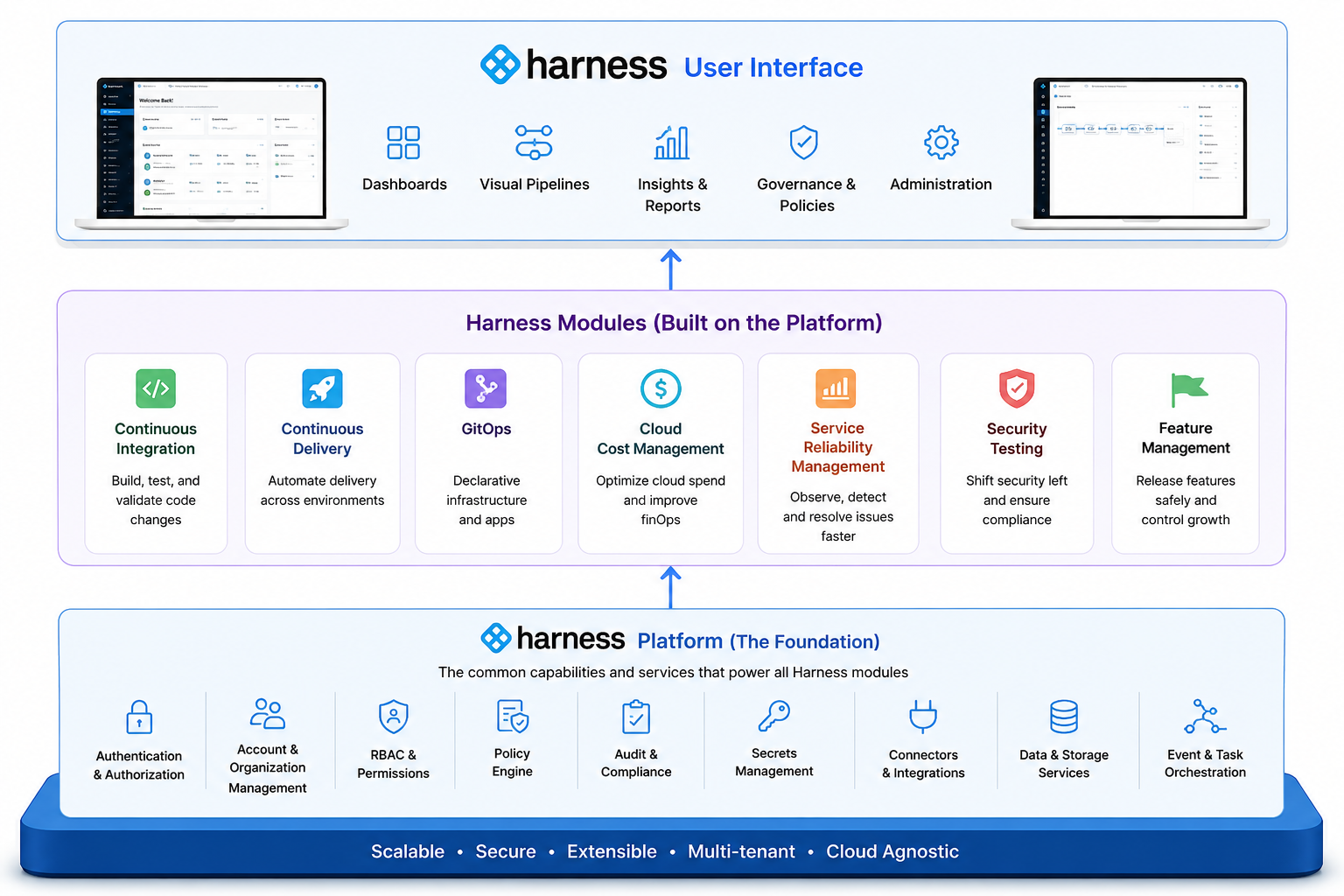
The Harness Platform is the foundation that everything else in Harness is built on. Think of it as the common layer that handles all the shared capabilities your teams need: user management, access control, secrets, connectors, auditing, and notifications. You define these capabilities once and reuse them everywhere.
On top of this foundation sit the four **Harness Agents**, which are the products you use to deliver software, test it for security risk, protect it in production, and manage its cost. Because every Agent runs on the platform, each one automatically inherits all platform capabilities.
Click to view full size image
For example, when you set up authentication, permissions, or notifications at the platform level, those settings apply consistently across every Agent and capability you use.
Harness Platform is also referred to as **Harness Manager**. It is the web UI where you sign in, create projects, set up pipelines, and manage your configurations.
***
### Before you begin
* **Know basic DevOps concepts:** What CI/CD means, what a pipeline is in general terms, and why access control matters in engineering teams.
* **What an identity provider (IdP) is (optional):** Helps you understand the [authentication and RBAC sections](/harness-platform/3.0/harness-platform-resources/authentication/authentication-overview.md).
* **Git basics (optional):** The [Git Experience](#git-experience) section assumes familiarity with repos and YAML.
{% hint style="info" %}
**NEW TO DEVOPS?**
Do not worry if you do not recognize a term. Check the [Harness Glossary](/database-devops/3.0/use-db-devops/reference/glossary.md) as you read.
{% endhint %}
***
### Autonomous SDLC
Harness is the platform for the **Autonomous SDLC**. Coding agents create changes in code. Harness gives AI agents the context and the control to take every code change safely through production and beyond.
Autonomous SDLC does not mean that every action runs without you. Harness supports a range of autonomy, and you decide where each Agent acts on its own, where it recommends an action for you to approve, and where it only reports what it found. The same identity, permissions, policies, approvals, verification, and evidence apply in every mode. You draw the lines, and Harness enforces them.
***
### Harness Agents
Harness organizes its functionality into four Agents. Each Agent is a complete product aligned to a clear outcome, and each one contains a set of capabilities that you activate only when you need them.
| Agent | Outcome | Capabilities |
| ------------------------------------ | ------------------------------------------------- | ---------------------------------------------------------------------------------------------------------------------- |
| **Harness Software Delivery Agent** | Take every code change safely through production. | Code Deployments, Builds, Infrastructure Deployments, Database Deployments, Artifacts, Code Repositories, Code Reviews |
| **Harness Security Testing Agent** | Find and fix risk before production. | Security Testing Orchestration, Supply Chain Security, SAST, SCA, Hardened Images (soon) |
| **Harness Runtime Protection Agent** | Protect applications, APIs, and AI in production. | API Posture Management, API Advanced Protection, AI Security |
| **Harness Cost Management Agent** | Control and optimize cloud and AI costs. | AI Costs, Cloud Costs, Engineering Efficiency |
Capabilities are modular. A capability such as Builds or Cloud Costs is something you turn on inside an Agent, so you pay for and operate only the functionality your teams use.
Additional Harness offerings, such as AI SRE, AI Evals, Internal Developer Portal, Feature Management and Experimentation, and Resilience Testing, run on this same platform foundation. They use the same identity, policy, context, and metering as the four Agents.
{% hint style="info" %}
**MODULES BECOME CAPABILITIES**
If you used Harness before the Agent model, the functionality you rely on has not changed. What were previously described as separate modules are now capabilities inside one of the four Agents. Your pipelines, entitlements, and configurations continue to work.
{% endhint %}
**Why these products are called Agents**
An Agent is more than a chat assistant. Each Agent combines context about your environment, the intelligence to reason over that context, the ability to execute work, and governance over every action it takes.
| Product | Work it owns |
| ------------------------ | -------------------------------------------- |
| A coding agent | Creates changes in code. |
| Software Delivery Agent | Takes each change safely through production. |
| Security Testing Agent | Finds and fixes risk before production. |
| Runtime Protection Agent | Protects software in production. |
| Cost Management Agent | Governs and optimizes cloud and AI costs. |
**The Agent Harness**
All four Agents share one common AI foundation, called the Agent Harness. It provides the following:
* **Expert Agents:** Understand, investigate, explain, recommend, create, and configure through natural language.
* **SDLC Knowledge Graph:** Provides shared context across repositories, services, teams, pipelines, deployments, security findings, runtime behavior, costs, and outcomes.
* **Worker Agents:** Built-in AI workflows that perform substantive work rather than only make recommendations.
* **Governed Orchestration Engine:** Runs work through Harness Delegates inside your own environments and applies identity, permissions, policy, approvals, deterministic workflows, verification, evidence, rollback, and cost controls.
You access all four Agents through one Harness AI experience across the UI, the CLI, and your IDE. Coding agents and other external tools reach the same context and capabilities through Harness MCP.
{% hint style="info" %}
**AGENTS VERSUS DELEGATES AND THE GITOPS AGENT**
Harness Agents are products. Harness Delegates and the Harness GitOps Agent are lightweight workers that run inside your infrastructure and execute tasks on behalf of Harness. For more information on how execution works, see [Delegates](#delegates).
{% endhint %}
***
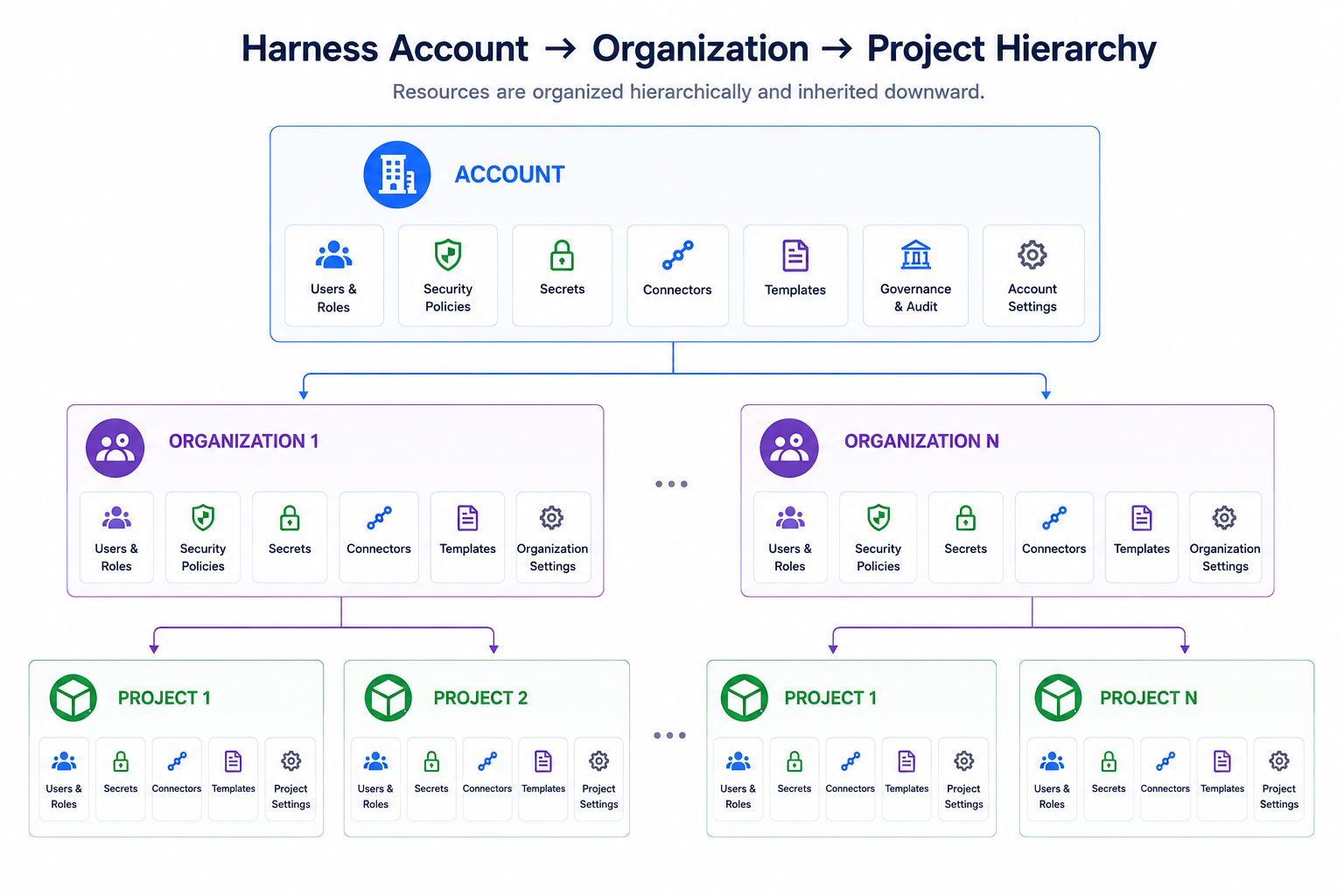
### Account, organizations, and projects
A Harness account is the highest level for all operations you perform in Harness. It is where you define your organizational structure, manage global settings, and control access across all users and projects. Within an account, you create organizations and projects, which let teams work independently while still following the shared security, governance, and access rules set at the account level.
* An **organization** (or *org*) groups together projects that share a common purpose or business goal, such as business units, product lines, or departments.
* A **project** is where teams do their day-to-day work, such as an application or service team, a platform or infrastructure team, or an individual workload.
To set up your account, see [Set up the Harness Platform](https://developer.harness.io/harness-platform/new-to-harness-platform/get-started#set-up-the-harness-platform). For more information on creating and managing organizations and projects, see [Organizations and projects](/harness-platform/3.0/harness-platform-resources/organizations-and-projects.md).
Click to view full size image
***
### Harness SaaS versus SMP offerings
Harness is offered as **Software as a Service (SaaS)** and **Self-Managed** (on-premises) editions. **This documentation covers the SaaS edition.** If you are using Self-Managed Enterprise Edition (SMP), go to the [SMP documentation](https://developer.harness.io/self-managed-enterprise-edition/).
| | **SaaS** | **Self-Managed Enterprise Edition (SMP)** |
| ------------------- | -------------------------------------------------------------------------------------------------------------------------------------------------------------------------------------------------------------------------------------------------------- | --------------------------------------------------------------------------------------------------------------------------------------------------------------------------------------------------------------------------------------------------- |
| **What it is** | Fully managed, cloud-hosted version of Harness. No infrastructure setup required. | Kubernetes-native deployment that runs on your own public or private cloud infrastructure. For more information on how it is deployed, see [SMP overview](/self-managed-enterprise-edition/new-to-self-managed-enterprise-edition/smp-overview.md). |
| **Plans/licensing** | Free, Team, and Enterprise. To compare plans, see [Subscriptions and licenses](/harness-platform/3.0/subscriptions-and-licenses/subscriptions.md). | Requires a valid SMP license key and access to download the Harness SMP software. |
| **Get access** | [Sign up with the Free plan](https://app.harness.io/auth/#/signup/?module=cd\&utm_medium=harness-developer-hub), then [sign in](https://app.harness.io/auth/#/signin). Team/Enterprise accounts are created by invitation from an Account Administrator. | Contact [Harness Support](mailto:support@harness.io) to obtain your license key and software download access. |
| **Setup** | None. Harness manages the infrastructure. | Follow the [installation instructions](/self-managed-enterprise-edition/use-self-managed-enterprise-edition/smp-installationupgrade.md), then sign in at `http://YOUR_DOMAIN_NAME/auth/#/signin`. |
***
### Role-based access control (RBAC)
Role-based access control (RBAC) describes **who** is allowed to perform **what** actions and **where**.
With RBAC, you can delegate administrative responsibility at the organization and project levels instead of managing everything at the account level.
For example, you can assign a project administrator who is responsible for managing access, resources, and settings within a specific project.
Once ownership is delegated:
* Organization and project admins can invite and manage users.
* Teams can independently manage pipelines, Agent capabilities, and platform resources.
* Changes made in one project or organization do not affect others.
This approach reduces dependency on account administrators and allows teams to move faster while maintaining strong governance and security boundaries.
Harness RBAC has three core components:
* **Principals**: The people and systems that need access; users, user groups, and service accounts.
* **Roles**: What actions they can take; for example, create pipelines or view secrets.
* **Resource groups**: Where they can do it; for example, only within a specific project.
You grant access by combining a **role** and a **resource group** and assigning them to a **principal**. Harness RBAC applies across all scopes, from the account level down to individual resources such as projects, pipelines, and services, and to every action an Agent takes, so AI-driven work runs under the same permissions as human work.
For detailed setup, including [adding users](/harness-platform/3.0/harness-platform-resources/platform-access-control/add-users.md), [user groups](/harness-platform/3.0/harness-platform-resources/platform-access-control/add-user-groups.md), [service accounts](/harness-platform/3.0/harness-platform-resources/platform-access-control/add-and-manage-service-account.md), and [API keys and tokens](/harness-platform/3.0/harness-platform-resources/automation/api/add-and-manage-api-keys.md), see the [Harness RBAC documentation](/harness-platform/3.0/harness-platform-resources/platform-access-control/rbac-in-harness.md).
***
### Governance using policy as code
Harness lets you enforce governance and compliance using policy as code, powered by Open Policy Agent (OPA).
Policies act as guardrails that automatically evaluate configurations and actions across the platform. You use them to ensure teams follow standards.
For example, if you want to make sure nobody accidentally deploys to production, you write a rule (a "policy") that Harness checks automatically before every deployment. If the rule fails, the deployment is blocked.
Because every Agent runs through the same Governed Orchestration Engine, these policies also apply to the work that Expert Agents and Worker Agents perform.
You can start quickly by using built-in sample policies or create custom policies tailored to your organization’s needs. For more information, see the [Harness governance overview](/harness-platform/3.0/harness-platform-resources/governance/policy-as-code/harness-governance-overview.md).
***
### Secrets management
Harness includes built-in support for secrets management to securely store and manage sensitive data such as API keys, passwords, and tokens.
Harness encrypts secrets so you can reference them safely across your account without exposing their values. In addition to the built-in secret manager, Harness integrates with popular external secret managers, allowing you to continue using your existing security tools and workflows.
For more information, see the [Harness secrets management overview](/harness-platform/3.0/harness-platform-resources/secrets/secrets-management/harness-secret-manager-overview.md).
***
### Delegates
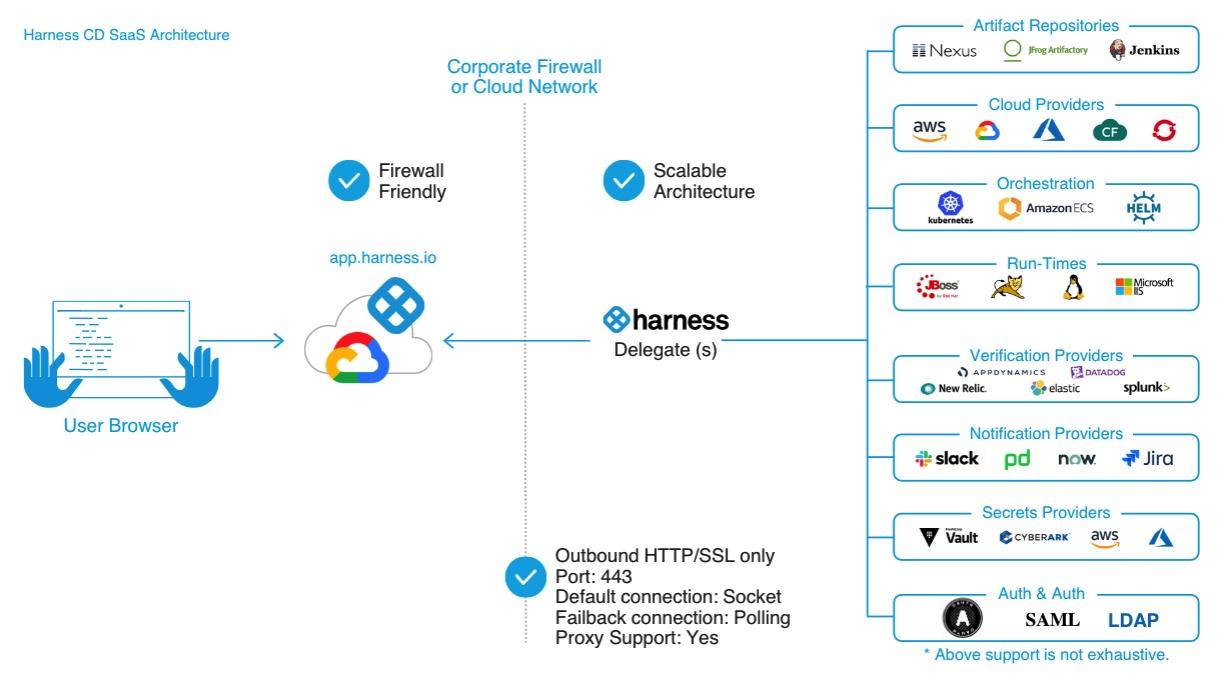
Harness Delegates are lightweight workers that you install in your environment, such as a Kubernetes cluster or a virtual machine, to securely execute tasks on behalf of the Harness Platform.
Delegates connect to Harness Manager using **outbound-only HTTP/HTTPS**, so you do not need any inbound network access. When you run a pipeline, Harness Manager tells the Delegate what to do, and the Delegate performs the actual operations, such as deploying to a cluster or pulling an artifact, within your network.
Delegates are how Agent work stays inside your environment. When a Worker Agent executes a task, the Governed Orchestration Engine runs it through a Delegate using your own credentials, so your code, secrets, and infrastructure never leave your boundary.
Delegates are essential for enabling Harness to perform actions in your infrastructure, but you do not need to install one immediately. You set up a Delegate when configuring pipelines and connectors, and the platform guides you through the installation process.
Harness Delegate architecture diagram
**Harness GitOps Agent**
The Harness GitOps Agent is similar to a Harness Delegate, but it is purpose-built to support **GitOps-based workflows and management**.
GitOps is part of the Software Delivery Agent. To get started, see [Install a Harness GitOps Agent](/continuous-delivery/use-gitops/gitops-entities/agents/install-a-harness-git-ops-agent.md). For a deeper understanding of how Delegates and GitOps Agents work together, see [Delegate and GitOps Agent strategy](https://www.harness.io/blog/delegates-and-agents-onramp-to-scale-with-harness).
***
### Connectors
[Harness connectors](/harness-platform/3.0/harness-platform-resources/connectors.md) contain the information necessary to integrate and work with third-party tools. For example, a GitHub connector authenticates with a GitHub account and repo, and then fetches files as part of a build or deploy stage in a pipeline.
Harness offers many types of connectors, including:
* [Code repo connectors](/harness-platform/3.0/harness-platform-resources/connectors/code-repositories.md)
* [Artifact repo connectors](/harness-platform/3.0/harness-platform-resources/connectors/artifact-repositories.md)
* [Cloud provider connectors](/harness-platform/3.0/harness-platform-resources/connectors/cloud-providers.md)
* [Monitoring and logging system connectors](/harness-platform/3.0/harness-platform-resources/connectors/monitoring-and-logging-systems/connect-to-monitoring-and-logging-systems.md)
* [Ticketing system connectors](/harness-platform/3.0/harness-platform-resources/connectors/ticketing-systems.md)
Connectors also supply the model endpoints that Agents use. An AI model connector points an Agent at a hosted or self-hosted model, so the Agent reasons over your context using a provider you control.
***
### Pipelines
In Harness New, the pipeline is the primary unit of implementation: every workflow, human-driven or AI-driven, runs as a pipeline. A pipeline is built from [stages](https://github.com/harness/harness-developer-hub/tree/main/3k-docs/platform/harness-platform-resources/pipelines/stage/overview.md), which group one major segment of work, and each stage runs a sequence of [steps and step groups](https://github.com/harness/harness-developer-hub/tree/main/3k-docs/platform/harness-platform-resources/pipelines/steps/group.md). Pipelines cover integration, delivery, operations, testing, deployment, real-time changes, and monitoring, and you can trigger them manually or automatically in response to Git events, schedules, and new artifacts.
Pipelines are also where Agent work runs. An Agent step performs AI-driven work, such as reviewing a pull request or fixing a failing build, inside the same pipeline that builds and deploys your service, under the same approvals and policies.
Build pipelines visually in [Pipeline Studio](https://github.com/harness/harness-developer-hub/tree/main/3k-docs/platform/harness-platform-resources/pipelines/pipeline-studio.md) or write them directly using the [pipeline YAML reference](https://github.com/harness/harness-developer-hub/tree/main/3k-docs/platform/harness-platform-resources/pipelines/yaml-reference.md); both editors stay in sync, and you can manage either through [Harness Git Experience](#git-experience). Define a step, stage, or pipeline once as a [template](https://github.com/harness/harness-developer-hub/tree/main/3k-docs/platform/harness-platform-resources/templates/templates-overview.md) to reuse it across projects.
***
### Automation
Imagine you want to onboard a new team. Without automation, you would need to manually create user accounts, assign roles, create a project, and configure connectors, one click at a time in the UI.
Harness offers several approaches to automating the management of Harness entities in your account:
* [Terraform Provider](/harness-platform/3.0/harness-platform-resources/automation/terraform-provider.md): Define projects, roles, and connectors in a `.tf` file and apply it in one command, which keeps your setup reproducible and version-controlled.
* [Harness API](/harness-platform/3.0/harness-platform-resources/automation/api.md): Invite users in bulk and assign projects programmatically.
* [Harness CLI](/harness-platform/3.0/harness-cli/cli.md): Trigger pipelines and manage resources directly from your terminal or CI scripts.
***
### Git Experience
With [Harness Git Experience](/harness-platform/3.0/harness-platform-resources/git-experience/git-experience-overview.md), you store and manage Harness configurations such as pipelines, templates, and input sets directly in a Git repository.
Instead of making changes only in the UI, you can edit YAML files in Git and have those changes automatically reflected in Harness. This means your Harness configurations go through the same pull request reviews, version history, and branching workflows as your application code.
***
### Feature lifecycle
Learn about recent and upcoming changes to the Harness Platform and Agents.
* [Release notes](https://developer.harness.io/release-notes/)
* [Product roadmap](https://developer.harness.io/roadmap/)
* [Feature availability](/release-notes/features.md)
Beta, Limited GA, and GA definitions
Harness releases features and capabilities that may be in various states of development, including **Beta**, **Limited GA**, and **GA**.
A **Beta** feature or capability:
* Requires a feature flag for access.
* May have bugs and performance issues.
* May include functionality that is not carried forward to the GA release.
* May be unstable and affect existing features.
* May not have documentation.
* May not be production-ready.
* May be incomplete.
A **Limited GA** feature or capability:
* Requires a feature flag for access.
* Has basic documentation.
* May work for specific production environments.
A **GA** feature or capability:
* Is production-ready.
* Has complete documentation.
* Has a stable UI.
***
### Cross-Agent platform capabilities
The Harness Platform provides capabilities that work across all four Agents. You do not need to configure them separately for each capability you activate.
* [Approvals](/harness-platform/3.0/harness-platform-resources/approvals/approvals-tutorial.md): Pause a pipeline at any stage and require manual or automated sign-off before it continues.
* [Dashboards](/harness-platform/3.0/harness-platform-resources/harness-dashboards/dashboard-legacy/dashboards-overview.md): View real-time data on deployments, builds, and resource usage across your account.
* [Global default settings](/harness-platform/3.0/harness-platform-resources/settings/default-settings.md): Set account-wide defaults for timeouts, behaviors, and configurations so every team starts from a consistent baseline.
* [Governance](/harness-platform/3.0/harness-platform-resources/governance/policy-as-code/harness-governance-overview.md): Enforce policies using Open Policy Agent (OPA) to block non-compliant configurations before they are applied.
* [Harness AI](/harness-platform/use-harness-ai/harness-ai.md): Use one AI experience across the UI, the CLI, and your IDE to troubleshoot failures, generate pipelines, and get contextual recommendations. External coding agents reach the same context through Harness MCP.
* [Notifications](/harness-platform/3.0/harness-platform-resources/notifications-and-banners/notifications.md): Send pipeline and approval alerts to Slack, Microsoft Teams, email, or PagerDuty.
* [Templates](https://github.com/harness/harness-developer-hub/tree/main/3k-docs/platform/harness-platform-resources/templates/templates-overview.md): Define steps, stages, and pipelines once and reuse them across multiple projects.
* [Triggers](/harness-platform/3.0/harness-platform-resources/triggers/triggers-overview.md): Automatically run pipelines in response to Git events, schedules, or new artifact versions.
* [Variables, expressions, and runtime input](/harness-platform/3.0/harness-platform-resources/variables-and-expressions/runtime-inputs.md): Pass dynamic values to pipelines at runtime and reference shared values across steps and stages.
***
### Next steps
* [What's New](/harness-platform/3.0/in-harness-3.0/getting-started.md): Understand what changes between Harness Classic and Harness New.
* [Harness Agents](/harness-platform/3.0/in-harness-3.0/agents.md): Review the agent catalog, model connectors, and governance controls.
* [What's supported](/harness-platform/3.0/in-harness-3.0/platform-whats-supported.md): Check supported platforms and integrations.
* [Navigation](/harness-platform/3.0/in-harness-3.0/navigation.md): Find your way around the redesigned UI.
{% @harness-feedback/feedback %}