> For the complete documentation index, see [llms.txt](https://developer.harness.io/llms.txt). Markdown versions of documentation pages are available by appending `.md` to page URLs; this page is available as [Markdown](https://developer.harness.io/harness-platform/subscriptions-and-licenses/subscriptions.md).
# Subscription Overview and Management
Learn how to view and manage your Harness subscriptions and licenses, including updates, usage tracking, and license details.
You can view and manage module subscription details as well as license information directly within your Harness account. This includes monitoring current subscriptions, reviewing license allocations, and adjusting as necessary to meet your organizational needs.
### Developer 360 subscriptions
You can subscribe to Harness modules using the [Developer 360](https://www.harness.io/pricing) subscription model. The Developer 360 subscription offers two plans: **Free** and **Enterprise**. All plans include [Harness AI](/harness-platform/use-harness-ai/harness-ai.md), our AI Development Assistant.
{% hint style="info" %}
This model spans all modules except Cloud Cost Management, which is on a *Cloud Spend* model.
{% endhint %}
The following sections explain how this subscription model works across the various modules on the platform.
#### Who is a developer?
A **Developer** contributes to code development, deployment, security, maintenance, optimization, or all other technical activities related to software code that is managed with Harness.
These users leverage Harness to create code repositories, build, test, secure, and deploy software, conduct chaos experiments, manage SLOs, handle feature flags, and more.
The definition of a **Developer** (and any associated consumption entitlements) remains consistent for **Free** and **Enterprise** plans.
#### Modules with direct developer tracking
The following Harness modules are integral to a **Developer's** daily workflow. Each module requires a separate developer license for every user involved.
* **Code Repository (CODE):** All users on the Harness Platform who have permission to access Harness CODE module are considered as **CODE Developers** and consume a license.
* **Continuous Integration (CI):** All users on the Harness Platform who have permission to access Harness CI module are considered as **CI Developers** and consume a license.
* **Internal Developer Portal (IDP):** All users on the Harness Platform who have permission to access Harness IDP module are considered as **IDP Developers** and consume a license.
* **Feature Management & Experimentation (FME)**: All users on the Harness Platform who have permission to access the Harness FME module consume a user seat. Seats represent named users who manage flags, experiments, environments, or integrations within FME.
* **AI DLC Insights (AIDI):** AIDI allows admins to explicitly define (import) the list of Developers for whom Insights must be generated. All Developers in this list, explicitly consume a Developer license. These Developers may never login to the Harness Platform, but consume a license by virtue of having Insights generated for their engineering-related work. Insights may often be accessed by management or engineering leadership.
#### Modules with no direct developer tracking (consumption entitlements)
All other Harness modules (except CCM) are indirectly involved in a **Developer's** day-to-day workflow, and they track an indirect unit instead of a **Developer** license. Harness refers to these indirect units as **Consumption Entitlements**.
In these cases, the **Developer** license acts as a proxy for granting a predetermined set of consumption entitlements, as explained below.
You have the option to subscribe to additional **Consumption Entitlements** as needed, with an associated additional cost.
Continuous Delivery and GitOps (CD) Services
CD deploys software services onto infrastructure platforms spanning traditional VMs, Kubernetes, public cloud platforms, serverless functions, and other custom deployment targets. A **Service** is an independent unit of software you track and manage through Harness CD and GitOps. This typically maps to:
* A service in Kubernetes.
* A containerized service on a cloud (such as AWS ECS, Azure ACS, or Google Container Engine).
* A VM in the traditional VM-based apps.
* Five serverless functions in serverless environments.
CD tracks **Service** license consumption instead of **Developers**. All **Service** licenses are tracked over a *last 30 days* active window. For more information about CD services and how they are tracked, go to [Service licensing for CD](/continuous-delivery/troubleshooting-and-resources/resources/service-licensing-for-cd.md).
Feature Management & Experimentation (FME) Services
Feature Management & Experimentation (FME) tracks license consumption using **Monthly Tracked Keys (MTKs)** and **User Seats**.
* Monthly Tracked Keys (MTKs) represent the number of unique traffic type identifiers (e.g. `anonymous`) evaluated by FME SDKs in a given month. This measures feature flag and experiment usage at scale. For example, if your app evaluates flags for 500,000 unique end users in September, that counts as 500,000 MTKs toward your subscription.
* User Seats represent the named users (team members) who log into Harness FME to manage flags, experiments, environments, or integrations. Each active user account with access to FME consumes one seat.
FME also enforces service limits for projects, environments, flags, segments, and more to ensure reliability. These limits are not billed, but can be raised by contacting [Harness Support](/feature-management-experimentation/troubleshooting-and-resources/fme-support.md).
Service Reliability Management (SRM) Services
SRM helps manage SLOs/SLIs for various services in an R\&D organization. A **Service** is an independent unit of software you track & manage through Harness SRM. This typically maps to:
* A service in Kubernetes.
* A containerized service on a cloud (such as AWS ECS or Azure ACS or Google Container Engine).
* A VM in the traditional VM-based apps.
* Five serverless functions in serverless environments.
SRM tracks **Service** license consumption, instead of **Developers**. All Service licenses are tracked over a *last 30 days* active window.
Chaos Engineering (CE) Services
Chaos Engineering (CE) makes it easy to run chaos experiments across diverse services within an R\&D organization, aimed at enhancing their resilience. A **Service** represents an autonomous software unit managed and tracked through Harness CE. This typically maps to:
* A service in Kubernetes.
* A containerized service on a cloud (such as AWS ECS, Azure ACS, or Google Container Engine).
* A VM in the traditional VM-based apps.
* Five serverless functions in serverless environments.
CE tracks **Service** license consumption, instead of **Developers**. All Service licenses are tracked over a *last 365 days* active window.
For more information about CE services and how they are tracked, go to [Service licensing for CE](/resilience-testing/chaos-engineering/use-chaos-engineering/license-consumption.md).
Harness Database DevOps (DB DevOps) Instances
Harness Database DevOps is a database lifecycle and deployment management module that licenses consumption on a **per Database Instance** basis under the dev360 model.
Each provisioned DB Instance is considered a licensed unit and consumes one DB Instance entitlement; pricing scales with the number of deployed instances. Subscription details (plan type, subscribed instance limits, start & expiry dates, and live usage metrics) are available in **Account Settings → Subscriptions**.
For purchases, add-ons, or assistance with renewal or sizing, contact the [Harness Sales Team](https://www.harness.io/company/contact-sales) or open a ticket via the [Harness Support Portal](https://support.harness.io).
Infrastructure as Code Management (IACM) Executions
An IACM **Execution** is counted as every successful IACM stage execution that uses an Infrastructure Provider's `apply` command (such as `terraform apply`) and results in resource changes.
IACM tracks **Executions** license consumption, instead of **Developers**.
Security Testing Orchestration (STO) Security Scans
A **Security Scan** is defined as the execution of the Security Testing Orchestration (STO) step within a pipeline. This involves scanning a **Target** for security vulnerabilities. A target can be a repository, container image, configuration, or live application.
STO tracks **Security Scans** license consumption, instead of **Developers**. **Security Scans** are tracked over a *last 30 days* active window.
Supply Chain Security (SCS) Supply Chain Executions
A **Supply Chain Execution** is defined as the execution of the Supply Chain Security (SCS) step in a pipeline. Generating SBOMs, enforcing SBOM policies, SCS compliance, generating SLSA provenance, or verifying SLSA provenance, signing artifacts or verifying the artifacts are all counted as unique SCS steps.
SCS tracks **Supply Chain Executions** license consumption, instead of **Developers**. **Supply Chain Executions** are tracked over a *last 30 days* active window.
#### Included and add-on consumption entitlements
The Developer 360 subscription model includes module-specific consumption entitlements by default.
This means every developer license for a module includes a corresponding consumption entitlement, where applicable.
You can always acquire additional consumption entitlements as needed through add-on purchases.
**Included consumption entitlements**
| Harness Module | Included Consumption Entitlement |
| ------------------------------------- | -------------------------------------------------------- |
| **Code Repository** | Not applicable since **Developers** are tracked directly |
| **Continuous Integration** | Not applicable since **Developers** are tracked directly |
| **Continuous Delivery & GitOps** | 1 Service for every 3 **Developers** |
| **Service Reliability Management** | 1 Service for every 3 **Developers** |
| **Chaos Engineering** | 1 Service for every 3 **Developers** |
| **Infrastructure as Code Management** | 120 Executions per **Developer** per year |
| **AI DLC Insights** | Not applicable since **Developers** are tracked directly |
| **Internal Developer Portal** | Not applicable since **Developers** are tracked directly |
| **Security Testing Orchestration** | 100 Security Scans per **Developers** per month |
| **Supply Chain Security** | 100 Supply Chain Executions per **Developers** per month |
**Add-on consumption entitlements**
For every module where a consumption entitlement applies, you can purchase any number of add-on entitlements.
This means you can purchase more:
* Services for CD, SRM, and CE
* Executions for IACM
* Security Scans for STO
* Supply Chain Executions for SCS
#### Cloud Cost Management (CCM) Cloud Spend
CCM does not follow the Developer 360 subscription model.
**Cloud Spend** for CCM is licensed as a Monthly/Annual Cloud Spend that is managed and optimized via Harness. This cloud spend is actively tracked in the CCM module experience and tracked against the licensed cloud spend.
### View subscriptions
You can view and manage your Harness module subscriptions in your Harness **Account Settings**.
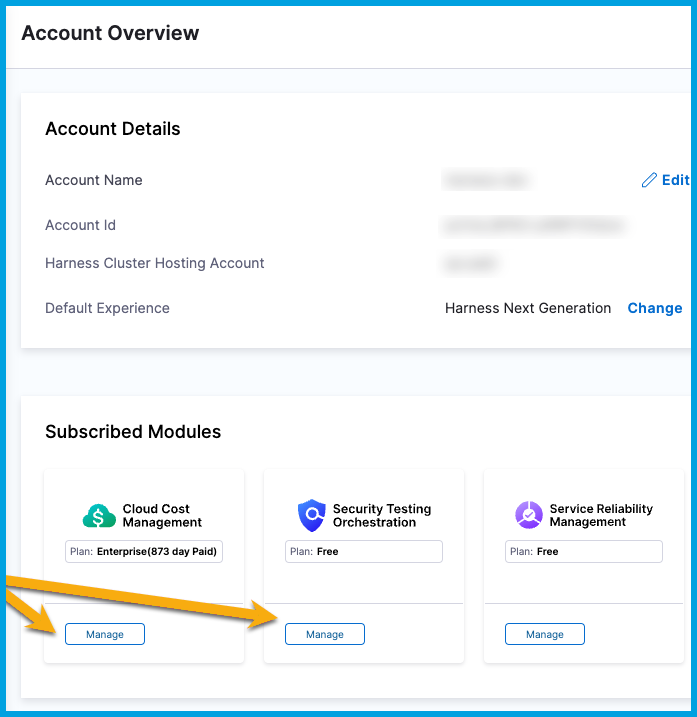
In your Harness account, go to **Account Settings** to view which Harness modules you are currently subscribed to. Subscriptions are shown in the **Subscribed Modules** section on the **Overview** page. You can select **Manage** to go to the **Subscriptions** page.
**Subscriptions page**
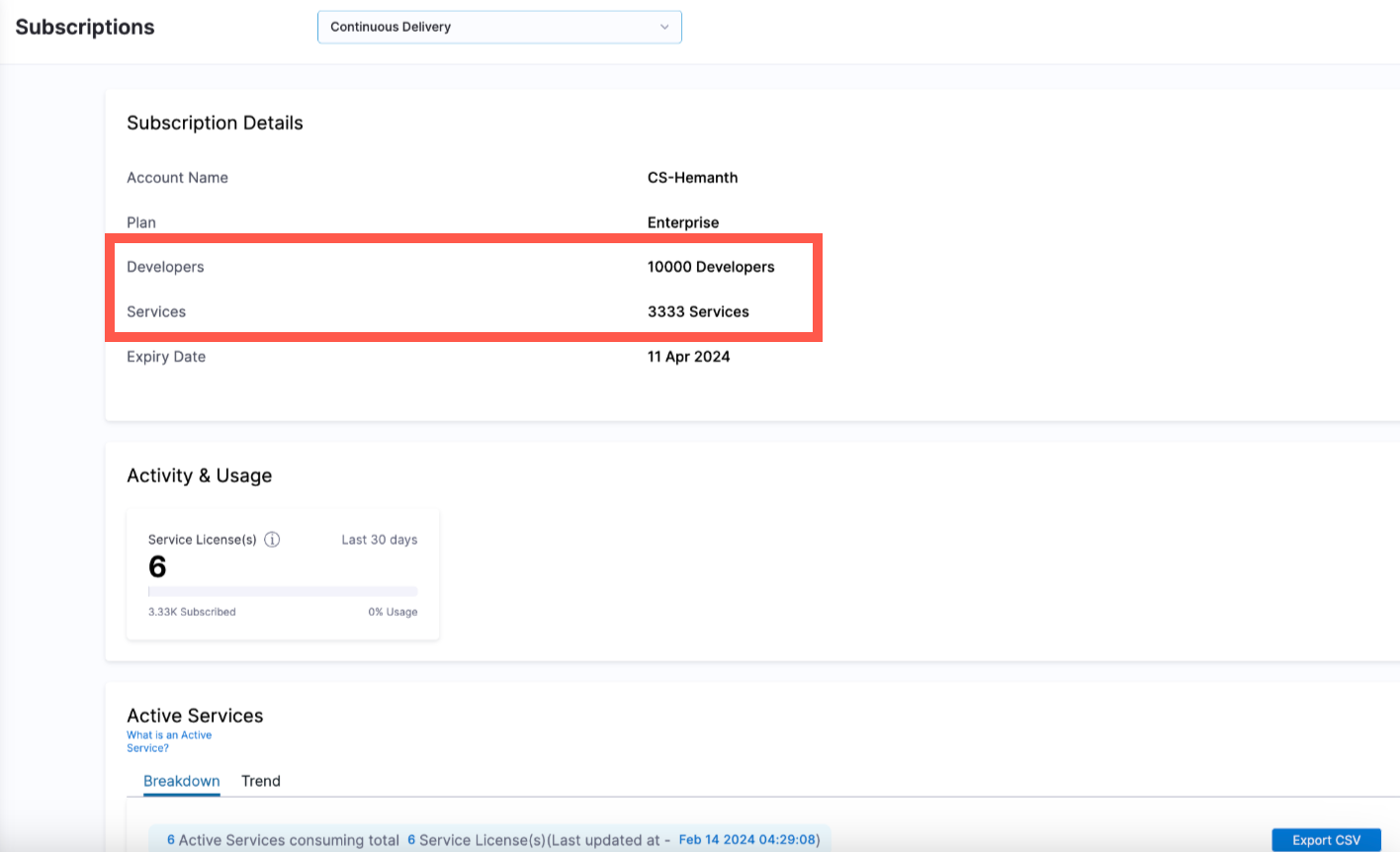
For Developer 360 module subscriptions, the **Subscriptions** page displays the developer license count (**Developers**), as well as the consumption entitlement, depending on the module's licensing unit.
For example, consumption entitlement for CD could include **Services** or **Service Instances**.
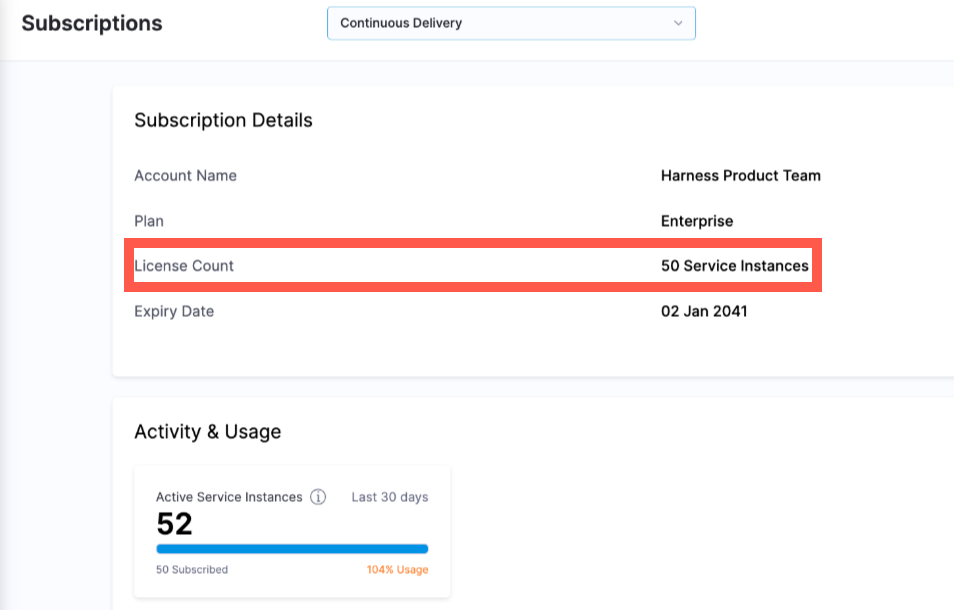
For module subscriptions not purchased under a Developer 360 subscription, the **Subscriptions** page displays the **License Count** for your module-specific license. For example, for CD this is **CD Services** or **CD Service Instances**.
### Cloud credits
{% hint style="info" %}
**NOTE**
Currently, the **Cloud Credits** page is behind the feature flag `PL_ENABLE_LICENSE_USAGE_COMPUTE`. Contact [Harness Support](mailto:support@harness.io) to enable the feature.
{% endhint %}
For Developer 360 module subscriptions, you can view your cloud credits on the **Subscriptions** page. In your Harness account, go to **Account Settings**, then select **Subscriptions**.
On the **Subscriptions** page, select **Cloud Credits**.

**Credits & Usage**
**Credits & Usage** enables you to view the following credit information:
* **Available Credits:** Current balance of active credits remaining to use.
* **Month-to-date Credit Usage:** Credits consumed month-to-date.
* **Next Expiry Date:** The next upcoming credit expiration date.
* **Credit Overage:** Current amount of credit overage. As a courtesy, Harness notifies you when you are running low on cloud credits. For more information, go to [Credit allowance by plan tier](/continuous-integration/troubleshooting-and-resources/ci-subscription-mgmt.md#credit-allowance-by-plan-tier) and [Credit overages (overuse)](/continuous-integration/troubleshooting-and-resources/ci-subscription-mgmt.md#credit-overages-overuse).
**Credits Breakdown**
**Credits Breakdown** enables you to view your credit usage by organization, project, or resource class. You can also use the date filters to view by a **Recommended** range, **Relative dates**, **Calendar months**, or a selected custom range.
**Credits Allocation**
**Credits Allocation** enables you to view the following details for your credit allocation:
* **Start Date:** The date on which a block of credits were applied to your account.
* **Expiry Date:** The date on which a block of credits expires.
* **Type:** The credit type: Free, Team, or Enterprise.
* **Quota:** The total number or allocated credits.
* **Used:** Credits consumed during the active credit period.
* The active credit period is the time between the **Start Date** and **Expiry Date** for your oldest unexpired credits.
* For free accounts, the credit balance resets at the end of every calendar month. Your **Start Date** is the first of the month. Your **Expiry Date** is the end of the month.
* If you purchased additional credits that haven't yet expired, the **Start Date** for **Used Credits** is the date that you purchased the additional credits, and the active credit period covers the lifetime of your purchased credits. For example, if you purchase credits in January that last for six months, **Used Credits** tracks credit usage from January through July, when your purchased credits expire. Therefore, **Used Credits** could include credits with various expiration dates.
* **Available:** The number of credits available to use.
* **Status:** The credit status, **Active** or **Expired**.
For more information about Harness Cloud billing and cloud credit consumption, go to [Subscriptions and licenses](/continuous-integration/troubleshooting-and-resources/ci-subscription-mgmt.md#harness-cloud-billing-and-cloud-credits).
### Developer 360 modules subscriptions
For Developer 360 module subscriptions, you can view your subscription details on the Subscriptions page. In your Harness account, go to Account Settings, then select Subscriptions.
On the Subscriptions page, select the Developer 360 modules.

Licenses are now based on developers. License Utilization shows the number of users over the number of licenses subscribed.

With the License Management, customers can directly assign user groups or service accounts to the respective module through this new subscription page. Customers can either assign All Account Users and Service Accounts or Select User Groups and Service Accounts to a specific module.

This is an honor system, where customers report licensed user groups and service accounts. There is no enforcement mechanism even if no users are assigned, modules will remain accessible to all users in the system.
### Manage subscriptions
You can quickly and securely manage your Harness subscriptions directly through your [Harness account](https://app.harness.io) any time, including:
* Upgrading your plan.
* Managing payment details and billing admins.
* Viewing license usage data.
* Viewing Harness Cloud credit usage data.
{% hint style="info" %}
Online subscription management is not available for all modules. If you want to upgrade your subscription for a module that doesn't yet support self-service subscription management, contact the [Harness Sales team](https://www.harness.io/pricing?module=cd).
{% endhint %}
### Module subscriptions and licenses
For more information about specific module subscriptions and licenses, go to:
* [CI Subscriptions and licenses](/continuous-integration/troubleshooting-and-resources/ci-subscription-mgmt.md)
* [CD Service-based licensing and usage](/continuous-delivery/troubleshooting-and-resources/resources/service-licensing-for-cd.md)
* [FME usage and billing](/feature-management-experimentation/management-and-administration/account-usage.md)
* [SRM subscriptions and licenses](/service-reliability-management/new-to-srm/get-started/srm-subscription-licensing.md)
* [CE license consumption](/resilience-testing/chaos-engineering/use-chaos-engineering/license-consumption.md)
* [AIDI subscriptions and licenses](/software-engineering-insights/use-software-engineering-insights/get-started/sei-subscription-and-licensing.md)
* [CODE subscriptions and licenses](/code-repository/2.0/troubleshooting-and-resources/cr-subscription-mgmt.md)
### Cloud Marketplace offerings
For information about Cloud Marketplace subscriptions, go to [Cloud marketplace offerings](/harness-platform/subscriptions-and-licenses/cloud-marketplaces.md).
{% @harness-feedback/feedback module="harness-ai" pagePath="harness-ai/subscriptions-and-licenses/subscriptions" %}