> For the complete documentation index, see [llms.txt](https://developer.harness.io/llms.txt). Markdown versions of documentation pages are available by appending `.md` to page URLs; this page is available as [Markdown](https://developer.harness.io/harness-platform/use-harness-platform/platform-access-control/attribute-based-access-control.md).
# Attribute-based access control
Attribute-based access control (ABAC) is an optional RBAC extension that grants access to Harness resources based on connector and environment types.
Attribute-based access control (ABAC) grants access to Harness resources based on attributes associated with those resources, such as connector type or environment type. ABAC is an optional extension of [Role-based access control (RBAC)](/harness-platform/3.0/harness-platform-resources/platform-access-control/rbac-in-harness.md) that uses attribute-based rules to grant access in the context of specific actions. Use ABAC to refine [resource groups](/harness-platform/use-harness-platform/platform-access-control/manage-resource-groups.md) with an additional dimension of control.
***
### What you will learn in this topic
By the end of this topic, you will be able to:
* Understand [how ABAC works](#how-abac-works) and when to use it to extend RBAC.
* [Configure ABAC](#configure-abac) on a resource group.
* Follow the [next steps](#next-steps) to combine roles with ABAC-enhanced resource groups and complete your RBAC setup.
***
### Before you begin
Before you configure ABAC, ensure you have the following:
* **Harness account access**: **Admin** permissions for the account, organization, or project where you configure ABAC.
* **RBAC knowledge**: Familiarity with roles and resource groups. Go to [RBAC in Harness](/harness-platform/3.0/harness-platform-resources/platform-access-control/rbac-in-harness.md) to know how roles and resource groups grant access.
* **Existing resource group**: A resource group to refine, or permissions to create one. Go to [Manage resource groups](/harness-platform/use-harness-platform/platform-access-control/manage-resource-groups.md) to manage existing resource groups.
***
### How ABAC works
RBAC is role-based, which means permissions and access to resources are determined by the roles assigned to users, user groups, and service accounts. ABAC adds a dimension to this model by granting access based on the type of a resource rather than a specific named resource.
ABAC can help you:
* **Simplify management**: Manage role bindings at scale with fewer, broader rules.
* **Refine access**: Provide more fine-grained access control.
* **Reduce overhead**: Reduce the number of role bindings you need to manage.
* **Add business meaning**: Leverage attributes with specific business meanings.
ABAC adds the dimensions of [connector](/harness-platform/use-harness-platform/connectors.md) and [environment](/continuous-delivery/use-continuous-delivery/cd-building-blocks/environments/environment-overview.md) types to refine resource groups. For example:
* Grant access to manage pre-production environments but not other types of environments.
* Grant access to manage code repository connectors but not other types of connectors.
***
### Configure ABAC
Configure ABAC on a resource group to scope access by connector and environment type. You configure ABAC while you create or edit a resource group.
1. [Create or edit a resource group](/harness-platform/use-harness-platform/platform-access-control/manage-resource-groups.md).
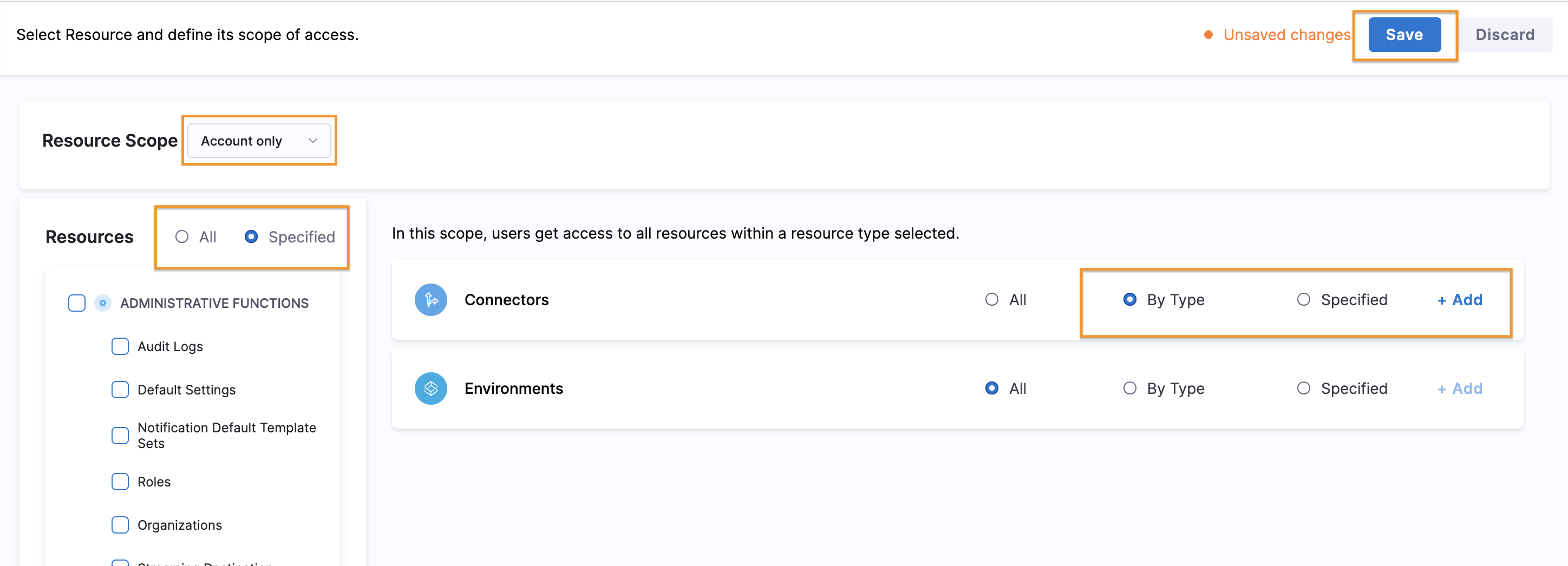
2. For **Resources**, select **Specified**.
Click to view full size image
3. Select **Environments** and/or **Connectors**.
ABAC is available for environments and connectors only. These steps focus on configuring ABAC; however, your resource groups can include other resource categories. Go to [Manage resource groups](/harness-platform/use-harness-platform/platform-access-control/manage-resource-groups.md) to configure other resource categories.
Click to view full size image
4. To apply ABAC to **Connectors** or **Environments**, select **By Type**, and then click **Add**.
For information about the **All** and **Specified** options, go to [Manage resource groups](/harness-platform/use-harness-platform/platform-access-control/manage-resource-groups.md).
ABAC is in addition to the **Resource Scope**. For example, if the **Resource Scope** is **Project Only**, and you select connectors **By Type**, then the resource group includes all connectors of the selected types that are in the specified project only. Go to [scopes and refinement](/harness-platform/use-harness-platform/platform-access-control/manage-resource-groups.md#scopes-and-refinement) for more information on how scope and ABAC interact.
5. Select the types to include, and then click **Add**.
For **Environments**, you can choose **Production** or **Pre-Production**.
For **Connectors**, you can choose one or more of the following Harness connector types: **Artifact Repositories**, **Cloud and AI Costs**, **Cloud Providers**, **Code Repositories**, **Communication Tools**, **Documentation**, **Monitoring and Logging Systems**, **Secret Managers**, and **Ticketing Systems**.
6. Click **Save**.
***
### Next steps
Pair your ABAC resource group with a role, then assign both to your users. Because ABAC applies to environments and connectors, choose a role that includes environment or connector permissions.
* [Configure RBAC in Harness](/harness-platform/use-harness-platform/platform-access-control/configure-rbac.md): Complete the end-to-end workflow that ties resource groups, roles, and assignments together.
* [Roles](/harness-platform/use-harness-platform/platform-access-control/add-manage-roles.md): Create the role that grants the environment and connector permissions your ABAC resource group needs.
After you configure roles and resource groups, assign them to:
* [Users](/harness-platform/use-harness-platform/platform-access-control/add-users.md)
* [User groups](/harness-platform/use-harness-platform/platform-access-control/add-user-groups.md)
* [Service accounts](/harness-platform/use-harness-platform/platform-access-control/add-and-manage-service-account.md)
{% @harness-feedback/feedback module="harness-ai" pagePath="harness-ai/use-harness-platform/platform-access-control/attribute-based-access-control" %}