> For the complete documentation index, see [llms.txt](https://developer.harness.io/llms.txt). Markdown versions of documentation pages are available by appending `.md` to page URLs; this page is available as [Markdown](https://developer.harness.io/harness-platform/use-harness-platform/templates/template-overrides.md).
# Override template advanced settings
Let template callers override a controlled set of a template's advanced settings, such as conditional execution, failure strategy, and looping strategy.
Templates allow the same logic to be reused across multiple pipelines, stages, steps, and step groups. Template overrides extend that reuse by allowing template owners to define a common value for an advanced setting once, while enabling individual callers to override only the values they need, without editing or duplicating the template.
This topic explains how a template owner allows specific advanced settings to be overridden, and how a caller overrides those settings when it references the template. A caller is any entity that references a template, for example, a pipeline that references a stage template, or a stage that references a step template.
Template overrides are supported for the following template types:
* [Step templates](/harness-platform/use-harness-platform/templates/run-step-template-quickstart.md)
* [Stage templates](/harness-platform/use-harness-platform/templates/add-a-stage-template.md)
* [Step group templates](/harness-platform/use-harness-platform/templates/create-a-stepgroup-template.md)
* [Pipeline templates](/harness-platform/use-harness-platform/templates/create-pipeline-template.md)
{% hint style="info" %}
This feature is behind the feature flag `PIPE_TEMPLATE_OVERRIDES`. Contact [Harness Support](mailto:support@harness.io) to enable it for your account.
Template overrides are supported only for templates that use the v0 YAML version. They apply to both inline and remote templates.
{% endhint %}
***
### What you will learn in this topic
* How [template overrides](#how-template-overrides-work) work and when to use them.
* How a template owner [allows advanced settings to be overridden](#allow-overrides-on-a-template).
* How a caller [overrides the settings a template allows](#override-settings-from-a-caller).
* Which [advanced settings are overridable](#supported-settings-by-template-type) for each template type.
* The [limitations](#limitations) to know before you use this feature.
***
### How template overrides work
When many entities reference the same template, most of them use the same value for a given advanced setting, and only a few need a different one. Without template overrides, each caller that needs a different value has to duplicate the template.
For example, a stage template is used in 50 pipelines. In 49 of them, the stage runs after a manual approval. In one pipeline, the stage must run automatically. Template overrides let the template set the common value, and let that one pipeline override it, without a second template.
A [runtime input](/harness-platform/use-harness-platform/templates/template.md#template-inputs) gives the same outcome, but then all 50 callers must pass the value, including the 49 that use the common one. With template overrides, the template holds the common value, and only the one caller that needs a different value provides an override. The other 49 callers pass nothing.
Template overrides use two YAML fields:
* **`allowedOverrides`** (on the template): The template owner lists the advanced settings that callers are allowed to override. It sits in parallel with `template.spec`. If a setting is not listed here, callers cannot override it. An empty or absent `allowedOverrides` means nothing can be overridden.
* **`templateOverrides`** (on the caller): The entity that references the template supplies new values for the settings it wants to change. `templateOverrides` sits next to `templateInputs` on the caller.
During template resolution, Harness applies an override only when the caller requests it and the template allows it. The override is applied as the final step, so an allowed override replaces the template's own value.
**An override for a setting the template does not allow is ignored.**
***
### Allow overrides on a template
The template owner decides which advanced settings callers may override. This applies to Step, Stage, Step Group, and Pipeline templates.
1. Open the template in the Template Studio, or create a new one.
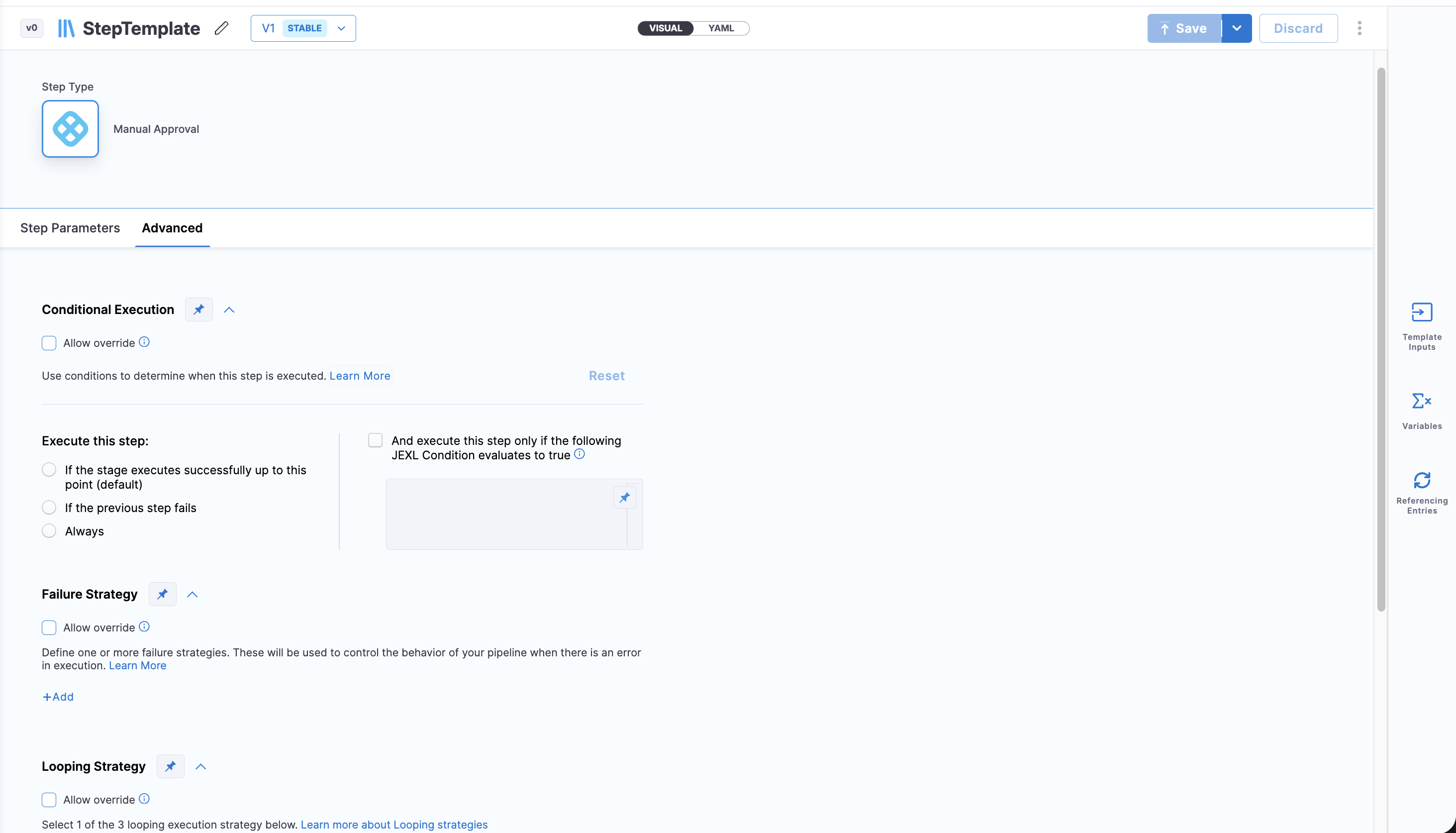
2. Configure the advanced setting you want to make overridable with the default value that most callers should use. Each setting is overridable only for certain template types. Go to [Supported settings by template type](#supported-settings-by-template-type) to check which settings apply.
3. In the **Advanced** section, select **Allow override** for that setting.
4. Save the template.
Click to view full size image
When you allow a setting, Harness adds it to the template's `allowedOverrides` list in YAML.
The following examples show the `allowedOverrides` block for each template type. List only the settings you want callers to override. Each example lists every setting that is overridable for that template type.
Step template
```yaml
template:
identifier: myStepTemplate
type: Step
spec:
type: ShellScript
spec: { ... }
allowedOverrides: # settings this template lets its callers override
- ConditionalExecution # when
- LoopingStrategy # strategy
- FailureStrategy # failureStrategies
- PolicyEnforcement # enforce
- DelegateSelectors # delegateSelectors
```
Stage template
```yaml
template:
identifier: myStageTemplate
type: Stage
spec:
type: Custom
spec:
execution:
steps:
- step:
type: ShellScript
spec: { ... }
allowedOverrides: # settings this template lets its callers override
- ConditionalExecution # when
- LoopingStrategy # strategy
- ExecutionStrategy # runMode
- FailureStrategy # failureStrategies
- DelegateSelectors # delegateSelectors
```
Step group template
```yaml
template:
identifier: myStepGroupTemplate
type: StepGroup
spec:
steps:
- step:
type: ShellScript
spec: { ... }
allowedOverrides: # settings this template lets its callers override
- ConditionalExecution # when
- LoopingStrategy # strategy
- FailureStrategy # failureStrategies
- DelegateSelectors # delegateSelectors
```
Pipeline template
```yaml
template:
identifier: myPipelineTemplate
type: Pipeline
spec:
stages:
- stage:
type: Custom
spec: { ... }
allowedOverrides: # settings this template lets its callers override
- PipelineTimeout # timeout
- AllowStageExecutions # allowStageExecutions
- FixedInputsOnRerun # fixedInputsOnRerun
- DelegateSelectors # delegateSelectors
```
***
### Override settings from a caller
A caller supplies new values for the settings the template allows. You can do this in the pipeline UI or in YAML.
A caller is any entity that references the template. For example, when a Shell Script step template is used in a pipeline, that pipeline step is the caller. The same applies to any caller, such as a stage that references a step template, or a pipeline that references a stage template.
Override values do support runtime inputs (`<+input>`), but Harness discourages this. If you want a setting to be supplied at run time, use a [template input](/harness-platform/use-harness-platform/templates/template.md#template-inputs) instead of a runtime override.
If an override is set as a runtime input and no value is supplied at run time, Harness does not fall back to the template's common value. Instead, it uses a default value from the Harness system, the same way it does for a runtime template input that is left unset.
To override a setting from the UI:
1. Open the pipeline or other entity that references the template.
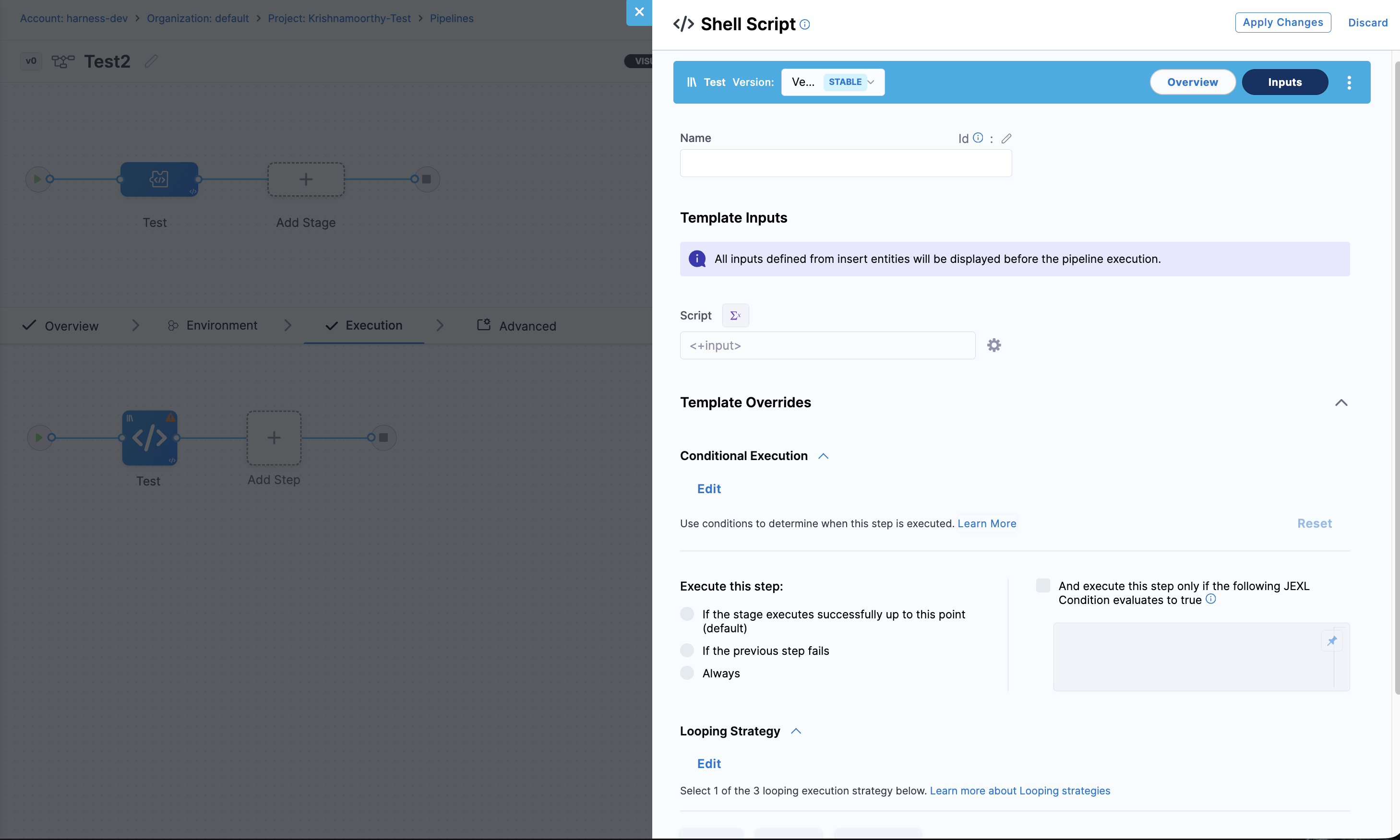
2. Select the templated stage, step group, or step, and open the **Inputs** section. The settings the template allows appear under **Template Overrides**, next to **Template Inputs**. For each allowed setting, select **Edit** and provide the value you want to use for this caller. Only the settings the template allows are available to override.
3. Save the entity.
Click to view full size image
{% hint style="info" %}
When you edit an allowed setting under **Template Overrides**, the value you enter applies only to this caller. The template's own value stays unchanged, and other entities that reference the same template are not affected. Harness records the value in the caller's `templateOverrides` block, and applies it as the last step during template resolution, so the override replaces the template's value for this pipeline or stage. The overridden value takes effect the next time the entity runs.
{% endhint %}
YAML example
Add a `templateOverrides` block next to `templateInputs`. Provide a value only for the settings the template allows. Overrides for settings that are not allowed are ignored.
```yaml
- stage:
template:
templateRef: myStageTemplate
versionLabel: v2
templateInputs: # values for the template's <+input> fields
type: Custom
templateOverrides:
when: # fixed value
pipelineStatus: Failure
failureStrategies: # fixed value
- onFailure:
errors: [AllErrors]
action:
type: Ignore
runMode: # NOT in the template's allowedOverrides -> ignored
type: POST_PRODUCTION_ROLLBACK
```
In this example, the template allows `ConditionalExecution` and `FailureStrategy`, so the caller overrides `when` and `failureStrategies` with fixed values. The `runMode` override is not in the template's `allowedOverrides`, so Harness ignores it. At execution time, the compiled YAML shows the overridden values.
***
### Supported settings by template type
A setting is overridable only for the template types marked below. When you edit `allowedOverrides` on a template, Harness offers only the settings that apply to that template type.
Legend: ✅ Supported, ❌ Not supported.
| Advanced setting | `allowedOverrides` value | YAML field | Step | Stage | Step Group | Pipeline |
| ---------------------- | ------------------------ | ---------------------- | :--: | :---: | :--------: | :------: |
| Conditional Execution | `ConditionalExecution` | `when` | ✅ | ✅ | ✅ | ❌ |
| Looping Strategy | `LoopingStrategy` | `strategy` | ✅ | ✅ | ✅ | ❌ |
| Execution Strategy | `ExecutionStrategy` | `runMode` | ❌ | ✅ | ❌ | ❌ |
| Failure Strategy | `FailureStrategy` | `failureStrategies` | ✅ | ✅ | ✅ | ❌ |
| Policy Enforcement | `PolicyEnforcement` | `enforce` | ✅ | ❌ | ❌ | ❌ |
| Delegate Selectors | `DelegateSelectors` | `delegateSelectors` | ✅ | ✅ | ✅ | ✅ |
| Pipeline Timeout | `PipelineTimeout` | `timeout` | ❌ | ❌ | ❌ | ✅ |
| Allow Stage Executions | `AllowStageExecutions` | `allowStageExecutions` | ❌ | ❌ | ❌ | ✅ |
| Fixed Inputs on Re-run | `FixedInputsOnRerun` | `fixedInputsOnRerun` | ❌ | ❌ | ❌ | ✅ |
For a pipeline template, only pipeline-level advanced settings are overridable. Advanced settings on the stages inside a pipeline template cannot be overridden from the pipeline caller. For delegate selectors, only the node-level delegate selector is supported, not selectors set inside a specific step's own configuration.
***
### Limitations
* **Only v0 YAML templates are supported.** Template overrides apply to templates that use the v0 YAML version, whether they are inline or remote. Templates on later YAML versions cannot use `allowedOverrides` or `templateOverrides`.
* **A setting configured as a runtime input cannot be allowed for override.** If an advanced setting in the template is set to `<+input>`, you cannot add it to `allowedOverrides`, and Harness blocks the save with an error.
* **Overrides are not retroactive.** Updating `allowedOverrides` on a template updates only that template. Entities that already reference the template are not reconciled or re-saved. The new allow-list takes effect the next time the referencing entity runs.
* **Removing a setting from `allowedOverrides` silently disables it.** If the template owner removes a setting from `allowedOverrides` while a caller is still providing that override, Harness ignores the caller's value and does not notify the caller. The caller keeps the override in its YAML, but the value no longer applies.
* **Only allowed settings apply.** An override for a setting that the template does not list in `allowedOverrides` is ignored.
* **Pipeline templates override pipeline-level settings only.** Stage-level advanced settings inside a pipeline template cannot be overridden from the pipeline caller.
{% hint style="warning" %}
**DO NOT OVERRIDE SETTINGS OUTSIDE `TEMPLATEOVERRIDES`**
Before template overrides existed, some users overrode a setting when they put it in parallel with the template block in the YAML editor. This is not the official way to override a setting. It still works today in the YAML editor, but Harness discourages it. Move any such overrides to `templateOverrides` on the caller. Harness plans to block this unofficial approach in a future release.
{% endhint %}
***
### Next steps
* [Use a template](/harness-platform/use-harness-platform/templates/use-a-template.md): Reference a template from a pipeline and provide its inputs.
* [Templates best practices](/harness-platform/use-harness-platform/templates/templates-best-practices.md): Design reusable templates that scale across teams.
* [Harness templates overview](/harness-platform/use-harness-platform/templates/template.md): Understand template types, scopes, and versioning.
{% @harness-feedback/feedback module="harness-ai" pagePath="harness-ai/use-harness-platform/templates/template-overrides" %}