> For the complete documentation index, see [llms.txt](https://developer.harness.io/llms.txt). Markdown versions of documentation pages are available by appending `.md` to page URLs; this page is available as [Markdown](https://developer.harness.io/harness-solutions-factory/3.0/use-hsf/created-resources.md).
# Created Resources
Understand the resources created by HSF.
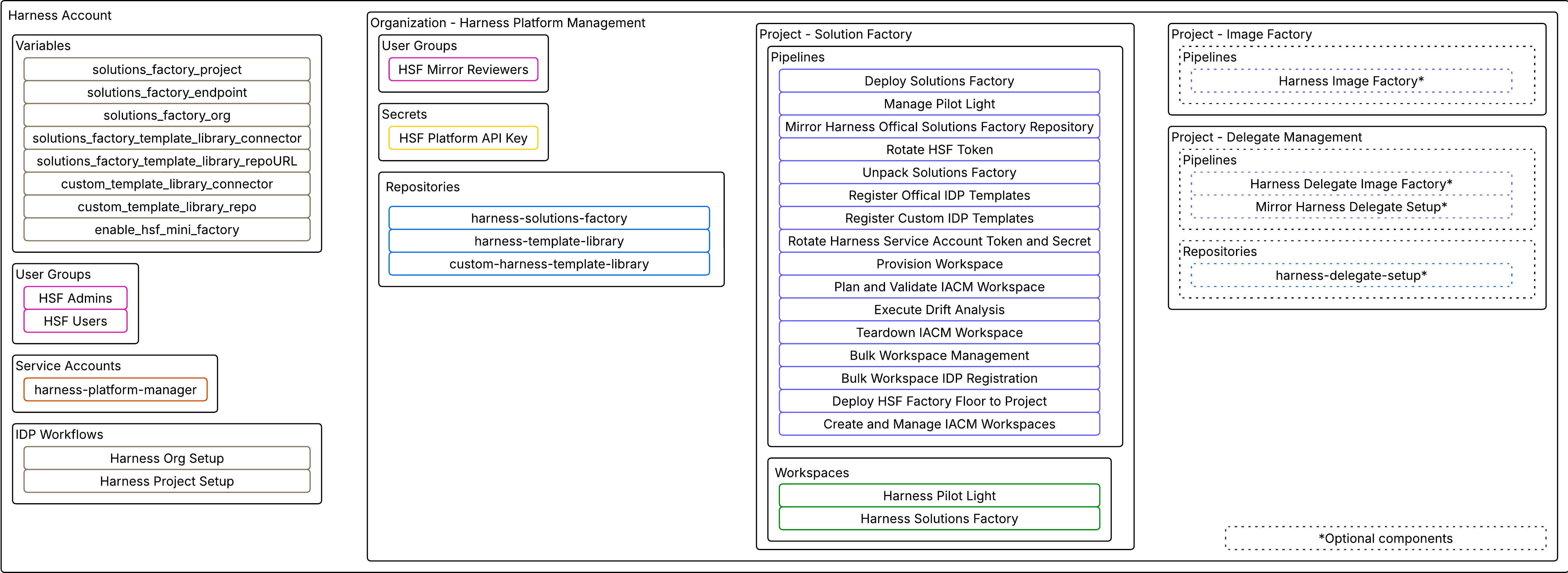
After HSF is deployed you will have the following resources in your account:
Click to view full size image
### Account-level resources
#### Service account
A service account named `harness-platform-manager` is created at the account level. This service account has admin privileges and is responsible for provisioning and managing the resources necessary for running HSF workflows.
#### Variables
To support IDP workflows, account-level variables are created. These variables store key configuration values, including the project name, organization name, connector information, and platform URL. They enable workflows to dynamically locate and interact with the correct components and environments within Harness. The variables created are:
| Variable | Description and Example | Can be changed? |
| ------------------------------------------------ | ------------------------------------------------------------------------------------------------------------------------------------------------------------------------------------ | ------------------------------------------- |
| solutions\_factory\_project |
The project name of where Solutions Factory is deployed. Example: Solutions\_Factory
| No |
| solutions\_factory\_endpoint |
The endpoint of where Solutions Factory is deployed. Example:
| No |
| solutions\_factory\_org |
The organization of where Solutions Factory is deployed. Example: Harness\_Platform\_Management
| No |
| solutions\_factory\_template\_library\_connector |
Connector for Harness Template Library. Example: org.Harness\_Template\_Library\_Repo
| No |
| solutions\_factory\_template\_library\_repo |
URL of where HTL lives. Example:
| No |
| custom\_template\_library\_connector |
Connector for Custom Template Library. Example: org.Custom\_Harness\_Template\_Library\_Repo
| Yes, if moving CHTL to a SCM of your choice |
| custom\_template\_library\_repo |
URL of where Custom Template Library lives. Example:
| Yes, if moving CHTL to a SCM of your choice |
| enable\_hsf\_mini\_factory |
Flag to indicate if IDP workflows will default to leveraging the mini-factory to distribute workloads Example: false
| Yes depending on need for mini factory |
### Organization-level resources
#### Organization
All HSF-related resources are organized under a newly created organization named `Harness Platform Management`. This organization serves as the central location for all projects, configurations, and access controls associated with the HSF deployment.
HSF is intentionally isolated into its own organization rather than placed inside an existing one so that platform-level management concerns stay separate from everything else in your Harness account. This also makes RBAC cleaner: HSF Admins can have org-admin rights scoped to this organization.
#### User groups
Within the `Harness Platform Management` organization, two user groups are created at the account level:
* `HSF Admins` has organization admin privileges and is intended for platform administrators and users managing the implementation of HSF (usually the platform engineering team). This group of users will also be the ones who can approve changes and will get email notifications if this setting is set.
* `HSF Users` are granted organization viewer privileges and is designed for broader team access to view and use the workflows without elevated permissions.
At the organization level one user group is created:
* `HSF Mirror Reviewers` this group has the ability to review new PR updates that are published by the HSF team and can merge them into the account.
#### Secrets
Secrets are also created at the organization level to securely manage authentication and access credentials. `HSF Platform API Key`, stores the secret value associated with the `harness-platform-manager` service account. This key is managed by a pipeline that automatically handles rotation to maintain security best practices.
#### Repositories
There are three repositories included in the deployment and exist under the organization level. You can find them under Harness Platform Management (organization) → Solutions Factory (account) → Code Repository (module) → Repositories:
* The [`harness-solutions-factory` repository](https://github.com/harness/harness-solutions-factory) houses all of the source code that is required to standup and run Harness Solutions Factory. A code branch rule called `harness_solutions_factory_codeowners` is created in this repository.
* The [`harness-template-library` repository](https://github.com/harness/harness-template-library) houses all of the scaffold and templates for how to manage Harness resources. A code branch rule called `harness_solutions_factory_codeowners` is created in this repository.
* The `custom-harness-template-library` repository houses customized templates created to support Harness entity management and provisioning. It is created via a point in time mirror of `harness-template-library` when your instance of HSF is deployed.
#### Projects
Several projects are initialized within the `Harness Platform Management` organization.
* The `Solutions Factory` project contains all the core pipelines and configurations required to manage HSF.
* The `Image Factory` project is the target destination for the deployment of CI image factory. In the future it will house all of the HSF image specific factories.
* The `Delegate Management` project is the target destination for the delegate image factory.
### Project-level resources
#### Pipelines
The Solutions Factory project includes sixteen pipelines, each designed to perform a specific role in the HSF lifecycle.
**HSF Core Pipelines:**
These pipelines manage the HSF framework. You or your team will run these manually during deployment, upgrades, and ongoing maintenance.
| Pipeline | What it does | When to run |
| ---------------------------------------------------- | ----------------------------------------------------------------------------------------------------------------------------------------------------------------------- | ------------------------------------------------------------------------------------------------- |
| Deploy Solutions Factory | Handles configuration tasks for setting up and managing the HSF deployment. Initializes the target environment and is used during upgrades and configuration changes. | Initial deployment; after configuration changes |
| Manage Pilot Light | Applies updates and changes to the core HSF framework. Maintains the foundational infrastructure that supports the overall platform. | After merging a new HSF version PR; after changing Pilot Light variables |
| Mirror Harness Official Solutions Factory Repository | Clones data from the official HSF repository into your account and manages synchronization for future releases. Creates a pull request when a new version is available. | Runs on a schedule automatically; can also be triggered manually to pull the latest version |
| Unpack Solutions Factory | Extracts and initializes the Solutions Factory bundle during deployment. Removes itself when finished. | Runs once during initial deployment |
| Rotate HSF Token | Handles scheduled token rotation for the `harness-platform-manager` service account. | Runs on a schedule automatically (default: weekly on Sundays at 03:00); can be triggered manually |
| Rotate Harness Service Account Token and Secret | Rotates a Harness service account token and updates the corresponding Harness secret with the new value. | As needed for service account token management |
| Deploy HSF Factory Floor to Project | Initializes HSF Factory Floor in a new or existing project, deploying the core workspace pipelines into that project. | If you want to deploy Factory Floor |
| Deploy HSF Hub | Initializes Hub project, deploying HTL/ CHTL templates as pipelines into that project. | If you want to deploy Hub |
**HSF IaCM Pipelines:**
These pipelines are invoked automatically during workflow execution. You typically will not run these directly; they are triggered by IDP workflows and operate on IaCM workspaces on your behalf.
| Pipeline | What it does |
| --------------------------------- | ------------------------------------------------------------------------------------------------------------- |
| Create and Manage IACM Workspaces | Invoked at the start of each workflow. Provisions and manages IaCM workspaces and registers resources in IDP. |
| Provision Workspace | Plans and applies the workspace configuration with built-in approvals. |
| Plan and Validate IACM Workspace | Verifies Terraform code without applying changes. |
| Execute Drift Analysis | Identifies configuration drift between live resources and source code. |
| Teardown IACM Workspace | Removes workspaces with built-in approvals. |
| Bulk Workspace Management | Performs bulk operations across multiple IaCM workspaces. |
**HSF IDP Pipelines:**
These pipelines sync the contents of your template libraries into IDP. Run them any time you make changes to the Custom Template Library and want those changes reflected in the IDP workflow catalog.
| Pipeline | What it does | When to run |
| ------------------------------- | ----------------------------------------------------------------------------------------------------------------------------------- | ------------------------------------------------------------------------------------------------------------ |
| Register Custom IDP Templates | Reads the `idp_registry_mgr.yaml` registration file in `custom-harness-template-library` and imports all listed templates into IDP. | After adding, modifying, or removing templates in Custom Template Library; after merging a new HTL mirror |
| Bulk Workspace IDP Registration | Bulk-registers existing IaCM workspaces into IDP. | When upgrading from an older HSF version where workspaces were created before IDP registration was automated |
#### Workspaces
Two IACM workspaces are created in the Solutions Factory Project:
* The `Harness Pilot Light` workspace manages and controls the core framework components.
* The `Harness Solutions Factory` workspace manages the "engine" layer of HSF, including the logic for requests made via IDP and the execution and provisioning of associated resources. This is the workspace that handles the practical implementation of self-service requests.
{% @harness-feedback/feedback %}