> For the complete documentation index, see [llms.txt](https://developer.harness.io/llms.txt). Markdown versions of documentation pages are available by appending `.md` to page URLs; this page is available as [Markdown](https://developer.harness.io/infrastructure-as-code-management/platform/iacm-connectors-variables/variable-sets.md). Agents can also search and read this documentation through its [MCP server](https://developer.harness.io/~gitbook/mcp).
# Variable Sets
Learn how Variable Sets let you define reusable environment variables, Terraform variables, and secrets once, then apply them across multiple IaCM workspaces.
A Variable Set is a reusable collection of connectors, environment variables, OpenTofu or Terraform variables, and secrets. You define a Variable Set once at the account, org, or project level and attach it to multiple workspaces, reducing repeated variable definitions across your infrastructure configuration.
When multiple Variable Sets are attached to a workspace, Harness evaluates them in priority order. Variables from a higher-priority set override those from lower-priority sets, giving you fine-grained control over which values take effect when the same variable name appears in more than one set.
Variable Sets come in two types. An **infrastructure** Variable Set attaches to OpenTofu, Terraform, and Terragrunt workspaces. A **configuration** Variable Set holds Ansible variables and environment variables and attaches to Ansible playbooks and inventories. Go to [Configuration Variable Sets for Ansible](#configuration-variable-sets-for-ansible) to set one up.
***
## What you will learn
* **Variable Set scopes:** The account, org, and project levels at which Variable Sets can be created and managed.
* **CRUD operations:** How to create, update, and delete Variable Sets.
* **Workspace attachment:** How to attach a Variable Set to a workspace via the Connectors and Variables tab.
* **Priority control:** How to reorder Variable Sets in a workspace to determine which values take precedence when conflicts occur.
* **Downstream impact:** How to use the Referenced By tab to identify all workspaces affected by a Variable Set change.
* **Configuration Variable Sets:** How to share Ansible variables and environment variables across playbooks and inventories, and how Harness resolves them at run time.
***
## Create, update, or delete a Variable Set
Variable Sets are managed from **Account Settings**, **Organization Settings**, or **Project Settings**.
1. Go to **Account Settings**, **Organization Settings**, or **Project Settings**, then select **IaCM Settings**.
2. Select **Variable Sets**.
3. To create a Variable Set, click **Create a new Variable set** and configure your variables.
4. To update a Variable Set, click its tile to open and edit it.
5. To delete a Variable Set, click the **More** icon on the tile, then select **Delete**.
***
## Attach a Variable Set to a workspace
After you create a Variable Set, attach it to one or more workspaces from the workspace configuration.
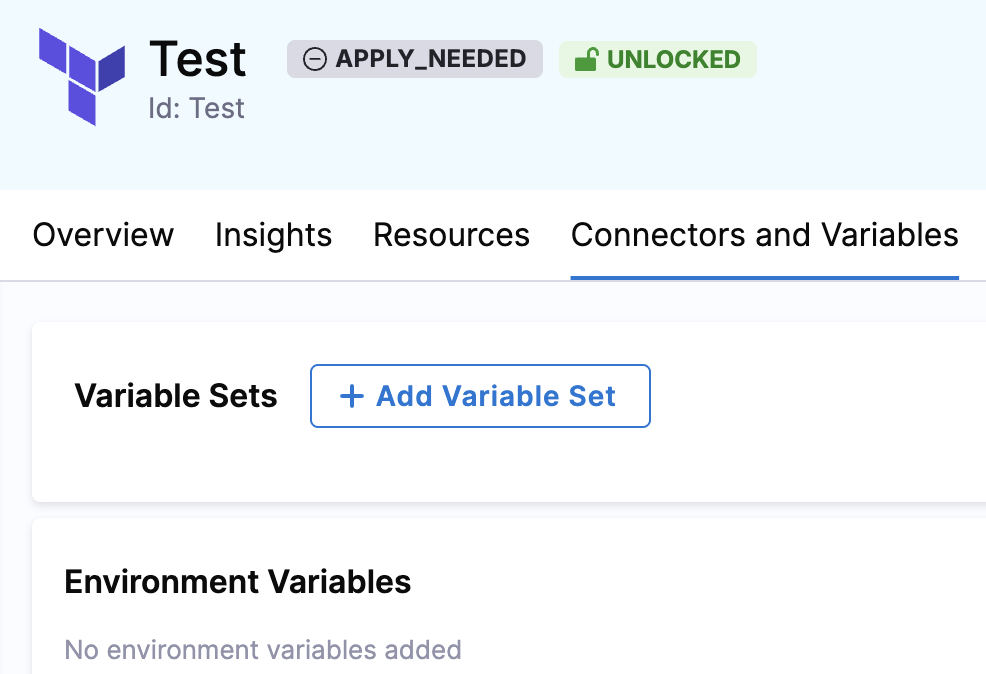
1. Open the workspace, then select the **Connectors and Variables** tab.
2. In the **Variable Sets** section, click **Add Variable Set**.
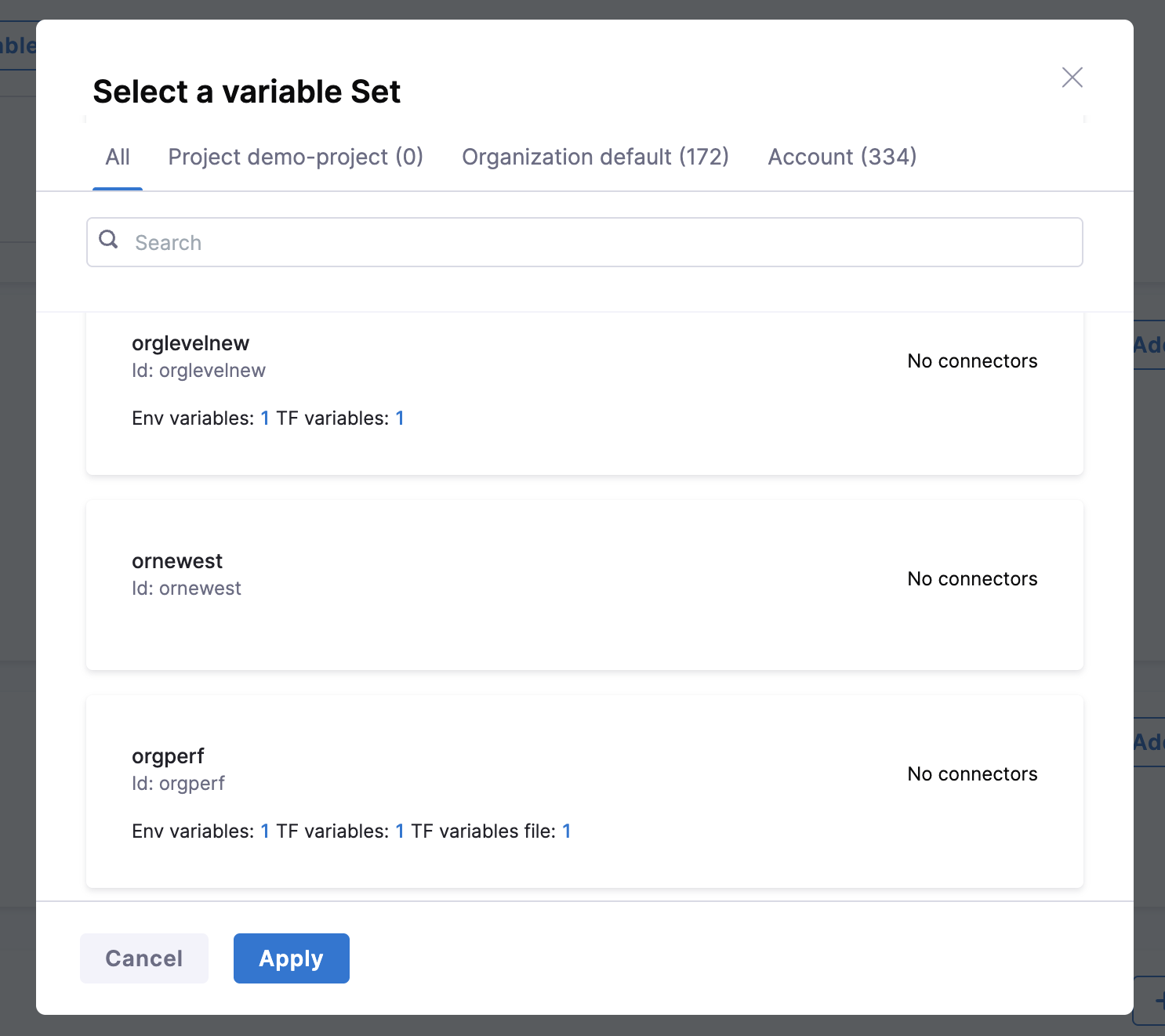
3. Select the Variable Set from the list to attach it to the workspace, then click **Apply**.
Go to [Connectors and Variable Sources](https://developer.harness.io/infrastructure-as-code-management/platform/iacm-connectors-variables/connectors-variables.md) to review how Variable Sets interact with other variable sources and to understand the full order of precedence.
***
## Set Variable Set priority
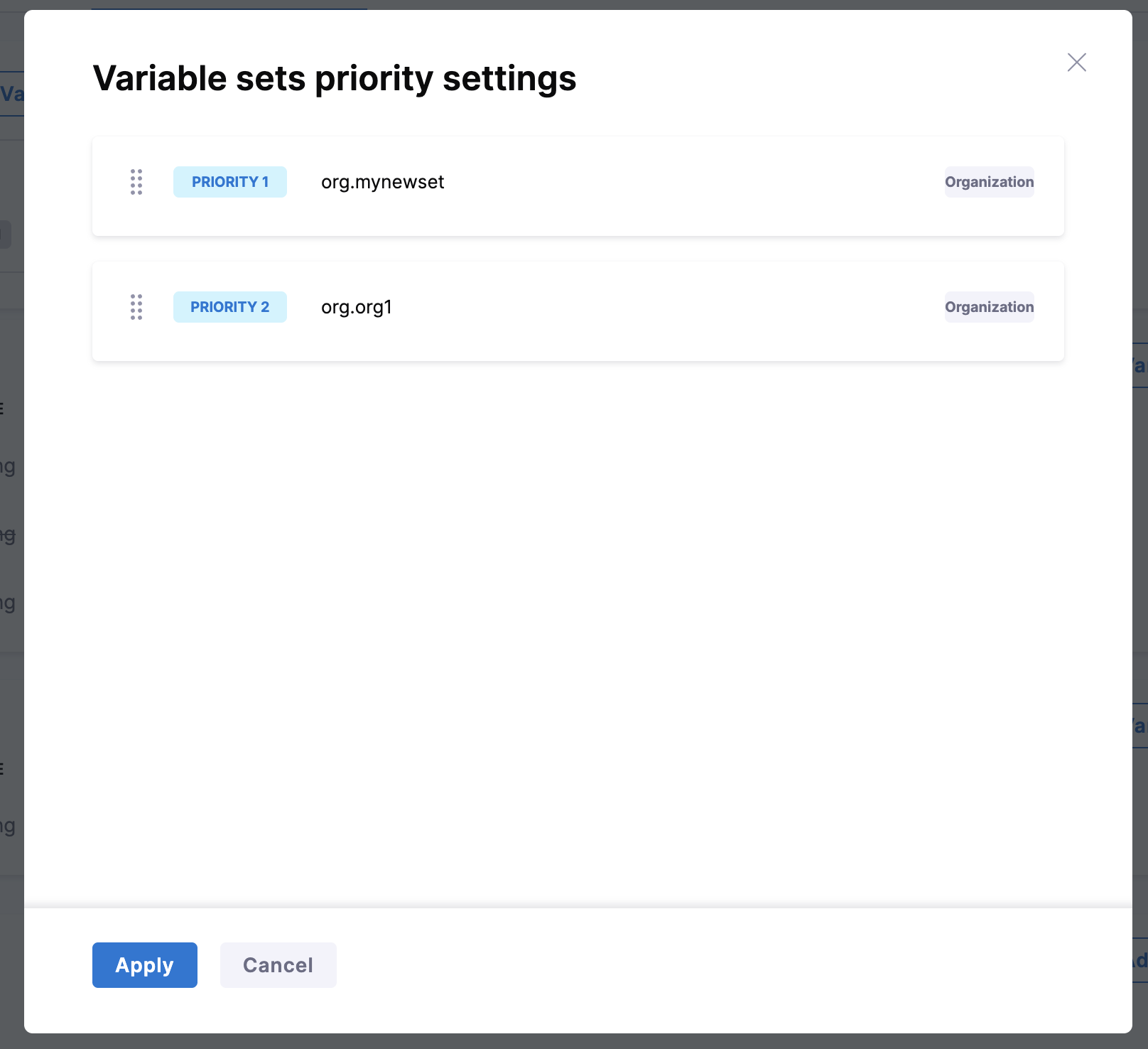
When more than one Variable Set is attached to a workspace, Harness uses priority order to resolve conflicts. Variables from the highest-priority set override those from lower-priority sets when the same variable name exists in multiple sets. The workspace shows which Variable Set provides the value used during execution.
To set Variable Set priority:
1. Open the workspace and select the **Connectors and Variables** tab.
2. Click **Priority Settings**.
3. In the panel, drag the Variable Sets into your preferred order: highest priority at the top, lowest at the bottom.
Priority 1 is the highest priority. Priority 2 is lower than Priority 1, and so on.
***
## Identify downstream impact
When you modify a Variable Set, every workspace that uses it is affected. Use the **Referenced by** tab on a Variable Set to see all workspaces where it is applied before you make changes.
To view downstream workspaces:
1. Go to **Account Settings**, **Organization Settings**, or **Project Settings**, then select **IaCM Settings**.
2. Select **Variable Sets**, then open the Variable Set.
3. Select the **Referenced by** tab.
The tab lists every workspace that has this Variable Set attached, so you can assess the impact of your changes before saving them.
***
## Input sources and runtime behavior
Each variable in a workspace shows its source:
* `TEMPLATE`: inherited from the workspace template.
* `CUSTOM`: defined directly in the workspace or Variable Set.
Use `<+input>` as a variable value to prompt the pipeline executor for a value at runtime. Go to [Fixed values, runtime inputs, and expressions](https://developer.harness.io/harness-platform/use-harness-platform/variables-and-expressions/runtime-inputs) to understand how runtime inputs work. Go to [Connectors and Variable Sources](https://developer.harness.io/infrastructure-as-code-management/platform/iacm-connectors-variables/connectors-variables.md) to review all variable input sources and their order of precedence.
***
## Multi-level Variable Set attachment
{% hint style="success" %}
The Multi-level Variable Set attachment feature is in [Limited GA](#user-content-fn-1)[^1] and requires enablement. [View all early access features.](https://developer.harness.io/release-notes/features.md)
{% @harness-feature-flag-access/request-feature-flag-access module="infrastructure-as-code-management" pagePath="infrastructure-as-code-management/platform/iacm-connectors-variables/variable-sets" pageTitle="Variable%20Sets" featureFlags="%5B%7B%22name%22%3A%22Multi-level%20Variable%20Set%20attachment%22%2C%22key%22%3A%22IACM\_MULTI\_LEVEL\_VARIABLE\_SETS%22%2C%22status%22%3A%22LIMITED\_GA%22%2C%22description%22%3A%22Enables%20attaching%20account-%20and%20org-scoped%20Variable%20Sets%20directly%20to%20project-level%20workspaces.%20Without%20this%20flag%2C%20Variable%20Sets%20must%20be%20created%20and%20attached%20within%20the%20same%20scope.%22%2C%22section%22%3A%22multi-level-variable-set-attachment%22%7D%5D" %}
{% endhint %}
You can create Variable Sets at the **account**, **org**, or **project** level. By default, you attach a Variable Set to workspaces at the same scope where it was created.
You can attach account- and org-scoped Variable Sets to workspaces in projects under the same account or org. This lets you define shared variable configurations once and reuse them across projects without duplicating Variable Sets.
To attach an account- or org-scoped Variable Set to a workspace, go to the workspace **Connectors and Variables** tab, select **Add Variable Set**, and select a Variable Set listed under **Organization** or **Account** scope in the picker.
***
## Configuration Variable Sets for Ansible
A configuration Variable Set is a reusable collection of Ansible variables and environment variables. Attach it to Ansible playbooks and inventories so that shared values, such as a deployment user, a region, or an API token, are defined once instead of on every playbook and inventory. A configuration Variable Set does not hold OpenTofu or Terraform variables, variable files, or connectors.
### What a configuration Variable Set holds
| Collection | How Harness uses it at run time |
| ------------------------- | ------------------------------------------------------------------------------------------------------------- |
| **Ansible variables** | Passed to `ansible-playbook` as `--extra-vars`, so they override group and host variables from the inventory. |
| **Environment variables** | Injected into the environment of the Ansible process. Execution logs list them by name only, never by value. |
The type dropdown offers **string**, **secret**, **number**, **boolean**, and **json**. Harness passes every value from a set to Ansible as a string, so use the `from_json` filter in the playbook to read a JSON value as a list or a dictionary. A variable name must start with a letter or an underscore, contain only letters, digits, and underscores, and be no longer than 128 characters.
### Create a configuration Variable Set
You can create a configuration Variable Set at the account, organization, or project scope. Your role needs the Variable Set view, edit, and delete permissions for that scope.
1. Go to **Account Settings**, **Organization Settings**, or **Project Settings**, then select **IaCM Settings**.
2. Select **Variable Sets**.
3. Click **Create a new Variable set**.
4. Enter a name. **Description** and **Tags** are optional.
5. Under **Select a variable set type**, select **Configuration**.
6. Click **Create**.
The Variable Set opens on the **Variables** tab. Add the values there:
1. Under **Environment Variables**, click **Add Variable**.
2. Select a type, then enter a key and a value. These values are injected into the Ansible process.
3. Under **Ansible Variables**, click **Add Variable**.
4. Select a type, then enter a key and a value. These values are passed to `ansible-playbook` as `--extra-vars`.
A secret value must reference a secret that the Variable Set scope can read:
| Variable Set scope | Allowed secret references |
| ------------------ | ---------------------------------------------------------- |
| Account | `account.` |
| Org | `account.` or `org.` |
| Project | `account.`, `org.`, or `` |
### Attach a configuration Variable Set to a playbook or inventory
Attach configuration Variable Sets from the **Variables** tab of a playbook or an inventory. A project playbook or inventory can use sets from its project, its org, or its account.
1. Open the playbook or inventory, then select the **Variables** tab.
2. Click **Add Variable Set**.
3. Select one or more sets from the **Project**, **Organization**, or **Account** tab, then click **Apply**.
4. Drag the attached sets into priority order. The set at the top has Priority 1, the highest priority.
The same set cannot be attached twice to one playbook or inventory. After you attach sets, the **Variables** tab shows a merged view of every variable, with its source (defined on the playbook or inventory, or inherited from a set), the set it comes from, and whether the value is in use or overridden.
### Variable precedence at run time
When the same Ansible variable is defined in more than one place, Harness passes the value from the highest-precedence source:
| Precedence | Source |
| ----------- | ------------------------------------------------------------------------ |
| 1 (highest) | Extra variables set on the Ansible pipeline step |
| 2 | Variables defined on the playbook |
| 3 | Configuration Variable Sets attached to the playbook, in priority order |
| 4 | Variables defined on the inventory |
| 5 (lowest) | Configuration Variable Sets attached to the inventory, in priority order |
Environment variables from a set never replace an environment variable that is already set for the step, the playbook, or the inventory.
The execution log lists the Ansible variables that came from Variable Sets, with secret values masked, and lists set environment variables by name.
### Git and Galaxy credentials in a configuration Variable Set
Ansible variables whose names start with `ANSIBLE_GIT_AUTH_` or `ANSIBLE_GALAXY_SERVER_`, in a set attached to a playbook, configure authentication for private collections instead of being passed as `--extra-vars`. Use this to share one set of Galaxy or Git credentials across many playbooks. When the playbook defines the same key, the playbook value wins. Go to [Authenticate private Ansible Galaxy content](https://developer.harness.io/infrastructure-as-code-management/use-iacm/configuration-management/playbooks/authenticate-private-collections.md) for the keys each source needs.
### Delete a configuration Variable Set
Harness blocks deletion of a configuration Variable Set while it is attached to any playbook or inventory. Open the set and select the **Referenced by** tab to find the attachments, detach the set from each one, then delete it.
***
## Next steps
After creating or updating a Variable Set:
* Go to [Connectors and Variable Sources](https://developer.harness.io/infrastructure-as-code-management/platform/iacm-connectors-variables/connectors-variables.md) to attach the Variable Set to a workspace and review the full variable precedence order.
* Go to [Provision a workspace](https://developer.harness.io/infrastructure-as-code-management/platform/workspaces/provision-workspace.md) to run a pipeline that uses your Variable Set configuration.
* Go to [Workspace Templates](https://developer.harness.io/infrastructure-as-code-management/platform/workspaces/workspace-templates.md) to apply Variable Sets consistently across multiple workspaces through a template.
## FAQs Can a project workspace use Variable Sets from account or org scope?
Yes, with the `IACM_MULTI_LEVEL_VARIABLE_SETS` feature flag enabled. Without that flag, a Variable Set must be created and attached within the same scope as the workspace. You can attach more than one Variable Set to a workspace at any scope. When the same variable name appears in more than one attached set, the set with the highest priority (Priority 1) wins.
Why can I not delete a configuration Variable Set in Harness IaCM?
Harness blocks deletion while the set is attached to a playbook or an inventory. Open the set, select the **Referenced by** tab, and detach the set from every playbook and inventory listed there before you delete it.
Saving a configuration Variable Set fails because of a secret reference
The secret reference is outside the scope that the set can read. An account set can reference only `account.`, and an org set can reference `account.` or `org.`. Move the secret to a scope the set can read, or create the set at a lower scope.
A variable from a configuration Variable Set is not used when the playbook runs
A higher-precedence source defines the same name. Open the **Variables** tab of the playbook or inventory and check the merged view, which marks each value as in use or overridden. Pipeline step extra variables, playbook variables, and higher-priority sets all outrank a lower-priority set.
{% @harness-feedback/feedback %}
[^1]: On by default, ready for production use and rolling out to every Harness environment incrementally. If you want it before it reaches your environment, request access and Harness will turn it on for your account. Rollout happens in stages, so a feature can reach some environments a week or two before others. Harness can also turn it off via the same **Request access** process for your account if you need it off.