> For the complete documentation index, see [llms.txt](https://developer.harness.io/llms.txt). Markdown versions of documentation pages are available by appending `.md` to page URLs; this page is available as [Markdown](https://developer.harness.io/internal-developer-portal/new-to-idp/overview.md).
# Overview
A home for developers to create, manage, and explore software.
**Harness Internal Developer Portal (IDP) is a unified platform that empowers developers to build, discover, and manage software while platform engineers automate standards and governance.**
Harness IDP enables you to:
* *Create* new software components quickly while adhering to your company's best practices.
* *Automate* day-to-day developer tasks and processes by creating self-service Workflows.
* *Manage* the software you own with a developer-centric view of service health, deployments, and alerts.
* *Explore* your organization's entire software ecosystem to discover technical documentation, APIs, and services.
Fully integrated with the Harness platform, Harness IDP boosts **developer productivity** and satisfaction while reducing **maintenance overhead** for platform engineering teams, enabling your organization to ship faster with higher quality.
***
### What is Harness IDP?
An Internal Developer Portal (IDP) is a centralized platform that brings together all the tools, services, and knowledge developers need to build and ship software efficiently. It serves as the **single source of truth** for your organization's software ecosystem.
To read more about the Harness IDP core product pillars, go to [Product Pillars](#product-pillars).
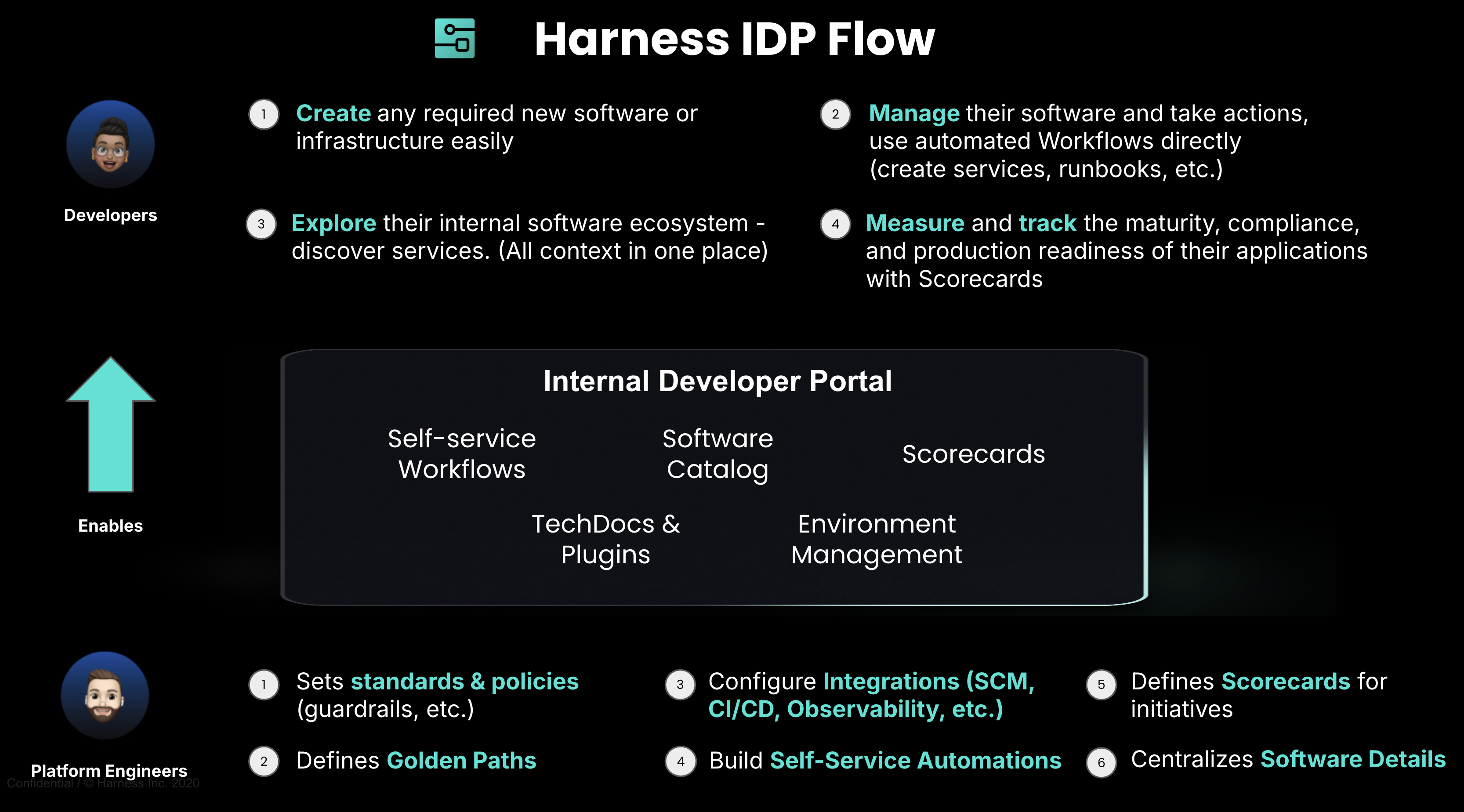
Here is a quick overview of **how Harness IDP works**:
Here is how Harness IDP boosts developer productivity and reduce overhead toil for platform engineers:
* **For Platform Engineers:** Automate developer workflows with built-in standards and guardrails. Build *golden paths* that free your team from repetitive tasks, enforce best practices across all services, and scale your platform; all while maintaining control and governance.
* **For Developers:** Get productive faster with *self-service access* to everything you need. Create new services in minutes using pre-approved templates, discover any API or documentation instantly, and access all your tools from one unified interface; no more context switching or waiting on tickets.
***
### Product pillars
Harness IDP is built on some core pillars that work together to deliver a complete and productive developer experience. Here is how each pillar helps you:
{% tabs %}
{% tab title="Software Catalog" %}
**Your single source of truth for all software assets**
The Software Catalog provides a **centralized registry** of all your services, APIs, libraries, and infrastructure components. Track ownership, dependencies, and metadata in **one searchable location**.
**Key Capabilities:**
* Discover any service or API instantly with powerful Catalog search.
* Visualize service dependencies and relationships, with all the context in one place.
* Track service ownership and contact information.
* Auto-import and populate Catalog from Git and Harness CD.
[Explore the Software Catalog →](/internal-developer-portal/use-idp/software-catalog/overview.md)

{% endtab %}
{% tab title="Workflows" %}
**Automate service onboarding and Day-2 operations**
Self-Service Workflows eliminate repetitive tasks by providing developers with **golden path templates** for common operations. Platform engineers build the workflows once, and developers use them repeatedly.
**Key Capabilities:**
* Create new services from pre-approved templates.
* Provision infrastructure and cloud resources automatically.
* Configure CI/CD pipelines without manual setup.
* Execute day-to-day operations with a simple form.
[Explore Workflows →](/internal-developer-portal/use-idp/self-service-workflows/overview.md)

{% endtab %}
{% tab title="Scorecards" %}
**Measure and enforce software quality standards**
Scorecards help you **define, track, and improve Software Quality** across your organization. Set standards for security, reliability, documentation, and DevOps maturity, then measure compliance automatically. Get **automated visibility** into which services meet your standards and which need improvement.
**Key Capabilities:**
* Define quality checks and maturity standards.
* Measure compliance across all services.
* Track improvement over time with trends.
* Enforce production readiness gates.
[Explore Scorecards →](/internal-developer-portal/use-idp/scorecards/scorecard.md)

{% endtab %}
{% tab title="Environment Management" %}
**Create, configure, and manage environments with self-service**
Environment Management enables developers and platform engineers to **create, configure, and manage environments from a single point of control**. Provide a **self-service, automated, and repeatable** way to manage environments efficiently with built-in guardrails and governance.
**Key Capabilities:**
* Create environments using standardized blueprints and templates.
* Manage Day 2 operations (create, update, delete) for infrastructure and services.
* Orchestrate complex infrastructure provisioning with Platform Orchestrator.
* Enforce governance and compliance through RBAC and policies.
[Explore Environment Management →](/internal-developer-portal/use-idp/environment-management/overview.md)
{% endtab %}
{% tab title="Plugins" %}
**Enrich your software catalog with contextual metadata**
Plugins display additional **metadata** about software components and entities **directly in the catalog**, showing information like CI/CD pipelines, alerts, incidents, and more; all without leaving the portal.
**Key Capabilities:**
* View CI/CD pipeline status, deployment history, and build information about software components directly in the Catalog.
* Monitor alerts, incidents, and service health in real-time.
* Upload and use custom plugins tailored to your internal tools.
* Continuously expanding plugin library with new integrations.
[Explore Plugins →](/internal-developer-portal/use-idp/plugins/overview.md)
{% endtab %}
{% tab title="TechDocs" %}
**Documentation that lives with your code**
TechDocs enables a docs-as-code approach where documentation lives alongside your source code in Git. Write docs in **Markdown**, commit them alongside your source code, and publish automatically. Your team can discover and access documentation instantly through the **Docs tab** in the Catalog, no more outdated wikis or scattered knowledge.
**Key Capabilities:**
* Write documentation in Markdown alongside your code.
* Support for MkDocs plugins including Material theme, diagrams, and code documentation.
* Search across all documentation.
* Version docs alongside code for consistency.
[Explore TechDocs →](/internal-developer-portal/use-idp/software-catalog/integrate-tools/techdocs/enable-docs.md)
{% endtab %}
{% endtabs %}
***
### Video overview
Watch this video for an overview of Harness IDP:
{% embed url="" %}
***
### Get started
Ready to get started with Harness IDP? Follow these simple steps:
1. [Enable Harness IDP](/internal-developer-portal/new-to-idp/get-started.md)
2. [Setup Git Integrations](/internal-developer-portal/new-to-idp/get-started.md)
3. [Populate Your Catalog](/internal-developer-portal/new-to-idp/get-started.md)
4. [Create Your First Workflow](/internal-developer-portal/new-to-idp/get-started.md)
5. [Configure Plugins](/internal-developer-portal/use-idp/plugins/overview.md)
6. [Define Quality Scorecards](/internal-developer-portal/use-idp/scorecards/scorecard.md)
***
{% @harness-feedback/feedback %}