> For the complete documentation index, see [llms.txt](https://developer.harness.io/llms.txt). Markdown versions of documentation pages are available by appending `.md` to page URLs; this page is available as [Markdown](https://developer.harness.io/internal-developer-portal/use-idp/scorecards/create-scorecards/data-sources.md).
# Data Sources
Comprehensive guide to all available data sources for Scorecard checks
Harness IDP allows you to integrate various data sources to collect specific data points for each software component. Once a data source is enabled, you can use it to create checks for your scorecards.
**Data Sources** are third-party providers that supply specific types of data for software components. Examples include Bitbucket, Catalog Info YAML, Datadog, GCP, GitHub, GitLab, Harness, Harness CD, Jira, Kubernetes, PagerDuty, SonarQube, and Traceable. **Data Points** are the specific pieces of information that each data source provides for a software component. Data points can be numbers, strings, or booleans.
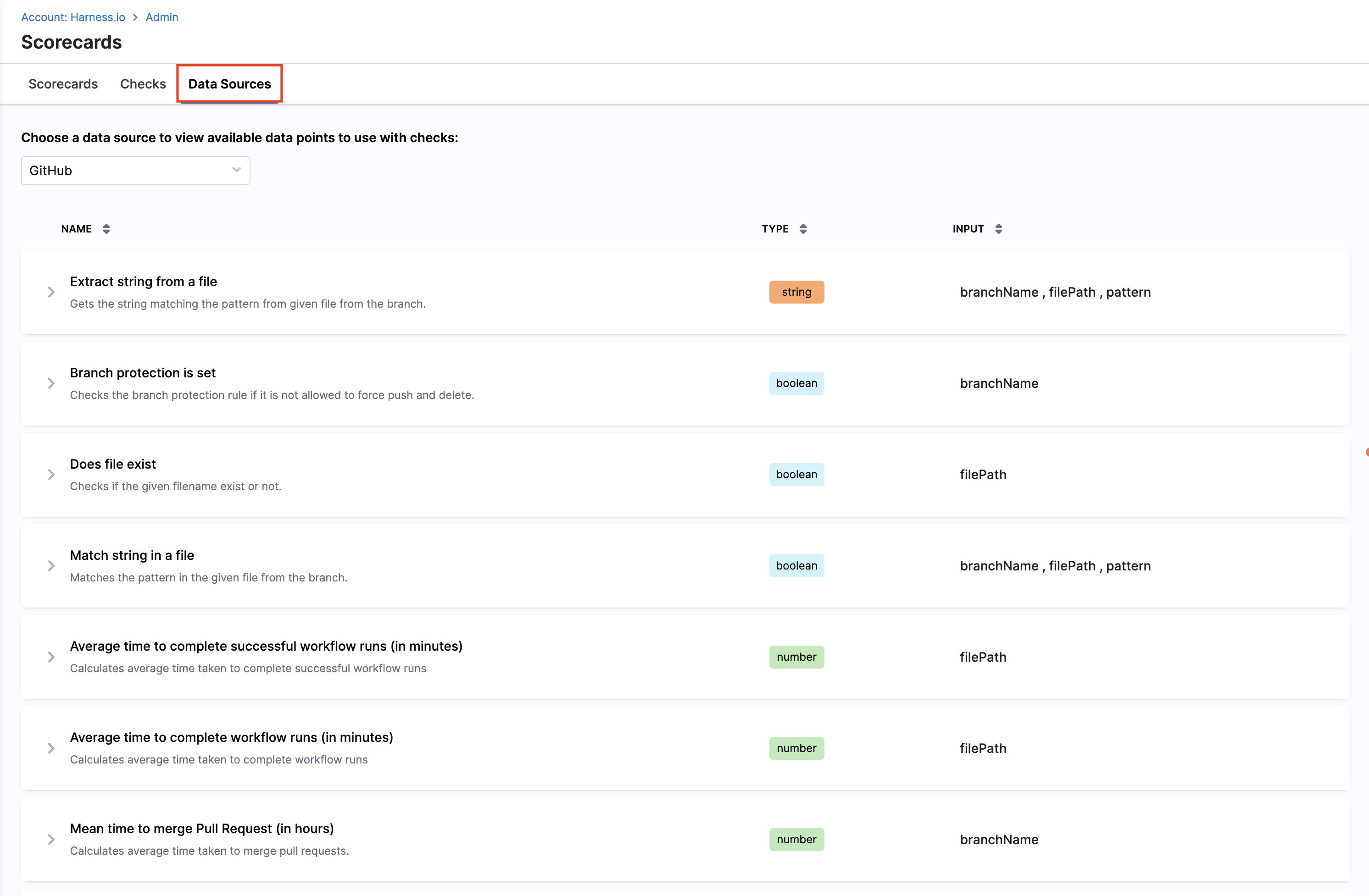
A **Data Sources** tab is available on the **Scorecards** page where you can view all supported data sources and their corresponding data points.
***
### Data sources
#### Bitbucket
The following data points are available for the Bitbucket data source. All data points follow similar patterns to GitHub and GitLab, requiring the `backstage.io/source-location` annotation for repository identification.
**Available data points:**
1. **Default branch**
* Fetches default branch from Bitbucket Cloud integration properties.
2. **Repository description**
* Fetches repository description from Bitbucket Cloud integration properties.
3. **Extract string from a file**
* See the GitHub section for a detailed description.
4. **Branch protection is set**
* Checks the branch protection rule if it is not allowed to merge pull requests without approvals.
> This check works with repository-level branch restrictions. Bitbucket Cloud allows branch restrictions to be configured at both the repository and project levels. However, Bitbucket Cloud's REST API only exposes repository-level branch restrictions. Project-level restrictions, while enforced by Bitbucket across all repositories in a project, are not accessible via the API and therefore cannot be detected programmatically by any tool. To ensure this check works as expected, configure branch restrictions at the repository level.
5. **Does file exist**
* Checks if the given filename exist or not.
6. **Is private**
* Fetches is private from Bitbucket Cloud integration properties.
7. **Match string in a file**
* Matches the pattern in the given file from the branch.
8. **Mean time to merge Pull Request (in hours)**
* Calculates average time taken to merge pull requests.
9. **Project key**
* Fetches project key from Bitbucket Cloud integration properties.
{% hint style="info" %}
**URL priority for branch name field**
For Bitbucket data points that require a branch name, the same priority rules apply as described under GitHub for the URL priority for branch name field.
{% endhint %}
**Prerequisites for Bitbucket connector**
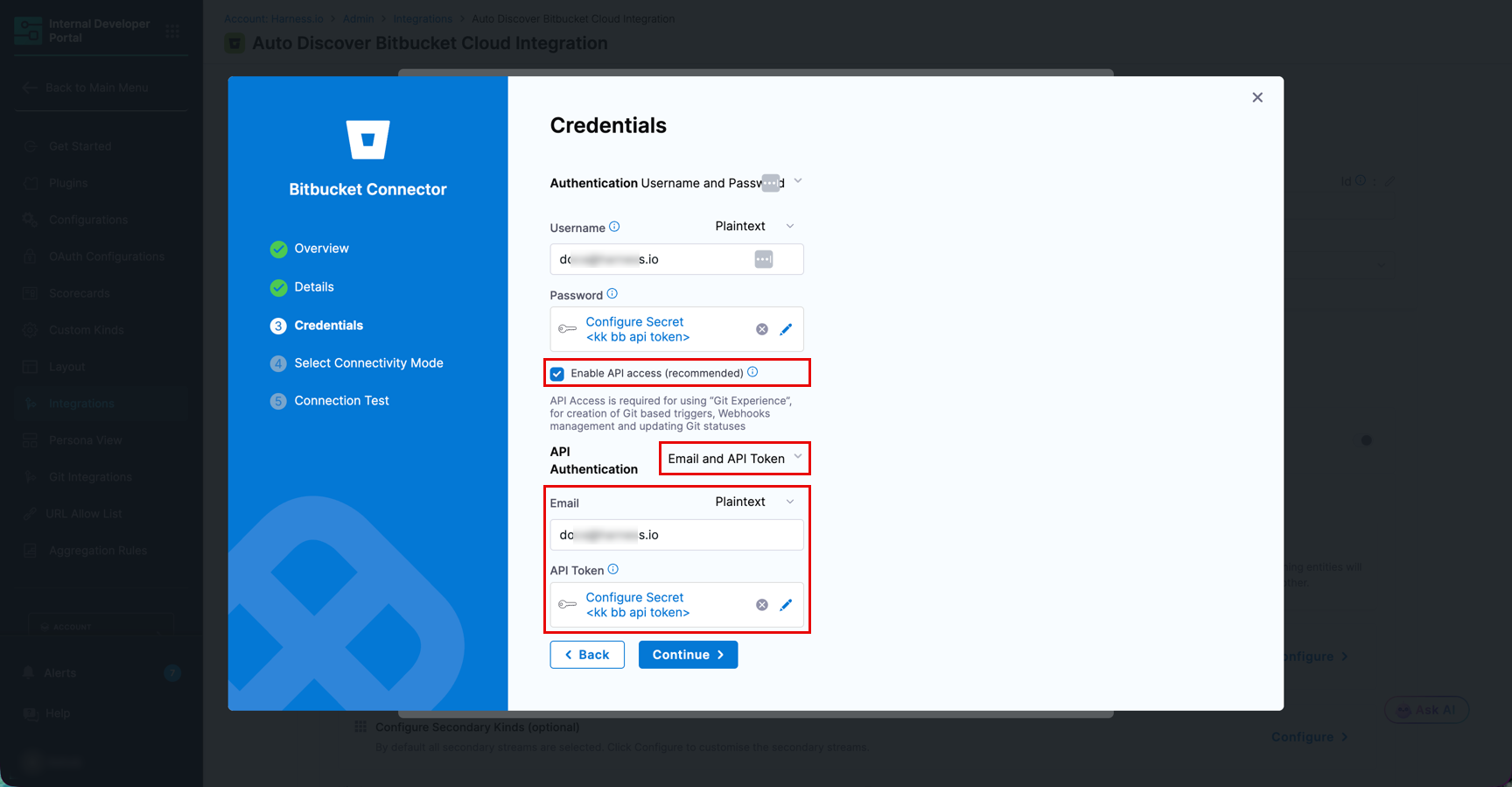
Configure the Bitbucket connector using **Email and API Token** authentication to ensure Scorecards can fetch Bitbucket data without permission-related issues.
Use the following credentials when setting up the connector:
* **Email**: Your Bitbucket account email address
* **API Token**: A Bitbucket API token with the required scopes
To create an API token, go to [Atlassian account security settings](https://id.atlassian.com/manage-profile/security/api-tokens).
The API token must include the following scopes:
* `read:repository:bitbucket`
* `read:project:bitbucket`
* `read:pullrequest:bitbucket`
* `read:workspace:bitbucket`
* `admin:project:bitbucket`
* `admin:repository:bitbucket`
* `admin:workspace:bitbucket`
***
#### Catalog Info YAML
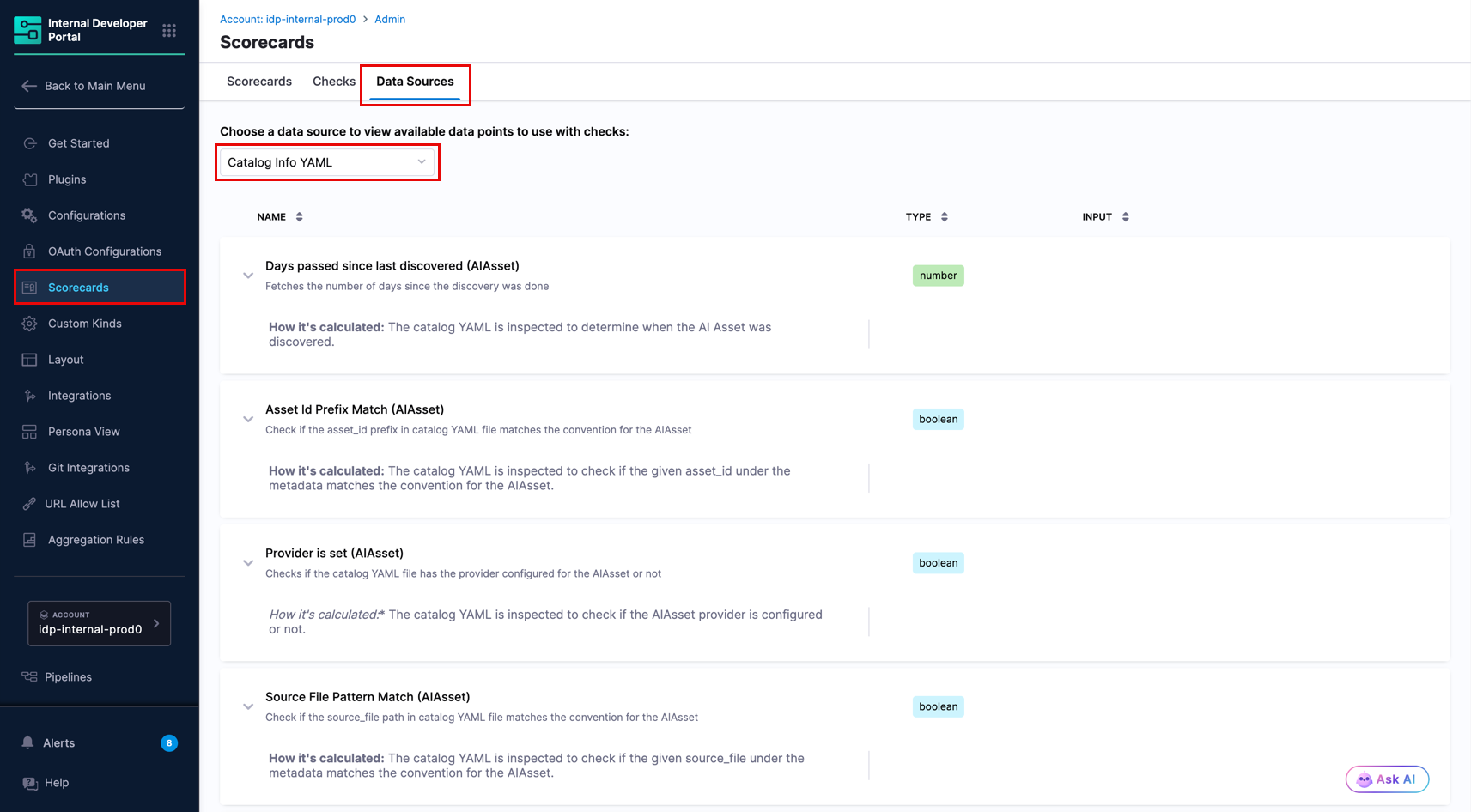
The Catalog Info YAML data source evaluates fields stored directly in an entity's `catalog-info.yaml`. It provides four structural checks specific to **AIAsset** entities, and general entity checks available for any catalog entity kind. Data points below follow the same order as **Configure** → **Scorecards** → **Data Sources** → **Catalog Info YAML**.
**AIAsset checks**
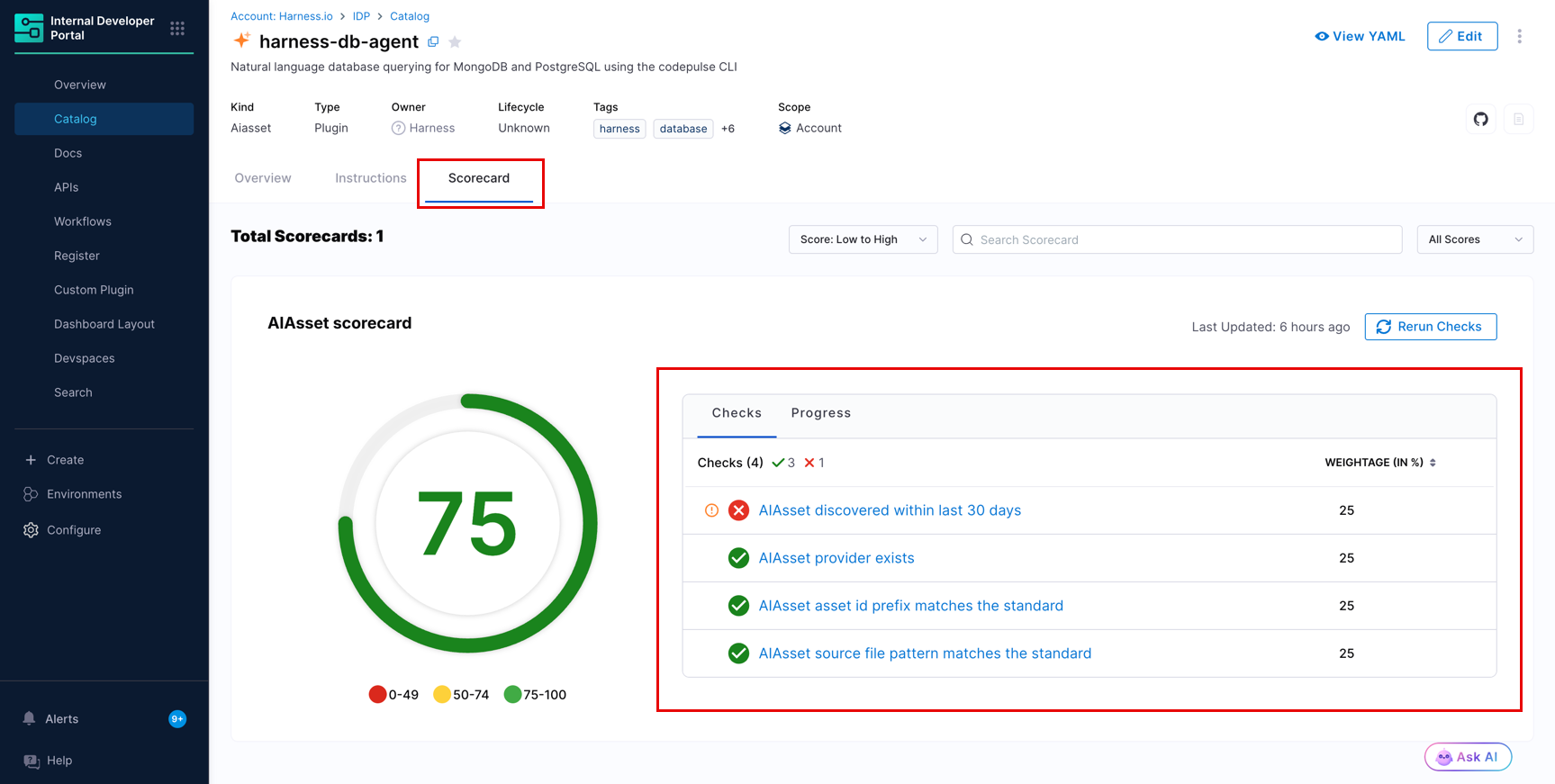
The AIAsset checks from the **Catalog Info YAML** data source currently support assets discovered via the [IDP GitHub integration](/internal-developer-portal/use-idp/software-catalog/create-entity/catalog-discovery/integrations/github.md) only. The following example shows an AIAsset scorecard with all four checks applied to a plugin entity.
**Available data points**:
| Check | Type | Description |
| --------------------------------------------- | ------- | ---------------------------------------------------------------------------------------------------------------------------------------------------------------------------------------------------------------------------------------------------------------------------------------------------------------------- |
| `Days passed since last discovered (AIAsset)` | Number | Fetches the number of days since the AI asset was last rediscovered by the integration. Use this check with a threshold condition (for example, `<= 30`) to confirm the asset is still being actively indexed in its source system. |
| `Asset Id Prefix Match (AIAsset)` | Boolean | Checks whether `metadata.integration_properties.GitHub.asset_id` in the catalog YAML begins with the expected prefix for the asset's type: Plugin → `p_`, Skill → `s_`, Command → `c_`, Agent → `a_`. |
| `Provider is set (AIAsset)` | Boolean | Checks whether the `metadata.integration_properties.GitHub.provider` field is configured in the catalog YAML. The field must be set to a recognized provider value (for example, `OpenAI` or `Anthropic`) for the check to pass. |
| `Source File Pattern Match (AIAsset)` | Boolean | Checks whether the `metadata.integration_properties.GitHub.source_file` path in the catalog YAML follows the structural convention for the asset's type: Skill → `**/skills//SKILL.md`, Command → `**/commands/.md`, Agent → `**/agents/.md`, Plugin (definition) → `**/.claude-plugin/plugin.json`. |
**General entity checks**
| Check | Type | Description |
| ------------------------------------- | ------- | --------------------------------------------------------------------------------------------------------- |
| `Annotation exists` | Boolean | Checks if the catalog YAML file has the given annotation configured or not. |
| `Evaluate expression (JEXL)` | String | Evaluates a JEXL expression on the catalog YAML file. |
| `Pagerduty is set` | Boolean | Checks if the catalog YAML file has the annotation `pagerduty.com/service-id` configured or not. |
| `Owner is defined and is not unknown` | Boolean | Checks if the catalog YAML file has the owner configured or not. |
| `System is defined and it exists` | Boolean | Checks if your component has `spec.system` defined and whether or not it is a valid entry in the catalog. |
| `Documentation exists` | Boolean | Checks if the catalog YAML file has the annotation `backstage.io/techdocs-ref` configured or not. |
***
#### Datadog
The Datadog data source provides insights from Datadog service metadata stored under `metadata.integration_properties.Datadog` in the catalog YAML. Go to [Datadog integration](/internal-developer-portal/use-idp/software-catalog/create-entity/catalog-discovery/integrations/datadog.md) to configure the integration and enrich catalog entities.
**Available data points:**
1. **Contacts count**
* Fetches contacts count from Datadog integration properties
2. **Description**
* Fetches description from Datadog integration properties
3. **Docs count**
* Fetches docs count from Datadog integration properties
4. **GitHub HTML URL**
* Fetches GitHub HTML URL from Datadog integration properties
5. **Monitor count**
* Fetches monitor count from Datadog integration properties
6. **Red monitors count**
* Fetches red monitors count from Datadog integration properties
**Prerequisites:**
* Configure the [Datadog integration](/internal-developer-portal/use-idp/software-catalog/create-entity/catalog-discovery/integrations/datadog.md) and import or merge the service into the catalog so the entity is enriched with Datadog integration properties
***
#### GCP
The GCP data source provides insights from GCP resource metadata stored under `metadata.integration_properties.GCP` in the catalog YAML. Go to [GCP integration](/internal-developer-portal/use-idp/software-catalog/create-entity/catalog-discovery/integrations/gcp.md) to configure the integration and enrich catalog entities.
**Available data points:**
1. **Asset type**
* Fetches asset type from GCP integration properties
2. **Create time**
* Fetches create time from GCP integration properties
3. **Display name**
* Fetches display name from GCP integration properties
4. **Location**
* Fetches location from GCP integration properties
5. **Organization**
* Fetches organization from GCP integration properties
6. **Project**
* Fetches project from GCP integration properties
7. **Resource name**
* Fetches resource name from GCP integration properties
8. **State**
* Fetches state from GCP integration properties
**Prerequisites:**
* Configure the [GCP integration](/internal-developer-portal/use-idp/software-catalog/create-entity/catalog-discovery/integrations/gcp.md) and import or merge the resource into the catalog so the entity is enriched with GCP integration properties
***
#### GitHub
The following data points are available for the GitHub data source.
**1. Extract string from a file**
**Objective:** Gets the string matching the pattern from given file from the branch.
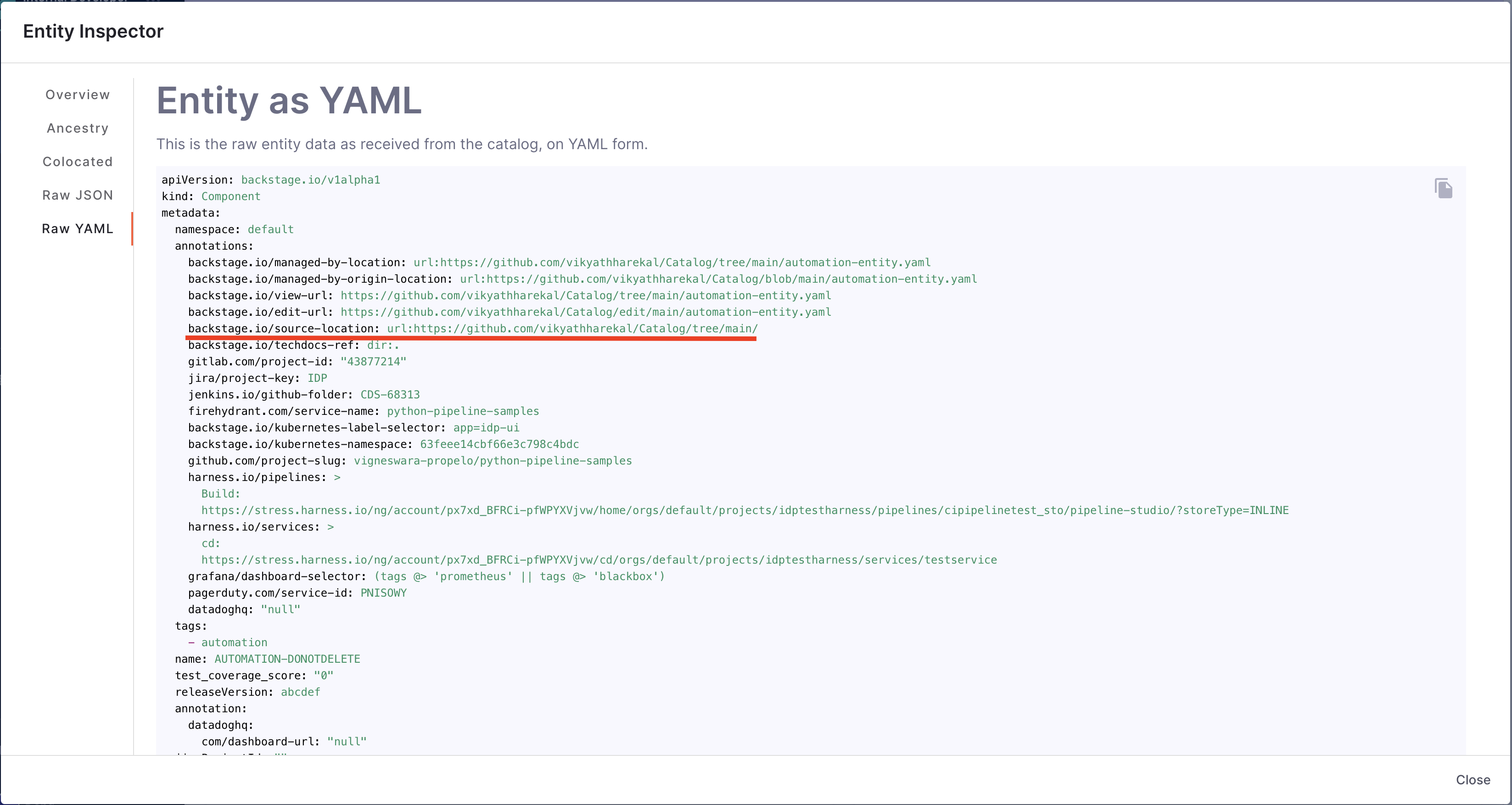
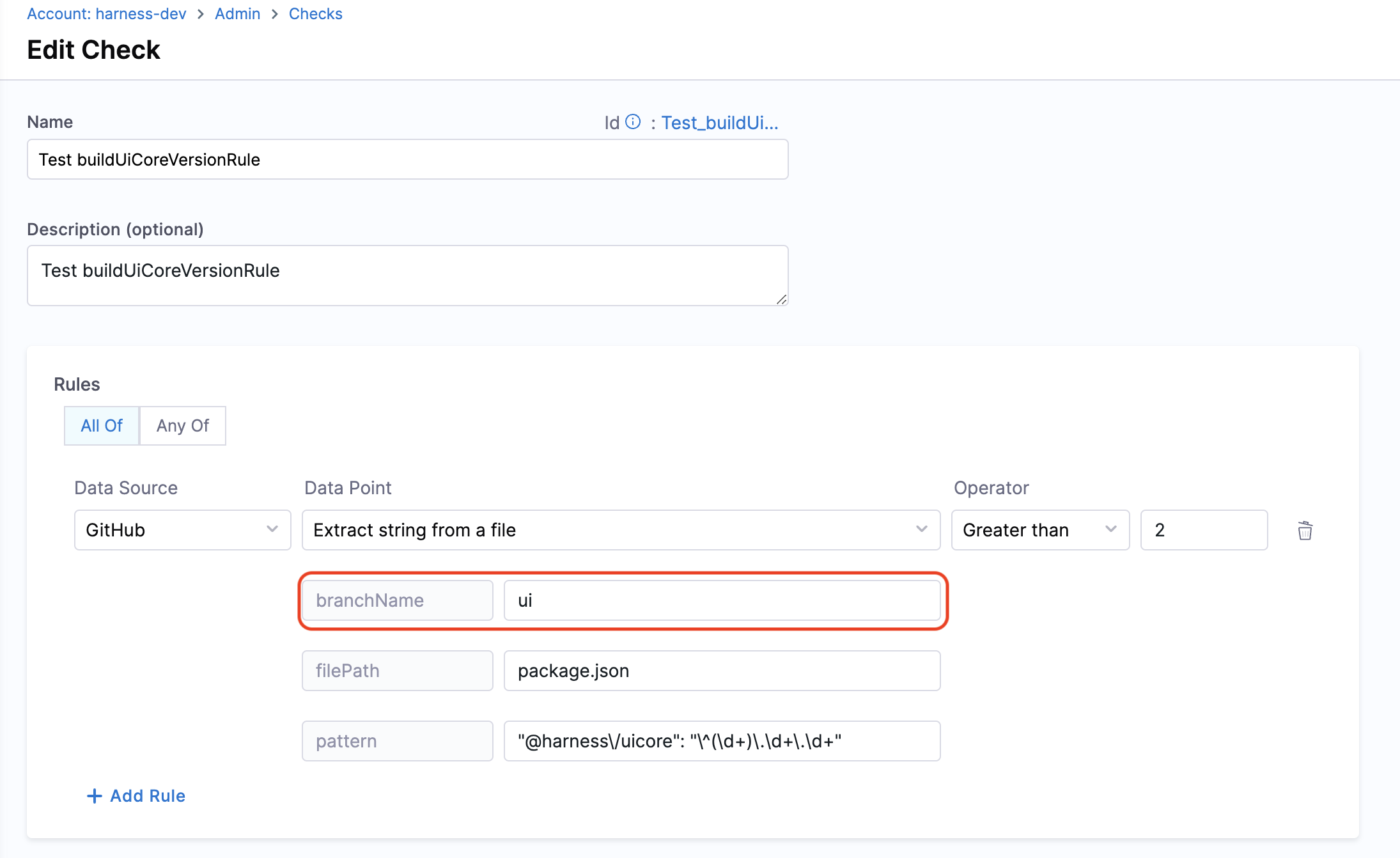
**Calculation Method:** If a branch name is specified, it is utilized. However, if no branch name is provided, the system retrieves information from the catalog YAML file using the `backstage.io/source-location` annotation to determine the branch name and repository details. It is essential to specify the filename with its extension or provide the relative path from the root folder (e.g., README.md or docs/README.md) in the conditional input field. The filename can also be provided as a regex pattern. For example, for a file path `/backstage/blob/master/scripts/log-20240105.anyextension`, the regex would be `/backstage/blob/master/scripts/log-20240105\..*`. After fetching the file, the designated pattern is then searched within the file contents, and its value is extracted and returned.
**URL priority for branch name field**
In some data points, we take `branchName` as input. It is an optional field if the branch is mentioned in `source-location` in your entity YAML. It is suggested to provide a branchName if you want to use the same for all repositories; otherwise, we use the branch name mentioned in the `source-location`.
If you mention the `branchName` field as a check config other than what is present in the `source-location`, the priority order conditions are:
1. If it is in both, the check configuration will take precedence
2. If it is in only one, we will use that value
3. If it is in neither, the check will fail
**Prerequisites:** Provide suitable `backstage.io/source-location` annotation if the catalog YAML file is present outside the source GitHub repository.

**2. Has agents file** \* Fetches has agents file from GitHub integration properties.
**3. Repository URL** \* Fetches repository url from GitHub integration properties.
**4. Branch protection is set**
**Objective:** Ensure that branch protection rules disallow force push and delete.
**Calculation Method:** Fetches the `backstage.io/source-location` annotation from the catalog YAML file to find repository details and verify the branch protection rules.
**Prerequisites:**
* GitHub Connector with Admin access
* Provide suitable `backstage.io/source-location` annotation if the catalog YAML file is present outside the source GitHub repository

**Example YAML:**
```yaml
kind: "Component"
apiVersion: "backstage.io/v1alpha1"
metadata:
name: order-service
annotations:
backstage.io/source-location: 'url:https://github.com/kubernetes/kubernetes/tree/master'
...
spec:
...
```
**5. Does file exist**
**Objective:** Verify the existence of a specified file in the repository.
**Calculation Method:** Uses the `backstage.io/source-location` annotation to locate the repository and check for the file's presence. Make sure to mention the filename with extension or relative path from the root folder (e.g., README.md or docs/README.md) in the conditional input field.
**Prerequisites:** Provide suitable `backstage.io/source-location` annotation if the catalog YAML file is present outside the source GitHub repository.

**Example YAML:**
```yaml
kind: "Component"
apiVersion: "backstage.io/v1alpha1"
metadata:
name: order-service
annotations:
backstage.io/source-location: 'url:https://github.com/kubernetes/kubernetes/tree/master'
...
spec:
...
```
**6. Latest release published at** \* Fetches latest release published at from GitHub integration properties.
**7. Match string in a file**
**Objective:** Matches the pattern in the given file from the branch.
**Calculation Method:** If a branch name is specified, it is utilized. However, if no branch name is provided, the system retrieves information from the catalog YAML file using the `backstage.io/source-location` annotation to determine the branch name and repository details. It is essential to specify the filename with its extension or provide the relative path from the root folder (e.g., README.md or docs/README.md) in the conditional input field. After fetching the file, the contents are examined to find the pattern. Returns true/false based on whether the pattern was found or not.
**URL priority for branch name field**
In some data points, we take `branchName` as input. It is an optional field if the branch is mentioned in `source-location` in **catalog-info.yaml**. It is suggested to provide a branchName if you want to use the same for all repositories; otherwise, we use the branch name mentioned in the `source-location`.
If you mention the `branchName` field as a check config other than what is present in the `source-location`, the priority order conditions are:
1. If it is in both, the check configuration will take precedence
2. If it is in only one, we will use that value
3. If it is in neither, the check will fail
**Prerequisites:** Provide suitable `backstage.io/source-location` annotation if the catalog YAML file is present outside the source GitHub repository.

**8. Average time to complete successful workflow runs (in minutes)**
**Objective:** Calculate the average time taken to complete **successful** workflow runs (in minutes).
**Calculation Method:** Fetches `backstage.io/source-location` annotation from catalog YAML file to find repository details and calculates the average time for the last 100 successful workflow runs to complete.
**Prerequisites:**
* Provide suitable `backstage.io/source-location` annotation if the catalog YAML file is present outside the source GitHub repository
* Make sure to mention the workflow ID or filename in the conditional input field
**9. Average time to complete workflow runs (in minutes)**
**Objective:** Calculate the average time taken to complete workflow runs (in minutes).
**Calculation Method:** Fetches `backstage.io/source-location` annotation from catalog YAML file to find repository details and calculates the average time for the last 100 workflow runs to complete.
**Prerequisites:**
* Provide suitable `backstage.io/source-location` annotation if the catalog YAML file is present outside the source GitHub repository
* Make sure to mention the workflow ID or filename in the conditional input field
**10. Mean time to merge Pull Request (in hours)**
**Objective:** Calculate the average time taken to merge the last 100 pull requests.
**Calculation Method:** Retrieves repository details using `backstage.io/source-location` and calculates the average merge time.
**Prerequisites:**
* Provide suitable `backstage.io/source-location` annotation if the catalog YAML file is present outside the source GitHub repository
* Make sure to mention the branch name in the conditional input field

**Example YAML:**
```yaml
kind: "Component"
apiVersion: "backstage.io/v1alpha1"
metadata:
name: order-service
annotations:
backstage.io/source-location: 'url:https://github.com/kubernetes/kubernetes/tree/master'
...
spec:
...
```
**11. Open code scanning alerts**
**Objective:** Calculates the total number of open alerts reported in code scanning for the given severity.
**Calculation Method:** Fetches `backstage.io/source-location` annotation from catalog YAML file to find repository details and calculates the total number of open alerts reported in code scanning.
**Prerequisites:**
* GitHub Connector with read access for code scanning alerts
* Provide suitable `backstage.io/source-location` annotation if the catalog YAML file is present outside the source GitHub repository
* Make sure to mention the severity type in the conditional input field
**12. Open Dependabot alerts**
**Objective:** Calculates the total number of open alerts reported by Dependabot for the given severity.
**Calculation Method:** Fetches `backstage.io/source-location` annotation from catalog YAML file to find repository details and calculates the total number of open alerts reported by Dependabot.
**Prerequisites:**
* Provide suitable `backstage.io/source-location` annotation if the catalog YAML file is present outside the source GitHub repository
* Make sure to mention the severity type in the conditional input field
**13. Open pull requests by account**
**Objective:** Calculates the total number of open pull requests raised by the given account.
**Calculation Method:** Fetches `backstage.io/source-location` annotation from catalog YAML file to find repository details and calculates the total number of open pull requests raised by account.
**Prerequisites:**
* Provide suitable `backstage.io/source-location` annotation if the catalog YAML file is present outside the source GitHub repository
* Make sure to mention the username in the conditional input field
**14. Open secret scanning alerts**
**Objective:** Calculates the total number of open alerts reported in secret scanning.
**Calculation Method:** Fetches `backstage.io/source-location` annotation from catalog YAML file to find repository details and calculates the total number of open alerts reported in secret scanning.
**Prerequisites:**
* GitHub Connector with read access for secret scanning alerts
* Provide suitable `backstage.io/source-location` annotation if the catalog YAML file is present outside the source GitHub repository
**15. Primary language** \* Fetches primary language from GitHub integration properties.
**16. Workflow success rate**
**Objective:** Calculates success rate for the given workflow.
**Calculation Method:** Fetches `backstage.io/source-location` annotation from catalog YAML file to find repository details and calculates the success rate for the workflow.
**Prerequisites:**
* Provide suitable `backstage.io/source-location` annotation if the catalog YAML file is present outside the source GitHub repository
* Make sure to mention the workflow ID or filename in the conditional input field
**17. Workflows count**
**Objective:** Calculates total number of workflows.
**Calculation Method:** Fetches `backstage.io/source-location` annotation from catalog YAML file to find repository details and calculates the total number of workflows.
**Prerequisites:** Provide suitable `backstage.io/source-location` annotation if the catalog YAML file is present outside the source GitHub repository.
***
#### GitLab
The following data points are available for the GitLab data source.
**1. Extract string from a file**
**Objective:** Gets the string matching the pattern from given file from the branch.
**Calculation Method:** If a branch name is specified, it is utilized. However, if no branch name is provided, the system retrieves information from the catalog YAML file using the `backstage.io/source-location` annotation to determine the branch name and repository details. It is essential to specify the filename with its extension or provide the relative path from the root folder (e.g., README.md or docs/README.md) in the conditional input field. After fetching the file, the designated pattern is then searched within the file contents, and its value is extracted and returned.
**URL priority for branch name field**
In some data points, we take `branchName` as input. It is an optional field if the branch is mentioned in `source-location` in **catalog-info.yaml**. It is suggested to provide a branchName if you want to use the same for all repositories; otherwise, we use the branch name mentioned in the `source-location`.
If you mention the `branchName` field as a check config other than what is present in the `source-location`, the priority order conditions are:
1. If it is in both, the check configuration will take precedence
2. If it is in only one, we will use that value
3. If it is in neither, the check will fail
**Prerequisites:** Provide suitable `backstage.io/source-location` annotation if the catalog YAML file is present outside the source GitLab repository.
**2. Branch protection is set**
**Objective:** Ensure that branch protection rules disallow force push and delete.
**Calculation Method:** Fetches `backstage.io/source-location` annotation from the catalog YAML file to find repository details and verify the branch protection rules.
**Prerequisites:**
* GitLab Connector with Admin access
* Provide suitable `backstage.io/source-location` annotation if the catalog YAML file is present outside the source GitLab repository

**Example YAML:**
```yaml
kind: "Component"
apiVersion: "backstage.io/v1alpha1"
metadata:
name: order-service
annotations:
backstage.io/source-location: 'url:https://gitlab.com/kubernetes/kubernetes/tree/master'
...
spec:
...
```
**3. Does file exist**
**Objective:** Verify the existence of a specified file in the repository.
**Calculation Method:** Uses the `backstage.io/source-location` annotation to locate the repository and check for the file's presence. Make sure to mention the filename with extension or relative path from the root folder (e.g., README.md or docs/README.md) in the conditional input field.
**Prerequisites:** Provide suitable `backstage.io/source-location` annotation if the catalog YAML file is present outside the source GitLab repository.

**Example YAML:**
```yaml
kind: "Component"
apiVersion: "backstage.io/v1alpha1"
metadata:
name: order-service
annotations:
backstage.io/source-location: 'url:https://gitlab.com/kubernetes/kubernetes/tree/master'
...
spec:
...
```
**4. Match string in a file**
**Objective:** Matches the pattern in the given file from the branch.
**Calculation Method:** If a branch name is specified, it is utilized. However, if no branch name is provided, the system retrieves information from the catalog YAML file using the `backstage.io/source-location` annotation to determine the branch name and repository details. It is essential to specify the filename with its extension or provide the relative path from the root folder (e.g., README.md or docs/README.md) in the conditional input field. After fetching the file, the contents are examined to find the pattern. Returns true/false based on whether the pattern was found or not.
**URL priority for branch name field**
In some data points, we take `branchName` as input. It is an optional field if the branch is mentioned in `source-location` in **catalog-info.yaml**. It is suggested to provide a branchName if you want to use the same for all repositories; otherwise, we use the branch name mentioned in the `source-location`.
If you mention the `branchName` field as a check config other than what is present in the `source-location`, the priority order conditions are:
1. If it is in both, the check configuration will take precedence
2. If it is in only one, we will use that value
3. If it is in neither, the check will fail
**Prerequisites:** Provide suitable `backstage.io/source-location` annotation if the catalog YAML file is present outside the source GitLab repository.
**5. Mean time to merge Pull Request (in hours)**
**Objective:** Calculate the average time taken to merge the last 100 pull requests.
**Calculation Method:** Retrieves repository details using `backstage.io/source-location` and calculates the average merge time.
**Prerequisites:**
* Provide suitable `backstage.io/source-location` annotation if the catalog YAML file is present outside the source GitLab repository
* Make sure to mention the branch name in the conditional input field

**Example YAML:**
```yaml
kind: "Component"
apiVersion: "backstage.io/v1alpha1"
metadata:
name: order-service
annotations:
backstage.io/source-location: 'url:https://gitlab.com/kubernetes/kubernetes/tree/master'
...
spec:
...
```
***
#### Harness
The Harness data source provides insights into your CI/CD pipelines and deployments.
**Before you begin**
To use Harness as a data source for Scorecards, you need to:
1. Add the Harness annotation in your `catalog-info.yaml` file:
```yaml
metadata:
annotations:
harness.io/pipelines: |
labelA:
labelB:
```
2. The pipeline URL format should be:
```
https://app.harness.io/ng/account//module/ci/orgs//projects//pipelines//
```
**Available data points:**
1. **CI Pipeline success rate (last 7 days)**
* Percentage of successful CI pipeline executions in the past 7 days
2. **(Code) Extract string from a file**
* Gets the string matching the pattern from given file from the branch
3. **(Code) Does file exist**
* Checks if the given filename exists or not
4. **Policy evaluation successful**
* Checks if policy evaluation was successful for the pipeline
5. **(Code) Match string in a file**
* Matches the pattern in the given file from the branch
6. **Tests passing on CI**
* Checks if tests are passing on CI
7. **Number of Active Vulnerabilities (STO)**
* Calculates the number of active vulnerabilities reported by STO for the given scanner tool and severity
8. **STO stage added in pipeline**
* Checks if an STO stage is added in the pipeline
**Error scenarios**
**Missing Harness Annotation:** If the `harness.io/pipelines` annotation is missing from the catalog-info.yaml file, the check will fail with an appropriate error message indicating that the annotation is required.
**Invalid Pipeline URL:** If the pipeline URL format is incorrect or the pipeline does not exist, the check will fail with an error message.
***
#### Harness CD
The Harness CD data source provides insights from Harness CD DORA metrics stored under `metadata.integration_properties.HarnessCD` in the catalog YAML. Go to [Catalog Auto-Discovery with Harness CD Services](/internal-developer-portal/use-idp/software-catalog/create-entity/catalog-discovery/integrations/harness-cd.md) to configure the integration and enrich catalog entities.
**Available data points:**
1. **Average deployment duration (seconds)**
* Fetches average deployment duration (seconds) from Harness CD integration properties
2. **Change failure rate percent**
* Fetches change failure rate percent from Harness CD integration properties
3. **Deployment frequency per sprint**
* Fetches deployment frequency per sprint from Harness CD integration properties
**Prerequisites:**
* Configure the [Harness CD integration](/internal-developer-portal/use-idp/software-catalog/create-entity/catalog-discovery/integrations/harness-cd.md) and sync the service into the catalog so the entity is enriched with Harness CD integration properties
***
#### Jira
The Jira data source provides insights into your project management and issue tracking.
**Available data points:**
1. **Issues count**
* Calculates the total number of issues for the given JQL query
2. **Issues open/close ratio**
* Calculates the ratio between Open & Closed issues for the given JQL query
3. **Mean time to resolve (in hours)**
* Calculates the average time taken to resolve issues for the given JQL query
**Prerequisites:**
* Add the Jira project key annotation in your `catalog-info.yaml`:
```yaml
metadata:
annotations:
jira/project-key: MYPROJ
```
***
#### Kubernetes
The Kubernetes data source provides insights into your Kubernetes deployments and resources.
**Before you begin**
1. **Enable Kubernetes Plugin:**
* The Kubernetes plugin must be enabled in your IDP
* Configure the plugin with appropriate cluster access
2. **Add Kubernetes Annotation:**
* Add the `backstage.io/kubernetes-id` annotation to your `catalog-info.yaml`:
```yaml
metadata:
annotations:
backstage.io/kubernetes-id: my-service
```
**Available data points:**
1. **Days passed since the application was last deployed**
* Fetches the number of days since the most recent deployment was done.
2. **Replicas count**
* Fetches the number of replicas configured for the given service.
***
#### PagerDuty
The PagerDuty data source provides insights into your incident management and on-call schedules.
**Before you begin**
1. **Enable PagerDuty Plugin:**
* The PagerDuty plugin must be enabled in your IDP
2. **Add PagerDuty Annotation:**
* Add the PagerDuty integration key to your `catalog-info.yaml`:
```yaml
metadata:
annotations:
pagerduty.com/integration-key:
```
Available data points:
1. **Mean seconds to first ack**
* Fetches mean seconds to first ack from PagerDuty integration properties.
2. **Mean seconds to resolve**
* Fetches mean seconds to resolve from PagerDuty integration properties.
3. **Total incidents**
* Fetches total incidents from PagerDuty integration properties.
4. **Average resolved time of the last 10 resolved incidents (in Minutes)**
* Calculates the average resolved time for last 10 incidents.
5. **Default role**
* Fetches default role from PagerDuty integration properties.
6. **Service or team identifier**
* Fetches service or team identifier from PagerDuty integration properties.
7. **Is Escalation Policy set**
* Checks if escalation policy is set for given service.
8. **Is on-call set**
* Checks if on call is set for given service.
9. **Service or team name**
* Fetches service or team name from PagerDuty integration properties.
10. **Number of incidents in the last 30 days**
* Checks the number for incidents created for given service in last 30 days.
11. **Service status**
* Fetches service status from PagerDuty integration properties.
**Error scenarios**
**Missing PagerDuty Annotation:** If the PagerDuty annotation is missing from the catalog-info.yaml file, the check will fail with an error message indicating that the annotation is required.

***
#### SonarQube
The SonarQube data source provides insights from SonarQube code quality metrics stored under `metadata.integration_properties.SonarQube` in the catalog YAML. Go to [SonarQube integration](/internal-developer-portal/use-idp/software-catalog/create-entity/catalog-discovery/integrations/sonarqube.md) to configure the integration and enrich catalog entities.
**Available data points:**
1. **Branch coverage**
* Fetches branch coverage from SonarQube integration properties
2. **Bugs**
* Fetches bugs from SonarQube integration properties
3. **Code smells**
* Fetches code smells from SonarQube integration properties
4. **Duplicated lines density**
* Fetches duplicated lines density from SonarQube integration properties
5. **Line coverage**
* Fetches line coverage from SonarQube integration properties
6. **Lines of code (NCLOC)**
* Fetches lines of code from SonarQube integration properties
7. **Reliability rating**
* Fetches reliability rating from SonarQube integration properties
8. **Security hotspots**
* Fetches security hotspots from SonarQube integration properties
9. **Security rating**
* Fetches security rating from SonarQube integration properties
10. **Maintainability rating**
* Fetches maintainability rating from SonarQube integration properties
11. **Vulnerabilities**
* Fetches vulnerabilities from SonarQube integration properties
12. **Quality gate status**
* Fetches quality gate status from SonarQube integration properties
**Prerequisites:**
* Configure the [SonarQube integration](/internal-developer-portal/use-idp/software-catalog/create-entity/catalog-discovery/integrations/sonarqube.md) and import or merge the project into the catalog so the entity is enriched with SonarQube integration properties
***
#### Traceable
{% hint style="info" %}
These data points apply only to IDP entities with `kind: API`. They will not appear or evaluate for any other entity kind.
{% endhint %}
The Traceable data source provides out-of-the-box data points derived from live API traffic observed by Traceable. These require the `IDP_API_ENDPOINT_EXTRACTION` feature flag to be enabled and the Traceable integration to be configured. Go to [Traceable integration](/internal-developer-portal/use-idp/software-catalog/create-entity/catalog-discovery/integrations/traceable.md) to configure the integration.
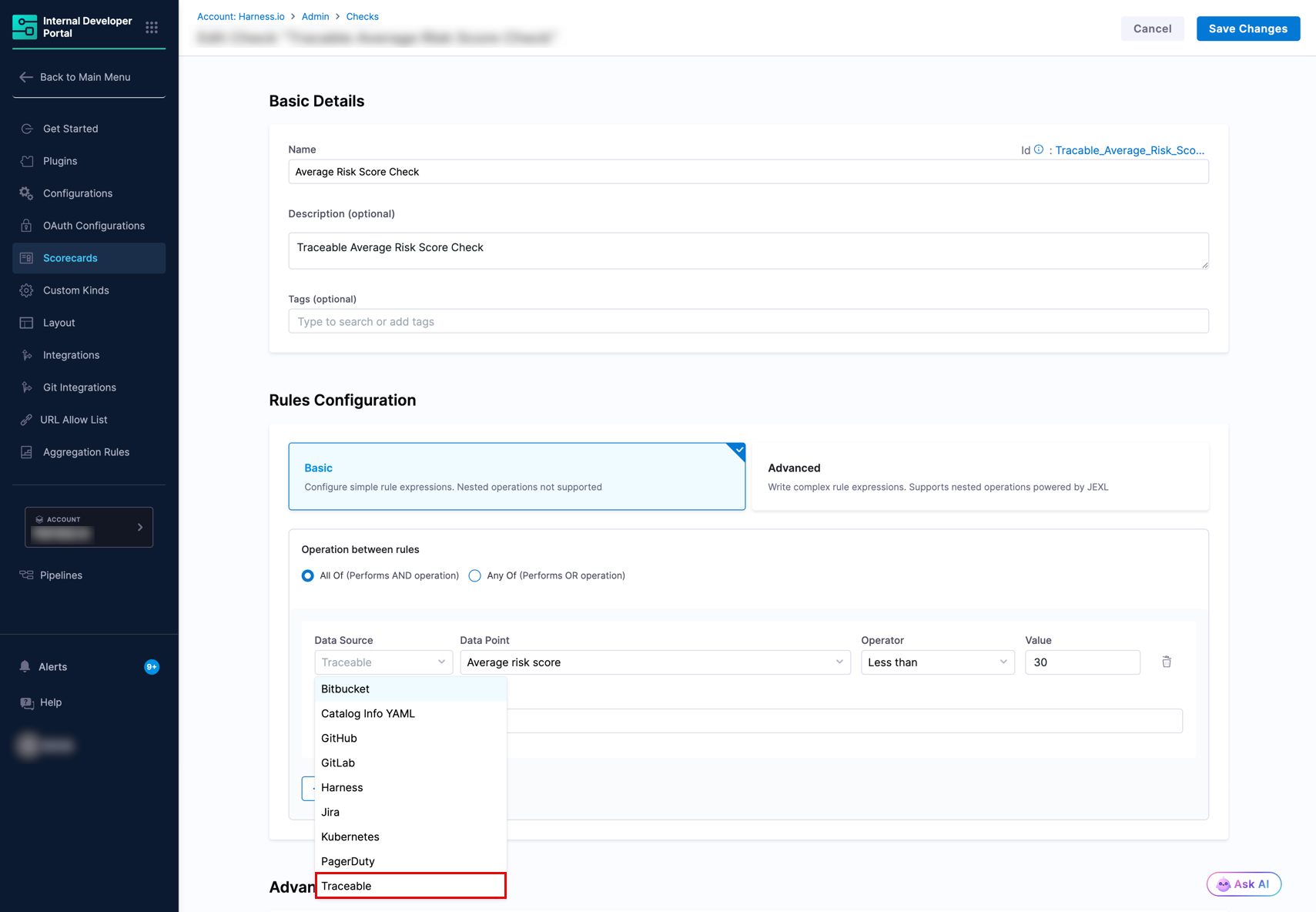
To view available Traceable data points, go to **Configure** → **Scorecards** → **Data Sources** and select **Traceable** from the dropdown.
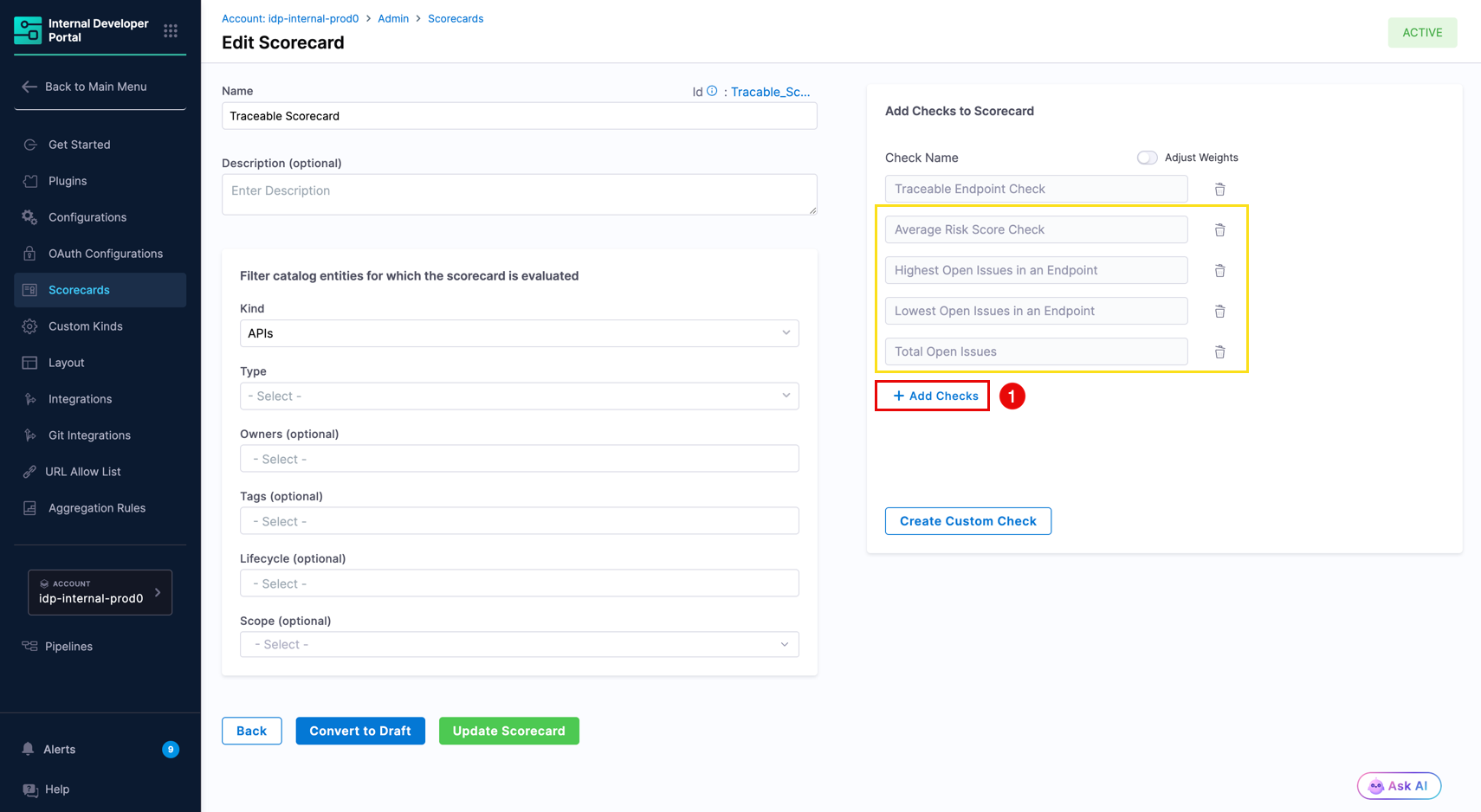
**Available data points**
The following data points return a value of type **number**. The example use cases below illustrate one way to apply each data point. You can use them in checks however best fits your workflow.
| Data point | Description | Example use case |
| ------------------------------------ | ------------------------------------------------------------------------------------------------------------------------------------------------------------------------------------- | ---------------------------------------------------------------------------------------------------------------------------------------------- |
| `Average risk score` | The average Traceable risk score across all endpoints matched to this entity. For example, if an entity has three endpoints with risk scores 6, 8, and 10, this data point returns 8. | Track overall risk exposure for the entity as a single, averaged number. |
| `Highest open issues on an endpoint` | The highest open issue count among all matched endpoints in this entity. | You could use this to flag entities where a single endpoint exceeds a set number of open issues, even if the overall average looks acceptable. |
| `Lowest open issues on an endpoint` | The lowest open issue count among all matched endpoints in this entity. | You could use this to check whether at least one endpoint in the entity has fewer open issues than a threshold you define. |
| `Endpoints with OWASP issues` | Counts the number of API endpoints with open issues matching the specified OWASP categories. | Track how many endpoints are exposed to specific OWASP risk categories (e.g. `['A01','A02','A03']`) to prioritize remediation. |
| `Total open issues` | The sum of all open issues across every matched endpoint. | This can help track the overall security debt of an API and measure improvement over time. |
**Create a check using Traceable data**
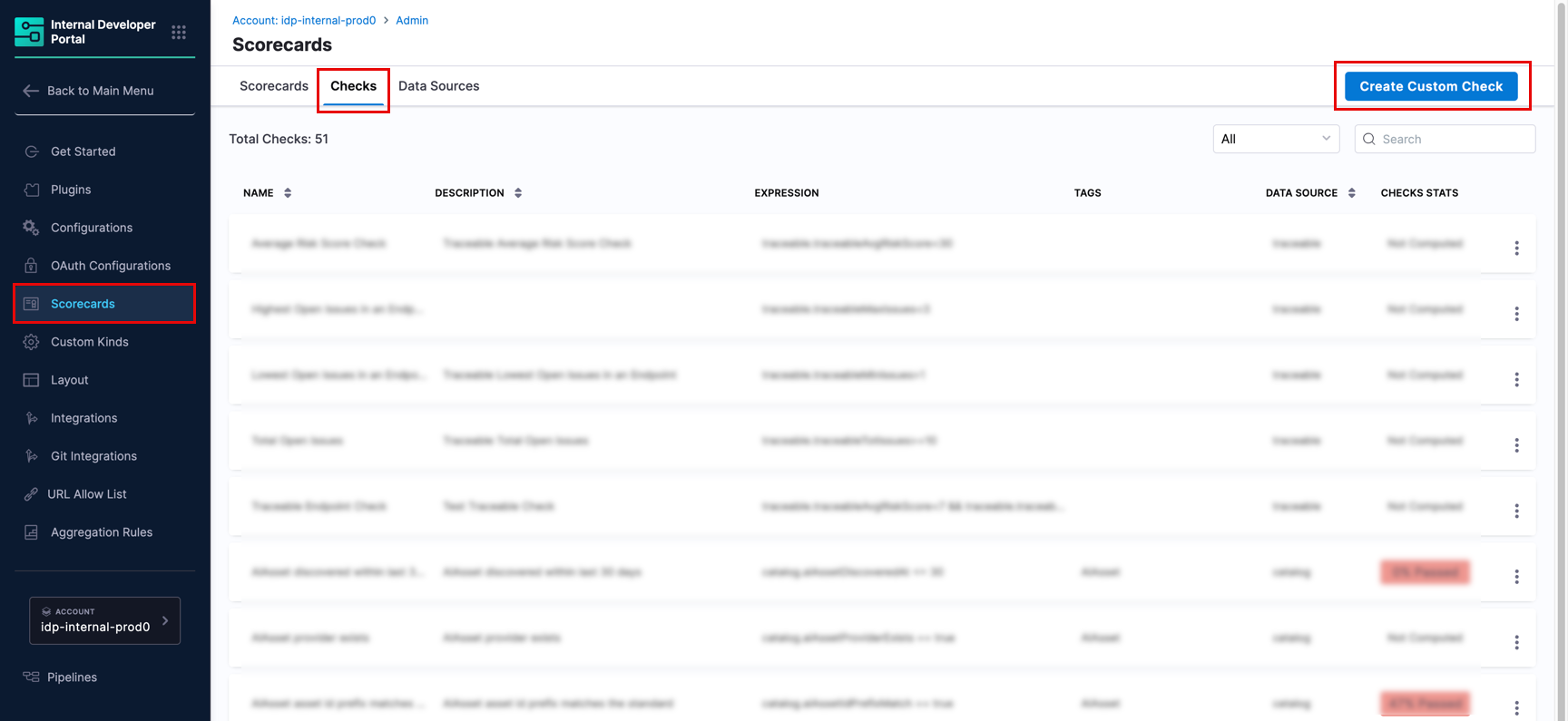
1. Go to **Configure** → **Scorecards** → **Checks** and select **Create Custom Check**.
2. Under **Rules Configuration**, set **Data Source** to **Traceable**.
3. Select a **Data Point** from the dropdown.
4. Set the **Operator** and **Value** for your condition (for example, Average risk score less than or equal to 7).
5. Under **Advanced Configuration**, set the default result for missing data. This controls whether a missing data result counts as a pass or a fail. The default is **Fail**.
6. Save the check.
**Apply the check to a scorecard**
When creating or editing a scorecard, set **Kind** to **APIs** in the entity filter. Traceable data points are only evaluated against API entities and will not produce results if the scorecard targets Components or other kinds.
***
### Custom data sources
Custom data sources enable you to extend Harness IDP's scorecard capabilities beyond the out-of-the-box integrations. This is particularly useful when you want to build scorecards for tools that aren’t natively supported or when you need to enrich existing catalog entities with additional metadata.
There are two primary approaches to working with data sources in Harness IDP:
1. **Out-of-the-Box Data Sources**: Native integrations (GitHub, GitLab, Jira, PagerDuty, etc.) that automatically fetch data from connected tools
2. **Custom Data Sources**: User-defined data ingested via the Catalog Ingestion API, allowing you to bring in data from any source
**When to use custom data sources**
Consider using custom data sources when:
* **Tool Not Natively Supported**: You’re using a tool that doesn’t have an out-of-the-box integration (e.g., custom testing frameworks, proprietary tools, internal systems)
* **Multiple Data Sources**: You want to combine data from multiple tools into a single metric
Use the Catalog Ingestion API to programmatically update your catalog entities with custom data. The API accepts the full entity YAML and updates the catalog.
**Steps**
1. **Create a Custom Check using the Catalog Expressions Data Point**
* Navigate to **Configure** → **Scorecards** → **Checks**
* Create a new check and select Catalog as the data source
* Use catalog expressions to reference your custom data
2. **Ingest Data into the Catalog using the API**
* Use the Catalog Ingestion API to push your custom data
* You can use a Python script or any other method to automate this process
3. **Schedule Periodic Data Updates**
* Set up a cron job or scheduled process to push data periodically and keep your catalog up-to-date
* You can use a scheduled Harness pipeline, a cron job, or any other automation to trigger the ingestion API at regular intervals (e.g., hourly, daily)
* This ensures your custom data remains current and reflects the latest information from your data sources
Watch [this video](https://youtu.be/MB-IWGoYjOo?si=J5GgmUItG1TQ-0M1) to see a working example. Here is a [sample Harness pipeline](https://github.com/harness-community/idp-samples/blob/main/idp-pipelines/Catalog_Ingestion_Pipeline.yaml) with a Python script for ingestion.
***
### Next steps
Explore the following pages next:
* Learn how to [create custom checks](/internal-developer-portal/use-idp/scorecards/create-scorecards/checks.md) using these data sources
* Explore scorecard tutorials for advanced use cases:
* [Track Migrations using Scorecards](/internal-developer-portal/use-idp/scorecards/tutorials/track-migrations.md)
* [Harness OPA using Scorecards](/internal-developer-portal/use-idp/scorecards/tutorials/opa-implementation.md)
* Review how to [manage your scorecards](/internal-developer-portal/use-idp/scorecards/manage-scorecards.md)
{% @harness-feedback/feedback %}