> For the complete documentation index, see [llms.txt](https://developer.harness.io/llms.txt). Markdown versions of documentation pages are available by appending `.md` to page URLs; this page is available as [Markdown](https://developer.harness.io/internal-developer-portal/use-idp/software-catalog/catalog-yaml.md).
# Understand Catalog YAML
Understand the basics of Catalog YAML.
Harness IDP marks a significant evolution of the Internal Developer Portal, introducing a Harness-native data model tailored for enterprise-scale environments and strong access control. Going forward, only the **Harness-native data model** schema will be used and referenced. This guide walks you through the new **Harness-native YAML schema** and outlines the key changes from the previous schema.
***
### Quick reference: Entity YAML examples Component YAML Example
```yaml
apiVersion: harness.io/v1
kind: Component
name: anomaly-detection
identifier: anomaly-detection
type: service
owner: group:ccmplayacc
spec:
lifecycle: production
dependsOn:
- component:ng-manager
metadata:
description: CCM anomaly detection backend service
annotations:
backstage.io/kubernetes-label-selector: app=anomaly-detection
github.com/project-slug: wings-software/ce-anomalyDetection
pagerduty.com/service-id: PFVOX97
jira/project-key: CCM
backstage.io/source-location: url:https://github.com/wings-software/ce-anomalyDetection/tree/main
links:
- title: repo
url: https://github.com/wings-software/ce-anomalyDetection
tags:
- python
```
API YAML Example
```yaml
apiVersion: harness.io/v1
kind: API
type: openapi
identifier: cenextgen
name: cenextgen
owner: johndoe
spec:
lifecycle: production
definition:
$text: https://github.com/OAI/OpenAPI-Specification/blob/main/examples/v2.0/json/api-with-examples.json
metadata:
description: The official CE NEXTGEN service REST APIs
```
System YAML Example
```yaml
apiVersion: harness.io/v1
kind: System
name: Payment System
identifier: paymentsystem
type: domain
owner: team-payment
metadata:
description: This system groups services and libraries related to payment processing.
tags:
- rest
- java
```
Resource YAML Example
```yaml
apiVersion: harness.io/v1
kind: Resource
name: Payment Database
identifier: payment-database
type: database
owner: group:ccmplayacc
spec:
system:
- system:account/ccm_platform
dependsOn:
- resource:account/ccm-backup-storage
metadata:
description: MongoDB database for CCM platform data storage
annotations:
harness.io/db-instance: mongodb-ccm-prod-01
harness.io/db-region: us-east-1
harness.io/backup-schedule: daily-2am-UTC
links:
- title: Database Dashboard
url: https://harness-monitoring.grafana.net/d/mongodb-ccm
- title: Backup Policy
url: https://harness.atlassian.net/wiki/spaces/CCM/pages/123456/Database+Backup+Policy
tags:
- mongodb
- database
- production
```
Team YAML Example
```yaml
apiVersion: harness.io/v1
kind: Group
type: engineering
name: Cloud Infrastructure Team
identifier: cloud_infrastructure_team
spec:
members:
- user:account/jane.doe@harness.io
- user:account/john.smith@harness.io
parent: group:account/idp_team
profile:
email: cloud_infrastructure_team@techo.io
metadata:
description: User Group responsible for building and maintaining the company’s core cloud infrastructure.
teamLead: Jane Doe
region: US West
tags:
- cloud
- engineering
```
{% hint style="info" %}
Ensure that **no entity YAML files** are stored in **Git in IDP** until the **Git Experience** feature is released. You can track its release and other updates in the **IDP 2.0 Features Status** table
{% endhint %}
***
### What is new in IDP?
IDP implements a **Harness-native entity schema** featuring targeted adjustments to previous Backstage-style YAML configurations. These changes primarily introduce scope concepts (project, organization, or account) while enhancing readability based on user feedback.
JSON Schemas for all Catalog entities are available through our API.
**⨁ New fields**
* `orgIdentifier` (optional)
* `projectIdentifier` (optional)
These fields define the entity's scope. For project-scoped entities, both fields will be present. For organization-scoped entities, only `orgIdentifier` will appear. Account-level entities will have the scope automatically assigned to the account.
**♻️ Updated fields**
* `metadata.name` becomes `identifier`
* This aligns with Harness Entity YAML definitions and enhances UX consistency. Moved to root level due to its importance to entity definition.
* `metadata.title` becomes `name`
* Aligned with Harness Entity YAML definitions and moved to root level to reflect its critical importance.
* `spec.type` becomes `type`
* Relocated to root level as it is fundamental to entity definition. The `kind` and `type` fields define entity behavior and should appear together.
* `spec.owner` becomes `owner`
* Moved to root level to emphasize its significance. IDP Catalog addresses ownership challenges, warranting prominent placement of this field.
**⊖ Removed fields**
* `metadata.namespace`
* Previously used in Backstage for scoping (typically set as default). With the introduction of Harness Platform Hierarchy, `namespace` becomes redundant. Scope is now determined using `projectIdentifier` and `orgIdentifier`.
* `spec.system` and `spec.domain`
* These fields previously helped organize components within systems. Since entities will now exist within Harness projects and organizations, these structures will replace System and Domain functionality.
**Unchanged fields**
* `metadata` continues to be flexible. You can define your own properties within metadata.
* `annotations`, `description`, `tags`, `links`, `labels` etc. continue to be part of metadata.
***
### Common to all kinds: The envelope
The root object of your **Catalog YAML** file follows a standard structure. Below are the core properties that can be included in your Catalog YAML, as defined in **IDP**:
#### `apiVersion`
The `apiVersion` field specifies the **version of the specification format** that the entity conforms to. It plays a critical role in ensuring compatibility and evolution of the entity schema over time. This field is **mandatory** for every entity definition, as it allows the parser to correctly interpret the structure and content of the entity.
With IDP, we have introduced a Harness-native entity schema. As part of this change, all entities now use an `apiVersion` prefixed with `harness.io/`.
Use the following **default value** for your catalog entities:
```yaml
apiVersion: harness.io/v1
```
***
#### `kind`
The `kind` field defines the **high-level** type of entity being described in the YAML file. When combined with `apiVersion`, it helps the parser understand how to interpret the rest of the entity’s structure and behavior. This field is also **mandatory** for every entity definition.
With **IDP,** you can define the following `kind` types in your Catalog YAML:
* `kind: Component`
* `kind: API`
* `kind: Resource`
* `kind: Workflow`
* `kind: System`
* `kind: Group`
Each kind represents a different type of entity within the Harness-native data model. [Read more about the different entity kinds here.](#entity-kinds)
***
#### `identifier`
The `identifier` field is a **unique, machine-readable** reference for the entity. It serves as the primary key for identifying and interacting with the entity. Ensure your `identifier` follows [naming rules](https://developer.harness.io/harness-platform/use-harness-platform/references/entity-identifier-reference#identifier-naming-rules). Invalid identifiers may lead to entity registration errors.
| **Property** | **Description** |
| -------------- | ---------------------------------------------------- |
| **Uniqueness** | Must be **unique** per `kind` (case-sensitive). |
| **Required** | ✅ Yes, this field is **mandatory** for all entities. |
This field can be reused after an entity is deleted. It must adhere to the format defined in the [identifier naming rules](https://developer.harness.io/harness-platform/use-harness-platform/references/entity-identifier-reference#identifier-naming-rules).
All entity references across the platform use the `identifier`.
**Example usage:**
```yaml
identifier: artist
```
***
#### `name`
The `name` field represents the **display name of the entity** shown in the UI.
| **Property** | **Description** |
| -------------- | --------------------------------- |
| **Uniqueness** | Not required to be unique. |
| **Required** | ❌ No, this field is **optional**. |
This field supports explanatory or user-friendly strings and may contain special characters.
**Example usage:**
```yaml
name: Artist Service
```
***
#### `type`
The `type` field represents the type of entity (e.g., website, service, library, API, etc). The `kind` and `type` fields together define entity behavior and should always appear together.
While the catalog accepts any string value here, organizations should maintain a consistent taxonomy. Common examples include:
1. `service` - a backend API service
2. `website` - a frontend web application
3. `library` - a reusable software component (e.g., npm module, Java library)
**Example usage:**
```yaml
type: service
```
***
#### `projectIdentifier`
In IDP, legacy **System** entities are now mapped to Harness Projects. Thus the `projectIdentifier` field indicates which **project the entity belongs to**. It is **optional** for Org or Account-scope entities, but **required** for those created at the Project scope.
**Example usage:**
```yaml
projectIdentifier: public-websites
```
***
#### `orgIdentifier`
In IDP, legacy **Domain** entities are now mapped to Harness Orgs. Thus the field `orgIdentifier` indicates which **Org the entity belongs to**.
**Example usage:**
```yaml
orgIdentifier: default
```
***
#### `owner`
The `owner` field indicates the owner of that entity and maps to Harness Users or Teams depending on the scope.
While `owner` is not mandatory, it is **strongly recommended** to associate entities with logical owning teams.
{% hint style="info" %}
**OWNER FIELD AND PERMISSIONS**
The `owner` field records organizational responsibility, and when the owner is a Team it also grants access. Users who hold View, Create/Edit, or Delete permission on the owning Team hold the same permission on the entity. Direct catalog permissions granted at the entity's scope continue to apply independently of this field.
A Team can be named as the owner of an entity only if the entity is in the same scope as the Team, or in one of the Team's child scopes. For example, a Team at the Organization scope can own entities in that organization and in its projects, but it cannot own entities at the Account scope.
Go to [Team access control](/internal-developer-portal/use-idp/software-catalog/teams/team-access-control.md) for details.
{% endhint %}
* At **Project scope**: any User or Team from Project, Org, or Account can be assigned.
* At **Org scope**: assign Users or Teams from Org or Account.
* At **Account scope**: assign from Account-level only.
The `spec.owner` field supports multiple formats for defining ownership:
* You can use a plain value like `backend-team`. This is treated as a group by default. If no matching group is found, it is still accepted and displayed as an arbitrary string without validation.
* For explicit user or group references, use one of the following formats:
* `user:/`
* `group:/`
Supported scope formats:
* `account`
* `account.`
* `account..`
* Owner resolution is **case-sensitive**. Make sure the casing in your reference exactly matches the group names as defined in your account.
> In cases where reliable resolution is critical, consider using the **user group ID** instead of just the name to avoid ambiguity.
**When a user or user group owner is deleted**
When you delete a user or user group that owns an entity, IDP doesn't remove or reassign the entity's `owner` field, as doing so could silently change ownership on entities you never intended to modify.
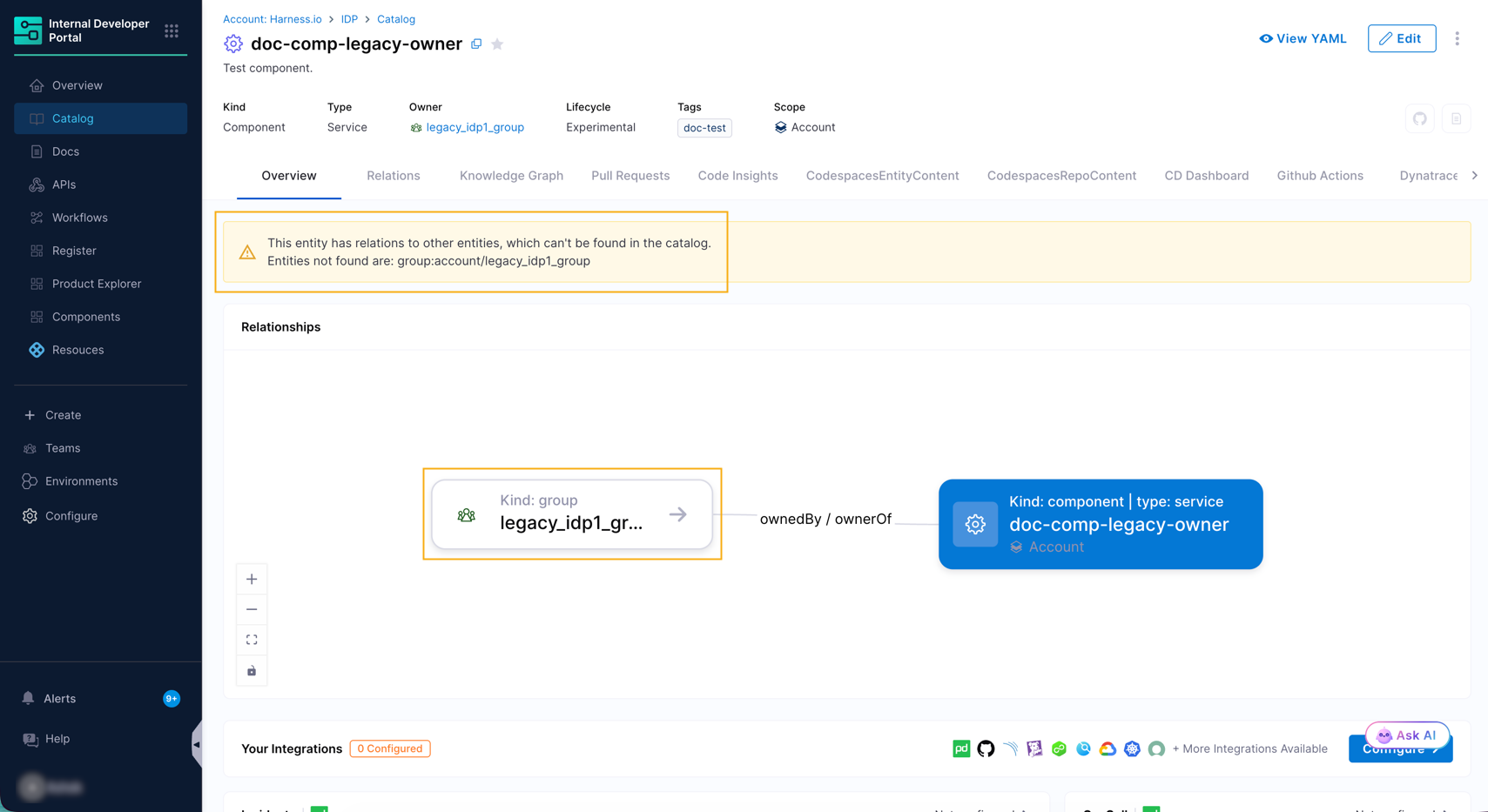
An entity with a deleted owner displays a warning banner on the **Overview** tab, and its **Relationships** card still links to the deleted owner.
Warning banner for an owner that can't be found in the catalog
To clear the warning, edit the entity using visual or yaml view, and set the owner to a valid user or Team, and then click **Save Changes**.
{% hint style="info" %}
Deleting a Team behaves differently, as IDP removes the Team as owner automatically. Go to [Edit and delete a Team](/internal-developer-portal/use-idp/software-catalog/teams/manage-teams.md#edit-and-delete-a-team) for details.
{% endhint %}
***
#### `metadata`
A container for auxiliary data that is not part of the entity’s specification. Additional metadata helps enhance platform-level processing or categorization. See individual entity kind sections for specific structure guidelines.
Go to the [`metadata` descriptor format](https://backstage.io/docs/features/software-catalog/descriptor-format#common-to-all-kinds-the-metadata) to review every `metadata` field.
***
#### `spec`
Defines the actual specification data that describes the entity. This is the core configuration and varies depending on the `kind`. See individual entity kind sections for specific structure guidelines.
***
### Entity kinds
#### Kind: Component
A **Component** describes a software component. It is typically closely tied to the source code that constitutes the component and is what a developer would typically consider a “unit of software,” usually with a distinct deployable or linkable artifact.
**Entity structure**
All the fields mentioned below are the mandatory parameters required to define a Component:
| **Field** | **Value** |
| ---------------- | ----------------------------------------------------------------- |
| `apiVersion` | **harness.io/v1** |
| `kind` | **Component** |
| `type` | You can find out more about the `type` key here. |
| `spec.lifecycle` | You can find out more about the `lifecycle` key here. |
| `spec.system` | Optional. Reference to System entities this Component belongs to. |
**Example YAML**
```yaml
apiVersion: harness.io/v1
kind: Component
type: website
identifier: artistweb
name: artistweb
owner: artist-relations-team
spec:
lifecycle: production
system:
- system:account/marketing_systems
- system:account/web_platform
partOf:
- system:account/customer_experience
metadata:
description: The place to be, for great artists
annotations:
example.com/service-discovery: artistweb
links:
- url: https://admin.example-org.com
title: Admin Dashboard
icon: dashboard
type: admin-dashboard
labels:
example.com/custom: custom_label_value
tags:
- java
```
***
#### Kind: System
A **System** is a high-level catalog entity used to logically group related software components, APIs, and infrastructure resources. It represents a functional or domain-specific boundary such as a module, platform area, or business unit, enabling teams to organize and manage complex software ecosystems more effectively.
**Entity structure**
All the fields mentioned below are the mandatory parameters required to define a System:
| **Field** | **Value** |
| ------------ | ------------------------------------------------------- |
| `apiVersion` | **harness.io/v1** |
| `kind` | **System** |
| `type` | Common values include `domain`, `module`, or `platform` |
| `owner` | The team or group responsible for the System |
**Example YAML**
```yaml
apiVersion: harness.io/v1
kind: System
type: domain
identifier: paymentsystem
name: Payment System
owner: team-payment
spec:
lifecycle: ""
metadata:
description: This system groups services and libraries related to payment processing.
tags:
- payments
- financial
```
***
#### Kind: API
An **API** describes an interface that can be exposed by a component. APIs can be defined using formats such as OpenAPI, AsyncAPI, GraphQL, gRPC, or others. For `type: openapi` entities, Harness IDP automatically extracts individual endpoints from the spec and stores them in Ingested Properties, where they can be enriched with custom metadata. Go to [API endpoint extraction and enrichment](/internal-developer-portal/use-idp/software-catalog/integrate-tools/api-endpoint-enrichments.md) to enrich extracted endpoints.
**Entity structure**
All the fields mentioned below are the mandatory parameters required to define an API:
| **Field** | **Value** |
| ----------------- | ------------------------------------------------------ |
| `apiVersion` | **harness.io/v1** |
| `kind` | **API** |
| `type` | You can find out more about the `type` key here. |
| `spec.lifecycle` | You can find out more about the `lifecycle` key here. |
| `spec.definition` | You can find out more about the `definition` key here. |
**`type` definition**
The type of the `API` definition as a string (e.g., `openapi`):
1. `openapi` – A definition in YAML or JSON based on OpenAPI v2 or v3.
2. `asyncapi` – A definition based on the AsyncAPI specification.
3. `graphql` – A definition using GraphQL schemas.
4. `grpc` – A definition based on Protocol Buffers for use with gRPC.
**Example YAML**
```yaml
apiVersion: harness.io/v1
kind: API
type: openapi
identifier: petstore
name: petstore
owner: Harness_Partners
spec:
lifecycle: dev
definition:
$text: https://github.com/swagger-api/swagger-petstore/blob/master/src/main/resources/openapi.yaml
metadata:
description: The petstore API
links:
- url: https://github.com/swagger-api/swagger-petstore
title: GitHub Repo
icon: github
- url: https://github.com/swagger-api/swagger-petstore/blob/master/src/main/resources/openapi.yaml
title: API Spec
icon: code
tags:
- store
- rest
```
{% hint style="info" %}
For `type: openapi` entities, Harness IDP automatically extracts endpoints from `spec.definition` and stores them in Ingested Properties under `metadata.apis`. You can enrich those endpoints with custom metadata using the Catalog Custom Properties API. Go to [API endpoint extraction and enrichment](/internal-developer-portal/use-idp/software-catalog/integrate-tools/api-endpoint-enrichments.md) to enrich extracted endpoints.
{% endhint %}
***
#### Kind: Resource
A **Resource** describes infrastructure components that a system needs to operate, like BigTable databases, Pub/Sub topics, S3 buckets, or CDNs. Modeling them alongside components and systems helps visualize infrastructure footprint and enables tooling around them.
**Entity structure**
All the fields mentioned below are the mandatory parameters required to define a Resource:
| **Field** | **Value** |
| ------------ | ------------------------------------------------ |
| `apiVersion` | **harness.io/v1** |
| `kind` | **Resource** |
| `type` | You can find out more about the `type` key here. |
**`type` definition**
The type of the `Resource` as a string (e.g., `database`). This field is required. There is no enforced list of values; each organization can define names that suit their tech stack.
Common examples include:
* `database`
* `s3-bucket`
* `kubernetes-cluster`
**Example YAML**
```yaml
apiVersion: harness.io/v1
kind: Resource
type: database
identifier: artistsdb
name: artistsdb
owner: artist-relations-team
spec: {}
metadata:
description: Stores artist details
```
***
#### Kind: Group
**Group** entities back the [Teams](/internal-developer-portal/use-idp/software-catalog/teams/overview.md) you see in the Catalog and in the **Teams** page. They let you model your organization inside IDP, including squads, departments, and cross-functional units, and they can be marked as the owner of other catalog entities.
Set `type` to `team` for a standard Team. Go to [Creating a Team](/internal-developer-portal/use-idp/software-catalog/teams/create-a-team.md) for the create flow and the full field reference.
**Entity structure**
All the fields mentioned below are the parameters required to define a Group:
| **Field** | **Value** |
| ------------ | --------------------------------------------------- |
| `apiVersion` | **harness.io/v1** |
| `kind` | **Group** |
| `name` | Human-readable name for the group |
| `identifier` | Unique identifier for the group |
| `type` | Common values include `team`, `squad`, `department` |
**Special spec fields**
| **Field** | **Description** |
| -------------- | ----------------------------------------------- |
| `spec.members` | List of users belonging to the group |
| `spec.parent` | Reference to a parent group, enabling hierarchy |
| `spec.profile` | Additional profile information like email |
**Example YAML**
```yaml
apiVersion: harness.io/v1
kind: Group
type: engineering
name: Cloud Infrastructure Team
identifier: cloud_infrastructure_team
spec:
members:
- user:account/jane.doe@harness.io
- user:account/john.smith@harness.io
lifecycle: active
parent: group:account/idp_team
profile:
email: idp_team@harness.io
metadata:
description: Cloud Infrastructure Team for building and maintaining the company’s core cloud infrastructure.
teamLead: Jane Doe
region: US West
tags:
- cloud
- engineering
```
***
#### Kind: Workflow
**Workflows** enable developer self-service by automating manual tasks and processes. Platform engineering teams can use workflows to:
* Automate new service onboarding
* Simplify Day 2 operations
* Provide developers with **golden paths** to production, including best practices and guardrails
Workflows are stored in the catalog using `kind: Workflow`.
**Entity structure**
All the fields mentioned below are the mandatory parameters required to define a Workflow:
| **Field** | **Value** |
| ----------------- | ------------------------------------------------------ |
| `apiVersion` | **harness.io/v1** |
| `kind` | **Workflow** |
| `type` | You can find out more about the `type` key here. |
| `spec.parameters` | You can find out more about the `parameters` key here. |
| `spec.steps` | You can find out more about the `steps` key here. |
**Example YAML**
```yaml
apiVersion: harness.io/v1
kind: Workflow
type: service
identifier: reactapp
name: Create a new service
owner: d.p@harness.io
spec:
output:
links:
- title: Pipeline Details
url: ${{ steps.trigger.output.PipelineUrl }}
parameters:
- title: Service Details
required:
- project_name
- template_type
- public_template_url
- repository_type
- repository_description
- repository_default_branch
- direct_push_branch
- slack_id
properties:
token:
title: Harness Token
type: string
ui:widget: password
ui:field: HarnessAuthToken
projectId:
title: Project Identifier
description: Harness Project Identifier
type: string
ui:field: HarnessProjectPicker
template_type:
title: Type of the Template
type: string
description: Type of the template
public_template_url:
title: Public Template URL
type: string
description: URL of the public Cookiecutter template
repository_type:
type: string
title: Repository Type
enum:
- public
- private
default: Public
repository_description:
type: string
title: Repository Description
description: Auto-generated using the self-service flow of Harness IDP
owner:
title: Service Owner
type: string
ui:field: OwnerPicker
ui:options:
allowedKinds:
- Group
steps:
- id: trigger
name: Creating your React app
action: trigger:harness-custom-pipeline
input:
url: https://app.harness.io/ng/account/account_id/module/idp/orgs/org_id/projects/project_id/pipelines/pipeline_id/pipeline-studio/?storeType=INLINE
inputset:
project_name: ${{ parameters.project_name }}
template_type: ${{ parameters.template_type }}
public_template_url: ${{ parameters.public_template_url }}
apikey: ${{ parameters.token }}
metadata:
description: A workflow to create a new service
tags:
- nextjs
- react
- javascript
```
***
#### \[Deprecated] kind: Location
The **Location** entity served as a reference to a YAML path that produced other entities.\
However, with Harness IDP managing all entities internally, this entity type is no longer required and has been **deprecated**.
***
### Placeholder resolution
Harness IDP supports substitutions and placeholder resolutions in Catalog entity YAMLs using `$text`, `$json`, and `$yaml`. These placeholders let you dynamically reference and embed external content into your entity YAML definitions.
Placeholders like `$json: https://example.com/entity.json` are substituted by the content of the referenced file. You can reference files using either an **absolute URL** or a **relative reference**:
* **Absolute URL:** If an absolute URL is provided (for example, `https://example.com/entity.yaml`), Harness IDP fetches and resolves the content directly from that location.
* **Relative Reference:** If a relative path is provided (for example, `./referenced.yaml`), it is resolved relative to the **`backstage-source-location`** of the entity YAML file where the placeholder is defined. In practice, this means the path is evaluated from the directory containing the entity YAML file associated with that **`backstage-source-location`**.
Harness IDP supports three placeholder types:
* **`$text`**: Interprets the referenced file as plain text and embeds it as a string.
* **`$json`**: Interprets the referenced file as JSON and embeds the parsed structure.
* **`$yaml`**: Interprets the referenced file as YAML and embeds the parsed structure.
{% hint style="info" %}
If a placeholder URL points to a file on a branch whose name contains a slash (for example, `feature/my-branch`), add a branch query parameter to the URL. Go to [Reference specs on branches that contain slashes](/internal-developer-portal/use-idp/software-catalog/tutorials/add-api-docs.md#reference-specs-on-branches-that-contain-slashes) for handling such instances.
{% endhint %}
#### Implementation
For Catalog entities, place the placeholder directly under `spec.definition`. Choose the placeholder type that matches the format of your need. For example, use `$text` if you want to embed the raw OpenAPI/Swagger content as a string, or `$yaml` or `$json` if you want the referenced file parsed and embedded as structured data.
```yaml
apiVersion: harness.io/v1
kind: API
type: openapi
identifier: internalpetstore
name: internalpetstore
owner: api-team@example.com
spec:
lifecycle: production
definition:
$yaml: ./openapi/petstore.yaml
```
#### Example
Load the definition of an API entity from the web and embed it as a string in `spec.definition`:
```yaml
apiVersion: harness.io/v1
kind: API
type: openapi
identifier: petstore
name: petstore
owner: petstore@example.com
spec:
lifecycle: production
definition:
$text: https://petstore.swagger.io/v2/swagger.json
metadata:
description: The Petstore API
```
* With an **absolute URL**, Harness IDP resolves content from the given location.
* With a **relative path** (e.g., `./swagger.json`), Harness IDP resolves it relative to the entity YAML file’s **`backstage-source-location`**.
{% @harness-feedback/feedback %}