> For the complete documentation index, see [llms.txt](https://developer.harness.io/llms.txt). Markdown versions of documentation pages are available by appending `.md` to page URLs; this page is available as [Markdown](https://developer.harness.io/internal-developer-portal/use-idp/software-catalog/create-entity/catalog-discovery/custom-integrations/ingest-data.md).
# Ingest data
Push records into a Custom Integration using the Upsert API or a webhook, reference the fields each data schema accepts, delete ingested records, and monitor ingestion on the Events tab.
Once your integration is enabled, you send it data. How you do that depends on the [ingestion mode](/internal-developer-portal/use-idp/software-catalog/create-entity/catalog-discovery/custom-integrations/overview.md#ingestion-modes) you chose: an API integration receives HTTP calls that you make, and a webhook integration receives calls that the source tool makes.
{% hint style="info" %}
* [Create a Custom Integration](/internal-developer-portal/use-idp/software-catalog/create-entity/catalog-discovery/custom-integrations/create-custom-integration.md) and note its endpoint from the **Overview** tab.
* For API mode, have a Harness [Service Account Token (SAT)](https://developer.harness.io/harness-platform/use-harness-platform/platform-access-control/add-and-manage-service-account) or [Personal Access Token (PAT)](https://developer.harness.io/harness-platform/use-harness-platform/automation/api/add-and-manage-api-keys#create-personal-api-keys-and-tokens) ready.
{% endhint %}
***
### Push data with the API
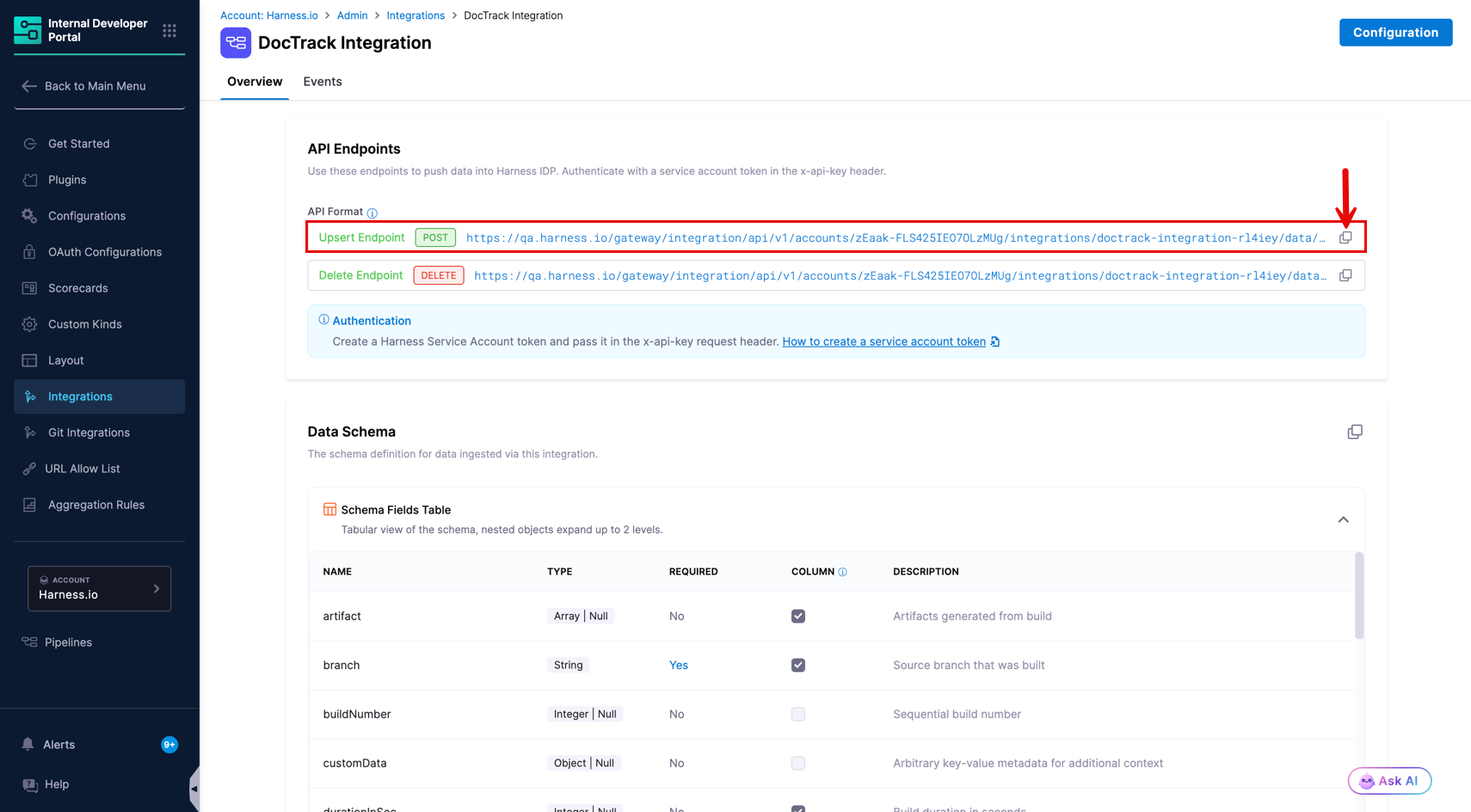
Copy the **Upsert Endpoint** from the integration's **Overview** tab. It has this shape:
```http
POST https://app.harness.io/gateway/integration/api/v1/accounts/{accountId}/integrations/{integrationId}/data/{dataKind}
```
{% hint style="info" %}
* Copy the endpoint from the Overview tab rather than assembling it by hand. It already contains your account ID, the integration Id, and the correct data kind.
* Always include `entity_ref` in every record you push. Without it, records ingest successfully but are not linked to any entity and will not appear on any entity page. Find the correct value on the entity's detail page under **Identity → entityRef**, for example `component:account/api_cards_docs`.
{% endhint %}
#### Headers
| Header | Required | Value |
| ----------------- | -------- | ------------------------------------------------------------------------------------------------------------------------------------------------------------------------------------------------------------------------------------------------------------------------------------------------------------------------------------------------ |
| `x-api-key` | Yes | Harness [Service Account Token (SAT)](https://developer.harness.io/harness-platform/use-harness-platform/platform-access-control/add-and-manage-service-account) or [Personal Access Token (PAT)](https://developer.harness.io/harness-platform/use-harness-platform/automation/api/add-and-manage-api-keys#create-personal-api-keys-and-tokens) |
| `Harness-Account` | Yes | Your Harness account ID. |
| `Content-Type` | Yes | `application/json` |
#### Request body
Records are sent in a `records` array. Each object is one record matching the integration's data schema:
```json
{
"records": [
{
"identifier": "run-98765",
"name": "backend-api-build",
"entity_ref": "component:default/my-backend-service",
"service": "my-backend-service",
"timestamp": "2026-05-26T09:50:00Z",
"status": "SUCCESS",
"branch": "main",
"sha": "a1b2c3d4e5f6",
"repositoryUrl": "https://github.com/example/backend-api"
}
]
}
```
#### cURL example
```sh
curl \
--location 'https://app.harness.io/gateway/integration/api/v1/accounts//integrations//data/build' \
--header 'Content-Type: application/json' \
--header 'x-api-key: ' \
--header 'Harness-Account: ' \
--data '{
"records": [
{
"identifier": "run-98765",
"name": "backend-api-build",
"entity_ref": "component:default/my-backend-service",
"service": "my-backend-service",
"timestamp": "2026-05-26T09:50:00Z",
"status": "SUCCESS",
"branch": "main",
"sha": "a1b2c3d4e5f6",
"repositoryUrl": "https://github.com/example/backend-api"
}
]
}'
```
#### How updates work
The `identifier` field is the record's key. Pushing a record whose identifier already exists updates that record in place rather than creating a second one.
This is what lets you report progress on a long-running operation. A Jenkins pipeline can push a build with `"status": "RUNNING"` when it starts and push the same identifier again with `"status": "SUCCESS"` when it finishes, and the entity page shows one build that changed state.
{% hint style="info" %}
For the **Custom** schema, `identifier` is optional. If your schema omits it, Harness assigns each record an internal ID and those records cannot be updated by a later push.
{% endhint %}
***
### Receive data with a webhook
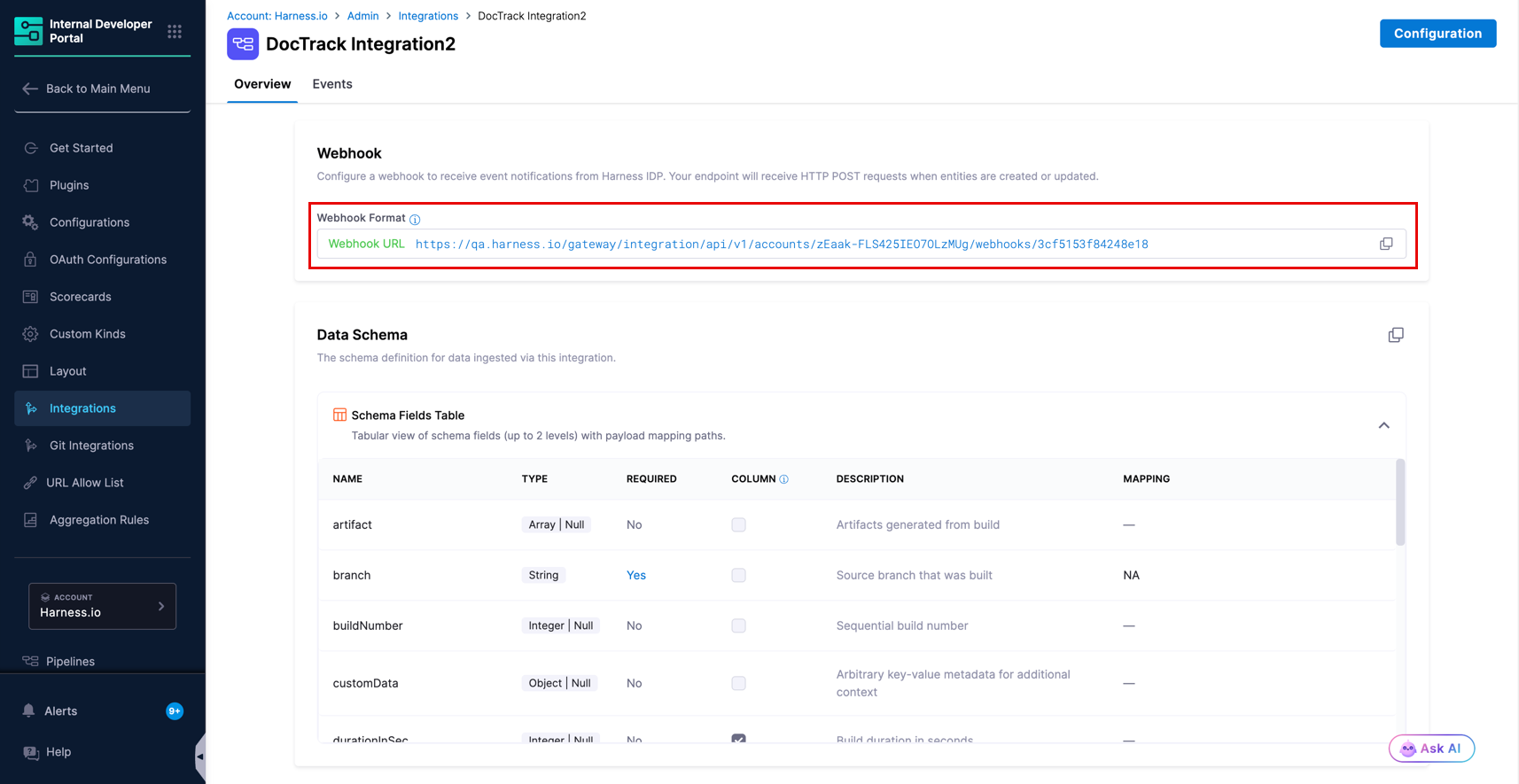
For a webhook integration, copy the **Webhook URL** from the integration's **Overview** tab and register it in the source tool. It has this shape:
```
https://app.harness.io/gateway/integration/api/v1/accounts/{accountId}/webhooks/{webhookId}
```
The source tool posts its own payload to this URL. Harness authenticates the request using the [Auth Type](/internal-developer-portal/use-idp/software-catalog/create-entity/catalog-discovery/custom-integrations/create-custom-integration.md#step-3-choose-an-ingestion-mode) you configured, then converts the payload into a record using the [payload mapping](/internal-developer-portal/use-idp/software-catalog/create-entity/catalog-discovery/custom-integrations/create-custom-integration.md#map-the-webhook-payload) on the schema fields.
You do not control the request body here, so the mapping does the work of translating it. Verify the mapping against a real payload from your tool rather than its documentation, since payload shapes often differ between event types.
{% hint style="info" %}
Because the same identifier updates the same record, a tool that fires repeatedly for one entity behaves correctly. PagerDuty sending `triggered` and then `resolved` for one incident produces a single incident record that changes status, provided `identifier` is mapped to the incident's own ID.
{% endhint %}
***
### Link records with entity\_ref
Instead of relying on [Correlation Mapping](/internal-developer-portal/use-idp/software-catalog/create-entity/catalog-discovery/custom-integrations/create-custom-integration.md#step-5-configure-correlation-mapping-optional), a record can name its target entity directly with `entity_ref`:
```json
{
"records": [
{
"identifier": "deploy-456",
"name": "prod-release-v2.1",
"entity_ref": "component:default/payment-service",
"timestamp": "2026-05-26T13:55:00Z",
"status": "SUCCESS",
"environment": "production"
}
]
}
```
{% hint style="info" %}
If your Correlation Mapping is not showing data on the entity page, add `entity_ref` directly to the payload as a fallback. Unlike correlation mapping, which requires an exact match against `metadata.name` (not the display title), `entity_ref` links the record to the entity unconditionally. You can find the `entity_ref` of any entity on its detail page under **Identity → entityRef**.
{% endhint %}
Use this when the sending system genuinely knows the IDP entity reference. In most pipelines it does not, so Correlation Mapping on a value like the service name or repository URL is more practical.
***
### Schema reference
Fields marked required cause the record to be rejected if missing. Timestamps use ISO 8601 format, for example `2026-05-26T13:55:00Z`.
All schemas accept these common fields:
| Field | Type | Description |
| ------------ | ------ | ------------------------------------------------------------------------------------------- |
| `identifier` | string | Unique record identifier from the source system. Acts as the record key for updates. |
| `name` | string | Human-readable name shown in the catalog table. |
| `timestamp` | string | Used to order records. Defaults to ingestion time if omitted. |
| `type` | string | A value you define. Records become filterable by it on the entity page. |
| `entity_ref` | string | Links the record to a catalog entity directly. |
| `url` | string | Link back to the record in the source tool. Makes the record name clickable in the catalog. |
| `tags` | object | Key-value strings for extra context. |
| `customData` | object | Free-form additional data, shown in the record details panel. |
{% hint style="info" %}
The six out-of-the-box schemas have `additionalProperties: false`. This means a record with any field not listed in the schema table is **rejected**. If you need extra fields, use the **Custom** schema, which allows any fields you define.
{% endhint %}
{% tabs %}
{% tab title="Build" %}
| Field | Type | Required | Description |
| --------------- | ---------------- | -------- | ------------------------------------------------------- |
| `identifier` | string | Yes | Unique build identifier. |
| `name` | string | Yes | Build name, such as the job or pipeline name. |
| `timestamp` | string | Yes | Build start time. |
| `branch` | string | Yes | Source branch that was built. |
| `sha` | string | Yes | Git commit SHA that triggered the build. |
| `repositoryUrl` | string | Yes | Repository URL. |
| `status` | string | No | `SUCCESS`, `FAILED`, `RUNNING`, `ABORTED`, or `QUEUED`. |
| `durationInSec` | integer | No | Build duration in seconds. |
| `buildNumber` | integer | No | Sequential build number. |
| `artifact` | array of strings | No | Artifacts produced by the build. |
| `triggeredBy` | string | No | Person or system that triggered the build. |
| `service` | string | No | Service identifier, commonly used for correlation. |
```json
{
"records": [{
"identifier": "run-98765",
"name": "backend-api-build",
"entity_ref": "component:default/my-backend-service",
"service": "my-backend-service",
"timestamp": "2026-05-26T09:50:00Z",
"status": "SUCCESS",
"branch": "main",
"sha": "a1b2c3d4e5f6",
"repositoryUrl": "https://github.com/example/backend-api",
"durationInSec": 30,
"buildNumber": 142,
"artifact": ["docker.example.com/backend-api:1.2.3"],
"triggeredBy": "github-webhook",
"url": "https://ci.example.com/builds/98765"
}]
}
```
{% endtab %}
{% tab title="Deployment" %}
| Field | Type | Required | Description |
| --------------- | ------- | -------- | ------------------------------------------------------- |
| `identifier` | string | Yes | Unique deployment identifier. |
| `name` | string | Yes | Deployment name, such as the pipeline name. |
| `timestamp` | string | Yes | Deployment start time. |
| `status` | string | Yes | `SUCCESS`, `FAILED`, `RUNNING`, `ABORTED`, or `QUEUED`. |
| `environment` | string | Yes | Target environment, such as `production`. |
| `type` | string | No | Deployment type, such as `DEPLOYMENT` or `ROLLBACK`. |
| `durationInSec` | integer | No | Deployment duration in seconds. |
| `artifact` | string | No | Artifact version being deployed. |
| `triggeredBy` | string | No | Person or system that triggered the deployment. |
| `service` | string | No | Service identifier, commonly used for correlation. |
```json
{
"records": [{
"identifier": "deploy-456",
"name": "prod-release-v2.1",
"entity_ref": "component:default/payment-service",
"type": "DEPLOYMENT",
"service": "payment-service",
"timestamp": "2026-05-26T13:55:00Z",
"status": "SUCCESS",
"environment": "production",
"artifact": "payment-service:v2.1.0",
"durationInSec": 100,
"triggeredBy": "release-pipeline",
"url": "https://cd.example.com/deployments/456"
}]
}
```
{% endtab %}
{% tab title="Incidents" %}
| Field | Type | Required | Description |
| ------------------------- | ------- | -------- | ------------------------------------------------------------------ |
| `identifier` | string | Yes | Unique incident identifier. |
| `name` | string | Yes | Incident title or summary. |
| `status` | string | No | `triggered`, `acknowledged`, or `resolved`. |
| `urgency` | string | No | `high` or `low`. |
| `priority` | string | No | Priority label, such as `P1`. |
| `resolutionDurationInSec` | integer | No | Time taken to resolve, in seconds. |
| `assignee` | object | No | Assignee details, for example `{ "name": "...", "email": "..." }`. |
| `timestamp` | string | No | Time the incident was triggered. |
| `service` | string | No | Service identifier, commonly used for correlation. |
```json
{
"records": [{
"identifier": "INC-2024",
"name": "Payment gateway timeout",
"entity_ref": "component:default/payment-service",
"service": "payment-service",
"timestamp": "2026-05-26T03:00:00Z",
"status": "resolved",
"urgency": "high",
"priority": "P1",
"resolutionDurationInSec": 600,
"assignee": { "name": "John Smith", "email": "john@example.com" },
"url": "https://pagerduty.example.com/incidents/INC-2024"
}]
}
```
{% hint style="info" %}
`resolutionDurationInSec` is only meaningful once an incident is resolved. Send it on the payload that sets `status` to `resolved`.
{% endhint %}
{% endtab %}
{% tab title="Quality" %}
| Field | Type | Required | Description |
| ------------------------ | ------- | -------- | ------------------------------------------------------------------------ |
| `identifier` | string | Yes | Unique quality-report identifier. |
| `name` | string | Yes | Report name. |
| `coverage` | number | No | Code-coverage percentage, 0 to 100. |
| `bugs` | integer | No | Number of bugs found. |
| `codeSmells` | integer | No | Number of code smells found. |
| `duplicatedLinesDensity` | number | No | Percentage of duplicated lines. |
| `reliabilityRating` | string | No | `A` (best) to `E` (worst). |
| `securityRating` | string | No | `A` (best) to `E` (worst). |
| `maintainabilityRating` | string | No | `A` (best) to `E` (worst). |
| `score` | number | No | Overall quality score. |
| `threshold` | number | No | Minimum passing threshold for the quality metric. |
| `status` | string | No | `OK`, `ERROR`, or `WARN`. |
| `type` | string | No | Quality check type, for example `code_coverage`, `unit_test`, or `lint`. |
| `vulnerabilities` | integer | No | Number of vulnerabilities found. |
| `technicalDebt` | string | No | Technical debt estimate, for example `2h` or `1d`. |
| `timestamp` | string | No | Report time. |
| `url` | string | No | Link to the quality report in the source tool. |
| `service` | string | No | Service identifier, commonly used for correlation. |
```json
{
"records": [{
"identifier": "sonar-payment-svc",
"name": "payment-service quality",
"entity_ref": "component:default/payment-service",
"service": "payment-service",
"timestamp": "2026-05-26T06:00:00Z",
"coverage": 82.5,
"bugs": 3,
"codeSmells": 24,
"duplicatedLinesDensity": 3.2,
"reliabilityRating": "A",
"securityRating": "B",
"maintainabilityRating": "A",
"status": "OK",
"type": "code_coverage",
"score": 82.5,
"threshold": 80.0,
"vulnerabilities": 1,
"technicalDebt": "2h",
"url": "https://sonarqube.example.com/projects/payment-service"
}]
}
```
{% endtab %}
{% tab title="Security issues" %}
| Field | Type | Required | Description |
| ---------------- | ------ | -------- | -------------------------------------------------- |
| `identifier` | string | Yes | Unique issue identifier. |
| `name` | string | Yes | Issue title or vulnerability message. |
| `timestamp` | string | Yes | Time the issue was reported. |
| `severity` | string | No | `CRITICAL`, `HIGH`, `MEDIUM`, `LOW`, or `INFO`. |
| `status` | string | No | `OPEN`, `CONFIRMED`, `RESOLVED`, or `CLOSED`. |
| `type` | string | No | Issue type, such as `VULNERABILITY`. |
| `cve` | string | No | Associated CVE identifier. |
| `rule` | string | No | Rule or policy that flagged the issue. |
| `packageVersion` | string | No | Version of the affected package. |
| `toolName` | string | No | Name of the scanning tool that reported the issue. |
| `source` | string | No | Scanner or tool that found the issue. |
| `resolution` | string | No | `FIXED`, `WONTFIX`, or `FALSE_POSITIVE`. |
| `url` | string | No | Link back to the issue in the source tool. |
| `service` | string | No | Service identifier, commonly used for correlation. |
```json
{
"records": [{
"identifier": "VULN-1042",
"name": "SQL Injection in login endpoint",
"entity_ref": "component:default/auth-service",
"service": "auth-service",
"timestamp": "2026-05-25T18:00:00Z",
"severity": "CRITICAL",
"status": "OPEN",
"type": "VULNERABILITY",
"cve": "CVE-2024-1234",
"toolName": "Trivy",
"url": "https://scanner.example.com/issues/1042",
"customData": { "file": "src/auth/login.go", "line": 42 }
}]
}
```
{% endtab %}
{% tab title="Security scans" %}
Use the `security_scan` schema to record the summary output of a security scan: how many findings were found at each severity level. Use `security_issues` to record individual vulnerabilities.
| Field | Type | Required | Description |
| ------------ | ------ | -------- | -------------------------------------------------------------------------------------------------- |
| `identifier` | string | Yes | Unique scan identifier. |
| `timestamp` | string | Yes | Scan time (ISO 8601). |
| `name` | string | No | Human-readable scan name. |
| `toolName` | string | No | Name of the scanning tool. |
| `scanResult` | object | No | Vulnerability counts by severity. Contains `critical`, `high`, `medium`, `low` (all integers). |
| `target` | object | No | What was scanned. Contains `name`, `type` (`Repo`, `Container`, or `Other`), `url`, and `version`. |
| `url` | string | No | Link to the scan report in the source tool. |
| `service` | string | No | Service identifier, commonly used for correlation. |
```json
{
"records": [{
"identifier": "scan-20260804-001",
"name": "pet-clinic container scan",
"entity_ref": "component:default/pet-clinic",
"service": "pet-clinic",
"timestamp": "2026-08-04T10:00:00Z",
"toolName": "Trivy",
"scanResult": {
"critical": 2,
"high": 5,
"medium": 12,
"low": 3
},
"target": {
"name": "pet-clinic:v2.1.0",
"type": "Container",
"url": "https://registry.example.com/pet-clinic:v2.1.0",
"version": "v2.1.0"
},
"url": "https://scanner.example.com/scans/20260804-001"
}]
}
```
{% endtab %}
{% tab title="Custom" %}
The Custom schema accepts whatever fields you define in your JSON Schema. These fields are recognized and given special treatment when present:
| Field | Type | Required | Description |
| --------------- | ------ | -------- | --------------------------------------------------------------------- |
| `identifier` | string | No | Record key. If your schema omits it, records cannot be updated later. |
| `name` | string | No | Displayed as the record name. |
| `timestamp` | string | No | Used to order records. |
| `entity_ref` | string | No | Links the record to a catalog entity. |
| `type` | string | No | Makes records filterable by type. |
| `tags` | object | No | Key-value strings for extra context. |
| *(your fields)* | any | No | Any additional fields defined in your schema. |
```json
{
"records": [{
"identifier": "review-789",
"name": "PR Review for auth-refactor",
"timestamp": "2026-05-26T09:00:00Z",
"entity_ref": "component:default/auth-service",
"type": "code-review",
"reviewer": "alice",
"prNumber": 789,
"approved": true
}]
}
```
{% endtab %}
{% endtabs %}
***
### Delete ingested records
API-based integrations expose a **Delete Endpoint**, available on the **Overview** tab:
```http
DELETE https://app.harness.io/gateway/integration/api/v1/accounts/{accountId}/integrations/{integrationId}/data/{dataKind}
```
Use exactly one filter per request. Combining filters in a single call is not supported.
{% tabs %}
{% tab title="By identifier" %}
```json
{
"identifiers": ["run-98765", "run-98766"]
}
```
{% endtab %}
{% tab title="By entity" %}
```json
{
"filter": {
"entity_refs": ["component:default/payment-service"]
}
}
```
{% endtab %}
{% tab title="By type" %}
```json
{
"filter": {
"types": ["ROLLBACK", "DEPLOYMENT"]
}
}
```
{% endtab %}
{% endtabs %}
{% hint style="info" %}
Webhook-based integrations do not expose a delete endpoint. To remove data ingested through a webhook, [delete the integration](/internal-developer-portal/use-idp/software-catalog/create-entity/catalog-discovery/custom-integrations/create-custom-integration.md#delete-an-integration).
{% endhint %}
***
### Monitor ingestion with the Events tab
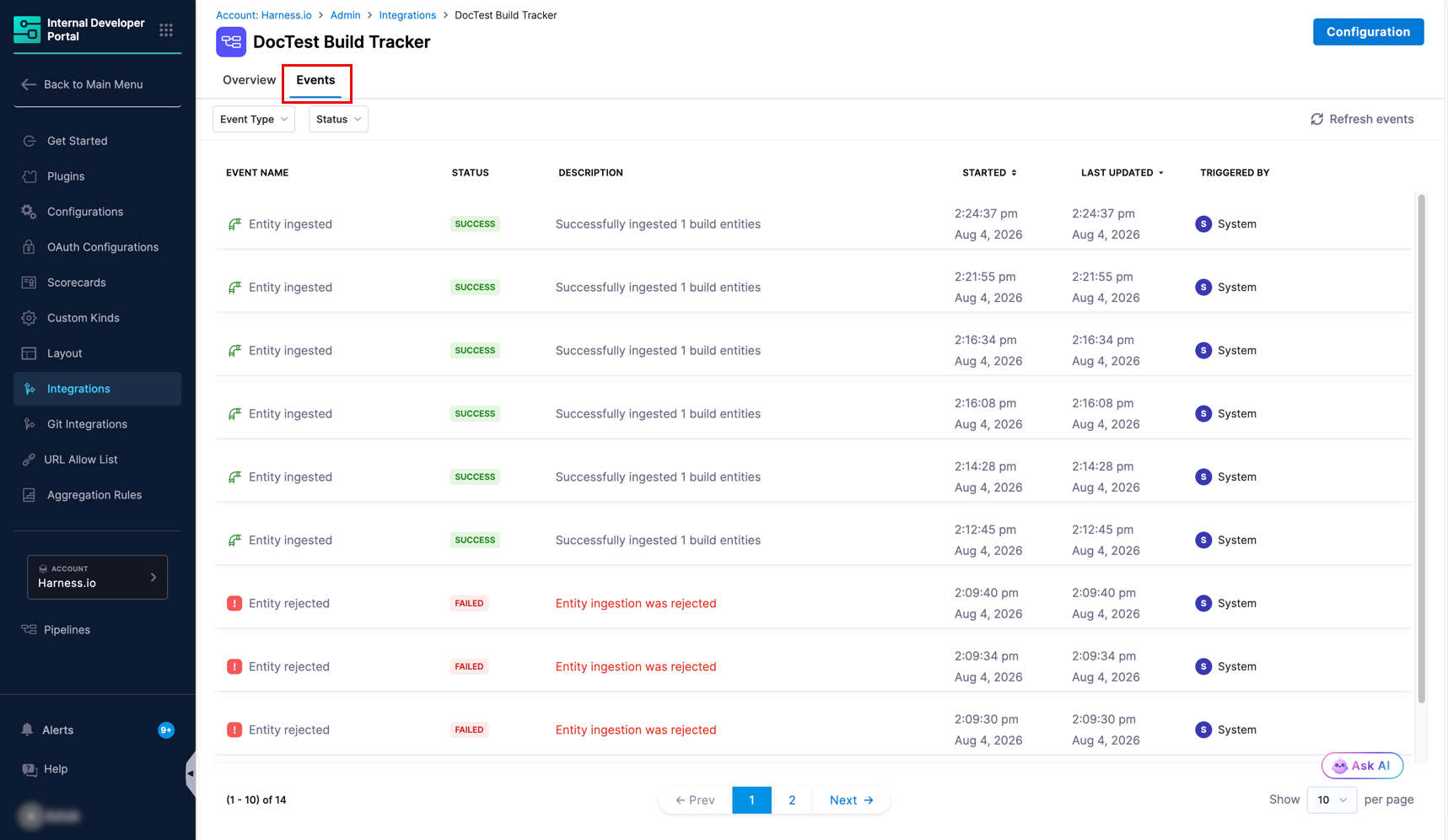
Every Custom Integration has an **Events** tab that records configuration changes and ingestion activity. Use it to confirm data is arriving and to diagnose rejected records.
Filter the list with the **Event Type** and **Status** dropdowns, and select **Refresh events** to reload it.
| Column | Description |
| ---------------- | ----------------------------------------------------------------------------------------- |
| **Event Name** | The action and its outcome, such as `Integration created` or `Entity rejected`. |
| **Status** | `SUCCESS` or `FAILED`. |
| **Description** | A summary of what happened, including the reason for failures. |
| **Started** | When the event began. |
| **Last Updated** | The most recent timestamp for the event. |
| **Triggered By** | The actor responsible, either `System` or the user or service account that made the call. |
Events you will see include:
| Event Name | Meaning |
| ----------------------- | -------------------------------------------------------------------------------------------------------------- |
| **Integration created** | The integration was created successfully. |
| **Integration enabled** | The integration is active and accepting data. |
| **Integration updated** | The configuration was changed. |
| **Entity rejected** | An incoming record was not ingested. The description gives the reason, most often a schema validation failure. |
{% hint style="info" %}
`Entity rejected` is the first place to look when a push returns success but nothing appears in the catalog. It distinguishes a payload that failed validation from a payload that was accepted but did not correlate to any entity.
{% endhint %}
***
### Next steps
Data that has been ingested does not appear on entity pages until you add the corresponding tab to your entity layout. Go to [View data in the catalog](/internal-developer-portal/use-idp/software-catalog/create-entity/catalog-discovery/custom-integrations/view-data-in-catalog.md).
{% @harness-feedback/feedback %}