> For the complete documentation index, see [llms.txt](https://developer.harness.io/llms.txt). Markdown versions of documentation pages are available by appending `.md` to page URLs; this page is available as [Markdown](https://developer.harness.io/internal-developer-portal/use-idp/software-catalog/create-entity/catalog-discovery/integration-events.md).
# Integration Events
Monitor sync and lifecycle activity for Airbyte-based integrations in Harness IDP. Understand event types, statuses, and how to use the Events tab.
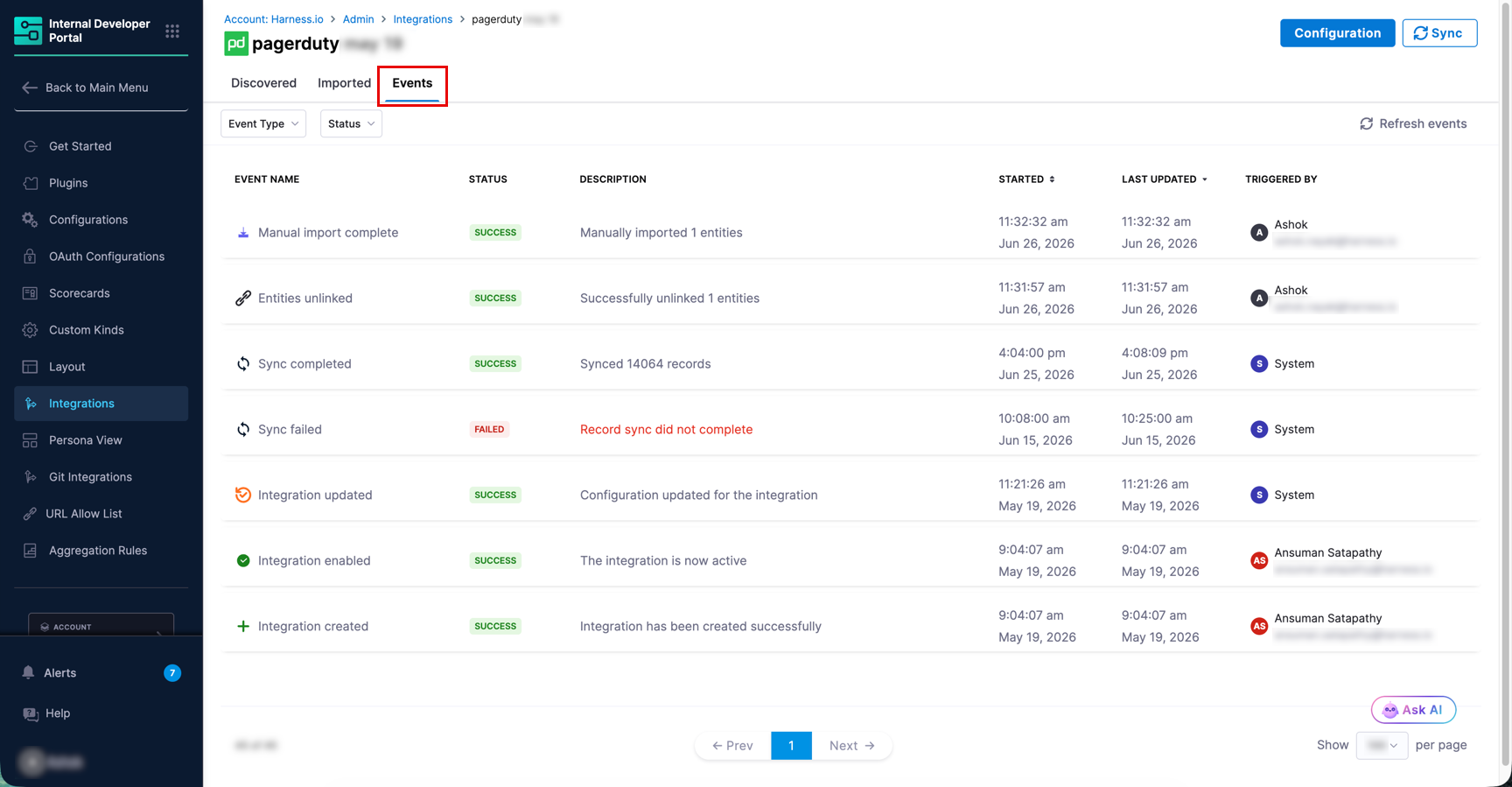
The **Events** tab is available for every Airbyte-based integration. It logs all sync runs, integration lifecycle events, import operations, entity unlink, and entity deletion events for that integration. Use it to verify that scheduled syncs are completing, confirm that imports finished successfully, and investigate failures.
{% hint style="info" %}
* The Events tab is available for the following integrations: [Bitbucket Cloud](/internal-developer-portal/use-idp/software-catalog/create-entity/catalog-discovery/integrations/bitbucket-cloud.md), [Datadog](/internal-developer-portal/use-idp/software-catalog/create-entity/catalog-discovery/integrations/datadog.md), [Dynatrace](/internal-developer-portal/use-idp/software-catalog/create-entity/catalog-discovery/integrations/dynatrace.md), [GitHub](/internal-developer-portal/use-idp/software-catalog/create-entity/catalog-discovery/integrations/github.md), [Google Cloud](/internal-developer-portal/use-idp/software-catalog/create-entity/catalog-discovery/integrations/gcp.md), [PagerDuty](/internal-developer-portal/use-idp/software-catalog/create-entity/catalog-discovery/integrations/pagerduty.md), [ServiceNow CMDB](/internal-developer-portal/use-idp/software-catalog/create-entity/catalog-discovery/integrations/servicenow-cmdb.md), and [SonarQube](/internal-developer-portal/use-idp/software-catalog/create-entity/catalog-discovery/integrations/sonarqube.md). It is not available for Harness CD, Kubernetes integration, and Platform integrations.
* Events are retained for 180 days. Events older than 180 days are automatically removed and cannot be recovered.
* [Custom Integrations](/internal-developer-portal/use-idp/software-catalog/create-entity/catalog-discovery/custom-integrations/overview.md) also have an Events tab, but it reports ingestion and lifecycle activity rather than sync runs. Go to [Monitor ingestion](/internal-developer-portal/use-idp/software-catalog/create-entity/catalog-discovery/custom-integrations/ingest-data.md#monitor-ingestion-with-the-events-tab) for those event types.
{% endhint %}
***
### Access the Events tab
To access the Events tab, complete the following steps:
1. In Harness IDP, go to **Configure** → **Integrations**.
2. Find your integration card and click **View**.
3. On the integration detail page, click the **Events** tab.
***
### Filter events
Two dropdowns let you narrow the event list:
* **Event Type**: Filters by the kind of action that generated the event. Go to [Event type reference](#event-type-reference) for the full list.
* **Status**: Filters by outcome. Available values are **Success**, **Partial Success**, **Running**, and **Failed**.
The event list refreshes automatically every minute. Click **Refresh events** in the top right to reload the list immediately.
***
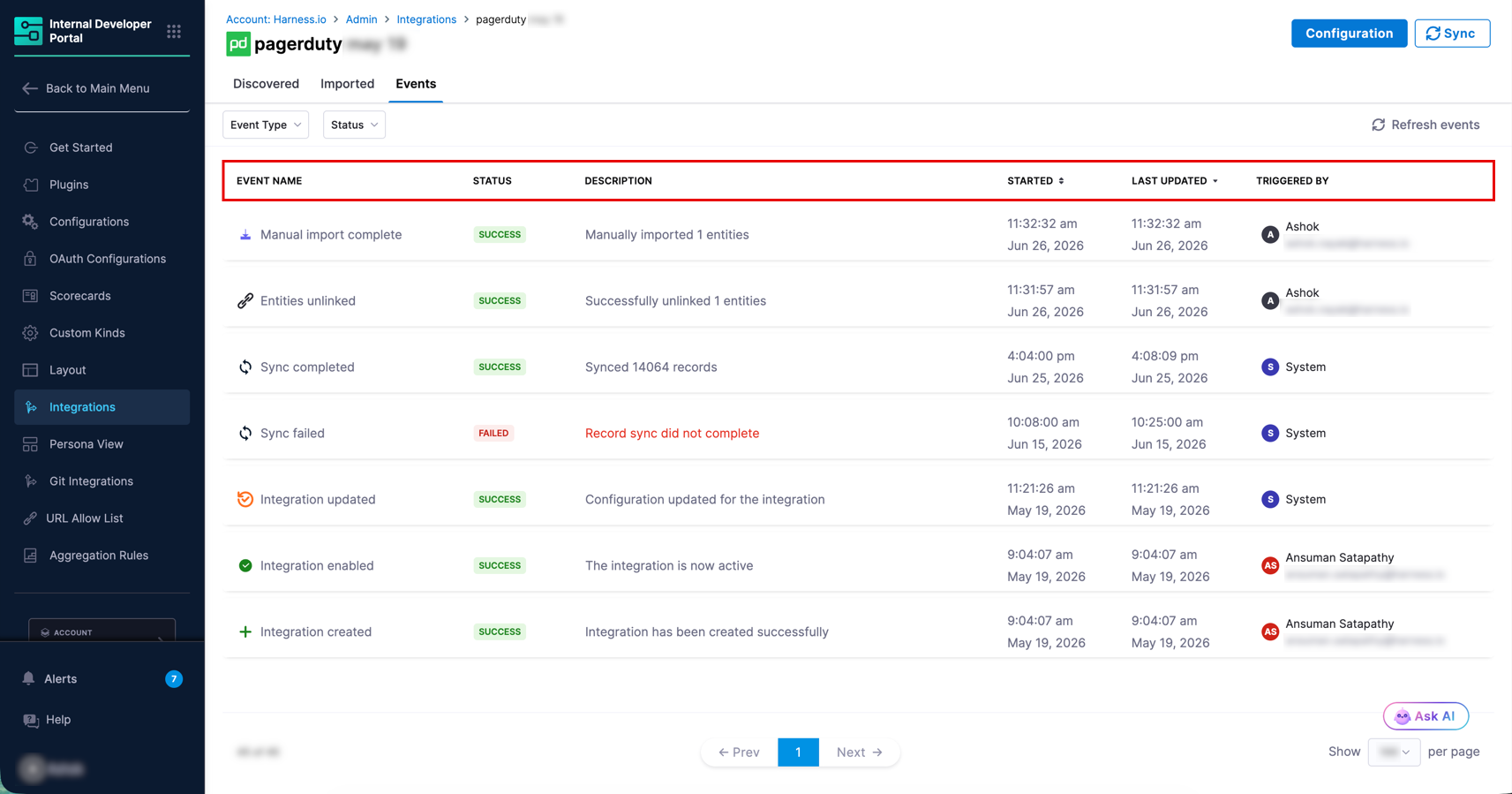
### Event table columns
The event list displays the following columns for each event.
| Column | Description |
| ---------------- | -------------------------------------------------------------------------------------- |
| **Event Name** | The name of the event as shown in the UI, indicating the action and its outcome. |
| **Status** | The result of the event: **Success**, **Partial Success**, **Running**, or **Failed**. |
| **Description** | A brief summary of the event outcome, including record counts where applicable. |
| **Started** | The date and time when the event began. |
| **Last Updated** | The most recent timestamp for this event. |
| **Triggered By** | The actor that initiated the event, such as **System** for scheduled syncs. |
***
### Event details panel
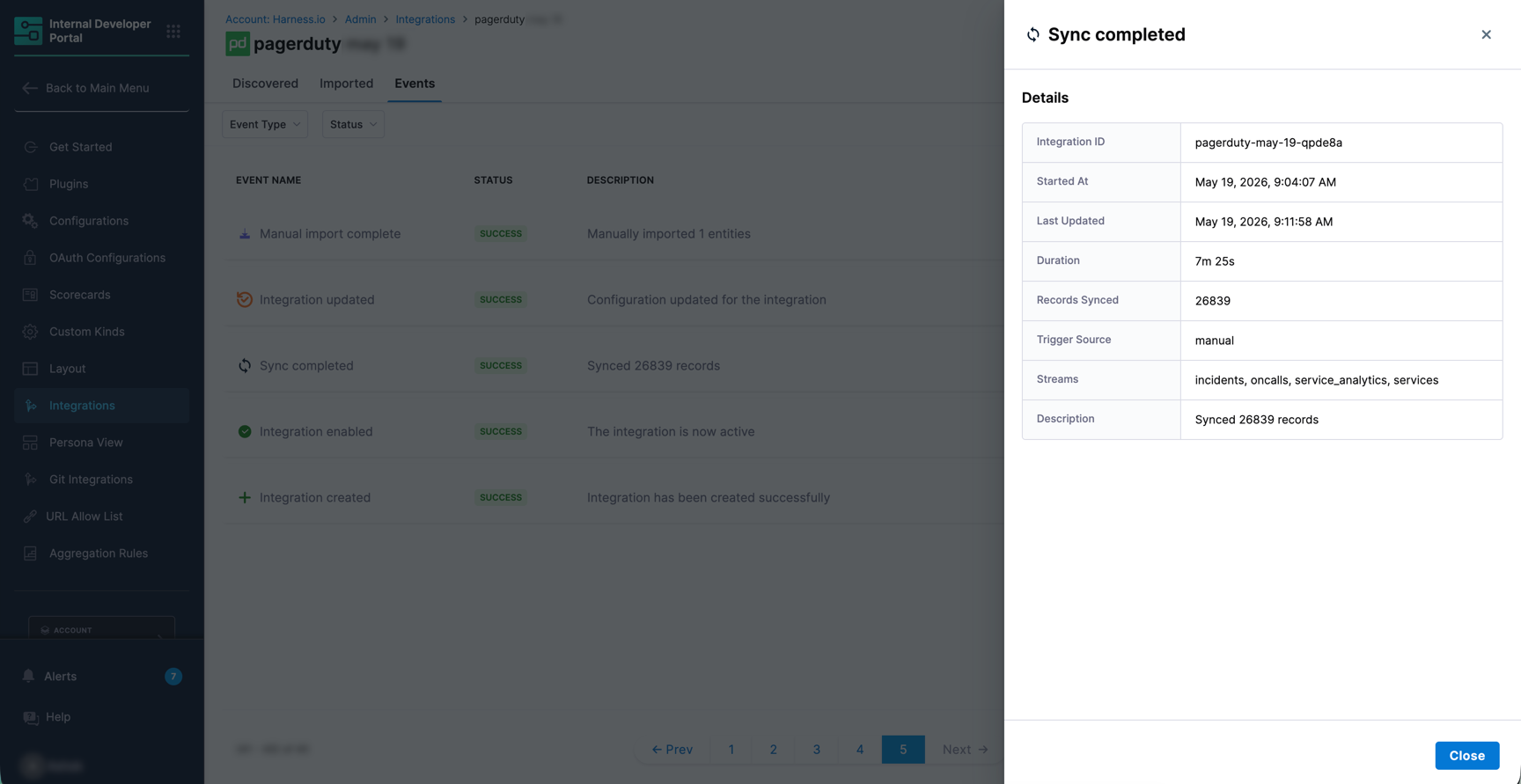
Click any event row to open a details panel on the right side of the page.
| Field | Description |
| ------------------ | ---------------------------------------------------------------------------------------------------------------- |
| **Integration ID** | The unique identifier of the integration. |
| **Started At** | The exact date and time the event started. |
| **Last Updated** | The most recent update timestamp. |
| **Duration** | How long the event took to complete. |
| **Records Synced** | The number of records processed during the event. |
| **Trigger Source** | What initiated the event: `scheduled` for automated syncs, or `manual` when triggered using the **Sync** button. |
| **Streams** | The data streams involved in this event, such as the resource types being synced. |
| **Description** | A summary of the event outcome. |
***
### Event type reference
| Event Type | Status | Event Name |
| -------------------------- | --------------- | --------------------------------------- |
| **Sync run** | Running | Syncing records |
| | Success | Sync completed |
| | Partial Success | Sync partially completed |
| | Failed | Sync failed |
| **Integration created** | Running | Creating integration |
| | Success | Integration created |
| | Failed | Integration creation failed |
| **Integration updated** | Running | Updating integration |
| | Success | Integration updated |
| | Failed | Integration update failed |
| **Integration enabled** | Running | Enabling integration |
| | Success | Integration enabled |
| | Failed | Integration enable failed |
| **Integration disabled** | Running | Disabling integration |
| | Success | Integration disabled |
| | Failed | Integration disable failed |
| **Entities manual import** | Running | Starting manual import |
| | Success | Manual import complete |
| | Partial Success | Manual import partially completed |
| | Failed | Manual import unsuccessful |
| **Auto import** | Running | Auto-importing \ |
| | Success | \ auto-imported |
| | Partial Success | \ auto-import partially completed |
| | Failed | \ auto-import failed |
| **Entities unlink** | Running | Unlinking entities |
| | Success | Entities unlinked |
| | Partial Success | Entities partially unlinked |
| | Failed | Unlink failed |
| **Entity deleted** | Success | Entity deleted |
| | Failed | Entity deleted |
{% hint style="info" %}
For **Auto import** events, `` is replaced by the actual entity kind being processed, such as `resource` or `component`.
For integration lifecycle events (Integration created, updated, enabled, and disabled), a **Failed** status covers both full failures and partial failures.
For **Sync run** events, a **Failed** status can indicate one of three conditions: the sync encountered an error, the sync got stuck and was marked stale by the system, or a newer sync started before this one completed and overrode it.
For **Entity deleted** events, one event is emitted per stream. The description includes the number of entities deleted and the stream name, for example `Deleted 644 issues entities`. These events are triggered by **System** and run only on full sync streams.
A **Failed** status on an Entity deleted event does not always indicate an error. It also appears when the circuit breaker blocks deletion to protect your entities.
{% endhint %}
***
### Entity deletion
When a record is deleted in a connected tool, such as a SonarQube project or a CMDB record, it stops appearing in syncs. Deletion detection identifies these records and emits an **Entity deleted** event, so stale data does not stay in your catalog.

{% hint style="warning" %}
Deletion detection emits delete events. It does not remove entities from the IDP catalog itself.
{% endhint %}
**View deletion events**
1. In Harness IDP, go to **Configure** → **Integrations**.
2. Find your integration card and click **View**.
3. On the integration detail page, click the **Events** tab.
One event is emitted per stream, and each event is triggered by **System**, because deletion runs automatically after a sync.
| Status | Description |
| ----------- | --------------------------------------------------------------------------------------------------------------------------------------------------------------------------------------- |
| **Success** | Entities were deleted. The description includes the count and stream, for example `Deleted 644 issues entities`. |
| **Failed** | No entities were deleted for that stream, for example `Failed to delete issues entities`. This happens when the circuit breaker blocks deletion, or when deletion encountered an error. |
{% hint style="info" %}
A failed Entity deleted event does not always mean something is broken. It often means the circuit breaker protected your entities from a source-side problem. Check your source system and your integration configuration before raising a support request.
{% endhint %}
**When deletion happens**
Deletion works on **full sync** streams only. Incremental streams return only new or changed records, so a missing record does not mean it was deleted.
Deletion is intentionally delayed so that a temporary problem does not remove valid entities. By default:
* A record must be missing from at least **3 consecutive successful syncs**.
* A record must have been missing for at least **24 hours**.
* Deletion checks run about **once a week** per integration.
* A sync is not used for deletion if any of its streams failed, or if any records were dropped during the sync.
As a result, a record deleted at the source can take up to a week or more to appear as an Entity deleted event. A new integration is not checked for deletions until it has completed enough successful syncs.
**Circuit breaker**
Deletion is blocked for a stream if it would remove more than **80%** of that stream's entities. This protects against source outages or access changes that return empty or partial data. The next eligible sync retries deletion for that stream.
Narrowing the integration scope has the same effect. If you remove repositories, projects, or tables from the integration configuration, their entities stop syncing and are treated as deleted at the source. If that removes more than the circuit breaker limit at once, deletion stays blocked for that stream until the scope is restored.
{% @harness-feedback/feedback %}