> For the complete documentation index, see [llms.txt](https://developer.harness.io/llms.txt). Markdown versions of documentation pages are available by appending `.md` to page URLs; this page is available as [Markdown](https://developer.harness.io/internal-developer-portal/use-idp/software-catalog/integrate-tools/api-endpoint-enrichments.md).
# API endpoint extraction and enrichment
Learn how Harness IDP automatically extracts endpoints from an OpenAPI spec into Ingested Properties, and how to write custom enrichment metadata to individual endpoints using the Catalog Custom Prope
When you [register a catalog entity](/internal-developer-portal/use-idp/software-catalog/tutorials/add-api-docs.md#create-an-api-entity) with `kind: API` and `type: openapi`, Harness IDP automatically parses the OpenAPI spec you provide and extracts a structured, trimmed representation of its endpoints. This extracted data appears in the entity's Ingested Properties under `metadata.apis` and can then be enriched with custom metadata from your own tools, scripts, or external services.
This page explains what gets extracted, how to configure the entity definition so extraction works reliably, and how to write enrichment data to individual endpoints using the Catalog Custom Properties API.
{% hint style="info" %}
If you use Traceable for API security, the [Traceable integration](/internal-developer-portal/use-idp/software-catalog/create-entity/catalog-discovery/integrations/traceable.md) pushes risk scores, data type exposure, and open issues onto your API entity pages automatically. The CCP API described on this page is for writing your own custom enrichment metadata from any external tool or script.
{% endhint %}
***
### Before you begin
This feature is gated behind the `IDP_API_ENDPOINT_EXTRACTION` feature flag. Contact [Harness Support](https://www.harness.io/company/contact-sales) to enable it for your account.
***
### How endpoint extraction works
After an API entity is saved, IDP parses `spec.definition` and extracts each endpoint from the spec.
Rather than storing the full specification (which can run to tens of thousands of lines), IDP stores only the operationally relevant fields per endpoint: path, HTTP method, summary, operation ID, and tags. This trimmed representation is stored in the entity's Ingested Properties under `metadata.apis` (explained in the next section).
Extraction runs each time the entity is created or updated in IDP. For specs provided via a Git placeholder or a bare URL, IDP also re-fetches and re-parses the spec automatically every 6 hours when the source changes. If you use an inline spec, re-save the entity YAML whenever the spec changes to trigger a fresh parse.
***
### The metadata.apis structure
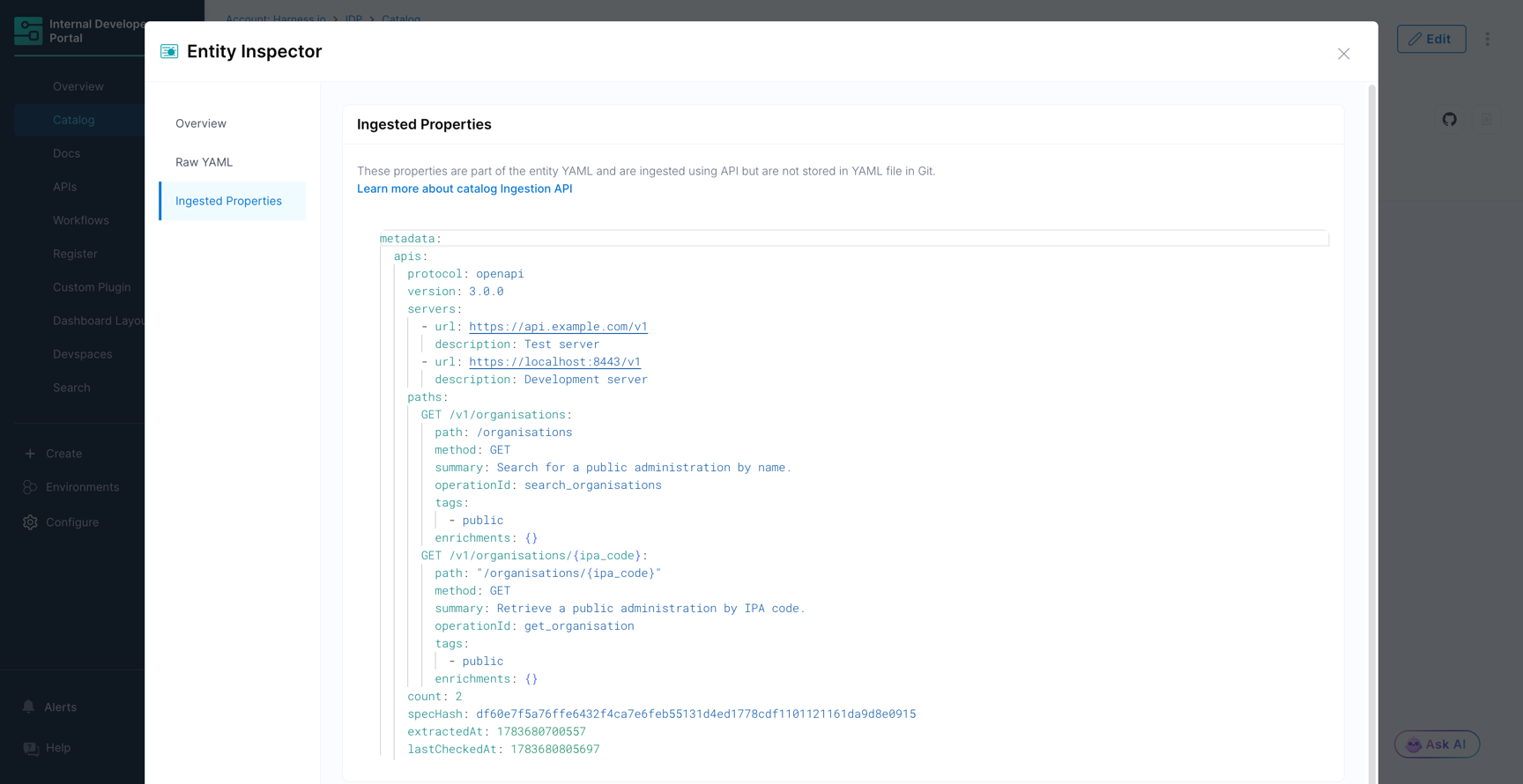
After a successful extraction, the entity's Ingested Properties contain a `metadata.apis` block. Here is an example for a spec with two endpoints:
```yaml
metadata:
apis:
protocol: openapi
version: 3.0.0
servers:
- url: https://api.example.com/v1
description: Test server
- url: https://localhost:8443/v1
description: Development server
paths:
GET /v1/organisations:
path: /organisations
method: GET
summary: Search for a public administration by name.
description: Connects to the index and searches for a public administration by name.
operationId: search_organisations
tags:
- public
deprecated: false
enrichments: {}
GET /v1/organisations/{ipa_code}:
path: "/organisations/{ipa_code}"
method: GET
summary: Retrieve a public administration by IPA code.
description: Retrieves information about a specific public administration using its IPA code.
operationId: get_organisation
tags:
- public
deprecated: false
enrichments: {}
count: 2
specHash: df60e7f5a76ffe6432f4ca7e6feb55131d4ed1778cdf1101121161da9d8e0915
extractedAt: 1783680700557
lastCheckedAt: 1783680805697
extractionStatus: success
```
Every field in `metadata.apis` except `enrichments` is system-managed. IDP writes those fields during extraction and they cannot be modified through the API. Attempting to write to any system-managed path returns HTTP 400. The `enrichments: {}` block on each endpoint is the only location where you or an external service can write data.
***
### Configure the spec for extraction
Endpoint extraction relies on IDP being able to read the OpenAPI spec. The method you use to provide the spec in `spec.definition` determines what prerequisites you need.
#### Method 1: Inline spec definition
You can embed the entire OpenAPI spec (either in JSON or YAML) directly inside the entity YAML using a literal block scalar in `spec.definition`:
```yaml
spec:
lifecycle: production
definition: |
openapi: "3.0.0"
info:
title: Starter Kit API
version: 1.0.0
servers:
- url: https://api.example.com/v1
paths:
/organisations:
get:
summary: Search for a public administration by name.
operationId: search_organisations
tags:
- public
/organisations/{ipa_code}:
get:
summary: Retrieve a public administration by IPA code.
operationId: get_organisation
tags:
- public
```
#### Method 2: Git-hosted spec via placeholders
If your spec lives in a Git repository, reference it using a placeholder in `spec.definition`. The placeholder tells IDP what file format to expect when it fetches the content:
| Placeholder | Use when the spec file is |
| ----------- | --------------------------------------------------------- |
| `$yaml` | A YAML file (`.yaml` or `.yml`) |
| `$json` | A JSON file (`.json`) |
| `$text` | Any other text format, or when the file type is ambiguous |
```yaml
spec:
lifecycle: production
definition:
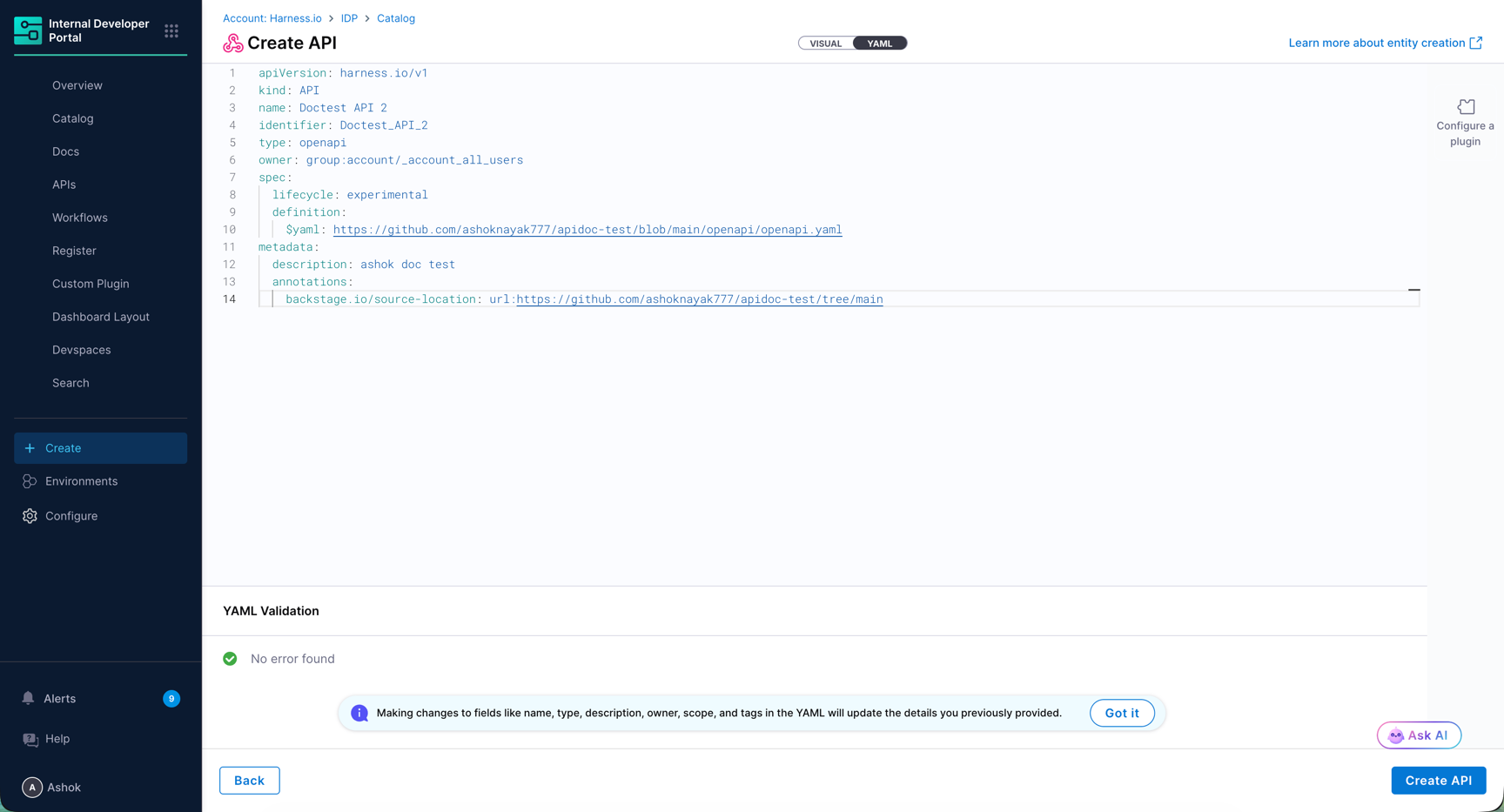
$yaml: https://github.com/your-org/your-repo/blob/main/openapi.yaml
```
{% hint style="warning" %}
Placeholders in Harness IDP support only Git-based URLs (GitHub, GitLab, Bitbucket, Azure Repo). They do not resolve arbitrary public HTTP URLs. If you have a spec hosted at a non-Git HTTP endpoint, use the [bare-URL method](#method-3-bare-url-public-http) mentioned in this doc. Users familiar with open-source Backstage may expect any HTTP URL to work here; that is not the case in Harness IDP.
{% endhint %}
Using a Git placeholder requires two additional prerequisites.
**Prerequisite 1: Configure a Git Integration**
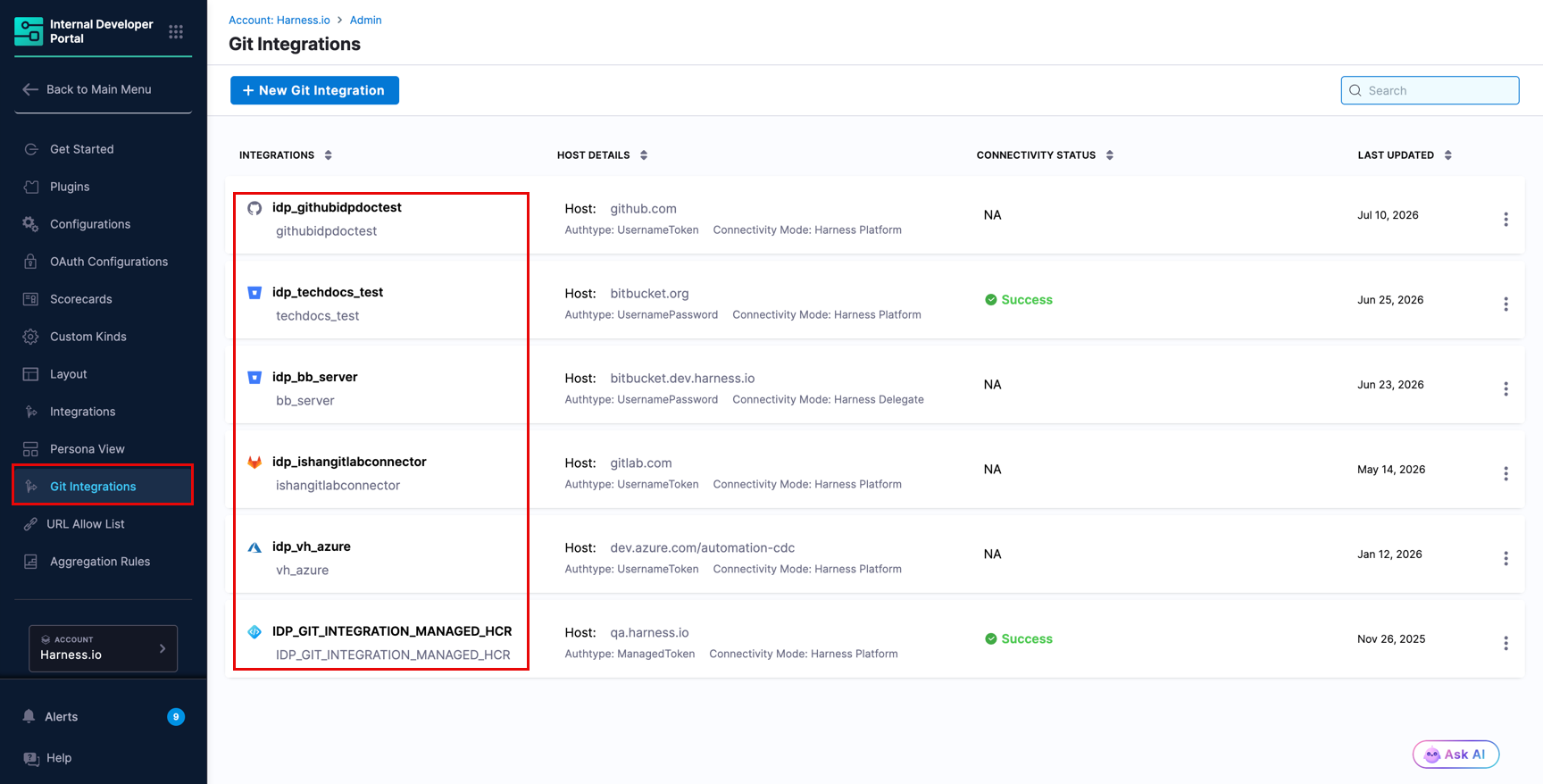
A Git Integration supplies the credentials IDP uses when fetching the spec. Go to **Configure** → **Git Integrations**, select **+ New Git Integration**, and choose your provider. Select an existing Harness connector or create one, validate permissions, and save.
{% hint style="info" %}
Only one Git Integration per provider host is active at a time. If your Harness account has multiple connectors for the same provider, the one registered in Git Integrations is the one IDP uses for all spec fetches from that provider.
{% endhint %}
**Prerequisite 2: Add the source-location annotation (private repositories only)**
For private repositories, add the `backstage.io/source-location` annotation to your entity YAML, pointing to the repository root. IDP uses this annotation to resolve the correct Git credentials during the fetch:
```yaml
metadata:
description: My payment service API
annotations:
backstage.io/source-location: url:https://github.com/your-org/your-repo/tree/main
```
This annotation is not required for public Git repositories.
{% hint style="info" %}
If your spec file is on a branch whose name contains a slash (for example, `feature/my-branch`), add a branch query parameter to the placeholder URL. Go to [Reference specs on branches that contain slashes](/internal-developer-portal/use-idp/software-catalog/tutorials/add-api-docs.md#reference-specs-on-branches-that-contain-slashes) for handling such instances.
{% endhint %}
#### Method 3: Bare URL (public HTTP)
If the spec is hosted at a publicly accessible non-Git URL, provide the URL directly as the value of `spec.definition`, without a `$` placeholder prefix:
```yaml
spec:
lifecycle: production
definition: https://petstore.swagger.io/v2/swagger.json
```
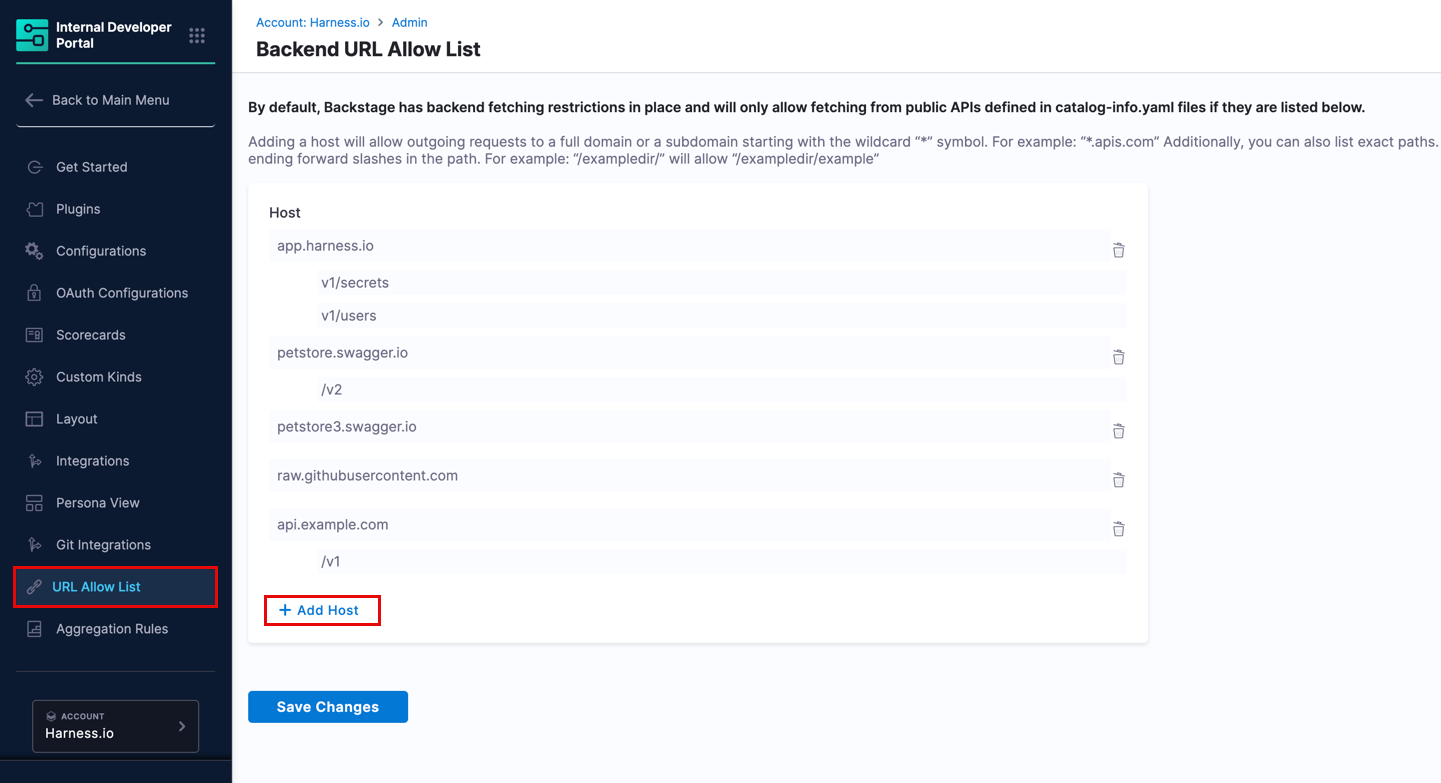
IDP fetches the URL directly. No Git Integration is needed. However, for the spec to render in the UI, the domain must also be added to the URL Allow List.
**Configure the URL Allow List (for UI rendering)**
In IDP, go to **Configure** → **URL Allow List** and add the host of the URL where your spec is served. You can use a wildcard to cover subdomains (for example, `*.swagger.io`). Subdirectory matching is supported with a trailing slash (for example, `/v2/` matches `/v2/swagger.json`).
{% hint style="info" %}
The URL Allow List controls which domains the IDP frontend can render. It is not required for backend extraction or enrichment. Git-hosted specs fetched via a Git Integration connector are not subject to this restriction.
{% endhint %}
***
### Enrich endpoint data
Once endpoints are extracted, you can attach custom metadata to any endpoint using the Catalog Custom Properties (CCP) API. Enrichments are stored separately from the extracted spec data and are never written to the entity's `catalog-info.yaml` in Git. Any service or tool that can make an authenticated HTTP request can write enrichments: your own scripts, CI/CD steps, or external integrations.
{% hint style="info" %}
Enrichment data written to endpoint properties is also available as a data source for [Scorecard](/internal-developer-portal/use-idp/scorecards/scorecard.md) rules, allowing you to define and measure API quality checks against enriched values such as risk scores or compliance tags. If you use Traceable for API security, the [Traceable integration](/internal-developer-portal/use-idp/software-catalog/create-entity/catalog-discovery/integrations/traceable.md) displays risk scores and open issues automatically as ready-made scorecard data points without requiring manual enrichment. Go to [Traceable data points](/internal-developer-portal/use-idp/scorecards/create-scorecards/data-sources.md#traceable) to configure these checks.
{% endhint %}
Go to the [Catalog Ingestion API](/internal-developer-portal/use-idp/software-catalog/integrate-tools/catalog-ingestion-api.md) reference to review the general CCP API contract.
#### The writable path
The property path for any enrichment write is:
```
metadata.apis.paths."".enrichments.
```
The endpoint key (for example, `GET /v1/organisations`) contains a space, so it must be wrapped in escaped double quotes when used in the dotted property path:
```
metadata.apis.paths.\"GET /v1/organisations\".enrichments.riskScore
```
Any depth below `enrichments` is valid and is created automatically:
```
# Single-level key
metadata.apis.paths.\"GET /v1/organisations\".enrichments.criticality
# Nested key
metadata.apis.paths.\"GET /v1/organisations\".enrichments.owner.team.name
```
{% hint style="info" %}
The endpoint key is case-sensitive and must match exactly what appears in `metadata.apis.paths`. Check the Entity Inspector → **Ingested Properties** for the exact key of each endpoint before writing.
{% endhint %}
#### Request format
**Endpoint:** `POST /v1/catalog/custom-properties/entity`
**Headers:**
```http
Harness-Account:
x-api-key:
Content-Type: application/json
```
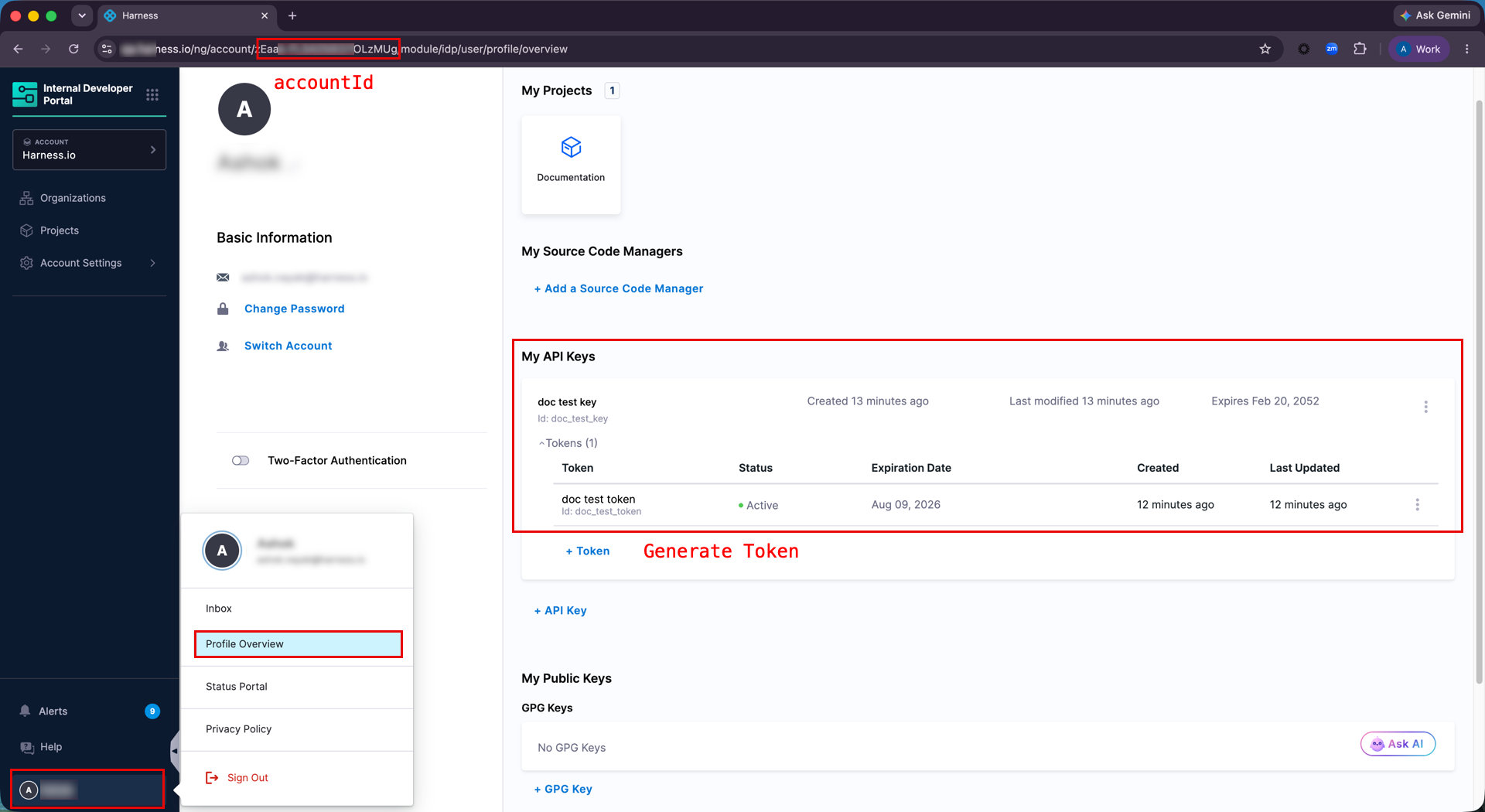
You can get `accountId` and `PAT token` as shown below:
**Body:**
```json
{
"entity_ref": "api:account/",
"properties": [
{
"property": "metadata.apis.paths.\"\".enrichments.",
"value": "",
"mode": "replace"
}
]
}
```
{% hint style="info" %}
**POINTS TO REMEMBER**
* The `entity_ref` identifier is the entity's `identifier` field (not name). Find it in Entity Inspector → **Raw YAML**.
* The `properties` array accepts multiple entries in a single request. One invalid entry fails the entire request.
* Append `?dryRun=true` to the request URL to validate the request without persisting any data.
**Modes:**
{% endhint %}
| Mode | Behavior |
| ------------------- | ------------------------------------------------------------------------------------------------------------------------- |
| `replace` (default) | Sets or overwrites the value at the path. Applied if `mode` is omitted or unrecognized. |
| `append` | For arrays, concatenates new items onto the existing list. For objects, merges keys. For scalars, behaves like `replace`. |
***
### Examples
#### Write a scalar value
```bash
curl -X POST 'https://app.harness.io/gateway/v1/catalog/custom-properties/entity' \
-H 'Harness-Account: ' \
-H 'x-api-key: ' \
-H 'Content-Type: application/json' \
-d '{
"entity_ref": "api:account/",
"properties": [
{
"property": "metadata.apis.paths.\"GET /v1/organisations\".enrichments.riskScore",
"value": 8.5,
"mode": "replace"
}
]
}'
```
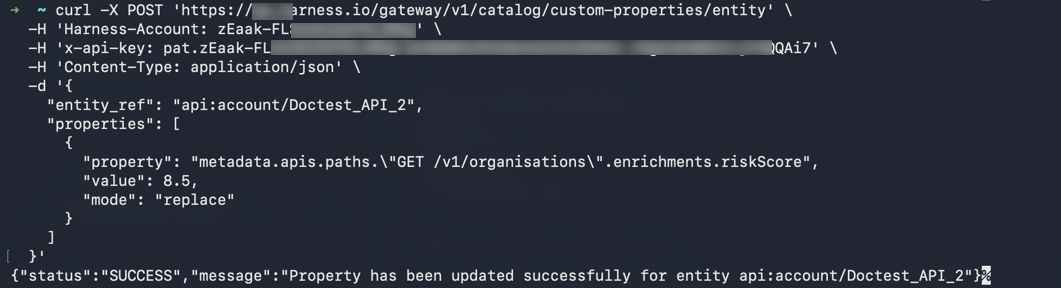
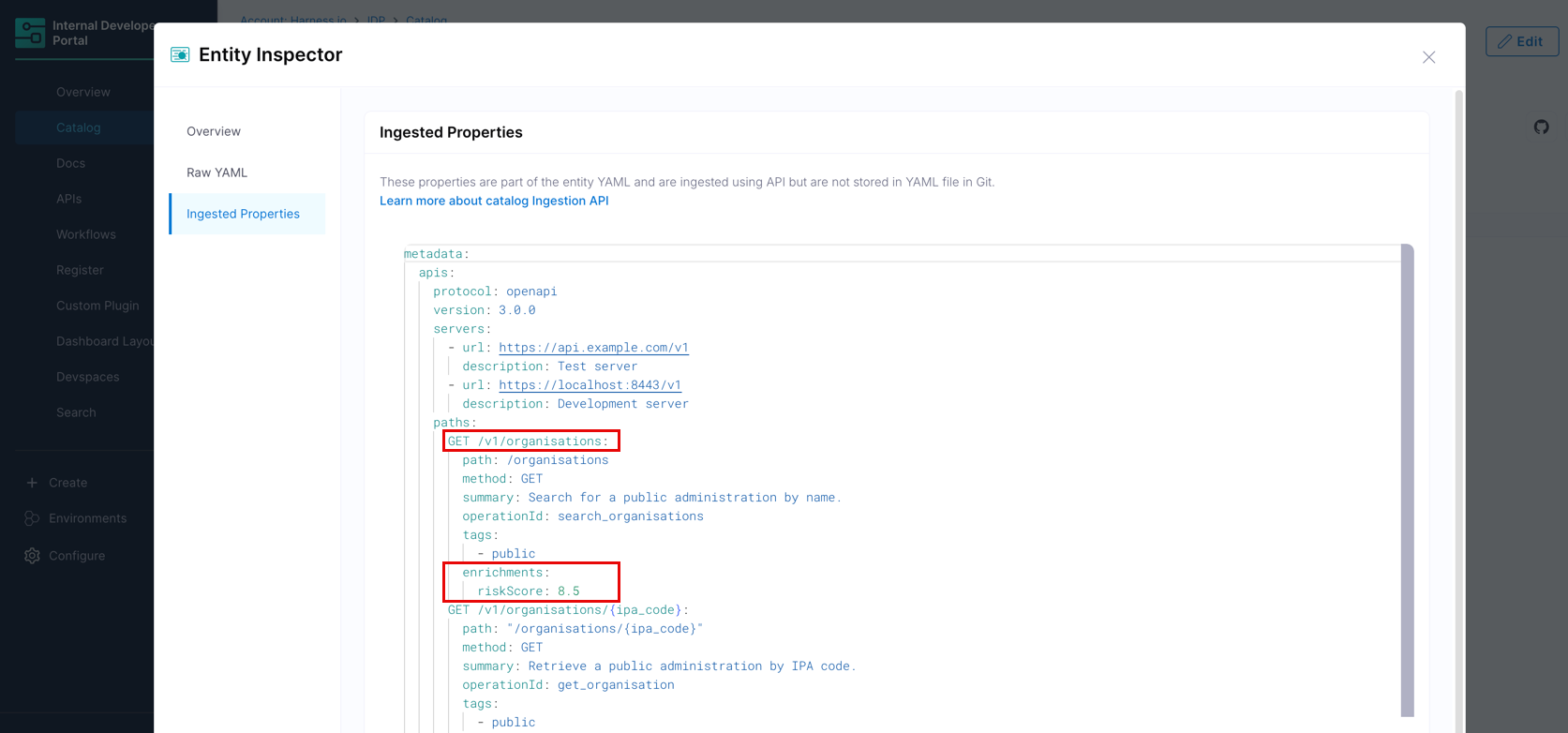
**Results**
* Successful Curl Request
* Successful Enrichment of API Endpoint
{% hint style="warning" %}
The endpoint key in the property path must match exactly what appears under `metadata.apis.paths` in Ingested Properties, including the server base path prefix. In this example the spec defines `servers.url` as `https://api.example.com/v1`, so IDP prepends `/v1` to every endpoint path when building the key. Check Entity Inspector → **Ingested Properties** for the exact keys on your entity before writing enrichments.
{% endhint %}
#### Write multiple properties at once
Multiple properties for the same endpoint (or across different endpoints) can be written in a single request:
```bash
curl -X POST 'https://app.harness.io/gateway/v1/catalog/custom-properties/entity' \
-H 'Harness-Account: ' \
-H 'x-api-key: ' \
-H 'Content-Type: application/json' \
-d '{
"entity_ref": "api:account/",
"properties": [
{
"property": "metadata.apis.paths.\"GET /v1/organisations\".enrichments.riskScore",
"value": 8.5,
"mode": "replace"
},
{
"property": "metadata.apis.paths.\"GET /v1/organisations\".enrichments.public",
"value": false,
"mode": "replace"
}
]
}'
```
#### Write a list, then extend it
First write (sets the list):
```bash
"properties": [
{
"property": "metadata.apis.paths.\"GET /v1/organisations\".enrichments.compliance",
"value": ["pci", "gdpr"],
"mode": "replace"
}
]
```
Second write (adds to the list without overwriting):
```bash
"properties": [
{
"property": "metadata.apis.paths.\"GET /v1/organisations\".enrichments.compliance",
"value": ["soc2"],
"mode": "append"
}
]
```
Result: `compliance: [pci, gdpr, soc2]`
#### Write a nested object
```bash
"properties": [
{
"property": "metadata.apis.paths.\"GET /v1/organisations\".enrichments.owner",
"value": { "team": "payments", "slack": "#pay" },
"mode": "replace"
}
]
```
Result:
```yaml
enrichments:
owner:
team: payments
slack: "#pay"
```
***
### What is blocked
All fields under `metadata.apis` other than `enrichments` are system-managed. Writes to these paths return HTTP 400 `INVALID_REQUEST`:
| Blocked path | Reason |
| ----------------------------------------------------- | --------------------------------------- |
| `metadata.apis` | System-managed root |
| `metadata.apis.count` | Set by the extraction process |
| `metadata.apis.specHash` | Set by the extraction process |
| `metadata.apis.paths."GET /v1/organisations".summary` | Endpoint field, not under `enrichments` |
| `metadata.apis.paths."GET /v1/organisations".method` | Endpoint field, not under `enrichments` |
Writes to paths outside `metadata.apis` (for example, `metadata.team`) are normal custom property writes and are not restricted.
***
### Read enrichments
```bash
curl -X GET \
'https://app.harness.io/gateway/v1/catalog/custom-properties/entity?entity_ref=api:account/' \
-H 'Harness-Account: ' \
-H 'x-api-key: '
```
The merged result is also visible in the Entity Inspector under **Ingested Properties**.
***
### Delete an enrichment
```bash
curl -X DELETE 'https://app.harness.io/gateway/v1/catalog/custom-properties/entity' \
-H 'Harness-Account: ' \
-H 'x-api-key: ' \
-H 'Content-Type: application/json' \
-d '{
"entity_ref": "api:account/",
"properties": ["metadata.apis.paths.\"GET /v1/organisations\".enrichments.riskScore"]
}'
```
***
### Enrichment lifecycle
Enrichments are stored separately from the extracted spec data. When the spec re-fetches and extraction runs again, enrichments for endpoints still present in the spec carry forward unchanged. If an endpoint is removed from the spec, all enrichments for that endpoint are deleted along with it.
Avoid writing to a property path that names a non-existent endpoint key. The request will succeed, but the enrichment will never appear in Ingested Properties because no extraction result exists to attach it to.
***
### Frequently asked questions When does extraction run, and how do I re-trigger it after a spec change?
Extraction runs each time the entity is created or updated in IDP. For specs provided via a Git placeholder or a bare URL, IDP also re-fetches and re-parses the spec automatically every 6 hours, so changes at the source are picked up without any action on your part. If you use an inline spec, there is no external source to re-fetch from, so you must re-save the entity YAML whenever the spec changes to trigger a fresh parse.
Why do I get HTTP 400 when writing to a metadata.apis path?
All fields under `metadata.apis` except `enrichments` are system-managed. You can only write to paths under `metadata.apis.paths."".enrichments.*`. Writes to any other `metadata.apis` path, such as `metadata.apis.count` or `metadata.apis.paths."GET /v1/organisations".summary`, return HTTP 400.
The enrichment I wrote is not showing in Ingested Properties. Why?
The most likely cause is that the endpoint key in the property path does not exactly match the key in `metadata.apis.paths`. The key includes the HTTP method, a space, and the full path including the server base path prefix from `servers.url` in the spec. Check Entity Inspector → Ingested Properties for the exact key, then re-run the request with the corrected path.
What happens to enrichments if an endpoint is removed from the spec?
If an endpoint is removed from the OpenAPI spec and extraction runs again, all enrichments for that endpoint are deleted along with the endpoint entry. Enrichments for endpoints that remain in the spec carry forward unchanged.
{% @harness-feedback/feedback %}