> For the complete documentation index, see [llms.txt](https://developer.harness.io/llms.txt). Markdown versions of documentation pages are available by appending `.md` to page URLs; this page is available as [Markdown](https://developer.harness.io/internal-developer-portal/use-idp/software-catalog/integrate-tools/catalog-ingestion-api.md).
# Catalog Ingestion API
Update Catalog Metadata using Ingestion APIs
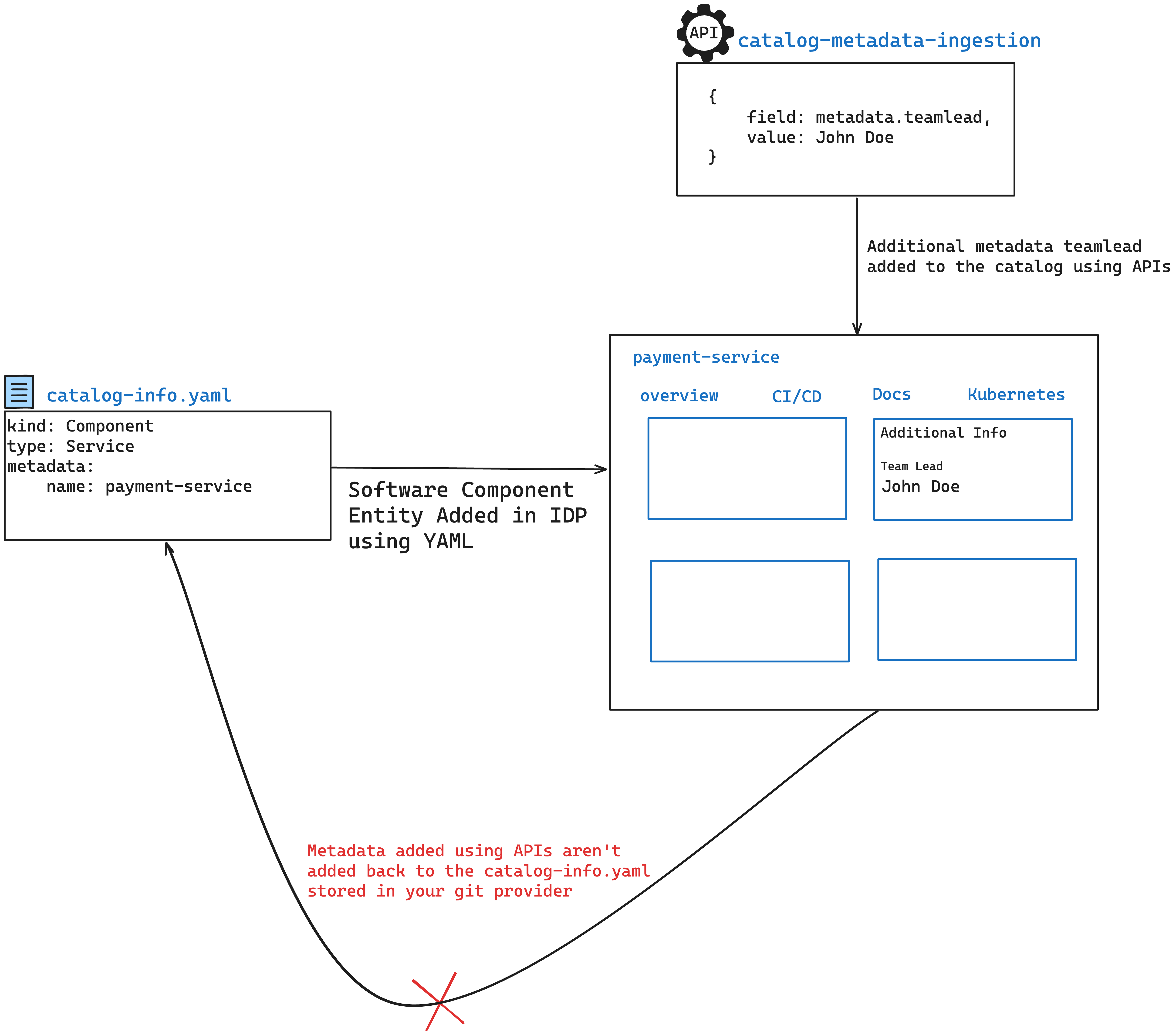
Software Catalog in Harness IDP supports modifying metadata associated with the services, libraries, websites and any other entities registered in the Catalog, without having to manually edit the `catalog-info.yaml`. This allows integrations with many systems such as cost trackers, service health checkers, security scans or even simple spreadsheets tracking personnel details like who is on-call this week.
The ingested data can be used to display on the UI, can be consumed in [Custom Plugins](/internal-developer-portal/use-idp/plugins/custom-plugins/overview.md) and measured in Scorecard Checks.
{% hint style="info" %}
**WHICH MECHANISM DO I NEED?**
Use the Catalog Ingestion API to change a property on an entity, such as a team lead or a cost figure. Use a [Custom Integration](/internal-developer-portal/use-idp/software-catalog/create-entity/catalog-discovery/custom-integrations/overview.md) to attach activity records such as builds, deployments, incidents, quality reports, or security findings, which are displayed on the entity without modifying its metadata.
{% endhint %}
Architecture Diagram of Catalog Ingestion
### Use cases - API quick overview
#### 1. Update a single property of a single catalog entity
```http
POST /catalog/custom-properties/entity
```
```json
{
"entity_ref": "boutique-service",
"property": "metadata.teamLead",
"value": "David John"
}
```
#### 2. Update multiple properties of a single catalog entity
```http
POST /catalog/custom-properties/entity
```
```json
{
"entity_ref": "boutique-service",
"properties": [
{
"property": "metadata.teamLead",
"value": "David John"
},
{
"property": "metadata.teamOwner",
"value": "Grace"
}
]
}
```
#### 3. Update a single property of multiple catalog entities
```http
POST /catalog/custom-properties/property
```
```json
{
"property": "metadata.releaseVersion",
"entity_refs": [
{
"entity_ref": "component:default/order-service",
"value": 1.2.0
},
{
"entity_ref": "component:default/idp-service",
},
{
"entity_ref": "component:default/pipeline-service",
}
],
"value": 1.5.0,
}
```
#### 4. Update a single property of multiple unspecified catalog entities using filters
```http
POST /catalog/custom-properties
```
```json
{
"property": "metadata.teamLead",
"filter": {
"kind": "Component",
"type": "service"
},
"value": "Jane Doe"
}
```
#### 5. Update a single property of a catalog entity without replacing existing values
```http
POST /catalog/custom-properties/entity
```
```json
{
"entity_ref": "boutique-service",
"property": "metadata.tags",
"value": [
"python",
"java",
"c++"
],
"mode": "append"
}
```
> **Note**: `append` only works with data types that can hold multiple values, such as arrays or maps. It does not apply to simple data types like strings.
### Common API request details
#### API base URL
`https://app.harness.io/gateway/v1/`
#### Headers
```http
X-API-KEY: Harness API Key
Content-Type: application/json
```
You can generate your Harness API Keys by following the [Harness API Key docs](https://developer.harness.io/harness-platform/use-harness-platform/automation/api/add-and-manage-api-keys).
You can find your account ID in any of your Harness URLs, for example: `https://app.harness.io/ng/account//idp/overview`.
### Detailed API usage and examples
#### Update a single property of a single catalog entity
**cURL example**
```sh
curl \
--location 'https://app.harness.io/gateway/v1/catalog/custom-properties/entity' \
--header 'Content-Type: application/json' \
--header 'x-api-key: ' \
--data '{
"entity_ref": "boutique-service",
"property": "metadata.codeCoverageScore",
"value": "83"
}'
```
**Endpoint**
**HTTP Method**
`POST`
**URL**
```
https://app.harness.io/gateway/v1/catalog/custom-properties/entity
```
**Request body**
```json
{
"entity_ref": "boutique-service",
"property": "metadata.codeCoverageScore",
"value": "83"
}
```
In the above example, we update/add **only** the `metadata.codeCoverageScore` **property** for the mentioned **entity** `boutique-service`.
What is Entity Ref?
[Entity ref](https://backstage.io/docs/features/software-catalog/references/) is a stringified way of referencing a Catalog entity with the format `[:][/]`. `namespaces` are optional and are usually `default`. `kind` is often optional too and is assumed to be either `Component`, `API` or `Group` depending upon the context. The simplest way to represent a component is to use the name field `metadata.name`. For example
* `boutique-service`
This internally translates into `component:default/boutique-frontend` which means the entity is of `kind: Component` in the `default` namespace.
Here are some other examples of valid `entity_refs` -
* `component:order-service`
* `api:petstore`
* `group:my-team`
* `component:default/my-service`
Entity Refs are case-insensitive. [Read More](/internal-developer-portal/use-idp/software-catalog/tutorials/entity-ref.md) on the Entity Reference.
How to check the final entity?
You can use the Entity Inspector to view the final Raw YAML.


```yaml
apiVersion: backstage.io/v1alpha1
kind: Component
metadata:
name: my-new-service
description: Description of my new service
annotations:
harness.io/project-url: https://app.harness.io/ng/account/vpCkHK/module/idp-admin/orgs/default/projects/Backstage/pipelines/Releasenpm/
codeCoverageScore: 83
...
```
#### Update multiple properties of a single catalog entity
**cURL example**
```sh
curl \
--location 'https://app.harness.io/gateway/v1/catalog/custom-properties/entity' \
--header 'Content-Type: application/json' \
--header 'x-api-key: ' \
--data '{
"entity_ref": "boutique-service"
"properties": [
{
"property": "metadata.codeCoverageScore",
"value": "83"
},
{
"property": "metadata.cloudCost",
"value": "$2400",
}
]
}'
```
**Endpoint**
**HTTP method**
`POST`
**URL**
```
https://app.harness.io/gateway/v1/catalog/custom-properties/entity
```
**Request body**
```json
{
"entity_ref": "boutique-service",
"properties": [
{
"property": "metadata.codeCoverageScore",
"value": "83"
},
{
"property": "metadata.cloudCost",
"value": "$2400"
}
]
}
```
In the above example, we add the `metadata.codeCoverageScore` & `metadata.cloudCost` properties for the mentioned `boutique-service`.
What is Entity Ref?
[Entity ref](https://backstage.io/docs/features/software-catalog/references/) is a stringified way of referencing a Catalog entity with the format `[:][/]`. `namespaces` are optional and are usually `default`. `kind` is often optional too and is assumed to be either `Component`, `API` or `Group` depending upon the context. The simplest way to represent a component is to use the name field `metadata.name`. For example
* `boutique-service`
This internally translates into `component:default/boutique-frontend` which means the entity is of `kind: Component` in the `default` namespace.
Here are some other examples of valid `entity_refs` -
* `component:order-service`
* `api:petstore`
* `group:my-team`
* `component:default/my-service`
Entity Refs are case-insensitive.
How to check the final entity?
You can use the Entity Inspector to view the final Raw YAML.


```yaml
apiVersion: backstage.io/v1alpha1
kind: Component
metadata:
name: my-new-service
description: Description of my new service
annotations:
harness.io/project-url: https://app.harness.io/ng/account/vpCkHK/module/idp-admin/orgs/default/projects/Backstage/pipelines/Releasenpm/
codeCoverageScore: 83
...
```
#### Update a single property of multiple catalog entities
**cURL example**
```sh
curl --location 'https://app.harness.io/gateway/v1/catalog/custom-properties/entity' \
--header 'Content-Type: application/json' \
--header 'x-api-key: ' \
--data '{
"property": "metadata.releaseVersion",
"entity_refs": [
{
"entity_ref": "component:default/order-service",
"value": 1.2.0
},
{
"entity_ref": "component:default/idp-service",
},
{
"entity_ref": "component:default/pipeline-service",
}
],
"value": 1.5.0,
}'
```
{% hint style="info" %}
You can skip the corresponding values of some entities in the `entity_refs` array and provide the default value under root `value` field of the payload. Value field is optional if all entities have a corresponding value specified.
{% endhint %}
How to check the final entity?
You can use the Entity Inspector to view the final Raw YAML.


```yaml
apiVersion: backstage.io/v1alpha1
kind: Component
metadata:
name: my-new-service
description: Description of my new service
annotations:
harness.io/project-url: https://app.harness.io/ng/account/vpCkHK/module/idp-admin/orgs/default/projects/Backstage/pipelines/Releasenpm/
codeCoverageScore: 83
...
```
**Endpoint**
**HTTP method**
`POST`
**URL**
```
https://app.harness.io/gateway/v1/catalog/custom-properties/entity
```
**Request body**
```json
{
"property": "metadata.releaseVersion",
"entity_refs": [
{
"entity_ref": "component:default/order-service",
"value": 1.2.0
},
{
"entity_ref": "component:default/idp-service",
},
{
"entity_ref": "component:default/pipeline-service",
}
],
"value": 1.5.0,
}
```
In the above example, we add the `metadata.releaseVersion` **property** for the mentioned **entities**.
What is Entity Ref?
[Entity ref](https://backstage.io/docs/features/software-catalog/references/) is a stringified way of referencing a Catalog entity with the format `[:][/]`. `namespaces` are optional and are usually `default`. `kind` is often optional too and is assumed to be either `Component`, `API` or `Group` depending upon the context. The simplest way to represent a component is to use the name field `metadata.name`. For example
* `boutique-service`
This internally translates into `component:default/boutique-frontend` which means the entity is of `kind: Component` in the `default` namespace.
Here are some other examples of valid `entity_refs` -
* `component:order-service`
* `api:petstore`
* `group:my-team`
* `component:default/my-service`
Entity Refs are case-insensitive.
How to check the final entity?
You can use the Entity Inspector to view the final Raw YAML.


```yaml
apiVersion: backstage.io/v1alpha1
kind: Component
metadata:
name: my-new-service
description: Description of my new service
annotations:
harness.io/project-url: https://app.harness.io/ng/account/vpCkHK/module/idp-admin/orgs/default/projects/Backstage/pipelines/Releasenpm/
codeCoverageScore: 83
...
```
#### Update a single property of multiple unspecified catalog entities using filters
**HTTP method**
`POST`
**URL**
```bash
https://app.harness.io/gateway/v1/catalog/custom-properties
```
**Request body**
```json
{
"property": "metadata.teamLead",
"filter": {
"kind": "Component",
"type": "service"
},
"skip_entity_refs": ["idp-service"],
"value": "Jane Doe"
}
```
* **skip\_entity\_refs:** (Optional) Entities mentioned in this array are not modified with this request.
What is Entity Ref?
[Entity ref](https://backstage.io/docs/features/software-catalog/references/) is a stringified way of referencing a Catalog entity with the format `[:][/]`. `namespaces` are optional and are usually `default`. `kind` is often optional too and is assumed to be either `Component`, `API` or `Group` depending upon the context. The simplest way to represent a component is to use the name field `metadata.name`. For example
* `boutique-service`
This internally translates into `component:default/boutique-frontend` which means the entity is of `kind: Component` in the `default` namespace.
Here are some other examples of valid `entity_refs` -
* `component:order-service`
* `api:petstore`
* `group:my-team`
* `component:default/my-service`
Entity Refs are case-insensitive.
* **field:** It contains the information on the metadata name to be added, here in the above example it would ingest the `teamLead` under metadata. **This will not append your catalog-info.yaml stored in your git**, rather you could view the changes on IDP.
{% hint style="info" %}
We need to add escape character for any field has an additional `DOT` in the path like `metadata.annotation.harness.io/idp-test`, that part needs to be escaped with `\"` like this `metadata.annotations.\"harness.io/idp-test\"`
{% endhint %}
* **filter:** This is used to identify the software components where you want to ingest the new entity, you can filter through `kind`, `type`, `owners`, `lifecycle` and `tags`. **Where only `kind` is the mandatory fields.**
{% hint style="info" %}
**Error Handling**: We validate the body of the API and certain fields like `kind`, `metadata`, `metadata.name`, `metadata.namespace`, are uneditable and if you try to change these, the endpoint returns an Error Code 400. Also make sure your metadata updates adhere to the [backstage schema](https://github.com/backstage/backstage/tree/master/packages/catalog-model/src/schema)
For `kind: API` entities with `type: openapi`, the `metadata.apis` subtree is additionally system-managed: writes to any path under `metadata.apis` other than `metadata.apis.paths."".enrichments.*` also return HTTP 400. Go to [API endpoint extraction and enrichment](/internal-developer-portal/use-idp/software-catalog/integrate-tools/api-endpoint-enrichments.md) to review the writable paths.
{% endhint %}
How to check the final entity?
You can use the Entity Inspector to view the final Raw YAML.


```yaml
apiVersion: backstage.io/v1alpha1
kind: Component
metadata:
name: my-new-service
description: Description of my new service
annotations:
harness.io/project-url: https://app.harness.io/ng/account/vpCkHK/module/idp-admin/orgs/default/projects/Backstage/pipelines/Releasenpm/
codeCoverageScore: 83
...
```
#### Update a single property of a catalog entity without replacing existing values
**cURL example**
```sh
curl --location 'https://app.harness.io/gateway/v1/catalog/custom-properties/entity' \
--header 'Content-Type: application/json' \
--header 'x-api-key: ' \
--data '{
"entity_ref": "boutique-service",
"property": "metadata.tags",
"value": [
"python",
"java",
"c++"
],
"mode": "append"
}'
```
**Endpoint**
**HTTP method**
`POST`
**URL**
```
https://app.harness.io/gateway/v1/catalog/custom-properties/entity
```
**Request body**
```json
{
"entity_ref": "boutique-service",
"property": "metadata.tags",
"value": [
"python",
"java",
"c++"
],
"mode": "append"
}
```
When you want to update a specific property of a catalog entity, you can use different modes to control how the update behaves. The default mode is `replace`, which completely overwrites the existing value. However, you can use other modes like `append` for complex datatype like array to preserve the existing values while adding new ones.
**Available modes:**
* **replace** (default): Completely replaces the existing value with the new one provided in the `value` field.
* **append**: Adds new values to the existing array (or other types to be appended like maps or key-value pairs).
> **Note**: `append` only works with data types that can hold multiple values, such as arrays or maps. It does not apply to simple data types like strings.
***
**Example 1: Add a property to the entity (no mode specified)**
By default, when you add a property to an entity, it uses the `replace` mode to set the value.
```http
POST /catalog/custom-properties/entity
```
```json
{
"entity_ref": "boutique-service",
"property": "metadata.tags",
"value": [
"scala"
]
}
```
This sets the `metadata.tags` for `boutique-service` to `"scala"` replacing the existing values
**Example 2: Add new values to the entity**
To add new tags without replacing the existing ones, you can use the `append` mode.
```http
POST /catalog/custom-properties/entity
```
```json
{
"entity_ref": "boutique-service",
"property": "metadata.tags",
"value": [
"python",
"java",
"c++"
],
"mode": "append"
}
```
Result: The `metadata.tags` property will now be `["scala", "python", "java", "c++"]`, with the new values added to the existing ones.
**Example 3: Add a new annotation**
To add a new `annotation` under, `metadata` we can append the `metadata.annotations` field.
```http
POST /catalog/custom-properties/entity
```
```json
{
"entity_ref": "github-pull-request",
"property": "metadata.annotations",
"value": {
"harness.io/pipelines": "CI: https://app.harness.io/ng/account/account_id/module/idp-admin/orgs/default/projects/idpprojectsc/pipelines/DummyPipeline/pipeline-studio?storeType=INLINE"
},
"mode": "append"
}
```
Result: The `metadata.annotations` property will now add `harness.io/pipelines` to the existing annotations. If `harness.io/pipelines` annotations already exists then this will overwrite the same.
**When to use each mode:**
* `replace`: Use when you want to completely replace the value of a property. For example, if the existing tags are outdated, and you want to set new ones.
* `append`: Use when you want to add new values without losing the current values, applicable to array or map types. This is useful for incremental updates like **adding a new annotation** to the `catalog-info.yaml`.
```json
{
"entity_ref": "boutique-service",
"property": "metadata.annotations",
"value": [
{
"pagerduty.com/integration-key": "AS567G"
}
],
"mode": "append"
}
```
```yaml
## Example catalog-info.yaml
...
metadata:
name: my-new-service
description: Description of my new service
annotations:
backstage.io/techdocs-ref: dir:.
pagerduty.com/integration-key: AS567G
tags:
- java
...
```
### Other examples
#### Dry run
Using the **dry\_run** field, you can check all the metadata and components getting affected by the **Catalog Metadata Ingestion API** without actually modifying them. `dry_run` will not apply any change rather will provide a preview of all the changes as shown in the example below.
```json
[
{
"field": "metadata.offShoreTeamLead",
"entities_with_additions": {
"count": 0,
"entity_refs": []
},
"entities_with_updates": {
"count": 2,
"entity_refs": [
"component:default/order-service",
"component:default/foodservice"
]
}
}
]
```
As you could see in the example above we display the affected software components under `entity_refs`. To use **dry\_run** you need to add `?dry_run=true` field in the URL
```
https://app.harness.io/gateway/v1/catalog/custom-properties?dry_run=true
```
#### Advanced example of using catalog filters
```http
POST https://app.harness.io/gateway/v1/catalog/custom-properties
```
```json
{
"property": "metadata.releaseVersions",
"filter": {
"kind": "Component",
"type": "service",
"owners": ["harness_account_all_users"],
"lifecycle": ["experimental", "production"],
"tags": ["food-ordering", "java", "tag1"]
},
"value": [
{
"prod1": "1.5"
},
{
"prod2": "1.4"
},
{
"prod3": "1.3"
}
]
}
```
#### Delete a single custom property for a given entity
```bash
curl --location --request DELETE 'https://app.harness.io/gateway/v1/catalog/custom-properties/entity' \
--header 'Content-Type: application/json' \
--header 'x-api-key: ' \
--data '{
"entity_ref": "boutique-service",
"property": "metadata.teamLead"
}'
```
Note that this only works for the custom properties added using the Ingestion APIs. This API will not remove any property added using the Catalog Info YAML.
#### Delete multiple properties for a given entity
```bash
curl --location --request DELETE 'https://app.harness.io/gateway/v1/catalog/custom-properties/entity' \
--header 'Content-Type: application/json' \
--header 'x-api-key: ' \
--data '{
"entity_ref": "boutique-service",
"properties": ["metadata.teamLead", "metadata.teamOwner"]
}'
```
#### Delete a single property for multiple entities
```bash
curl --location --request DELETE 'https://app.harness.io/gateway/v1/catalog/custom-properties/property' \
--header 'Content-Type: application/json' \
--header 'x-api-key: ' \
--data '{
"property": "metadata.releaseVersion",
"entity_refs": ["idp-service", "order-service"]
}'
```
#### Delete one property on unspecified catalog entities using filters
```bash
curl --location --request DELETE 'https://app.harness.io/gateway/v1/catalog/custom-properties' \
--header 'Content-Type: application/json' \
--header 'x-api-key: ' \
--data '{
"property": "metadata.teamLead",
"filter": {
"kind": "Component",
"type": "service"
},
"skip_entity_refs": ["order-service"],
}'
```
In the above example it will delete the property `metadata.teamLead`, across **all** the entities **except** `order-service` mentioned under `skip_entity_refs`.
#### Get catalog custom properties for a given entity
```http
GET /catalog/custom-properties/entity?entity_ref=boutique-service
```
#### Get entities associated with a custom property
```http
GET /catalog/custom-properties/entity?property=metadata.releaseVersion
```
### Other catalog endpoints
This page describes only the ingestion related Catalog endpoints. Look at other [Catalog API endpoints](/internal-developer-portal/working-with-apis/api-references/public-api.md) which contains basic endpoints for fetching full entity, registering and unregistering entities.
### API takes priority over catalog YAML file (in case of a conflict)
Any property updated using Ingestion APIs will take priority over what is specified in the Catalog Info YAML files. For example, if a `catalog-info.yaml` has the following
```yaml
# ...
metadata:
name: boutique-frontend
customProperty: valueA
```
And you use the Ingestion API to update the `metadata.customProperty` to `valueB`. Then the final value of the property will be `valueB`. However, note that this will not update the actual `catalog-info.yaml` inside your Git repository.
{% @harness-feedback/feedback %}