> For the complete documentation index, see [llms.txt](https://developer.harness.io/llms.txt). Markdown versions of documentation pages are available by appending `.md` to page URLs; this page is available as [Markdown](https://developer.harness.io/release-orchestration/use-release-orchestration/release-orchestration-activities/activities-overview.md).
# Overview
Learn about activities and their role in Release Orchestration release processes
Activities are the individual tasks that make up a release process. They represent the actual work that needs to be performed during a release and serve as the fundamental execution units within phases.
### What you will learn from this topic
* Understand [what an activity is](#what-is-an-activity) and why activities exist
* How to identify the [activity types](#activity-types) supported in Release Orchestration
* How an activity moves through its [lifecycle](#activity-lifecycle) and how [dependencies](#activity-dependencies-and-execution-order) control execution order
* How to review real-world examples of activities used in standard and hotfix release processes
### What is an activity?
In Release Orchestration, **Activities** are the fundamental building blocks of a release process.
A **Process** is defined as a collection of phases. Each **Phase** is modeled as a logical group of activities. An **Activity** represents a single, atomic unit of work: automated, manual, or a nested subprocess.
Activities abstract what you want to do in the process, without forcing you to re-model the underlying pipelines or steps each time. This separation of concerns enables:
* **Clarity**: Activities have clear names and purposes (for example, "Run CI Pipeline" or "QA Sign-off")
* **Flexibility**: Change the implementation (the pipeline or script) without restructuring the entire process
* **Reusability**: Define an activity once and use it across multiple phases and processes
Click to view full size image
### Why activities?
Activities exist to provide a structured, reusable, and traceable way to model release workflows:
**Reusable Unit of Work**: Activities can be defined once and reused across:
* Multiple phases in the same process
* Multiple processes within the same account
* Multiple releases over time
**Separation of Concerns**: Activities separate process modeling (the release flow) from implementation details (pipelines, plugins, scripts). This allows process designers to focus on what needs to happen, while pipeline engineers focus on how it happens.
**Easy Pipeline Consumption**: Automated activities encapsulate Harness pipelines with input and output mappings, enabling integration without embedding pipeline YAML directly in the process definition.
**Traceability and Insights**: Every activity execution is tracked with:
* Start and end timestamps
* Execution status (pending, running, succeeded, failed, on hold)
* Inputs provided and outputs captured
* Approvals and sign-offs
* Audit trails for compliance
**Governance and Control**: Activities support approval gates, conditional execution, and dependencies, ensuring releases follow validated, compliant workflows.
### Activity types
Release Orchestration supports three types of activities, each serving different purposes in the release workflow.
Click to view full size image
**Pipeline activity (automated)**
Pipeline activities execute Harness pipelines automatically as part of the release workflow. They are the workhorses of automation in Release Orchestration.
**Characteristics:**
* Links to a specific Harness pipeline (CI, CD, STO, or any module pipeline)
* Passes activity inputs to the pipeline at runtime
* Tracks pipeline execution status in real-time
* Captures pipeline outputs for use in subsequent activities
* Supports timeout, retry, and failure handling configurations
**Use Cases:**
* Building and packaging artifacts (CI pipelines)
* Deploying services to environments (CD pipelines)
* Running automated test suites (testing pipelines)
* Executing security scans (STO pipelines)
* Performing database migrations or infrastructure provisioning
**Benefits:**
* **Automation**: Eliminates manual execution and reduces human error
* **Consistency**: Ensures the same validated pipeline runs every time
* **Speed**: Accelerates releases by automating repetitive tasks
* **Integration**: Uses existing Harness pipelines without modification
Pipeline activities keep the release YAML lean and avoid hitting pipeline size limits (3 MB) when many activities are present. Instead of embedding pipeline logic, you reference the pipeline and provide inputs.
**Manual activity**
Manual activities are used for long-lived human steps such as sign-offs, approvals, file uploads, or information capture. They enable human checkpoints and decision points within automated workflows.
**Characteristics:**
* Pauses execution until a user completes the activity
* Captures user inputs, approvals, or evidence (file uploads, comments)
* Tracks who completed the activity and when
* Supports multiple approvers and minimum approval thresholds
* Can have deadlines or escalations
**Use Cases:**
* **Approval Checkpoints**: Gating production deployments until stakeholders approve
* **Sign-offs and Acknowledgments**: QA sign-off after testing; Operations sign-off after deployment
* **Manual Verification Steps**: Smoke testing, sanity checks, or visual validation
* **Information Capture and Documentation**: Recording release notes, incident details, or rollback decisions
* **External System Interactions Requiring Human Input**: Coordinating with third-party vendors or legacy systems
**Benefits:**
* **Governance**: Enforces required approvals and sign-offs
* **Flexibility**: Accommodates tasks that cannot be fully automated
* **Auditability**: Captures who approved what and when, with full evidence trails
* **Collaboration**: Enables cross-team coordination and handoffs
**Subprocess activities**
Subprocess activities contain nested processes, allowing you to compose complex workflows from simpler, reusable building blocks.
**Characteristics:**
* References another process by its identifier
* Executes the referenced process as part of the parent process
* Passes inputs to the subprocess and captures its outputs
* Supports nesting up to a maximum depth (typically 3 levels) to prevent infinite recursion
* Maintains parent process context during subprocess execution
**Use Cases:**
* **Reuse Processes**: Include common workflows (for example, a "Deploy to Environment" process) as activities in larger processes
* **Build Complex Processes**: Compose multi-stage releases from smaller, tested subprocesses
* **Modularize Large Releases**: Break a large, monolithic process into smaller, maintainable subprocesses
* **Iterative Operations**: Execute a subprocess multiple times with different inputs (for example, deploy to multiple regions)
**Real-World Example: Iterative Bug Fix Cycles**
* QA discovers a defect during testing
* The "Hotfix Subprocess" is triggered:
* The developer applies a hotfix
* CI pipeline rebuilds and tests
* QA validates the fix
* If a new issue is found, the subprocess repeats
* Once QA approves, the parent process continues to deployment
**Benefits:**
* **Reusability**: Define common workflows once and include them in multiple processes
* **Maintainability**: Update a subprocess in one place; all processes using it automatically reflect the change
* **Clarity**: Break complex workflows into understandable, self-contained units
* **Dynamic Workflows**: Adapt to scenarios requiring branching, iteration, or specialized recovery procedures
### Activity store
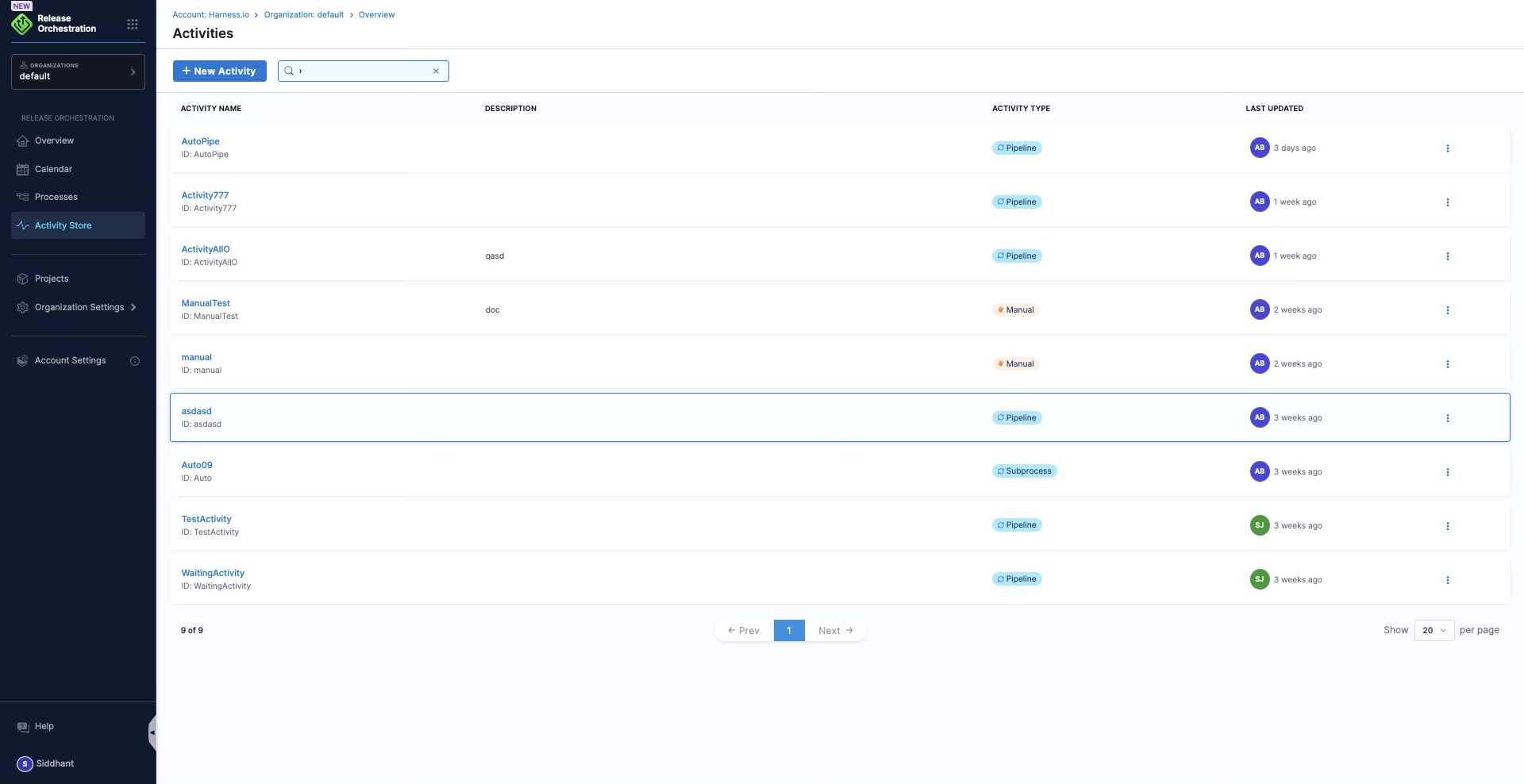
Release Orchestration provides an **Activity Store**, a centralized repository of reusable activities that can be used across processes and releases.
Click to view full size image
**What is in the Activity Store:**
* **Reusable Activity Templates**: Pre-configured activities (for example, "Build and Package," "Deploy to Production," "Security Scan")
* **Inputs and Outputs**: Encapsulated pipeline configurations with input and output mappings
* **Standard and Custom Activities**: Both platform-provided and organization-specific activities
**Benefits:**
* **Consistency**: Standardized activity implementations ensure consistent behavior across releases
* **Efficiency**: Faster process creation by reusing pre-built activities
* **Governance**: Centralized control over approved activities and integrations
* **Collaboration**: Share activities across teams and projects
For more information, see [Activity Store](/release-orchestration/use-release-orchestration/release-orchestration-activities/activity-store.md).
### Activity lifecycle
Activities progress through several states during execution:
1. **Pending**: Activity is scheduled but not yet started; waiting for dependencies to complete
2. **Running**: Activity is currently executing (pipeline running or awaiting user input)
3. **Succeeded**: Activity completed successfully
4. **Failed**: Activity encountered an error; remediation may be required
5. **On Hold**: Activity is paused; waiting for manual input, approval, or an external condition
6. **Skipped**: Activity was intentionally bypassed due to conditions or configuration
7. **Ignored**: Activity failed but was marked as ignorable; process continues despite the failure
### Activity dependencies and execution order
Activities can depend on other activities within the same phase, controlling execution order:
**Sequential Execution**: Activity B depends on Activity A; B starts only after A completes successfully.
```yaml
phase:
activities:
- activity:
id: build_artifact
name: Build Artifact
depends-on: []
- activity:
id: security_scan
name: Security Scan
depends-on:
- build_artifact
```
**Parallel Execution**: Activities with no dependencies run concurrently to reduce overall execution time.
```yaml
phase:
activities:
- activity:
id: unit_tests
name: Unit Tests
depends-on: []
- activity:
id: integration_tests
name: Integration Tests
depends-on: []
```
**Conditional Execution**: Activities can be conditionally executed based on expressions, variables, or previous activity outcomes.
### Real-world activity examples
**Example 1: Standard release process activities**
**Planning Phase**
* Manual Activity: "Gather Release Requirements"
* Manual Activity: "Finalize Release Plan"
**Build Phase**
* Manual Activity: "Branch Cut"
* Pipeline Activity: "Run CI Pipeline" (depends on Branch Cut)
* Pipeline Activity: "Generate Artifacts" (depends on Run CI Pipeline)
**Testing Phase**
* Pipeline Activity: "Deploy to QA Environment"
* Pipeline Activity: "Run Automated Tests" (depends on Deploy to QA)
* Manual Activity: "QA Sign-off" (depends on Run Automated Tests)
**Deployment Phase**
* Pipeline Activity: "Deploy to Staging"
* Manual Activity: "Approval for Production" (depends on Deploy to Staging)
* Pipeline Activity: "Deploy to Production" (depends on Approval for Production)
**Post-Deployment Phase**
* Pipeline Activity: "Run Smoke Tests"
* Manual Activity: "Postmortem and Documentation"
**Example 2: Hotfix release process activities**
**Hotfix Phase**
* Manual Activity: "Identify Critical Issue"
* Manual Activity: "Emergency Approval"
* Subprocess Activity: "Hotfix Development and Testing" (iterative subprocess)
* Pipeline Activity: "Deploy Hotfix to Production"
* Pipeline Activity: "Validate Hotfix"
This example demonstrates how subprocess activities enable iterative workflows in scenarios that require multiple cycles of development and validation.
### Related topics
* [Activity Store](/release-orchestration/use-release-orchestration/release-orchestration-activities/activity-store.md)
* [Automated Activities](/release-orchestration/use-release-orchestration/release-orchestration-activities/activity-types/automated-activities.md)
* [Manual Activities](/release-orchestration/use-release-orchestration/release-orchestration-activities/activity-types/manual-activities.md)
* [Subprocess Activities](/release-orchestration/use-release-orchestration/release-orchestration-activities/activity-types/subprocess-activities.md)
{% @harness-feedback/feedback %}