> For the complete documentation index, see [llms.txt](https://developer.harness.io/llms.txt). Markdown versions of documentation pages are available by appending `.md` to page URLs; this page is available as [Markdown](https://developer.harness.io/release-orchestration/use-release-orchestration/release-orchestration-processes/process-modeling.md).
# Process Modeling
Learn how to model release processes using phases, activities, and dependencies.
Process modeling in Release Orchestration lets you define your release workflows with phases, activities, dependencies, and variables. You can create processes using AI-based generation or manual configuration to match your team's specific requirements.
### What you will learn from this topic
* How to [create a process with Harness AI](#ai-based-process-creation)
* How a [process is structured](#process-structure) into metadata, inputs, variables, phases, activities, and dependencies
* How to [model complex release processes](#modeling-complex-release-processes) with sequential, parallel, and conditional execution
* How Harness resolves activities for [git-backed processes](#git-backed-processes)
* How Harness [syncs changes and automatically creates processes, process inputs, and activities](#sync-from-git-to-harness) when their YAML files are pushed to a connected Git repository
* How to start from a [process blueprint](#process-blueprints) for common release scenarios
### Create a process with AI
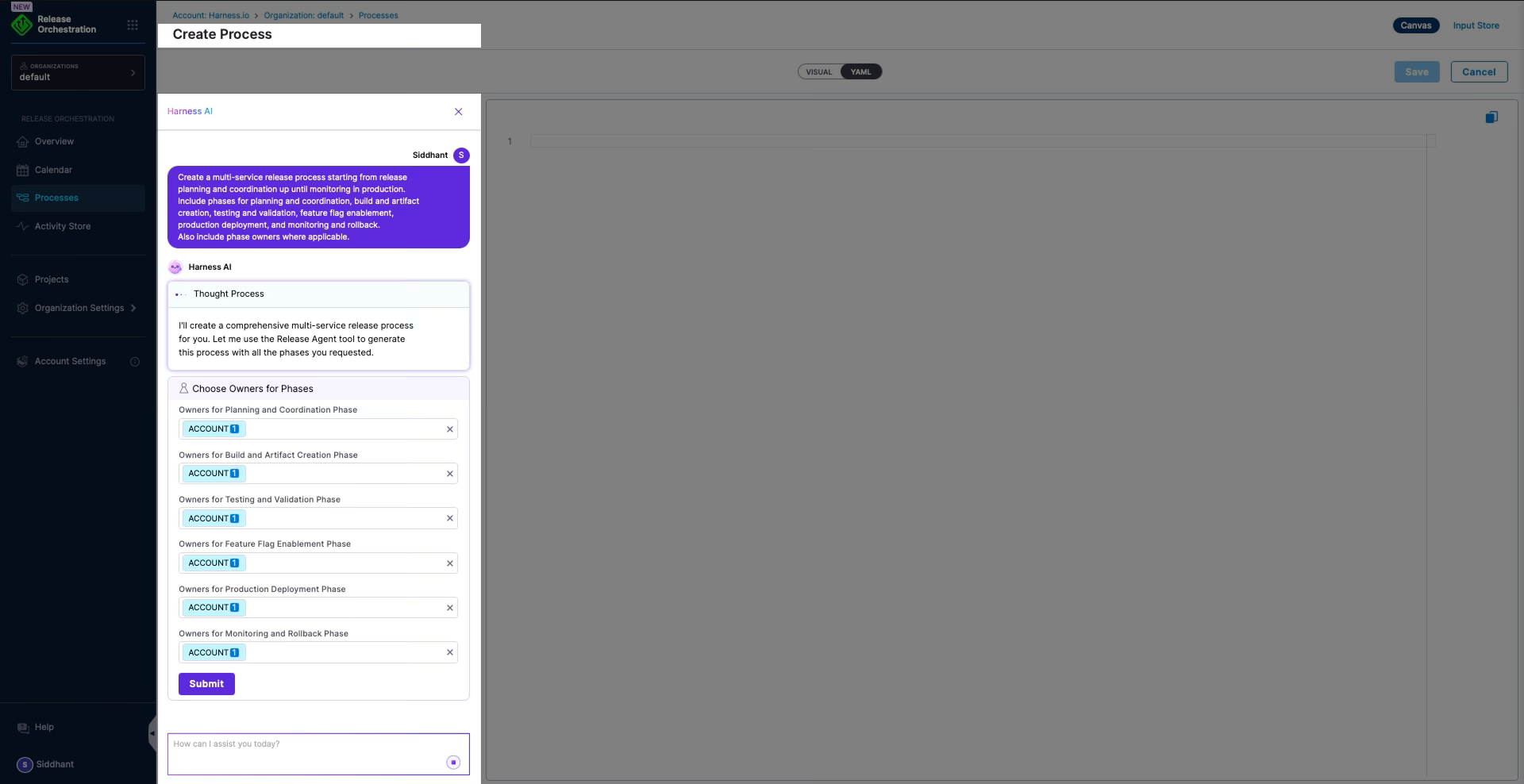
Harness supports creating processes using Harness AI. Release processes are often documented in various sources as text. Release Orchestration lets you provide that documentation and create the process in Harness Release Orchestration.
To create a process with Harness AI, navigate to **Processes**, then click **Create Process**.
Click to view full size image
Enter instructions that define your release process. Use the following example:
**Example prompt:**
```
Create a multi-service release process, from release planning and coordination through monitoring in production. The process includes the following phases:
- Release planning and coordination (Owner: Release Manager)
- Build and artifact creation
- Testing and validation
- Feature flag enablement
- Production deployment
- Monitoring and rollback
```
After you submit the prompt, Harness AI performs the following actions:
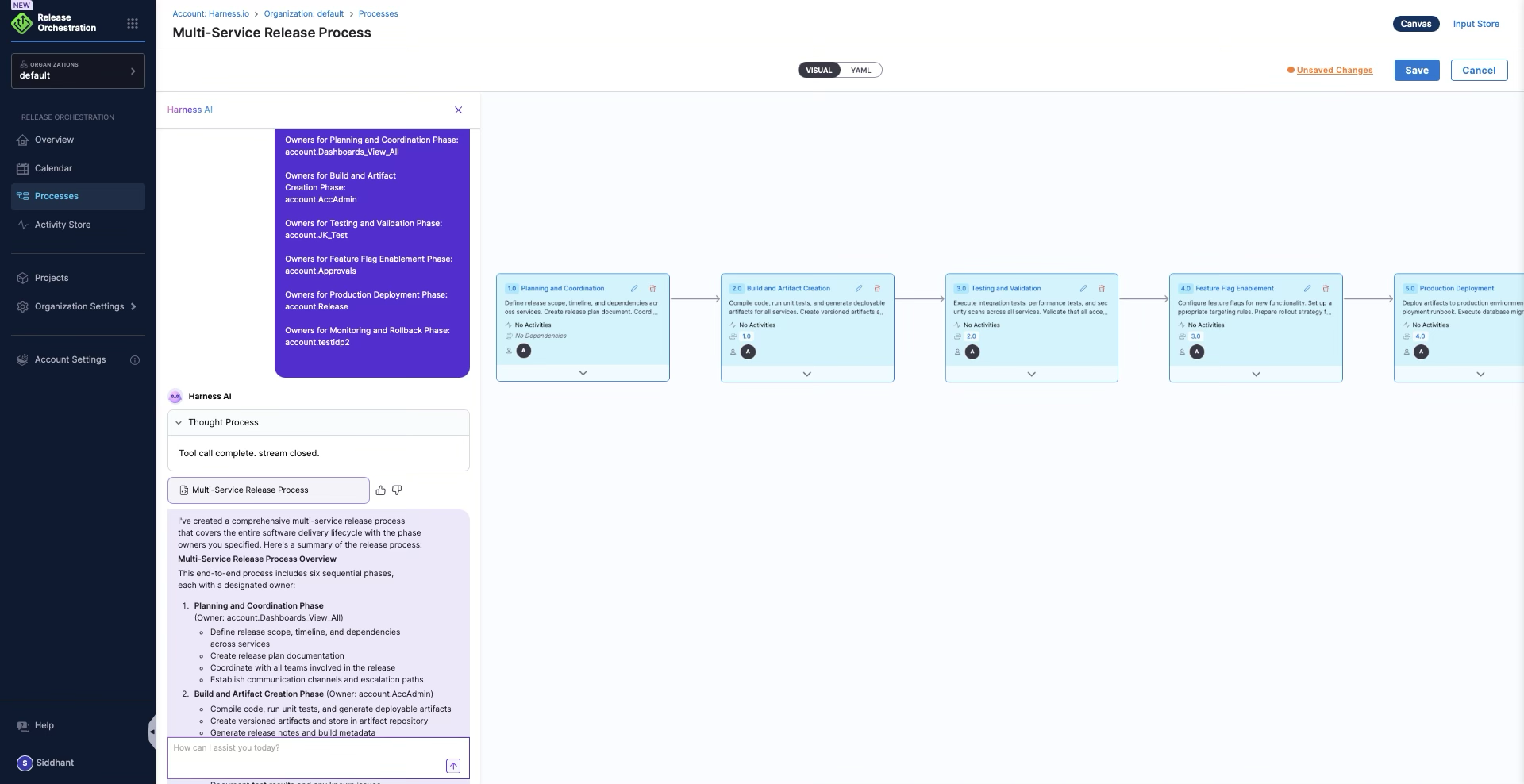
* **Creates phases:** Identifies logical groups of activities as phases.
* **Assigns owners:** Assigns owners from the prompt or asks you to provide them.
* **Creates activities:** Generates activities within each phase.
* **Infers dependencies:** Determines execution order and dependencies.
Click to view full size image
Harness AI asks you to provide owners for each phase. After you select owners, Harness AI creates YAML for the release process. The YAML appears as a step-by-step release process.
Click to view full size image
You can define phases, activities, and dependencies manually to match your release process. Use Harness AI to generate a starting process.
### Process structure
### Basic structure
A process has the following elements:
1. **Metadata**: Name and description
2. **Inputs**: Required parameters (captured using an Input Store when executing)
3. **Variables**: Process-wide variables
4. **Phases**: Major stages
5. **Activities**: Tasks within phases
6. **Dependencies**: Execution order rules
### YAML example
The following example uses the same YAML shape as a real process created in Release Orchestration (nested `phase` and `activity` blocks, `depends-on`, `owners`, and optional `if` and `data` fields).
```yaml
process:
name: Comprehensive Release Process
description: A structured release process covering build, test, and deployment phases
id: comprehensive_release_process
phases:
- phase:
id: build_phase
name: Build Phase
description: Build and validate artifacts before testing.
owners:
- Development Team
depends-on: []
activities:
- activity: AutoPipe
id: AutoPipe
name: AutoPipe90
description: ""
depends-on: []
- activity: AutoPipe
id: AutoPipe12
name: AutoPipe12
description: ""
depends-on:
- AutoPipe
- activity: AutoPipe
id: TestActivity00
name: TestActivity00
description: ""
depends-on:
- AutoPipe12
if: <+90>
- activity: ManualTest
id: AutoIioo
name: Auto_deploy
description: doc
depends-on:
- AutoPipe12
- phase:
id: test_phase
name: Test Phase
description: Execute tests and quality gates before deployment.
owners:
- QA Team
depends-on:
- build_phase
activities:
- activity: TestActivity
id: TestActivity
name: TestActivity
depends-on: []
- phase:
id: deploy_phase
name: Deploy to Staging1 Phase
owners:
- DevOps Team
depends-on:
- test_phase
activities:
- activity: WaitingActivity
id: WaitingActivity
name: WaitingActivity
depends-on: []
data:
pipeline:
pipeline: default/MyProject/MyPipeline
inputSet: {}
```
### Model complex release processes
You can model complex release processes with different sequences of parallel and sequential execution.
### Common execution patterns
**Sequential execution**
Activities execute one after another:
```
Activity A → Activity B → Activity C
```
**Parallel execution**
Activities execute simultaneously:
```
Activity A ─┐
├→ Activity D
Activity B ─┤
└→ Activity E
Activity C ─┘
```
**Conditional execution**
Activities execute based on conditions:
```
Activity A → [Condition] → Activity B (if true)
└→ Activity C (if false)
```
### Phase dependencies
Phases can have dependencies preconfigured. For example:
* The **test phase** has dependencies on the **build phase**
* The **validation phase** has dependencies on the **build phase**
* Phases execute in the order defined by their dependencies
### Activity dependencies
Activities within each phase can also have dependencies. For example:
* **Activity 3** (a manual pipeline or automated activity) and **Activity 3.1** (a manual activity) are dependent on **Activity 2** (an automated pipeline activity)
* Activities execute in the order defined by their dependencies
* Dependencies can be configured to support both parallel and sequential execution
### Complex process structure example
A pre-built, preconfigured process might have:
* **Build Phase**: Contains build activities
* **Test Phase**: Depends on Build Phase, contains test activities
* **Validation Phase**: Depends on Build Phase, contains validation activities
* **Activities with dependencies**: Activities within phases that depend on other activities
With this structure, it is possible to model complex release processes and execute them using a release.
### Git-backed processes
For git-backed processes, Harness resolves activities based on the following rules:
### Activity resolution rules
| Process Location | Activity Location | Resolution Status |
| ---------------- | ---------------------- | ------------------ |
| branchA | Inline activity | ✅ Resolves |
| branchA | branchA (same repo) | ✅ Resolves |
| branchA (repoA) | Default branch (repoB) | ✅ Resolves |
| branchA (repoA) | branchB (repoA) | ❌ Shows as Unknown |
**Key behavior:** Harness fetches activities from the same branch where the process is stored.
### Resolution failure
Activities show as **Unknown** when the process and activity are in the same repository but different branches. The activity becomes non-editable in the UI.
**Example:**
* Process in `release-v2` branch
* Activity in `main` branch (same repository)
* Result: Activity shows as Unknown
### Configuration options
Use one of the following approaches:
1. Store activities in the same branch as the process
2. Store activities in a different repository (reference from default branch)
3. Define activities inline in the process YAML
{% hint style="info" %}
Store processes and their activities in the same branch to ensure correct resolution.
{% endhint %}
### Sync from Git to Harness
When bidirectional Git Experience (GitX) is enabled for a repository, Harness listens for webhook events on tracked folder paths. Changes pushed under those paths are processed into Harness as either an update to an existing entity or the automatic creation of a new one.
Harness tracks the folder paths configured on the GitX webhook for that repository, commonly under `.harness/`. Only files under a tracked path are eligible for sync and automatic creation. Files outside a tracked path are ignored by GitX for this flow.
**Update an existing entity**
When you push a change to an existing Git-backed process, process input, or activity YAML file under a tracked path, Harness:
1. Receives the webhook event for the push.
2. Identifies the entity from the file path.
3. Validates the YAML against the structure and schema rules for that entity type.
4. If validation succeeds, refreshes its cached copy of the file.
The entity then reflects the updated YAML the next time you open or run it in Harness. If validation fails, Harness does not apply the update, and the webhook event is marked failed or warning so you can inspect the error and fix the YAML in Git.
**Example: Update a process**
1. The process `checkout-release` already exists in Harness and is stored at `.harness/process/checkout-release.yaml`.
2. You edit that file in Git, for example to change a phase description, and push to the branch Harness is syncing.
3. GitX validates the YAML and refreshes the cache.
4. Opening or running `checkout-release` in Harness shows the updated definition.
**Create a new entity automatically**
When you push a new process, process input, or activity YAML file to a tracked path on the repository's default branch, Harness automatically creates the corresponding entity. On create, Harness:
1. Confirms the file is under a path the GitX webhook is tracking.
2. Infers the entity type from the path convention.
3. Validates the YAML before creating the entity.
4. Creates the entity in Harness if validation succeeds.
A push to a non-default branch does not trigger automatic creation. A push outside a tracked path is also ignored for automatic creation.
Harness infers the entity type from the path convention. The path depth reflects the entity's scope:
* Account-scoped entity: `.harness//.yaml`
* Org-scoped entity: `.harness/orgs///.yaml`
* Project-scoped entity: `.harness/orgs//projects///.yaml`
The entity folder in the path determines what Harness creates:
* `process/.yaml` creates a process.
* `activity/.yaml` creates an activity.
* `process//processInput/.yaml` creates a process input for that process.
**Example: Auto-create an activity**
1. GitX is connected to your repository and tracks `.harness/` (or `.harness/activity/`).
2. On the default branch, you add `.harness/activity/deploy-service.yaml` with a valid activity YAML definition.
3. You push the commit.
4. Harness matches the path to an activity, validates the YAML, and creates the `deploy-service` activity in Harness.
5. The new activity appears in the UI without a manual import.
**Example: Auto-create a process input**
1. The process `checkout-release` already exists, either inline or stored remotely in Git.
2. On the default branch, you add `.harness/process/checkout-release/processInput/prod-defaults.yaml`.
3. You push the file under a tracked path.
4. After validation, Harness creates the process input `prod-defaults` under that process.
### Process blueprints
Start with blueprints for common scenarios:
* Standard production release
* Hotfix release
* Multi-service release
* Scheduled release
Customize a blueprint to fit your needs.
### Related topics
* [Phases](/release-orchestration/use-release-orchestration/release-orchestration-phases/phases-overview.md)
* [Activities](/release-orchestration/use-release-orchestration/release-orchestration-activities/activities-overview.md)
* [Activity dependencies](/release-orchestration/use-release-orchestration/release-orchestration-activities/activities-overview.md#activity-dependencies-and-execution-order)
* [Modeling complex processes](#modeling-complex-release-processes)
{% @harness-feedback/feedback %}