> For the complete documentation index, see [llms.txt](https://developer.harness.io/llms.txt). Markdown versions of documentation pages are available by appending `.md` to page URLs; this page is available as [Markdown](https://developer.harness.io/resilience-testing/3.0/shared-capabilities/image-registry.md).
# Image Registry
A repository that hosts container images used by chaos experiments.
#### What is an image registry?
An image registry is a repository that hosts container images that are used by chaos experiments. Registries can be **public** or **private**. HCE allows you to use custom image registries for chaos experiments.
A custom image registry allows for storing container images securely, restricting access to authorized users and applications only.
{% hint style="info" %}
* You can configure the image registry to be used with the default probes. If you have not configured a probe yet, the experiment will use the default image registry.
* HCE does not provide image registry support for default probes.
{% endhint %}
Follow the steps below to use [custom values](#custom-values-for-image-registry) or [default values](#default-values-for-image-registry) of the image registry in your chaos experiment.
[This](https://youtu.be/jpSd1nGf8s0) video provides a step-by-step walkthrough of configuring the Image Registry.
#### Why use a custom image registry?
When the image you need to use for your chaos experiment is private, and the chaos experiments are required to be run for internal consumption, you can configure image registry as **private** and provide custom values to it. This way, you will have better control, and security when working with private images.
Depending on whether you use DDCR (Delegate Driven Chaos Runner) or dedicated chaos infrastructure, image registry settings is configured from **account**/**organization**/**project**/**infrastructure** settings or from the UI, respectively.
{% hint style="info" %}
**NOTE**
This feature is behind the feature flag `CHAOS_IMAGEREGISTRY_DEV`. Contact [Harness Support](mailto:support@harness.io) to enable the feature.
{% endhint %}
{% tabs %}
{% tab title="Harness Delegate / DDCR" %}
#### Permissions required
Ensure you have at least **View** permissions to the project to execute chaos experiments.
To create or view an image registry, ask your admin to grant you the **Create/Edit** permissions from account/project/organization settings.

#### Configure image registry from account, organization, project, or infrastructure settings
With appropriate permissions, you can configure image registry from the **account** or **organization** or **project** or **infrastructure** settings.
This approach provides flexibility and ensures you can manage image registry settings at different levels.
In this example, you will learn how to configure image registry from **Account Settings**.
1. Go to **Account Settings** -> **Image Registry (For Chaos)**.

2. Provide registry details: a. Specify the server and account name. b. Choose the image registry type. c. Enable **Allow Overrides** option if you want to allow changes to image registry settings at lower levels, such as Organization, Project, or Infrastructure. For example,, you are in the **Account** scope. Allowing overrides will allow you to make changes to the image registry settings at the **Organization**, **Project**, and **infrastructure** levels.

3. Use Custom Images (Optional):
a. Enable **Use custom images** if you want to provide custom images for the specified fields. b. Add your custom images in the fields shown in the screenshot.

{% hint style="info" %}
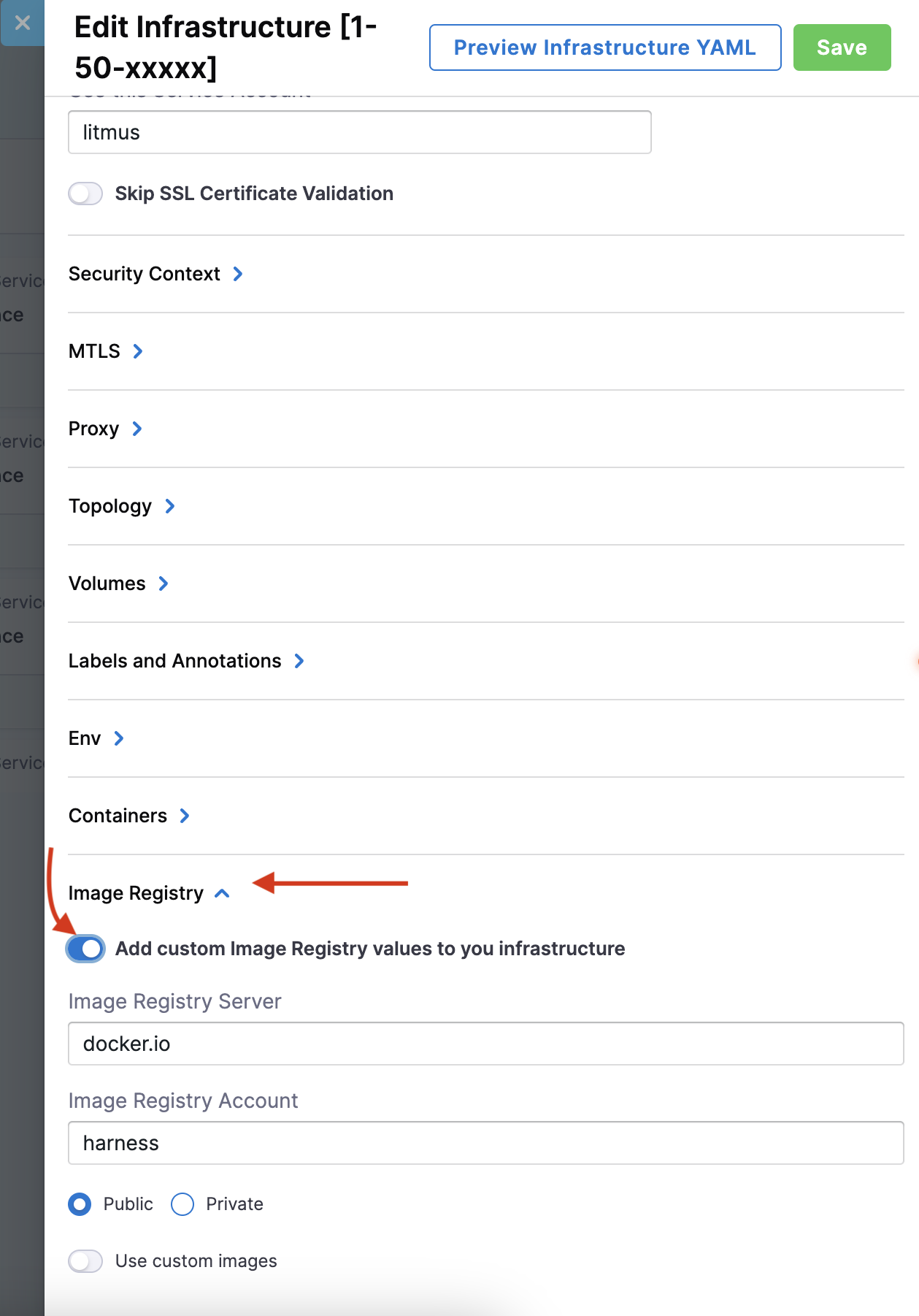
If you enable the **Allow Overrides** option, you can configure the image registry for infrastructures that are **Supported by a Harness Delegate**: a. Go to Environments > Infrastructure. b. Click Edit. c. Scroll to the bottom to access the **Image Registry** settings.
 {% endhint %}
{% endtab %}
{% tab title="Dedicated chaos infrastructure" %}
### Custom values for image registry
#### Step 1: Navigate to image registry
Do the following:
* To use a custom image, go to **Image Registry** on the left-hand side, and select **Use custom values**.

#### Step 2: Specify parameters
Do the following:
* Specify parameters for the custom values, such as **Custom image registry server**, **Custom image registry account**, and **Registry type**.

* You can choose between **Public** or **Private** in the **Registry type**. When you select **Private** registry type, add the **secret name**.

#### Step 3: Save the custom values
Do the following:
* Select **Save** to save your changes.
In your chaos experiment manifest, the above custom setting will be reflected below.
```yaml
container:
name: ""
image: docker.io/chaosnative/k8s:1.30.0
imagePullSecrets:
- name: defreg
command:
- sh
- "-c"
args:
- kubectl apply -f /tmp/ -n {{workflow.parameters.adminModeNamespace}} && sleep 30
```
{% hint style="info" %}
**NOTE**
* If you use a public image or provide the `imagePullSecret` while using a private registry, the Argo workflow controller (v3.4.x) finds the entry point for litmus-checker.
* If you use an image from an internal registry without providing `imagePullSecret`, the workflow facilitates a default command that you can use to determine the entry point of litmus-checker.
{% endhint %}
### Default values for image registry
Do the following:
* To use a default image, navigate to image registry, select **Use default values**, and then select **Save**.

In your chaos experiment manifest, the above default setting will be reflected below.
```yaml
container:
name: ""
image: docker.io/chaosnative/k8s:1.30.0
command:
- sh
- "-c"
args:
- kubectl apply -f /tmp/ -n {{workflow.parameters.adminModeNamespace}} && sleep 30
```
{% endtab %}
{% endtabs %}
### Pull chaos images from GAR or ECR
In addition to Docker Hub, Harness publishes chaos images to **Google Artifact Registry (GAR)** and **Amazon Elastic Container Registry (ECR)**. Pulling from GAR or ECR can help avoid Docker Hub rate limiting and throttling issues.
{% hint style="info" %}
For general information about configuring Harness to pull images from GAR or ECR, go to [Connect to the Harness container image registry](/harness-platform/3.0/harness-platform-resources/connectors/artifact-repositories/connect-to-harness-container-image-registry-using-docker-connector.md).
{% endhint %}
#### GAR
Chaos images are available on the [Harness project on GAR](https://us-docker.pkg.dev/gar-prod-setup/harness-public/harness/) at the following paths:
{% tabs %}
{% tab title="Harness Delegate / DDCR" %}
| Image | GAR path |
| --------------------------- | ------------------------------------------------------------------------------------- |
| chaos-ddcr | `us-docker.pkg.dev/gar-prod-setup/harness-public/harness/chaos-ddcr` |
| chaos-ddcr-faults | `us-docker.pkg.dev/gar-prod-setup/harness-public/harness/chaos-ddcr-faults` |
| chaos-log-watcher | `us-docker.pkg.dev/gar-prod-setup/harness-public/harness/chaos-log-watcher` |
| service-discovery-collector | `us-docker.pkg.dev/gar-prod-setup/harness-public/harness/service-discovery-collector` |
| {% endtab %} | |
{% tab title="Dedicated Chaos Infrastructure" %}
| Image | GAR path |
| --------------------------------- | ------------------------------------------------------------------------------------------- |
| chaos-log-watcher | `us-docker.pkg.dev/gar-prod-setup/harness-public/harness/chaos-log-watcher` |
| chaos-workflow-controller | `us-docker.pkg.dev/gar-prod-setup/harness-public/harness/chaos-workflow-controller` |
| chaos-argoexec | `us-docker.pkg.dev/gar-prod-setup/harness-public/harness/chaos-argoexec` |
| chaos-exporter | `us-docker.pkg.dev/gar-prod-setup/harness-public/harness/chaos-exporter` |
| chaos-operator | `us-docker.pkg.dev/gar-prod-setup/harness-public/harness/chaos-operator` |
| chaos-runner | `us-docker.pkg.dev/gar-prod-setup/harness-public/harness/chaos-runner` |
| chaos-subscriber | `us-docker.pkg.dev/gar-prod-setup/harness-public/harness/chaos-subscriber` |
| chaos-go-runner | `us-docker.pkg.dev/gar-prod-setup/harness-public/harness/chaos-go-runner` |
| k8s-chaos-infrastructure-upgrader | `us-docker.pkg.dev/gar-prod-setup/harness-public/harness/k8s-chaos-infrastructure-upgrader` |
| {% endtab %} | |
| {% endtabs %} | |
To configure your image registry to pull from GAR, set the **Custom image registry server** to `us-docker.pkg.dev/gar-prod-setup/harness-public` and the **Custom image registry account** to `harness`.
#### ECR
DDCR chaos images are also available on the [Harness ECR public gallery](https://gallery.ecr.aws/harness) at the following paths:
| Image | ECR path |
| --------------------------- | ------------------------------------------------------------ |
| chaos-ddcr | `public.ecr.aws/harness/harness/chaos-ddcr` |
| chaos-ddcr-faults | `public.ecr.aws/harness/harness/chaos-ddcr-faults` |
| chaos-log-watcher | `public.ecr.aws/harness/harness/chaos-log-watcher` |
| service-discovery-collector | `public.ecr.aws/harness/harness/service-discovery-collector` |
To configure your image registry to pull from ECR, set the **Custom image registry server** to `public.ecr.aws/harness` and the **Custom image registry account** to `harness`.
{% hint style="info" %}
**NOTE**
Only DDCR images are available on ECR. Dedicated chaos infrastructure images are available on GAR and Docker Hub only.
{% endhint %}
### Images required
Listed below are images that you should download to use image registry. The example below describes images required for 1.53.x release. Based on the release, the version will vary.
Go to the [Delegate release](/release-notes/delegate.md) to download the latest version of Delegate and [Chaos Engineering](/release-notes/chaos-engineering.md) to get the latest version of chaos component images, respectively.
{% tabs %}
{% tab title="Harness Delegate / DDCR" %}
* harness/chaos-ddcr:1.53.0
* harness/chaos-log-watcher:1.53.0
* harness/service-discovery-collector:0.33.0
* docker.io/harness/chaos-ddcr-faults:1.53.0
{% endtab %}
{% tab title="Dedicated Chaos Infrastructure" %}
* harness/chaos-log-watcher:1.53.0
* harness/chaos-workflow-controller:v3.4.16
* harness/chaos-argoexec:v3.4.16
* harness/chaos-exporter:1.53.0
* harness/chaos-operator:1.53.0
* harness/chaos-runner:1.53.0
* harness/chaos-subscriber:1.53.0
* docker.io/harness/chaos-go-runner:1.53.0
* harness/k8s-chaos-infrastructure-upgrader:1.53.0
{% endtab %}
{% endtabs %}
{% @harness-feedback/feedback %}
{% endhint %}
{% endtab %}
{% tab title="Dedicated chaos infrastructure" %}
### Custom values for image registry
#### Step 1: Navigate to image registry
Do the following:
* To use a custom image, go to **Image Registry** on the left-hand side, and select **Use custom values**.

#### Step 2: Specify parameters
Do the following:
* Specify parameters for the custom values, such as **Custom image registry server**, **Custom image registry account**, and **Registry type**.

* You can choose between **Public** or **Private** in the **Registry type**. When you select **Private** registry type, add the **secret name**.

#### Step 3: Save the custom values
Do the following:
* Select **Save** to save your changes.
In your chaos experiment manifest, the above custom setting will be reflected below.
```yaml
container:
name: ""
image: docker.io/chaosnative/k8s:1.30.0
imagePullSecrets:
- name: defreg
command:
- sh
- "-c"
args:
- kubectl apply -f /tmp/ -n {{workflow.parameters.adminModeNamespace}} && sleep 30
```
{% hint style="info" %}
**NOTE**
* If you use a public image or provide the `imagePullSecret` while using a private registry, the Argo workflow controller (v3.4.x) finds the entry point for litmus-checker.
* If you use an image from an internal registry without providing `imagePullSecret`, the workflow facilitates a default command that you can use to determine the entry point of litmus-checker.
{% endhint %}
### Default values for image registry
Do the following:
* To use a default image, navigate to image registry, select **Use default values**, and then select **Save**.

In your chaos experiment manifest, the above default setting will be reflected below.
```yaml
container:
name: ""
image: docker.io/chaosnative/k8s:1.30.0
command:
- sh
- "-c"
args:
- kubectl apply -f /tmp/ -n {{workflow.parameters.adminModeNamespace}} && sleep 30
```
{% endtab %}
{% endtabs %}
### Pull chaos images from GAR or ECR
In addition to Docker Hub, Harness publishes chaos images to **Google Artifact Registry (GAR)** and **Amazon Elastic Container Registry (ECR)**. Pulling from GAR or ECR can help avoid Docker Hub rate limiting and throttling issues.
{% hint style="info" %}
For general information about configuring Harness to pull images from GAR or ECR, go to [Connect to the Harness container image registry](/harness-platform/3.0/harness-platform-resources/connectors/artifact-repositories/connect-to-harness-container-image-registry-using-docker-connector.md).
{% endhint %}
#### GAR
Chaos images are available on the [Harness project on GAR](https://us-docker.pkg.dev/gar-prod-setup/harness-public/harness/) at the following paths:
{% tabs %}
{% tab title="Harness Delegate / DDCR" %}
| Image | GAR path |
| --------------------------- | ------------------------------------------------------------------------------------- |
| chaos-ddcr | `us-docker.pkg.dev/gar-prod-setup/harness-public/harness/chaos-ddcr` |
| chaos-ddcr-faults | `us-docker.pkg.dev/gar-prod-setup/harness-public/harness/chaos-ddcr-faults` |
| chaos-log-watcher | `us-docker.pkg.dev/gar-prod-setup/harness-public/harness/chaos-log-watcher` |
| service-discovery-collector | `us-docker.pkg.dev/gar-prod-setup/harness-public/harness/service-discovery-collector` |
| {% endtab %} | |
{% tab title="Dedicated Chaos Infrastructure" %}
| Image | GAR path |
| --------------------------------- | ------------------------------------------------------------------------------------------- |
| chaos-log-watcher | `us-docker.pkg.dev/gar-prod-setup/harness-public/harness/chaos-log-watcher` |
| chaos-workflow-controller | `us-docker.pkg.dev/gar-prod-setup/harness-public/harness/chaos-workflow-controller` |
| chaos-argoexec | `us-docker.pkg.dev/gar-prod-setup/harness-public/harness/chaos-argoexec` |
| chaos-exporter | `us-docker.pkg.dev/gar-prod-setup/harness-public/harness/chaos-exporter` |
| chaos-operator | `us-docker.pkg.dev/gar-prod-setup/harness-public/harness/chaos-operator` |
| chaos-runner | `us-docker.pkg.dev/gar-prod-setup/harness-public/harness/chaos-runner` |
| chaos-subscriber | `us-docker.pkg.dev/gar-prod-setup/harness-public/harness/chaos-subscriber` |
| chaos-go-runner | `us-docker.pkg.dev/gar-prod-setup/harness-public/harness/chaos-go-runner` |
| k8s-chaos-infrastructure-upgrader | `us-docker.pkg.dev/gar-prod-setup/harness-public/harness/k8s-chaos-infrastructure-upgrader` |
| {% endtab %} | |
| {% endtabs %} | |
To configure your image registry to pull from GAR, set the **Custom image registry server** to `us-docker.pkg.dev/gar-prod-setup/harness-public` and the **Custom image registry account** to `harness`.
#### ECR
DDCR chaos images are also available on the [Harness ECR public gallery](https://gallery.ecr.aws/harness) at the following paths:
| Image | ECR path |
| --------------------------- | ------------------------------------------------------------ |
| chaos-ddcr | `public.ecr.aws/harness/harness/chaos-ddcr` |
| chaos-ddcr-faults | `public.ecr.aws/harness/harness/chaos-ddcr-faults` |
| chaos-log-watcher | `public.ecr.aws/harness/harness/chaos-log-watcher` |
| service-discovery-collector | `public.ecr.aws/harness/harness/service-discovery-collector` |
To configure your image registry to pull from ECR, set the **Custom image registry server** to `public.ecr.aws/harness` and the **Custom image registry account** to `harness`.
{% hint style="info" %}
**NOTE**
Only DDCR images are available on ECR. Dedicated chaos infrastructure images are available on GAR and Docker Hub only.
{% endhint %}
### Images required
Listed below are images that you should download to use image registry. The example below describes images required for 1.53.x release. Based on the release, the version will vary.
Go to the [Delegate release](/release-notes/delegate.md) to download the latest version of Delegate and [Chaos Engineering](/release-notes/chaos-engineering.md) to get the latest version of chaos component images, respectively.
{% tabs %}
{% tab title="Harness Delegate / DDCR" %}
* harness/chaos-ddcr:1.53.0
* harness/chaos-log-watcher:1.53.0
* harness/service-discovery-collector:0.33.0
* docker.io/harness/chaos-ddcr-faults:1.53.0
{% endtab %}
{% tab title="Dedicated Chaos Infrastructure" %}
* harness/chaos-log-watcher:1.53.0
* harness/chaos-workflow-controller:v3.4.16
* harness/chaos-argoexec:v3.4.16
* harness/chaos-exporter:1.53.0
* harness/chaos-operator:1.53.0
* harness/chaos-runner:1.53.0
* harness/chaos-subscriber:1.53.0
* docker.io/harness/chaos-go-runner:1.53.0
* harness/k8s-chaos-infrastructure-upgrader:1.53.0
{% endtab %}
{% endtabs %}
{% @harness-feedback/feedback %}