> For the complete documentation index, see [llms.txt](https://developer.harness.io/llms.txt). Markdown versions of documentation pages are available by appending `.md` to page URLs; this page is available as [Markdown](https://developer.harness.io/resilience-testing/shared-capabilities/rbac.md).
# RBAC for Resilience Testing
Manage resources, permissions, and roles for Harness Resilience Testing.
Harness Resilience Testing uses Role-Based Access Control (RBAC) to determine who can view, create, run, and manage resilience resources. Access control is exposed in the Harness UI under a single **Resilience** module category, so the permissions described here apply across the Resilience Testing module rather than to one submodule. Permissions are enforced against the same account, organization, and project hierarchy as the rest of the platform.
RBAC acts as the first layer of safety for resilience testing. It controls configuration-time access to resources such as experiments, ChaosHubs, and infrastructures. Execution-time controls, such as which faults can run against which targets, are handled separately by [ChaosGuard](/resilience-testing/shared-capabilities/governance/governance-in-execution/governance-in-execution.md).
{% hint style="warning" %}
**EXECUTE VIA PIPELINE PERMISSION REMOVED**
The `Execute via Pipeline` permission (`chaos_chaosexperiment_executepipeline`) is deprecated and removed. It was deprecated in release `access-control_1.262.0` and marked inactive in `access-control_1.265.0`. Pipeline-based experiment execution now uses the **Execute** permission (`chaos_chaosexperiment_execute`). Update any roles, API calls, or Terraform configurations that still reference `chaos_chaosexperiment_executepipeline`.
{% endhint %}
***
## What you will learn
* **Resilience resources and permissions:** The resources Harness registers for RBAC and the operations available on each.
* **Permission types:** What each permission grants, including the non-standard verbs such as `Execute`, `Manage`, `Access`, and `Verify/Unverify`.
* **Environment permission:** The permission an environment needs before experiments can run against it. This is a common source of access issues.
* **Example roles:** Two reference roles, a resilience administrator and a resilience tester, that you can recreate for your teams.
* **Role assignment:** How to bind a role to a user.
***
## Before you begin
This page assumes:
* **Platform RBAC basics:** Familiarity with roles and resource groups. Go to [RBAC in Harness](https://developer.harness.io/harness-platform/use-harness-platform/platform-access-control) to understand the permissions model.
* **Role administration access:** To create roles and assign them, you need administrative privileges at the scope where you assign the role (for example, the **Account Admin** role for account-level assignment).
***
## Access scopes
Resilience resources follow the standard Harness [scope hierarchy](https://developer.harness.io/harness-platform/use-harness-platform/platform-access-control#permissions-hierarchy-scopes). Assign permissions at the scope that matches how your teams are organized:
* **Account:** Permissions apply across the entire account.
* **Organization:** Permissions apply to all projects within an organization.
* **Project:** Permissions apply within a single project.
A role combines a set of permissions, and a [resource group](https://developer.harness.io/harness-platform/use-harness-platform/platform-access-control/manage-resource-groups) determines the resources those permissions apply to. To view your current permissions, go to **Account/Organization/Project Settings** > **Access Control** > **Roles**, select a role, and open the **Resilience** module.
***
## Resilience resources and permissions
Harness registers the following resources for RBAC under the **Resilience** module. Each resource has its own set of permissions that you assign to roles.
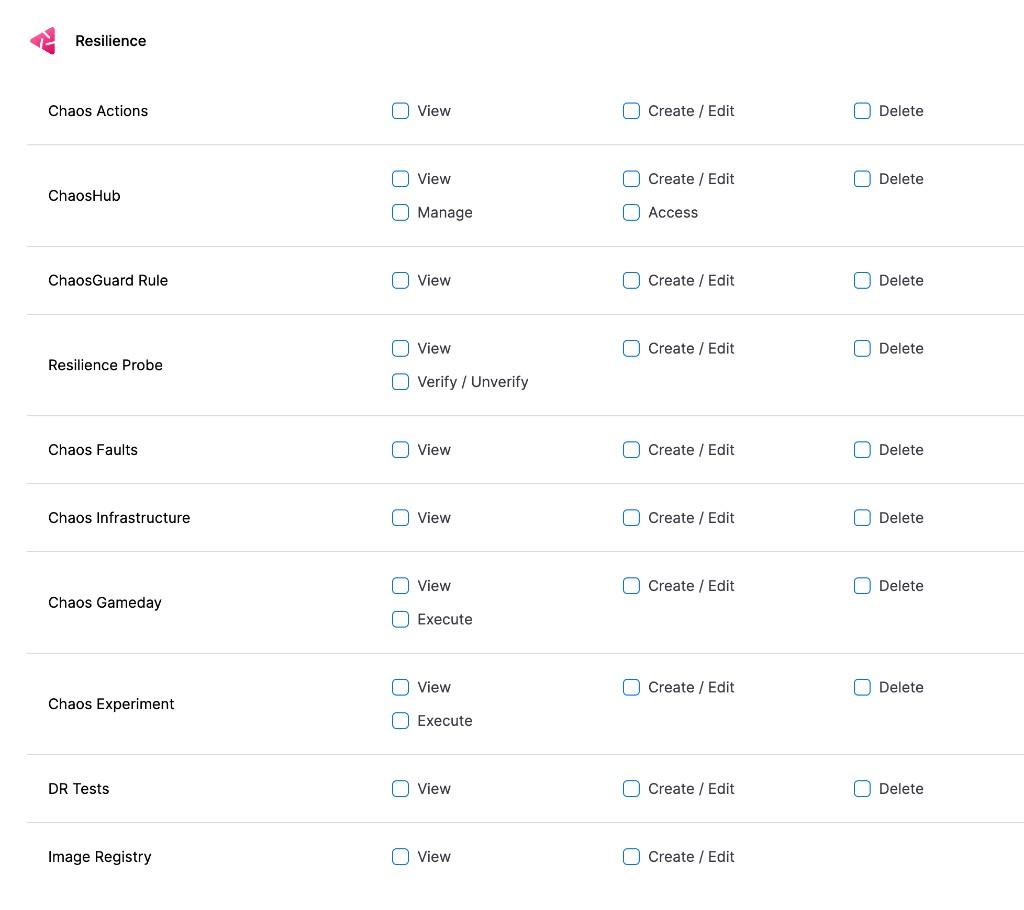
Click to view full size
*The Resilience module permissions in the Harness role editor*
| Resource | Permissions | Description |
| -------------------- | ----------------------------------------------------------------------------------------- | ------------------------------------------------------------------------------------------------------------------------------------------------------------------------------------------------ |
| Chaos Experiment |
View
Create / Edit
Delete
Execute
| Run, edit, and manage [experiments](/resilience-testing/chaos-testing/experiments.md). The **Execute** permission covers running an experiment directly and as a step inside a Harness pipeline. |
| Chaos Infrastructure |
View
Create / Edit
Delete
| Connect and manage the [infrastructure](/resilience-testing/chaos-testing/infrastructure.md) where experiments run. |
| ChaosHub |
View
Create / Edit
Delete
Access
Manage
| Manage [ChaosHubs](/resilience-testing/chaos-testing/chaoshub.md) that store reusable resilience artifacts. |
| Chaos Faults |
View
Create / Edit
Delete
| Manage the fault definitions available to experiments. |
| Chaos Actions |
View
Create / Edit
Delete
| Manage [actions](/resilience-testing/chaos-testing/actions.md) that run custom tasks within experiments. |
| Resilience Probe |
View
Create / Edit
Delete
Verify / Unverify
| Manage [probes](/resilience-testing/chaos-testing/probes.md) that validate steady state during experiments. |
| ChaosGuard Rule |
View
Create / Edit
Delete
| Manage [ChaosGuard](/resilience-testing/shared-capabilities/governance/governance-in-execution/governance-in-execution.md) rules that govern fault execution. |
| DR Tests |
| Manage the [image registry](/resilience-testing/shared-capabilities/image-registry.md) used to pull resilience images. |
***
## Environment permission (required to run experiments)
Experiments run against a Harness **Environment**, which is a shared platform resource rather than a Resilience resource. Granting experiment permissions alone is not enough.
{% hint style="warning" %}
**REQUIRED TO RUN EXPERIMENTS AGAINST A TARGET**
Before a user can run experiments against an environment, the role must grant the **Execute Chaos Experiment** permission (`chaos_environment_executeChaosExperiment`) on that environment, in addition to the **Execute** permission on **Chaos Experiment**. If a user can create an experiment but cannot run it against a target, this missing environment permission is the most common cause.
{% endhint %}
Click to view full size
*The **Execute Chaos Experiment** permission on a Harness environment*
***
## Permission types
Permissions control the specific actions a user can perform on a resource. Most resources use the standard verbs, while a few resources add permissions specific to resilience testing.
**Standard permissions:**
* **View:** Read-only access to the resource.
* **Create / Edit:** Create new resources or modify existing ones.
* **Delete:** Remove the resource.
**Resilience-specific permissions:**
* **Execute:** Run the resource. For **Chaos Experiment**, this single permission covers running an experiment directly and as a step inside a Harness pipeline.
* **Access:** Reference a **ChaosHub** when configuring other resources, such as selecting a hub while building an experiment, without granting edit rights.
* **Manage:** Administrative control of a **ChaosHub**, including its connection and configuration, beyond Create / Edit / Delete. Grant **Manage** only to administrators who own ChaosHub setup.
* **Execute Chaos Experiment:** Run experiments against a Harness **Environment**. This permission is set on the environment, not on the Resilience resource. Go to [Environment permission](#environment-permission-required-to-run-experiments) to review the requirement.
* **Verify / Unverify:** Mark a **Resilience Probe** as verified or unverified to indicate whether it is approved for use.
{% hint style="info" %}
**CHAOSHUB MANAGE PERMISSION**
`Manage` is a ChaosHub-specific permission that is broader than `Create / Edit`. Treat it as an administrator-level permission and keep it out of standard tester roles.
{% endhint %}
***
## Example roles
Harness provides a built-in resilience administrator role, and you can also create custom roles that match your team responsibilities. The two example roles below are common starting points. Recreate them by selecting the permissions shown, then bind them to users or user groups.
### Resilience administrator
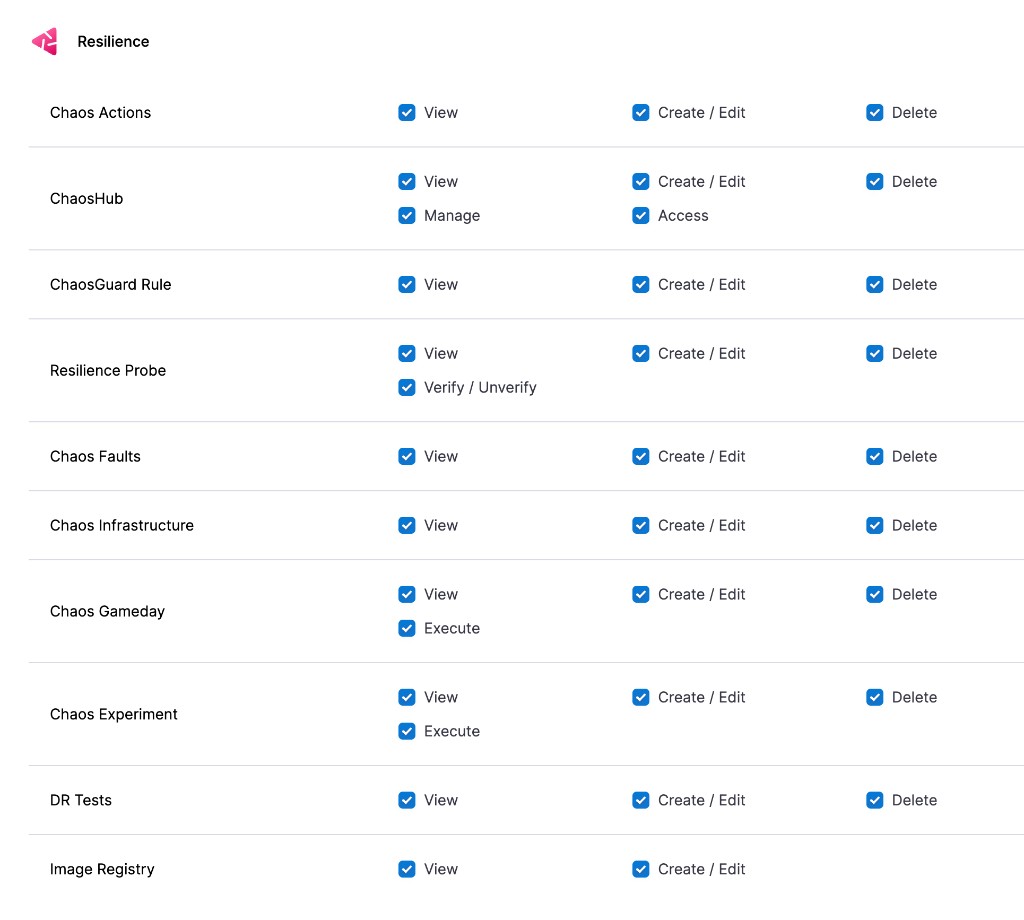
A resilience administrator owns the full resilience testing setup. This role grants every permission on Resilience resources, including ChaosHub **Manage** and Resilience Probe **Verify / Unverify**, along with the platform permissions needed to administer projects and shared resources.
| Resource | Permissions |
| ---------------------- | ---------------------------------------------- |
| Chaos Experiment | View, Create / Edit, Delete, Execute |
| Chaos Infrastructure | View, Create / Edit, Delete |
| ChaosHub | View, Create / Edit, Delete, Access, Manage |
| Chaos Faults | View, Create / Edit, Delete |
| Chaos Actions | View, Create / Edit, Delete |
| Resilience Probe | View, Create / Edit, Delete, Verify / Unverify |
| ChaosGuard Rule | View, Create / Edit, Delete |
| DR Tests | View, Create / Edit, Delete |
| Image Registry | View, Create / Edit |
| Environment (platform) | Execute Chaos Experiment |
Click to view full size
*Resilience permissions selected for a resilience administrator role*
A resilience administrator also needs the platform permissions to administer projects, users, and shared resources at the relevant scope. Set those in the **Administrative Functions** and **Shared Resources** sections of the same role.
### Resilience tester
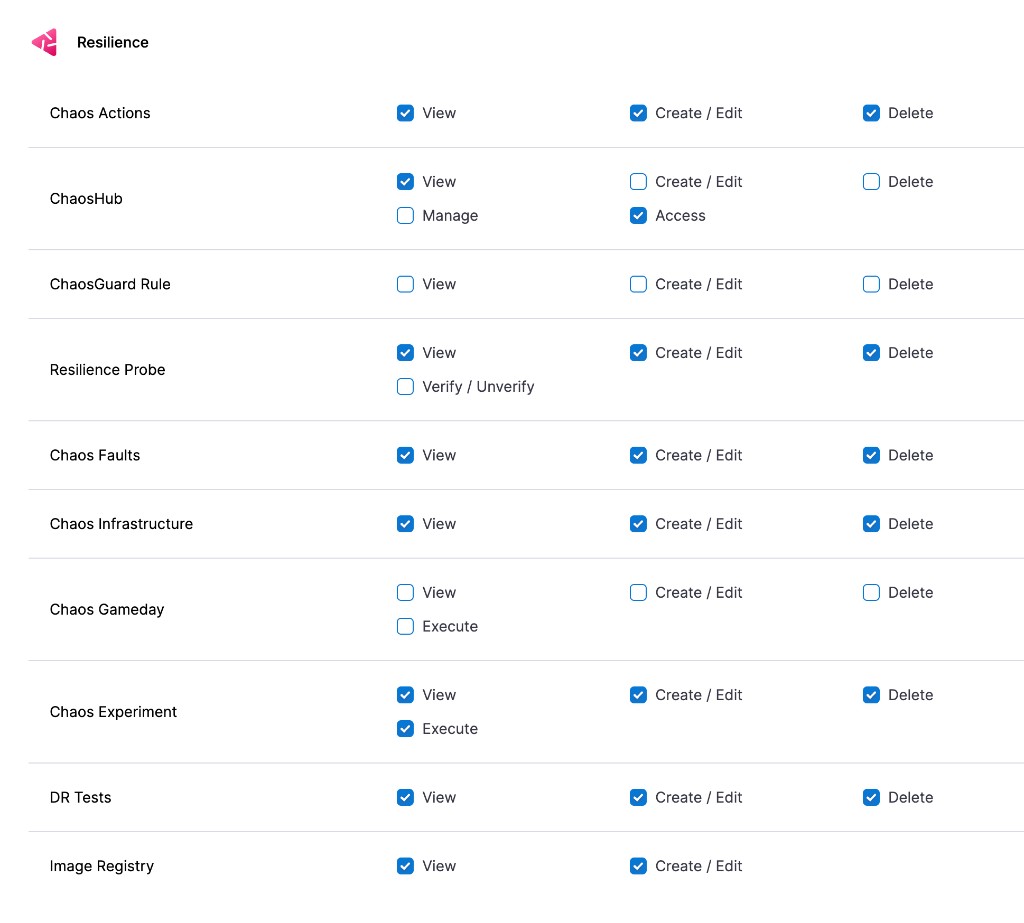
A resilience tester builds and runs experiments but does not administer ChaosHubs or platform settings. This role omits ChaosHub **Manage**, ChaosGuard Rule edits, and Probe **Verify / Unverify**.
| Resource | Permissions |
| ---------------------- | ------------------------------------ |
| Chaos Experiment | View, Create / Edit, Delete, Execute |
| Chaos Infrastructure | View, Create / Edit, Delete |
| ChaosHub | View, Access |
| Chaos Faults | View, Create / Edit, Delete |
| Chaos Actions | View, Create / Edit, Delete |
| Resilience Probe | View, Create / Edit, Delete |
| DR Tests | View, Create / Edit, Delete |
| Image Registry | View, Create / Edit |
| Environment (platform) | Execute Chaos Experiment |
Click to view full size
*Resilience permissions selected for a resilience tester role*
A resilience tester typically needs only read-only access in the **Administrative Functions** and **Shared Resources** sections, plus access to any connectors and secrets the experiments use.
***
## Assign a role Assign a resilience role to a user
1. Select **Account/Organization/Project Settings** (left menu) > **Access Control**.
2. In the **Users** table, select the user profile.
3. Under **Role Bindings**, select **+ Role**.
4. Select the role you created and the resource group it applies to, then select **Apply**.
To create the role itself first, go to [Manage roles](https://developer.harness.io/harness-platform/use-harness-platform/platform-access-control/add-manage-roles) to add a role and [Add resource groups](https://developer.harness.io/harness-platform/use-harness-platform/platform-access-control/manage-resource-groups) to scope the resources it applies to.
***
## Load testing access
Load Testing does not register dedicated RBAC resources yet. Access to load testing is governed by the same **Resilience** module category as it gains resources. This section will list Load Testing resources and permissions when they become available.
***
## Related concepts
* [Governance in execution with ChaosGuard](/resilience-testing/shared-capabilities/governance/governance-in-execution/governance-in-execution.md): Restrict which faults run against which targets at execution time.
* [Security in Resilience Testing](/resilience-testing/security/index.md): Understand blast radius control and infrastructure permissions.
* [RBAC in Harness](https://developer.harness.io/harness-platform/use-harness-platform/platform-access-control): Review the platform-wide permissions model.
{% @harness-feedback/feedback %}