> For the complete documentation index, see [llms.txt](https://developer.harness.io/llms.txt). Markdown versions of documentation pages are available by appending `.md` to page URLs; this page is available as [Markdown](https://developer.harness.io/sandbox/custom-integration-showcase/feedback-ticket-triage.md).
# Feedback & Ticket Triage
A feedback button on every page that routes reader comments straight into the support triage queue.
## What it does
Every page in the Harness Developer Hub carries a small feedback control. A reader who finds a page unclear, outdated, or wrong can say so on the spot, with no separate contact form and no need to leave the page. What they submit is posted to an intake webhook and picked up by triage automation, which routes it toward the right documentation owner.
## Why it is built this way
Like the feature-flag card, this is a webframe (the visible button and comment box) paired with a worker that owns the actual network call. The webframe never sees or holds the webhook's secret; it only reports what the reader typed. That keeps the credential-bearing code in exactly one place, reviewable and auditable, regardless of how many pages the button appears on.
Feedback is tagged with the page it came from (`pagePath`) and the module it belongs to, so triage is not just "someone flagged a problem"; it arrives with enough context to act on immediately.
## This is what it looks like in action
No separate demo page is needed for this one, because the integration is already live at the bottom of every page in this space, including this one. Scroll down and it is there, wired with `module="sandbox"` and `pagePath="sandbox/feedback-ticket-triage"` exactly as it would be on a production page. That is the real block, connected to the real intake webhook — the same instance a reader on any live documentation page would use.
{% @harness-feedback-dev/feedback %}
## Walking through the panels
**Give feedback** sits at the bottom of every page, right where the block above renders:
Where the button lives on every page
### Panel 1 — provide feedback
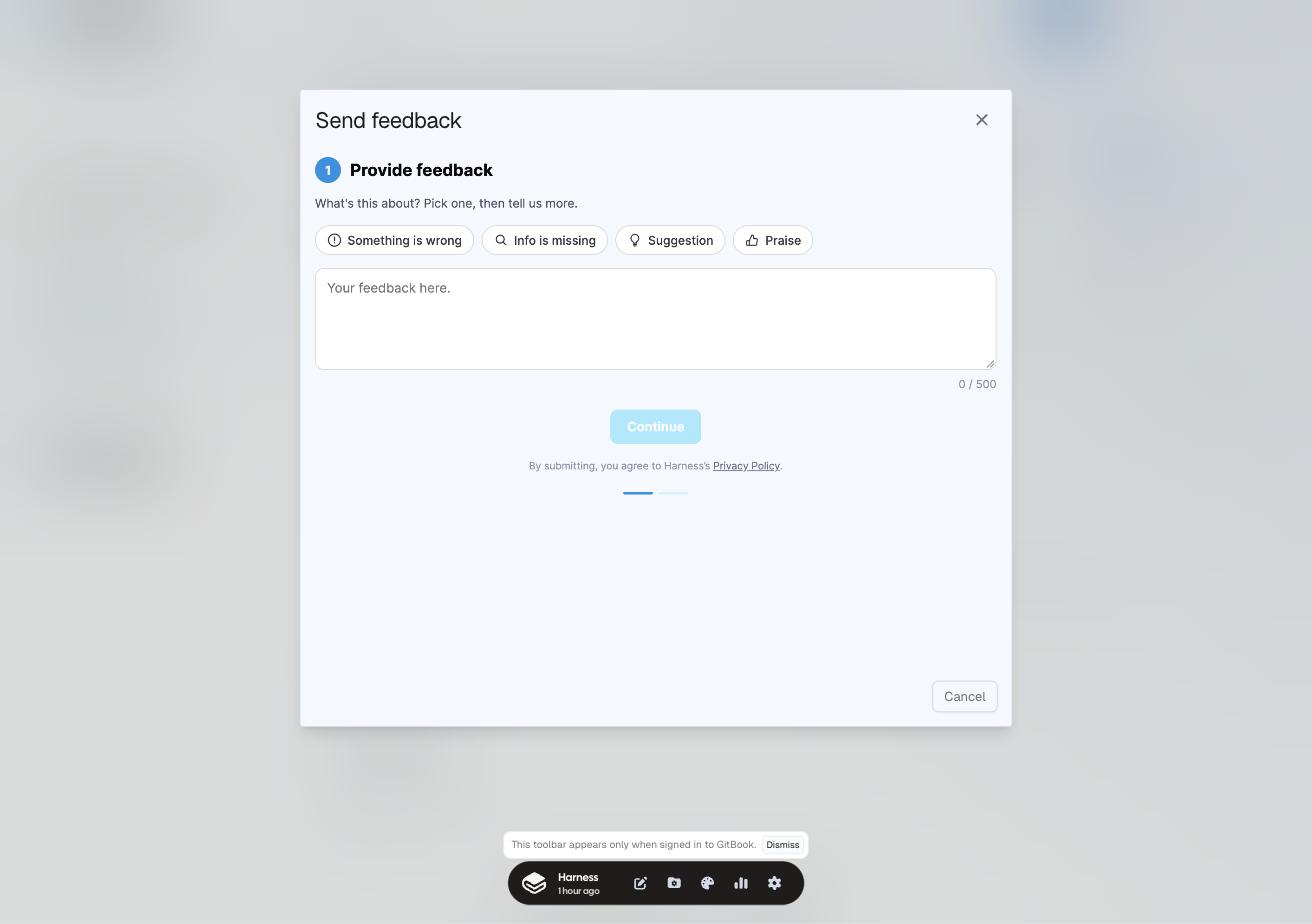
Selecting it opens a two-step flow. The first step asks what the feedback is about (something is wrong, info is missing, a suggestion, or praise) and for the feedback itself:
Step 1: pick a type, write what happened
### Panel 2 — leave details, or don't, then submit
{% hint style="info" %}
Screenshot pending for this panel — the integration's second step renders inside a cross-origin iframe that this session's browser automation could not click into (the accessibility tree does not expose its controls, and coordinate clicks did not register). Described below from the real behaviour rather than skipped.
{% endhint %}
Continuing from panel 1 leads to a details step, and its default changed recently: feedback is now **anonymous unless the reader wants a reply**. Only choosing "I'd like a response" prompts for contact details, rather than asking for them upfront on every submission the way the integration used to. That is a small change with a real effect on submission rate: a reader flagging a typo does not need to justify giving their email to do it.
From there, the reader has two ways to finish:
* **Submit** — sends the feedback as written, straight to the intake webhook.
* **Submit and ask AI** — sends the same feedback, and additionally takes the reader's raw statement and reforms it into a proper question, using the Gemini API behind the integration's worker. That constructive question is then handed to Kapa AI, opened in a new widget, so the reader can immediately query the docs with a well-formed question instead of the rough note they started with. They get an answer in the moment, and the original feedback still reaches triage either way.
Both paths end the same way from the triage side: the feedback lands regardless of whether the reader also asked AI.
## Where the feedback goes after that
The part a reader never sees: once feedback is submitted, a webhook fires into an n8n workflow that:
1. maps the page the feedback was left on to the Harness module it belongs to
2. resolves the documentation engineer who owns that module
3. opens a Jira ticket, automatically assigned to that module and that writer
From there it is in the normal ticket queue, picked up in due course rather than needing anyone to manually triage where a piece of reader feedback should land.
{% @harness-feedback/feedback module="sandbox" pagePath="sandbox/feedback-ticket-triage" %}