> For the complete documentation index, see [llms.txt](https://developer.harness.io/llms.txt). Markdown versions of documentation pages are available by appending `.md` to page URLs; this page is available as [Markdown](https://developer.harness.io/security-testing-orchestration/readme.md).

# Security Testing Orchestration Documentation

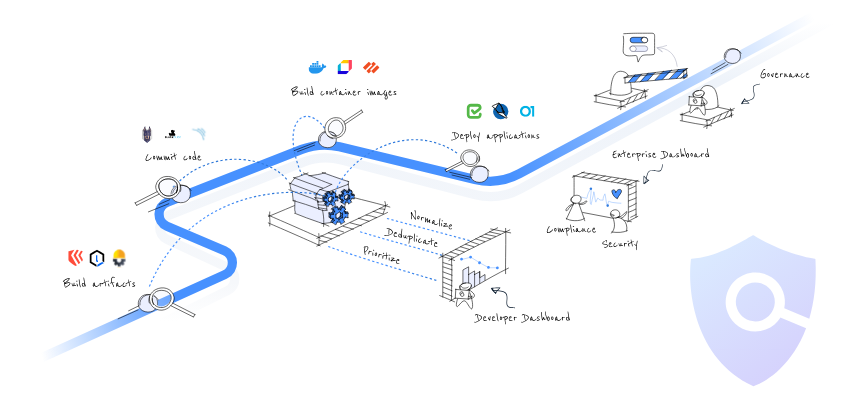
With Harness Security Testing Orchestration (STO), your pipelines can detect security vulnerabilities automatically. Harness STO enables DevOps and Security teams teams to left shift security testing as a key outcome of their DevSecOps initiative. STO orchestrates scanning, intelligently deduplicating scanner output, prioritizing remediations, and enforcing governance into your pipelines. STO puts scanning directly into your pipelines to ensure that vulnerabilities are caught and fixed before your products are ever released.

<figure><img src="https://2033425938-files.gitbook.io/~/files/v0/b/gitbook-x-prod.appspot.com/o/spaces%2Fna57sNwixrWxOX8cOMRg%2Fuploads%2Fgit-blob-9f25632703ae2c5e4158c4fdde1530f188a00914%2Fimage.png?alt=media" alt=""><figcaption></figcaption></figure>

### Get started <a href="#get-started" id="get-started"></a>

<table data-view="cards"><thead><tr><th></th><th></th><th data-hidden data-card-target data-type="content-ref"></th></tr></thead><tbody><tr><td><strong>Get Started</strong></td><td>Run your first scan quickly and see what you can do next.</td><td><a href="/security-testing-orchestration/new-to-sto/get-started.md">Get Started</a></td></tr><tr><td><strong>STO basics</strong></td><td>Learn about the security scanning problems facing developers and how STO provides the solutions they need.</td><td><a href="/security-testing-orchestration/new-to-sto/overview.md">Overview</a></td></tr><tr><td><strong>STO concepts</strong></td><td>Learn about key STO concepts such as scan targets, baselines, severities, and exemptions.</td><td><a href="/security-testing-orchestration/new-to-sto/key-concepts.md">Key Concepts</a></td></tr></tbody></table>

### Run scans and ingest data <a href="#run-scans-and-ingest-data" id="run-scans-and-ingest-data"></a>

<table data-view="cards"><thead><tr><th></th><th></th><th data-hidden data-card-target data-type="content-ref"></th></tr></thead><tbody><tr><td><strong>STO workflows</strong></td><td><p>Learn about the three high-level workflows for running scans and ingesting results: orchestration, extraction, and ingestion.</p><p>Orchestration workflows<br>Learn how to scan an object and ingest the results automatically in one step.</p></td><td><a href="/security-testing-orchestration/new-to-sto/key-concepts/sto-workflows-overview.md">STO scan modes</a></td></tr><tr><td><strong>Orchestration workflows</strong></td><td>Learn how to scan an object and ingest the results automatically in one step.</td><td><a href="/security-testing-orchestration/new-to-sto/key-concepts/run-an-orchestrated-scan-in-sto.md">Orchestration mode</a></td></tr><tr><td><strong>Ingestion workflows</strong></td><td>Learn how to run scans in a separate step, or outside Harness entirely, and ingest the results.</td><td><a href="/security-testing-orchestration/new-to-sto/key-concepts/ingest-scan-results-into-an-sto-pipeline.md">Ingestion mode</a></td></tr><tr><td><strong>Configure external scanners</strong></td><td>STO includes integrations with over 30 external tools for scanning repositories, container images, applications, and configurations.</td><td><a href="/security-testing-orchestration/new-to-sto/sto-whats-supported/scanners.md">Security scanners</a></td></tr><tr><td><strong>Ingest SARIF scan results</strong></td><td>SARIF is an open data format supported by many scan tools. You can ingest results from any tool that supports this format.</td><td><a href="/security-testing-orchestration/use-sto/sto-custom-scanning-and-ingestion/ingest-sarif-data.md">Ingest SARIF scan results</a></td></tr><tr><td><strong>Ingest data from custom scanners</strong></td><td>You can ingest custom Issues from any scanning tool. This topic shows you how.</td><td><a href="/security-testing-orchestration/use-sto/sto-custom-scanning-and-ingestion/ingesting-issues-from-other-scanners.md">Ingest from unsupported scanners</a></td></tr></tbody></table>

### View, troubleshoot, and fix vulnerabilities <a href="#view-troubleshoot-and-fix-vulnerabilities" id="view-troubleshoot-and-fix-vulnerabilities"></a>

<table data-view="cards"><thead><tr><th></th><th></th><th data-hidden data-card-target data-type="content-ref"></th></tr></thead><tbody><tr><td><strong>View issues in target baselines over time</strong></td><td>See all detected issues in your main branches, latest images, and other target baselines.</td><td><a href="/security-testing-orchestration/use-sto/sto-security-issues/sto-overview.md">STO overview page</a></td></tr><tr><td><strong>Create Jira tickets for detected issues</strong></td><td>You can easily create Jira tickets for issues detected during an STO build.</td><td><a href="/security-testing-orchestration/use-sto/jira-integrations.md">Create Jira Tickets</a></td></tr><tr><td><strong>Navigate and drill down into detected vulnerabilities</strong></td><td>The Security Testing Dashboard enables you to view, navigate, discover, and investigate detected vulnerabilities in your organization.</td><td><a href="/security-testing-orchestration/use-sto/sto-dashboards-and-reports/security-testing-dashboard.md">Security Testing Dashboard</a></td></tr></tbody></table>

### Stop builds based on detected vulnerabilities <a href="#stop-builds-based-on-detected-vulnerabilities" id="stop-builds-based-on-detected-vulnerabilities"></a>

<table data-view="cards"><thead><tr><th></th><th></th><th data-hidden data-card-target data-type="content-ref"></th></tr></thead><tbody><tr><td><strong>Exemptions (Ignore Rules) for Specific Issues</strong></td><td>Learn how to set fail_on_seerity to stop pipeline builds and create exemptions (ignore rules) for specific vulnerabilities.</td><td><a href="/security-testing-orchestration/use-sto/sto-exempt-issues/exemption-workflows.md">Request issue exemption</a></td></tr><tr><td><strong>Stop pipelines automatically using governance policies</strong></td><td>Learn how to create OPA policies to stop pipelines automatically.</td><td><a href="/security-testing-orchestration/use-sto/enforce-sto-policies-for-governance/create-opa-policies.md">Create OPA policies</a></td></tr><tr><td><strong>GitHub triggers to block pull requests with vulnerabilities</strong></td><td>You can create GitHub event triggers to trigger STO scans and block pull requests if the results match your failure criteria.</td><td><a href="/security-testing-orchestration/troubleshooting-and-resources/sto-use-cases/stop-builds-based-on-scan-results/github-triggers.md">GitHub triggers to block pull requests</a></td></tr><tr><td><strong>GitLab triggers to block merge requests with vulnerabilities</strong></td><td>You can create GitLab event triggers to trigger STO scans and block merge requests if the results match your failure criteria.</td><td><a href="/security-testing-orchestration/troubleshooting-and-resources/sto-use-cases/stop-builds-based-on-scan-results/gitlab-triggers.md">GitLab triggers to block merge requests</a></td></tr></tbody></table>

{% @harness-feedback/feedback %}
