> For the complete documentation index, see [llms.txt](https://developer.harness.io/llms.txt). Markdown versions of documentation pages are available by appending `.md` to page URLs; this page is available as [Markdown](https://developer.harness.io/security-testing-orchestration/new-to-sto/key-concepts/targets-and-baselines.md).
# Targets, variants, and baselines in STO
What to scan - repo/branch, image/tag, app/version, and baseline (root) element.
This topic discusses the following STO topics:
* [Targets](#targets)
* [Variants](#variants)
* [Baselines](#baselines)
* [Where was an issue detected: in the variant, in the baseline, or both?](#where-was-an-issue-detected-in-the-variant-in-the-baseline-or-both)
* [Every target needs a baseline](#every-target-needs-a-baseline)
#### Targets
Every scan step has a specific *target*, which is a user-defined label for the code repository, container, application, or configuration to scan. You define the test target when you configure the scan step. It is good practice to create descriptive, specific labels for your targets.
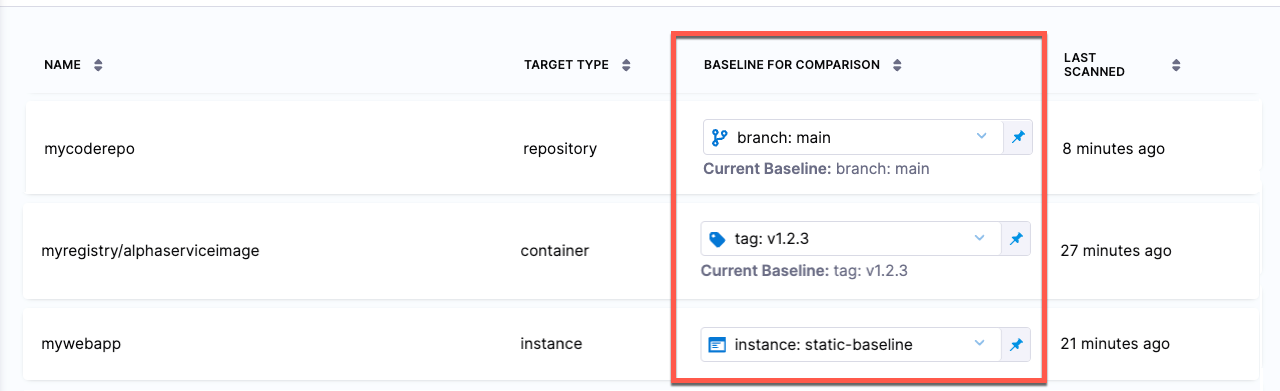
You can view all your targets in one page: go to **Security Tests** (left menu) and then **Test Targets**.
Test Targets page
#### Variants
Each scan operation has a specified *variant* that specifies the branch, tag, digest, or version to scan.
#### Baselines
You can specify a **baseline** for each target. This is usually the "root" variant of the target, such as the `main` branch, the `latest` tag, or a digest (e.g., `@sha256:abc123...`). When a scan finishes successfully, STO does the following:
* Compares each issue detected in the scanned variant against the target baseline.
* Places each issue into one of two buckets:
* New issues in the current variant only, or
* Common issues also in the baseline (or, if no baseline is specified, in the previous scan).
#### Is an issue unique to the variant or common to the baseline?
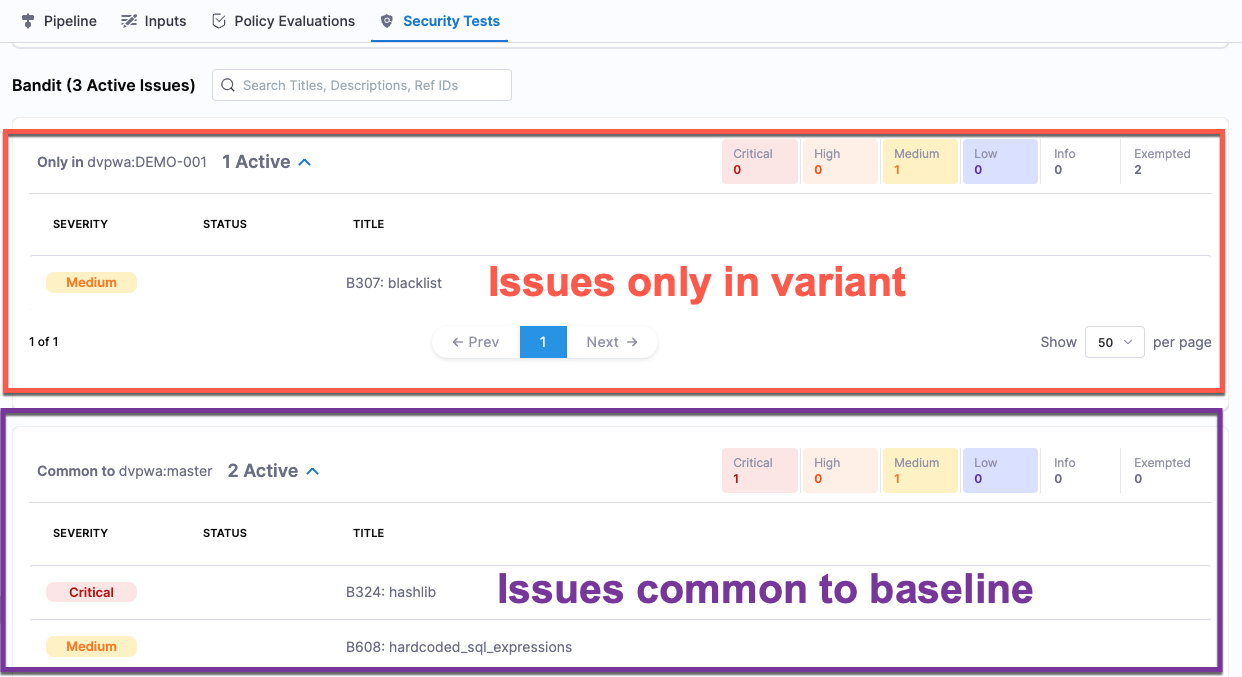
Every STO pipeline execution has a [Vulnerabilities tab](/security-testing-orchestration/use-sto/sto-security-issues/view-scan-results.md) with separate lists of issues that make it easy to determine
* Issues only in the variant.
* Issues common to the variant and the baseline.
If you scanned the baseline, or the baseline isn't defined, you'll see
* New issues only in the current scan (first list).
* Old issues common to the previous scan (second list).
New and common issues in Vulnerabilities tab
#### Every target needs a baseline
[Every target needs a baseline](/security-testing-orchestration/troubleshooting-and-resources/sto-use-cases/set-up-sto-pipelines/set-up-baselines.md) to enable the full suite of STO features. Here's why:
* For developers, it’s critical to distinguish between security issues in the baseline vs. issues in the variant you’re working on. Thus if you’re working in a downstream branch, you want to detect and resolve issues in your branch (the variant) before merging, so you don’t introduce them into the main branch (the baseline).
* When you scan a variant of a target with a baseline defined, the scan results make it easy to identify issues in the variant only (“your” issues) vs. issues also found in the baseline. The [Vulnerabilities tab](/security-testing-orchestration/use-sto/sto-security-issues/view-scan-results.md) divides these issues into two lists:
* **Only in <*****target*****>:<*****variant*****>** Issues found in the scanned variant only.
* **Common to <*****target*****>:<*****baseline*****>** Issues also found in the target baseline.
* The [STO Overview](/security-testing-orchestration/use-sto/sto-security-issues/sto-overview.md) and [Security Testing Dashboard](/security-testing-orchestration/use-sto/sto-dashboards-and-reports/security-testing-dashboard.md) show detected issues for targets with baselines defined. While individual scan results focus on variant issues, these views focus on baseline issues. These views enable security personnel and other non-developers to monitor, investigate, and address issues in production-ready targets and view vulnerability trends over time.
* In short, baselines make it easy for developers to drill down into “shift-left” issues in downstream variants and security personnel to drill down into “shift-right” issues in production targets.
{% @harness-feedback/feedback %}