> For the complete documentation index, see [llms.txt](https://developer.harness.io/llms.txt). Markdown versions of documentation pages are available by appending `.md` to page URLs; this page is available as [Markdown](https://developer.harness.io/security-testing-orchestration/troubleshooting-and-resources/sto-use-cases/stop-builds-based-on-scan-results/github-triggers.md).

# GitHub triggers to block pull requests with vulnerabilities

You can create GitHub event triggers to support a variety of STO workflows and use cases. This topic describes how to do the following:

* Trigger an STO pipeline that detects vulnerabilities and blocks merging when a pull request targets a protected branch and/or updates specific files in the repo.
* Include a keyword in a review comment to trigger a new scan if a previous pipeline execution failed.
* Set branch protection rules that block pull requests if the STO pipeline fails.

The following steps outline the basic workflow.

1. [Create a trigger](#create-the-harness-trigger) for your Harness pipeline.

   This should automatically register an outbound webhook in your Git repo.
2. [Set up the failure criteria](#set-up-the-failure-criteria) for your STO pipeline.
3. [Create a pull request](#test-the-outbound-webhook-and-trigger) to test the webhook and trigger.
4. [Add a branch protection rule](#add-a-branch-protection-rule-for-the-git-repo) to ensure that the pull request cannot be merged if the Harness pipeline fails.

### Before you begin <a href="#before-you-begin" id="before-you-begin"></a>

These workflows require the following:

* A [Harness connector](/harness-ai/use-harness-platform/connectors/code-repositories/ref-source-repo-provider/git-hub-connector-settings-reference.md) to your GitHub account
* A Harness pipeline with a code-repository scan step such as Semgrep
* The [Codebase](/continuous-integration/use-harness-ci/use-harness-ci/codebase-configuration/create-and-configure-a-codebase.md) in your pipeline should point to the Git repo that you want to scan

### Create the Harness trigger <a href="#create-the-harness-trigger" id="create-the-harness-trigger"></a>

The following sections describe two triggers that can be very useful in the context of STO scanning:

* [Trigger on a changed file](#trigger-on-a-changed-file)
* [Trigger on a review comment](#trigger-on-a-pr-review-comment)

#### Trigger on a changed file <a href="#trigger-on-a-changed-file" id="trigger-on-a-changed-file"></a>

You can specify a trigger that says: If a pull request updates any of these files, run the pipeline and scan the repo.

This type of trigger supports uses cases such as:

* If the pull request updates any file that matches the trigger filter, run a SAST scan and block the PR if the scan results meet the [failure criteria](#set-up-the-failure-criteria).
* If the pull request updates a specific file of interest, such as a `pom.xml` workspace file, run an SCA scan and block the PR if the scan results meet the [failure criteria](#set-up-the-failure-criteria).

**Trigger setup**

1. Go to your STO pipeline, select **Triggers** (top right), and add a new trigger.
2. Set up the trigger as follows.

[**Configuration**](/harness-ai/use-harness-platform/triggers/triggering-pipelines.md#configure-the-trigger)

1. [Connector](/harness-ai/use-harness-platform/connectors/code-repositories/ref-source-repo-provider/git-hub-connector-settings-reference.md) to your GitHub account
2. **Repository name**
3. [Event](/harness-ai/use-harness-platform/triggers/triggers-reference.md#event-and-actions) = **Pull Request**
4. [Actions](/harness-ai/use-harness-platform/triggers/triggers-reference.md#event-and-actions) to trigger the pipeline

[**Condition**](/harness-ai/use-harness-platform/triggers/triggers-reference.md#conditions-settings)

The following conditions are the most relevant to this workflow. You can add other conditions as needed. Triggers are complex filters in which all conditions are AND-ed together.

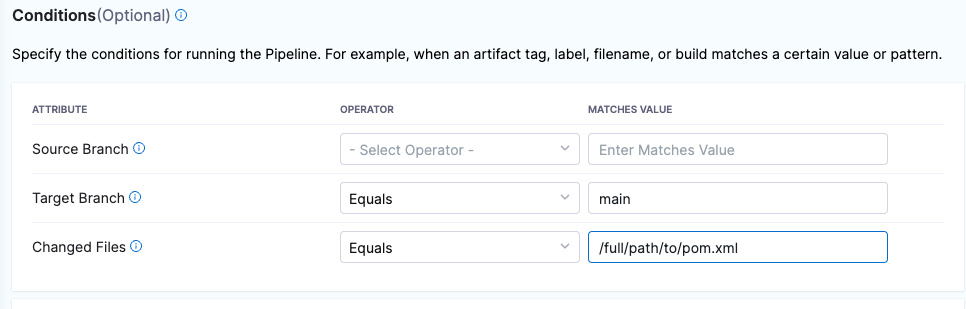
1. **Target Branch** This should match your [target baseline](/security-testing-orchestration/troubleshooting-and-resources/sto-use-cases/set-up-sto-pipelines/set-up-baselines.md), such as `main`.
2. [Changed Files](/harness-ai/use-harness-platform/triggers/triggers-reference.md#branch-and-changed-files-conditions) The files that trigger the STO pipeline if they have updates in the PR. You can specify multiple files using the [operators](/harness-ai/use-harness-platform/triggers/triggers-reference.md#operators) **In**, **Not In**, and **Regex**.

Here's a simple example: trigger a build if a PR seeks to update a specific `pom.xml` in the `main` branch.

<figure><img src="/files/umO6B7D4zRQy15Vq3ZF0" alt=""><figcaption><p>Trigger a pipeline execution when a PR updates a specific file in the main branch</p></figcaption></figure>

[**Pipeline input**](/harness-ai/use-harness-platform/triggers/triggering-pipelines.md#set-pipeline-input)

The pipeline input should be configured correctly, with **Build Type** set to **Git Pull Request**.

**Test the trigger**

After you create the trigger, proceed to [Set up the failure criteria](#set-up-the-failure-criteria).

<details>

<summary>YAML trigger example</summary>

```yaml

trigger:
  name: sast-test-trigger
  identifier: sasttesttrigger
  enabled: true
  encryptedWebhookSecretIdentifier: ""
  description: ""
  tags: {}
  orgIdentifier: default
  stagesToExecute: []
  projectIdentifier: default
  pipelineIdentifier: triggertestupdatepom
  source:
    type: Webhook
    spec:
      type: Github
      spec:
        type: PullRequest
        spec:
          connectorRef: my_github_connector
          autoAbortPreviousExecutions: false
          payloadConditions:
            - key: changedFiles
              operator: Equals
              value: /full/path/to/pom.xml
            - key: targetBranch
              operator: Equals
              value: main
          headerConditions: []
          repoName: dvpwa-djb
          actions:
            - Open
            - Reopen
  inputYaml: |
      pipeline:
         identifier: triggertestupdatepom
         properties:
           ci:
             codebase:
               build:
                 type: PR
                 spec:
                   number: <+trigger.prNumber>


```

</details>

#### Trigger on a PR review comment <a href="#trigger-on-a-pr-review-comment" id="trigger-on-a-pr-review-comment"></a>

You can specify a trigger that says: If a reviewer includes a specific keyword in a pull-request review comment, run the pipeline and scan the repo.

This type of trigger is useful when a pipeline execution fails for reasons other than the [failure criteria](#set-up-the-failure-criteria) you specified for the pipeline. If the STO scan doesn't finish in the original execution, a reviewer can add a review comment with a keyword such as `RERUN_STO_PIPELINE`.

**Trigger setup**

1. Go to your STO pipeline, select **Triggers** (top right), and add a new trigger.
2. Set up the trigger as follows.

[**Configuration**](/harness-ai/use-harness-platform/triggers/triggering-pipelines.md#configure-the-trigger)

1. [Connector](/harness-ai/use-harness-platform/connectors/code-repositories/ref-source-repo-provider/git-hub-connector-settings-reference.md) to your GitHub account
2. **Repository name**
3. [Event](/harness-ai/use-harness-platform/triggers/triggers-reference.md#event-and-actions) = **Issue Comment**
4. [Actions](/harness-ai/use-harness-platform/triggers/triggers-reference.md#event-and-actions), such as **Create** and **Edit**, to trigger the scan. You can also select **All actions** to allow reviewers to trigger a scan at any time.

[**Condition**](/harness-ai/use-harness-platform/triggers/triggers-reference.md#conditions-settings)

The following conditions are the most relevant to this workflow. You can add other conditions as needed. Triggers are complex filters in which all conditions are AND-ed together.

1. **Target Branch** This should match your [target baseline](/security-testing-orchestration/troubleshooting-and-resources/sto-use-cases/set-up-sto-pipelines/set-up-baselines.md).
2. Enter the following [JEXL condition](/harness-ai/use-harness-platform/triggers/triggers-reference.md#jexl-conditions) with the keyword to trigger a new scan:

   `<+trigger.payload.comment.body>.contains("RERUN_STO_SCAN")`

   <figure><img src="/files/v6scqBX1Hh4JU6f3RzBe" alt=""><figcaption><p>Trigger when a PR comment includes RERUN_STO_SCAN</p></figcaption></figure>

[**Pipeline input**](/harness-ai/use-harness-platform/triggers/triggering-pipelines.md#set-pipeline-input)

The pipeline input should be configured correctly, with **Build Type** set to **Git Pull Request**.

**Test the trigger**

After you create the trigger, proceed to [Set up the failure criteria](#set-up-the-failure-criteria).

<details>

<summary>YAML trigger example</summary>

```yaml

trigger:
  name: dvpwa-issue-comment-KEYWORD
  identifier: dvpwaissuecommentKEYWORD
  enabled: false
  encryptedWebhookSecretIdentifier: ""
  description: ""
  tags: {}
  orgIdentifier: default
  stagesToExecute: []
  projectIdentifier: sto_tutorials
  pipelineIdentifier: prtest
  source:
    type: Webhook
    spec:
      type: Github
      spec:
        type: IssueComment
        spec:
          connectorRef: my_github_connector
          autoAbortPreviousExecutions: false
          payloadConditions:
            - key: targetBranch
              operator: In
              value: master, develop
          headerConditions: []
          jexlCondition: <+trigger.payload.comment.body>.contains("RERUN_STO_SCAN")
          repoName: dvpwa
          actions: []
  inputYaml: |
    pipeline:
      identifier: prtest
      properties:
        ci:
          codebase:
            build:
              type: PR
              spec:
                number: <+trigger.prNumber>


```

</details>

### Set up the failure criteria <a href="#set-up-the-failure-criteria" id="set-up-the-failure-criteria"></a>

You can configure your Harness pipeline to fail if the scan finds vulnerabilities that match a specified set of criteria. You can use one of two methods:

* [Fail on Severity](/security-testing-orchestration/use-sto/sto-exempt-issues/exemption-workflows.md)

  Every STO scan step has a `fail_on_severity` setting that fails the step if a scan detects issues with the specified severity or higher. You can also create exemptions ("Ignore rules") for specific issues to override this behavior.
* [Governance policies](/security-testing-orchestration/use-sto/enforce-sto-policies-for-governance/create-opa-policies.md)

  You can use Harness Policy as Code to write and enforce policies against your security tests, and to block your pipelines if a security test has any issues that violate those policies. STO includes a set of predefined templates for blocking pipelines based on issue severity, reference ID, CVE age, title, and number of occurrences.

### Test the outbound webhook and trigger <a href="#test-the-outbound-webhook-and-trigger" id="test-the-outbound-webhook-and-trigger"></a>

#### Verify the webhook in GitHub <a href="#verify-the-webhook-in-github" id="verify-the-webhook-in-github"></a>

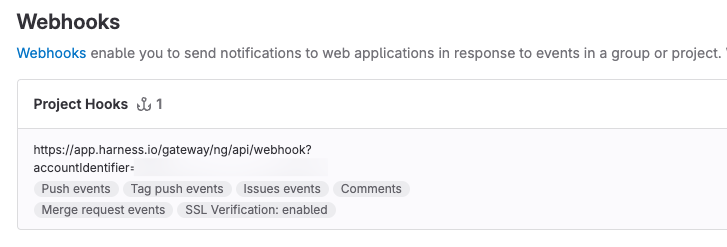
Once you add a trigger to your pipeline, your Git service provider should create a webhook for the trigger automatically. This is true for all non-custom webhooks and all Git providers supported by Harness.

1. Go to your GitHub account, and then select **Settings** > **Webhooks**.

   <figure><img src="/files/4DuHjqAT6n4IgQQLW54Z" alt=""><figcaption><p>GitHub webhook for new trigger</p></figcaption></figure>
2. If you don't see a webhook, you can add one manually.

For more information, go to [Register the webhook in the Git provider](/harness-ai/use-harness-platform/triggers/triggering-pipelines.md#register-the-webhook-in-the-git-provider).

#### Test the webhook and trigger <a href="#test-the-webhook-and-trigger" id="test-the-webhook-and-trigger"></a>

To test your trigger, update your GitHub repo to verify that the trigger works as intended.

* To verify the [changed-file trigger](#trigger-on-a-changed-file) described above:
  * Go to the root branch you specified in the trigger.
  * Update the file you specified in the trigger. Then create a pull request in a new branch.
* To verify the [review-comment trigger](#trigger-on-a-pr-review-comment) described above, create a pull request and then add a review comment with the keyword you specified.
  * Go to the root branch you specified in the trigger.
  * Create a pull request in a new branch.
  * Add a review comment with the keyword you specified in the trigger.

You should now see the following:

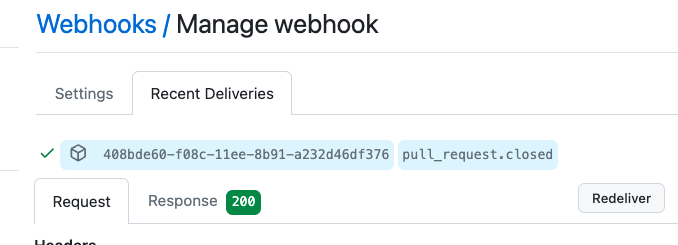
1. In the GitHub repo, the request and response were successful.

   <figure><img src="/files/Wp6QY70t9zYN8x5xb4sX" alt=""><figcaption><p>GitHub: request and response were successful</p></figcaption></figure>
2. In the **Pipeline Executions** page of your Harness pipeline, the trigger starts a new execution.

   <figure><img src="/files/M3vxx2PEmexCupYHCQsk" alt=""><figcaption><p>Harness: new pipeline execution</p></figcaption></figure>
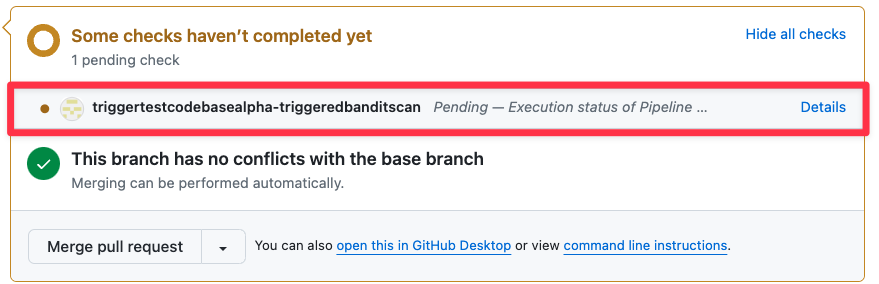
3. In the GitHub pull request, the pipeline execution appears as an automated check.

   <figure><img src="/files/5kaFTDw9VQHiHodL65EZ" alt=""><figcaption><p>GitHub: automated check (Harness STO pipeline)</p></figcaption></figure>

If the trigger doesn't work as intended, go to [Troubleshoot Git event triggers](/harness-ai/use-harness-platform/triggers/triggering-pipelines.md#troubleshoot-git-event-triggers).

### Add a branch protection rule for the Git repo <a href="#add-a-branch-protection-rule-for-the-git-repo" id="add-a-branch-protection-rule-for-the-git-repo"></a>

The final step is to ensure that a PR cannot be merged if the STO pipeline fails. To do this, you create a protection rule for your root branch.

The following steps describe a simple setup in GitHub. For more information, go to [Managing a branch protection rule](https://docs.github.com/en/repositories/configuring-branches-and-merges-in-your-repository/managing-protected-branches/managing-a-branch-protection-rule) in the GitHub documentation.

If you're using a different SCM, go to the SCM documentation and search for `branch protection`.

#### Add the protection rule <a href="#add-the-protection-rule" id="add-the-protection-rule"></a>

1. Go to your GitHub repo and select **Settings** > **Branches** > **Add Rule**.
2. In **Branch name pattern**, add a string or regular expression for the branch or branches you want to protect. This should match your [target baseline](/security-testing-orchestration/troubleshooting-and-resources/sto-use-cases/set-up-sto-pipelines/set-up-baselines.md).
3. Select **Require a pull request before merging** and **Require Approvals**. This isn't required, but it's good practice.
4. Select **Require status checks to pass before merging**.
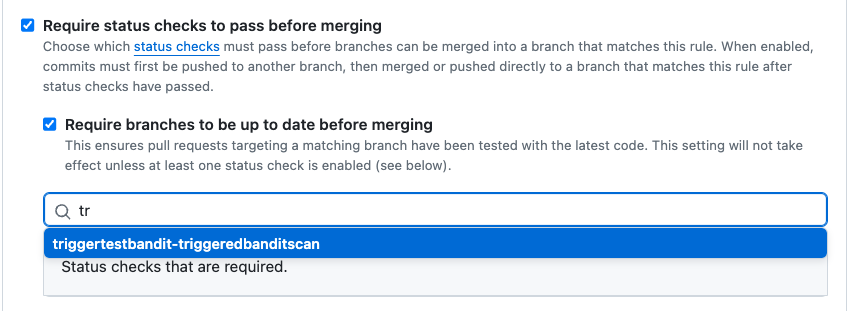
5. In the search field below, enter the first characters of the check name and then select the check.

   <figure><img src="/files/7JvWruaDAWxLywn0HRc8" alt=""><figcaption><p>Add shared path for scan results</p></figcaption></figure>
6. Configure any other settings as appropriate.
7. Scroll to the bottom of the page and save your rule.

#### Test the protection rule <a href="#test-the-protection-rule" id="test-the-protection-rule"></a>

Now that you've set up the rule, trigger another Harness pipeline execution and fail it to verify that the rule stops the pull request.

{% hint style="info" %}
To verify the branch protection rule, you must ensure that your STO pipeline fails. To configure your pipeline to fail temporarily, you can do one of the following:

* Set [Fail on Severity](/security-testing-orchestration/new-to-sto/key-concepts/fail-pipelines-by-severity.md) to **Low** in the scan step of your pipeline. Then scan a repo with known vulnerabilities.
* Add a temporary Run step to your pipeline with the command `exit(1)`.
  {% endhint %}

1. Trigger another pipeline execution.
   * For the [changed-file trigger](#trigger-on-a-changed-file) described above, make and push a change. Then create a pull request.
   * For the [review-comment trigger](#trigger-on-a-pr-review-comment) described above, add a review comment with the keyword you specified.
2. Now, merging is blocked if the Harness pipeline fails.

   ![](/files/0jyahW7Q9eVB3eq0TfIH)

### For more information <a href="#for-more-information" id="for-more-information"></a>

* The Harness platform docs include [extensive information about triggers](/harness-ai/use-harness-platform/triggers.md). The following topics are highly relevant to STO use cases:
  * [Trigger pipelines using Git events](/harness-ai/use-harness-platform/triggers/triggering-pipelines.md)
  * [Webhook triggers reference](/harness-ai/use-harness-platform/triggers/triggers-reference.md)
* For detailed information about outbound webhooks and branch protection rules, go to the docs for your source code management (SCM) provider. This topic describes a few simple GitHub workflows, but these topics are outside the scope of Harness documentation.