> For the complete documentation index, see [llms.txt](https://developer.harness.io/llms.txt). Markdown versions of documentation pages are available by appending `.md` to page URLs; this page is available as [Markdown](https://developer.harness.io/security-testing-orchestration/use-sto/enforce-sto-policies-for-governance/create-opa-policies.md).
# Create OPA policies to stop STO pipelines automatically
Create OPA policies to stop pipelines automatically.
You can use [Harness Policy as Code](/harness-platform/use-harness-platform/governance/policy-as-code/harness-governance-overview.md) to write and enforce policies against your [security tests](/security-testing-orchestration/use-sto/sto-security-issues/view-scan-results.md), and to stop your pipelines if a security test has any issues that violate those policies.
You can use Harness Policy as Code to enforce policies such as:
* A security test cannot include any issues in a list of severities such as Critical or New Critical.
* A security test cannot include any issues for CVEs past a certain age, for example no critical-severity CVEs more than three years old.
* A security test cannot include any issues in a list of titles such as `libsqlite3` or `javascript.express.security.audit`.
* A security test cannot include any more than 75 occurrences of TAR-related issues (issue title matches regex `".*tar.*"`).
* A security test cannot include any issues in a list of reference IDs such as CWE-78 or CVE-2023-52138.
### Important notes
* This topic assumes that you have a basic knowledge of the following:
* Governance policies and how to implement them:
* [Harness Policy as Code overview](/harness-platform/use-harness-platform/governance/policy-as-code/harness-governance-overview.md)
* [Harness Policy As Code quickstart](/harness-platform/use-harness-platform/governance/policy-as-code/harness-governance-quickstart.md)
* [Open Policy Agent (OPA)](https://www.openpolicyagent.org/)
* [Severity scores and levels in STO](/security-testing-orchestration/new-to-sto/key-concepts/severities.md)
### Security Test policy samples
The Harness Policy Library includes the following [policy samples](/harness-platform/use-harness-platform/governance/policy-as-code/sample-policy-use-case.md) that make it easy to [create security test policies](/security-testing-orchestration/use-sto/enforce-sto-policies-for-governance/create-opa-policies.md#workflow-description) and enforce them against your scan results.
* [Warn or Block vulnerabilities by severity](#warn-or-block-vulnerabilities-by-severity)
* [Warn or Block vulnerabilities by reference ID](#warn-or-block-vulnerabilities-by-reference-id)
* [Warn or Block vulnerabilities by title](#warn-or-block-vulnerabilities-by-title)
* [Warn or Block vulnerabilities by number of occurrences](#warn-or-block-vulnerabilities-by-number-of-occurrences)
* [Warn or Block vulnerabilities by CVE age](#warn-or-block-vulnerabilities-by-cve-age)
* [Warn or Block vulnerabilities using STO output variables](#warn-or-block-vulnerabilities-using-sto-output-variables)
* [Warn or Block pipeline based on the code coverage results](#block-the-pipeline-based-on-the-code-coverage-results)
* [Warn or Block pipeline based on external policy failures](#block-the-pipeline-based-on-external-policy-failures)
* [Warn or Block vulnerabilities from application layers of your container image](#warn-or-block-vulnerabilities-from-application-layers-of-your-container-image)
* [Warn or Block vulnerabilities from base image of your container image](#warn-or-block-vulnerabilities-from-base-image-of-your-container-image)
* [Warn or Block vulnerabilities based on the EPSS score](#warn-or-block-vulnerabilities-based-on-the-epss-score)
* [Warn or Block vulnerabilities based on CISA KEV count](#warn-or-block-vulnerabilities-based-on-cisa-kev-count)
* [Warn or Block Reachable or Exploitable Vulnerabilities reported by the Harness Scanner](#warn-or-block-reachable-or-exploitable-vulnerabilities-reported-by-the-harness-scanner)
**Warn or Block vulnerabilities by severity**
Apply a policy to a scan step to warn or block on any vulnerabilities with the specified severity.
You must copy the entire sample code from the OPA policy library, as described in [Create a new Security Tests OPA policy](/security-testing-orchestration/use-sto/enforce-sto-policies-for-governance/create-opa-policies.md#create-a-new-security-tests-opa-policy).
Here is a sample policy that you can evaluate using the **On Step** event for a scan step.
{% hint style="info" %}
This policy sample supports the following vulnerabilities only: `Critical`, `High`, `Medium`, `Low`, and `Info`. To create policies based on output variables such as `NEW_CRITICAL`, go to [Exclude vulnerabilities using STO output variables](#exclude-vulnerabilities-using-sto-output-variables).
{% endhint %}
```json
package securityTests
import future.keywords.in
import future.keywords.if
# Define a set of severities that are denied (Critical, High, Medium, Low, Info)
# The following example denies if the scan results include any issue with a severity of Critical or High.
deny_list := fill_defaults([
{
"severity": {"value": "Critical", "operator": "=="}
},
{
"severity": {"value": "High", "operator": "=="}
}
])
```
**Warn or Block vulnerabilities by reference ID**
Apply a policy to a scan step to warn or block on any vulnerabilities in a specific list of CVEs or CWEs.
You must copy the entire sample code from the OPA policy library, as described in [Create a new Security Tests OPA policy](/security-testing-orchestration/use-sto/enforce-sto-policies-for-governance/create-opa-policies.md#create-a-new-security-tests-opa-policy).
Here is a sample policy that you can evaluate using the **On Step** event for a scan step.
```json
package securityTests
import future.keywords.in
import future.keywords.if
# Define a set of reference-identifiers that are denied
# The following policy denies if the scan results include any occurrence of
# - cwe-772
# - cve-2019-14250
# - CWE-772
# - CVE-2019-14250
deny_list := fill_defaults([
{
"refId": {"value": "772", "operator": "=="},
"refType": {"value": "cwe", "operator": "=="}
},
{
"refId": {"value": "772", "operator": "=="},
"refType": {"value": "CWE", "operator": "=="}
},
{
"refId": {"value": "2019-14250", "operator": "=="},
"refType": {"value": "cve", "operator": "=="}
},
{
"refId": {"value": "2019-14250", "operator": "=="},
"refType": {"value": "CVE", "operator": "=="}
}
])
```
**Warn or Block vulnerabilities by title**
Apply a policy to a scan step to warn or block on any vulnerabilities in a specific list of issue titles.
You must copy the entire sample code from the OPA policy library, as described in [Create a new Security Tests OPA policy](/security-testing-orchestration/use-sto/enforce-sto-policies-for-governance/create-opa-policies.md#create-a-new-security-tests-opa-policy).
You can use the `~` operator to find titles based on [Python regular expressions](https://docs.python.org/3/library/re.html).
Here is a sample policy that you can evaluate using the **On Step** event for a scan step.
```json
package securityTests
import future.keywords.in
import future.keywords.if
# Define a set of titles that are denied
# The following example denies if the scan results include any issues related to `tar@1.34` or `libsqlite3`
deny_list := fill_defaults([
{
"title": {"value": "tar@1.34", "operator": "~"}
},
{
"title": {"value": "libsqlite3", "operator": "~"}
}
])
```
**Warn or Block vulnerabilities by number of occurrences**
Apply a policy to a scan step to warn or block vulnerabilities based on a set of titles and the maximum allowed number of occurrences for each vulnerability.
You must copy the entire sample code from the OPA policy library, as described in [Create a new Security Tests OPA policy](/security-testing-orchestration/use-sto/enforce-sto-policies-for-governance/create-opa-policies.md#create-a-new-security-tests-opa-policy).
You can use the `~` operator to find titles based on [Python regular expressions](https://docs.python.org/3/library/re.html).
Here is a sample policy that you can evaluate using the **On Step** event for a scan step.
```json
package securityTests
import future.keywords.in
import future.keywords.if
# Define a set of titles and maximum occurrences that are denied
# The following example denies on scan results with more than 25 occurrences of TAR- or cURL-related issues
deny_list := fill_defaults([
{
"title": {"value": ".*tar.*", "operator": "~"},
"maxOccurrences": {"value": 25, "operator": ">="},
},
{
"title": {"value": ".*curl.*", "operator": "~"},
"maxOccurrences": {"value": 25, "operator": ">="},
}
])
```
**Warn or Block vulnerabilities by CVE age**
Apply a policy to a scan step to warn or block vulnerabilities based on CVEs by severity and age.
You must copy the entire sample code from the OPA policy library, as described in [Create a new Security Tests OPA policy](/security-testing-orchestration/use-sto/enforce-sto-policies-for-governance/create-opa-policies.md#create-a-new-security-tests-opa-policy).
Here is a sample policy that you can evaluate using the **On Step** event for a scan step.
```json
package securityTests
import future.keywords.in
import future.keywords.if
# Define a set of CVE ages (as old/older than given year) and severities (equal/greater than) that are denied
# This example denies CVEs for any of the following filters:
# - Critical severities, new (2021 or earlier)
# - High severities, old (2018 or earlier)
# - Medium severities, very old (2015 or earlier)
deny_list := fill_defaults([
{
"year": {"value": 2023, "operator": "<="},
"severity": {"value": "Critical", "operator": "=="}
},
{
"year": {"value": 2018, "operator": ">="},
"severity": {"value": "High", "operator": "=="}
},
{
"year": {"value": 214, "operator": "<="},
"severity": {"value": "Medium", "operator": "=="}
}
])
```
**Warn or Block vulnerabilities using STO output variables**
You can create policies based on the [output variables](/security-testing-orchestration/new-to-sto/key-concepts/output-variables.md) generated by an STO scan step.
For example, suppose you want a policy to warn or block if a scan step finds any new vulnerabilities with severities of Critical or High. In this case, you can [create a policy](#create-a-new-opa-policy) with the following OPA code:
```
package pipeline_environment
# Warn or block if the scan step detects any NEW_CRITICAL or NEW_HIGH vulnerabilities
deny[sprintf("Scan can't contain any NEW_CRITICAL vulnerability '%s'", [input[_].outcome.outputVariables.NEW_CRITICAL])] {
input[_].outcome.outputVariables.NEW_CRITICAL != "0"
}
deny[sprintf("Scan can't contain any high vulnerability '%s'", [input[_].outcome.outputVariables.NEW_HIGH])] {
input[_].outcome.outputVariables.NEW_HIGH != "0"
}
```
**Warn or Block the pipeline based on the code coverage results**
Apply a policy to the scan step to either warn or block the pipeline based on the code coverage value. You can use the sample policy **Security Test - Code Coverage**. Below is a sample policy for reference:
```
package securityTests
import future.keywords.in
import future.keywords.if
# Define a set of Output Variables that are denied
deny_list :=([
# Fail if CODE_COVERAGE is less than 50.0
{
"name": "CODE_COVERAGE", "value": 50.0, "operator": "<"
},
# Optionally define more Output Variables here
# {
# "name": "HIGH", "value": 0, "operator": ">"
# }
])
```
**Warn or Block the pipeline based on external policy failures**
Apply a policy to the scan step to either warn or block the pipeline based on the external policy failures. You can use the sample policy **Security Tests - External Policy Failures**. Below is a sample policy for reference:
```
package securityTests
import future.keywords.in
import future.keywords.if
# Define a set of Output Variables that are denied
deny_list :=([
# Fail if EXTERNAL_POLICY_FAILURES count is greater than 0
{
"name": "EXTERNAL_POLICY_FAILURES", "value": 0, "operator": ">"
},
# Optionally define more Output Variables here
# {
# "name": "HIGH", "value": 0, "operator": ">"
# }
])
```
**Warn or Block vulnerabilities from application layers of your container image**
Apply a policy to the scan step to either warn or block the pipeline based on the vulnerabilities found in the application layers of your container image. You can use the following sample policy:
```
package securityTests
import future.keywords.in
import future.keywords.if
# Deny list: list the BASE_* variables we want to check
deny_list := [
{ "name": "APP_CRITICAL", "value": 0, "operator": ">" },
{ "name": "APP_HIGH", "value": 0, "operator": ">" },
{ "name": "APP_MEDIUM", "value": 0, "operator": ">" },
{ "name": "APP_LOW", "value": 0, "operator": ">" },
{ "name": "APP_INFO", "value": 0, "operator": ">" }
]
#### DO NOT CHANGE THE FOLLOWING SCRIPT
# Top-level deny
deny[msg] {
item = deny_list_violations[i][j]
variable := item.variable
violation := item.violation
msg := sprintf("Pipeline blocked: Output Variable ['%s'] value violates deny rule %v", [variable.name, violation])
}
# Collect deny list violations
deny_list_violations[violations] {
input[i].name == "output"
output_variables := input[i].outcome.outputVariables
ov_name := object.keys(output_variables)[j]
violations := [x |
x := {
"variable": {"name": ov_name},
"violation": deny_list[k]
}
deny_compare(ov_name, output_variables[ov_name], deny_list[k])
]
count(violations) > 0
}
# Compare helper
deny_compare(ov_name, ov_value, rule) {
ov_name == rule.name
num_compare(to_number(ov_value), rule.operator, rule.value)
}
# Numeric comparison helpers
num_compare(a, "==", b) := a == b
num_compare(a, "<=", b) := a <= b
num_compare(a, ">=", b) := a >= b
num_compare(a, "<", b) := a < b
num_compare(a, ">", b) := a > b
```
**Warn or Block vulnerabilities from base image of your container image**
Apply a policy to the scan step to either warn or block the pipeline based on vulnerabilities found in the base image of your container image.
The following sample policy works as follows:
1. Verifies whether the base image of your container image is approved.
2. If the base image is approved, no further checks are performed and the policy passes.
3. If the base image is not approved, it checks for vulnerabilities in the base image and warns or blocks the pipeline based on the severity count of the vulnerabilities.
```
package securityTests
import future.keywords.in
import future.keywords.if
# Deny list: list the BASE_* variables we want to check
deny_list := [
{ "name": "BASE_CRITICAL", "value": 0, "operator": ">" },
{ "name": "BASE_HIGH", "value": 0, "operator": ">" },
{ "name": "BASE_MEDIUM", "value": 0, "operator": ">" },
{ "name": "BASE_LOW", "value": 0, "operator": ">" },
{ "name": "BASE_INFO", "value": 0, "operator": ">" }
]
#### DO NOT CHANGE THE FOLLOWING SCRIPT
# Top-level deny
deny[msg] {
item = deny_list_violations[i][j]
variable := item.variable
violation := item.violation
msg := sprintf("Pipeline blocked: Output Variable ['%s'] value violates deny rule %v", [variable.name, violation])
}
# Collect deny list violations
deny_list_violations[violations] {
input[i].name == "output"
output_variables := input[i].outcome.outputVariables
# ✅ Skip all checks if BASE_IMAGE_STATUS == "approved"
not ignore_base_vulns(output_variables)
ov_name := object.keys(output_variables)[j]
violations := [x |
x := {
"variable": {"name": ov_name},
"violation": deny_list[k]
}
deny_compare(ov_name, output_variables[ov_name], deny_list[k])
]
count(violations) > 0
}
ignore_base_vulns(output_variables) {
status := output_variables["BASE_IMAGE_APPROVED"]
lower(status) == "true"
}
# Compare helper
deny_compare(ov_name, ov_value, rule) {
ov_name == rule.name
num_compare(to_number(ov_value), rule.operator, rule.value)
}
# Numeric comparison helpers
num_compare(a, "==", b) := a == b
num_compare(a, "<=", b) := a <= b
num_compare(a, ">=", b) := a >= b
num_compare(a, "<", b) := a < b
num_compare(a, ">", b) := a > b
```
**Warn or Block vulnerabilities based on the EPSS score**
Apply a policy to the scan step to either warn or block the pipeline based on the code coverage value. You can use the sample policy **Security Test - EPSS score found in issues.** Below is a sample policy for reference:
```
package securityTests
import future.keywords.in
import future.keywords.if
# Configurable inputs:
# max_issues - Fail if the number of matching issues exceeds this value
# epss_threshold - EPSS score threshold (in percentage % upto 1 decimal point)
# epss_percentile_threshold - EPSS Percentile threshold (in percentage % upto 1 decimal point)
max_issues := 0
epss_threshold := 90.0
epss_percentile_threshold := 90.0
deny_list := fill_defaults([
{
"epssScore": {"value": epss_threshold, "operator": ">"},
},{
"epssPercentile": {"value":epss_percentile_threshold, "operator":">"}
}
])
#### DO NOT CHANGE THE FOLLOWING SCRIPT
deny_list_violations[violations] {
input[i].name == "securityTestData"
issue := input[i].outcome.issues[j]
violations := [x |
x := {
"issue": {"id": issue.id, "title": issue.title},
"violation": remove_null(deny_list[k])
}
deny_compare(issue, deny_list[k])
count(x.violation) > 0
]
count(violations) > 0
}
deny[msg] {
# Count unique issue IDs that match ANY rule
unique_issue_ids := {issue.id |
some i, j
input[i].name == "securityTestData"
issue := input[i].outcome.issues[j]
deny_compare(issue, deny_list[_])
}
issue_count := count(unique_issue_ids)
issue_count > max_issues
msg := sprintf("Found %d issue(s) with EPSS defined, which exceeds the maximum allowed of %d ", [issue_count, max_issues])
}
deny_compare(issue, rule) := true if {
num_compare(round_off_one_decimal(issue.details.epss), rule.epssScore.operator, rule.epssScore.value)
num_compare(round_off_one_decimal(issue.details.epssPercentile), rule.epssPercentile.operator, rule.epssPercentile.value)
}
str_compare(a, "==", b) := a == b
str_compare(a, "!", b) := a != b
str_compare(a, "~", b) := regex.match(b, a)
str_compare(a, null, b) := a == b if { b != null}
str_compare(a, null, null) := true
num_compare(a, "==", b) := a == b
num_compare(a, "<=", b) := a <= b
num_compare(a, ">=", b) := a >= b
num_compare(a, "<", b) := a < b
num_compare(a, ">", b) := a > b
num_compare(a, null, b) := a == b if { b != null}
num_compare(a, null, null) := true
semver_compare(a, "<=", b) := semver.compare(b, a) <= 0
semver_compare(a, "<", b) := semver.compare(b, a) < 0
semver_compare(a, "==", b) := semver.compare(b, a) == 0
semver_compare(a, ">", b) := semver.compare(b, a) > 0
semver_compare(a, ">=", b) := semver.compare(b, a) >= 0
semver_compare(a, "!", b) := semver.compare(b, a) == 0
semver_compare(a, "~", b) := regex.match(b, a)
semver_compare(a, null, b) := semver.compare(b, a) == 0 if { b != null}
semver_compare(a, null, null) := true
round_off_one_decimal(score) := result {
result = round(score * 1000) / 10.0
}
get_cve_year(cve, type) := to_number(substring(cve,0,4)) if {
type == "cve"
} else := 1000000
remove_null(obj) := filtered {
filtered := {key: val | val := obj[key]; val.value != null}
}
default_ri(issue) := issue.details.referenceIdentifiers if {
count(issue.details.referenceIdentifiers) != 0
} else := [{
"id": "",
"type": ""
}]
fill_defaults(obj) := list {
defaults := {
"epssScore": {"value": null, "operator": null},
"epssPercentile": {"value": null, "operator": null},
}
list := [x | x := object.union(defaults, obj[_])]
}
```
**Warn or Block vulnerabilities based on CISA KEV count**
Apply a policy to the scan step to warn or block the pipeline when the number of issues on the [CISA Known Exploited Vulnerabilities (KEV) catalog](/security-testing-orchestration/use-sto/risk-and-priortization/cisa-kev.md) exceeds your threshold. You can use the sample policy **Security Tests – CISA Known Exploited Vulnerabilities**. Below is a sample policy for reference:
```
package securityTests
import future.keywords.if
# maxCISAKnownExploitedIssues: maximum allowed count of CISA KEV issues
deny_list := fill_defaults([
{
"maxCISAKnownExploitedIssues": {"value": 0, "operator": ">"},
}
])
#### DO NOT CHANGE THE FOLLOWING SCRIPT
deny[msg] {
input[i].name == "securityTestData"
issues := input[i].outcome.issues
rule := deny_list[_]
kev_issues := [issue |
issue := issues[_]
issue.details.inKev == true
]
matched_count := count(kev_issues)
num_compare(matched_count, rule.maxCISAKnownExploitedIssues.operator, rule.maxCISAKnownExploitedIssues.value)
msg := sprintf("Too many CISA KEV vulnerabilities detected! Found %d issue(s) on the CISA KEV catalog, maximum allowed is %d",
[matched_count, rule.maxCISAKnownExploitedIssues.value])
}
num_compare(a, "==", b) := a == b
num_compare(a, "<=", b) := a <= b
num_compare(a, ">=", b) := a >= b
num_compare(a, "<", b) := a < b
num_compare(a, ">", b) := a > b
num_compare(a, null, b) := a == b if { b != null}
num_compare(a, null, null) := true
fill_defaults(obj) := list {
defaults := {
"maxCISAKnownExploitedIssues": {"value": null, "operator": null},
}
list := [x | x := object.union(defaults, obj[_])]
}
```
**Warn or Block Reachable or Exploitable Vulnerabilities reported by the Harness Scanner**
Apply a policy to the Harness scan step to either warn or block the pipeline based on the reachability or exploitable vulnerabilities reported by the Harness Scanner.
You can use the sample policy Security Tests - Static Reachability of an Issue. Below is a sample policy for reference:
```
package securityTests
import future.keywords.in
import future.keywords.if
# maxReachableIssuesCount: maximum allowed count of reachable issues
deny_list := fill_defaults([
{
"maxReachableIssuesCount": {"value": 0, "operator": ">"},
}
])
#### DO NOT CHANGE THE FOLLOWING SCRIPT
deny[msg] {
input[i].name == "securityTestData"
issues := input[i].outcome.issues
rule := deny_list[_]
# Count reachable issues
reachable_issues := [issue |
issue := issues[_]
issue.reachability == "reachable"
]
matched_count := count(reachable_issues)
# Check if count exceeds the maximum allowed
num_compare(matched_count, rule.maxReachableIssuesCount.operator, rule.maxReachableIssuesCount.value)
msg := sprintf("Too many reachable vulnerabilities detected! Found %d reachable issues, maximum allowed is %d",
[matched_count, rule.maxReachableIssuesCount.value])
}
num_compare(a, "==", b) := a == b
num_compare(a, "<=", b) := a <= b
num_compare(a, ">=", b) := a >= b
num_compare(a, "<", b) := a < b
num_compare(a, ">", b) := a > b
num_compare(a, null, b) := a == b if { b != null}
num_compare(a, null, null) := true
remove_null(obj) := filtered {
filtered := {x | x := obj[_]; x.value != null}
}
fill_defaults(obj) := list {
defaults := {
"maxReachableIssuesCount": {"value": null, "operator": null},
}
list := [x | x := object.union(defaults, obj[_])]
}
```
### Workflow description
The following steps describes the end-to-end workflow:
1. [Create your policies](#create-a-new-security-tests-opa-policy) using [Security test policy samples](#security-tests-policy-samples).
2. Create a [policy set](#create-a-policy-set) with the policies you want to enforce.
3. [Enforce the policy set](#enforce-the-policy-in-your-scan-step) in your scan step.
#### Create a new Security Tests OPA policy
1. You can create policies at the account or the project scope. Go to your account or project, then select **Security and Governance** > **Policies**.
2. Select **Policies** (top right) and then **New Policy**.
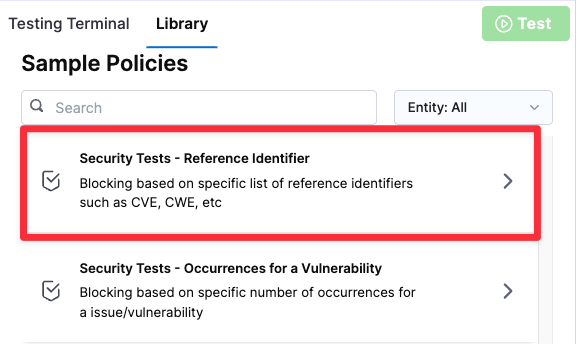
3. Select a **Security Tests** policy from the [**Policy samples**](#security-tests-policy-samples) library.
Select policy sample
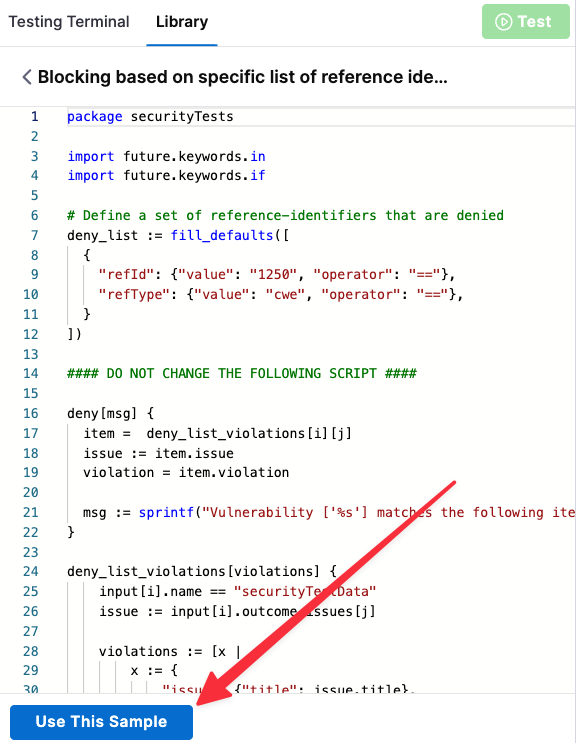
4. Select **Use this sample** (bottom). This copies the entire policy sample to the edit pane (left).
Select policy sample
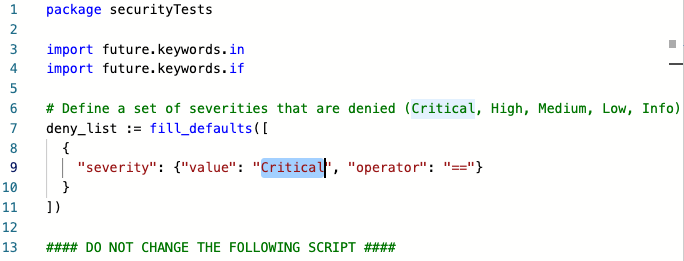
5. Configure the policy as needed. In this example, the policy excludes vulnerabilities with a severity of Critical.
Select policy sample
6. Test your policy to verify that it works as intended.
Each policy sample includes a set of test data that you can use. In the **Testing Terminal**, examine the test data and edit it as needed. Then click **Test** to verify the results.
It is good practice to test both a Success and Failure case for your policy. The following example illustrates this workflow.
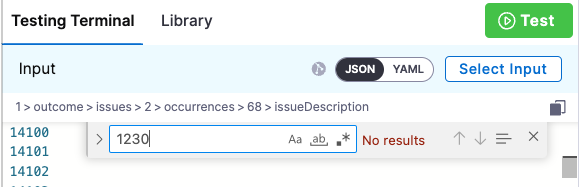
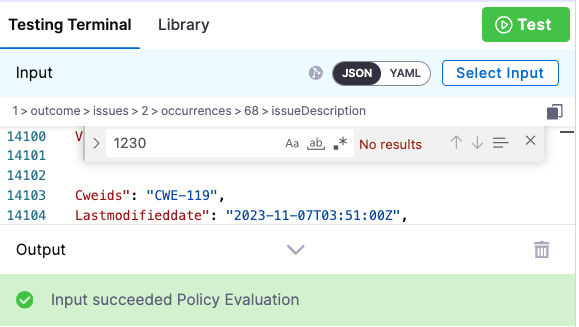
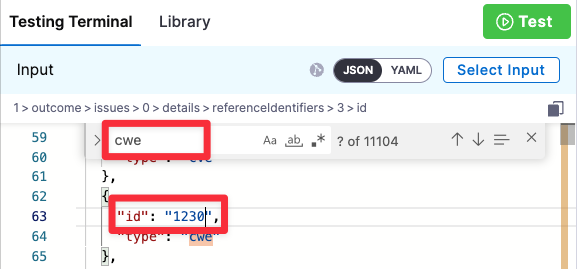
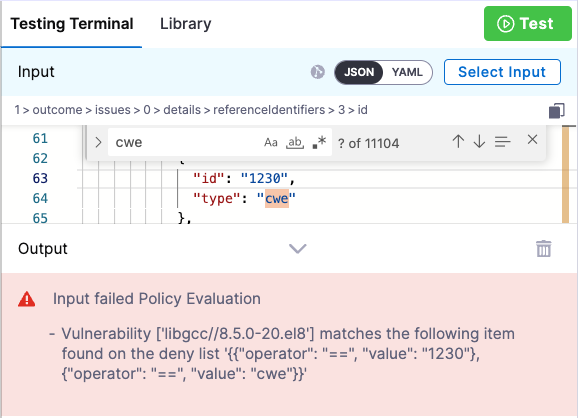
In this example, the policy denies on reference ID CWE-1230. In this case, you would do the following:
1. Search the test results for the string `1230`. In this case, the ID is not found.
Select policy sample
2. Click **Test**. The test succeeds.
Select policy sample
3. Search the test results for the string `cwe` and edit an entry so it matches the reference ID.
Select policy sample
4. Click **Test** again. The test fails because the data includes the specified CWE.
Select policy sample
7. Once you're satisfied that the policy works as intended, save it.
#### Create a policy set
A [policy set](/harness-platform/use-harness-platform/governance/policy-as-code/harness-governance-overview.md#harness-policy-set) is a collection of one or more policies. You combine policies into a set and then include it in a scan step.
1. Go to **Security and Governance** > **Policies**. Then click **Policy Sets** (top right) and then **New Policy Set**.
2. Click **New Policy Set**. The Policy Set wizard appears.
3. Overview:
1. Name — Enter a descriptive name such as **myorg/myimage policies**.
2. Entity type this policy applies to = **Security Tests**
3. On what event should the policy be set to = **On Step**
These settings allow you to apply the member policies to a specific step, which you'll define below.
4. Policy evaluation criteria:
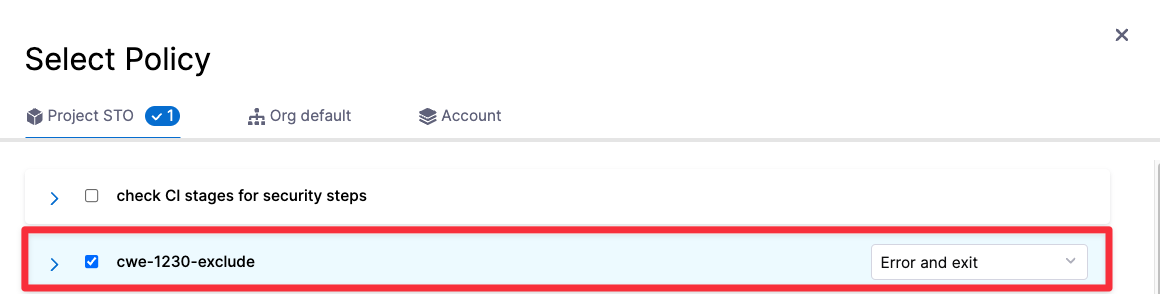
1. Click **Add Policy**.
2. Select the policy you just created and set the pull-down to **Error and Exit**. This is the action to take if any policies in the set are violated.
Select policy sample
3. Click **Apply** to add the policy to the set, then **Finish** to close the Policy Set wizard.
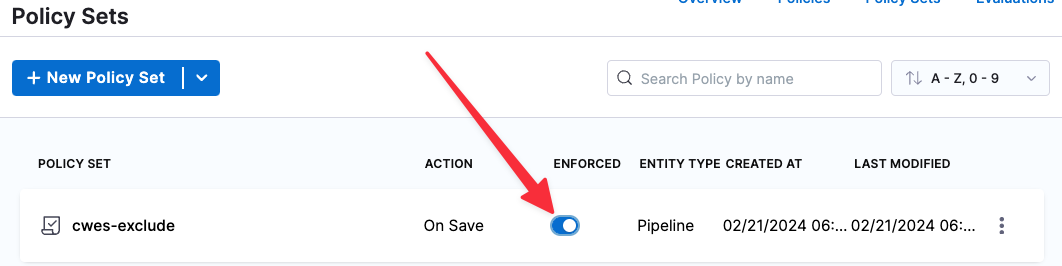
5. :exclamation: In the **Policy Sets** page, enable **Enforced** for your new policy set.
Select policy sample
#### Enforce the policy in your scan step
Now you can set up your scan step to stop builds automatically when the policy gets violated.
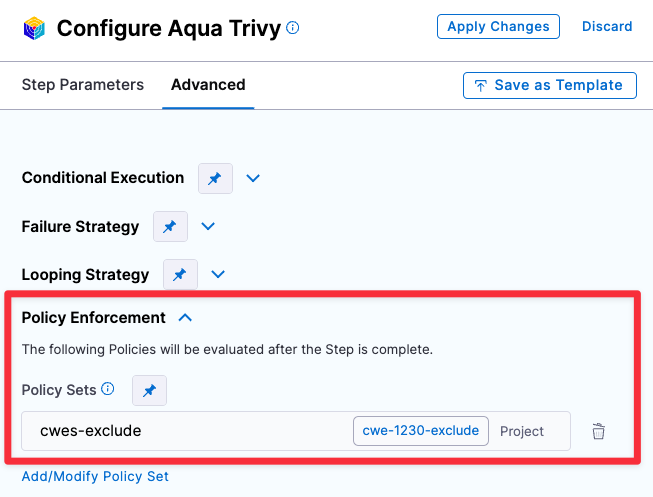
1. Go to the scan step and click **Advanced**.
2. Under **Policy Enforcement**, click **Add/Modify Policy Set** and add the policy set you just created.
3. Click **Apply Changes** and then save the updated pipeline.
Select policy sample
#### Set up email notifications for pipeline failures
You have a Policy that fails the pipeline based on an OPA policy. Now you can configure the stage to send an email notification automatically whenever the pipeline fails.
1. Click **Notifications** (right-side menu). The New Notification wizard appears.
2. Set up the notification as follows:
1. Overview page — Enter a notification name such as **Pipeline failed -- NEW\_CRITICAL or NEW\_HIGH issues detected**.
2. Pipeline Events page — Select **Stage Failed** for the event that triggers the notification. Then select the stage that has the Policy step you just created.

3. Notification Method page — Specify **Email** for the method and specify the recipient emails.
### YAML pipeline example
The following pipeline that can generate two different notifications. If the code scan detects any CRITICAL or NEW\_CRITICAL issues, it sends an automated email like this:
```
"STO scan of sto-notification-example found the following issues:
Critical : 1
New Critical : 0
High: 0
New High: 0
Medium: 0
New Medium: 0
See https://app.harness.io/ng/#/account/XXXXXXXXXXXXXXXXXXXXXX/sto/orgs/default/"
```
If the scan finds any NEW\_CRITICAL or NEW\_HIGH issues, it stops the pipeline execution and sends an email like this:
```
Stage Block_on_New_Critical_and_New_High_issues failed in pipeline stonotifyexample_-_v3
triggered by D*** B******
Started on Fri Apr 07 14:53:34 GMT 2023 and StageFailed on Fri Apr 07 14:53:36 GMT 2023
Execution URL https://app.harness.io/ng/#/account/XXXXXXXXXXXXXXXXXXXXXX/sto/orgs/default/projects/myProject/pipelines/stonotifyexample_-_v3/executions/XXXXXXXXXXXXXXXXXXXXXX/pipeline
2s
```
Here's the full pipeline. Note that the policy and policy set are referenced, but not defined, in the pipeline itself.
```yaml
pipeline:
name: sto-notification-example
identifier: stonotifyexample
projectIdentifier: default
orgIdentifier: default
tags: {}
properties:
ci:
codebase:
connectorRef: YOUR_CODE_REPO_CONNECTOR_ID
build: <+input>
stages:
- stage:
name: banditScanStage
identifier: banditScanStage
description: ""
type: SecurityTests
spec:
cloneCodebase: true
execution:
steps:
- step:
type: Bandit
name: Bandit_1
identifier: Bandit_1
spec:
mode: orchestration
config: default
target:
name: dvpwaScanStep-v3
type: repository
variant: <+codebase.branch>
advanced:
log:
level: info
infrastructure:
type: KubernetesDirect
spec:
connectorRef: YOUR_KUBERNETES_CLUSTER_CONNECTOR_ID
namespace: YOUR_NAMESPACE
automountServiceAccountToken: true
nodeSelector: {}
os: Linux
- stage:
name: Block on New-Critical and New-High issues
identifier: Block_on_New_Critical_and_New_High_issues
description: ""
type: Custom
spec:
execution:
steps:
- step:
type: Email
name: emailOnNotification
identifier: Email_1
spec:
to: john.smithh@myorg.org
cc: ""
subject: "STO ALERT: Critical issues found in <+pipeline.name>"
body: |-
"STO scan of <+pipeline.name> found the following issues:
Critical : <+pipeline.stages.banditScanStage.spec.execution.steps.Bandit_1.output.outputVariables.CRITICAL>
New Critical : <+pipeline.stages.banditScanStage.spec.execution.steps.Bandit_1.output.outputVariables.NEW_CRITICAL>
High: <+pipeline.stages.banditScanStage.spec.execution.steps.Bandit_1.output.outputVariables.HIGH>
New High: <+pipeline.stages.banditScanStage.spec.execution.steps.Bandit_1.output.outputVariables.NEW_HIGH>
Medium: <+pipeline.stages.banditScanStage.spec.execution.steps.Bandit_1.output.outputVariables.MEDIUM>
New Medium: <+pipeline.stages.banditScanStage.spec.execution.steps.Bandit_1.output.outputVariables.NEW_MEDIUM>
See https://app.harness.io/ng/#/account/MY_ACCOUNT_ID/sto/orgs/default/"
timeout: 1d
when:
stageStatus: All
condition: <+pipeline.stages.banditScanStage.spec.execution.steps.Bandit_1.output.outputVariables.NEW_CRITICAL> > 0 || <+pipeline.stages.banditScanStage.spec.execution.steps.Bandit_1.output.outputVariables.CRITICAL> > 0
- step:
type: Policy
name: Policy_1
identifier: Policy_1
spec:
policySets:
- account.Security_Set_Block_on_Issue_Severity
type: Custom
policySpec:
payload: |-
{
"NEW_CRITICAL": <+pipeline.stages.banditScanStage.spec.execution.steps.Bandit_1.output.outputVariables.NEW_CRITICAL>,
"NEW_HIGH": <+pipeline.stages.banditScanStage.spec.execution.steps.Bandit_1.output.outputVariables.NEW_HIGH>
}
timeout: 10m
failureStrategies: []
tags: {}
notificationRules:
- name: example sto test
identifier: example_sto_test
pipelineEvents:
- type: StageFailed
forStages:
- Block_on_Critical_and_High_issues
notificationMethod:
type: Email
spec:
userGroups: []
recipients:
- john.smithh@myorg.org
enabled: true
```
{% @harness-feedback/feedback %}