> For the complete documentation index, see [llms.txt](https://developer.harness.io/llms.txt). Markdown versions of documentation pages are available by appending `.md` to page URLs; this page is available as [Markdown](https://developer.harness.io/security-testing-orchestration/use-sto/enforce-sto-policies-for-governance/enforce-opa-policies.md).
# Use security test policies to stop STO pipelines automatically
Use security test policies to stop pipelines automatically.
Once you [create one or more OPA policies for your STO pipelines](/security-testing-orchestration/use-sto/enforce-sto-policies-for-governance/create-opa-policies.md), you can enforce them as described in the following workflow.
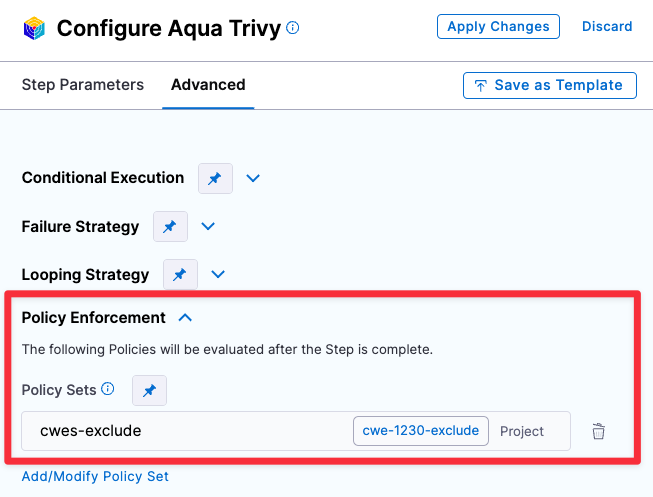
1. Go to the scan step your STO pipeline and click **Advanced**.
2. Under **Policy Enforcement**, click **Add/Modify Policy Set** and add the policy set you just created.
3. Click **Apply Changes** and then save the updated pipeline.
Select policy sample
#### Set up notifications for pipeline failures
You have a Policy that fails the pipeline based on an OPA policy. Now you can configure your pipeline to send notification automatically whenever it fails.
For more information, go to the following:
* [Set up email notifications](/security-testing-orchestration/use-sto/sto-set-notifications/email-notifications.md)
* [Set up Slack notifications](/security-testing-orchestration/use-sto/sto-set-notifications/slack-notifications.md)
### YAML pipeline example
The following pipeline that can generate two different notifications. If the code scan detects any CRITICAL or NEW\_CRITICAL issues, it sends an automated email like this:
```
"STO scan of sto-notification-example found the following issues:
Critical : 1
New Critical : 0
High: 0
New High: 0
Medium: 0
New Medium: 0
See https://app.harness.io/ng/#/account/XXXXXXXXXXXXXXXXXXXXXX/sto/orgs/default/"
```
If the scan finds any NEW\_CRITICAL or NEW\_HIGH issues, it stops the pipeline execution and sends an email like this:
```
Stage Block_on_New_Critical_and_New_High_issues failed in pipeline stonotifyexample_-_v3
triggered by D*** B******
Started on Fri Apr 07 14:53:34 GMT 2023 and StageFailed on Fri Apr 07 14:53:36 GMT 2023
Execution URL https://app.harness.io/ng/#/account/XXXXXXXXXXXXXXXXXXXXXX/sto/orgs/default/projects/myProject/pipelines/stonotifyexample_-_v3/executions/XXXXXXXXXXXXXXXXXXXXXX/pipeline
2s
```
Here's the full pipeline. Note that the policy and policy set are referenced, but not defined, in the pipeline itself.
```yaml
pipeline:
name: sto-notification-example
identifier: stonotifyexample
projectIdentifier: default
orgIdentifier: default
tags: {}
properties:
ci:
codebase:
connectorRef: YOUR_CODE_REPO_CONNECTOR_ID
build: <+input>
stages:
- stage:
name: banditScanStage
identifier: banditScanStage
description: ""
type: SecurityTests
spec:
cloneCodebase: true
execution:
steps:
- step:
type: Bandit
name: Bandit_1
identifier: Bandit_1
spec:
mode: orchestration
config: default
target:
name: dvpwaScanStep-v3
type: repository
variant: <+codebase.branch>
advanced:
log:
level: info
infrastructure:
type: KubernetesDirect
spec:
connectorRef: YOUR_KUBERNETES_CLUSTER_CONNECTOR_ID
namespace: YOUR_NAMESPACE
automountServiceAccountToken: true
nodeSelector: {}
os: Linux
- stage:
name: Block on New-Critical and New-High issues
identifier: Block_on_New_Critical_and_New_High_issues
description: ""
type: Custom
spec:
execution:
steps:
- step:
type: Email
name: emailOnNotification
identifier: Email_1
spec:
to: john.smithh@myorg.org
cc: ""
subject: "STO ALERT: Critical issues found in <+pipeline.name>"
body: |-
"STO scan of <+pipeline.name> found the following issues:
Critical : <+pipeline.stages.banditScanStage.spec.execution.steps.Bandit_1.output.outputVariables.CRITICAL>
New Critical : <+pipeline.stages.banditScanStage.spec.execution.steps.Bandit_1.output.outputVariables.NEW_CRITICAL>
High: <+pipeline.stages.banditScanStage.spec.execution.steps.Bandit_1.output.outputVariables.HIGH>
New High: <+pipeline.stages.banditScanStage.spec.execution.steps.Bandit_1.output.outputVariables.NEW_HIGH>
Medium: <+pipeline.stages.banditScanStage.spec.execution.steps.Bandit_1.output.outputVariables.MEDIUM>
New Medium: <+pipeline.stages.banditScanStage.spec.execution.steps.Bandit_1.output.outputVariables.NEW_MEDIUM>
See https://app.harness.io/ng/#/account/MY_ACCOUNT_ID/sto/orgs/default/"
timeout: 1d
when:
stageStatus: All
condition: <+pipeline.stages.banditScanStage.spec.execution.steps.Bandit_1.output.outputVariables.NEW_CRITICAL> > 0 || <+pipeline.stages.banditScanStage.spec.execution.steps.Bandit_1.output.outputVariables.CRITICAL> > 0
- step:
type: Policy
name: Policy_1
identifier: Policy_1
spec:
policySets:
- account.Security_Set_Block_on_Issue_Severity
type: Custom
policySpec:
payload: |-
{
"NEW_CRITICAL": <+pipeline.stages.banditScanStage.spec.execution.steps.Bandit_1.output.outputVariables.NEW_CRITICAL>,
"NEW_HIGH": <+pipeline.stages.banditScanStage.spec.execution.steps.Bandit_1.output.outputVariables.NEW_HIGH>
}
timeout: 10m
failureStrategies: []
tags: {}
notificationRules:
- name: example sto test
identifier: example_sto_test
pipelineEvents:
- type: StageFailed
forStages:
- Block_on_Critical_and_High_issues
notificationMethod:
type: Email
spec:
userGroups: []
recipients:
- john.smithh@myorg.org
enabled: true
```
{% @harness-feedback/feedback %}