> For the complete documentation index, see [llms.txt](https://developer.harness.io/llms.txt). Markdown versions of documentation pages are available by appending `.md` to page URLs; this page is available as [Markdown](https://developer.harness.io/security-testing-orchestration/use-sto/risk-and-priortization/epss-score.md).
# EPSS score
Learn how EPSS scores help prioritize vulnerabilities based on exploitation likelihood.
Harness STO helps you identify security issues early in the pipeline by shifting vulnerability management left. However, identifying vulnerabilities alone is not sufficient. Prioritizing them based on risk is equally important.
STO also surfaces [CISA KEV](/security-testing-orchestration/use-sto/risk-and-priortization/cisa-kev.md) status for CVE-associated issues. EPSS predicts exploitation likelihood; CISA KEV confirms whether CISA has documented active exploitation. Use both signals together when you prioritize remediation.
### What is EPSS score?
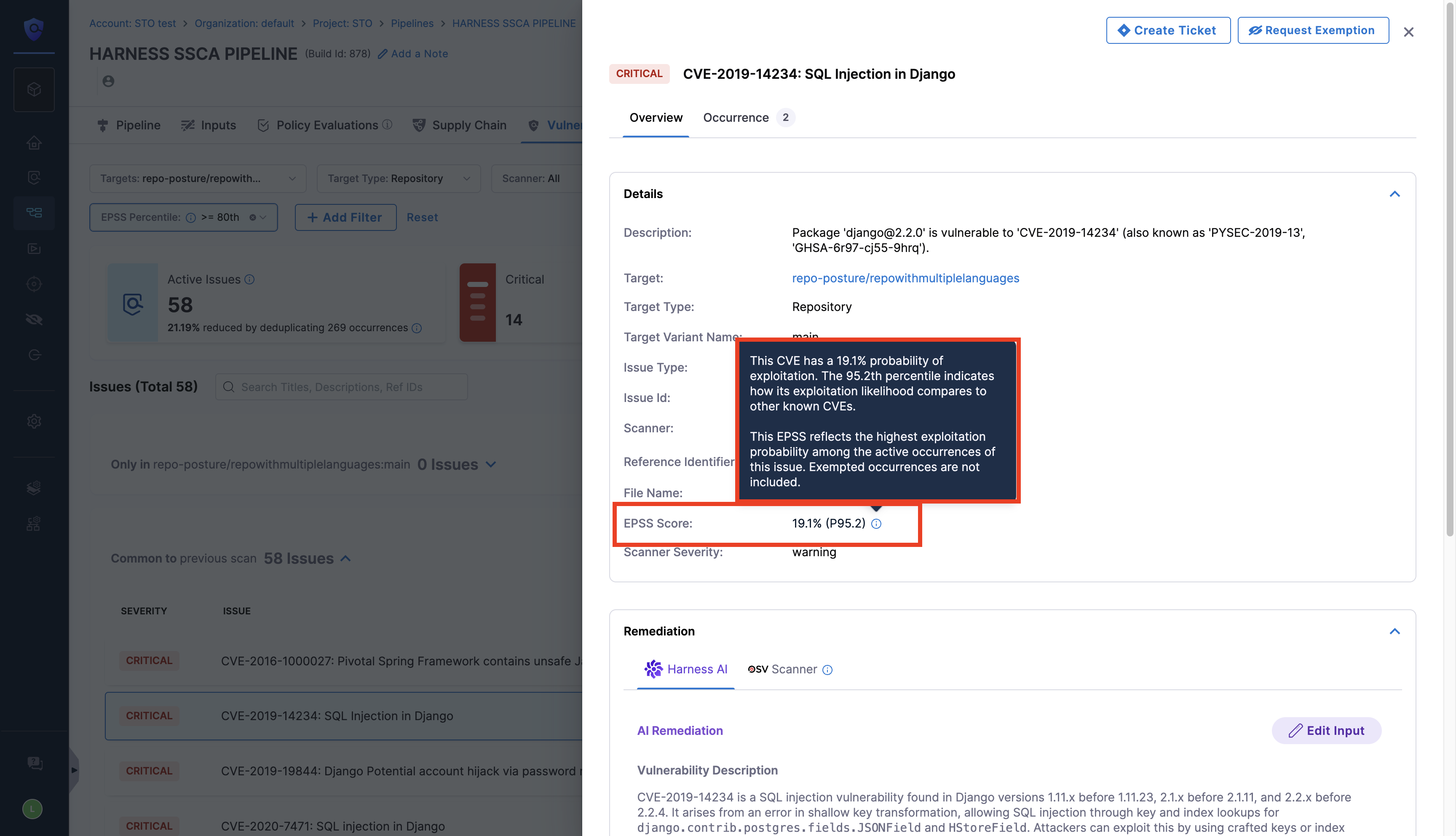
To support risk-based prioritization, Harness STO surfaces the **Exploit Prediction Scoring System (EPSS) score** on the **Issues** and **Vulnerabilities** pages. EPSS provides:
**Probability:** The likelihood (0–100%) that a [Common Vulnerabilities and Exposures (CVE)](https://www.cve.org/) will be exploited in the wild within the next 30 days.
**Percentile:** The relative ranking of the CVE’s exploitation likelihood compared to other CVEs.
Most vulnerabilities, including High or Critical issues rated by the [Common Vulnerability Scoring System (CVSS)](https://www.first.org/cvss/examples), are never exploited in the wild. A vulnerability can have a CVSS score of 9 or 10 yet remain unlikely to be exploited. EPSS uses risk-based signals to help you prioritize real-world exploitation.
{% hint style="info" %}
* EPSS scores are updated once every 24 hours.
* Issues with a CVE ID receive an EPSS score.
* This feature requires the `STO_ISSUE_EPSS` feature flag. Contact [Harness Support](mailto:support@harness.io) to enable it.
{% endhint %}
#### View EPSS scores
In the **Issues** section, select an issue to open the Issue Details panel. You can view the EPSS score for issues with a CVE ID. You can also view EPSS scores on the [Vulnerabilities](/security-testing-orchestration/use-sto/sto-security-issues/view-scan-results.md) tab. Apply filters based on **EPSS probability** and **percentile**.
#### Enforce an OPA policy
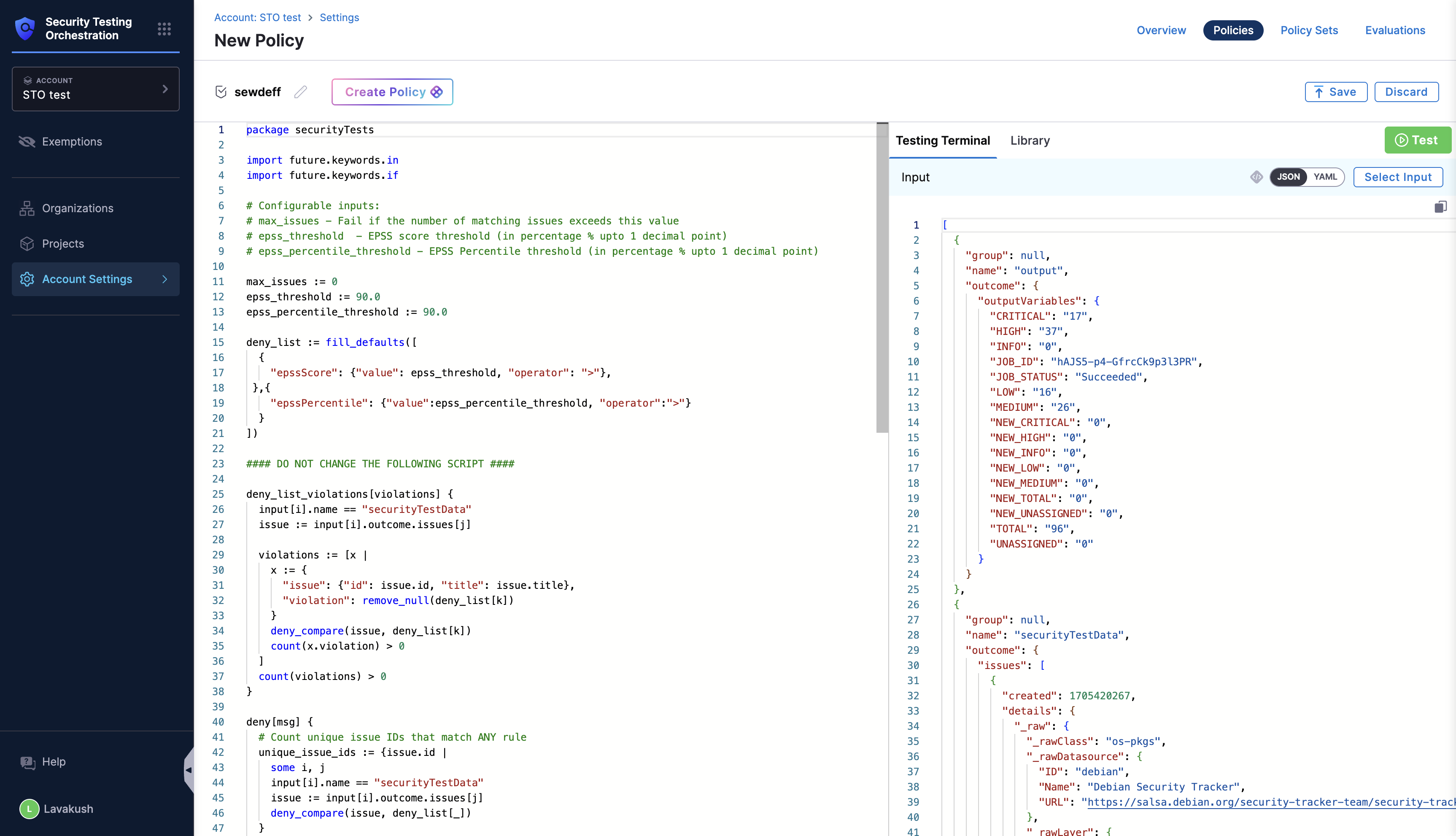
Block vulnerabilities based on EPSS probability and percentile with an [OPA policy](/security-testing-orchestration/use-sto/enforce-sto-policies-for-governance/create-opa-policies.md#warn-or-block-vulnerabilities-based-on-the-epss-score). Navigate to **Account Settings**, select **Policies**, and search for the EPSS policy. Open the policy and configure the maximum EPSS threshold and percentile. The policy blocks vulnerabilities that exceed those values.
{% @harness-feedback/feedback %}