> For the complete documentation index, see [llms.txt](https://developer.harness.io/llms.txt). Markdown versions of documentation pages are available by appending `.md` to page URLs; this page is available as [Markdown](https://developer.harness.io/security-testing-orchestration/use-sto/sto-dashboards-and-reports/sto-dashboards-overview.md).
# STO Dashboards overview
Explore, navigate, and use dashboards by STO.
In Harness, [Dashboards](/harness-platform/use-harness-platform/harness-dashboards/dashboard-legacy/dashboards-overview.md) provide a visual interface to gather, analyze, and monitor data across different modules. Each module contributes its own dashboards with metrics relevant to that module’s functionality. All dashboards are available at the **Account level** only.
STO dashboards offer visibility into security tests, scan results, scanner usage, targets, and pipeline execution data etc. Each dashboard includes charts, tables, and graphs, along with filters that help you drill down into specific data as needed.
STO includes the following dashboards:
* [**Security Testing Dashboard**](/security-testing-orchestration/use-sto/sto-dashboards-and-reports/security-testing-dashboard.md)
* [**STO Usage Dashboard**](/security-testing-orchestration/use-sto/sto-dashboards-and-reports/sto-usage-dashboard.md)
* [**STO Pipeline Execution Summary**](/security-testing-orchestration/use-sto/sto-dashboards-and-reports/sto-pipeline-execution-summary.md)
* [**STO All Occurrences Dashboard**](/security-testing-orchestration/use-sto/sto-dashboards-and-reports/all-occurences-dashboard.md)
Each dashboard presents data based on its specific focus. For more information, see the documentation for each dashboard.
{% hint style="info" %}
You can also create custom dashboards tailored to your specific use case. Refer to [Create Dashboards](/harness-platform/use-harness-platform/harness-dashboards/dashboard-legacy/create-dashboards.md) documentation to learn more.
{% endhint %}
### View STO Dashboards
To access STO dashboards in Harness:
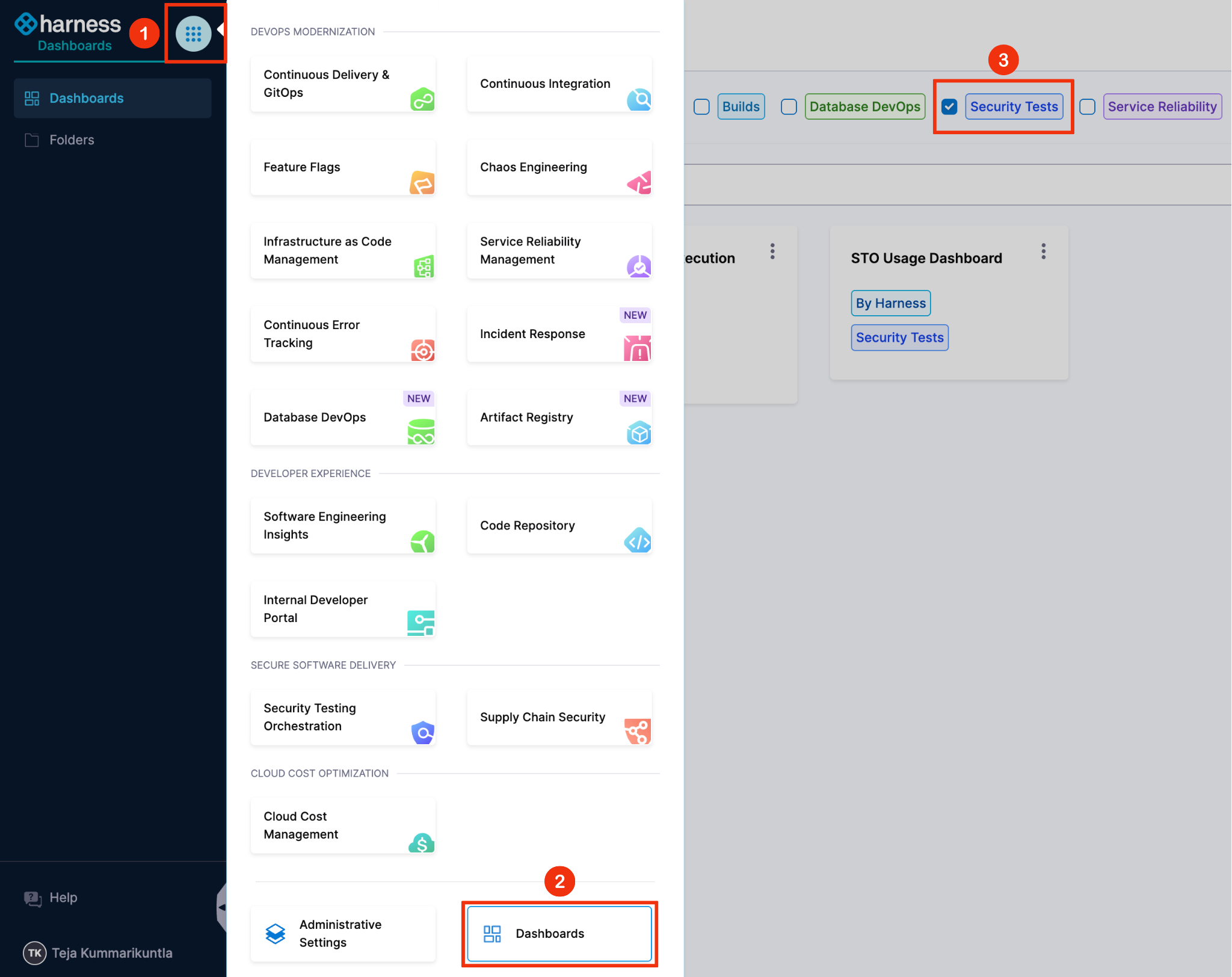
1. Click the **Grid** icon in the top-left menu.
2. Select **Dashboards**.
3. Choose **Security Tests** from the list.
Dashboards provided by STO are labeled with **Security Tests** and tagged as **By Harness**.