> For the complete documentation index, see [llms.txt](https://developer.harness.io/llms.txt). Markdown versions of documentation pages are available by appending `.md` to page URLs; this page is available as [Markdown](https://developer.harness.io/security-testing-orchestration/use-sto/sto-scanner-configuration/semgrep/sast-scan-semgrep.md).
# Tutorial: SAST code scans using Semgrep
Scan a codebase using Semgrep
This tutorial shows you how to scan your codebases using [Semgrep](https://semgrep.dev), a popular tool for detecting vulnerabilities in application code. Semgrep can scan a [wide variety of languages](https://semgrep.dev/docs/supported-languages/) and includes a [free version](https://semgrep.dev/pricing/) for individuals who want to scan files locally.
In this tutorial, you'll set up a simple pipeline with a Semgrep step running in orchestration mode.

{% hint style="info" %}
**IMPORTANT NOTES**
* This tutorial uses the free version of Semgrep to run simple SAST scans. More advanced workflows are possible but are outside the scope of this tutorial.
* Semgrep scans use an agent that [uploads data to the Semgrep cloud](https://semgrep.dev/docs/metrics/) by default. Semgrep uses this data to improve the user experience. Therefore this tutorial is not suitable for air-gapped environments.
* This tutorial has the following prerequisites:
* A [connector](/harness-ai/use-harness-platform/connectors/code-repositories.md) to your Git account (for example, `http://github.com/my-account`)
* Your connector should use a [Harness text secret](/harness-ai/use-harness-platform/secrets/add-use-text-secrets.md) for your Git access token.
{% endhint %}
### Set up your pipeline
Do the following:
1. Select **Security Testing Orchestration** (left menu, top) > **Pipelines** > **Create a Pipeline**. Enter a name and click **Start**.
2. In the new pipeline, select **Add stage** > **Security**.
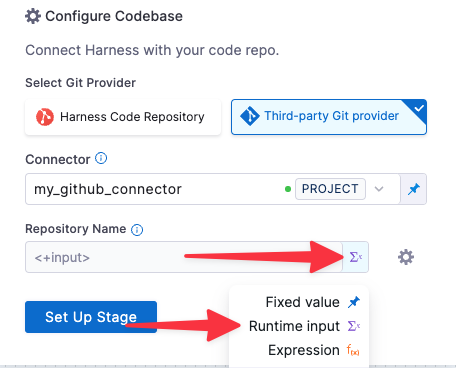
1. Under **Configure Codebase**, select the connector to your Git account.
2. In **Repository Name**, open the value-type pulldown (right) and select **Runtime Input**.
Configure codebase to specify repository at runtime
3. Go to **Infrastructure** and select **Cloud**, **Linux**, and **AMD64** for the infrastructure, OS, and architecture.
### Add the Semgrep step
1. In **Execution**, click **Add step** and select **Semgrep**.
2. In the Semgrep step, verify that the Scan mode is **Orchestration**.
3. Set [**Fail on Severity**](/security-testing-orchestration/new-to-sto/key-concepts/fail-pipelines-by-severity.md) to **Medium**.
4. Apply your changes and save the pipeline.
### Run the pipeline and check your results
1. Run the pipeline: click **Run** (top right). The **Run Pipeline** dialog box appears.
2. Enter the repository and branch to scan.
When you scan a codebase for the first time, the standard practice is to scan the root branch. This is usually the `main` or `master` branch.
3. Run the pipeline and then wait for the execution to finish.
If the scan detected any critical vulnerabilities, the pipeline fails with the message `Exited with message: fail_on_severity is set to critical and that threshold was reached.`

4. Select **Vulnerabilities** and examine any issues detected by your scan.

### Specify the baseline
{% hint style="info" %}
It is [good practice](/security-testing-orchestration/new-to-sto/key-concepts/targets-and-baselines.md#every-target-needs-a-baseline) to specify a baseline for every target. Defining a baseline makes it easy for developers to drill down into "shift-left" issues in downstream variants and security personnel to drill down into "shift-right" issues in the baseline.
{% endhint %}
1. Select **Test Targets** (left menu).
2. Select the baseline you want for your target.

### YAML pipeline example
Here's an example of the pipeline you created in this tutorial. If you copy this example, update `YOUR_GIT_CONNECTOR_ID` with your codebase connector.
```yaml
pipeline:
name: harness_semgrep_tutorial
identifier: harness_semgrep_tutorial
projectIdentifier: default
orgIdentifier: default
tags: {}
stages:
- stage:
name: scan_codebase
identifier: scan_codebase
description: ""
type: SecurityTests
spec:
cloneCodebase: true
platform:
os: Linux
arch: Amd64
runtime:
type: Cloud
spec: {}
execution:
steps:
- step:
type: Semgrep
name: Semgrep_1
identifier: Semgrep_1
spec:
mode: orchestration
config: default
target:
type: repository
detection: auto
advanced:
log:
level: info
fail_on_severity: medium
properties:
ci:
codebase:
connectorRef: YOUR_GIT_CONNECTOR_ID
repoName: <+input>
build: <+input>
```
{% @harness-feedback/feedback %}