> For the complete documentation index, see [llms.txt](https://developer.harness.io/llms.txt). Markdown versions of documentation pages are available by appending `.md` to page URLs; this page is available as [Markdown](https://developer.harness.io/security-testing-orchestration/use-sto/sto-scanner-configuration/snyk/snyk-container-scanning.md).
# Snyk Container scanning
Use Harness STO to perform Snyk Container scan
The Snyk step in Harness STO allows you to find and fix vulnerabilities in container images based on container registry scans. This document helps you to configure Snyk step in your pipeline to perform Snyk Container scanning either through orchestration or ingestion scan modes in STO.
* [**Orchestration mode**](#snyk-container-scan---orchestration-mode): In this mode, the Snyk step [runs the scan](/security-testing-orchestration/new-to-sto/key-concepts/run-an-orchestrated-scan-in-sto.md), then normalizes and deduplicates the results.
* [**Ingestion mode**](#snyk-container-scan---ingestion-mode): In this mode, the Snyk step [reads scan results](/security-testing-orchestration/new-to-sto/key-concepts/ingest-scan-results-into-an-sto-pipeline.md) from a data file, normalizes the data, and deduplicates it.
Refer to the [Snyk step configuration](/security-testing-orchestration/use-sto/sto-scanner-configuration/snyk/snyk-scanner-reference.md) document to learn more about the fields in the Snyk step and how to configure them.
### Snyk Container scan - Orchestration mode
To perform Snyk Container scanning with orchestration scan mode, follow the below steps:
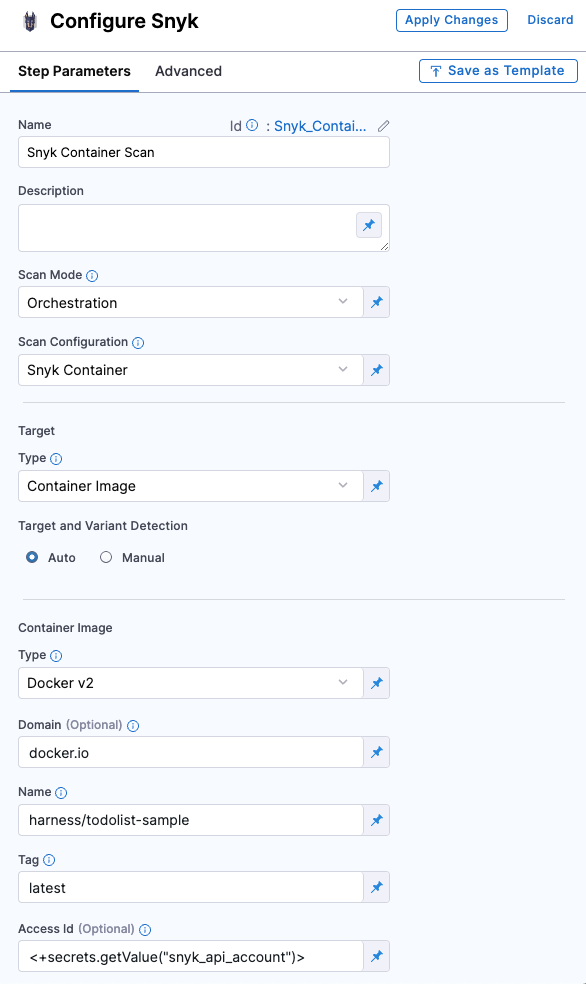
1. Search and add the **Snyk** step to your pipeline. You can use this step in **Build** stage or **Security** stage.
2. In the step configuration, set the following fields
1. Set the [**Scan Mode**](/security-testing-orchestration/use-sto/sto-scanner-configuration/snyk/snyk-scanner-reference.md#scan-mode) to **Orchestration**
2. Under [**Target**](/security-testing-orchestration/use-sto/sto-scanner-configuration/snyk/snyk-scanner-reference.md#target), set the **Type** to **Container**
3. Set the [**Scan Configuration**](/security-testing-orchestration/use-sto/sto-scanner-configuration/snyk/snyk-scanner-reference.md#scan-configuration) to **Snyk Container**
4. For [**Target and Variant Detection**](/security-testing-orchestration/use-sto/sto-scanner-configuration/snyk/snyk-scanner-reference.md#target-and-variant-detection) it's preferred to use **Auto** option or you can define them using the **Manual** option.
5. Under **Container Image** section, set the [**Type**](/security-testing-orchestration/use-sto/sto-scanner-configuration/snyk/snyk-scanner-reference.md#type-1), [**Domain**](/security-testing-orchestration/use-sto/sto-scanner-configuration/snyk/snyk-scanner-reference.md#domain), [**Name**](/security-testing-orchestration/use-sto/sto-scanner-configuration/snyk/snyk-scanner-reference.md#name-1), and [**Tag**](/security-testing-orchestration/use-sto/sto-scanner-configuration/snyk/snyk-scanner-reference.md#tag) of your image.
6. In **Access Id** and **Access Token**, you can pass the username and password of your container registry as Harness Secrets, which helps you access your private images. (Optional)
7. Under [**Authentication**](/security-testing-orchestration/use-sto/sto-scanner-configuration/snyk/snyk-scanner-reference.md#authentication), pass your Snyk API as Harness secret, for example: `<+secrets.getValue("snyk_api_token")>`
Click to view full size image
Refer to [Snyk step configuration](/security-testing-orchestration/use-sto/sto-scanner-configuration/snyk/snyk-scanner-reference.md) document to learn more about all the fields and their configurations.
### Snyk Container scan - Ingestion mode
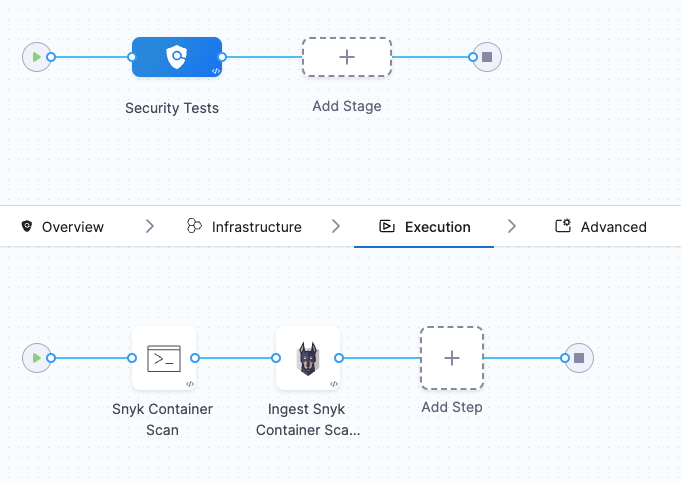
In the Ingestion scan mode, the Snyk step reads data from a file, normalizes it, and deduplicates it. To perform a Snyk Container scan using the Ingestion scan mode, we will use two steps:
1. **Run Step**: Scan the container with the Snyk CLI and save the results to a SARIF file.
2. **Snyk Step**: Ingest the scan results from the SARIF file.
Click to view full size image
\=
#### Requirements
Go to the **Overview** tab of the stage. Under **Shared Paths**, enter the following path: `/shared/scan_results`, this will be the location where the Run step will save the scan results.
#### Configure Run step
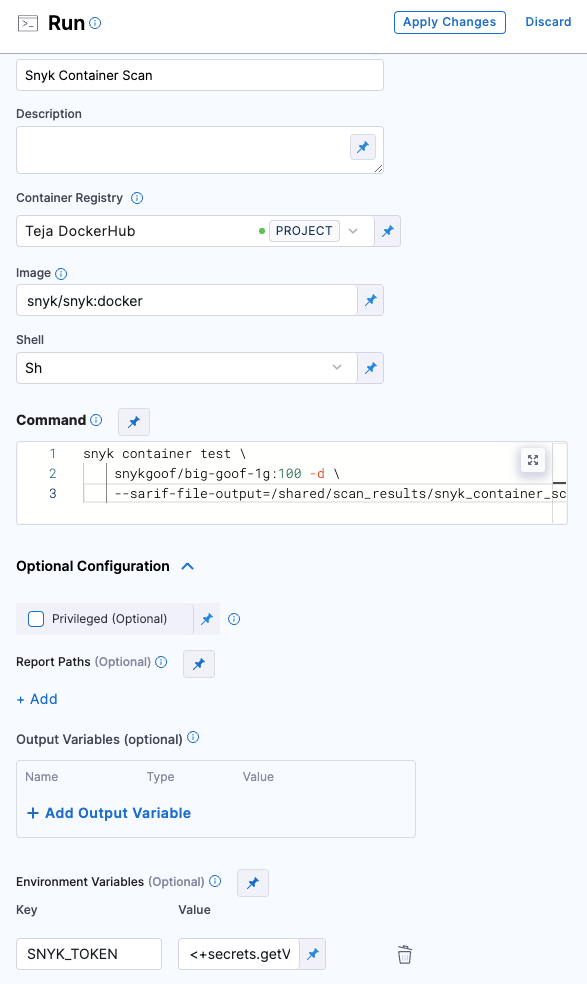
1. Add the **Run** step to the pipeline and open the step configuration.
2. In the **Container Registry** section, set your DockerHub connector. Snyk images will be pulled from their DockerHub account.
3. For **Image**, use `snyk/snyk:docker`
4. Set the **Shell** field to `sh`
5. In the **Command** field, enter the following command.
````
```
snyk container test \ snykgoof/big-goof-1g:100 -d \ --sarif-file-output=/shared/scan_results/snyk_container_scan.sarif || true
```
````
Snyk maintains a set of snykgoof repositories that you can use for testing your container-image scanning workflows.
6. In **Optional Configuration**, under **Environment Variables**, add a variable to access your Snyk API key:\
SNYK\_TOKEN = ``
7. In **Advanced** tab under **Failure Strategies**, set the Failure Strategy to **Mark as Success**. This step is required to ensure that the pipeline proceeds if Snyk finds a vulnerability. Otherwise, the build exits with an error code before STO can ingest the data.
Click to view full size image
\=
#### Configure Snyk step
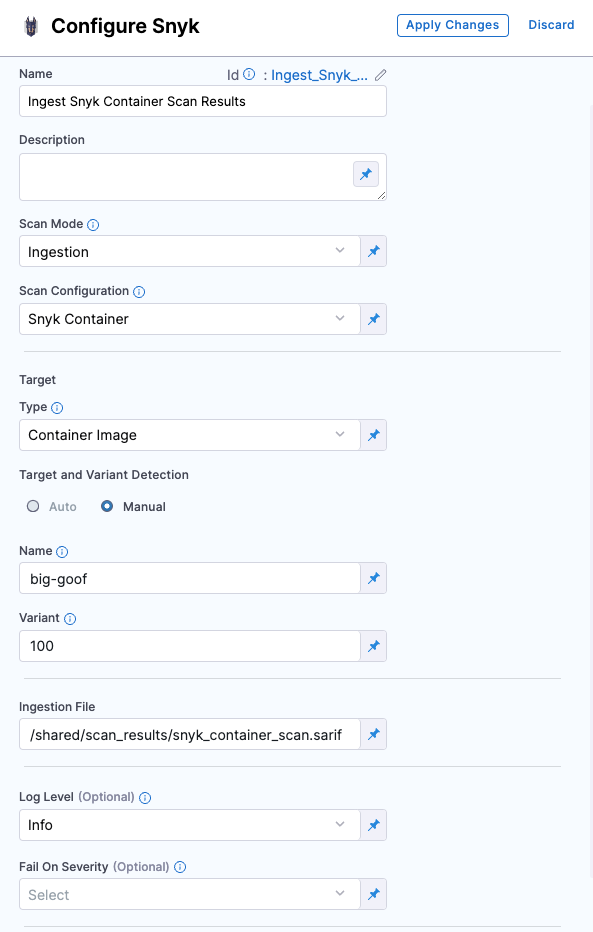
1. Add the **Snyk** step and open the step configuration.
2. Set the [**Scan Mode**](/security-testing-orchestration/use-sto/sto-scanner-configuration/snyk/snyk-scanner-reference.md#scan-mode) to **Ingestion**.
3. Set the [**Target Type**](/security-testing-orchestration/use-sto/sto-scanner-configuration/snyk/snyk-scanner-reference.md#target) to **Container**.
4. For [**Target and Variant Detection**](/security-testing-orchestration/use-sto/sto-scanner-configuration/snyk/snyk-scanner-reference.md#target-and-variant-detection), define them with the **Manual** option selected.
5. In the **Ingestion File** field, enter `/shared/scan_results/snyk_container_scan.sarif`
6. Apply your changes, save the configuration, and run the pipeline.
Click to view full size image
Refer to [Snyk step configuration](/security-testing-orchestration/use-sto/sto-scanner-configuration/snyk/snyk-scanner-reference.md) document to learn more about all the fields and their configurations.
{% @harness-feedback/feedback %}