> For the complete documentation index, see [llms.txt](https://developer.harness.io/llms.txt). Markdown versions of documentation pages are available by appending `.md` to page URLs; this page is available as [Markdown](https://developer.harness.io/service-reliability-management/use-srm/srm-dashboards/srm-dashboard-slo-history.md).
# SLO History
Understand the SLO History dashboard.
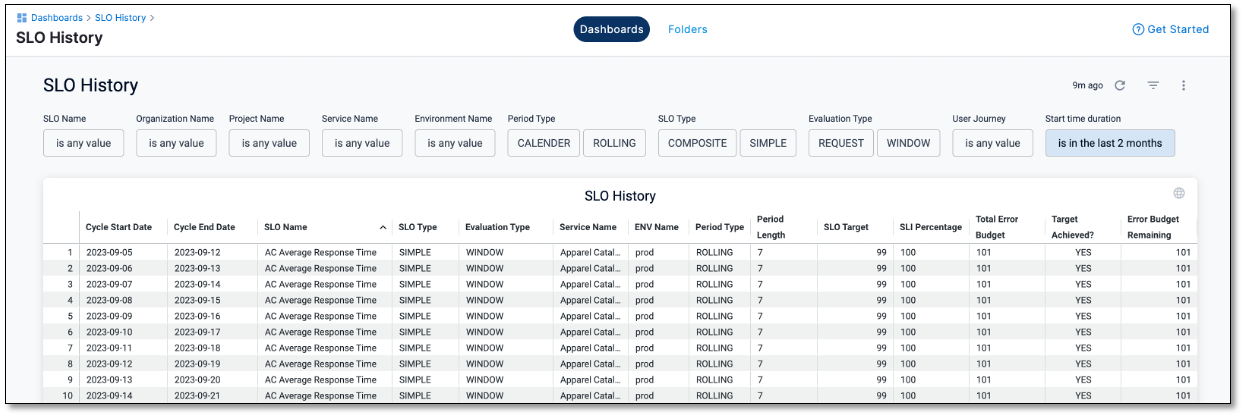
The SLO History dashboard, in its default configuration, provides comprehensive insights into all the SLOs, including their timelines, within your Harness organization.
## View SLO History dashboard
To access the SLO History dashboard, do the following:
1. Within your Harness project, navigate to **Dashboards**. On the Dashboards page, select **Service Reliability**.
The dashboard list is displayed, that includes the default SLO Health and SLO History dashboards.
2. Select the **SLO History** dashboard.
The SLO History dashboard is displayed.
## Explore SLO History dashboard
The SLO History dashboard displays the following key metrics:
* **Cycle start and end dates**: The time frame within which the SLO data is recorded.
* **SLO name**: The name of the SLO.
* **SLO type**: The type or category of the SLO. For example, simple or composite.
* **Evaluation type**: The method used for evaluating the SLO. For example, window or request-based.
* **Environment name**: The environment where the SLO is applied. For example, production, Terraform, and so on.
* **Service name**: The name of the service associated with the SLO.
* **Period length**: The duration over which the SLO is measured.
* **Period type**: The type of time period for measurement. For example, calendar or rolling.
* **SLO Target**: Your set SLO target percentage.
* **SLI percentage**: The percentage of Service Level Indicators (SLIs) achieved for the corresponding SLOs. SLIs are specific metrics used to evaluate SLOs.
* **Total error budget**: The overall error budget allocated for the SLOs, which represents the acceptable margin of error.
* **Target achieved**: Indicates whether the SLO target has been met, denoted as 'Yes' or 'No.'
* **Remaining error budget**: The remaining portion of the error budget.
{% hint style="info" %}
**NOTE**
You can customize the data displayed in the SLO History tile using filters to focus on specific aspects of your SLO health metrics and history.
{% endhint %}
{% @harness-feedback/feedback %}