> For the complete documentation index, see [llms.txt](https://developer.harness.io/llms.txt). Markdown versions of documentation pages are available by appending `.md` to page URLs; this page is available as [Markdown](https://developer.harness.io/software-engineering-insights/use-software-engineering-insights/setup-sei/sei-profiles/workflow-profiles/workflow-profile-overview.md).
# Overview
Use Workflow profiles to define stages, events, and measurement criteria for Lead Time reporting.
Workflow profiles in Software Engineering Insights enable you to define developer processes and measurement criteria for evaluating the efficacy of your organization's entire software development lifecycle. These profiles allow you to measure key metrics such as [DORA (DevOps Research and Assessment)](https://dora.dev/) and [Lead Time](/software-engineering-insights/use-software-engineering-insights/setup-sei/sei-profiles/workflow-profiles/velocity-profile.md), providing valuable insights into the time taken to ship changes or deploy bug fixes to production.
{% hint style="info" %}
**IMPORTANT**
Only **Harness Account Admins** or **SEI Admins** can create and manage these profiles. The best person to set them up is someone who knows exactly how software gets developed in your organization and can replicate the end-to-end software delivery process of your organization.
{% endhint %}
### Types of Workflow profiles
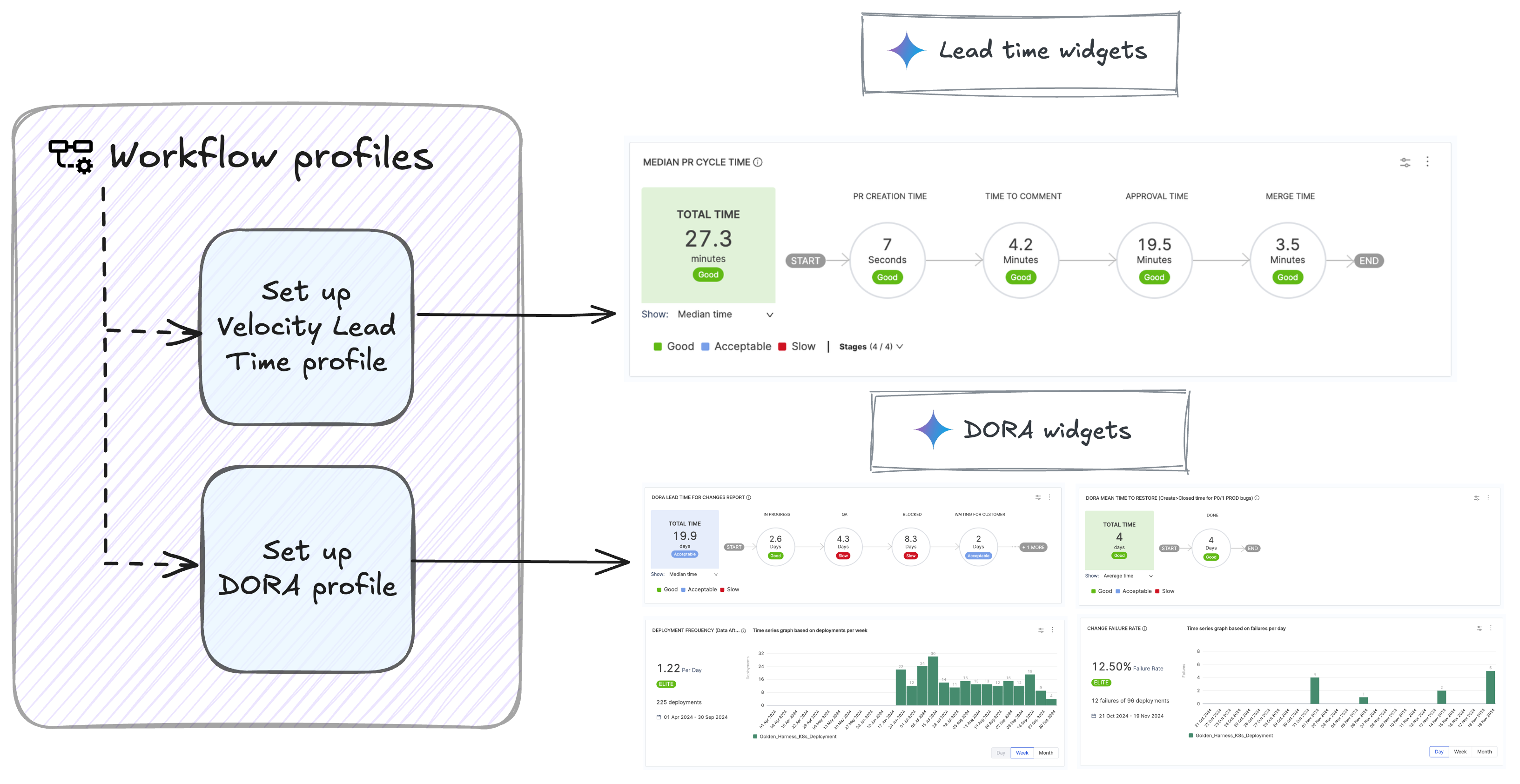
Workflow profiles in Harness are of two types:
* [DORA profile](#dora-profile)
* [Velocity Lead Time profile](#velocity-lead-time-profile)
Click to view full size image
#### DORA profile
DORA metrics are critical for evaluating and improving engineering team performance. The four DORA metrics are:
* Lead Time for Changes
* Deployment Frequency
* Mean Time to Restore (MTTR)
* Change Failure Rate
A DORA Profile defines thresholds for these metrics based on your organization’s delivery process. It ensures consistency and alignment with industry best practices while serving as the foundation for measuring these metrics across engineering teams.
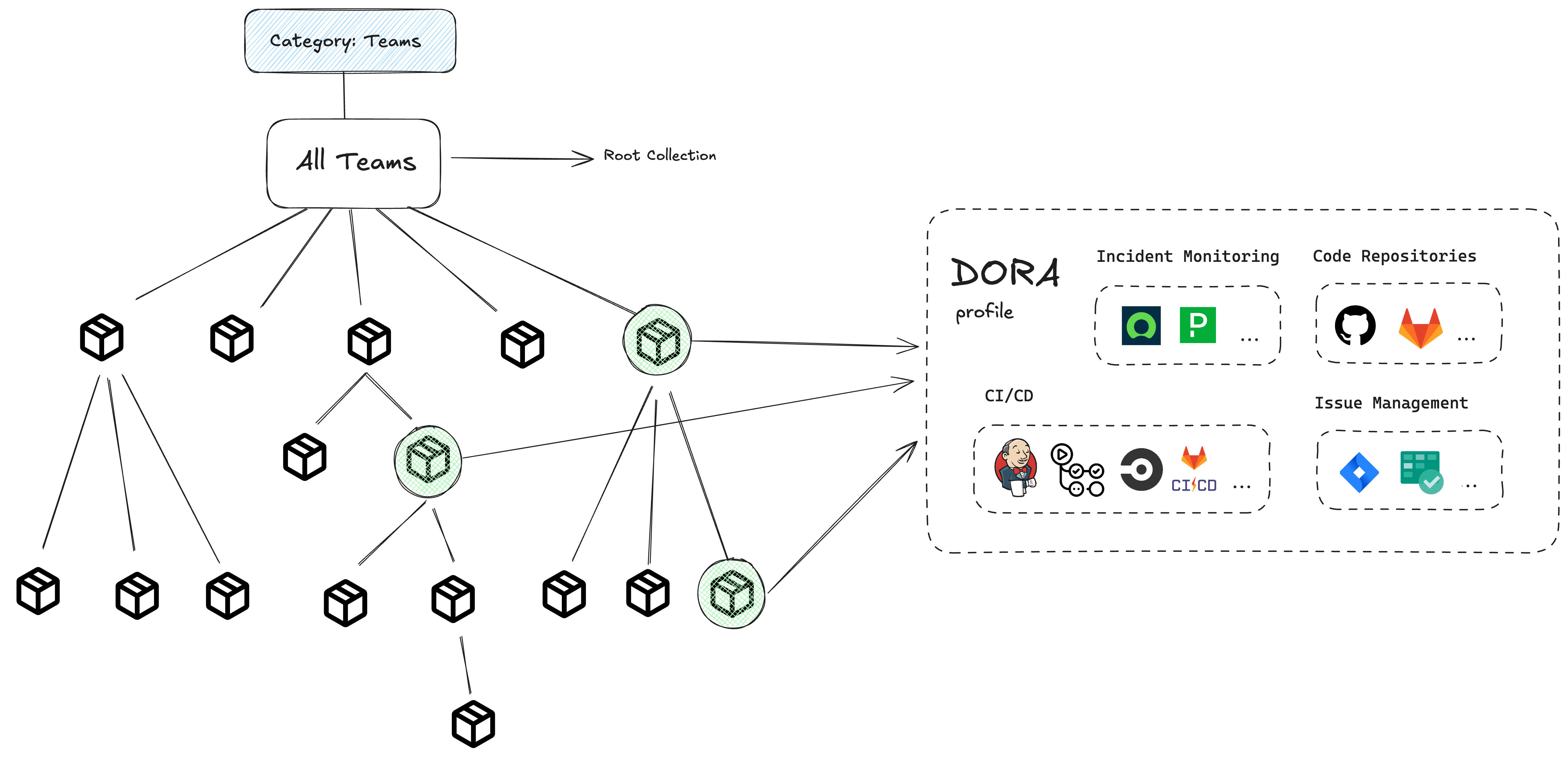
* It serves as a single source of truth for these metrics and ensures consistent measurement across tools like SCMs, CI/CD platforms, and issue management systems.
* Each DORA profile must be associated with a [Collection (a group of contributors)](/software-engineering-insights/use-software-engineering-insights/setup-sei/sei-projects-and-collections/manage-collections.md).
* While multiple collections can use the same DORA Profile, a collection cannot have more than one associated DORA profile.
* Harness SEI provides a default DORA profile with pre-configured SCM definitions, which can be customized.
Click to view full size image
**What's next**
* [Create & manage the DORA profile](/software-engineering-insights/use-software-engineering-insights/setup-sei/sei-profiles/workflow-profiles/dora-profile.md)
* [Add & configure the DORA widgets](/software-engineering-insights/use-software-engineering-insights/analytics-and-reporting/efficiency/dora-metrics/dora-metrics.md)
#### Velocity Lead Time profile
A Velocity Lead Time Profile focuses exclusively on defining and measuring lead time across various stages of your software delivery process. It allows you to configure workflow stages, such as backlog prioritization, development activities (e.g., commit and PR creation), and deployment.
The overall lead time is calculated by summing the time spent in each stage across tools like issue management systems, SCMs, and CI/CD platforms. Unlike DORA Profiles, Velocity profiles are selected at the widget level and are applicable to all lead time widgets, such as PR Lead Time and Issue Lead Time by Stage.
It is important to maintain proper hygiene across all stages of the workflow to ensure accurate lead time measurement.
**What's next**
* [Create a Velocity Lead Time profile](/software-engineering-insights/use-software-engineering-insights/setup-sei/sei-profiles/workflow-profiles/velocity-profile.md)
* [Add & configure the lead time widgets](/software-engineering-insights/use-software-engineering-insights/analytics-and-reporting/efficiency/velocity-lead-time.md)
#### DORA vs Velocity profile
The primary difference between the two profiles lies in their scope. DORA profiles define metrics for DORA widgets, while Velocity profiles are used in all other lead time-related widgets.
| **Aspect** | **DORA Profile** | **Velocity Lead Time Profile** |
| ------------------------ | ------------------------------------------------------- | -------------------------------------------------------------------------- |
| **Purpose** | Measures DORA metrics, including Lead Time for Changes. | Measures lead time across various workflows. |
| **Scope of Lead Time** | Specific to **Lead Time for Changes widget**. | Used in all other lead time widgets (e.g., PR Lead Time, Issue Lead Time). |
| **Association** | Associated with a **Collection**. | Selected at the widget settings |
| **Default Availability** | No default profile is available | A default Velocity type workflow profile is provided by the system. |
#### See also
* [Create & manage the DORA profile](/software-engineering-insights/use-software-engineering-insights/setup-sei/sei-profiles/workflow-profiles/dora-profile.md)
* [Create & manage the Velocity profile](/software-engineering-insights/use-software-engineering-insights/setup-sei/sei-profiles/workflow-profiles/velocity-profile.md)
* [Add & configure the DORA widgets](/software-engineering-insights/use-software-engineering-insights/analytics-and-reporting/efficiency/dora-metrics/dora-metrics.md)
* [Add & configure the Lead Time widgets (Velocity profile based)](/software-engineering-insights/use-software-engineering-insights/analytics-and-reporting/efficiency/velocity-lead-time.md)
{% @harness-feedback/feedback %}