> For the complete documentation index, see [llms.txt](https://developer.harness.io/llms.txt). Markdown versions of documentation pages are available by appending `.md` to page URLs; this page is available as [Markdown](https://developer.harness.io/software-supply-chain-assurance/new-to-scs/key-concepts.md).
# Harness SCS key concepts
Basic terminology and concepts related to SCS
This topic covers basic terminology and concepts related to the Harness Supply Chain Security (SCS) module.
### Software supply chain security
A *software supply chain* comprises almost anything involved in developing, building, and publishing software artifacts. This can include components, libraries, tools, processes, and more. *Software supply chain security* includes the measures and processes required to secure these elements.
[Supply-chain Levels for Software Artifacts (SLSA)](https://slsa.dev/) provides industry-wide standards and frameworks for software supply chain security. The Harness SCS module helps you meet these standards and otherwise secure your software supply chain.
It is a best practice in software supply chain security to produce declarations about your supply chain inventory or security, including:
* **Software Bill of Materials (SBOM):** An inventory of components used in producing an artifact.
* **SLSA Provenance:** A description of how an artifact was produced.
* **Attestation:** A digitally signed SBOM or SLSA Provenance that can be verified for authenticity.
For a detailed explanation of software supply chain security concepts and terms, go to the [SLSA terminology documentation](https://slsa.dev/spec/v1.0/terminology).
### SBOM generation and management
A Software Bill of Materials (SBOM) is essential for understanding the components and dependencies within an application, which in turn enables organizations to manage open-source component risks effectively.
The Harness SCS module provides comprehensive capabilities for generating, managing, and analyzing SBOM for software artifacts.
#### Integration with other Harness modules and third-party tools
The SCS module integrates with the CI and CD stages of Harness pipelines, ensuring that an SBOM is generated for every build of your software artifacts and, optionally, before deployment, as well. This helps you maintain up-to-date information about the components used in your applications at all times. Additionally, you have the flexibility to use your preferred SBOM generation tool.
The SCS module can also integrate with third-party SBOM generation tools, such as Syft. In the SCS module, this is referred to as *orchestrating* with a tool, and it allows you to use your preferred SBOM generation tools or tools standardized and approved by security and governance teams.
#### SBOM formats
SCS can generate SBOM in popular standard formats, such as CycloneDX and SPDX.
Because there are multiple SBOM formats and standards, the SCS module normalizes your SBOM to extract the relevant information, such as component name, version, supplier, and licensing data. This normalization process ensures that your SBOM data is consistent, easy to manage, and can be used for policy enforcement and further analysis.
#### Attest and store
When an SBOM is generated, the SCS module generates and signs the attestation, ensuring that the information is accurate and trustworthy. The attestations are then securely stored in your artifact repository, where you can access and analyze them as needed. Refer to [Attestation and verification](/software-supply-chain-assurance/new-to-scs/key-concepts.md#attestation-and-verification) to learn more. SBOM are also stored in the Harness Platform so that you can download, analyze, and share them as needed.
Attestations are stored as `.att` files in the artifact repository, specified in your build or deploy stage, along with the image. You can also find the SBOM on the **Execution details** page in Harness.
{% hint style="info" %}
While Harness is capable of generating SBOMs for both **Container Images** and **Code Repositories**, it is important to note that SBOM attestation is supported only for Container Images.
{% endhint %}
### Policy management and enforcement
With the Harness SCS module, you can define and enforce policies governing the use of open-source components within your software artifacts. This policy management and enforcement capability helps you ensure compliance with your security, legal, and operational requirements.
#### Policy definitions
You can create custom policies to define rules for open-source component usage based on criteria such as component name, version, license, PURL, and supplier.
#### Policy types
The SCS module supports these policy types:
* **Deny list policies:** Define components, or combinations of component attributes, that are not allowed. If an artifact includes a component that is part of the deny list, the artifact's policy evaluation fails.
* **Allow list policies:** Define components or combinations of component attributes that are allowed. If an artifact includes a component that *is not* part of the allow list, the artifact's policy evaluation fails.
* **Deny list and Allow list policies:** Policies with both deny list and allow list.
#### Policy enforcement
The SCS module enforces policies in the CI and CD stages of the software delivery lifecycle, ensuring that you build and deploy only compliant software artifacts. When an artifact moves through the CI and CD stages of your [pipelines](#pipelines), the SCS module checks the artifact and its associated SBOM against your defined policies. You can review any detected policy violations on the **Supply Chain** tab in **Execution details** page of a pipeline.
### SLSA compliance
With the Harness SCS module, you can achieve SLSA Build [Level 1](/software-supply-chain-assurance/use-scs/artifact-security/slsa/overview.md#how-to-comply-with-slsa-level-1), [Level 2](/software-supply-chain-assurance/use-scs/artifact-security/slsa/overview.md#how-to-comply-with-slsa-level-2), [Level 3](/software-supply-chain-assurance/use-scs/artifact-security/slsa/overview.md#how-to-comply-with-slsa-level-3). Go to [SLSA Overview](/software-supply-chain-assurance/use-scs/artifact-security/slsa/overview.md) to understand how each level is assessed.
SLSA Provenance attestations are stored as `.att` files in the artifact repository along with the image. You can also find the SLSA Provenance on the **Supply Chain** tab in **Execution details** page of a pipeline.
* [SLSA Generation and Attestation](/software-supply-chain-assurance/use-scs/artifact-security/slsa/generate-slsa.md)
* [SLSA Verification](/software-supply-chain-assurance/use-scs/artifact-security/slsa/verify-slsa.md)
### Attestation and verification
The attestation process in Harness SCS follows the [In-toto attestation framework](https://github.com/in-toto/attestation) and supports two types:
* [Keyless](#keyless)
* [Key-based](#key-based)
#### Keyless
Keyless attestation in Harness SCS eliminates the need for managing long-lived private keys by using workload identity for signing. Instead of a user-managed key pair, SCS uses [Cosign](https://docs.sigstore.dev/cosign/verifying/attestation/) with an OIDC-based identity to obtain a short-lived signing certificate during pipeline execution. Cosign generates an ephemeral key pair in memory, uses the private key to sign the SBOM or SLSA provenance, and immediately discards it after use. The resulting signed attestation, which includes the signature, certificate, and payload, is then pushed to the container registry and associated with the image digest, typically referenced using the digest with a `.att` extension.
For verification, the signed attestation is retrieved from the container registry and validated using the certificate and signature embedded in it. Cosign verifies the certificate against trusted root authorities, checks that the certificate was valid at the time of signing, and uses the public key in the certificate to verify the signature. This ensures that the attestation was signed by a trusted identity, has not been tampered with, and corresponds to the expected artifact, without requiring access to any private key.
#### Key-based
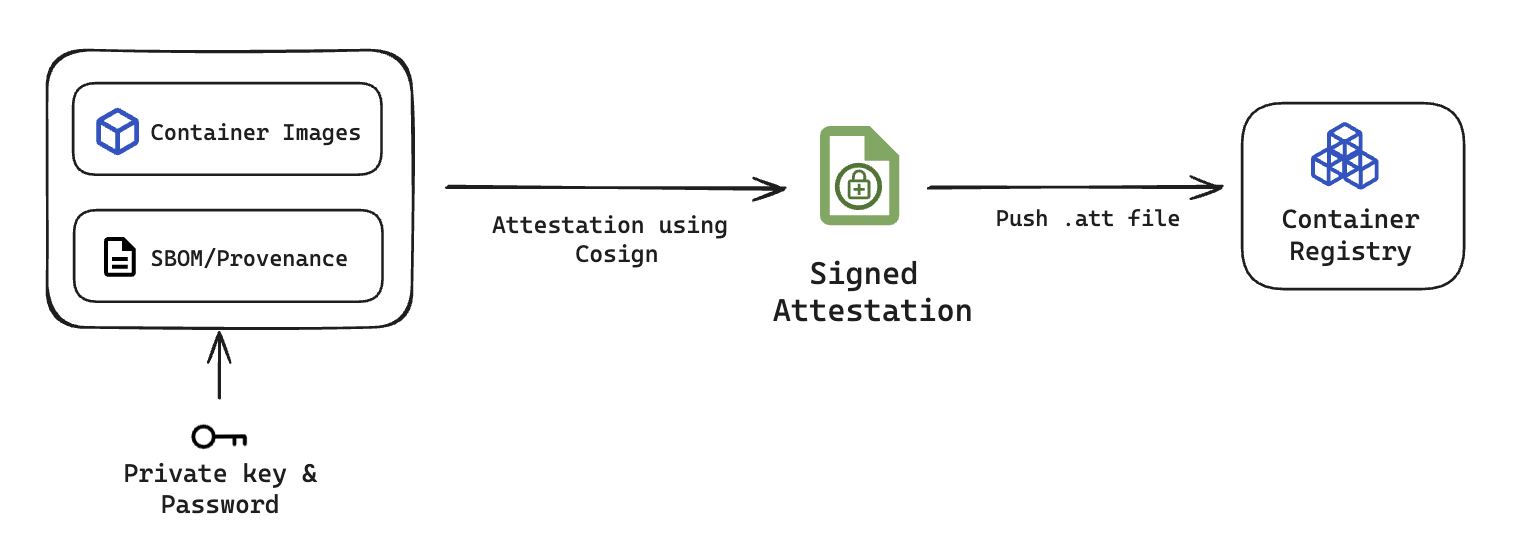
This process involves a container image, an SBOM or SLSA provenance, a private key from a key pair and a password. SCS uses [Cosign](https://docs.sigstore.dev/cosign/verifying/attestation/) to perform the attestation and securely sign it. The signed attestation is then pushed to the container registry, where the digest of the image is set as the file name with a `.att` extension.
Click to view full size image
Here is an example of what the signed attestation would look like
```json
{
"payloadType": "application/vnd.in-toto+json",
"payload": "CJTUERYUmVmLVBhY2thZ2UtZGViLXpsaWIxZy1mOTFhODZjZjhhYjJhZTY3XCIsXCJyZWxhdGlvbnNoaXBUeXBlXCI6XCJDT05UQUlOU1wifSx7XCJzcGR4RWxlbWVudE",
"signatures": [
{
"keyid": "dEdLda4DzZYoQgNCgW",
"sig": "MEUCIFoNt/ELa4DzZYoQgNCgW++AaCbYv4eOu0FloUFfAiEA6EJQ31P0ROEbLhDpUhMdMAzkqlBSCMFPDk1cyR1s6h8="
}
]
}
```
You can perform Base64 decoding on the payload data to view your SBOM or SLSA Provenance.
For verification, the signed attestation is retrieved from the container registry and verified using the corresponding public key. This public key should be of the same key pair where the attestation was signed using the private key.
### Artifact signing and verification
The artifact signing process in Harness SCS uses Cosign and leverages [OCI-compliant](https://github.com/opencontainers) registries to sign artifacts and associate their signatures with the artifact digest in the container registry. It supports the following signing methods:
* [Keyless](#keyless-1)
* [Key-based](#key-based-1)
#### Keyless
The keyless artifact signing process eliminates the need for user-managed private keys by using workload identity. It involves a container image or digest, or a non-container artifact, along with an OIDC-based identity provided during pipeline execution. SCS uses [Cosign](https://docs.sigstore.dev/cosign/verifying/attestation/) to obtain a short-lived signing certificate based on this identity and generates an ephemeral key pair in memory to sign the artifact. The private key is used only during signing and is immediately discarded after use. Once the signature is generated, it is pushed to the container registry and associated with the artifact digest, typically referenced using the digest with a `.sig` extension.
For verification, the signed artifact is retrieved from the container registry and verified using the certificate and signature associated with it. Cosign validates the certificate against trusted root authorities, checks that the certificate was valid at the time of signing, and uses the public key embedded in the certificate to verify the signature. This ensures that the artifact was signed by a trusted identity, has not been tampered with, and matches the expected artifact, without requiring access to any private key.
#### Key-based
The key-based artifact signing process involves a container image or digest, or a non-container image, along with a private key from a key pair and a password. SCS uses [Cosign](https://docs.sigstore.dev/cosign/verifying/attestation/) to perform the signing and securely verify it. Once the signature is successfully generated, the signed artifact is then pushed to the container registry, where the digest of the image is set as the file name with a `.sig` extension.
For verification, the signed artifact is retrieved from the container registry and verified using the corresponding public key. This public key should be of the same key pair where the artifact was signed using the private key.
### Attestation vs signing
Attestation and signing both produce cryptographic evidence about an artifact, but they answer different questions:
* Attestation provides cryptographic proof of an artifact’s origin based on how and where it was created. It captures metadata about the build environment and verifies the artifact’s integrity before it is signed. Attestation serves as a trusted statement regarding the artifact’s provenance and the conditions under which it was produced.
* Signing involves applying a cryptographic signature to the artifact to ensure that the artifact has not been altered or tampered with after it was created.
### Rekor
Rekor log provides a public, immutable, and verifiable transparency log for software artifacts when they are signed or attested. This enables anyone to independently verify the integrity and authenticity of the artifacts without relying on a central authority, simply by checking the log entry.
* Each Rekor log entry contains key metadata which is useful for audits.
* Rekor log entries are publicly recorded, ensuring that signing and attestation actions cannot be denied, and any tampering with the artifact, its attestation, or its signature is immediately detectable through a changed hash.
### Harness Platform components
The Harness SCS module integrates with other Harness modules and uses components that are common to the Harness Platform. Go to [Harness key concepts](/harness-platform/new-to-harness-platform/overview.md) to review Harness Platform terminology.
#### Pipelines
You add SCS steps to your CI (build), CD (deploy) and STO (security) stages in your Harness pipelines.
A pipeline is an end-to-end workflow that, for example, pulls code from a codebase, builds an artifact, runs tests or other actions on the artifact or code, and then uploads or deploys the artifact to storage or a container registry.
Go to the following topics to understand CI and CD pipelines:
* [CI key concepts](/continuous-integration/new-to-harness-ci/key-concepts.md)
* [CD key concepts](/continuous-delivery/new-to-continuous-delivery/overview.md#key-concepts)
Pipelines are comprised of stages and steps.
* **Stages:** A stage is a subset of a pipeline that contains one major segment of the workflow. For example, a CI (build) stage includes steps for building, pushing, and testing your code.
* **Steps:** A stage contains one or more steps. Each step is a series of commands that perform a task. For example, you can use an **SBOM Orchestration** step to generate SBOM.
#### Connectors
[Connectors](/harness-platform/use-harness-platform/connectors.md) contain the information necessary to integrate and work with third-party tools, such as Git providers and artifact repos. For example, a GitHub connector authenticates with a GitHub account and/or repo and fetches files as part of a deploy stage. Harness uses connectors at pipeline runtime to authenticate and run operations in external tools.
Connectors require different permissions depending on your build environment and the tasks your pipeline performs. For example, if your pipeline builds and pushes an image to Docker Hub, you need a connector that can connect to your Docker Hub repo and push images.
#### Delegates
The Harness Delegate is a software service you install in an environment, such as a Kubernetes cluster, that connects to the Harness Manager and performs tasks using your container orchestration platforms, artifact repositories, monitoring systems, and so on.
The delegate uses the credentials set up in the connectors used by the pipeline to perform deployment tasks. Additionally, the delegate needs permissions in the target environment to execute build tasks. These permissions are granted in the delegate config file or the environment account you use when installing the delegate.
Go to [Delegates](/harness-platform/use-harness-platform/delegates.md) to review installation and permission requirements.
#### Variables and expressions
You can add and reference [built-in and custom variables and expressions](/harness-platform/use-harness-platform/variables-and-expressions.md) in pipelines and stages. They are available across the pipeline. You can propagate and override their values in later stages.
### Next steps
With these concepts in place, start applying them in a pipeline:
* [Get started with SCS](/software-supply-chain-assurance/new-to-scs/get-started.md): Set up your first SCS pipeline and generate an SBOM.
* [SBOM Orchestration](/software-supply-chain-assurance/use-scs/open-source-management/generate-sbom-for-repositories.md): Generate and attest an SBOM for a code repository.
{% @harness-feedback/feedback %}