> For the complete documentation index, see [llms.txt](https://developer.harness.io/llms.txt). Markdown versions of documentation pages are available by appending `.md` to page URLs; this page is available as [Markdown](https://developer.harness.io/software-supply-chain-assurance/use-scs/artifact-security/slsa/slsa-gitlab-ci-cd/generate-slsa.md).
# Generate SLSA with Harness GitLab CI/CD
Use Harness GitLab CI/CD to Generate SLSA Provenance
Software artifacts move through multiple stages of the software development lifecycle before deployment. Without verifiable provenance, it can be difficult to determine how an artifact was built, where it originated, and whether the build process has been tampered with. This lack of traceability increases the risk of software supply chain attacks and makes it challenging to establish trust in released artifacts.
Harness Supply Chain Security (SCS) integrates with [GitLab CI/CD](https://gitlab.com/explore/catalog/harness-scs/gitlab-plugins?tab=components) to automate SLSA provenance generation as part of your GitLab workflow. It enables you to generate SLSA provenance for container images or local artifacts during pipeline execution. You can also optionally attest the generated provenance using Cosign, helping you establish artifact integrity and improve software supply chain trust throughout the software development lifecycle.
***
### What will you learn in this topic?
By the end of this topic, you will be able to:
* Set up Harness GitLab CI/CD integration from your SCS project.
* Configure SLSA provenance generation in your GitLab workflow using the **SLSA Generation** component.
* Configure optional SLSA provenance attestation using keyless, key-based, or Secret Manager signing methods.
* Generate and upload SLSA provenance to the SCS module.
***
### Before you begin
Make a note of the following before you proceed with generating SLSA provenance using GitLab CI/CD:
* Understand how to create Harness API keys using Personal API Keys or Service Account API Keys. Go to [Manage API Keys](/harness-ai/use-harness-platform/automation/api/add-and-manage-api-keys.md) and [Service Account API Keys](/harness-ai/use-harness-platform/automation/api/add-and-manage-api-keys.md#create-service-account-api-keys-and-tokens) to create them.
* If you are using key-based or Secret Manager signing or verification, create or configure a Cosign key pair before configuring the pipeline. Go tos [Quickstart Signing and Verifying with Cosign](https://docs.sigstore.dev/quickstart/quickstart-cosign/#quickstart-signing-and-verifying-with-cosign) to generate a local key pair or create one using a supported KMS provider. The key should be generated using Cosign of type `ecdsa-P256`. You do not need to install Cosign on your GitLab runner. The `harness/ssca-plugin` container image used by the Harness GitLab CI/CD components includes Cosign, so no additional installation is required.
* If you plan to use Secret Manager attestation, store your signing key in a supported secret manager. Currently, Harness supports HashiCorp Vault. For GitLab CI/CD, you point the component at the key through pipeline variables such as `KMS_KEY` (and `VAULT_ADDR` when the key is stored in HashiCorp Vault), so you do not need to configure a Harness Secret Manager connector. For setup steps specific to HashiCorp Vault, go to [Add a HashiCorp Vault secret manager](/harness-ai/use-harness-platform/secrets/secrets-management/add-hashicorp-vault.md).
* Ensure that your GitLab runners support Docker-in-Docker (DinD). The component runs using the `docker:24-dind` service. Go to [Use Docker-in-Docker](https://docs.gitlab.com/ci/docker/docker_in_docker/) to configure DinD support.
***
### Understand SLSA generation with Harness GitLab CI/CD
Harness SCS integrates with GitLab CI/CD through reusable GitLab CI/CD components. These components enable you to automate software supply chain security tasks in your GitLab pipelines, helping you build, verify, and govern software artifacts without adding custom implementation to your CI/CD workflow.
The **SLSA Generation** capability enables you to generate SLSA provenance for container images or local artifacts during pipeline execution. The generated provenance captures details about the build process, including the artifact, build environment, and source information. You can also optionally attest the generated provenance using Cosign before uploading it to the SCS module.
Once the provenance is generated, you can use it to establish artifact integrity, improve traceability across your software supply chain, and support provenance verification before software artifacts are promoted or deployed.
| **Why use it?** | **When to use it?** | **How can you leverage it?** |
| ------------------------------------------------------ | ------------------------------------------------------------------------------ | ------------------------------------------------------------------------------------------------------------------------------------------- |
| Generate verifiable provenance for software artifacts. | When you want to establish the origin and build history of software artifacts. | Use generated provenance to improve software supply chain traceability, verify artifact integrity, and support SLSA compliance initiatives. |
***
### Set up Harness GitLab CI/CD
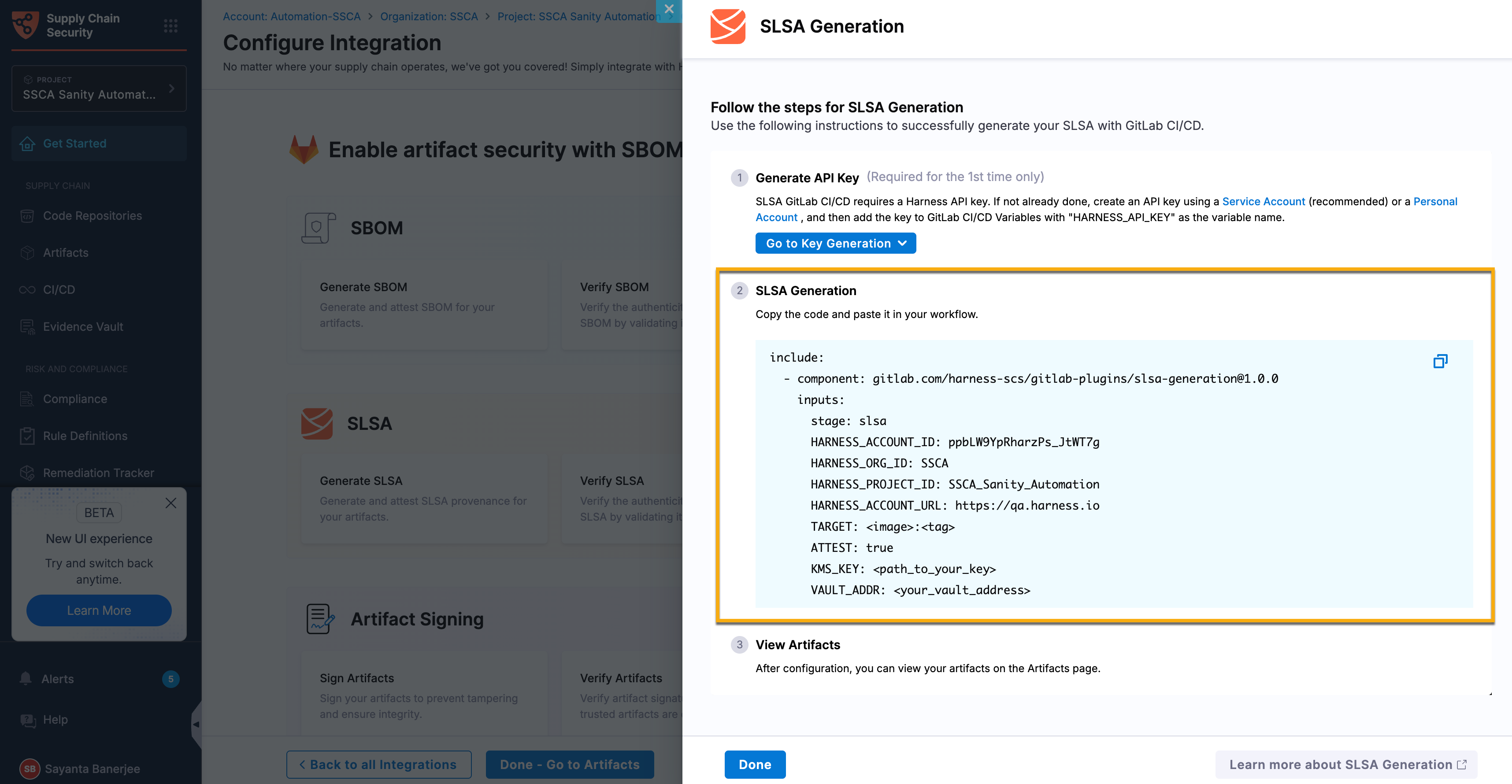
Before configuring SLSA generation in your GitLab pipeline, set up Harness GitLab CI/CD from your SCS project. The setup guides you through creating or selecting a Harness API key and generates a project-specific YAML configuration with your Harness account ID, organization ID, project ID, and account URL already populated. You can copy this configuration into your GitLab workflow and update the remaining inputs as needed.
Complete the following steps to set up Harness GitLab CI/CD:
1. Navigate to the **Integrations** page under the **Manage** section from the sidebar navigation of your SCS account.
2. Click the `Add Integration` button to go to the **Configure Integration** page.\
Alternatively, you can access this page by clicking **Get Started > Get Started** from the sidebar navigation of your SCS account.
3. Scroll down to the GitLab collapsible and click it to expand.
4. Click the `Configure` button under **Configure GitLab CI/CD in your pipeline to generate SBOM and SLSA, and sign artifacts** to open the **Configure Integration** page, where the Artifact Security feature cards are displayed.
5. Click the **Generate SLSA** card to open the **SLSA Generation** sidepanel.
6. Click the `Go to Key Generation` button to create the Harness API key required to configure Harness GitLab CI/CD.
* Select **Using Service Account** from the dropdown to create the API key using a service account. Go to [Service Account API Keys](/harness-ai/use-harness-platform/automation/api/add-and-manage-api-keys.md#create-service-account-api-keys-and-tokens) to create one.
* Select **Using Personal Account** from the dropdown to create a personal API key. Personal API keys are created at the account level and inherit the permissions assigned to your user account. Go to [Manage API Keys](/harness-ai/use-harness-platform/automation/api/add-and-manage-api-keys.md) to manage them.
7. Click **Copy** in the upper-right corner of the code block to copy the generated GitLab CI/CD configuration, and then paste it into your GitLab workflow file.
Click to view full size image
***
### Configure SLSA generation in GitLab CI/CD
After setting up Harness GitLab CI/CD, configure the **SLSA Generation** component in your GitLab workflow file. Add the required GitLab CI/CD variables to your GitLab project, configure the component inputs, configure the attestation settings if required, and run the pipeline. During pipeline execution, the component generates SLSA provenance for the specified artifact and uploads it to the SCS module. For the authoritative list of component inputs and defaults, see the CI/CD Catalog at [SCS GitLab Plugins](https://gitlab.com/explore/catalog/harness-scs/gitlab-plugins?tab=components#slsa-generation).
{% hint style="info" %}
If you are using **GitLab Self-Managed**, mirror the required Harness GitLab CI/CD components to your GitLab instance before configuring your pipeline. After mirroring the components, update the `component` reference in your workflow file to use the mirrored component. Go to [Use a GitLab.com component on GitLab Self-Managed](https://docs.gitlab.com/ci/components/#use-a-gitlabcom-component-on-gitlab-self-managed) to mirror components.
{% endhint %}
Complete the following steps to configure SLSA generation:
1. [Add the required GitLab CI/CD variables](#step-1-add-the-required-gitlab-cicd-variables)
2. [Include the SLSA Generation component](#step-2-include-the-slsa-generation-component)
3. [Configure SLSA provenance attestation in the workflow (optional)](#step-3-configure-provenance-attestation-optional)
4. [Review the workflow](#step-4-review-the-workflow)
5. [Run the pipeline](#step-5-run-the-pipeline)
#### Step 1: Add the required GitLab CI/CD variables
Before configuring the SLSA Generation component, add the following variables to your GitLab project. Go to [Define a CI/CD Variable for a project](https://docs.gitlab.com/ci/variables/#for-a-project) to add them.
| Variable | Description | Required | Example | Masked? |
| --------------------- | -------------------------------------------------------------------------------------- | -------- | ---------------------------- | ------- |
| `HARNESS_API_KEY` | Harness Personal API Key or Service Account API Key used to authenticate with Harness. | Yes | `pat.xxxxxxxxx` | Yes |
| `HARNESS_ACCOUNT_ID` | Harness account identifier. | Yes | `AbCdEf123456` | No |
| `HARNESS_ORG_ID` | Harness organization identifier. | Yes | `SCS_Org` | No |
| `HARNESS_PROJECT_ID` | Harness project identifier. | Yes | `SCS` | No |
| `HARNESS_ACCOUNT_URL` | Harness account URL. | Yes | `https://example.harness.io` | No |
{% hint style="info" %}
Masked GitLab CI/CD variables cannot be passed through component inputs. For this reason, the Harness scope variables (`HARNESS_ACCOUNT_ID`, `HARNESS_ORG_ID`, `HARNESS_PROJECT_ID`, and `HARNESS_ACCOUNT_URL`) must remain unmasked so that they can be wired through the component `inputs`. `HARNESS_API_KEY` remains masked and is consumed directly from the job environment, not passed as a component input. These values are included in the generated YAML provided during the [Set up Harness GitLab CI/CD](#set-up-harness-gitlab-cicd) workflow.
{% endhint %}
#### Step 2: Include the SLSA Generation component
Add an `scs` stage to your GitLab workflow file, or set the `stage` input on the component to an existing stage. Then, include the Harness **SLSA Generation** component in your GitLab workflow file.
The following code snippet demonstrates how to add the `scs` stage and include the SLSA Generation component in your GitLab workflow file. The snippet includes the minimum required component inputs because the component requires the Harness scope variables and the target artifact to run.
```yaml
stages: [scs]
include:
- component: gitlab.com/harness-scs/gitlab-plugins/slsa-generation@1.0.0
inputs:
HARNESS_ACCOUNT_ID: $HARNESS_ACCOUNT_ID
HARNESS_ORG_ID: $HARNESS_ORG_ID
HARNESS_PROJECT_ID: $HARNESS_PROJECT_ID
HARNESS_ACCOUNT_URL: $HARNESS_ACCOUNT_URL
TARGET: $CI_REGISTRY_IMAGE:$CI_COMMIT_SHA
```
Configure the component using the GitLab CI/CD variables created in the previous step and the following component inputs.
| **Input** | **Description** | **Required** | **Default** | **Example** |
| --------------------- | ------------------------------------------------------------------------------------------------------- | ------------ | ----------------------- | ----------------------------------- |
| `HARNESS_ACCOUNT_ID` | Harness account ID. Pass a non-masked CI/CD variable reference. | Yes | N/A | `$HARNESS_ACCOUNT_ID` |
| `HARNESS_ORG_ID` | Harness organization ID. Pass a non-masked CI/CD variable reference. | Yes | N/A | `$HARNESS_ORG_ID` |
| `HARNESS_PROJECT_ID` | Harness project ID. Pass a non-masked CI/CD variable reference. | Yes | N/A | `$HARNESS_PROJECT_ID` |
| `HARNESS_ACCOUNT_URL` | Harness base URL with scheme. Pass a non-masked CI/CD variable reference. | Yes | N/A | `$HARNESS_ACCOUNT_URL` |
| `TARGET` | Container image reference when `SOURCE` is `container`, or artifact file path when `SOURCE` is `local`. | Yes | N/A | `$CI_REGISTRY_IMAGE:$CI_COMMIT_SHA` |
| `ATTEST` | Generates and attests SLSA provenance. | No | `false` | `true` |
| `SOURCE` | Artifact source. Supported values are `container` and `local`. | No | `container` | `local` |
| `ARTIFACT_NAME` | Display name for a local artifact. Applicable when `SOURCE=local`. | No | File name from `TARGET` | `payment-service` |
| `ARTIFACT_VERSION` | Artifact version. Applicable when `SOURCE=local`. | No | N/A | `$CI_COMMIT_SHORT_SHA` |
| `stage` | GitLab pipeline stage in which the component runs. | No | `scs` | `security` |
| `job-name` | Name of the GitLab job created by the component. | No | `scs-slsa-generation` | `generate-slsa` |
{% hint style="info" %}
By default, the component generates provenance for a container image. To generate provenance for a local artifact, set `SOURCE` to `local`. When using a local artifact, specify the artifact path in `TARGET` and provide an `ARTIFACT_VERSION`.
{% endhint %}
To attest the generated provenance, configure the attestation inputs (`ATTEST_WITH`, `OIDC_PROVIDER`, `FULCIO_URL`, `KMS_KEY`, and `VAULT_ADDR`) as described in [Step 3: Configure provenance attestation (optional)](#step-3-configure-provenance-attestation-optional).
**Override the generated job**
Standard GitLab job keywords, such as `needs`, `before_script`, `script`, `after_script`, `allow_failure`, and `tags`, are not component inputs. To set them, redeclare the generated job (default name `scs-slsa-generation`, or the value of `job-name`) in your workflow file. GitLab merges your keys into the generated job.
```yaml
scs-slsa-generation:
needs: [build-image]
tags: [docker, linux]
before_script:
- echo "Starting provenance generation"
after_script:
- echo "Provenance generation complete"
```
{% hint style="info" %}
If you are generating provenance for an image in a private registry that is not the GitLab container registry, provide the registry credentials as masked GitLab CI/CD variables so that the component can access the image.
{% endhint %}
#### Step 3: Configure provenance attestation (optional)
Harness supports the following attestation methods:
* **Keyless attestation** – Uses OpenID Connect (OIDC) identities to sign the generated SLSA provenance without managing long-lived signing keys.
* **Key-based attestation** – Uses a cryptographic key managed through your organization's key management solution.
* **Secret Manager** – Uses signing keys stored in a supported secret manager.
{% hint style="info" %}
SLSA provenance attestation is disabled by default (`ATTEST: false`). The component generates and uploads the provenance without signing it. If you plan to verify the provenance attestation during [SLSA Verification](/software-supply-chain-assurance/use-scs/artifact-security/slsa/slsa-gitlab-ci-cd/verify-slsa.md), set `ATTEST: true` to generate a signed attestation.
{% endhint %}
Configure the appropriate attestation inputs based on the attestation method you want to use.
{% tabs %}
{% tab title="Configure keyless attestation" %}
If you enable SLSA attestation, you can configure **keyless attestation** to sign the generated SLSA provenance using an OpenID Connect (OIDC) identity. For GitLab CI/CD, set `OIDC_PROVIDER` to `non-harness`. The `harness` OIDC provider is not supported as of now. Keyless attestation requires **GitLab 15.7** or later, because it depends on GitLab `id_tokens`. Configure the following inputs.
| Input | Description | Required |
| --------------- | ----------------------------------------------------------------------------------------------------------------------------- | -------- |
| `ATTEST_WITH` | Specifies the attestation method. Set the value to `keyless`. | Yes |
| `OIDC_PROVIDER` | OIDC provider used to obtain the signing identity. For GitLab CI/CD, set the value to `non-harness`. | Yes |
| `FULCIO_URL` | Fulcio certificate authority endpoint. Used when `OIDC_PROVIDER` is `non-harness`. Defaults to `https://fulcio.sigstore.dev`. | No |
Provide the OIDC token to the generated job using `id_tokens`. The component reads the token from `PLUGIN_NON_HARNESS_OIDC_TOKEN`.
```yaml
stages: [scs]
include:
- component: gitlab.com/harness-scs/gitlab-plugins/slsa-generation@1.0.0
inputs:
HARNESS_ACCOUNT_ID: $HARNESS_ACCOUNT_ID
HARNESS_ORG_ID: $HARNESS_ORG_ID
HARNESS_PROJECT_ID: $HARNESS_PROJECT_ID
HARNESS_ACCOUNT_URL: $HARNESS_ACCOUNT_URL
TARGET: $CI_REGISTRY_IMAGE:$CI_COMMIT_SHA
ATTEST: true
ATTEST_WITH: keyless
OIDC_PROVIDER: non-harness
scs-slsa-generation:
id_tokens:
PLUGIN_NON_HARNESS_OIDC_TOKEN:
aud: sigstore
```
{% endtab %}
{% tab title="Configure key-based attestation" %}
To sign the generated SLSA provenance using a cryptographic key, set `ATTEST_WITH` to `keybased` and provide the Cosign key material as masked GitLab CI/CD variables on the job. `KMS_KEY` is not used for key-based attestation. It applies only to Secret Manager attestation.
| Input | Description | Required |
| ------------- | -------------------------------------------------------------- | -------- |
| `ATTEST_WITH` | Specifies the attestation method. Set the value to `keybased`. | Yes |
Provide the following masked GitLab CI/CD variables on the job:
| Variable | Description | Required |
| ----------------------------------------- | ---------------------------------------------------------------- | -------- |
| `SSCA_SLSA_GENERATION_COSIGN_PRIVATE_KEY` | Cosign private key used to sign the SLSA provenance attestation. | Yes |
| `SSCA_SLSA_GENERATION_COSIGN_PASSWORD` | Password for the Cosign private key. | Yes |
| {% endtab %} | | |
{% tab title="Configure Secret Manager attestation" %}
To use a signing key stored in a supported secret manager, configure the following inputs.
| Input | Description | Required |
| ------------- | ---------------------------------------------------------------------- | ----------- |
| `ATTEST_WITH` | Specifies the attestation method. Set the value to `secret-manager`. | Yes |
| `KMS_KEY` | KMS or Vault key URI for the signing key stored in the secret manager. | Yes |
| `VAULT_ADDR` | HashiCorp Vault address. Required when `KMS_KEY` uses a Vault URI. | Conditional |
| {% endtab %} | | |
| {% endtabs %} | | |
#### Step 4: Review the workflow
After configuring the required GitLab CI/CD variables and component inputs, your GitLab workflow file should resemble the following example. This example generates SLSA provenance for a container image in Harness SCS and attests the generated provenance using Cosign with a key stored in HashiCorp Vault. The Harness scope variables are wired through `inputs`, `HARNESS_API_KEY` remains a masked GitLab CI/CD variable, and the Vault variables (`KMS_KEY` and `VAULT_ADDR`) are provided because attestation is enabled.
```yaml
include:
- component: gitlab.com/harness-scs/gitlab-plugins/slsa-generation@1.0.0
inputs:
HARNESS_ACCOUNT_ID: $HARNESS_ACCOUNT_ID
HARNESS_ORG_ID: $HARNESS_ORG_ID
HARNESS_PROJECT_ID: $HARNESS_PROJECT_ID
HARNESS_ACCOUNT_URL: $HARNESS_ACCOUNT_URL
TARGET: $CI_REGISTRY_IMAGE:$CI_COMMIT_SHA
ATTEST: true
ATTEST_WITH: secret-manager
KMS_KEY: hashivault://cosign
VAULT_ADDR: $VAULT_ADDR
```
#### Step 5: Run the pipeline
Commit and push your changes to trigger the GitLab pipeline. During pipeline execution, the SLSA Generation component generates provenance for the specified artifact and uploads it to the SCS module. If provenance attestation is enabled, the component also generates and signs a provenance attestation using the configured attestation method. Go to [Tutorial: Create and run your first GitLab CI/CD pipeline](https://docs.gitlab.com/ci/quick_start/) to run a GitLab pipeline.
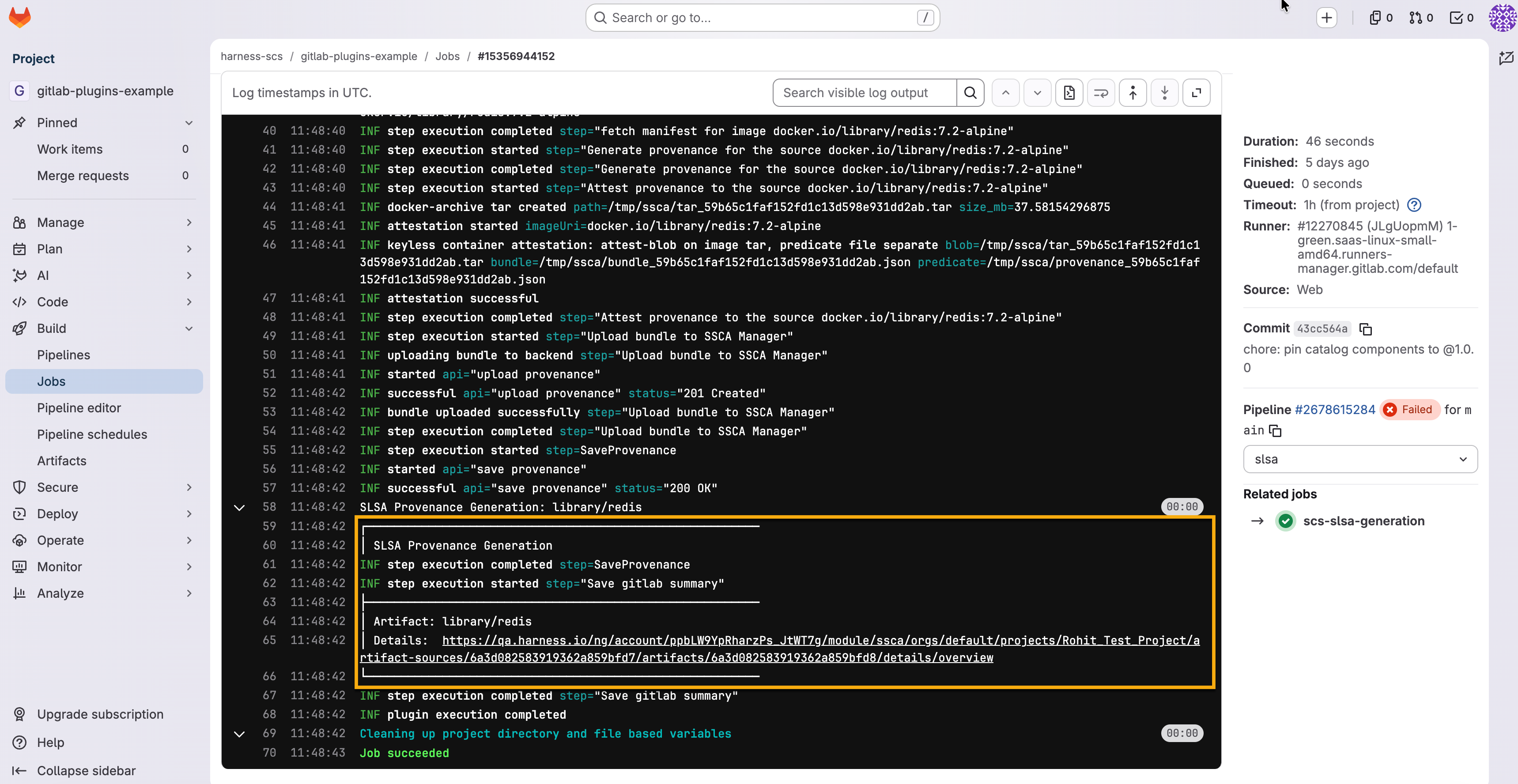
After the pipeline completes, open the job execution logs and click the **Harness Artifact Details** link to view the generated artifact in SCS. Go to [View the status of your pipeline and jobs](https://docs.gitlab.com/ci/quick_start/#view-the-status-of-your-pipeline-and-jobs) to check job status and pipeline details.
Click to view full size image
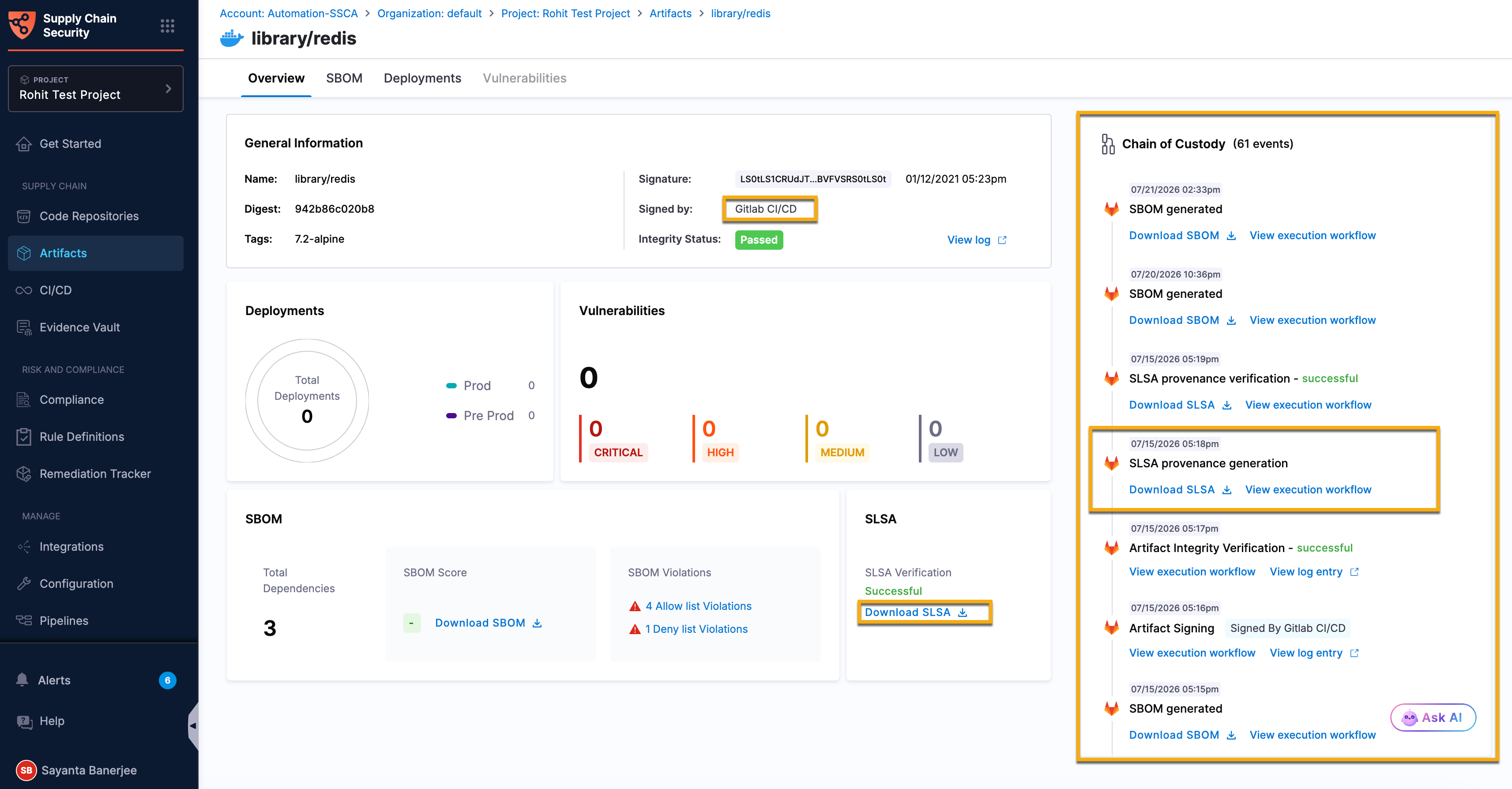
The Artifact Details page displays the generated SLSA provenance and its associated security results. The provenance is also automatically recorded in the [Chain of Custody](/software-supply-chain-assurance/use-scs/artifact-security/overview.md#chain-of-custody), providing an immutable audit trail of the artifact lifecycle and the associated GitLab CI/CD pipeline execution. Go to [Artifact Overview](/software-supply-chain-assurance/use-scs/artifact-security/overview.md) to navigate through artifacts.
Click to view full size image
***
### Example SLSA generation workflow Example SLSA generation workflow for a container image
The following example demonstrates how to configure the SLSA Generation component in a GitLab workflow to generate provenance for a container image. The example also shows how to optionally attest the generated provenance using Cosign with a key stored in HashiCorp Vault.
```yaml
stages:
- build
- scs
build-image:
stage: build
image: docker:24.0.5
services:
- docker:24.0.5-dind
script:
- docker build -t $CI_REGISTRY_IMAGE:$CI_COMMIT_SHA .
- docker push $CI_REGISTRY_IMAGE:$CI_COMMIT_SHA
include:
- component: gitlab.com/harness-scs/gitlab-plugins/slsa-generation@1.0.0
inputs:
stage: scs
job-name: generate-slsa
HARNESS_ACCOUNT_ID: $HARNESS_ACCOUNT_ID
HARNESS_ORG_ID: $HARNESS_ORG_ID
HARNESS_PROJECT_ID: $HARNESS_PROJECT_ID
HARNESS_ACCOUNT_URL: $HARNESS_ACCOUNT_URL
TARGET: $CI_REGISTRY_IMAGE:$CI_COMMIT_SHA
ATTEST: true
ATTEST_WITH: secret-manager
KMS_KEY: hashivault://cosign
VAULT_ADDR: $VAULT_ADDR
```
Example SLSA generation workflow for a local artifact
The following example generates provenance for a local artifact. It builds the artifact in an earlier job, passes it forward with `artifacts`, and uses `needs` so the SLSA job runs after the artifact is available. When `SOURCE` is `local`, `TARGET` is the artifact file path and `ARTIFACT_VERSION` is required.
```yaml
stages:
- build
- scs
build-artifact:
stage: build
script:
- ./build.sh -o $CI_PROJECT_DIR/target/myapp.jar
artifacts:
paths:
- target/myapp.jar
scs-slsa-generation:
needs: [build-artifact]
include:
- component: gitlab.com/harness-scs/gitlab-plugins/slsa-generation@1.0.0
inputs:
HARNESS_ACCOUNT_ID: $HARNESS_ACCOUNT_ID
HARNESS_ORG_ID: $HARNESS_ORG_ID
HARNESS_PROJECT_ID: $HARNESS_PROJECT_ID
HARNESS_ACCOUNT_URL: $HARNESS_ACCOUNT_URL
SOURCE: local
TARGET: $CI_PROJECT_DIR/target/myapp.jar
ARTIFACT_VERSION: $CI_COMMIT_SHORT_SHA
```
***
### Next steps
* [Verify SLSA with GitLab CI/CD](/software-supply-chain-assurance/use-scs/artifact-security/slsa/slsa-gitlab-ci-cd/verify-slsa.md): Verify SLSA provenance and validate the integrity of software artifacts before promotion or deployment.
* [Generate SBOM with GitLab CI/CD](/software-supply-chain-assurance/use-scs/open-source-management/sbom-gitlab-ci-cd/generate-sbom.md): Generate, attest, and upload SBOMs to Harness SCS during pipeline execution.
* [Ingest SBOM with GitLab CI/CD](/software-supply-chain-assurance/use-scs/open-source-management/sbom-gitlab-ci-cd/ingest-sbom.md): Upload existing SBOMs generated by external tools or build processes to Harness SCS.
* [Enforce SBOM Policies with GitLab CI/CD](/software-supply-chain-assurance/use-scs/open-source-management/sbom-gitlab-ci-cd/enforce-sbom-policies.md): Verify SBOM attestations and enforce software supply chain policies during pipeline execution.
{% @harness-feedback/feedback %}