> For the complete documentation index, see [llms.txt](https://developer.harness.io/llms.txt). Markdown versions of documentation pages are available by appending `.md` to page URLs; this page is available as [Markdown](https://developer.harness.io/software-supply-chain-assurance/use-scs/open-source-management/direct-indirect-dependency.md).
# Direct/Indirect Dependency
Filter dependencies via direct and indirect dependencies.
A Software Bill of Materials (SBOM) gives you a complete view of all components and dependencies used in your repository. Each dependency can either be directly declared in your repository or introduced indirectly through other dependencies. These indirect (transitive) dependencies are automatically pulled in when a direct dependency requires them to function.
A single dependency can bring in several others. As a result, understanding these relationships becomes important. Identifying dependencies as direct or indirect helps you trace component origins, understand their impact, and evaluate associated risks, such as vulnerabilities, outdated versions, or licensing issues. This visibility makes it easier to filter, analyze, and remediate dependencies within your SBOM.
***
### What you will learn from this topic
By the end of this topic, you will be able to understand:
* An understanding of dependencies and how they are represented in the SBOM.
* Detailed steps to filter direct and indirect dependencies.
* Detailed steps to view direct and indirect dependencies of a particular dependency.
***
### Before you begin
Make a note of the following before you proceed:
* Make sure that your SCM provider is integrated with the platform to generate SBOMs for your code repositories.
* Repository onboarding through RSPM currently supports GitHub. To integrate your GitHub account and onboard the repositories, refer to the [Get Started](/software-supply-chain-assurance/new-to-scs/get-started.md) guide.
* For other SCM providers, SBOMs can be generated through pipeline execution. To generate SBOM via pipeline execution, refer to the [Generate SBOM for Repositories](/software-supply-chain-assurance/use-scs/open-source-management/generate-sbom-for-repositories.md) documentation.
***
### Filter direct and indirect dependencies
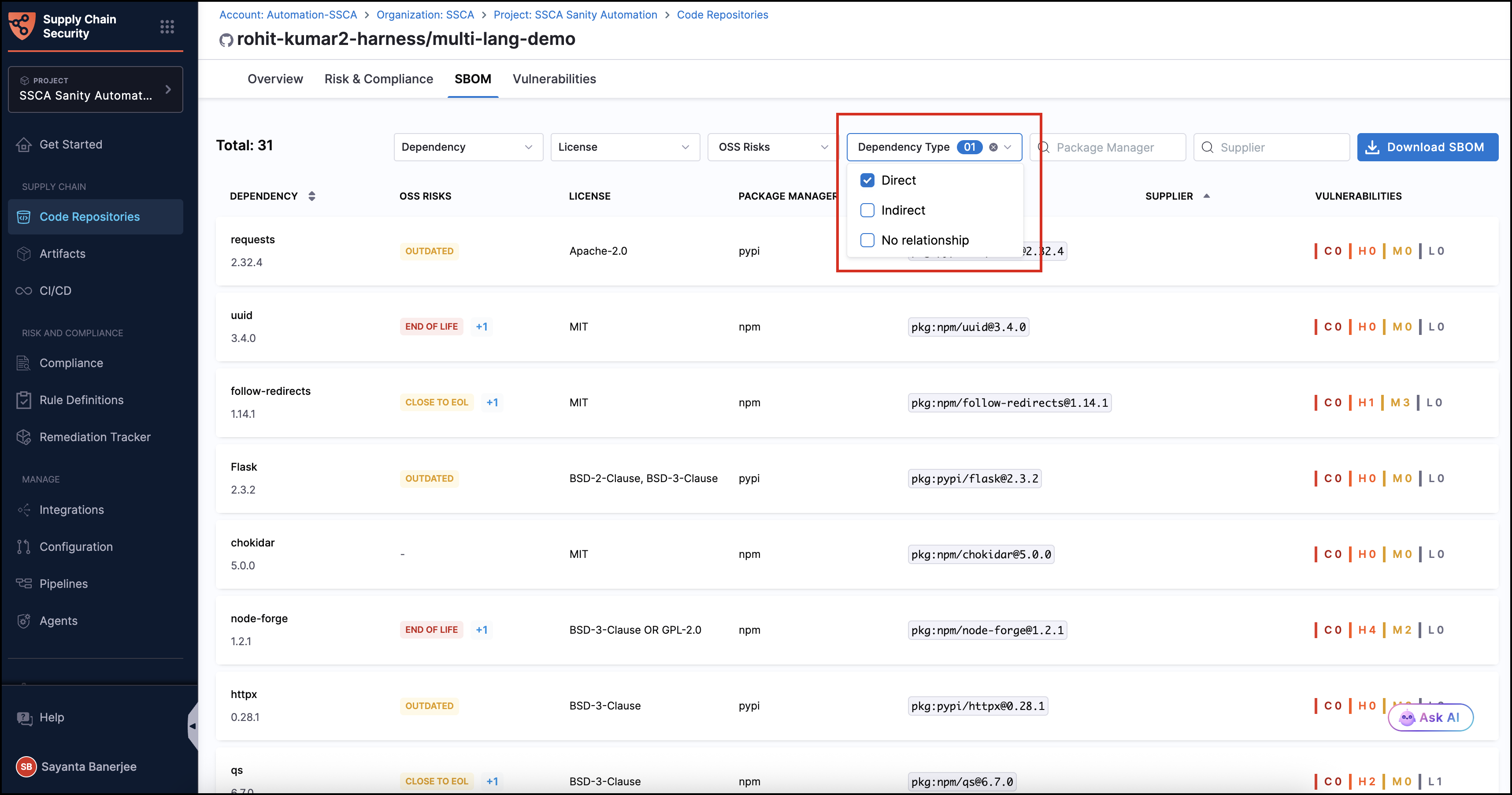
You can filter direct and indirect dependencies via dependency type. To do this, complete the following steps:
1. Navigate to the **Code Repositories** page under the **Supply Chain** section from the sidebar navigation of your SCS account and select your repository. The `Overview` tab opens by default.
2. Click the `SBOM` tab to view the list of dependencies.
3. Click `Dependency Type` and then select the desired dependency type to filter the dependencies. The available options are `Direct`, `Indirect`, and `No relationship`.
* **Direct** - Dependencies explicitly declared in your project configuration.
* **Indirect** - Transitive dependencies brought in by other dependencies.
* **No relationship** - Dependencies present in the SBOM but not currently mapped to your project’s dependency graph.
Filtering dependencies via dependency type is available only for code repositories.
Currently, direct dependencies are identified only for a limited set of build tools and ecosystems, including Maven, Gradle, npm, Yarn, pip, Conda, and Go modules, based on supported manifest files.
Click to view full size image
{% hint style="info" %}
This feature will be available for SMP starting with the June release.
{% endhint %}
***
### View the dependency table
The dependency table shows direct and indirect dependencies for a particular dependency. Complete the following steps to view the dependency table:
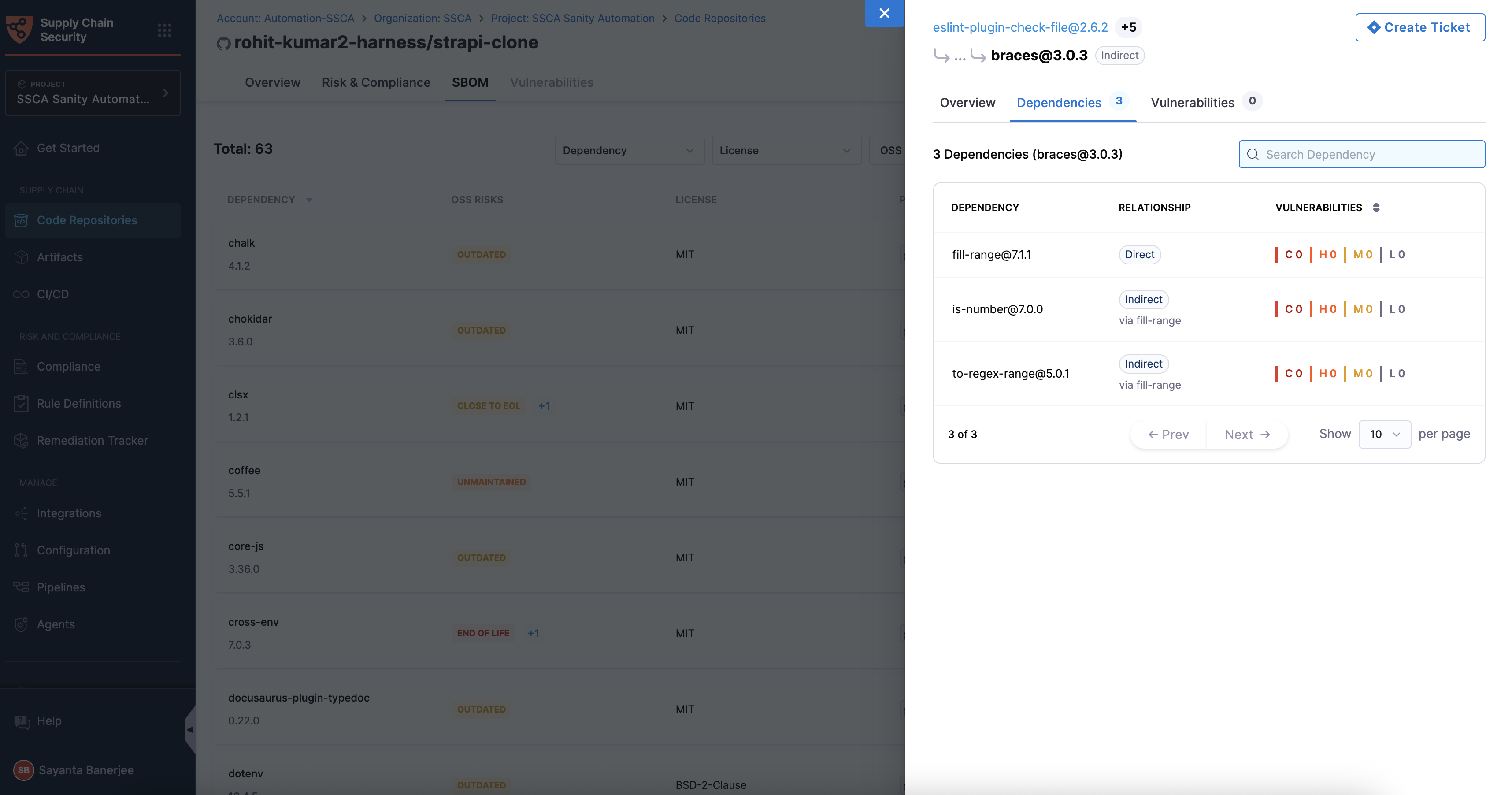
1. Click any dependency to open the side panel. It includes the `Overview`, `Dependencies`, and `Vulnerabilities` tabs, showing the dependency’s details and its relationship within the repository.
2. Click the `Dependencies` tab. It displays a table of direct and indirect dependencies, along with the total count. Each entry includes the dependency name and version, its relationship to the selected dependency, and the number of vulnerabilities categorized by severity.
{% hint style="info" %}
If a listed dependency is an indirect dependency of the selected dependency, the entry also shows its relationship to the direct dependency.
{% endhint %}
Click to view full size image
3. Click any dependency from the list to view its details. The side panel also displays the dependency relationship and the truncated path between the root dependency and the selected dependency. You can click on the root dependency to return to its details.
{% @harness-feedback/feedback %}