> For the complete documentation index, see [llms.txt](https://developer.harness.io/llms.txt). Markdown versions of documentation pages are available by appending `.md` to page URLs; this page is available as [Markdown](https://developer.harness.io/software-supply-chain-assurance/use-scs/risk-and-compliance/repository-security-posture-management-rspm.md).
# Repository security posture management - RSPM with Harness SCS
Security, risk and compliance posture of your code repositories.
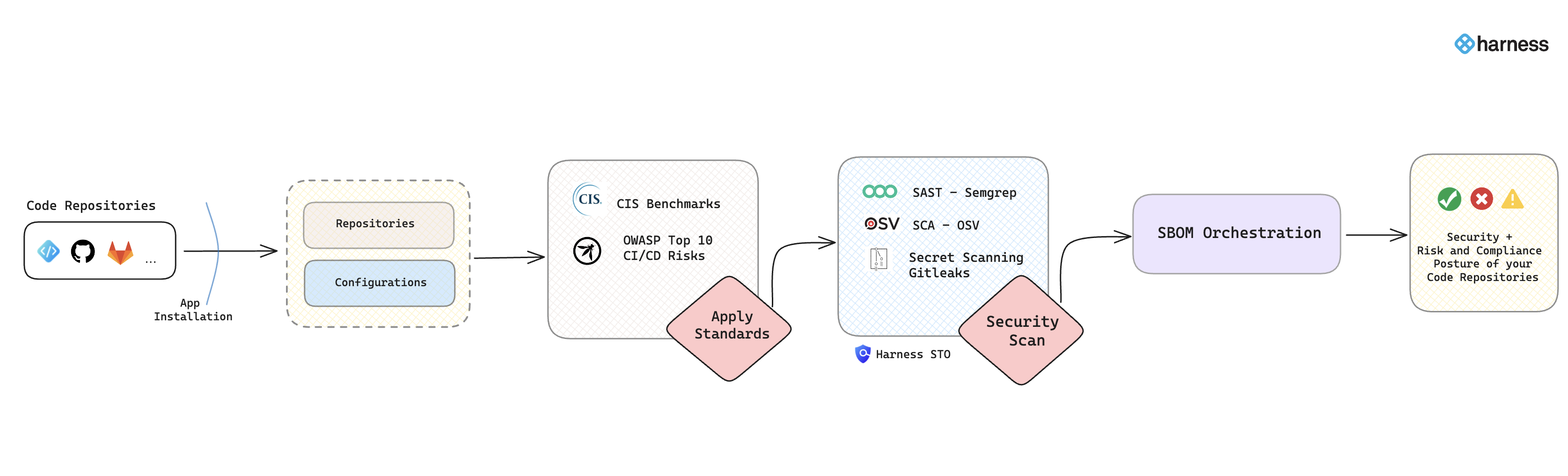
Understanding the security and risk posture of your code repositories is crucial for maintaining a secure development environment and preventing supply chain attacks. This section provides a comprehensive overview of the security and risk posture by presenting detailed insights into various aspects of your repositories. It highlights all the issues related to risk and compliance derived from the code repository configurations generated by applying industry-standard software supply chain benchmarks such as [*CIS*](https://www.cisecurity.org/benchmark/software-supply-chain-security)*,* [*OWASP Top 10 CI/CD Security Risks*](https://owasp.org/www-project-top-10-ci-cd-security-risks/), etc.
Additionally, it reveals details of security vulnerabilities through security scanning. Also, it provides an in-depth look into the composition of the repository by generating the Software Bill of Materials (SBOM) and its quality score. This helps users understand their repositories' security posture and manage them effectively to avoid potential supply chain attacks originating from code repositories and their organizational settings.
Click to view full size image
The RSPM feature in SCS offers details into:
* **Risk and Compliance Issues**: Provides visibility into all the issues related to risk and compliance derived from code repository configurations and organization settings based on compliance standards.
* **Security Vulnerabilities Detection**: Details of security vulnerabilities identified through SAST, SCA, and Secret scanning.
* **Software Bill of Materials (SBOM)**: Provides an in-depth look into the composition of the repository by providing a detailed list of dependencies. Additionally, it also offers the quality of the SBOM in various categories, utilizing a scoring system ranging from 0 to 10.
Click to view full size image
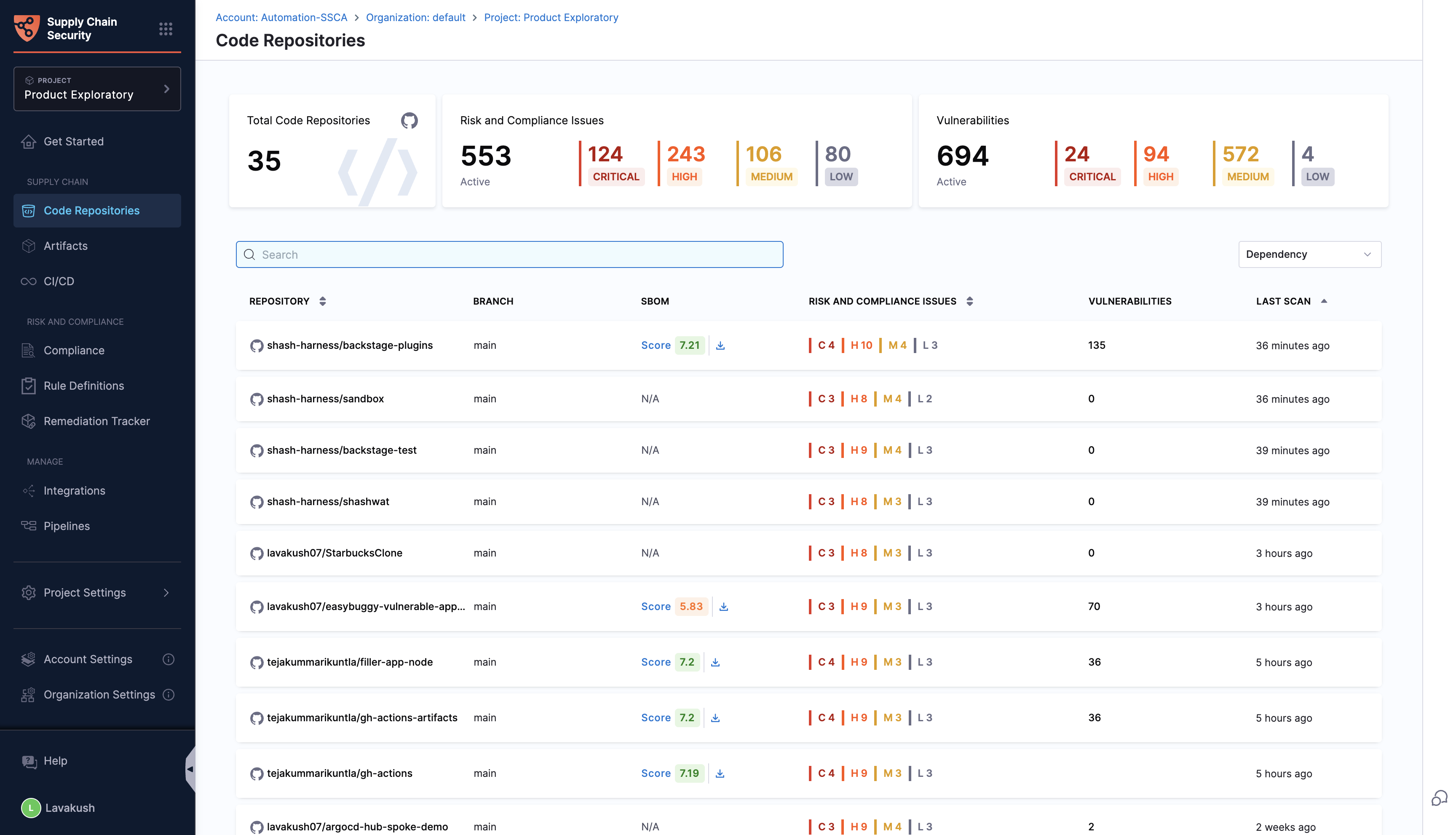
You can click on a repository in the “Code Repositories” section, and it will present all the details specific to each aspect of the repository.
{% hint style="info" %}
To onboard your code repositories, refer to the [Get Started](/software-supply-chain-assurance/new-to-scs/get-started.md) guide.
{% endhint %}
### Supported code repositories
The RSPM feature in the Harness SCS module is currently supported only for **GitHub**. Harness plans to add support for other code repositories in the near future.
{% hint style="info" %}
To efficiently onboard a large number of GitHub repositories, set up a single GitHub connector at the account level using [Harness APIs](https://apidocs.harness.io/tag/integration), which enables you to select and onboard repositories for specific projects and automatically create scan pipelines.
{% endhint %}
### Overview tab
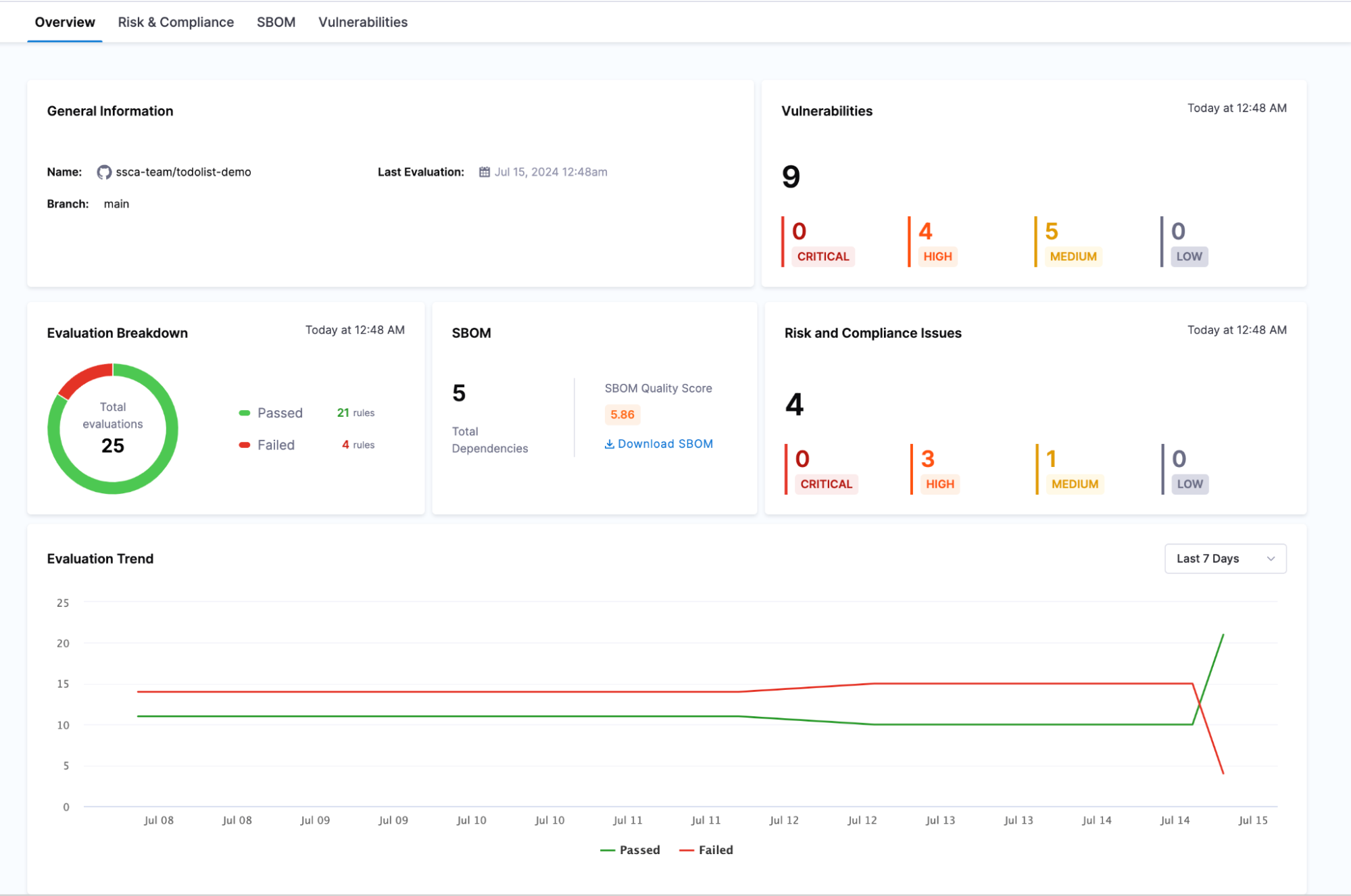
The overview page provides a comprehensive summary of a specific code repository's security and risk posture. This page compiles all the crucial details in one place, offering a clear and concise view.
{% hint style="info" %}
Scans will not run if **Git Experience** is enforced and the **Default Store Type for Entities** is set to remote in the account settings. Make sure these settings are configured correctly to enable scan execution.
{% endhint %}
#### What is an evaluation?
Before diving into the details, it is essential to understand what an "evaluation" means in this context. An evaluation refers to applying specific compliance rules to the repository and obtaining the results of these checks. Each evaluation assesses the repository against these predefined rules and provides a pass or fail status.
The page offers detailed information about:
* **General Information:** including the name, branch and the latest evaluation timestamp
* **Evaluation Breakdown:** A summary of rules passing versus failing
* **SBOM:** Presents the sum of all the dependencies with an SBOM quality score and an option to download the SBOM.
* **Risk & Compliance Issues and Vulnerabilities:** Breakdown of risk and compliance issues and vulnerabilities into critical, high, medium and low.
* **Evaluation Trend:** This graph presents the trend of evaluations over time, showing the number of rules passing and failing with respect to the date. This helps users visualize the improvement or decline in the security posture of their repositories.
Click to view full size image
### Risk and compliance tab
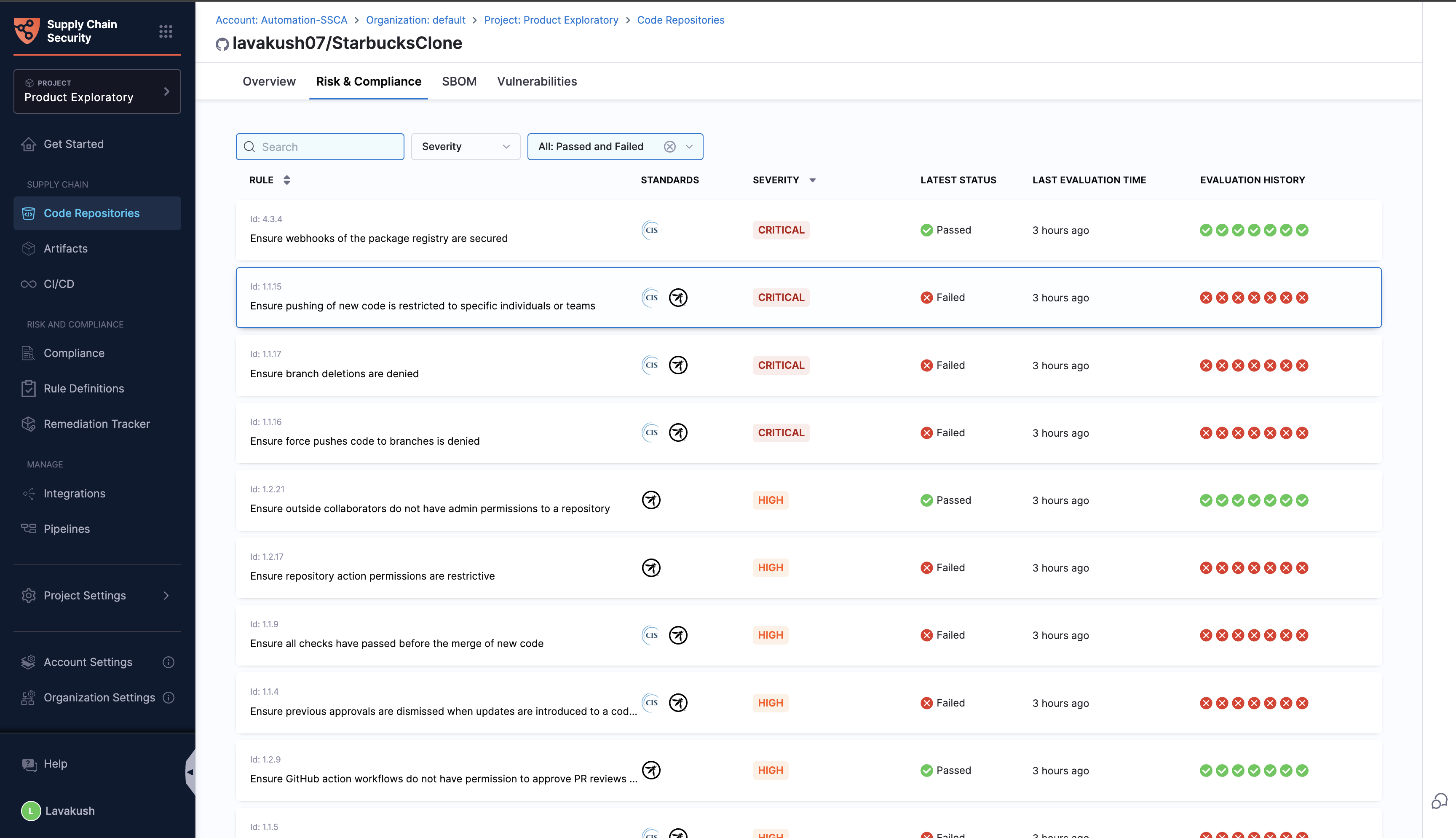
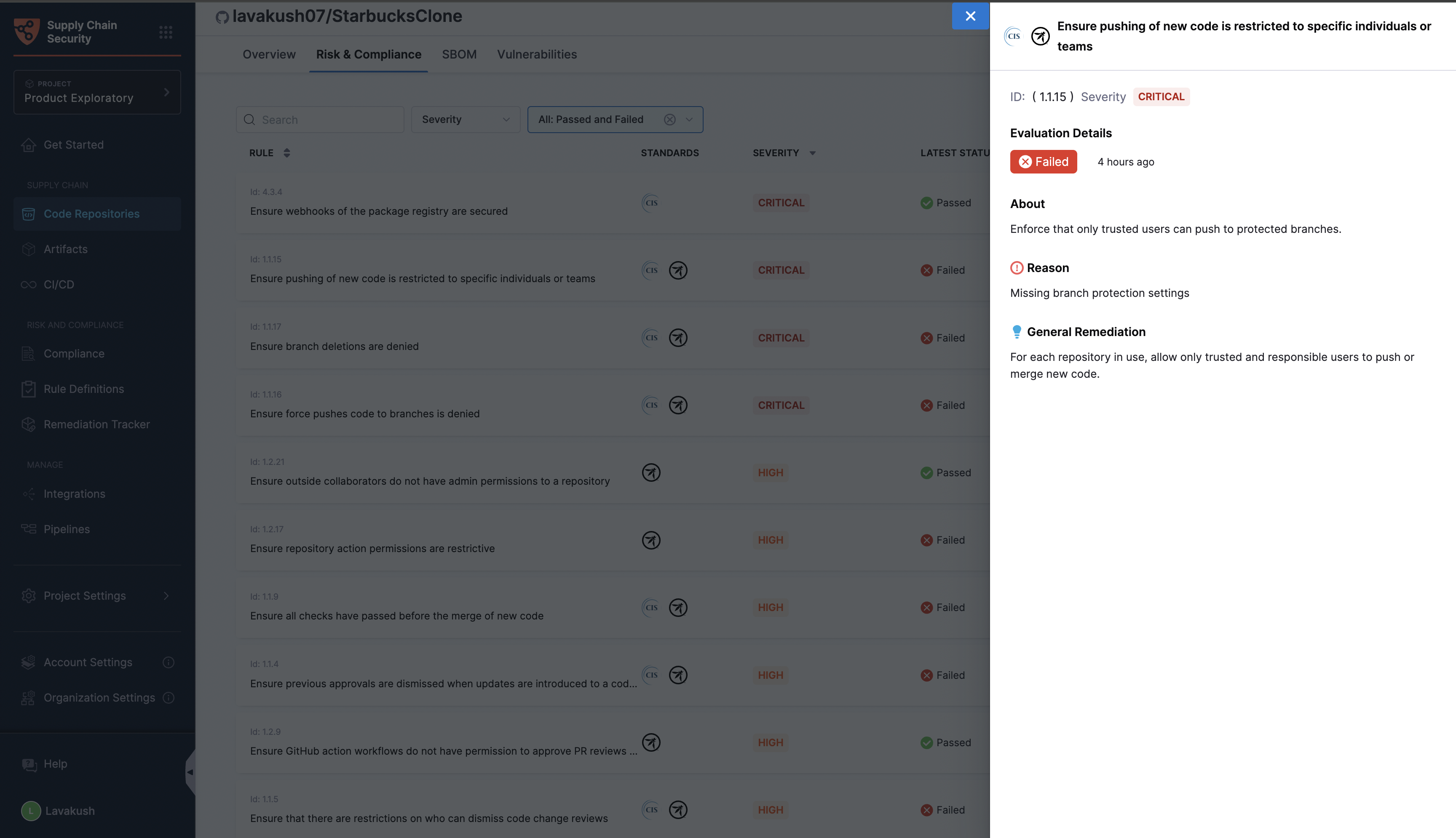
In this tab, you will find a list of rules applied to the repository, each accompanied by its name and the compliance standard to which it belongs. The latest status indicates whether the rule has passed or failed in the most recent evaluation, along with the date and time of the last evaluation. The evaluation history column shows the rule's status (passed or failed) over the last 7 evaluations, providing a clear view of its compliance trend.
Filters can help you narrow down the rules based on severity, including low, medium, high, and critical levels. You can filter the rules by their evaluation status, such as passed, failed, or all.
Click to view full size image
By clicking on a specific evaluation status, you can access detailed information about the rule, including the reason for its failure and general remediation steps to help address the issues identified.
Click to view full size image
### SBOM (Software Bill of Materials) tab
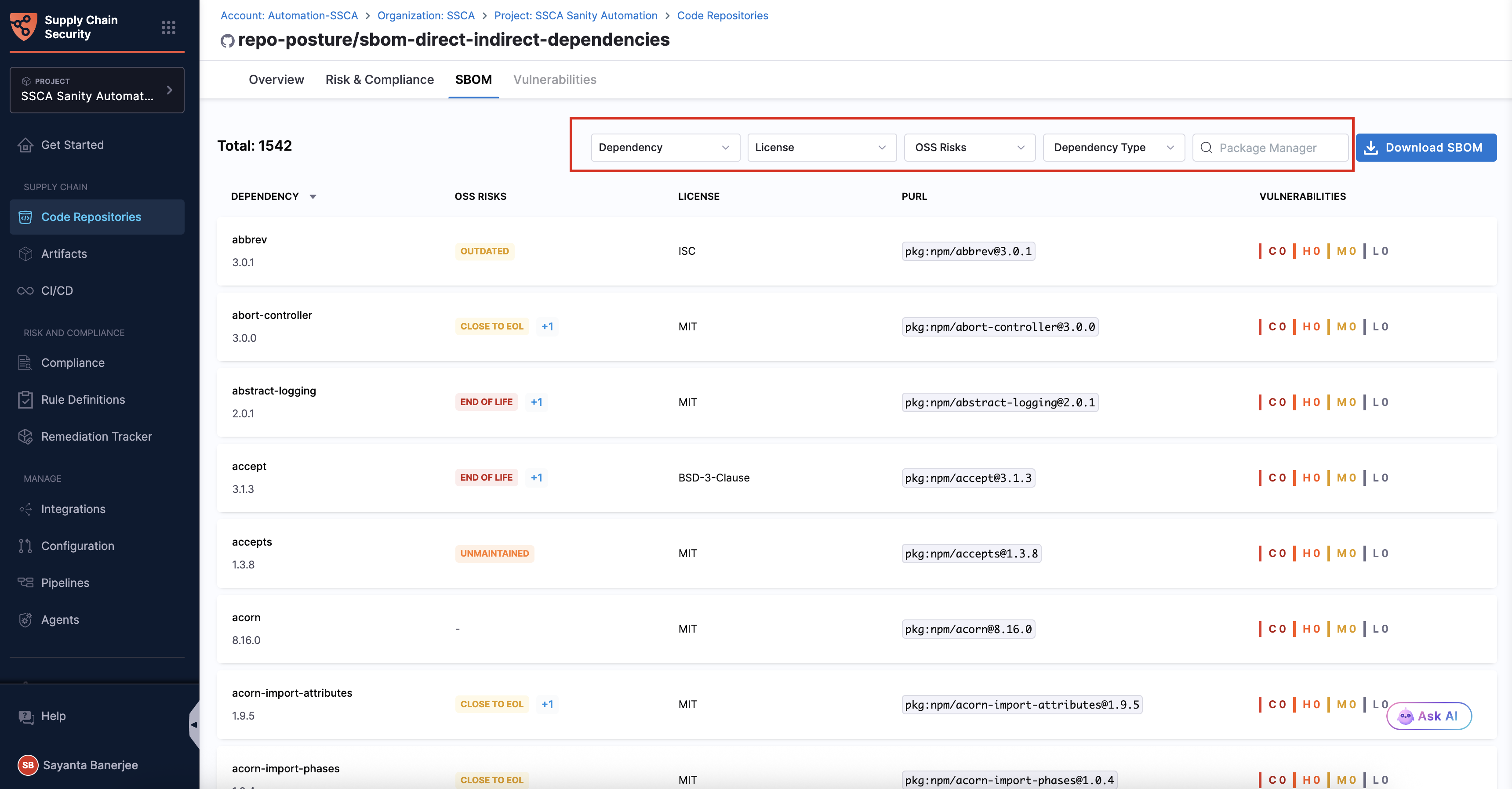
The SBOM section provides a comprehensive view of your repository’s dependencies. It includes a total dependency count and a detailed, searchable inventory. For each dependency, it surfaces key information such as name, version, OSS Risks, license, package manager, PURL (Package URL), supplier, and vulnerabilities.
* Use the following options to filter and refine the dependency list:
* **Dependency**: Find specific dependencies based on the dependency name and values. Click `Dependency` to specify the condition for the Dependency Name. Optionally, you can specify the condition for the Dependency Version as well.
* **License**: Find specific dependencies based on the type of license associated with them. Click `License` to specify the condition for the License associated with a dependency.
* **OSS Risks**: Filter and refine all the dependencies related to particular OSS Risks. Click `OSS Risks` and then select the checkboxes next to the desired risks in the list to filter the dependencies accordingly. The available options are [Malicious Packages](/software-supply-chain-assurance/use-scs/risk-and-compliance/opensource-security-risk-management.md#malicious-packages), [Typosquatting](/software-supply-chain-assurance/use-scs/risk-and-compliance/opensource-security-risk-management.md#typosquatting), [Known vulnerabilities in dependencies](/software-supply-chain-assurance/use-scs/risk-and-compliance/opensource-security-risk-management.md#vulnerabilities-in-sbom-components-oss-risk---1), [Unmaintained Components Identified](/software-supply-chain-assurance/use-scs/risk-and-compliance/opensource-security-risk-management.md#unmaintained-components-oss-risk---4), [Outdated Components Identified](/software-supply-chain-assurance/use-scs/risk-and-compliance/opensource-security-risk-management.md#outdated-components-oss-risk---5), [End of Life](/software-supply-chain-assurance/use-scs/risk-and-compliance/opensource-security-risk-management.md#end-of-life-components), and [Close to End of Life](/software-supply-chain-assurance/use-scs/risk-and-compliance/opensource-security-risk-management.md#close-to-end-of-life-components).
* **Dependency Type**: Filter dependencies based on the dependency relationship to your project. Click `Dependency Type` and then select the checkboxes next to the desired dependency type to filter the dependencies. The available options are `Direct`, `Indirect`, and `No relationship`. Go to [Direct/Indirect Dependency](/software-supply-chain-assurance/use-scs/open-source-management/direct-indirect-dependency.md#filter-direct-and-indirect-dependencies) to understand dependency relationships.
* **Package Manager**: Filter dependencies by package manager. Enter a package manager name in the corresponding search box to view all matching dependencies.
* Click the `Download SBOM` button to download the dependency list in JSON format.
Click to view full size image
* Click on any dependency to open the dependency side panel.
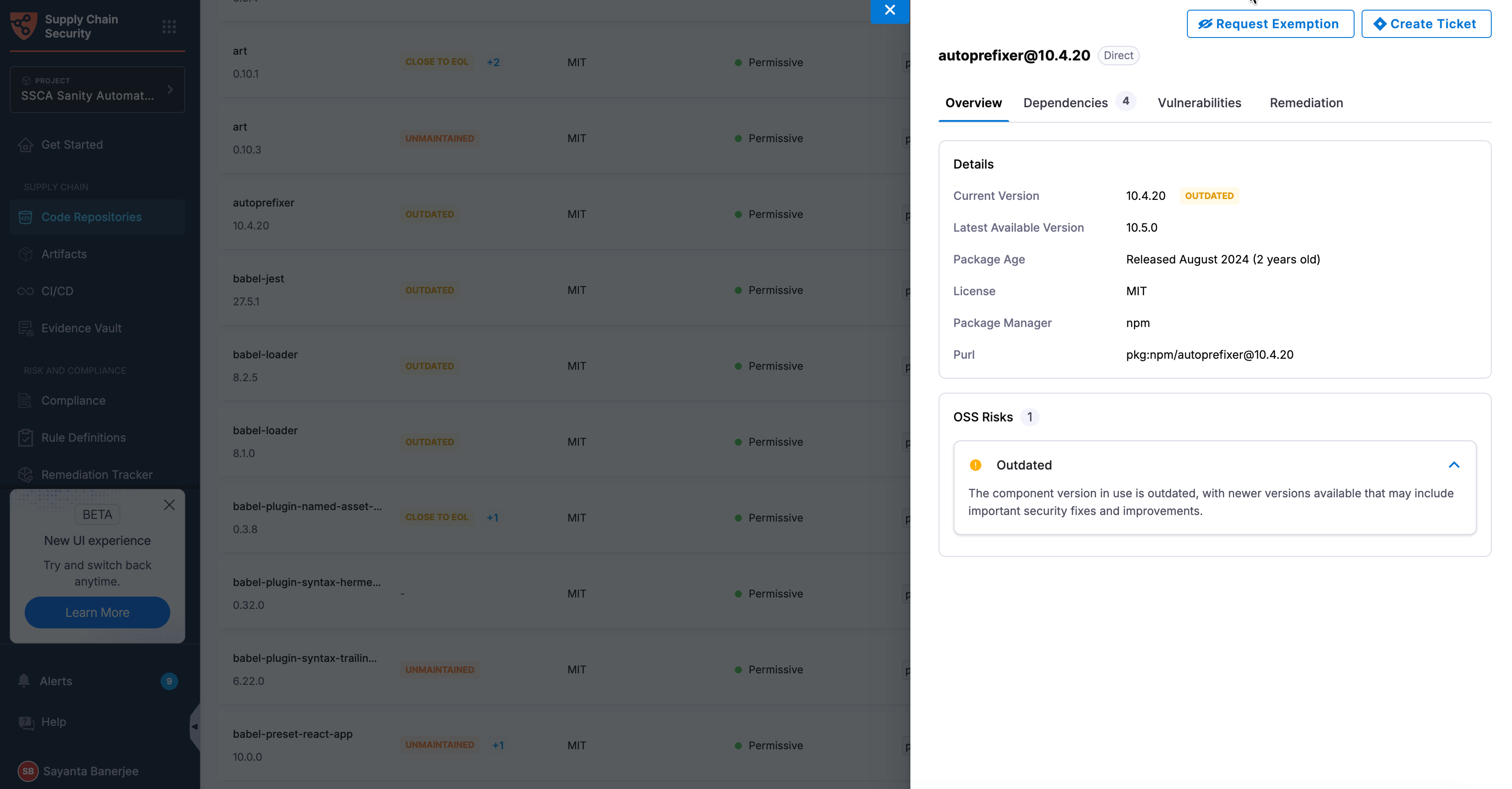
* The **Overview tab** of the dependency side panel opens by default. It has the following sections:
* **Details** - Review the dependency’s current and latest available versions, license, package manager, and associated Package URL (PURL).
* **OSS Risks** - Displays detailed information about the OSS risks associated with the selected dependency, including the total number of identified risks. Each risk is presented in a collapsible section. Click a collapsed section to view its details.
If multiple risks are present, the first section is expanded by default, while the remaining sections are collapsed. If only one risk is present, its section is expanded by default.
Click to view full size image
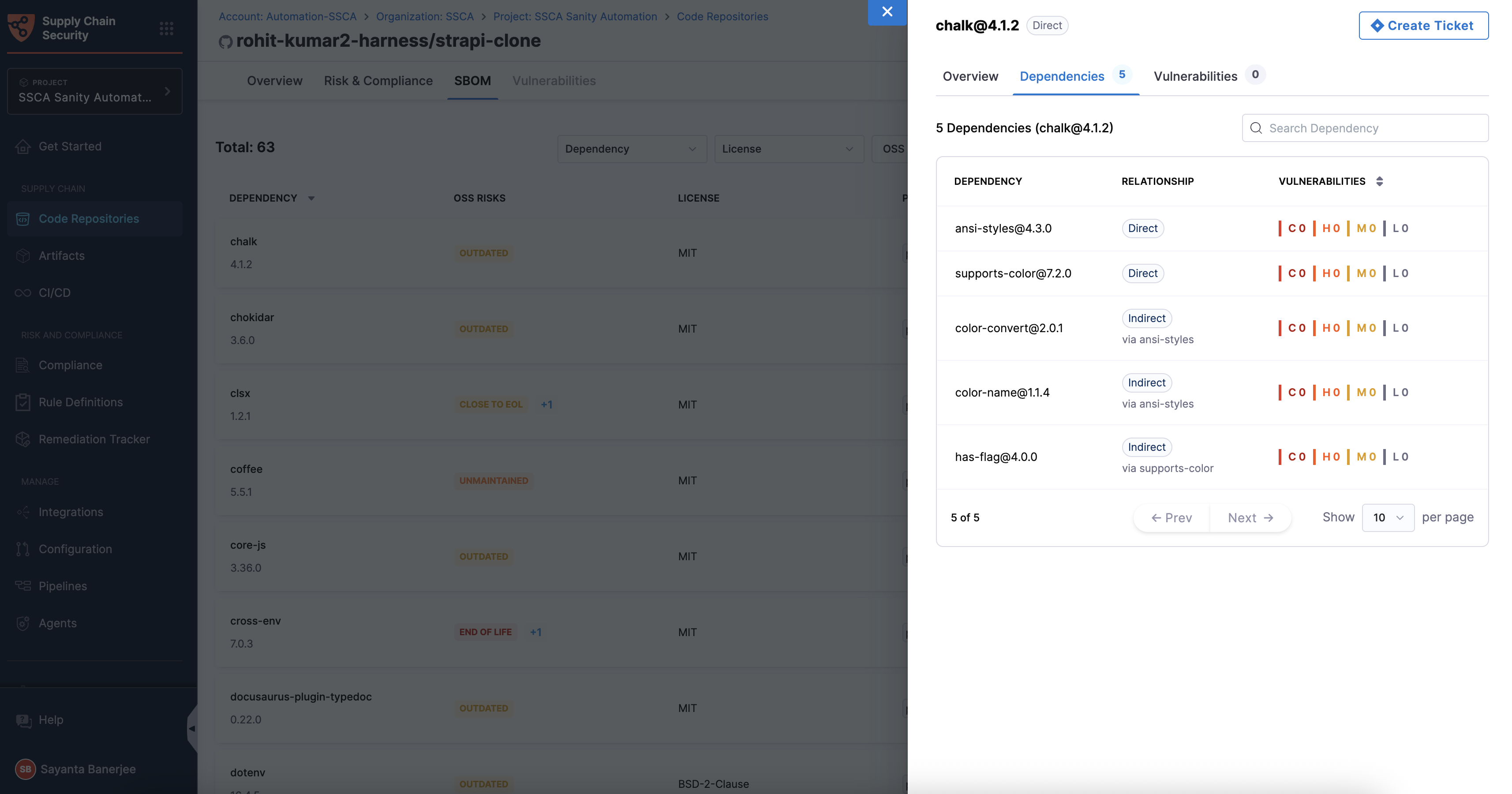
* The **Dependencies tab** displays the total number of direct and indirect dependencies in the form of a detailed table, associated with the selected dependency. Go to [Direct/Indirect Dependency](/software-supply-chain-assurance/use-scs/open-source-management/direct-indirect-dependency.md#view-the-dependency-table) to understand how the filtering works.
Click to view full size image
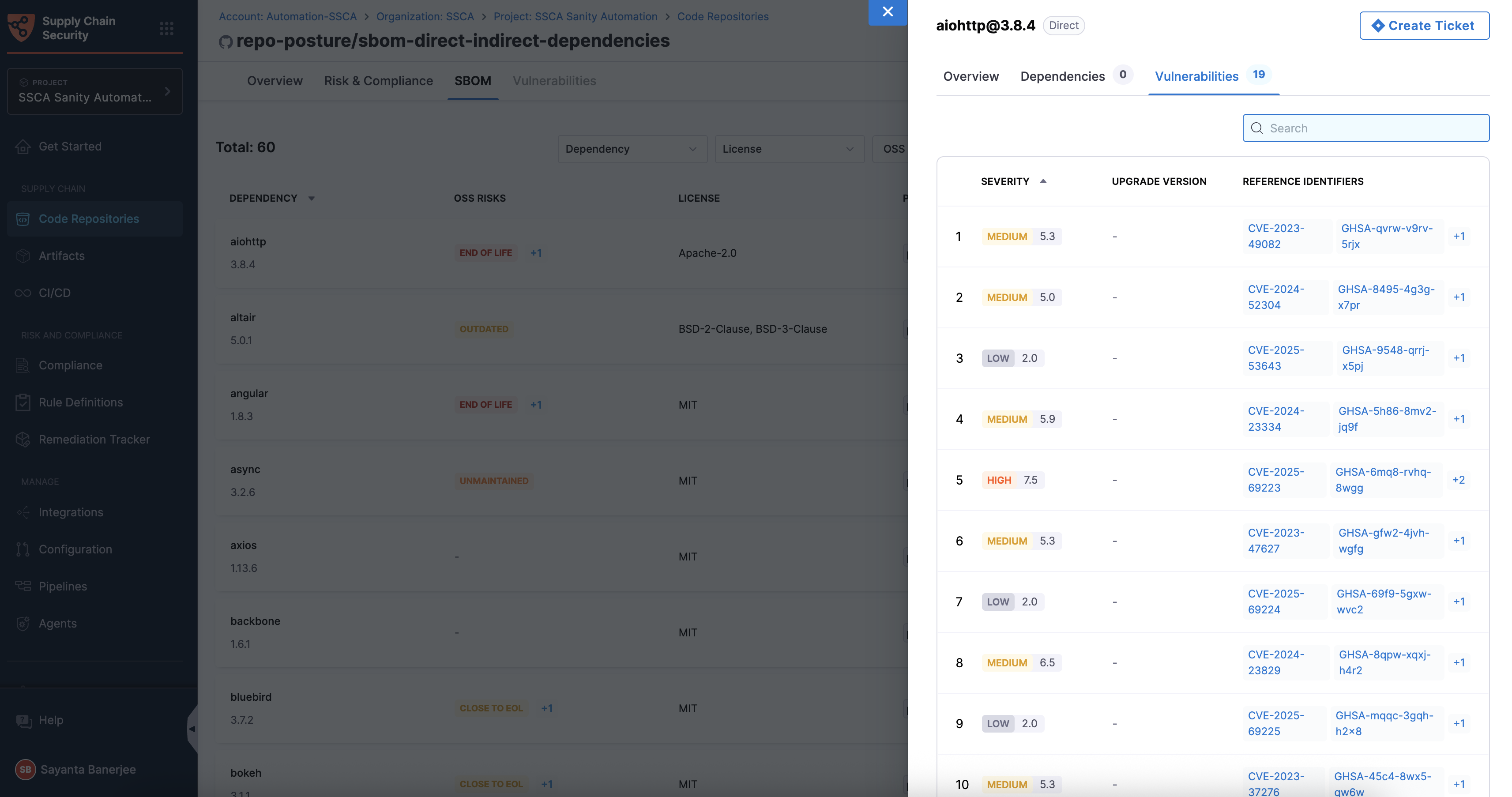
* The **Vulnerabilities tab** displays the total number of vulnerabilities and a detailed list of vulnerability information. Each entry includes severity with a vulnerability severity score, upgrade version, and reference identifiers (CVE, GHSA, CWE, and many more).
Vulnerabilities are derived either from the internal database or from the STO scan. If the STO license is not enabled, dependency vulnerabilities are mapped from the Harness internal database. If you have an STO license and want to map the vulnerabilities from the Harness internal database, contact Harness Support to enable this feature.
Click to view full size image
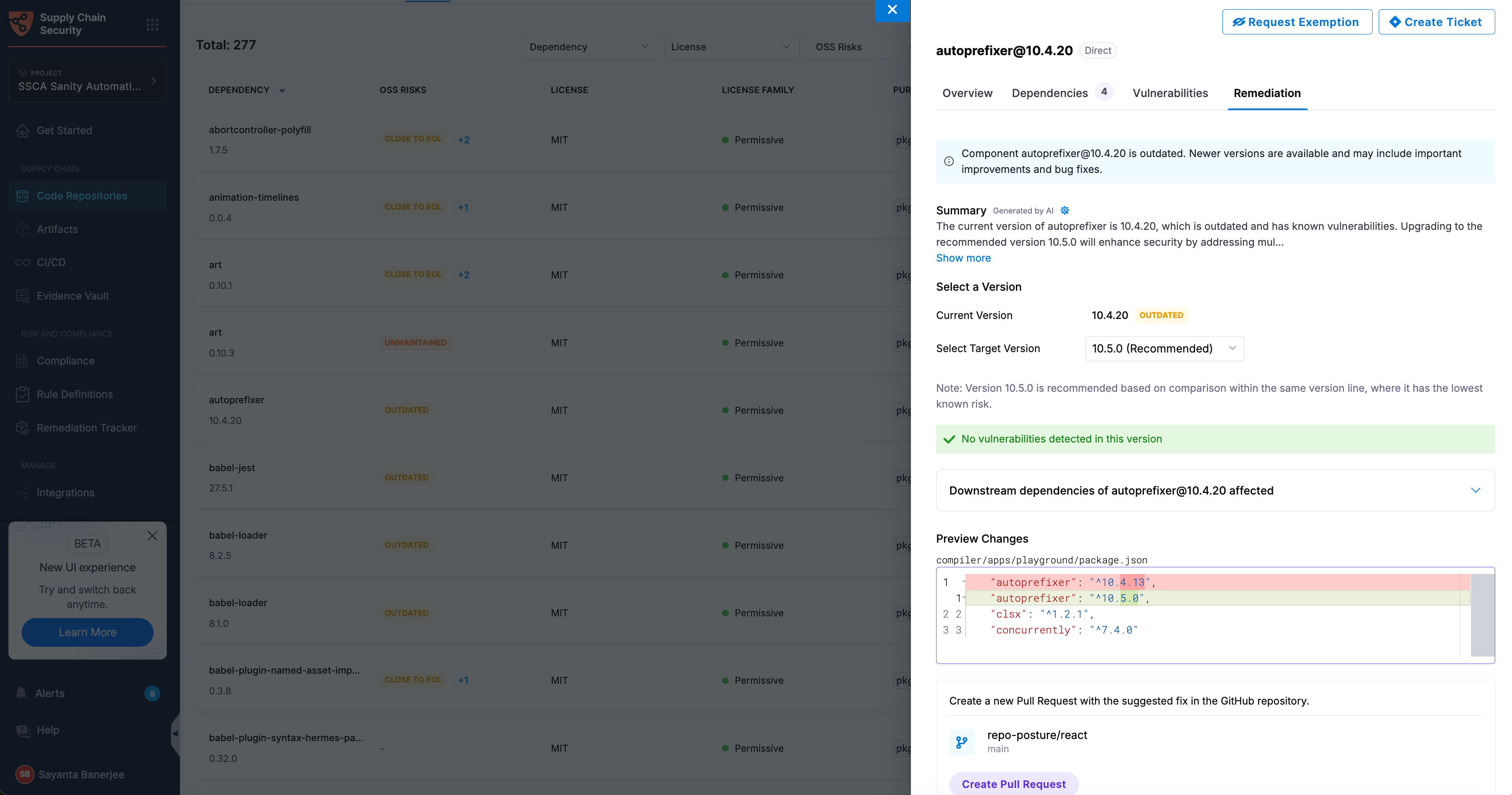
* The **Remediation tab** provides information related to the remediation of the dependency version. Go to [OSS Risks Remediation](/software-supply-chain-assurance/use-scs/open-source-management/oss-risks-remediation.md) to understand the remediation workflow.
Click to view full size image
### Vulnerabilities tab
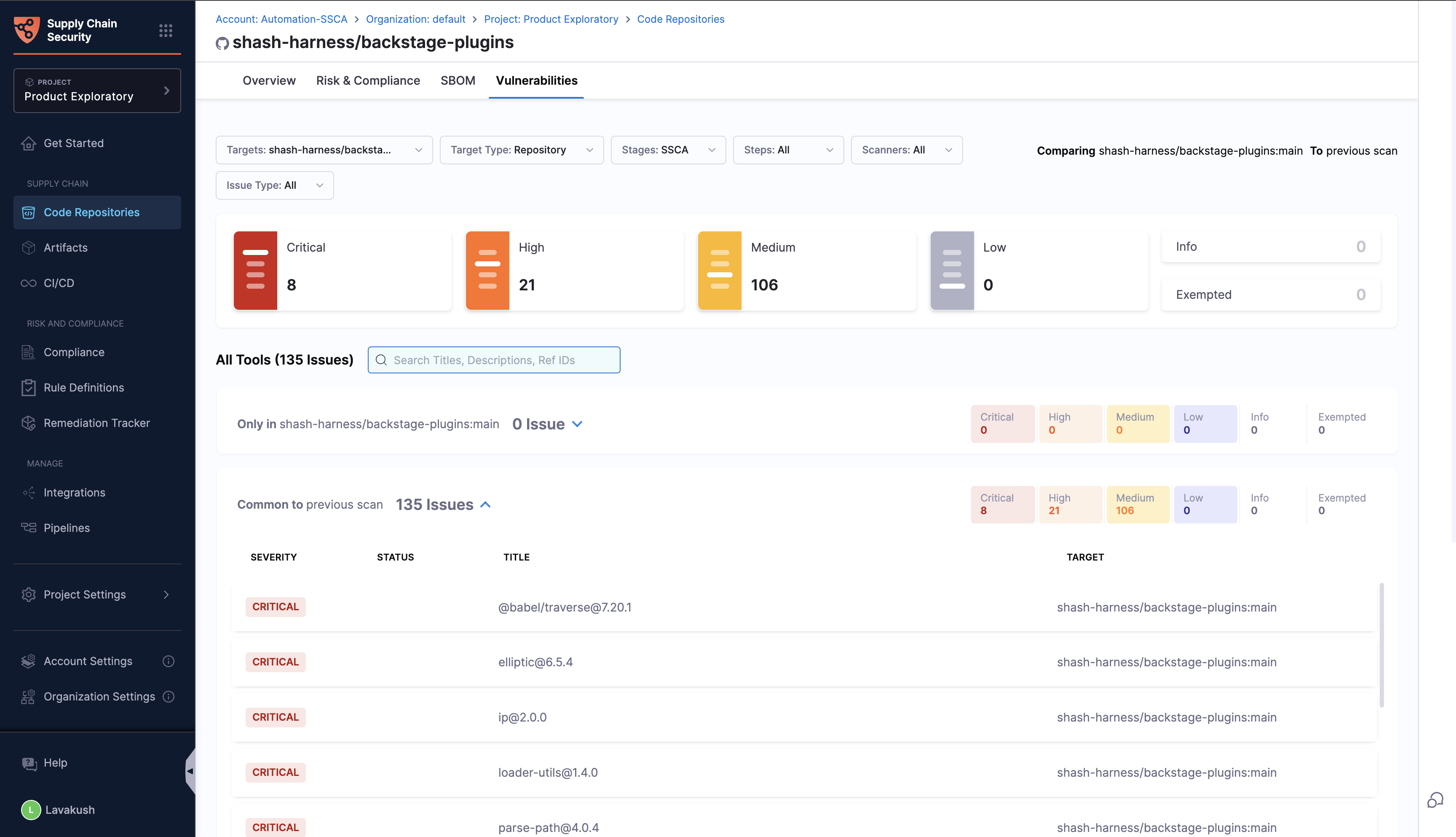
The Vulnerabilities tab presents the scan results performed on the repository, consolidating findings from various scanning tools. This view categorizes all identified vulnerabilities by severity and allows filtering based on scanners and other details. Users can access and manage vulnerability details to ensure the security of their repositories.
{% hint style="info" %}
The code repository is cloned in the Harness cloud for executing these scans, facilitated by the STO (Security Testing Orchestration) module
{% endhint %}
Click to view full size image
The types of scans conducted include:
1. Static Application Security Testing (SAST) using [Semgrep](/security-testing-orchestration/use-sto/sto-scanner-configuration/semgrep/semgrep-scanner-reference.md)
2. Secret Scanning with [Gitleaks](/security-testing-orchestration/use-sto/sto-scanner-configuration/gitleaks-scanner-reference.md)
3. Software Composition Analysis (SCA) with [OSV](/security-testing-orchestration/use-sto/sto-scanner-configuration/osv-scanner-reference.md).
Go to [view security test results](/security-testing-orchestration/use-sto/sto-security-issues/view-scan-results.md) in Harness STO documentation to understand the view and navigation.
For a complete overview of your supply chain's compliance posture, refer [Compliance Summary](/software-supply-chain-assurance/use-scs/risk-and-compliance/manage-compliance-posture.md) documentation.
{% @harness-feedback/feedback %}